Wix Website Cost in 2026: The Real Budget
Don’t be fooled by the Wix price in the ad.


We have put together a no-nonsense look at what a Wix website costs in 2026 for the people footing the bill: the local shop, the consultant, the marketer looking at a multi-year deal. We are talking about plan prices, the hidden line items, the point at which Wix ceases to be cheap and you consider migrating, and the so-called renewal cliff.
The 2026 Wix plan ladder, without the marketing gloss
You can verify the numbers on the four premium plans for yourself, TechRadar has a good breakdown if you want to. Billed annually they are straightforward: Light for $17, Core for $29, Business at $39 and the Elite version at $159 per month. Enterprise is a custom affair with Forbes Advisor putting it at some $500 a month. Go monthly and you can expect to pay 30 or 40% more up and down the ladder.
But these are not just tiers of storage. They are feature gates. You won’t get ecommerce on anything below Core. Want advanced shipping and automated tax? You need Business. The higher-volume tools are in Business Elite. If you are taking payments, the choice is not between Light and Core; it is Core or nothing.
What each tier is actually for
| Plan | Annual Price | Real use case | Where it fails |
|---|---|---|---|
| Free | $0 | Prototype, throwaway landing page | Wix subdomain, ads, no store, no custom domain |
| Light | $17/mo | Portfolio, consultant, brochure site | No ecommerce |
| Core | $29/mo | Entry-level online store, bookings | Thin on shipping and tax rules |
| Business | $39/mo | Growing store with real logistics | Ceilings on high-volume workflows |
| Business Elite | $159/mo | Higher-volume ecommerce, priority support | Diminishing returns vs a dedicated commerce platform |
There is a Free plan, sure, but don’t call it a business plan. It is a sandbox with Wix branding and a subdomain that puts a stop to any commercial activity. Not much use as a launch tier.
Where the Wix website cost quietly stacks up
For a business that is making use of its site, the plan is the least of the charges on the bill. If you read the threads on Reddit or Quora from practitioners, you will see the pattern: an active small business Wix site runs anywhere from $200 to $800 a year, all in. The gap between the $17/month headline and $800 is where you will find the surprises.
An itemized budget, based on Wix’s published fees and user reports, looks something like this:
- Domain: The first year is free, then you are out about $14.95 for the renewal and another $9.90 or so for WHOIS privacy.
- Email: Wix doesn’t do hosting in any meaningful way, so most put it through Google Workspace at $7 a user.
- Apps: Bookings, automation, review tools – the Wix App Market has them with their own recurring costs.
- Processing: Wix Payments will take 2.9% plus $0.30 per card. Standard industry fare but it adds up when you have volume.
- Compliance: To handle GDPR or CCPA properly you will likely need an outside cookie consent tool like Cookiebot, costing $6 to $49+ a year.
Add in the email and an app or two and your $17 plan is now $50 or $70 a month. No scam, just the cost of doing business. The error is to budget for the sticker and be taken aback by the bill.
The renewal cliff nobody mentions in year one
Ask around in the Wix communities and the one thing you will hear is about renewal shock. The promo ends, auto-renewal does its job and the invoice is for a very different sum. We have seen Reddit users talk about a jump from $180 to $504, or £600 over a two-year cycle. One person on X was hit with an unpro-rated $400 charge he didn’t expect.
It is ordinary SaaS mechanics, but for a small business it means a line item can double without notice. Two things to guard against it:
- Kill the auto-renew when you sign up. Some say a fresh signup will net you the new-customer discount again.
- Do the math on the sticker price. Put together a three-year total cost of ownership at the undiscounted rate. If the numbers don’t work for your business, Wix isn’t for you.
Monthly vs annual, and why “flexible” costs more
Monthly billing is supposed to give you options but it rarely does. The Light plan goes from $17 to $24, Business Elite to $172. A 30 to 40% markup for the privilege. Fine for a short-term test of a couple of months, but if you know you are running the site for a year, it is a tax on indecision. Make your commitment and pick your cadence accordingly.
Build cost: DIY, freelancer, or agency
The plan fee is for the platform. You still have to put the site together. There are three ways to go about it and the one that is cheapest on paper will often cost you the most in time.
DIY
A solo consultant with a clean template or portfolio can build it himself for $250 to $600 a year all-in. But as soon as you need custom logic or content that will rank, you are better off hiring out. What seems like a $17 site can eat up two weeks of your calendar.
Freelancer
Hire a competent freelancer for a small business build and you are looking at $500 to $5,000 depending on the scope. You will find Wix to be a good fit provided the brief is well defined, the site is not doing anything out of the ordinary and there is an in-house person to take it on once it is live. It is a weak choice if you are looking to scale or have the site running memberships and talking to a CRM.
Agency
An agency will put a price tag of $2,000 on a small business Wix site and $10,000 up for an ecommerce operation with custom flows. Then you have the figures from Forbes: a professionally put together small business site runs $2,000 to $9,000 to start and some $1,200 a year to maintain; for a corporate client you are looking at $10,000 to $35,000 upfront with maintenance hovering around $15,000. While those numbers do not care what platform you use, they give you an idea of the ceiling for a proper Wix build.
But the tradeoff is more than financial. A competent agency means fewer wrong turns and spares the owner from having to make calls on things he has no desire to become an expert in.
If you want the full story on what you will be spending after launch, have a look at our website maintenance cost guide to see where flat monthly quotes fall short and what real care entails.
The structural costs Wix pricing pages do not show
There are some of the priciest aspects of running a Wix site that you will never see on an invoice. You will see them in your performance metrics, in accessibility risk and in the cost of leaving.
Complexity you cannot fix
The rendering engine on Wix auto-generates DOM and ARIA attributes you can’t really get your hands on. The WebAIM Million 2026 report has the data: across the top million sites the average home page has 1,437 elements and 56.1 accessibility errors. In the 3,183 Wix pages we looked at, the average was 33.3. Sure, that is about 40% under the global mean, but it is still 33 errors on a template you cannot fully tidy up, mostly down to low contrast, unlabeled form controls and missing alt text.
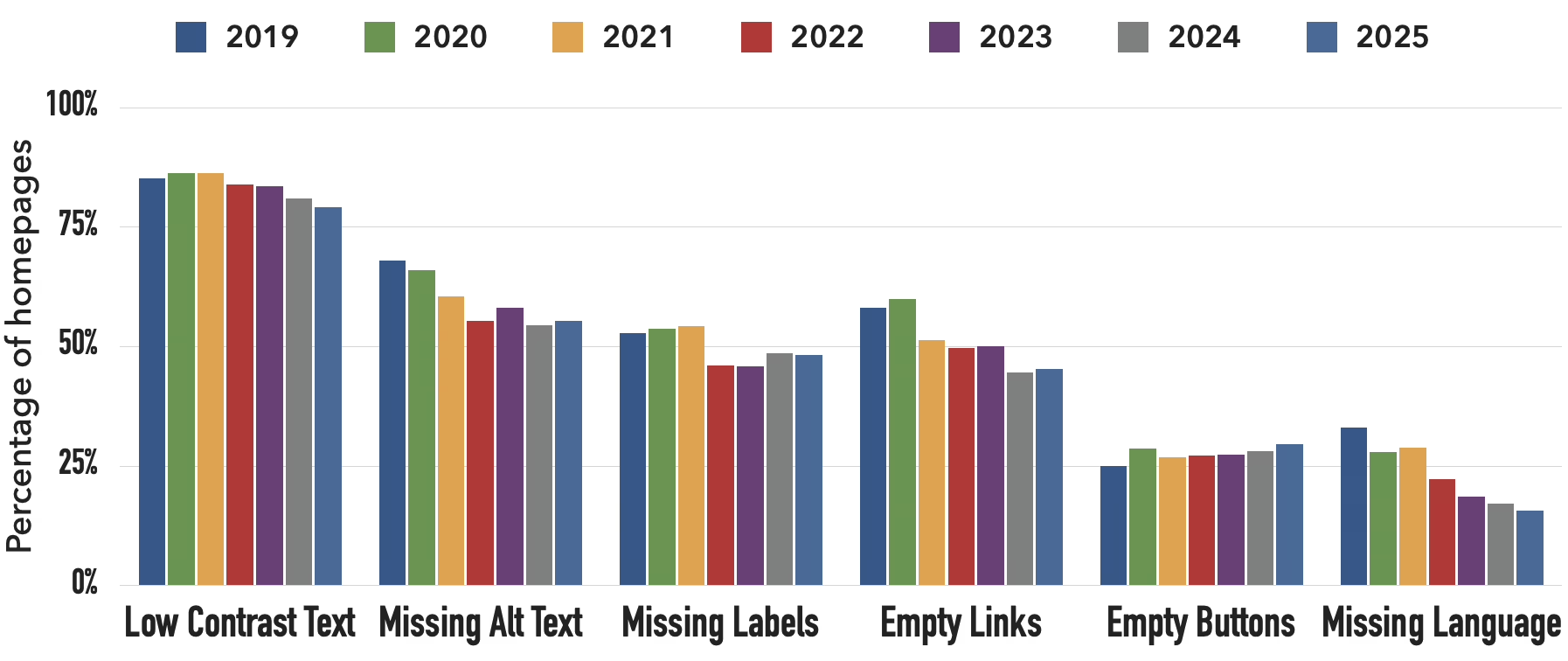
In practice, you pile on apps and scripts, LCP goes to pot and Core Web Vitals suffer with no easy way to trim the fat. On an SEO vertical where you are competing, that matters.
AI crawlers and modern controls
Wix has a robots.txt editor but don’t expect a one-click AI crawler blocker like you get with Squarespace’s single checkbox for 20+ agents. If you are a content site and want to keep GPTBot and Bytespider from eating your bandwidth, the difference is a matter of annoyance and a little money. To block crawlers on Wix you have to hand-edit the rules. Doable, but you are bound to make an error.
Vendor lock-in and the migration tax
Then there is the exit cost, which is the most invisible of all. You can scrape the content and re-enter product data, but Wix does not let you export the site as a whole. Forms, automations, membership logic and the like have to be done over again on whatever platform you move to. There is even a GitHub project for moving a paid Wix sub to free Netlify hosting. That says something.
Should you think you may migrate, plan for it from the off. Keep your media and product data off-platform. Think of any Wix build as a rental rather than a foundation. We go into what can be moved and what must be rebuilt in our Wix to WordPress migration guide.
Realistic budgets for three common businesses
Solo consultant with a positioning site
Put a custom domain and Google Workspace inbox on a light plan, add an app or two for forms and scheduling and if the owner builds it himself the tab comes to between $400 and $700 a year. Wix is very much the right tool here. The site is a brochure with a booking form, nothing more.
Small local shop
Now you are on a Core or Business plan with a product catalog, shipping and tax rules, payment processing and a paid app for loyalty or reviews. Once you factor in fees on actual revenue the run-rate is $1,500 to $3,500. Throw in $3,000 to $8,000 for a freelancer to set it up and Wix is workable enough, though you would be hard pressed to do it on Light. But if the volume of your ecommerce starts to grow, the equation changes. See our ecommerce website cost breakdown for when a dedicated commerce platform makes more sense in terms of both capability and cost.
Membership or course site
This is the point where Wix begins to show its limits. You have renewal logic, member dashboards and cancellation flows that chafe against the template. Even if the plan itself is affordable, the app stack gets out of hand and you end up with workarounds. Most businesses in this position will have outgrown Wix in 18 to 24 months. In the long run, it is cheaper to start somewhere with more headroom than to pay for a migration later.
When Wix genuinely makes sense
To be fair, Wix is good at what it was made for. Portfolios, brochure sites, small ecommerce. Their own 2026 State of Websites data claims a 50% faster time to launch and 66% of users going with custom domains. The figures are self-reported and biased, but they are in line with the platform’s strengths. For an SMB that needs to look the part by next week, or a local business with a modest catalog, it is hard to argue with.
But when you have custom workflows the templates won’t allow, your team is bolting on apps to make up for it and you can see yourself hitting the ceiling in a year or two, Wix ceases to make sense. The “cheap” option ends up costing you the most because you will be writing a check for the migration.
You will find a similar argument in the Experte review of Wix pricing: to have a business site on Wix that is truly functional you are looking at a minimum of $348 a year for Core, and the platform’s architecture puts a lid on headless CMS and any custom backend work. In short, that is where the value proposition as a cheap option ends.
We see the same tradeoff if you put Wix up against the competition for a content or nonprofit site. Check our comparison of the best website builders for nonprofits or our Squarespace vs WordPress piece and you will come to the same conclusion from another vantage point.
How to actually decide
Do yourself a favour and put on paper what the site must do in years one, two and three. I am not talking about aesthetics but function. Then align your plan with that kind of trajectory rather than what your wallet can take today. Make sure to include the line items folks tend to overlook: build help, compliance, payment fees, apps, email and the domain. Run the numbers at sticker price and don’t count on auto-renew.
Should the three year total seem like a fair ask for what Wix is giving you, then by all means launch. But if it is approaching the cost of a more robust platform, or you can already tell you are hitting a feature wall in the first year, hold off. It is better to put down a little more for a solid foundation than to start cheap and have to migrate later.
Here at Refact we go over this very decision with owners. We will scope out whether a small business already on Wix and running out of workarounds should make a move to WordPress or a commerce platform, do a targeted rebuild or simply stay put. And if you want to be sure you are not putting money into the wrong platform, our website migration service is there to ensure you get the call right.
Building a product and unsure what to scope first? Let’s talk. Free 30-minute call, no pitch.

Saeedreza Abbaspour is the CEO of Refact, where he works across product, engineering, and sales. He sets the studio’s direction while staying closely involved in the work itself, from shaping product strategy and UX architecture to helping define the technical systems behind Refact’s projects. His role connects business thinking with hands-on product execution, giving him a practical view of how software should be planned, built, launched, and improved. At Refact, Saeedreza focuses on building a studio that can move quickly, solve real client problems, and turn ideas into reliable digital products.
More from Saeedreza Abbaspour

