Headless WordPress Services: A 2026 Guide
You will not find the most telling figures in most of the writing on headless WordPress.


Headless WordPress development is a service worth procuring, but one should do so with care. This guide is for the engineering managers, product and marketing leaders who have to make calls based on facts rather than what is in a vendor’s deck. We set out to explain the architecture and its cost, where it is liable to break, and when you are better off leaving your setup as is.
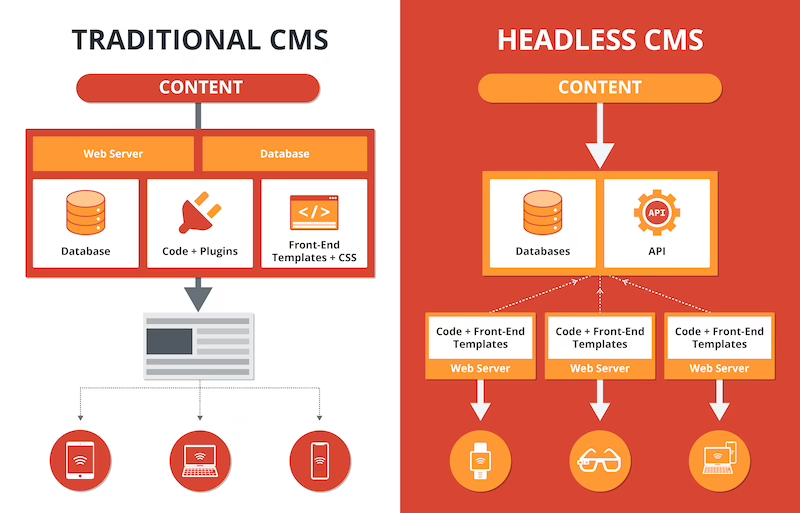
For a start, do not expect to find an official “headless mode” in WordPress. It is a surprise to some. Both the block editor and the documentation proceed on the assumption that pages are rendered via PHP templates. Headless is something you put together yourself. You take the built-in REST API or a WPGraphQL plugin and use it to supply content to a standalone frontend in Next.js or the like.
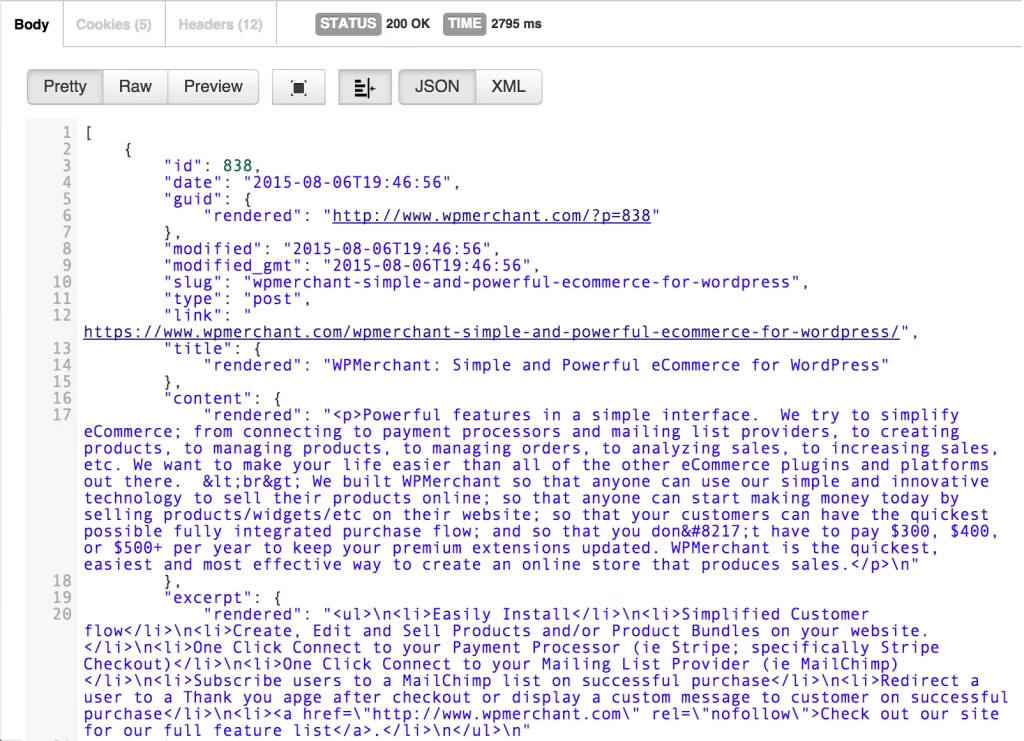
The result is two distinct systems. Your editors remain in WordPress while your visitors are looking at an entirely different application, typically React or Next.js, which renders the content on its own terms via the API. For those who want an unvarnished look at how that layer functions, we recommend this primer on REST architecture.
The real impact of the split is operational, not technical. Under normal circumstances WordPress takes care of the theme layer for everything from sitemaps and redirects to SEO metadata and caching. With headless, all of that falls to your frontend team. That is the point of no return for many projects.
What Headless WordPress Actually Is
Stays with WordPress: – The content model, media library, users and roles – Taxonomies and custom post types – Any backend-only plugins for workflow or structure
Moves to the frontend: – Page assembly and routing – Sitemaps, canonicals, schema and SEO output – Caching, edge delivery and static generation – Preview flows for draft review – Plugin behavior tied to a page builder or shortcode
We go into the plugin auditing and preview design in more detail in our piece on WordPress as a headless CMS.
What stays with WordPress, and what moves
There are four reasons you would do this, and they are usually quite straightforward. Marketing may be after a custom, fast frontend that a theme is not going to give them. The product has to have an app-like quality with personalization or interactive filters. Perhaps the content needs to live on a web app, a mobile app and marketing sites alike. Or the current WordPress installation is so encumbered with theme and plugin debt that a rebuild is inevitable.
A study from WP Engine puts the figure at 92% for professionals who say headless simplifies multichannel content. As a vendor number it is more of an appetite indicator than hard proof. The evidence is in the kind of companies that actually use it: high-traffic publishers, ecommerce brands with bespoke shopping flows, and SaaS firms where the marketing site has to feel contiguous with the product UI.
While the headless CMS market is projected to be in the $970 million to $1.5 billion range by 2026 (it was somewhere between $820 million and $1.3 billion in 2024), no independent analyst has singled out headless WordPress. From what practitioners will say, the adoption is largely an enterprise or complex-project phenomenon.
Why Teams Actually Move to Headless
If you look at the pricing from agencies, a pattern emerges. A small build on Next.js and WPGraphQL of 10 to 25 pages will set you back $8,000 to $20,000. Add in WooCommerce or form handling and a custom content model for a mid-sized project and you are in the $20,000 to $50,000 bracket. Complex work with multi-region delivery and internationalization easily goes over $60,000. An enterprise multi-brand affair can run from $150,000 to $400,000 or more.
Expect an uplift of 20 to 40% over a comparable traditional build. You are not paying extra for a shinier framework. You are covering the cost of a separate application and the DevOps to ship two stacks, the discipline of content modeling, and the SEO reconstruction.
In the course of scoping a project we see the costs break down as follows:
- Frontend application: Routing, component libraries and i18n work in Next.js or equivalent.
- API layer: Optimizing queries and setting up custom endpoints in WPGraphQL where the default schema is wanting.
- SEO reconstruction: A full redirect map, JSON-LD, Open Graph, robots and sitemaps. On a site with any traffic this is no minor undertaking.
- Preview and editor tooling: Custom routes for authenticated draft viewing.
- Caching and infrastructure: Whether it is incremental static regeneration or a Redis layer for dynamic requests.
- Plugin remediation: Rebuilding what only worked through the theme and checking for API exposure.
What a Headless Build Costs
ZZBLOCK5ZZ For the most part, two thirds of that list are irrelevant to your choice of frontend framework. It is precisely why asking “which framework” tends to be the wrong way to start.
Where Headless Projects Break
You can put a name to the failure patterns; they are consistent enough. When you are looking at quotes for headless CMS development, let this section be your filter.
SEO regressions after cutover
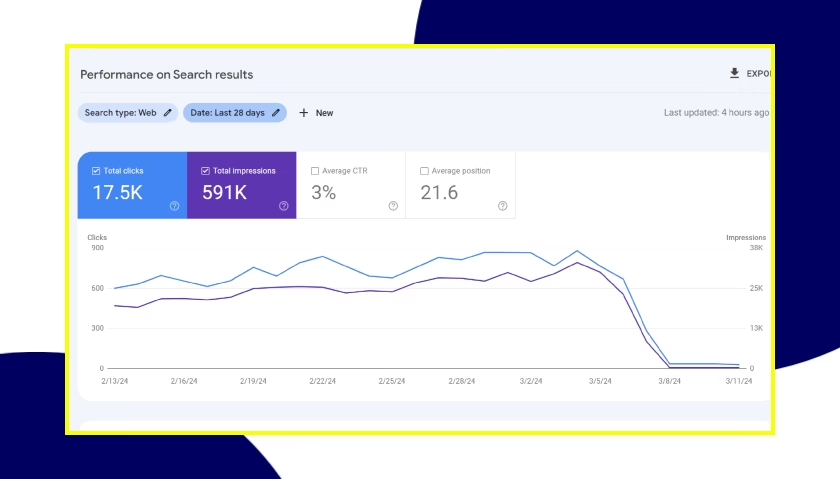
This is the one that matters. There is no automatic SEO boost from going headless. In fact, if the migration is handled as a simple frontend rewrite, it will do damage in the first month. The 4eck Media case and what we see with Roboto Studio have the same root causes: redirect maps that are not complete and leave long-tail URLs behind, JavaScript navigation that hampers crawlability, JSON-LD schema that is either missing or at odds with itself, and metadata left over from Yoast or Rank Math on the old site that was never put in place on the new one.
The fix is unglamorous work. You need a full URL audit and a redirect map for the long tail, schema parity checks prior to cutover, and someone to own technical SEO for a 30-day window after launch. We go into the discipline of that in our WordPress migration checklist and in a longer piece on how to redesign a website without losing SEO.
Broken preview and editor workflow
Then there is the matter of WordPress preview being so tied to the theme. With a headless configuration, hitting “View Post” in the editor is of little use; it shows the raw theme rather than the real thing. That erodes an editor’s trust in the CMS and creates bottlenecks at publish time. A good headless service will put in the work to build a custom preview route with proper authentication and test it on every content type. They will have the editors trained before the site ships, not after.
Plugins that quietly stop working
A lot of the well-known plugins do not play nice with REST or GraphQL, or only give you part of the data. If something is run by shortcodes or dynamic block render callbacks, a headless frontend cannot see it. Reimplementation is often called for with forms, membership gating and page builders. Should a proposal come across without a plugin-by-plugin audit, one should be requested.
Performance collapse under real load
WordPress is built for page-level caching, not to be a hot API backend. Have a frontend hit it dynamically with every request and the time to first byte will be slow and database contention will set in within a week. For any public site with traffic to speak of, static generation and edge caching are mandatory. So is Redis or Memcached in front of a dynamic endpoint.
Authentication that leaks
Application Passwords in WordPress are fine for internal automation but do not cut it for a mobile client or public app. Basic Auth tokens, CORS that is not right, or cache paths that conflate anonymous and authenticated responses are the makings of a security incident. Public applications are better off with an external identity provider mapped to roles, using OAuth or JWT through a properly maintained plugin.
Not sure how exposed your own site is? We run a free WordPress vulnerability check that lists what needs patching first. Request the check.
When Headless Is the Right Answer
There are some very real cases where headless is the right fit, even if vendor pages would have you believe otherwise.
- Multichannel publishing. Where one editorial system has to feed a website, an app, a newsletter and perhaps a partner API, the split makes sense.
- App-like frontends. You will struggle to get the kind of interactivity and personalization out of a WordPress theme that a React or Next.js layer provides.
- Performance ceilings on high-traffic sites. When a themed site is fully cached and still sluggish, headless with aggressive static generation is a useful lever.
- Complex integrations. A frontend that can treat WordPress as just one API alongside a commerce platform or product database is ideal for combining content.
- Enterprise governance. A decoupled architecture gives separated teams clear API contracts to work from.
When to keep WordPress traditional
But for a marketing brochure, a blog or a small ecommerce operation, headless is mostly added cost with no return. The same holds true if the team is dependent on visual page builders for quick edits, or lacks the DevOps and JavaScript resources to maintain two stacks post-launch. In those instances, a well-cached, theme-based approach via WordPress development services will beat a headless build that is not properly resourced.
What a Real Headless Service Looks Like
We have seen the strongest headless projects, our own included, and they all have a certain shape. The framework is not what makes them successful. It is the order of operations.
- Start with the business side. Determine what drives revenue and what performance figures would warrant the spend. What integrations are non-negotiable? Without those answers, the technical side has no anchor.
- Establish the content model and contract. Put the schema in place before any frontend code is written. Decide on required fields and how relationships are shown. Make it a matter of governance.
- Audit the plugins and plan for remediation. Give each one a status: exposed, partially so, or in need of reimplementation. Factor the cost of that into the quote.
- Have an SEO parity plan in hand. This means the URL and redirect maps, canonical logic, and a monitoring strategy for the 30 days following cutover.
- Train the editors on the preview. The route should be tested and working for every content type before the site is live.
- Cutover in phases. Run pilot content on the new frontend in parallel with the old to confirm SEO is intact, then move the rest across with rollback triggers in place.
Any team that will put a framework and timeline in front of you without first taking the time to work through those six steps is only quoting you on the easy part.
Two projects that shaped our view
Take our work on Teton Gravity Research’s publishing platform. The obvious issue was a legacy CMS with 10,000 articles in its grip. But the more difficult task was to draw a line in the sand over what should not be moved: which URL patterns had to be preserved for the equity search had given them, which features were past their prime and which workflows the editors could not do without. How we ordered those decisions made the difference between a migration that protected traffic and one that let it slip away.
We saw a different dynamic with SingularityHub, where the objective was to put a modern content and layout system in place so editors had greater control and developers did not have to act as a bottleneck. In both cases the lesson was the same: your architecture has to follow the publishing workflow, not vice versa.
Traditional vs Headless: A Practical Comparison
| Factor | Traditional WordPress | Headless WordPress |
|---|---|---|
| Initial build cost | Baseline | Roughly 20% to 40% higher |
| Hosting | One environment | Two: CMS host plus frontend platform |
| Plugin ecosystem | Broadly compatible | Audit required, some plugins do not work |
| Editor experience | Familiar preview and layout | Custom preview required, editor training essential |
| Frontend flexibility | Limited by theme | Fully custom |
| Multichannel delivery | Difficult | Native strength |
| SEO on migration | Standard risks | Higher risk unless disciplined |
| Team skills needed | PHP and WordPress | PHP, React or Next.js, DevOps, API design |
The plugin side of things tells a similar story. As the ACF team puts it in their headless WordPress guide, you only see performance gains if your rendering strategy allows for it; otherwise a plugin that was once theme-dependent becomes custom frontend work.
How to Evaluate an Agency
Put proposals to the test with these questions:
- What is your plan for auditing our existing plugins and dealing with the ones that will not hold up?
- When do you train our editors, and what kind of preview experience are they going to have?
- How do you intend to validate schema parity before cutover, and what is the redirect approach for long-tail URLs?
- Where will API responses and WordPress be cached?
- Who is responsible for the 30-day monitoring after we launch?
- And when exactly do you roll back, and what does that process entail?
A serious team will give you straight answers. If all you get is a pitch deck, move on.
A Final Word on Fit
There is an operations and governance element to headless WordPress, not just the technical side. It is the right call if the business requires multichannel delivery or enterprise-level performance. But it is an expensive way to go about it if the real issue is a bloated theme or a plugin stack no one wants to take responsibility for.
Should you want to determine where your business stands on that before committing to a build, our headless CMS development discovery is meant to resolve that. We are not in the business of selling you on headless; we want to ensure that when you make the investment, it is the version that will return the value. For the specifics on the frontend, our guide to a headless CMS with React will show you where a Next.js layer is worth the cost and where it is not.
Running a WordPress site that has outgrown its build? Let’s talk. Free 30-minute call, no pitch.

Masoud Golchin is a backend developer at Refact, working on server-side systems, internal tooling, and infrastructure. He builds and maintains the services that support both client projects and the team’s day-to-day development workflow. His work includes backend logic, developer tools, system reliability, and the technical foundations that allow products to scale and operate consistently. At Refact, Masoud focuses on creating practical engineering solutions that help the team move faster while keeping systems organized, maintainable, and dependable.
More from Masoud Golchin

