Headless CMS With React: When It Pays Off
You will not have any trouble choosing a tool for a headless CMS on React.


Let’s say you are considering a Headless CMS React setup for a site or publishing operation on the upswing. The architecture works, so that is not the question. What you need to ask is whether the kind of operational discipline it requires is a good fit for your team and your editors over the next couple of years.
What “Headless CMS React” Actually Means In Practice
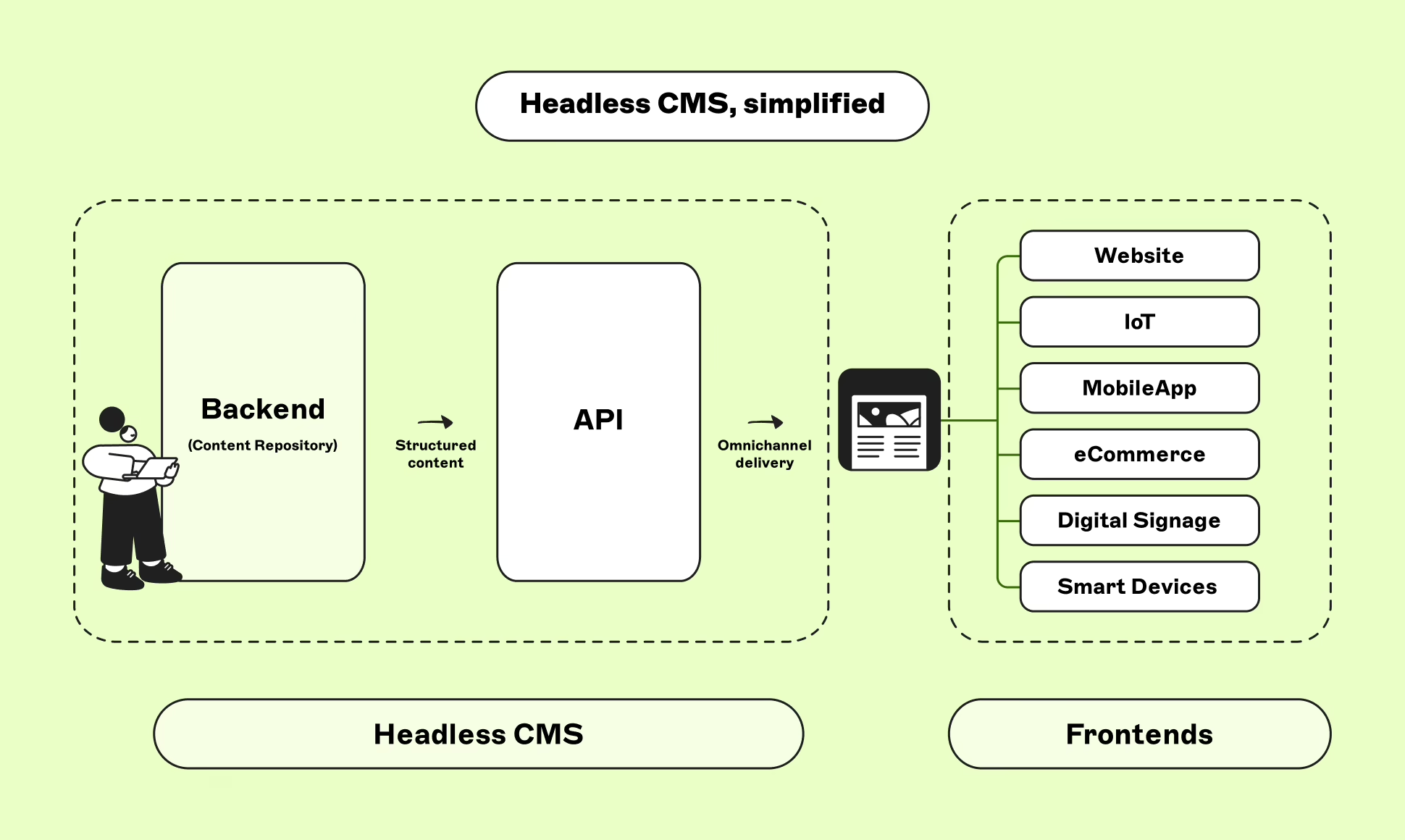
On paper it is simple enough: the headless CMS is for storing content and putting it out via an API. Your frontend, typically React in a Next.js environment, fetches and renders it. The CMS has no say in how or where a page appears. That is the whole point of the separation, and the wellspring of every tradeoff from there on in.
With WordPress or some other monolith you get the lot as one package – the content, the templates, the meta tags, sitemaps, caching and hydration. Go headless and you have split that bundle. The CMS keeps the content; your React side is now on the hook for presentation, performance, the SEO infrastructure, the data contract and the preview workflow. To see a better side-by-side of the options, we have a guide on headless vs traditional CMS.
This is what gives you the power to run multiple frontends or an omnichannel marketing site that can keep up with product. But it is also what makes it a pricey proposition for a team that simply wants a blog to load faster.
The Market Is Real, But It Is Not The Reason To Adopt
By all accounts the market is on an upward curve. You will see figures like 20 to 23 percent CAGR taking the industry from under a billion in the mid-2020s to well over $20 billion by the 2030s. Market Intelo puts the value at $2.1 billion this year and projects $12.8 billion by 2034. Other analysts will give you different hard numbers but the trajectory is hard to argue with.
As for the tech stack, React and Next.js are the de facto standard in any vendor comparison you read these days. Do not let that be your reason for adopting it, though. Let your own constraints be the driver.
When A Headless CMS On React Actually Pays Off
The approach really earns its keep in a few scenarios:
- Your content has to be in more than one place. You have a partner portal, an app, a help section in-product and the marketing site. APIs are the only sensible way to have structured content in sync across them all.
- Product and marketing are in each other’s way. A monolith will force both sides into the same template system. When a landing page needs product data or a product surface needs editorial, headless lets them work independently.
- Performance is a revenue issue. If slow pages are killing conversions and your current CMS won’t let you optimise, you have a problem.
- Engineering is clogged with page rebuilds. With component-driven React and mid-grain “section” models, most of those changes can be handed off to the editor.
If that does not sound like you, you can probably wait. For an MVP or a small brochure site, headless is just extra weight with little to show for it. You can find the same view from practitioners on Stack Overflow. The consensus is that you need the complexity for custom frontends or heavy API use.
What Actually Goes Wrong After Launch
When a Headless CMS React project goes wrong it is rarely for some exotic reason. The failure modes are predictable and have little to do with which platform you picked.
Schema changes break the frontend
Take auto-generated GraphQL. Change the content model and the API changes with it. If your TypeScript types in the React app are derived from the schema, a field you have renamed or a relationship you have done away with will halt the build. Unless you have CI-automated codegen and put some gates on schema changes, you will be looking at type drift and the occasional outage. The answer is to treat the content model like a versioned contract. Have a content architect own the schema and make sure any migration is handled through a PR. Editors should not be touching the model.
SEO stops working in a quiet, expensive way
Then there is the risk that is most often underestimated. In a headless React world the team is responsible for the meta tags, canonical URLs, sitemaps and the rest. In a traditional setup it was all bundled in. You find this out six months down the line when your Lighthouse scores are fine but your rankings have stalled.
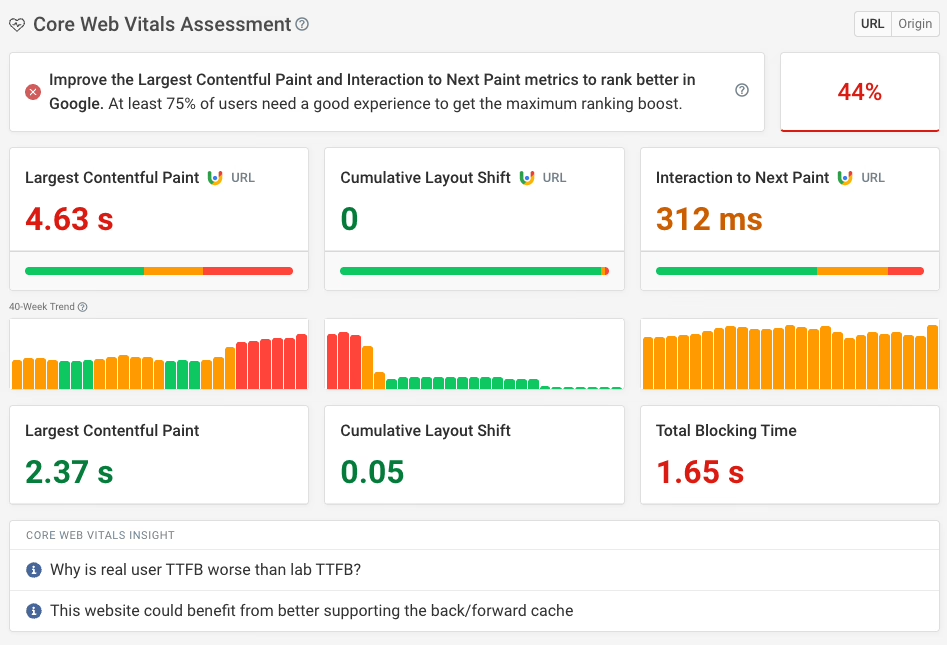
It is a structural matter. Put the SEO fields in the content model from the start – the JSON-LD, the description, the title. Make sure indexable pages are rendered via SSR or React Server Components rather than client-side. Let the CMS generate your sitemaps and have publish events fire webhooks to the Google Indexing API. You will find the Core Web Vitals targets that practitioners put to you from Google are very specific. We are talking INP of 200ms or less, CLS at or under 0.1, a cache hit ratio over 85 per cent on static assets and 60 for API responses.
The usual suspects for missing those marks are just as clear. LCP is killed by hero images you load via JavaScript when a native tag with fetchpriority="high" would do. You get CLS spikes from async hydration and fonts that load too late. Then there is the matter of oversized bundles making a hash of your INP. Do not mistake these for CMS issues; they are React architecture problems and changing out your CMS will not fix them.
Editors stop using the system
Turn to the community and the one friction point everyone mentions is editorial UX. Some will tell you Sanity is “customizable to a fault.” With Strapi and its ilk you have a control panel, not an environment for editors who have lost their WYSIWYG and are left working blind without a reliable preview.
What you need to do is bring editors into the content modeling phase before any React code is written and separate your preview from production. A visual-editor like Storyblok is right for a marketing team. For more structured operations with engineering on hand, something like Sanity makes sense. There is no universal winner.
Costs run past the license fee
Then there is the cost. Commercial enterprise platforms will set you back $20K to $150K a year or more, with other tiers in the $5K to $100K range. Tack on $5K to $50K for custom integrations. In our experience the implementation and ongoing engineering run up a bill larger than the license. And open-source is not free; you are simply trading the fee for hosting, patching and the time of an engineer. Put the full operating cost in your budget, not the sticker price.
How To Pick A Platform Without Getting Lost
There is no such thing as the best headless CMS for React and anyone telling you otherwise is setting you up for a platform your editors will come to loathe. Match the tool to your team.
- Sanity: If your editors can handle a technical bent and you have engineers close by, this is a strong choice for real-time collaboration and schema-in-code. GROQ is powerful if you can stomach the learning curve.
- Strapi: Open-source and self-hosted with Node-friendly REST and GraphQL. It gives you control if you have the capacity to run it. See our guide to Strapi for growing products for where we think it fits.
- Contentful: A mature, reliable enterprise option with good governance and multi-language support. It is expensive. We are frank about the tradeoffs in our headless CMS guide.
- Storyblok: The go-to for agencies and marketing teams with its visual editing. IDC put it in their 2025 MarketScape for AI-enabled headless CMS.
- Payload: TypeScript native and Next.js friendly with 43,000+ stars on GitHub. Very much developer-first.
- Headless WordPress: When you have some editorial inertia, why not keep the editor your team knows and let React handle the presentation?
We have a side-by-side comparison for founders if you want the details. Ask the practical questions: does the SDK handle React Server Components? Can your editors use it? What is the pricing at triple your current volume?
What A Realistic Migration Looks Like
An enterprise headless migration is a six to twelve month affair done in phases. Strapi’s 2024 guidance has it as a four-week pilot, eight weeks for core types and then another dozen to finish the job and the archives. We see that cadence in the field. Big-bang launches are predictable failures.
On the Teton Gravity Research project, the migration was not the hard part. Ten thousand articles were stuck in a legacy system that had foiled others. The work was in deciding what to retire and how to model things so the editorial team could be productive while we built the new platform. The content model came first, the React build second.
That is the pattern we follow, even on the SingularityHub redesign. Audit the content, model the structures, then pick your stack. Build the frontend with the editor in mind and test your redirects, sitemaps and edge cases until launch day is nothing to write home about.
The Decision Most Teams Should Make
If your site is small and stable, don’t bother migrating. A traditional CMS with some discipline will beat a headless rebuild on cost and speed. But if you are running campaigns, publishing everywhere and the website is holding the rest of the company back, a Headless CMS on React is worth it.
Success has little to do with the platform you pick and everything to do with whether you are ready to treat content as a product and the React side as a system you fully own. If you are on the fence and want a second opinion before you scope a rebuild, take a look at Refact’s headless CMS development and CMS migration work. We are in the business of helping you make that call.
Building a product and unsure what to scope first? Let’s talk. Free 30-minute call, no pitch.

Masoud Golchin is a backend developer at Refact, working on server-side systems, internal tooling, and infrastructure. He builds and maintains the services that support both client projects and the team’s day-to-day development workflow. His work includes backend logic, developer tools, system reliability, and the technical foundations that allow products to scale and operate consistently. At Refact, Masoud focuses on creating practical engineering solutions that help the team move faster while keeping systems organized, maintainable, and dependable.
More from Masoud Golchin
