Headless WordPress: When It’s Worth the Cost
When 4eck Media, an agency in Germany, put together a new site on a Strapi and Nuxt headless stack this past summer of 2023


Headless WordPress is a useful tool and its numbers are growing, but it is also costly, operationally demanding and one can make easy mistakes with it. This guide is intended for the business owner or operator who is thinking about making the switch. We will look at what headless truly entails, where it has merit and where it is apt to fail, so you can determine if your project is among the ten to twenty percent for whom it is worth it.
What Headless WordPress Actually Is
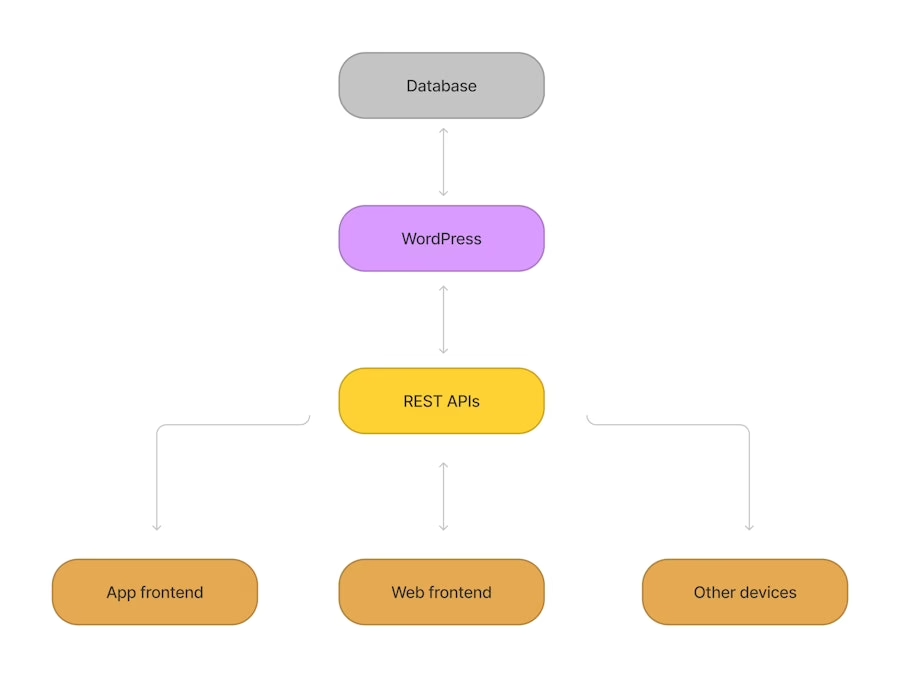
In a headless configuration, WordPress remains the content backend while the public-facing site is offloaded to a separate frontend app, say one built in Next.js or Astro. The PHP theme is not so much removed as bypassed; under the hood, WordPress is still WordPress. The frontend makes its way to the content via the WPGraphQL plugin or the REST API.
Decoupling is the objective. The editor is left with the familiar admin interface while the developer has complete say over page rendering, routes and performance. The two systems communicate by way of an API contract, and your team is responsible for every design choice downstream of that, be it for SEO, caching or preview.
But there is a price for that. You are no longer managing a website in the singular sense. There is a CMS, an API, a frontend, two hosting environments and two deployment pipelines to contend with. If there is a problem, the team has to figure out which end to fix.
Why Teams Actually Move to Headless
It is still a minority approach. According to WP Engine’s 2024 State of Headless report, 73% of businesses have some headless architecture in place across all CMSs, with WordPress accounting for over half of the enterprise variety. But in the wider WordPress world most put the headless share at 1 to 8 per cent, edging up to 25 per cent in the enterprise. It is common at the top of the market and uncommon elsewhere.
There are four consistent justifications for going headless.
Multichannel publishing
You need the same material on a mobile app, a smart display, a partner portal and the web itself. An API-driven backend is the only honest way to do it. Look at Vox Media: their headless transition gave them brand consistency from Polygon to The Verge and Eater, and they saw a 40 per cent lift in traffic in 40 days with Core Web Vitals to show for it. That is the model: one editorial team, many surfaces and strict performance requirements.
Product-like frontends
Then there are sites that are more application than content. Think custom search, live pricing, interactive tools or gated experiences. You can stretch a WordPress theme only so far before you are at odds with the render layer. A decoupled frontend will usually be the cheaper option over a two-year period.
Core Web Vitals at scale
For a publisher with millions of visitors a month, every millisecond counts. One large outlet cut its load times from 3.5 to 0.8 seconds after a headless rebuild, reaping a 22 per cent gain in organic traffic and a 75 per cent reduction in server costs over six months. The figures are there, provided the team has put in the work on SSR, edge caching and image discipline. For the rest, a modern block theme on classic WordPress is fast enough.
Existing editorial investment
A team already well-versed in the WordPress plugin stack will find that moving to something like Contentful or Sanity is more expensive than staying put and rebuilding the frontend. A migration to Contentful runs five to nine months on average. A properly scoped headless WordPress job can be done in eight to twelve weeks.
Where Headless Quietly Breaks
The hazards are not technical oddities. They are what cause projects to be put on the shelf or to miss their mark.
Preview is the number one editorial failure
Take the native WordPress preview function. It is predicated on the theme doing the work. In a headless environment the frontend does not know what the block editor is until you tell it. An editor hits “Preview” and is met with nothing. That is where you get pushback. Put it off to phase two and the project will stall regardless of how good the code is.
To put right you need a preview route in the frontend, secure token fetching for unpublished material and some WordPress side configuration. Faust.js is there to handle it for Next.js, but it is not without cost. Expect the preview infrastructure to take up a whole sprint.
Plugin compatibility breaks silently
Much of the WordPress plugin ecosystem is predicated on PHP theme rendering. While you will be fine with a backend-only tool like Advanced Custom Fields or Yoast, anything that puts out HTML, shortcodes or template hooks is useless on the frontend. Page builders, forms, LMS and membership plugins are in that camp.
Go through the list and decide what is being replaced and what has to be written as custom code. Do not skip it, or a €50,000 project will become one for €90,000.
SEO regression during migration
Google is looking at the rendered HTML of the frontend. “Headless” is not something that is detected or rewarded on its own. Should the frontend fail to server-render or do a static generation of pages, or if you have not been meticulous in porting over your meta, sitemaps, canonicals and redirects, you will see traffic collapse. 4eck Media is a case in point. There are many teams who have suffered the same fate and never made it public.
The checklist for preservation is nothing exotic, yet each item is important. You need to expose Yoast or Rank Math meta via the API and put it in the head, generate an XML sitemap on the frontend domain (and disable WordPress’s native one), and render JSON-LD from the API data. Be sure to preserve the URL structure or put in place 301 redirects. And test in Search Console before you launch, not in the aftermath. In fact, most teams would be well advised to run through a plain WordPress SEO checklist to pick off the easier wins before they start re-architecting.
The Real Cost and Complexity
Then there is the cost. According to practitioners, a headless WordPress build will set you back 20 to 40 percent more than a like-for-like traditional theme, and take three or four times as long as a simple rebuild. Maintenance roughly doubles once you are running two stacks with their respective hosting, pipelines, skill sets and monitoring.
Agencies tend to apply a rough filter when putting together estimates: under €7,000 and you stick with classic WordPress. From €7,000 to €20,000, you can do classic with a CDN and premium hosting. Headless only begins to make sense above €20,000 where the frontend requirements are complex. The figures may differ but the pattern is there. It is not a budget play.
The complexity is also felt in day-to-day operations. The content API is now a shared dependency requiring versioning and ownership. Routing is a contract between systems; an editor cannot just rename a slug and expect the frontend to hold up. Cache invalidation is a product issue, not an afterthought of infrastructure, since “the editor saved it but the site is still showing the old version” is a post-launch bug we see all too often.
If what is plaguing your site is a rigid theme, plugin bloat or sluggish editor workflows, a focused WordPress redesign will put right those issues at less expense and in less time than a headless rebuild. Unless the pain is truly architectural, headless is hard to justify.
Not sure how exposed your own site is? We run a free WordPress vulnerability check that lists what needs patching first. Request the check.
REST or WPGraphQL, and What Sits On Top
For the default stack in 2026 you will find WordPress with WPGraphQL and Next.js on separate infrastructures. WP Engine has put WPGraphQL in front of more than two million active installs, and it provides the kind of precise, typed queries against WordPress that you need for a complicated content model or multiple frontends. Have a look at the WPGraphQL documentation to get a sense of the schema.
REST remains the sensible option for simpler work and teams new to the approach; it is in WordPress already and handles most operations without the need for an extra plugin. But when overfetching or n+1 queries are a genuine concern, GraphQL has earned its keep.
On the frontend side, Next.js is the go to for its ecosystem and rendering flexibility, so skim the official docs when scoping. Astro is good for static, content-heavy sites, while Nuxt and Remix are alternatives. But the framework is secondary to the strategy: you want server-side or static generation to be safe on SEO. We have covered the tradeoffs in more detail in our guide on headless CMS with React for those looking into that layer.
What This Looks Like in Real Projects
At Refact we spend a lot of time determining if a business needs an architectural overhaul or if a better version of the current stack will suffice. Take Teton Gravity Research. When we did their platform rebuild, they had 10,000 articles in a legacy CMS and a public site up against global social networks. A headless frontend was not the answer. We did a disciplined WordPress rebuild with a modern content model and some hard choices on which features to let go. Headless would have come at twice the cost for no real gain.
We saw a different challenge with The Hustle’s Trends newsletter. They needed a paid platform integrated with community and email in under a fortnight. WordPress handled the content and we put in custom development where it was necessary. That is the pragmatic middle ground: use WordPress where it does its job and build custom only when you must.
Headless is a valid solution for certain problems. It is not the cure for a slow site or an irritating theme. For those there are cheaper ways.
How to Decide
Be honest with yourself on this.
| Signal | What it suggests |
|---|---|
| Same content published to web, apps, and other surfaces | Headless earns its cost |
| Product-like frontend with custom interactivity | Headless is likely the right call |
| Core Web Vitals are a competitive requirement at scale | Headless is worth evaluating |
| Mostly marketing pages with a blog | Stay classic WordPress |
| Heavy reliance on off-the-shelf plugins | Stay classic WordPress |
| No frontend or DevOps capacity in-house or on retainer | Stay classic WordPress |
There is a read-aloud test for it. Put into words the problem headless is solving for your business. If the statement is concrete and would hold up even if the trend went away tomorrow, then it is a fit. If you find yourself saying you want to “modernize the stack” or “improve architecture,” the project is not ready and you will be throwing money away.
One should also take in the broader picture of how large organisations structure their content systems. For teams with an eye on more than a single site, this guide to enterprise content management is worth a look. Then there is the matter of programmatic content; if that figures in the growth plan, have a read of our piece on programmatic SEO on WordPress to understand what it entails before concluding that headless is the way to go.
Where Refact Fits
The real value in making these choices lies upstream of the code. A proper discovery process will put to rest such questions as: what is the site’s purpose for the next two years? What can editors be expected to handle on their own? And which elements of the present stack are a genuine impediment to the business as opposed to merely an irritation? We do not put pen to technical spec until those are answered.
That is where we begin with our WordPress development and headless CMS builds. Should a classic WordPress site be the answer, we will tell you so and build it. If headless is called for, we scope it to the actual requirements and give an honest price for the two-stack reality. There is a money-back guarantee on the discovery phase for good reason; an architectural error is the costliest mistake in a rebuild.
Viewing headless WordPress as a strategic move rather than a simple upgrade to the stack is key. It is only when the team has the engineering maturity to manage two stacks over the long term and the business demands multichannel delivery or performance a tuned site cannot provide that it makes sense. Otherwise, a well-made WordPress site is easier on the editors, less expensive, quicker to market and fast enough for the end user. The trend is upward, but the right call is always specific to the project.
Running a WordPress site that has outgrown its build? Let’s talk. Free 30-minute call, no pitch.

Masoud Golchin is a backend developer at Refact, working on server-side systems, internal tooling, and infrastructure. He builds and maintains the services that support both client projects and the team’s day-to-day development workflow. His work includes backend logic, developer tools, system reliability, and the technical foundations that allow products to scale and operate consistently. At Refact, Masoud focuses on creating practical engineering solutions that help the team move faster while keeping systems organized, maintainable, and dependable.
More from Masoud Golchin

