WordPress Migration Checklist That Protects Revenue
A WordPress migration rarely fails on launch day.


That gap between “the site loads” and “the business runs” is what a real WordPress migration checklist is built to close. This is a guide for the person who has to sign off on the move: what actually goes wrong, which steps materially reduce risk, and where the cheap checklists are misleading. It assumes you care about search traffic, checkout reliability, and not being paged on a Saturday.
Treat the Migration as a Change Event, Not a Copy
The common framing is that a migration is moving files and a database from one server to another. That framing is where most of the damage starts. A live WordPress site is a running system with state: user sessions, scheduled jobs, webhook subscriptions, third-party API keys, cached objects, DNS records, and search engine indexes that already point at specific URLs. You are not moving a folder. You are cutting over a running system.
The 2025 WordPress vulnerability data underlines the urgency of doing this carefully. According to the Patchstack and Wordfence ecosystem reports circulated in 2025 and 2026, more than eleven thousand new vulnerabilities were disclosed across WordPress plugins and themes in a single year, with exploitation attempts arriving in hours once a CVE goes public. Redeploying an untouched plugin stack onto a new host is not a neutral operation. It is a fresh attack surface with the same known holes.
The frame that works better is this: a migration is a controlled engineering change with SEO, security, data integrity, and integration consequences. Every checklist item below exists to prevent one specific way that framing gets ignored.
If your migration plan does not name a single owner, a rollback trigger, and a post-launch monitoring window, you do not have a plan. You have an intention.
What Actually Breaks: The Failure Modes Worth Planning Around
Before the checklist, know the enemy. Post-mortems across agency case studies and practitioner threads keep surfacing the same handful of failure modes. Every strong checklist is a defense against these.
SEO collapse from an incomplete redirect map
The most quantified failure is search traffic loss. A single 301 redirect passes roughly 85 percent of link equity, so a chain of three redirects erodes that quickly. Missing 10 to 15 percent of legacy URLs from the redirect map, especially long-tail blog posts, attachment pages, and paginated archives, correlates with 40 to 60 percent long-term organic drops in agency case studies. A short-term 10 to 20 percent dip is normal even with clean execution. Anything worse usually traces back to a redirect map built from top pages instead of a full crawl.
Serialized data corruption from a naive search and replace
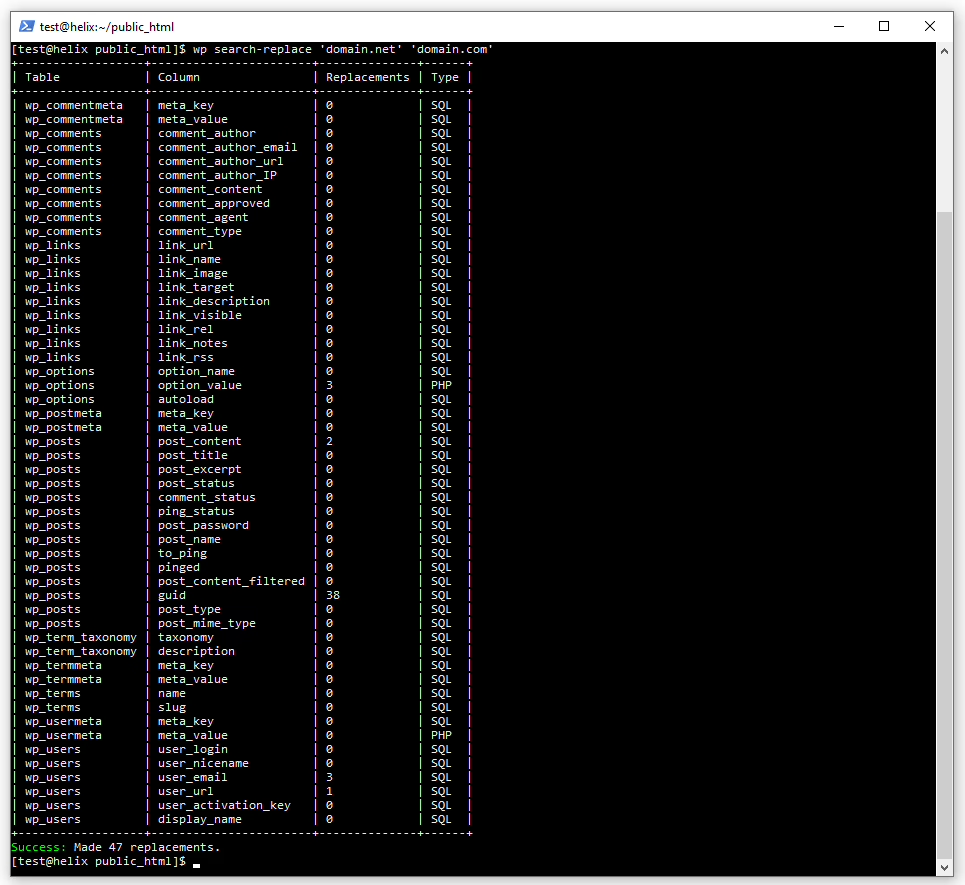
WordPress stores a lot of settings as PHP-serialized arrays, especially in wp_options, post meta, and page builder layouts. A raw SQL REPLACE() on those fields breaks the encoded string lengths and quietly corrupts widgets, menus, saved layouts, and custom fields. The site loads. Editors then discover that half the sidebars are empty. This is why WP-CLI’s wp search-replace, which is serialization-aware, is the default tool for professional teams and why free plugin migrations occasionally leave a long cleanup list on complex sites.
Integration failures that look fine at launch
Payment webhooks still pointing to the old server. SMTP falling back to the old host’s mail relay. Analytics tags firing on both the new domain and a cached copy of the old one. These do not throw errors on launch day. They surface when a customer emails support two days later asking where their receipt is, or when the CRM stops receiving lead form submissions and nobody notices for a week.
Environment drift between old and new hosts
PHP version, MySQL charset and collation, opcache status, Redis or Memcached availability, and memory limits all affect how the site actually behaves. A latin1 to utf8mb4 charset shift alone can turn characters into mojibake across ten thousand posts. Autoloaded options over one megabyte cripple TTFB on a new server that has not been tuned to match the old one.
The Pre-Migration Work That Prevents Most Problems
The single strongest predictor of a clean migration is the discipline of the pre-migration phase. Every hour spent here saves several hours during cutover and dozens after launch.
Inventory everything that can carry state
Do not start with “what pages do we have.” Start with what carries state or external dependencies. That includes active and inactive plugins, must-use plugins in wp-content/mu-plugins, custom tables from bespoke plugins, cron jobs, scheduled emails, webhook subscriptions on Stripe and PayPal, API keys stored in wp-config.php or plugin settings, and SMTP credentials. Anything that could still be pointing at the old server after DNS flips belongs on this list.
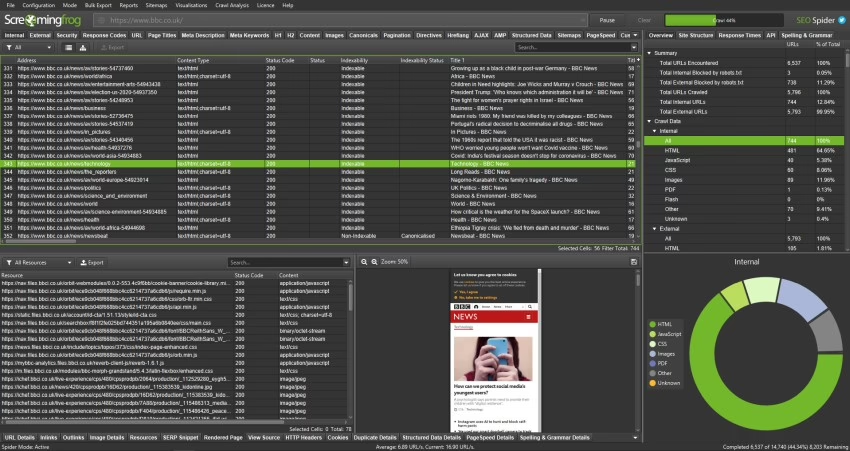
For content-heavy sites, add the URL inventory. A crawl with Screaming Frog or a similar tool captures indexable URLs including pagination, taxonomy archives, and author pages. Every one of those needs a redirect target on the new site. When Refact rebuilt Teton Gravity Research on WordPress, moving ten thousand articles out of ExpressionEngine, the redirect map was a larger piece of work than the theme. Same story on the St. Louis Magazine migration, where thirty thousand articles had to keep their organic footprint intact through the cutover.
Audit and patch before you move
Do not migrate a plugin stack you would not deploy fresh. Cross-check every active plugin against Patchstack or WPScan for open advisories, remove anything abandoned, and update everything else on staging before it moves. This is also the moment to prune. If a plugin is only there to support a page nobody visits, delete the page and the plugin together.
Take backups you have actually restored
Full file plus database backup, taken independently of the host, stored somewhere the host cannot delete. WP-CLI is preferred over plugin exports on large sites because plugin exports frequently choke past a few gigabytes. The important test, which most teams skip, is restoring the backup into a scratch environment. An untested backup is a hope.
Build the environment parity matrix
Write down, side by side, the PHP version, PHP extensions, memory limit, max execution time, MySQL version and charset, opcache status, object cache backend, image library, and CDN configuration for both source and target. This document is boring and it prevents most of the “why is it slow now” tickets after launch. If a row does not match, decide whether to change the target host or accept a specific consequence.
Stand up staging with indexing blocked
Staging exists to rehearse the migration, not to preview the design. Do at least one full dry run: import the database, run WP-CLI search-replace, regenerate permalinks, verify webhooks against a sandbox, and click through every revenue-critical path. Password protect the staging domain and confirm it is not in Google’s index. Staging left crawlable is one of the more common causes of duplicate-content penalties after a migration.
The Cutover: A Short Runbook, Not a Long Session
The cutover itself should be the least improvisational part of the whole project. If it is being improvised, the pre-work was not thorough enough. A workable runbook looks something like this:
- Lower DNS TTL to 300 seconds, at least 24 to 48 hours before the planned switch. This is the single cheapest thing you can do to shorten the propagation window.
- Enter maintenance mode or force logout for non-admin users on the source site. WooCommerce and membership sites need this. A brochure site probably does not.
- Take the final database snapshot immediately before cutover, after the freeze is in place.
- Transfer files and import the database on the target host. Update
wp-config.phpwith the new database credentials and regenerated salts. - Run WP-CLI
wp search-replacefor the old domain to the new domain, with--dry-runfirst, then live. Never a raw SQL replace on serialized fields. - Regenerate permalinks and verify
.htaccess. A homepage that loads while every internal URL 404s almost always traces back here. - Update webhook URLs and API keys at Stripe, PayPal, WooCommerce Payments, and any other integration pointing at the old origin. Run a real sandbox transaction end to end.
- Verify SSL on the new IP before flipping DNS. Confirm no mixed-content warnings on transactional pages.
- Flip DNS. Keep the old host live and reachable for at least 30 days as a rollback path.
- Purge CDN caches and confirm no staging URLs are cached at the edge.
One person owns this sequence. Not the “team.” One person, with the authority to stop, roll back, or continue. Multiple owners is how DNS gets changed twice and SSL certificates get forgotten.
Planning a move of your own? Our Migration Blueprint maps the content, redirects, and risks before anything is touched. Get the blueprint.
Post-Launch Verification: The Part Most Teams Skip
The migration is not done when the site loads on the new host. It is done when the site has run cleanly on the new host for long enough to be sure. That window is longer than most teams budget for.
The first hour
Test from at least two networks (office and mobile) and two devices. Different resolvers pick up DNS changes at different rates, and this is often why one person insists the launch is fine while another sees the old site. Walk the money-critical paths: place a real test order, submit a real lead form, reset a real password, and confirm the transactional email arrives at an address you actually check. Log in as a customer account and hit any gated content. Then log in as admin and open the plugin screens to check for fatal error notices.
The first week
Submit the new XML sitemap to Google Search Console. If the domain changed, use the Change of Address tool. Compare the crawl of the new site against the pre-migration URL inventory and confirm every legacy URL either resolves or 301s to a semantically equivalent page. Watch server error logs, PHP error logs, and slow query logs daily. WooCommerce sites should watch the orders list for anything stuck in “pending” status, which usually means a webhook is misconfigured.
The first 90 days
Search traffic recovers on a slower timeline than most people expect. Track indexation, ranking, and organic sessions weekly against your pre-migration baseline. A steady 10 to 20 percent short-term dip is normal. Anything deeper or lasting past six weeks usually means something in the redirect map, canonical tags, or robots.txt still needs attention. A technical SEO checklist for post-launch cleanup is the right companion to this phase. For deeper SEO risk work when the migration doubles as a redesign, the playbook on redesigning a site without losing SEO covers the URL and template decisions that matter.
Keep the old host paid up for 30 to 60 days. It is inexpensive insurance and the only real rollback path if something goes seriously wrong.
The Debates Worth Knowing About
Two questions come up on every project. The answers are context-dependent, not doctrinal.
To go with a plugin or do it by hand? The answer depends on the site. If it is a simple brochure site of no more than a few gigabytes, there is no harm in using a good plugin such as Duplicator Pro or All-in-One WP Migration; they are well supported and will spare you from human error. But put WooCommerce on the table with more than a small catalog, add in some custom tables or page builders, and you want the reliability of WP-CLI with a serialization-aware search and replace. You will hear some on Reddit say as much: migration plugins have a way of leaving serialized data in disarray when faced with a large site. For those taking the manual route, Shield Security’s checklist makes for a sound security-focused guide.
Then there is the question of a final sync or a content freeze. A freeze is the safer option to prevent any divergence in the database. Yet for an active store or newsroom that cannot be without publishing for two hours, a sync is more workable. Agencies tend to let e-commerce and membership sites be frozen while high-volume publishers get a sync with a delta import they have rehearsed. When there is any uncertainty, we would advise freezing. ServMask has a piece on their SEO migration checklist that rates the types of migration by SEO risk and is worth a look before making a call.
When Bringing In Help Actually Pays Off
An agency is not required for every move. An author with a blog on a shared host can handle an export with a plugin in an afternoon and be done with it. The equation is different once the site is generating revenue or has years of hard-earned search equity, or if the integration graph is not fully documented. In those cases the cost of a misstep is too high to not have someone make the process uneventful.
That is what most of our work at Refact comes down to. We see the same pattern whether we are moving a publisher from a legacy CMS, consolidating hosts for a WooCommerce operation, or rebuilding a Squarespace property for better editorial control (see our Squarespace to WordPress guide). It is all inventory, a parity matrix, a redirect map, a cutover that has been run through, and then monitoring. The specifics may differ but the discipline does not.
If the above seems like a lot, it is an honest accounting. A migration should be boring because it was planned to be. Should one wish to have a partner handle the discovery so production is not disturbed, we have WordPress migration services and a website migration engagement for just that. And for the theme and plugin choices that affect how a site stands up after cutover, our development side is there for it, as is the ongoing maintenance, backups and updates covered under our WordPress website maintenance.
In the end, a migration is hardly the interesting part of a site’s existence. It is simply what allows the rest of it to continue.
Migrating off a legacy CMS? Let’s talk. Free 30-minute call, no pitch.

Masoud Golchin is a backend developer at Refact, working on server-side systems, internal tooling, and infrastructure. He builds and maintains the services that support both client projects and the team’s day-to-day development workflow. His work includes backend logic, developer tools, system reliability, and the technical foundations that allow products to scale and operate consistently. At Refact, Masoud focuses on creating practical engineering solutions that help the team move faster while keeping systems organized, maintainable, and dependable.
More from Masoud Golchin

