WordPress Migration Service: What It Really Covers
It is rare for a WordPress migration to go awry on the day of launch.


We put this together for the operator in the room: the publisher with a CMS that is an editorial drag, the store owner who has had enough of botched updates, the marketing lead whose site is at the mercy of a sluggish host or some forgotten plugin.
Why This Is a Systems Problem, Not a File Copy
If you read the tutorials they will tell you it is a matter of backup, transfer and DNS. That is the easy part, and the only part you can see. But the database is full of PHP-serialized data; let a tool do a naive text replace on the URLs and you will corrupt your option arrays and page-builder settings as soon as the string lengths vary. You have postmeta, Elementor JSON, menu items, and the salts in wp-config.php that sign every session. Your MX records are on the same zone as your A records, so one slip up and business email is broken. Then there is SSL, HSTS, cron jobs, the CDN, DB collation and redirect maps. An unplanned move will find a way to go sideways in all of them.
Consider the numbers: Patchstack found 7,966 vulnerabilities in WordPress in 2024, a 34 percent jump. Some 91 to 96 percent of those are in plugins, with core accounting for only 7. The very thing that gives WordPress its power is what makes for a heavy edge case during a move. You are not just shifting code and content, you are re-establishing an equilibrium in a dozen systems the old team likely stopped documenting years back.
That is how we see it. What follows is based on that premise.
The Four Kinds of Migration, and Which One You Actually Have
You will run into trouble if you plan and price the migration as a single item. There are four distinct types.
Host to host on the same WordPress
The site and its code, plugins and content remain intact, only the server changes. Managed hosts will give you a zero-dollar quote for this. It is fine for a standard brochure site until you have custom plugins that need specific server-level settings, or the source PHP version is so far behind the target that half your plugins start throwing warnings.
In-place modernization
Domain and content library are the same but you are rebuilding the theme and plugin stack, and maybe the content model. This is what most publishers and stores mean when they talk about a migration because they can no longer sustain the current setup. The work is in the redirects, the editor training and mapping the content.
Another CMS to WordPress
A move from Drupal, Joomla, ExpressionEngine, Ghost or something homegrown into WordPress. The URLs will not match. Custom fields have to be made to fit post types, taxonomies or ACF groups that were not in the source. We have a Joomla to WordPress migration playbook that shows what that kind of translation looks like in practice; the pattern holds for most cross-CMS work.
WordPress to something else, or to headless
Or perhaps you are leaving WordPress for a Next.js frontend while using it as a backend, or abandoning it altogether. Timelines and budgets are in another league. Our headless WordPress services guide will outline the tradeoffs before you put pen to paper.
The risk is defined by the type. Put a vendor to the test and ask which of the four they see. If they are non-committal, they have not done their homework on the site.
Where Migrations Actually Break
Post-mortems are consistent in their findings. The list of what can fail is short and unremarkable.
- Serialized data corruption. A search-replace without serialization awareness will render plugin settings into unusable strings. White screens, broken menus. ServMask has a list of the 15 most common errors; nearly half of them come from this class of oversight.
- Redirect gaps. The main pages are covered but legacy archives and dynamic URLs are left to 404. Four to eight weeks later the rankings have slipped.
- Stale cache and CDN. The object cache is still on the old prefix, the CDN is serving old assets and depending on the POP a user hits, the site looks half-finished.
- MX and DNS collateral damage. A change is made to the whole zone at the registrar rather than the A record and email stops routing.
- SSL and HSTS misconfig. The new host has not reissued the cert, or HSTS is already in place and cannot be rolled back.
- Auth salts and sessions. New salts log everyone out at once. On a membership site you have a support incident by lunch.
- PHP and DB version skew. Old 7.x code does not take kindly to 8.2 or 8.3. Import errors show up hours after cutover.
- File permissions. Make sure
wp-config.phpis 600 and files are 644. Do it wrong and you either cannot upload or you have a security problem on your hands.
There is no need to commit the list to memory. A good partner will have it in front of them at the first meeting, not be discovering it on launch weekend.
What a Real Migration Service Actually Delivers
Put aside the marketing and you will find a serious engagement is really five phases and five deliverables. 1. Full inventory and discovery. We start by cataloguing everything the site has put on display: every URL pattern, content type, custom field and plugin. That includes cron jobs, integrations, third-party pixels, redirects already in place and any forms with a CRM tie-in. The redirect map is drawn up here, well before design or code are considered.
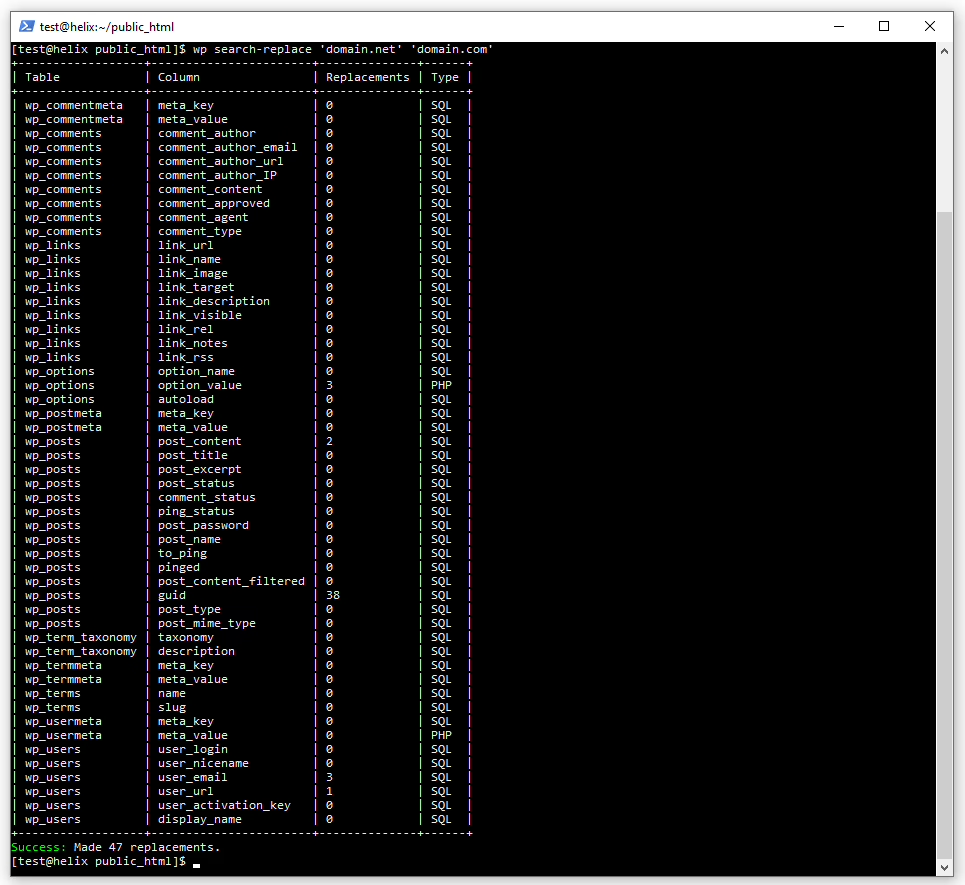
- Staging build and pipeline. The new environment is put in place with PHP and DB versions pinned down. A scripted migration pipeline is built using WP-CLI to make the move repeatable instead of a one-off affair. For URL rewriting we rely on Better Search Replace or
wp search-replacefor its serialization awareness, while WP-CLI is used to run the health checks.
- Rehearsal and delta sync. On a large site, content does not stand still during a project. To avoid having to put a freeze on publishing for a week come launch day, a delta sync process is put in place to keep staging in line with production right up to cutover. We rehearse the full cutover from end to end.
- Cutover. Twenty-four to 48 hours in advance the DNS TTL is lowered. If the situation calls for it, maintenance mode is engaged. Then comes the final sync and a DNS flip in a low-traffic window, with live monitoring on 4xx and 5xx errors, latency and Search Console.
- Handover and read-only rollback. The old setup remains available in read-only form for some 30 days. Editor training is done on the new stack as part of the process; Newsweek’s team took four weeks for that when they made the switch to WordPress VIP for good reason.
There is a WordPress migration checklist that runs through each of these phases. It is what makes a project controlled rather than hopeful. If a vendor has nothing to show you along those lines, that tells you all you need to know.
Planning a move of your own? Our Migration Blueprint maps the content, redirects, and risks before anything is touched. Get the blueprint.
What It Costs, and Why the Range Is So Wide
Assuming US development at $200 to $250 an hour, the 2026 enterprise migration benchmarks hold to fairly stable bands:
- A small enterprise job (1K to 5K posts, 2 or 3 custom post types) will run $25K to $50K for three or four months’ work.
- Mid-size, with 5K to 25K posts and 4 to 8 CPTs: $50K to $100K over four to six months.
- Large scale, 25K to 100K posts: $100K to $200K, six to 12 months out.
- Media and publishing of 100K+ posts: $200K+ for 12 to 18 months.
- Moving WordPress to a headless CMS backend with a Next.js frontend is anywhere from $20K to $80K based on the complexity.
You will find host-provided free migrations, DIY plugins and freelancers in the low hundreds to thousands below these figures. They suit a standard brochure site just fine. But where data corruption or SEO loss is a real cost, they are not the answer. Agency surveys are blunt on the matter: under $5K is only profitable for one in three agencies, so either the vendor is bleeding money on your project or cutting the very corners that lead to a failure list three weeks down the road.
In the end, cost is a function of four things: volume of content, integration complexity, how much downtime can be tolerated and the risk to SEO. When any of those is high, the plugin-and-a-prayer approach is off the table.
Two Migrations That Illustrate the Difference
Teton Gravity Research had 10,000 articles locked in ExpressionEngine and prior attempts at a move had ground to a halt. The request on paper was for a redesign. Before we would quote one, we put some harder questions to them about what their digital presence ought to be doing, then put the platform on a footing the editorial staff could work with. You can see the TGR platform rebuild; it was as much about untangling legacy dependencies and putting some bolted-on features to rest as it was a content move.
Then there was St. Louis Magazine, which presented the same problem in a different form. Thirty thousand articles were sitting in MetroPublisher, the workflow was clunky, newsletters required workarounds and the site was slow. With the St. Louis Magazine migration we moved the archive and reworked the editorial process in one go. In both instances the migration was the price of admission to get a platform the team could publish on without friction. That is the pattern at every scale: a successful migration is an opportunity to fix the architecture and performance, not simply port the mess.
How to Vet a Vendor Without Getting Snowed
Listen for specific answers to specific questions.
- How is serialized data handled in a URL rewrite? You want to hear of dry runs and Better Search Replace or
wp search-replace. Silence is not the right answer. - What is the redirect strategy for legacy URLs? A full inventory and automated validation should be baseline, not something you have to pay extra for.
- Lay out the rollback plan. We expect a description in a paragraph or two: old environment read-only for 30 days, low DNS TTL and a monitored cutover.
- Which plugins are you counting on to make it through the PHP version bump? There should be a compatibility audit scoping the target versions already.
- What is your approach to delta sync on a site that is still publishing? If the answer is to put a stop to it for a week, walk away.
- Who has ownership the week after you go live? Handoff and a support window are part of the deliverable, not a separate contract sprung on you later.
A defensive attitude from a vendor on the subject of backups or SEO is a tell. And if you want to be sure of the source side before the talk begins, there are tools to detect WordPress hosting.
The truth of it is that it comes down to three variables: the exposure to SEO, the cost of downtime and the complexity.
DIY, Managed Host, or Specialist
There is no need to overcomplicate a migration for an unremarkable site with a few pages, a modest archive and nothing in the way of ecommerce. A solid plugin or what your managed host offers at no cost will do the job. You will see WP Migrate, Duplicator or All-in-One WP Migration Pro put forward by those on Reddit as the go-to for this tier. They would have you follow up with Better Search Replace as a matter of course; it is all too common for plugin URL rewrites to overlook builder-specific tables, making cleanup a rule rather than an exception.
But put a WooCommerce store, a membership platform or a sizeable content library with some SEO equity on the table and the equation is different. When you pay for the engagement you are not paying for the file copy. The fee covers the audit, the redirect work, a rollback plan and the person on hand to debug at 2am when things do not go to plan as the tutorial suggested. Should ongoing operations be the issue, then a WordPress website maintenance contract after the fact is the only thing that will stop the newly fixed platform from reverting to its old ways.
What to Do Before You Call Anyone
Do yourself a favour and make three moves before asking for a quote; it will spare you weeks of misalignment.
Start by putting the kind of migration you require into a single sentence. If that proves difficult, it is a discovery issue, not one of price. Then make a list of the five items that are off limits to any breakage, be it the checkout, email, login, your CRM or the top ten organic pages. The rest can be discussed. And know your rollback threshold: if the site is down on a Tuesday morning, who has the say in when to flip back?
Take that to the vendor and the tone of the meeting will be entirely different.
Refact’s discovery process is designed to sort out whether you are looking at a plugin, a managed host or a proper website migration engagement before a line of code is written. There is no point in letting the meter run to find out what the project is. That is how migrations become costly.
Migrating off a legacy CMS? Let’s talk. Free 30-minute call, no pitch.

Masoud Golchin is a backend developer at Refact, working on server-side systems, internal tooling, and infrastructure. He builds and maintains the services that support both client projects and the team’s day-to-day development workflow. His work includes backend logic, developer tools, system reliability, and the technical foundations that allow products to scale and operate consistently. At Refact, Masoud focuses on creating practical engineering solutions that help the team move faster while keeping systems organized, maintainable, and dependable.
More from Masoud Golchin

