Joomla to WordPress Migration: A 2026 Playbook
A TechnologyChecker dataset puts the numbers in perspective: for every company that makes the switch from WordPress to Joomla


What does not get reported with the same frequency is how hard it can be. You will find public tutorials that make it look like a matter of an export, an import and a coffee break. Ask someone who has put in the work to ship a migration and they will tell you it is more of a partial rebuild. The plugin may do seventy percent of the heavy lifting but the last thirty is where the budget goes.
In truth, a move from Joomla to WordPress is a translation between two content models that have very different ideas on what an article is, its URL and who has access to it. Do it right and you have a site your team can run with a healthy editorial workflow and a proper plugin ecosystem. Do it wrong and you will be fielding questions over a drop in traffic for the rest of the quarter. This guide is for the operator who has to sign off on the budget and then live with the consequences.
Why the Migration Is Harder Than the Tutorials Say
Joomla has its own logic. Content is in #__content, categories in #__categories and structure in #__menu. An article will have an introtext, fulltext, a state, a language and an access level. The menu drives the navigation so the page layout and URL are often dictated by the menu item rather than the article.
WordPress is not built that way. Post types in wp_posts hold the content while taxonomies provide the structure. A menu item is simply a label for a permalink. Naive migrations fail to account for that gap and end up with orphaned articles and category pages that once had good rankings and are now gone.
The tooling can move the data. It cannot make product decisions such as what to do with a K2 field, whether a module position should become part of a theme, or how to compress a five-tier Joomla access hierarchy into three WordPress roles without exposing anything private. To skip those calls is to turn a two-week job into two months.
Decide If You Should Migrate At All
Then there is the question of whether a Joomla site is even worth moving. Practitioners and researchers are quite blunt: if you have an enterprise multilingual setup, deeply custom components or a heavy ACL, the process is costly and at times the sensible thing is to stay put.
You would have a strong case for making the change under these circumstances:
- The admin side is too slow or convoluted for editors to publish without calling a developer.
- The extensions you depend on are no longer maintained.
- Marketing wants to put out landing pages and campaigns faster than Joomla permits.
- There are mature WordPress equivalents for commerce or newsletters that Joomla lacks.
- It has become an ordeal to find a Joomla developer at a fair rate.
But if the site is a stable brochure and your ACL is doing real security work, or you have a bespoke application that no WordPress plugin can match, the cost of migrating is likely greater than the status quo. For those also looking at other platforms, our Drupal to WordPress migration playbook lays out similar trade-offs.
Inventory Before You Touch Anything
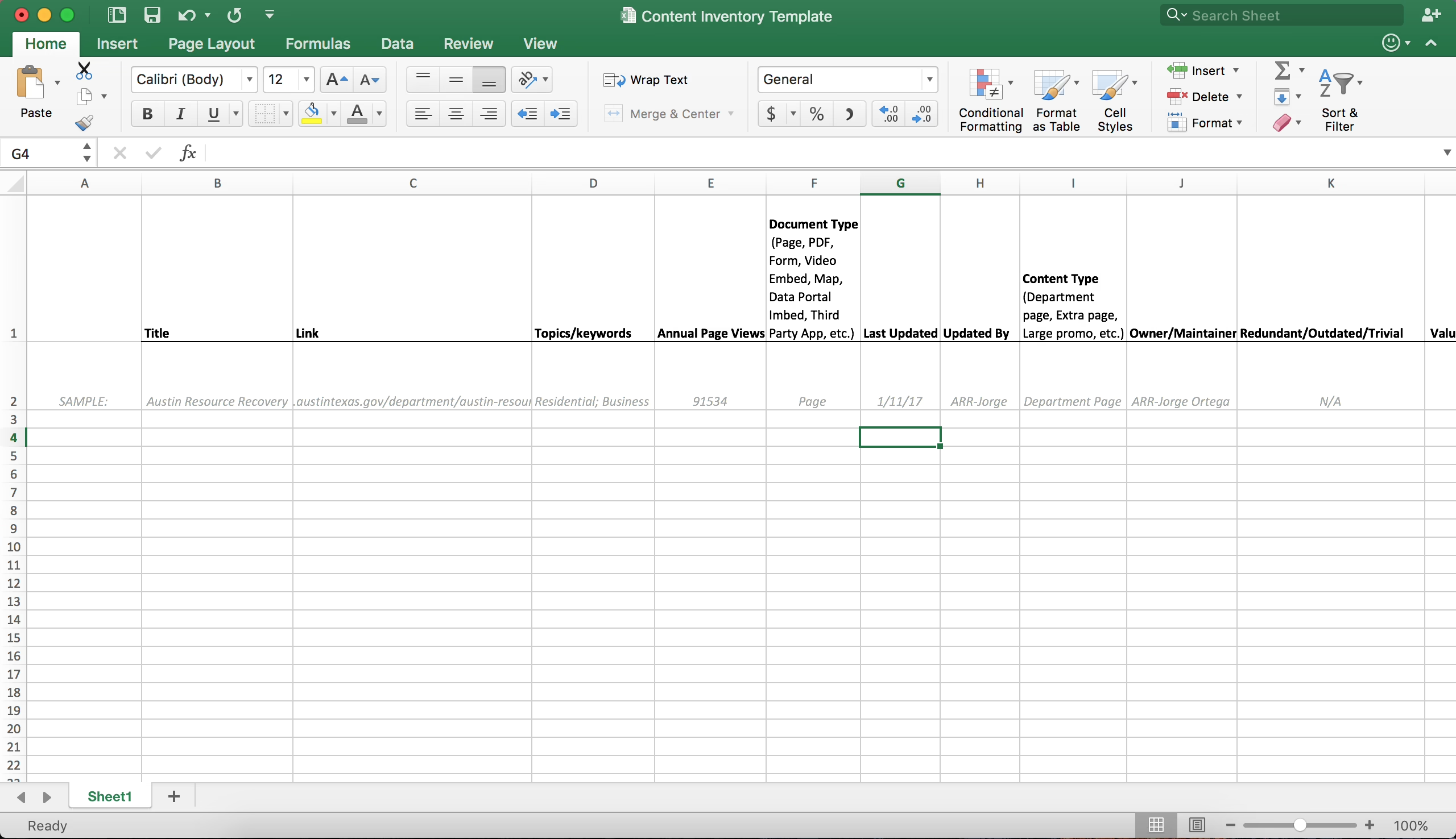
Before any tool is put to work, the most useful thing you can have is a spreadsheet. It is unglamorous but it is the line between a cutover you can control and a series of unpleasant surprises in production. Make a row for each type of content object on the site and note the following:
- Object: be it a native article, a K2 item, a file or module output.
- Volume: the total count and how many see active traffic.
- Access model: which group in Joomla has the rights to read or edit.
- WordPress destination: will it be a post, a page, a manual rebuild or something you retire?
- Migration path: does the plugin handle it or is a script needed?
- SEO weight: backlinks, indexed URLs and ranking pages.
Toolradar makes the point in their data migration strategy guide that an inventory is essential; without one, a plan is little more than a wish list. We have done this kind of inventory on legacy systems far worse than Joomla. In moving Teton Gravity Research from ExpressionEngine, the ten thousand articles were easy enough to extract from a CMS that was struggling to stay online. The harder part was determining which features of thirty years’ accretion still had a place on the new site.
Pick the Migration Method That Fits the Site
The site will tell you which of the three honest options you have.
The plugin path
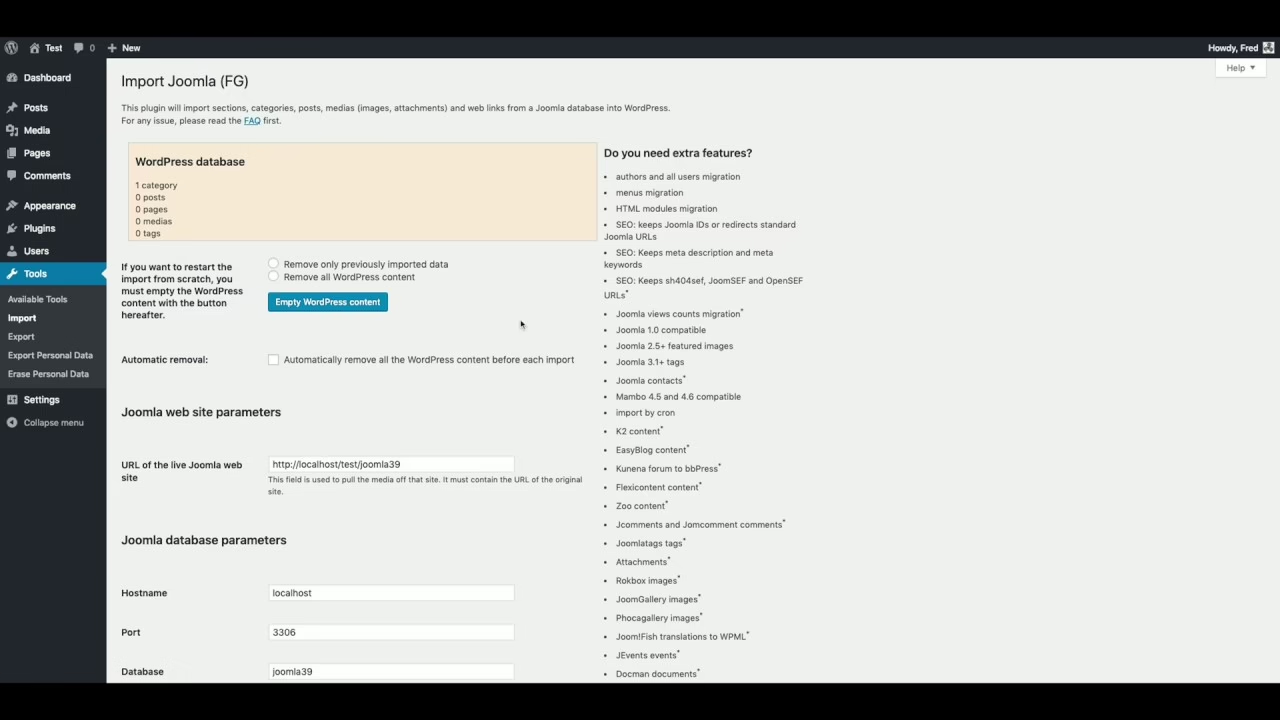
Take a standard content site and the default is FG Joomla to WordPress. The documentation says it supports everything from Joomla 1.5 to 6.0 and will pull sections, media, tags and posts straight from the database. Those on Reddit say it gets you seventy to eighty percent of the way there and that is a fair assessment. It is reliable for what it does. As for menus, layout, redirects and ACL, it leaves you to your own devices. The plugin is well suited to a Joomla site made up of the usual native articles and categories, provided your template is not playing fast and loose with module positions and your access model is something like an editor-and-admin setup rather than a five-tier hierarchy.
The custom script path
But if you are running K2 or an events component, have a directory or a custom component with thousands of records, the plugin will be at a loss. In such cases you need to put together a targeted importer for the Joomla database, map the fields to WordPress taxonomies and custom post types and deal with media relationships in a hands-on way. It is slower work and demands some PHP and MySQL know-how, but when the plugin can no longer cover what your business relies on, it is the only honest option.
The partner-led path
Then there are sites where a broken URL has a monetary cost, or where the ACL model is integral to security. For those operations, and for any project where infrastructure, migration and redesign must be in step, the plugin-plus-cleanup route is a false economy. A properly priced CMS migration project with outcomes in mind will invariably come in cheaper than putting right a botched weekend job.
It is not that one path is inherently superior to another; the mistake is to let price dictate the choice instead of looking at what the inventory tells you.
URL Mapping and Redirects: Where Sites Silently Break
You will find that the surest way to erode business value in a move from Joomla to WordPress is to go live without a proper redirect map. WordPress will default to /year/month/postname while Joomla is content with /category/article-name.html or the more unwieldy /index.php?option=com_content&view=article&id=123. The content may have moved but the addresses have not, and to a search engine the old URLs are 404s. Some will tell you traffic can drop by forty percent if you are not careful. That is anecdotal, but the mechanism is real enough and Google does not distinguish between a missing 301 and a page that has been deleted.
There is a straightforward, if unforgiving, workflow to safeguard your rankings:
- Run a crawl of the live site with Screaming Frog (or the like) to get every canonical and status code.
- Put that data side by side with your analytics and Google Search Console to see which URLs are bringing in backlinks and visitors.
- Make a mapping table for the old and new URLs, with a reason attached. Do not leave out a ranking page just because the slug is changing.
- Put your 301s in place at the server level in Nginx or
.htaccess, not via a plugin. You want them to endure any plugin churn without adding to the PHP load. - Re-enter your canonical tags and meta descriptions in a WordPress SEO tool; the Joomla extension data will not make the trip on its own.
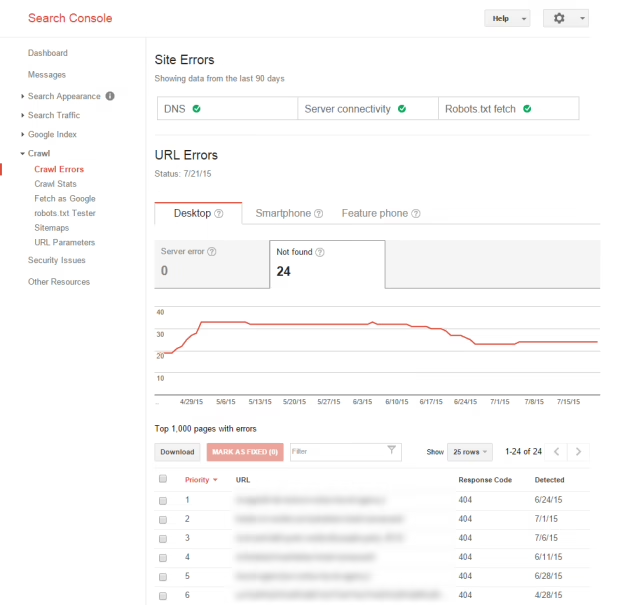
- On cutover day, submit the new sitemap to Search Console and keep an eye on crawl errors for the next fortnight.
If the redesign is part of the equation, we have covered the necessary SEO scaffolding in our guide to redesigning a website without losing SEO.
Planning a move of your own? Our Migration Blueprint maps the content, redirects, and risks before anything is touched. Get the blueprint.
ACL, Users, and the Permissions You Cannot Afford to Leak
Joomla’s access control is a strength, but also a source of quiet failure in migration. The system uses group hierarchies to put gates on content by menu item, category or component. WordPress has nothing quite so granular out of the box. While Members or User Role Editor can extend the roles and capabilities, the mapping is a matter of design.
An un-mapped group can mean private content is now public, or that a newsletter archive is being indexed by Google. Editorial workflows tied to Joomla states are reduced to draft and published. To avoid this kind of costly oversight, treat the process as a security review. Go through every access level on staging and log in as the user to confirm what is and is not visible before you switch over.
Rebuild the Design. Do Not Port the Template.
Ask any practitioner who has done more than one of these, or read the agency guides and Reddit threads, and the advice is uniform: do not attempt to recreate your Joomla template in WordPress. The tools will move the content but not the system that put it on the page. Even YOOtheme makes this clear on their support forum in a YOOtheme Pro discussion, noting that their cross-platform builder requires a rebuild, not a transfer.
Think of the migration as the redesign you have been deferring. With a light custom theme and something like Astra or GeneratePress you will end up with a site that is faster and easier to maintain. Trying to force module positions into WordPress generally yields a more fragile result. And since layout is where accessibility can easily slip, choose themes with a good record in that regard rather than a page-builder with the most drag-and-drop bells and whistles. WebAIM’s 2026 Million report shows how JavaScript-heavy themes and ARIA overuse tend to bring on more errors.
Media, Menus, and the Manual Twenty Percent
There is a certain luck of the draw with the migration plugin. It will put your Joomla /images/ folder where it belongs in /wp-content/uploads/ and may even remap some of the URLs in your article bodies. But do not expect it to create proper WordPress attachment records for those files. The media will show up in a post, yet it will be absent from the Media Library and unselectable in the block editor, and you will be without the metadata the WordPress ecosystem requires.
To put that right, one has to run a script. It goes through every imported post, looks at the HTML for image tags, converts the old absolute Joomla URLs to WordPress paths and puts in the necessary attachment record with the right _wp_attached_file data. For a site of any size, it is a day’s work but it spares the editorial team months of head scratching.
Then there are the menus, which are another letdown. A Joomla menu is a layout controller and URL router; in WordPress it is nothing more than a label. You can count on having to put in the time to rebuild the primary navigation and the homepage by hand. And any module that was pulling featured articles from category X in Joomla must be reworked as a query loop or a page builder section in WordPress.
Hosting, Security, and the Plugin Discipline That Comes With WordPress
Move a ten-year-old Joomla site off shared cPanel hosting and onto WordPress and it is not the same animal. WordPress is much more particular about server-level caching, PHP-FPM, a CDN and a web application firewall when it comes to performance and security. Make sure to put some budget aside for the infrastructure, not merely the CMS.
One should be candid about the security side of things. While the core is sound, the ecosystem presents a risk. Industry reports have it that ninety-five percent of WordPress vulnerabilities stem from outdated plugins, with well over seventy percent of installations running something vulnerable. The danger is greatest during a migration, when a team has quietly broadened its attack surface by swapping out ten Joomla components for fifteen WordPress ones.
The discipline required to keep a WordPress installation secure is unglamorous but effective: limit the number of plugins, stick with ones that have active support and recent updates, enforce two-factor authentication on your admins, back up to an off-site location daily and put a WAF in place. We cover this sort of thing in our WordPress migration checklist and the WordPress migration services overview.
What A Realistic Timeline Looks Like
Forget what the marketing material says; timelines are dictated by complexity. A small brochure site might be done in a weekend. Most agencies will give you five to ten days for a standard content site with a few hundred pieces of native Joomla content and a simple template. But if you are looking at a medium news operation with three thousand posts and some SEO history, plan on two or three weeks once you factor in staging and redirects. Custom components, e-commerce and multilingual sites will easily run a month or more.
Take the St. Louis Magazine project as an example. We moved thirty thousand articles from MetroPublisher and did not disrupt their editorial process, but it was measured in months because we had to reconstruct their newsletter and editorial operations around a CMS capable of handling it. That is the true scope of a publishing migration.
The Cutover Checklist That Actually Matters
Do not mistake the final day of a migration for a launch. It is a controlled release. When the DNS is switched, you need to be on top of these things:
- Check the redirect map on a sample of your top hundred ranking URLs to make sure they 301 to the right place in WordPress.
- Put in a new XML sitemap with Google Search Console and Bing.
- Go through all the business-critical flows yourself, from member logins and contact forms to checkout.
- Do a scan of the top fifty pages for orphaned media or broken links.
- Confirm that your analytics and conversion tracking are firing on the new domain.
- For the next two weeks, if not a month, you will want to be watching the crawl error reports.
The job is not finished when the site is live. It is finished when the search traffic is back to baseline, the editorial team is moving quicker than before and the revenue-generating flows are intact. That is what you should be after.
And if there is any question as to whether a Joomla site is a matter of a plugin or a complete re-architecture, Refact’s discovery process is designed to answer that before production is touched.
Migrating off a legacy CMS? Let’s talk. Free 30-minute call, no pitch.

Masoud Golchin is a backend developer at Refact, working on server-side systems, internal tooling, and infrastructure. He builds and maintains the services that support both client projects and the team’s day-to-day development workflow. His work includes backend logic, developer tools, system reliability, and the technical foundations that allow products to scale and operate consistently. At Refact, Masoud focuses on creating practical engineering solutions that help the team move faster while keeping systems organized, maintainable, and dependable.
More from Masoud Golchin

