Headless WooCommerce: When It’s Worth It
Headless commerce is supposed to be the fast option.
 Masoud GolchinSeptember 28, 2026
This article is for WooCommerce store owners, growth teams, and the developers they work with who are deciding whether to rebuild the storefront. The question is more practical now than it was two years ago. The WooCommerce Store API has improved a lot, starting with release 9.8. Quotes for these builds still run from $20,000 to well past $100,000, and you pay to run two systems for as long as the store exists. Below: what actually changes, where projects break, and how to tell whether your store clears the bar.
What Headless WooCommerce Changes, and What Stays Put
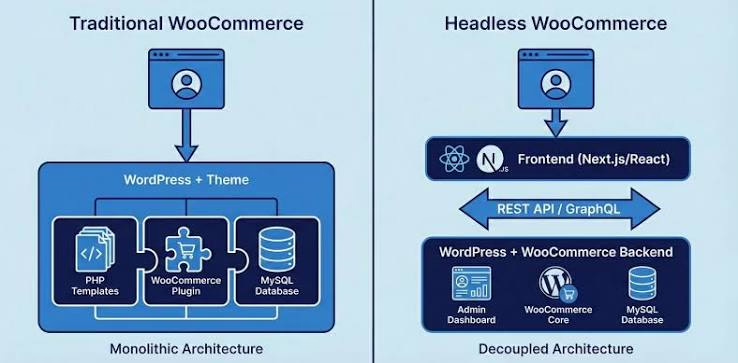
In a headless WooCommerce setup, WordPress and WooCommerce stay in charge of products, orders, inventory, tax rules, payment configuration, and fulfillment. Your team keeps using the same dashboard. What changes is the part shoppers see. A separate application, usually built with Next.js or React, sometimes Nuxt, Astro, Gatsby, or SvelteKit, renders the store and gets its data through APIs.
WooCommerce gives you two official APIs, and they do different jobs. The WooCommerce REST API documentation covers the authenticated API. It can create, read, update, and delete store data, which makes it the tool for admin-type work and broader data access. The Store API is the one built for storefronts. It needs no login and covers products, the cart, and checkout for the current shopper only. It cannot look up another customer’s orders, and it cannot change store settings. It only returns published products, so a draft product comes back as a 404. So account pages, order history, and anything close to admin work need their own plan from the start.
Many teams add a third layer. WPGraphQL with WooGraphQL is popular with teams who found that REST needed too many requests per page. CoCart is a third-party layer built for cart and session handling. No neutral benchmark compares these options. One builder who shipped a subscription store used the Store API for the basket, checkout, and coupons, and the REST API for product pages. That split is a sensible default.
The three shapes a build usually takes
- Full headless: the new frontend owns everything, from category pages through checkout and order confirmation. You get the most control, and you take on the most payment and session work.
- Hybrid: the new frontend handles catalog, search, and product pages, then passes the cart to WooCommerce’s native checkout. Practitioners mention this pattern more than any other.
- Partial: only one area gets decoupled, such as a campaign microsite or a regional storefront. The rest stays on the WordPress theme.
The rule that holds in all three: WooCommerce stays the source of truth. The frontend can be replaced. It is not your order system or your inventory record. For the framework side of that decision, our piece on Next.js ecommerce architecture covers the storefront patterns. The tradeoffs of headless WordPress projects in general also apply here.
Headless Is Not a Speed Upgrade by Default
The most common reason people give for going headless is speed. It is also where the most mistakes happen. Devansh Thakkar, who has written a lot about headless WooCommerce decisions, calls treating headless as a speed fix the biggest mistake teams make. The evidence supports him.
Start with Shopify’s own Core Web Vitals data. Shopify has its own reasons to favor its theme engine, and its study could not isolate ecommerce sites. Still, the direction is clear. A decoupled frontend is not fast unless someone makes it fast. Then look at a 2026 bachelor’s thesis by Landefjäll. It measured a production headless purchase flow at a large Swedish telecom. The pages looked excellent: Largest Contentful Paint of 1.15 to 1.60 seconds and Interaction to Next Paint of 14 to 56 milliseconds. Meanwhile, the order confirmation API call averaged 4.98 seconds. On every network condition tested, confirmation stayed around five seconds, and duplicate API calls added about 360 milliseconds to each step.
That study is one case, it isn’t WooCommerce, and the number of test runs was small. The lesson still applies. A new frontend can make catalog browsing faster. It does nothing for the WooCommerce transaction endpoints behind the “Place order” button. If your checkout is slow because of a payment gateway, a tax lookup, or an overloaded database, a React storefront won’t help.
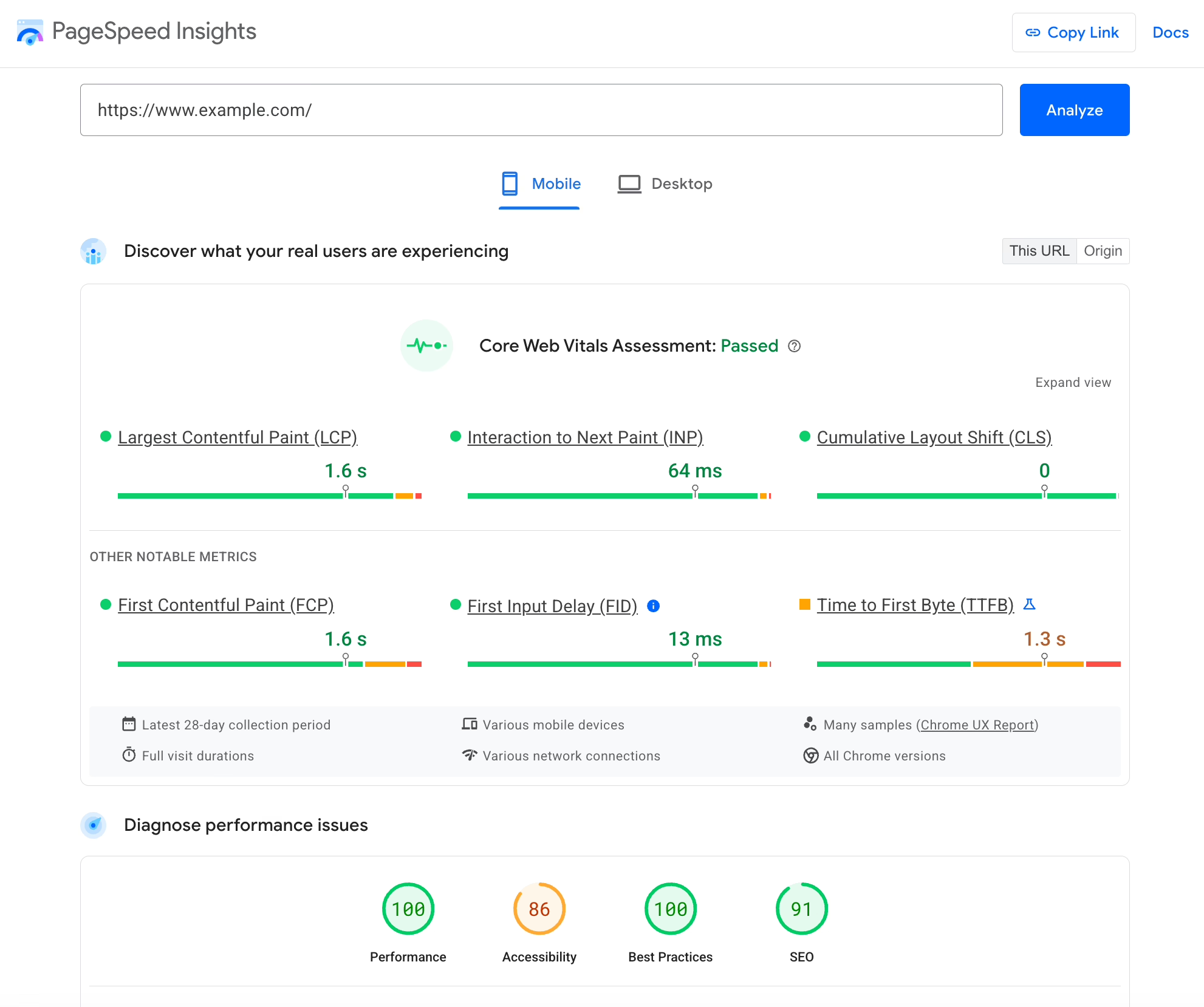
There is also a cheaper option. Blaze Commerce sells headless WooCommerce builds, and even its own case study says most stores can reach page loads of roughly 460 to 560 milliseconds without going headless. Block checkout and the Interactivity API keep closing the gap on the traditional side. WooCommerce 10.5 also added experimental REST API caching. In a test with about 20,000 products, response times fell from 2 to 2.5 seconds on a cache miss to 0.6 to 0.8 seconds on a hit. That feature is experimental and off by default, and it only affects API responses, not page speed. It does show that the platform itself is getting faster.
Before anyone quotes a rebuild, check the basics. Oversized product photos are still one of the most common causes of slow catalog pages, and MerchLoom’s WooCommerce image guide covers batching, compression, and CDN delivery for large catalogs. Hosting, object caching, and removing plugins you don’t need come next. If your limits are specific, like a checkout rule or a pricing model, custom WooCommerce development can often fix them without splitting the stack.
Where the Real Work Lives: Cart, Checkout, and Payments
Practitioners on Reddit and X keep saying the same thing: checkout and plugins “don’t come along for free.” A product page that reads catalog data is easy to build. A cart that follows a shopper across devices, logins, and failed payments is not.
Cart state is a session problem
WooCommerce carts are tied to a session, and by default the session is stored in a cookie. When your frontend and backend run on different domains, that cookie stops being simple. WooCommerce’s answer is a Cart-Token header that identifies the cart and removes the need for a nonce. The Store API changes in WooCommerce 9.8 exposed that token in CORS-protected requests, so browsers can now call the Store API directly without a proxy. The same release added PUT /checkout, which saves address fields, payment method, and order notes while the shopper types.
That release exposed the token, not the nonce. Clients that use nonces still have to save and refresh the nonce that comes back with each response. The failures practitioners report are predictable: cart counts that go wrong after login, guest carts that don’t merge into an account, and Stack Overflow questions about cross-domain cookies and clearing the cart that nobody has answered. The fix is discipline more than cleverness. Keep one source of truth for the cart. Test the real browser flow, not only curl requests. And keep the token out of logs and shared caches.
Payment gateways are where builds stall
A payment plugin that works on your current checkout may not work on a headless one. WooCommerce payment methods have a client-side integration that is separate from the server-side gateway, and advanced gateways may need processing written specifically for the Store API. WooCommerce itself warns that a gateway that isn’t compatible may simply not appear in block checkout.
The documented failures are concrete. One store owner on r/woocommerce had Stripe orders stuck at “Incomplete” during 3-D Secure, because the headless flow never exposed the PaymentIntent’s client_secret for confirmation. On GitHub, a maintainer of the Mollie plugin said headless support would need “a major refactor,” because the plugin depends on the WordPress frontend. The builder behind the subscription store mentioned earlier gave the most useful tip: the payment_data array sent at checkout is what makes gateways work, and payment plugins rarely document it.
Business rules make this harder. Fiore Designs, a Los Angeles florist, came to us because its Shopify checkout couldn’t check a recipient’s zip code for delivery, calculate a zone-based fee, or let the shopper pick a delivery date. Rules like these are what make a custom checkout expensive on any platform. One practitioner said that bringing a client’s delivery dates and gift cards into a headless checkout “would have added months.”
The hybrid handoff, and what it costs you
This is why the hybrid pattern is so common. The frontend builds the cart and then hands off to native WooCommerce checkout. One way to do it: encode the product IDs and quantities, send the shopper to Woo checkout, and use a small PHP snippet to rebuild the cart there. Your existing gateways, tax logic, and shipping plugins keep working. There are two downsides. The handoff input must be sanitized against injection. And one practitioner found the retained Woo checkout “ludicrously slow” next to the headless pages, a gap shoppers feel at the worst moment. The hybrid is usually still the right call unless you have a strong reason, and a team, to own payments, taxes, shipping, and sessions yourself.
The Plugin Audit That Decides Your Budget
Having a plugin installed in WordPress doesn’t mean it will work on a new storefront. Many WooCommerce extensions work through PHP hooks, templates, shortcodes, or scripts they inject into the theme. When the theme goes away, their frontend behavior goes with it. In release notes from the 9.8 era, Product Bundles, Composite Products, and Product Add-Ons were all missing data identifiers in Store API responses, even where the items could still be added to the cart.
| Plugin type | What usually happens when you go headless |
|---|---|
| Backend operations (fulfillment, ERP sync, inventory, order emails) | Usually keeps working, because it never touched the theme |
| Product configurators (bundles, composites, add-ons) | Needs a check of the Store API response and often custom endpoints |
| Frontend widgets (reviews, wishlists, currency switchers, upsells) | Has to be rebuilt in the new frontend or replaced |
| SEO plugins such as Yoast | Metadata and structured data must be pulled through the API and rendered by the frontend |
| Payment gateways | Must be tested end to end, including redirects, express pay, 3DS, and failures |
| Checkout field, shipping, tax, and discount logic | Stays on the server, but the frontend has to display it and handle every validation error |
This table is where the budget comes from. A feature that used to cost a $79 plugin license becomes custom code you now maintain. Before you approve a build, map every plugin that touches revenue to one of three outcomes: rebuild, replace with something that works over the API, or remove on purpose. The audit sometimes pays off anyway. In a Blaze Commerce case study for Jackie Mack Designs, 12 redundant plugins came out during the rebuild. That cleanup almost certainly explains part of the reported speed gain.
Caching, Rate Limits, and Other Defaults That Bite
Several WooCommerce defaults make sense on a traditional store and turn into risks once the storefront is separate.
Caching needs a hard boundary. WooCommerce says plainly that cart, My Account, and checkout must stay dynamic, and that session cookies must be kept out of caches. A cache rule that works perfectly for product pages becomes a privacy bug if it catches a cart response and serves one shopper’s cart to another. Cache public catalog content at the edge. Never cache anything personal.
Rate limiting is off. Store API rate limiting is optional and disabled by default. When you turn it on, the documented limit is 25 requests per 10 seconds, applied only to POST requests. Proxy-aware IP detection is also off by default, so behind a CDN every shopper can look like the same IP address. WooCommerce’s developer blog has written about card-testing attacks through the Store API, where fraudsters use your checkout to check whether stolen cards work. Turn on the limits deliberately, set up IP handling for your CDN, and use the separate setting that limits place-order attempts. The reverse problem also happens. One host flagged a custom app’s heavy API traffic as a bot attack, and it was only fixed by routing that traffic through a whitelisted static IP.
Large catalogs need a pagination plan. The Store API returns at most 100 items per page. Since WooCommerce 10.6, per_page must be at least 1, so the old per_page=0 trick for fetching everything no longer works. Practitioners with large catalogs have hit GraphQL performance limits and moved search and filtering to Typesense or Algolia. One team reported search results in about 20 milliseconds. Next Impact’s WooCommerce headless guide describes a workable pattern for catalogs above roughly 1,000 products. Use Incremental Static Regeneration with API-side pagination, pre-build the top 100 to 200 product pages, and refresh product data on a schedule.
That schedule is itself a decision. Jackie Mack’s “instant invalidation” still meant a 20 to 30 second sync for product, price, and content changes. That is fine for descriptions and risky for a flash sale. Stock and price shown at checkout should come live from WooCommerce, not from a static build.
Wondering how your store shows up in AI search? We put together a short visibility snapshot. Get the snapshot.
SEO Is No Longer Free
On a traditional WooCommerce store, your SEO plugin, permalinks, sitemaps, and structured data mostly look after themselves. On a headless store, practitioners put it bluntly: SEO is no longer free. Yoast metadata has to be fetched and rendered. Product schema has to be rebuilt. Category, tag, and filter URLs have to render on the server, because a storefront that only renders in the browser can hide product content from crawlers.
A migration is where rankings get lost. Today’s Closeout is not a headless or WooCommerce case, but it shows what’s at stake. After its move from Volusion to BigCommerce in late 2024, more than 15,000 URLs were redirected to the wrong places. Organic daily clicks fell from about 40 to 70 to almost zero within two months, and organic sales had effectively stopped by January 2025. The same discipline applies to any store rebuild. List every URL, map each redirect, rebuild metadata and structured data, render on the server, and watch indexing for weeks after launch. We cover redirect and data mapping discipline in more detail in our migration playbook.
What Headless WooCommerce Costs, and What the Adoption Numbers Really Say
Cost figures are thin and inconsistent. Thakkar estimates $20,000 to $50,000 for a build, plus a second hosting bill. Agency promotional posts quote $70,000 to $100,000 and up. The Squadron Nostalgia rebuild took “several hundred hours” and ran over schedule. None of these figures is rigorous. What they have in common: the build is the smaller part of the cost. You are signing up to run two connected systems, with two sets of updates, two hosting bills, and a developer who understands both WooCommerce and the frontend framework. Our breakdown of ecommerce build budgets shows where the hidden line items usually are.
Survey data shows the same costs. In a 2023 WBR Insights and eTail survey of 100 North American retail leaders, 44% named higher development costs as a headless challenge and 40% named maintenance. A 2024 WP Engine survey found organizational hurdles were the top barrier, at about 70%, ahead of budget at 65%.
Be careful with the adoption numbers vendors quote. Roundups like Crystallize’s headless commerce statistics roundup repeat figures such as “73% of businesses use headless.” That number comes from a vendor-commissioned WP Engine survey about website architecture at companies averaging around $800 million in revenue. It does not measure ecommerce, and certainly not WooCommerce. The MACH Alliance’s 87% measures a wider bundle of technologies at firms with at least 5,000 employees. Forrester’s 271% ROI figure models one Salesforce scenario built from four interviews. Market forecasts, like Mordor Intelligence’s market forecast, explain why so many vendors are pitching headless to you. None of them tells you whether your store needs it. No source estimates how many WooCommerce stores actually run headless. We go through the same numbers in our piece on headless ecommerce CMS tradeoffs.
What the Successful Builds Have in Common
Headless WooCommerce stores do run in production, and some report strong results. Three of the best-documented cases come from one agency, Blaze Commerce, which sells these builds. Read them with that in mind.
- Jackie Mack Designs: First Contentful Paint went from 5.2 seconds to 0.945 seconds, and bounce rate fell 22.4%. Two regional sites were merged and 12 plugins removed. The business won its largest wholesale account within months. No post-launch conversion rate was published.
- Squadron Nostalgia: Load time went from 6.3 seconds to 0.8 seconds, and conversion rose from 7.87% to 9.01%. It also dropped a $70 per month search subscription. The case study doesn’t state its measurement method or time period.
- Byron Bay Candles: Launched in 60 days. Mobile average order value went from $71 to $125, and search accounted for 40% of purchases. The UX redesign happened at the same time as the architecture change.
None of these cases separates the effect of headless from the cleanup, redesign, and new search that came with it. What they do share is useful. Each started from a specific business problem: slow mobile browsing, poor search, or duplicated admin work across regions. Each kept WooCommerce running operations. Each measured business results, not only speed scores. The stores that ship and stay stable also put serious money into testing. One operator runs more than 3,000 automated tests per release.
A specific problem doesn’t always point to a new frontend, though. When we built NudFud’s WooCommerce store, the hard part was making product pages explain the product: full nutrition panels, six certifications, and variant comparisons for a shopper deciding between crackers. That was a content model and UX problem. Swapping the rendering layer would not have solved it.
When Headless WooCommerce Makes Sense
Thakkar’s “Headless Threshold” is a good filter because it is strict. Go ahead only if all three are true: you have real scale, you need a custom experience a PHP theme can’t deliver, and you have the budget and team to run two systems. It’s an opinion, not a tested rule. The research still points the same way: headless suits a minority of stores that clear a high bar.
These situations tend to clear it:
- Several storefronts on one backend: regional or brand sites that need different presentation but share products and orders.
- Selling in more than one channel: the same catalog feeding a web store, a mobile app, and in-store screens.
- Browsing a large catalog: search and filtering that WordPress queries can’t serve fast enough, even after tuning.
- Interactive product experiences: configurators or visual builders that fight the theme at every step.
Stay on standard WooCommerce if your catalog is modest, your plugins cover checkout and shipping without friction, and your main complaint is how the store looks. A well-built block theme will close most of that gap. Also stay if your team depends on WordPress editing and nobody owns frontend maintenance after launch. If you’re comparing across platforms, Shugert’s headless Shopify guide lays out similar gates for Shopify stores. It’s a useful reminder that some practitioners who regretted headless WooCommerce moved to Shopify instead, and others shipped on Woo without trouble.
Answer these honestly before you ask for a quote:
- Have you benchmarked the current store on mobile, including the time from “Place order” to confirmation?
- Have caching, hosting, image work, and removing unused plugins already been tried?
- Can you name the specific frontend limit a theme can’t solve?
- Does every payment gateway you use have a tested headless or Store API path?
- Do you know which plugins touch the frontend and what replacing each one costs?
- Who will maintain the frontend 18 months from now?
If the first two answers are no, start there. If questions four through six have no answers yet, you aren’t ready to start building.
How to Scope a Build Without Getting Burned
If the store clears the bar, treat the risky parts as core scope, not background plumbing.
- Benchmark the whole journey first. Measure category pages, product pages, add to cart, checkout steps, and order confirmation on a realistic mobile connection. Without a baseline, nobody can tell whether the rebuild worked.
- Audit every plugin and gateway. Check each one against the real headless flow, including Store API response schemas, redirects, express payments, 3DS, and failure handling.
- Decide on the checkout model early. Choose full headless or hybrid handoff before design starts, because that choice sets the budget more than any other.
- Write the data contract. Decide which API serves which page, how the catalog is paged and indexed, what gets cached, and what must always be live.
- Test the edge cases. Guest-to-login transitions, address and stock changes mid-checkout, coupons, declined cards, expired sessions, and double submissions.
- Monitor the flows, not just uptime. Once the frontend is split from checkout, a basic uptime check can report the site as up while carts are failing. Add synthetic checks that actually add to cart and reach checkout.
- Launch in stages where you can. Start with one category, one region, or the catalog layer alone, with redirects mapped and indexing watched.
Headless WooCommerce works when it solves a problem you can name and that the traditional stack can’t. It’s an expensive detour when it replaces the diagnosis. Most stores that ask about headless need a clear answer about their real bottleneck before they need a new frontend. That early decision is what Refact’s ecommerce development work starts with. When a decoupled storefront really does earn its keep, our headless CMS development team scopes the build around checkout, plugins, and SEO first.
Building or replatforming a store? Let’s talk. Free 30-minute call, no pitch.

Masoud Golchin is a backend developer at Refact, working on server-side systems, internal tooling, and infrastructure. He builds and maintains the services that support both client projects and the team’s day-to-day development workflow. His work includes backend logic, developer tools, system reliability, and the technical foundations that allow products to scale and operate consistently. At Refact, Masoud focuses on creating practical engineering solutions that help the team move faster while keeping systems organized, maintainable, and dependable.
More from Masoud Golchin

