Shopify Headless: When It Actually Pays Off
Shopify’s own 2023 Core Web Vitals data made the pitch harder to sell.


That is the starting point any operator considering Shopify headless should hold in mind. The architecture can produce a sharper storefront, a better editorial system, and real conversion lift. It can also cost six figures, quietly erode organic traffic, and get reversed within two years if the business case was thin. This guide is written for the person who has to make the call: what headless actually is on Shopify in 2026, where it earns its cost, and where it turns into an expensive rebuild of a store that was already fine.
What Shopify Headless Actually Is
Most teams arrive at this conversation after a few rounds of “small” theme changes that stopped being small. A designer wants a product page Liquid cannot express. A merchandiser wants a landing template the theme editor cannot support. Someone on the team says “maybe we should go headless” and the meeting keeps going.
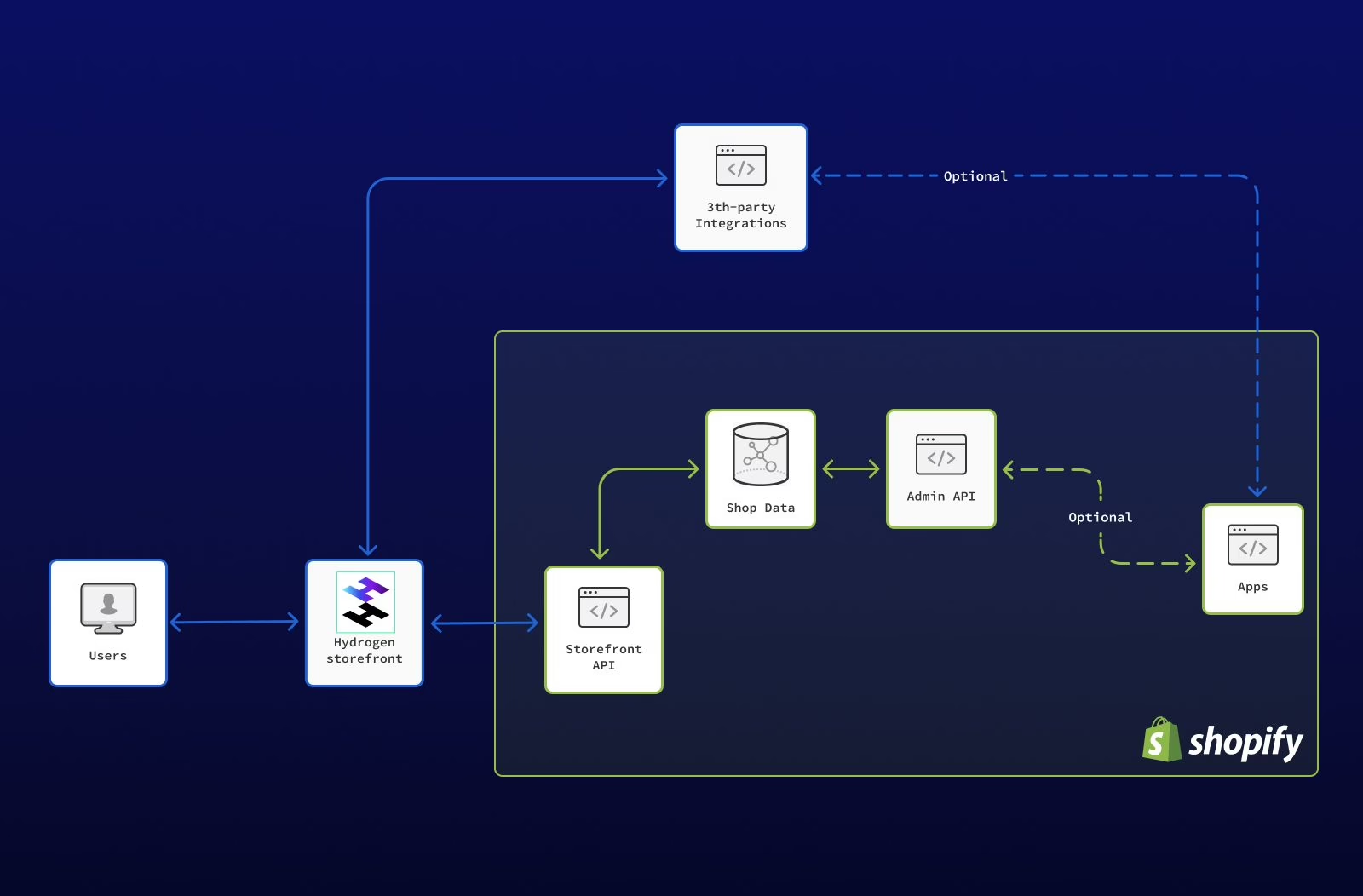
The architecture splits the store in two. Shopify keeps the commerce engine, catalog, cart, orders, payments, PCI compliance, and checkout, while the storefront becomes a separate front end that reads and writes through APIs. Shopify’s own material describes the same setup as separating the customer-facing front end from the commerce engine while keeping the engine inside Shopify’s platform, which is roughly [what Shopify counts as headless commerce](https://www.shopify.com/enterprise/blog/benefits-of-headless-commerce).
The important part is what does not decouple. Checkout is still hosted by Shopify. Customer, payment, and order data still live inside Shopify. Any attempt to move checkout to a custom Stripe flow means taking on PCI scope, fraud handling, wallets, discounts, and webhook-driven order reconciliation. The winning pattern across every well-documented case is unglamorous: Shopify stays the source of truth, and the front end is the only thing that changes.
The one term you will hear nonstop
The Storefront API is the pipe between the two halves. It is a GraphQL API for reading catalog data, managing carts, and starting checkout from the front end. Every headless Shopify build lives or dies on how that API is called, cached, and shaped.
Two constraints matter from day one. The API uses leaky-bucket rate limiting at roughly 60 requests per second per IP for anonymous traffic and 200 for authenticated. Deeply nested GraphQL queries can also time out at roughly ten seconds at the resolver level, even when they are technically inside the rate limit. Teams that discover both of these on Black Friday, rather than in design, are the ones who blow up in production.
The Stack: Hydrogen, Oxygen, Next.js
You do not need to love the stack, but you need to understand what you are paying for. Most proposals reduce to four moving parts, and if the vendor cannot explain each in a sentence, that is a signal.
Hydrogen is Shopify’s React-based storefront framework. It is preconfigured with Shopify-specific loaders, cart primitives, and SEO features, and it is now built on React Router and Vite according to the [Hydrogen and Oxygen fundamentals](https://shopify.dev/docs/storefronts/headless/hydrogen/fundamentals.md). Oxygen is the Shopify-run edge hosting layer for Hydrogen, with environment management, branch previews, and CDN handling included in the plan.
The alternative is Next.js on Vercel, usually paired with a content system like Sanity. Next.js is not Shopify-native, but it has a broader hiring pool, more ecosystem options, and more freedom on the front end. It also asks you to build the glue yourself: previews, environment management, image handling, and Shopify integration are all decisions you own.
| Layer | Job | Shopify-native | Custom path |
|---|---|---|---|
| Data | Products, collections, cart, pricing | Storefront API | Same API, different consumer |
| Front-end framework | Renders the shopping experience | Hydrogen (React Router) | Next.js App Router |
| Hosting | Serves the storefront at the edge | Oxygen | Vercel or similar |
| Content | Editable pages, landing, story | Shopify metafields, sections | Sanity, Contentful, or similar |
Community sentiment in 2026 is split. Practitioners like Andrew Jennings are shipping “almost every store” on Next.js App Router with Sanity, Vercel, and heavy AI-assisted coding, and reporting faster builds and clean client editing. Others push back that a Next.js team routinely underestimates the operational cost of rolling its own preview, environment, and integration setup, and that Hydrogen and Oxygen exist precisely to remove those decisions. Neither camp is wrong. The right answer is the one your team can maintain in year two, not year one.
If you are seriously comparing a custom front end, [our Next.js ecommerce breakdown](https://refact.co/insights/ecommerce/nextjs-ecommerce) is the right companion read before you commit.
Where the Performance Story Falls Apart
The marketing pitch says headless is faster. The data says it depends. Shopify’s CrUX numbers show Liquid outperforming most headless builds, and only carefully engineered Hydrogen matching or beating it. The [state of Shopify headless vs Liquid](https://commerce-ui.com/insights/the-state-of-shopify-headless-vs-liquid-spring-2026) analysis reaches the same conclusion from a different angle: a like-for-like Hydrogen build is around 20% more expensive than Liquid up front, and the performance gain is contingent on engineering discipline, not on the architecture itself.
What actually produces a fast headless storefront is boring: server-side rendering with streaming, a clear split between critical and deferred data in the loader, a centralized GraphQL layer with shared fragments, and aggressive caching at the edge. What produces a slow one is equally predictable: client-side waterfalls of Storefront API calls, mega-queries hitting the resolver timeout, and no server-side cart or catalog cache.
Shopify’s enterprise material for the platform as a whole cites up to 3.9× faster server speed and 93% of Shopify stores hitting a “fast” storefront benchmark on the [headless architecture page](https://www.shopify.com/enterprise/blog/headless-architecture). Those are platform numbers, not a promise about your build. Assume the storefront you launch will be as fast as your worst rendering decision.
SEO Is Where Migrations Quietly Bleed
A headless launch that mishandles SEO can lose 40 to 60% of organic traffic inside three months, per one 2026 source. The problems are usually the same short list: redirects that never got mapped, product and collection pages that stopped rendering server-side, structured data that vanished when the theme was replaced, faceted URLs that started multiplying, sitemap and canonical rules that did not survive the move, and image handling that regressed once Liquid’s responsive helpers were gone.
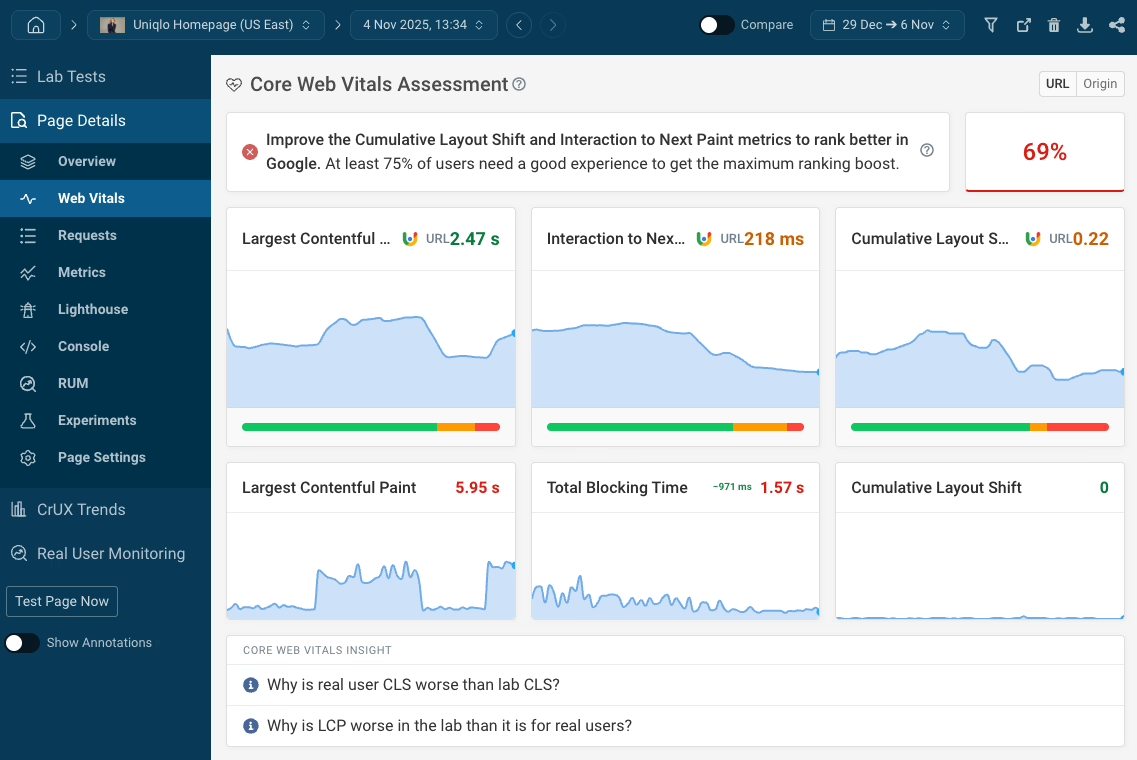
Treat Core Web Vitals as a launch requirement, not a report. LCP under 2.5 seconds, INP under 200 milliseconds, and CLS under 0.1 should sit in the release checklist. Every product and collection page should render on the server. Every legacy URL that carried traffic or backlinks should have a mapped 301. And every tracking pixel, from Meta and GA4 to affiliate scripts, should be re-implemented and tested, because they do not carry over automatically once themes are out of the picture.
If your SEO baseline is thin, do the audit before the rebuild. A Shopify-specific SEO refresher, like this [Shopify SEO consultant guide](https://wispra.com/blog/shopify-seo-consultant-the-guide-to-boost-your-sales-en), is a reasonable place to align the team before scoping the migration. And for the theme-side speed work that headless does not remove, [our Shopify speed optimization playbook](https://refact.co/insights/ecommerce/shopify-speed-optimization) covers the pieces most teams skip.
Checkout, Apps, and the Things That Break Silently
Two categories break in almost every headless build, and both are underestimated in scoping.
Checkout stays hosted. Shopify’s own tradeoff writeup on [what headless commerce is](https://www.shopify.com/enterprise/blog/what-is-headless-commerce) is honest about the boundary: the standard pattern is a redirect to hosted checkout because PCI compliance, wallets, risk scoring, and discounts come with it. Custom checkout is possible, but you inherit the operational burden and the reconciliation problem. Most successful headless brands, from Taschen and Boll and Branch to Nour Hammour and Allbirds, kept Shopify checkout in place and worked on everything else.
Apps stop being plug-and-play. Most Shopify apps assume Liquid theme injection through sections and blocks. In a headless setup, they become APIs you must wire and maintain by hand. Reviews, loyalty, upsell widgets, shipping calculators, subscription tools, and customer accounts all need to be audited before migration. Some will migrate cleanly. Others will need to be rebuilt or replaced. That work rarely appears in early quotes and almost always shows up in the second invoice.
A third quiet break is customer accounts. Legacy Storefront API mutations for customer auth were deprecated in API version 2024-04, which means older tutorials, integrations, and login flows built on those primitives no longer work. Any long-lived headless project needs to track API versions and align with Shopify’s modern account model rather than build on deprecated ground.
Wondering how your store shows up in AI search? We put together a short visibility snapshot. Get the snapshot.
Real Costs and the Bands Where It Pays Off
The honest picture on cost is a wide range because “headless” describes anything from a single-market Hydrogen refresh to a multi-brand, multi-region composable rebuild.
| Cost area | Liquid theme | Hydrogen + Oxygen | Next.js + Vercel + Sanity |
|---|---|---|---|
| Initial build | Lowest | Often $50K–$150K first year for a full single-market build | Usually the higher end because of custom front-end and content wiring |
| Ongoing engineering | Simplest to keep moving | Roughly $3K–$10K per month in many cases | Higher when the stack is heavily customized |
| Apps and integrations | Mostly off-the-shelf | More custom wiring | More custom wiring |
| Team requirements | Liquid | React plus Shopify APIs | React, Node, broader web engineering |
At the higher end, industry averages for full composable implementations sit near $2.6M, with a 3-year total cost of ownership 3 to 10× a monolithic Shopify setup. The IDC-referenced comparison is even sharper for full composable stacks against basic headless: 2.2 to 3.1× again. This is why practitioner consensus, on Reddit and in senior agency circles, is that headless is not defensible for merchants under roughly $1M in revenue without permanent engineering capacity.
A rough decision frame that has held up across projects:
- Under $1M ARR: stay on Liquid. Speed of iteration and cheap maintenance beat any theoretical performance gain.
- $1M–$5M ARR with a real content or UX bottleneck: Hydrogen becomes defensible. Pair with metafields or a light CMS to keep marketing unblocked.
- $5M+ ARR with omnichannel, multi-region, or a measurable performance ceiling: a custom Next.js build starts to earn its cost, provided you have a team who can own it.
[Our full breakdown of when Shopify headless pays off](https://refact.co/insights/ecommerce/shopify-headless-commerce) goes deeper on the GMV bands and the checkout constraints, if you want to pressure-test your own case.
What the Success Cases Have in Common
The public winners are easy to list. Taschen shipped a Hydrogen build in about five months and saw 12% more orders, 6% higher AOV, and 20% year-over-year sales growth. Boll and Branch reported 430% revenue growth post-migration. Nour Hammour posted 63% year-over-year conversion and 128% year-over-year sales growth. Babylist saw 145% year-over-year order volume and a 300% increase in iOS app checkouts in the first month. Allbirds cited a 37% conversion improvement with a 2.1-month payback.
Attribution deserves some skepticism, because a rebuild is never just a rebuild. It usually ships with new design, new copy, and fresh engineering investment. But the pattern under the numbers is consistent:
- A clear non-negotiable business reason: editorial UX, omnichannel, localization, or a real performance ceiling.
- Shopify kept as the source of truth for catalog, orders, and inventory.
- Hosted checkout retained.
- A centralized GraphQL layer, critical and deferred data split in loaders, SSR with streaming, and disciplined caching.
- Phased migration and measured KPIs, not a big-bang launch.
The failure cases share the opposite. They tend to be prestige-driven, understaffed, late on SEO and analytics planning, and quietly reverse within two years. One 2026 source estimates roughly 35% of headless migrations reverse in that window. Mid-market apparel brands in the $20M to $80M GMV range are reportedly among the quiet migrators back to Online Store 2.0 themes.
In our own Shopify work, the pattern that keeps repeating is not headless-versus-not. It is the willingness to keep the commerce engine boring and put the effort into the parts customers actually feel. On the [Broya Living Shopify build](https://refact.co/work/broya-living/), five years of iterative work on a single Shopify store did more for conversion than any architecture swap would have. For [Fiore Designs](https://refact.co/work/fiore-designs/), a florist whose delivery logic did not fit Shopify’s checkout at all, the answer eventually ran outside Shopify, precisely because the checkout constraint was the whole problem. The architecture followed the business need, not the other way around.
A Practical Migration Sequence
Most painful headless migrations fail because someone moved the front end before they understood the URLs, apps, content, and SEO that had to survive the move. A workable order of operations looks like this.
Before code
Audit the current site: revenue-driving pages, existing Core Web Vitals, top organic URLs, apps in use, integrations, and any custom checkout logic. Map every URL that must carry a 301. Decide which apps stay, which get replaced, and which get rebuilt against APIs. Pick Hydrogen or Next.js based on the team you can staff, not the framework you like.
During the build
Set up the Storefront API in staging first. Build the centralized GraphQL module with shared fragments and generated types. Split root loader data into critical (shop, layout) and deferred (cart, user status). Design around the rate limits and resolver timeout from day one. Rebuild structured data into product and collection templates. Wire redirects as pages ship, not at the end.
Cutover and stabilization
Submit a fresh sitemap. Monitor Search Console daily for the first 30 days. Watch Core Web Vitals against the pre-launch baseline, not against a theoretical target. Content QA every product, variant, price, and metadata field. Expect a 60 to 90 day stabilization window before calling the project settled.
A Hydrogen rebuild of a moderately complex store often lands in 6 to 8 weeks of build plus stabilization. A custom Next.js build often takes 12 to 20 weeks. The three decisions that most reliably derail timelines are late front-end selection, underestimated app re-integration, and redirect planning treated as a launch-week task.
How to Decide, in One Page
Three questions do most of the work. Is Liquid actually the constraint, or is the theme just tired? Do you have a specific UX, editorial, or omnichannel need that themes cannot express? Do you have, or can you keep, the engineering capacity to own a custom storefront for the next 24 months?
If any of those is a soft yes, stay on Liquid and invest in the theme, the content model, and the performance work. If all three are firm, headless starts to make sense, and the choice becomes Hydrogen for tighter integration or Next.js for broader flexibility. Either way, keep Shopify as the source of truth, keep checkout hosted, and design around API limits from the first sprint.
If your team cannot state the business reason for going headless in one sentence, do not sign the contract yet.
The pattern under every well-run Shopify headless build is the same: a specific unmet need, a staffed team, a measurable KPI, and a phased plan that treats rate limits, SEO, analytics, and apps as first-class design work. If you want a second opinion on whether that case is real before anyone writes code, that early clarity is exactly what [Refact’s Shopify practice](https://refact.co/services/shopify/) is set up to produce, whether the answer ends up being Hydrogen, Next.js, or a smarter Liquid build you already own.
Building or replatforming a store? Let’s talk. Free 30-minute call, no pitch.

Saeedreza Abbaspour is the CEO of Refact, where he works across product, engineering, and sales. He sets the studio’s direction while staying closely involved in the work itself, from shaping product strategy and UX architecture to helping define the technical systems behind Refact’s projects. His role connects business thinking with hands-on product execution, giving him a practical view of how software should be planned, built, launched, and improved. At Refact, Saeedreza focuses on building a studio that can move quickly, solve real client problems, and turn ideas into reliable digital products.
More from Saeedreza Abbaspour

