Shopify Theme Customization: A 2026 Guide
There is no sugar-coating the cost of a sluggish store in Shopify’s data: for every 100 milliseconds of load time you add


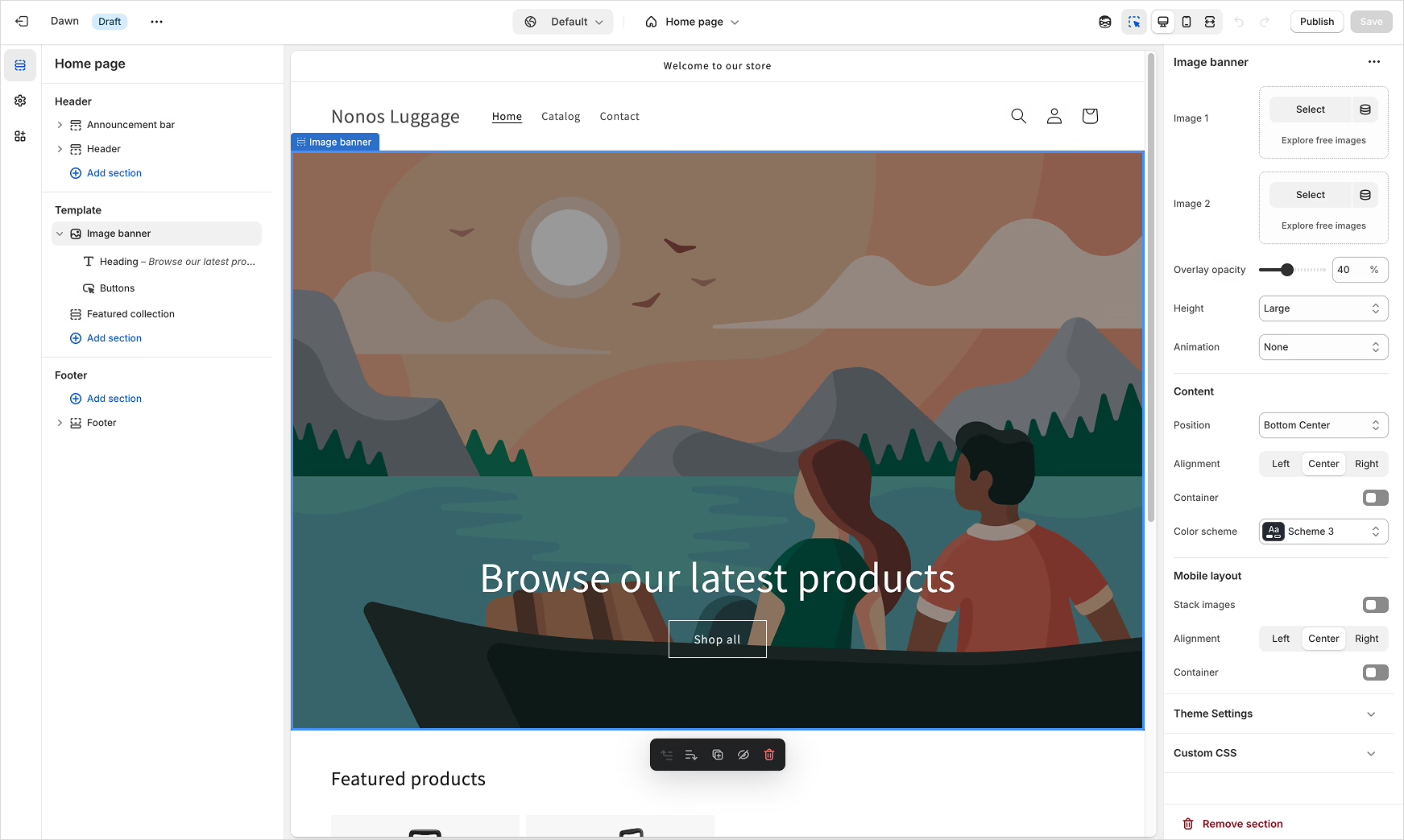
We have put together this guide for the merchant or operator who has moved beyond the easy wins of the theme editor and is looking to make customization choices with a view to the next year. We address what is worth changing and what should be left well alone, where custom code is a better value than another subscription, and how the 2025-26 shifts in the platform factor in.
Customization Is an Architecture Decision, Not a Design Task
To hear Shopify tell it, theming is a matter of drag-and-drop. Only half of that is accurate. While the visual editor is capable, any decision of substance is limited by the architecture of the theme you are working with.
You will find your ceiling is set by three things:
- Theme generation. If you are running a legacy “vintage” theme from before Online Store 2.0, you are without JSON templates and sections-everywhere support. Your content and merchandising teams will need a developer to move anything around. A migration is wiser than further hacking.
- On-store vs off-store. You can find excellent themes outside the Shopify Theme Store, but they are unvetted. Many lack proper JSON template coverage and will not survive an update from Shopify. The convenience is not worth the risk.
- Purpose fit. The “mega theme” that claims to suit every industry tends to suit none. A theme made for apparel or subscriptions has defaults that work with the way those catalogs are merched.
The sensible default for 2026 is a theme on the new theme-blocks architecture. Shopify’s Horizon family from the Summer ’25 Edition is the best example: modular blocks that are reusable and can be edited with natural-language prompts in Sidekick.
In aggregate, custom themes are still a niche. Census-type data from BuiltWith has them at 1.5% of top stores, a modest rise from 2020. Yet the figure jumps with revenue. According to StoreInspect, a Shopify Plus store is 2.33 times more likely to switch to a custom theme than a non-Plus operation, and the over $1M clubs rely on custom development heavily. Then there is Trademark, the most popular at 23%, while Dawn is the free standard with Horizon as the logical step up.
The takeaway is not that one must go custom. It is that as complexity increases, custom work is more defensible, and a premature build is an expensive error for a growing store to make.
Recognizing When Customization Is Actually Worth It
Ask yourself if the store is making it hard to sell.
When you first launch, a good on-store theme will suffice for the speed and support it offers. But friction sets in. You want product pages that vary by category, or collection pages with some storytelling. Marketing does not want landing pages that look like they came from the demo. Operations wants to make changes without putting in a ticket.
Light customization has its place here, but do not mistake it for the threshold where a full custom build is called for. The latter is justified when your merchandising is atypical – say, with bundles or mixed product types – or when the cost of monthly apps is starting to match what it would take to build a native feature once and be done with it. Or when you cannot untangle the app soup throttling your mobile performance.
We saw this in our five years with the Broya Living Shopify storefront. We began with some conversion tuning on the product side, but it evolved into a cart experience built for subscriptions and a content model for education. The standard flow was simply not suited to how a bone broth business converts. Every change we made was to remove friction, not for looks. For a sense of how these decisions impact the budget, see our Shopify website cost breakdown.
Set Performance Budgets Before You Touch Anything
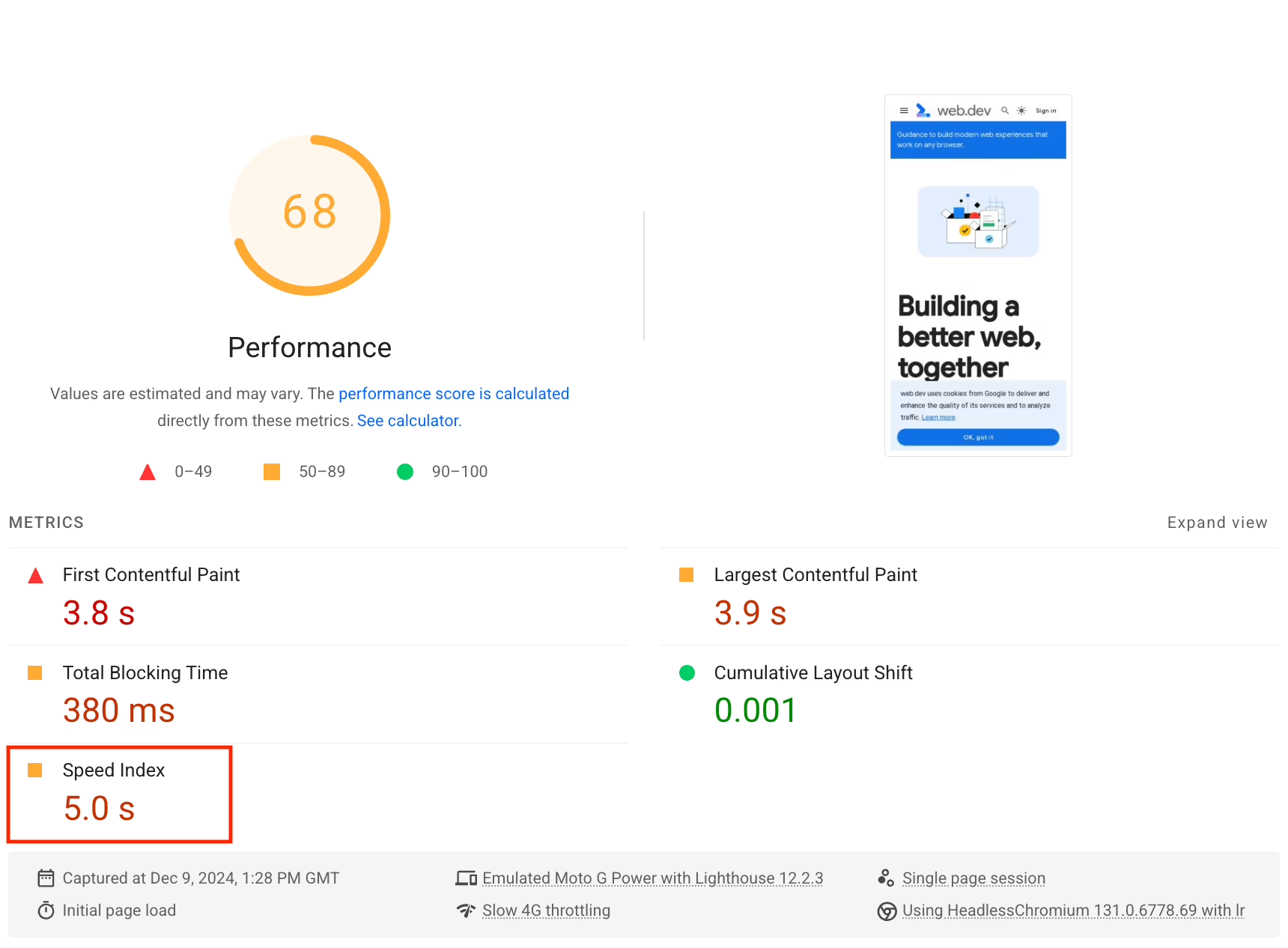
Performance is an item in the budget now, not an afterthought. The practitioner guides for the Summer ’25 Edition are quite firm on the figures:
- Keep the JavaScript bundle to 16 KB or under.
- HTML and CSS come first; JS is for progressive enhancement only. No jQuery or frameworks.
- Defer all scripts and use IIFEs.
- Two preloads per template is the limit.
- Use
image_tagfor responsive images and lazy-load what is below the fold.
These are hard limits because your Core Web Vitals are on a knife edge. Put a review widget, a carousel and a couple of tracking pixels on top of a hero video and each may seem fine on its own. In combination they will run through your JS budget, hold up the Largest Contentful Paint and undo months of hard won conversion gains. The data from the web is unambiguous. You will see a 32% jump in bounce rate when a page load stretches from one to three seconds, yet a mere 0.1-second gain in speed can put another 8% on your conversion numbers. Mobile is even more unforgiving. Do not rely on desktop DevTools to emulate it; that only flatters the store. Put in the time for real-device testing.
Before any customization work begins, have the budget in writing. From there, consider every proposal be it an app, a widget or some animation as a draw against it.
Apps Are Architecture, Not Add-ons
We do not see bad taste as the problem in our Shopify audits. It is what we call “app soup”. A store will have one app for tabs, another for bundles, a third for reviews and so on, with a fifth putting in a cart drawer. All of it is unreviewed code and CSS/JS being added to the storefront. Take one away and you are left with orphan code the theme still wants to render.
Put it this way: an app is not a feature. It is unvetted code and a DOM contract your theme could end up hard-coded to. Change the markup or let Shopify update the platform and the contract is broken.
There are two rules for keeping this in check.
For one, put app blocks in antifragile regions. The block should be in a part of the layout where turning off the app does not leave a gaping hole in your PDP. If it does, the theme has become dependent on the app in ways you did not plan for.
Then audit and consolidate. The Dermalogica team on Horizon made good use of this, replacing redundant apps with native theme features and picking up a 9% lift in conversion to boot, while putting over $35k a year back in their pocket on subscriptions. You will find that approach in most of the successful Shopify redesigns of the last couple of years.
An app is no badge of honor, nor is custom code. Make the call that leaves the storefront lighter and something your team can maintain without breaking it. For a sense of how to price out outside help on that tradeoff, our buyer’s guide to Shopify store development services is worth a read.
Metafields and Templates: The Real Customization Layer
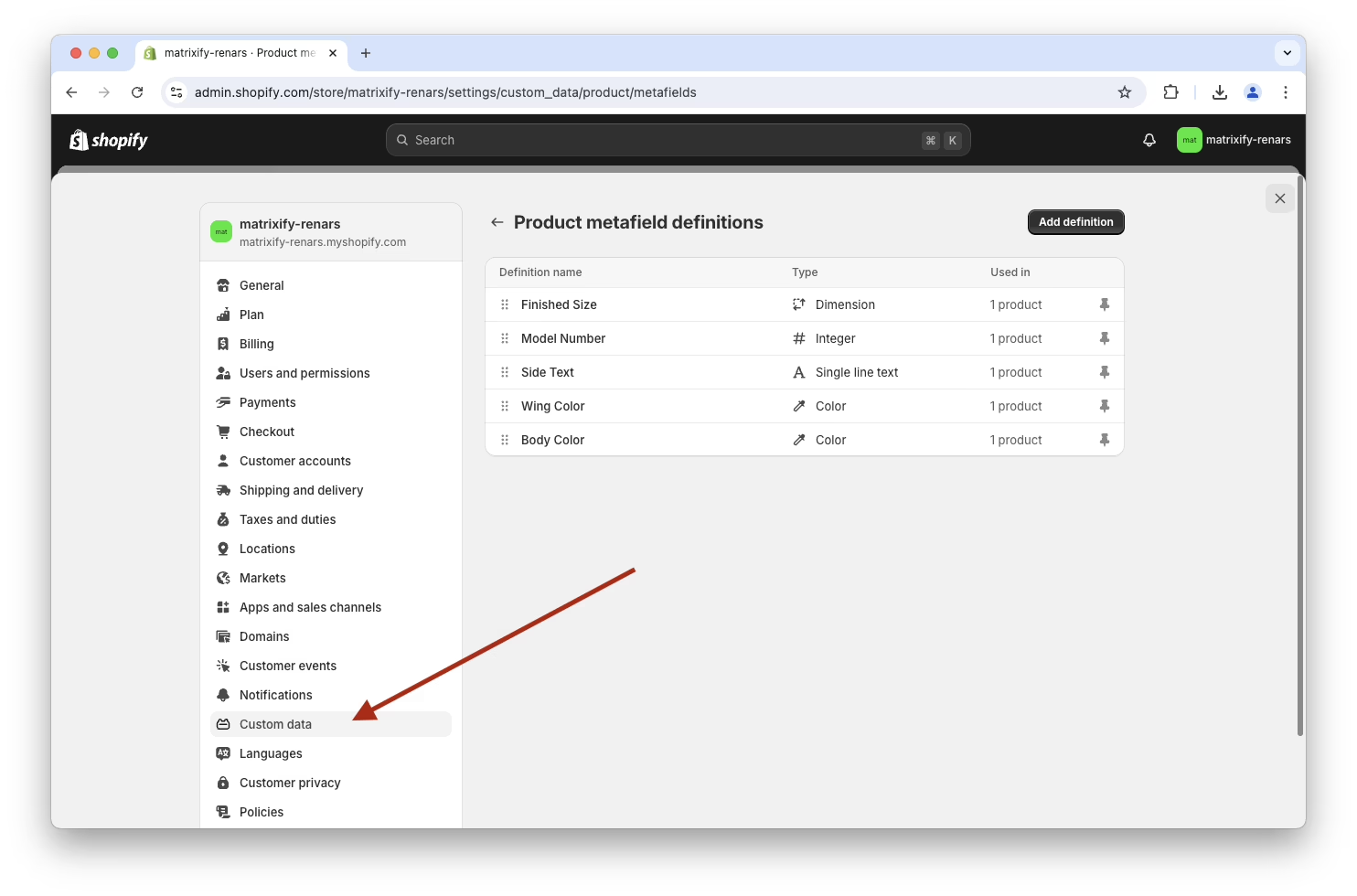
When visual controls are no longer sufficient, metafields are the neatest way to get more out of Shopify. They allow for disciplined logic in your theme templates to surface structured content like spec sheets, ingredients or shipping ETAs on products and pages. In their absence, merchants tend to patch things in a messier fashion: duplicating descriptions, pasting copy into a section for a single product, or using an app to manage information the theme could show on its own.
A pattern that holds up is to define the metafield in the admin with a naming convention that will make sense to new hires, then assign values via a CSV import or bulk workflow. Reference it in the template with Liquid conditionals so the block only shows if there is content to show. Build one PDP layout and let the product dictate the variation.
Respect the constraints of Liquid. There are no arbitrary external queries here; all data must come from Shopify objects or metafields. Keep the logic deterministic and put anything stateful in JavaScript. If you are fighting those limits, the feature probably has no business in the theme.
Plan for two other quiet ways to fail. Template rearrangement is a sure way to break the @type: Product JSON-LD that gives you rich results. Isolate the schema in its own snippet and it will weather a redesign. And do not leave accessibility to QA. Keyboard nav, focus order, 44px touch targets and aria-live for dynamic elements need to be part of the section from the start.
Wondering how your store shows up in AI search? We put together a short visibility snapshot. Get the snapshot.
A Workflow That Does Not Break the Live Store
In the old days of Shopify customization, the workflow was to duplicate the theme, edit the copy and swap it in when ready. It had its merits but meant the live version would drift and every merge was a risk.
Shopify is moving away from that with Rollouts, coming in June 2026. Teams will be able to schedule updates, run A/B tests and edit drafts on the live theme directly. Until then (and beyond) the discipline remains:
- Work in a dev store. A Partner account keeps your experiments from hitting customer traffic.
- Make use of the CLI. Scaffold from Dawn or Skeleton with
shopify theme initand preview locally. - Version-control it. Have your feature branches and changelog. The theme editor is not a history book.
- Let CI handle Theme Check and Lighthouse. Better the automated linter finds a regression than the merchant does.
- Change one thing at a time. When a metric moves you should know why.
Sidekick, the AI assistant, is now up to the task for some real work – reshaping layouts from a text prompt or drafting some Liquid. It is handy for the final 20% of a design tweak, but it cannot replace the judgment of whether the change belongs in the theme to begin with.
The Audit-First Pattern That Successful Customizations Share
There is a common thread in the case studies that are invariably put forward: Faherty with its 28% revenue increase, Dermalogica’s 9% conversion and $35K in app savings, Aje’s 135% post-migration conversion or Nuun’s 34% figure on a checkout 25% faster. In every instance they have one thing in common. They put an audit in place before making any changes.
It is a repeatable pattern, to be sure:
- Establish a baseline. Before you go near a file, record your Core Web Vitals, mobile behavior and conversion rates by template. Make note of every installed app, custom section, snippet and CSS override.
- Set numeric goals. “Put up add-to-cart by 10% on our top 20 products.” “Trim PDP LCP 30%.” “Save $2,000 a month on apps.” You will get a vague project if your goals are not specific.
- Replace, do not add. When a new feature is on the table, first determine if an old app or section can be done away with.
- Measure over a set period. Use the same metrics from your baseline and look at the numbers 30, 60 or 90 days after launch.
- Put it in writing. Do not let the knowledge reside in a single developer.
One might be rightly skeptical of the figures agencies like to report for their case studies. But the pattern holds true across enough independent brands to be trusted: define your targets, audit first, stick to native features where possible and protect performance.
The opposite is also true. An aesthetics-driven project with no baseline and a custom code ratio that has crept over 40% of the theme is a failed customization. At that point most audits will say a clean rebuild is the more economical option than further patching. Should your store be heading in that direction, we have the mechanics for a move that does not break SEO or subscriptions in our Shopify migration services playbook.
When to Bring in a Developer or Agency
Not all work needs to be outsourced. If the team is familiar with the setup, reordering sections or wiring up metafields on a sound theme is perfectly manageable in-house. But the point of handoff comes sooner than many merchants would think.
If AI has written code that cannot be accounted for, or three apps are vying for the same region, or certain pages are being left alone because any change seems too risky, you are no longer in the realm of simple customization. It becomes systems work. At that juncture it is less expensive to put a developer on it than to fund another round of apps and patches.
Outside help is warranted when:
- You are touching Liquid, JavaScript or app blocks on core buying flows.
- How you run campaigns or merchandise is tied to custom templates.
- There is overlap between multiple apps on tracking, cart or search.
- The in-house team has lost faith in its ability to make changes without breaking something.
A good partner will know when an app is called for and when it is not. He will delete the code that has no business being there and keep business requirements separate from implementation. Take Fiore Designs in Los Angeles, for example. Their issue was that Shopify’s standard checkout could not handle the zip-code zones and same-day cutoffs the way they did business. We did not install another app; we rebuilt the logic to suit how orders were actually fulfilled. See how we approached Fiore Designs for an illustration.
That sort of judgment is what a Shopify development partner should be bringing to the table with you.
What to Do Next
For all the marketing copy to the contrary, Shopify theme customization in 2026 is as much an engineering discipline as a design task. The important decisions are architectural: the workflow, the performance budget, the choice of theme and how you measure. Neglect them and the store will drift toward the kind of scenario that necessitates a costly rebuild in two years’ time.
Most merchants would do well to start with a three-bucket audit to see what belongs in the theme editor, what in the code and what should be left outside the theme entirely. Once those are sorted, the rest of the work follows. For those who prefer to have that conversation with a team that has been inside every shape of Shopify store for years, our Shopify development guide for operators is a fair place to begin.
Building or replatforming a store? Let’s talk. Free 30-minute call, no pitch.

Masoud Golchin is a backend developer at Refact, working on server-side systems, internal tooling, and infrastructure. He builds and maintains the services that support both client projects and the team’s day-to-day development workflow. His work includes backend logic, developer tools, system reliability, and the technical foundations that allow products to scale and operate consistently. At Refact, Masoud focuses on creating practical engineering solutions that help the team move faster while keeping systems organized, maintainable, and dependable.
More from Masoud Golchin

