Client Onboarding Portal: A Practical Guide
You have the contract in ink as of Tuesday.


We put this guide together for operators and owners who are figuring out how to handle the first fortnight of a new engagement. We cover what a portal should deliver, the features that make a difference, the build versus buy question and how to steer clear of a redesign that does more harm than good.
Why the First 72 Hours Decide More Than the Next 90 Days
Before a client has seen any tangible output, they are making up their mind about your team during onboarding. The numbers back that up. According to the OnboardMap 2026 benchmark report, firms that wrap up the process in a week or less see retention above 92% at the 90 day mark. Let it drag on for 14 to 21 days and you are looking at 70–80%. In all, between a third and half of your churn will come from those first 90 days.
Agency owners will put it in plainer language. One who has put through 85 clients or more says he has lost nearly every one of them in the opening week, before anything was built. Not because of a bad delivery but because the client felt adrift and let the team go.
A portal can close that window of uncertainty. Or it can be a source of friction with its extra logins and opaque comment threads. There is a divide: top firms will have the invite out within an hour of a signature while others wait a few days, and that alone affects completion, as our complete onboarding playbook shows.
Think of onboarding as a trust issue in admin clothing. If the client has to wonder twice what is happening next, the portal has already failed to inspire confidence.
What a Client Onboarding Portal Actually Is
In a client onboarding portal, the new client will do the intake, sign off on agreements and track the path to go-live. Do not view it as a UI; consider it a small state machine. A file being uploaded is not the same as it being accepted, yet conflating the two is why projects hit the skids in week two. Every item put in front of you should have a state: submitted, reviewed, escalated or rejected.
The way you frame that dictates what you put in place. A checklist app tells you if a box was ticked. A proper portal tells you if you are ready for the next gate, be it legal review or provisioning. And where a human call is needed, the workflow ought to block rather than let things pass by silently.
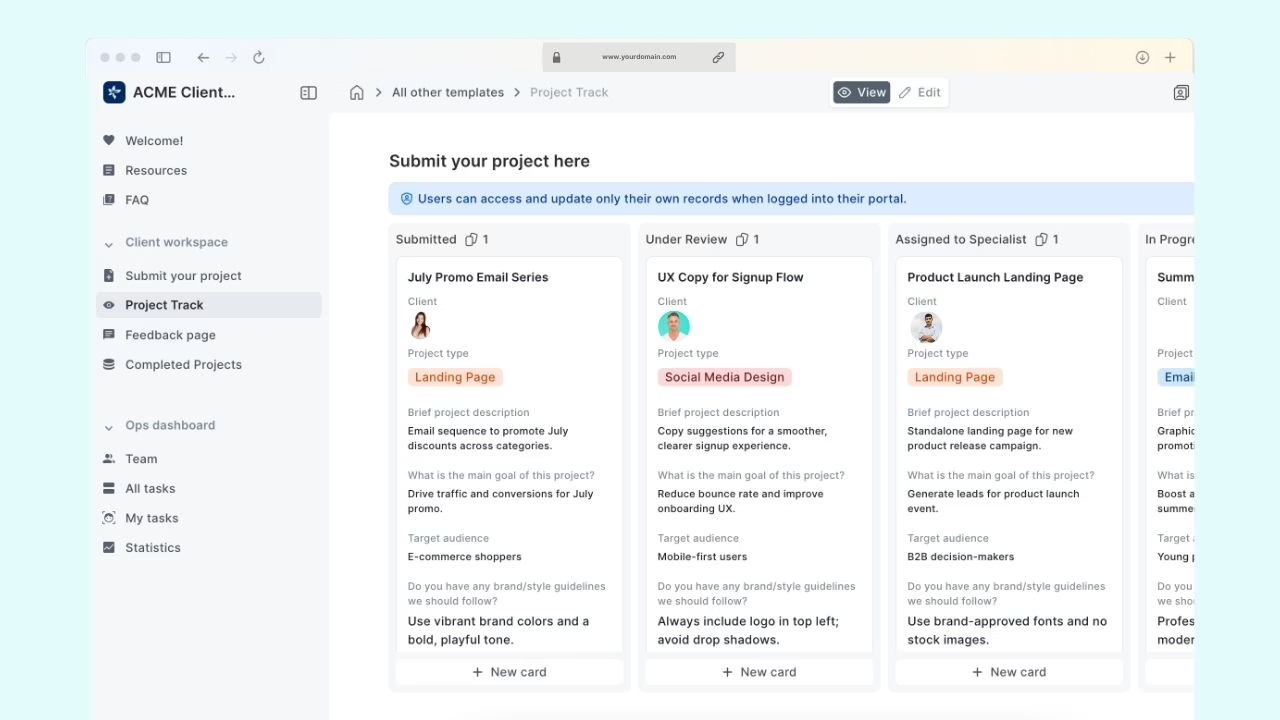
There are four non-negotiables. The portal must gather documents without clogging the inbox, present task status uniformly to both parties, enforce role-based access and leave an audit trail for sensitive moves. For a more in-depth look at scope and the traps that can quietly sink a project, we have a custom client portal build guide.
The Features That Actually Move Numbers
Ignore the noise in most vendor demos. There are only five things that tell you whether a client will stick with a portal or drop it.
Document intake with real state, not just uploads
Secure upload is expected. What counts is the aftermath. If putting a file in the portal auto-completes a task without a second look, you have created some form of checklist theater. Lexidy, a law firm, saw a 64% drop in client emails and freed up 25% more of their lawyers’ time after moving to a purpose-built solution where status was no longer an inbox game.
Progress visibility on both sides
Clients want to know the one thing they need to do next, not be presented with 14 items. Your internal staff needs to see where a client is bogged down and for how long. “First-login confusion” is the bane of SaaS and client portals, as anyone on the service-agency forums or Reddit will tell you. A clear next step is worth more than a pretty dashboard.
Automated reminders and SLA tracking
You are not there to hound them on paperwork. You are there to do away with the manager who puts in an hour a day on “just checking in” type correspondence. An SLA counter on the staff end prevents handoffs from becoming a bottleneck and reminders should be triggered by state, not the clock.
Role-based access and an audit log
Then there are the people beyond the original signer: the accountant, the legal contact, the one holding the brand assets. They each require a view scoped to them. The audit log is not so much for everyday use as it is for when something goes awry and you have to put a name and time to an action.
Integrations that write to one source of truth
And if it is not in sync with your CRM, billing and project tool, someone is going to retype something and make an error. We saw one agency trim onboarding from five hours to five minutes by making Airtable, Slack, Typeform and Asana part of a single source of truth with the portal doing the heavy lifting. When the portal is the authority and the rest of the stack reads from it, the email leakage dries up. There is no avoiding email leakage when status is one of five places to be found. We have covered the process design for this in document workflow automation done right.
Self-Serve, Hybrid, or Human-Led
Then there is the matter of onboarding and who is really in charge of it. That is a question most teams put off until the end, but it should be the first one answered.
Self-serve fits low-complexity SaaS and simple services
For an activation that is as simple as connecting an account and putting through three setup screens, a self-serve portal is the way to go. But the bar for design is high. The customer self-service portal pattern is only worth it if the user can get to a meaningful outcome in minutes, not after being put through a product tour.
Hybrid fits most professional services
You will need a combination of approaches with agencies, consultancies or any SaaS where implementation is heavy. Let the portal do the legwork on document collection, scheduling and status. A human should be the one to own the kickoff, handle scope changes and make the calls that require judgment. Our advice is to have human support available within the flow; do not make your clients leave the portal to get help.
Regulated work needs human paths built in
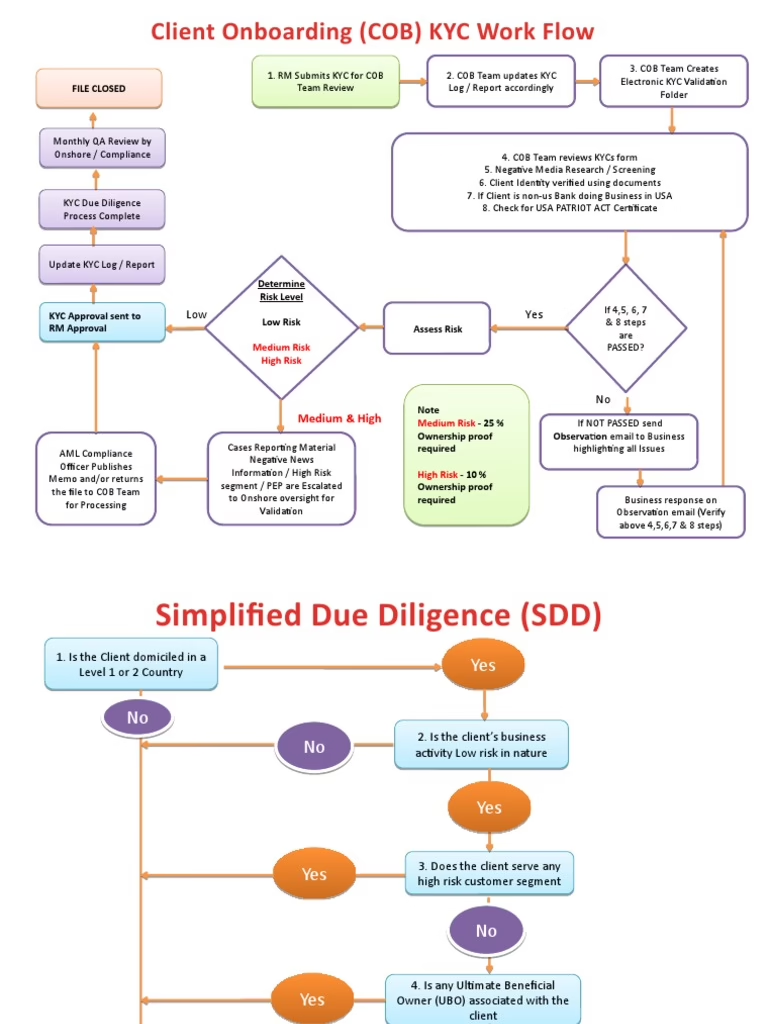
Take the case of corporate banking. McKinsey research has it that KYC and opening an account can consume over 40 per cent of onboarding time at some institutions. Deutsche Bank’s dbWelcome platform has been able to trim the more than 40 hours once spent on per-account investigations. Standard Chartered went about reducing KYC exceptions by making compliance checks part of the workflow rather than an afterthought. It is a lesson for any regulated industry: compliance is a gate, not something for the back office. Automation has its place at the edges, but human review must be in the state model from the start, not bolted on once the client has submitted.
Build, Buy, or Start Somewhere in the Middle
The build or buy debate is best had from the perspective of what constitutes your product, not the architecture.
Buy when the workflow is standard
Most tools are made for intake, e-sign, tasks and reminders. If your onboarding is of that shape, you can have a configured SaaS portal up and running in a couple of weeks and make changes easily. You give up some control over branding and logic for the sake of speed.
Build when the workflow is the differentiator
A custom portal that integrates with your CRM and billing stack is another story; expect two to four months of work. This is justified when you have data generic tools cannot model or approval steps that are anything but standard. See our B2B customer portal guide for where the line is drawn for those needing deep integration.
The middle path most people skip
Our recommendation is to begin with a SaaS portal and see how clients use it. Replace it only when the workflow has proven itself stable. There is nothing like committing to a custom build before the operations team has settled on a process, only to have to rebuild it six months down the line. When the workflow is the product, we have a portals and dashboard development practice for that, typically commencing with a product design engagement to nail down the state model before writing code.
Security and Compliance to Insist On
Security becomes non-negotiable once the portal is used for financial data, IDs or contracts. Two-factor for the client, multi-factor for staff, encryption in transit and at rest, session timeouts and immutable audit logging. And explicit rules on retention and deletion.
Email attachments are acceptable for a birthday invite, but not for a signed contract or KYC file. Put these five questions to a vendor and if the answers are not clean, move on:
- Is two-factor authentication the default for clients?
- Do you require MFA of your internal staff?
- Is the data encrypted in transit and at rest?
- Can you trace every action in the portal to a timestamp and user?
- What is the protocol for files and access when an engagement closes?
That final point is where most vendors are caught. An onboarding plan without an offboarding one results in orphaned accounts and permissions that are too broad, which is an incident in the making.
The Redesign Trap
FinFlow, a fintech, learned the hard way that not all change is for the better. They reworked their onboarding and saw completion fall from 78% to 61% as users were put off by new ID verification and broken context. It is a matter of measurement. Put in the discipline to track drop-off, processing time and email volume. If the numbers go backward because of an aesthetic improvement, put it back the way it was.
Two Patterns We See Repeatedly
Consider a consulting firm with contracts in Dropbox and kickoff scheduling spread across three threads of email. They do not need a fancy portal. A branded workspace with a progress bar and secure upload will do. The win is a kickoff meeting that actually takes place and fewer emails in week one asking where to send things.
A membership organization is built on the same core but in a different form. Members want a private area to check on renewals or find out who to talk to. The design tradeoffs are different when you have thousands of low-touch relationships to manage versus a few dozen, so the nonprofit member portal patterns are well worth a look.
How to Move Forward Without Overbuilding
Still on the fence? Put the current onboarding on a whiteboard. Identify what a portal can take on and what requires a human or causes delay. That map is your requirements document.
There are three matters to put in order before one even considers the tools: the state model for what each item will be subjected to, the data model to determine where things must reside, and the integration points so the portal knows which systems to write to. We have observed that a stalled portal project is invariably one that has overlooked one of these and made amends for it down the line.
Should you find yourself at an impasse part way through a build, do not assume the design is at fault. More often than not the problem is a lack of clear ownership or an incomplete CRM sync. Those are what need to be addressed prior to any new features.
What sets apart the portals that are still going strong two years on is that some took the time to think the workflow over in earnest before opening up a design tool. Our portal development work is geared toward doing just that, nailing down the state, permissions and the like from the outset. It is this early legwork that will determine if the portal continues to justify its existence well after the launch has been announced.
Building a product and unsure what to scope first? Let’s talk. Free 30-minute call, no pitch.

Parnia Sebti is a project and account manager at Refact, coordinating teams, clients, timelines, and delivery across the studio’s work. She helps keep projects organized from planning through execution, making sure communication stays clear and priorities stay aligned. Her role connects client needs with the internal team’s workflow, helping turn requirements, feedback, and moving parts into structured delivery. At Refact, Parnia also contributes to shaping the internal tools and processes the team uses to manage projects more effectively and keep work moving with clarity.
More from Parnia Sebti
