Custom CRM Software: When Building Pays Off
Building custom CRM software has never looked easier.


It usually isn’t. The first working version of a CRM was never the expensive part. The expensive parts are getting people to agree on the process, keeping the data trustworthy, making integrations survive bad days, getting access control right, and owning all of it for years. This article is for operators and business owners deciding whether to build or buy. It covers when custom CRM software earns its cost, what it takes to own one, and the technical traps that most build guides leave out.
“Custom CRM” Can Mean Three Very Different Projects
People use the phrase for at least three kinds of work, and the evidence behind each one is different.
- A bespoke build. A new application with its own database, interface, and integrations, written by a team or, more and more often, with help from AI coding agents.
- A heavily configured commercial platform. Salesforce, HubSpot, or Dynamics 365 with custom objects, custom workflows, and integrations built around your process.
- An open-source or low-code foundation. Twenty, Django CRM, Airtable, or Bubble, shaped around your records without starting from a blank repository.
This matters because most published success stories come from the second category. Lexmark reports that Dynamics 365 plus a CPQ tool cut quote revisions by 43%. IBM says its Customer 360 work made Service Cloud resolution 26% faster. Both figures come from the vendor side, and both describe configured platforms, not software written from scratch. The from-scratch stories mostly come from Reddit and X, where nobody checks the numbers. IBM’s own State of Salesforce report advises starting from standard processes and customizing selectively, and it warns that heavy customization creates technical debt.
So when someone makes a claim about “custom CRM,” ask which kind they mean. A result from a tuned Salesforce instance tells you very little about a bespoke build, and the reverse is also true.
First, Check Whether Your Workflow Is Different or Just Undefined
The warning signs build up slowly. Someone starts a private spreadsheet because the standard fields don’t cover an important qualification step. A sales manager keeps the real pipeline in Slack because CRM reports are always out of date. Someone connects email, billing, and support with a few automations, and one of them breaks often enough that nobody trusts the results anymore.
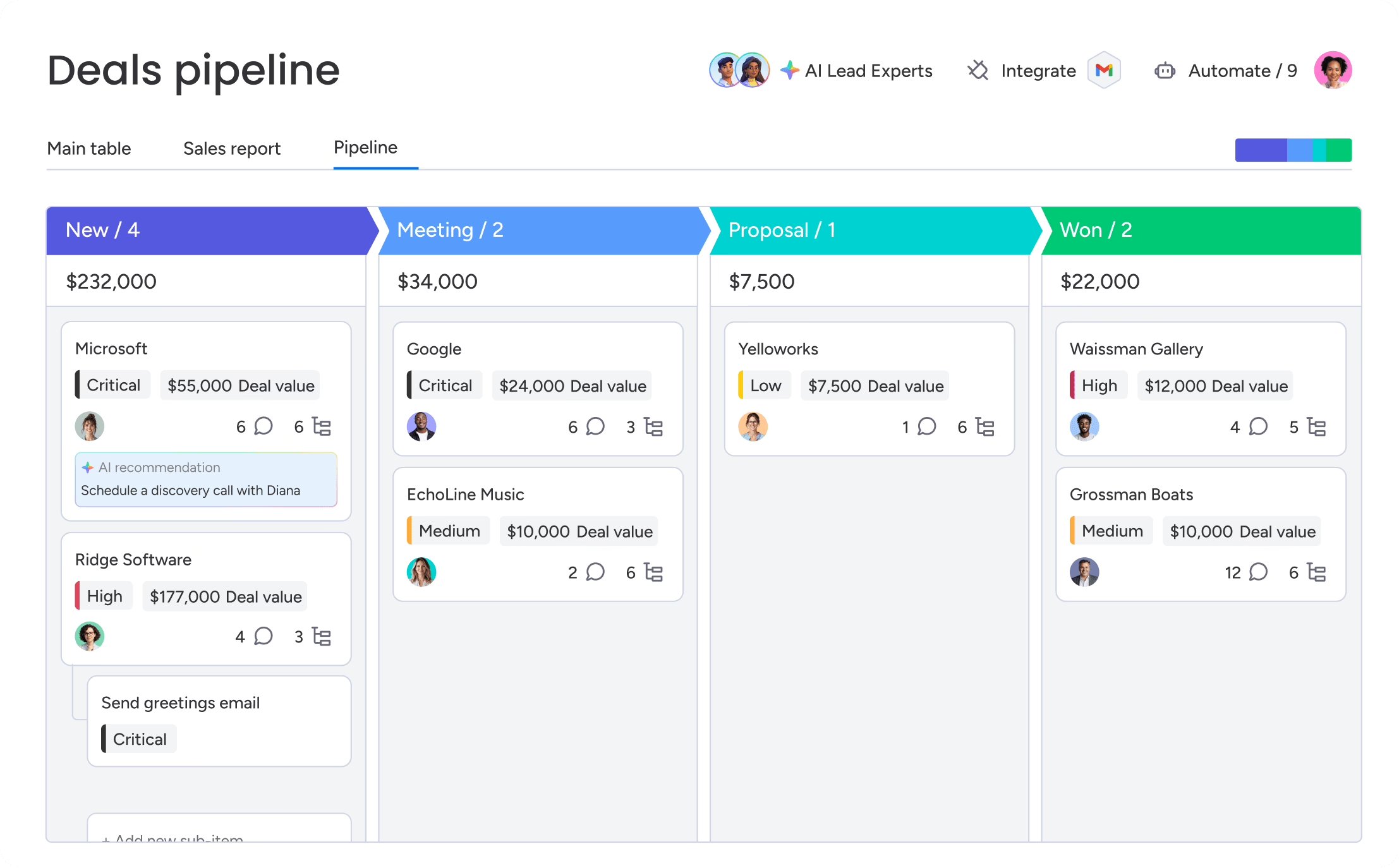
Sometimes that really is a software problem. Most packaged CRMs assume a familiar path: a lead becomes an opportunity, the opportunity moves through standard stages, and the deal closes. That model breaks down when you sell through referrals, approvals, memberships, projects, renewals, or several connected buying groups. A media company may need to link an advertiser, an agency, a campaign, an insertion order, and a delivery schedule. A property business may need to link a prospect, a building, a unit, a viewing, an application, and a lease. These differences go deeper than the screens. They change the data structure, permissions, reporting, and handoffs.
Sometimes, though, the process was never settled, and a new CRM would just give the confusion a fresh interface. Across practitioner threads and the one strong public audit on this topic, the failure that comes up most is using the build to discover the process. Teams pick a tool before they have agreed on workflows, exceptions, ownership, and approvals. One practitioner described what follows as a green status report sitting next to the real spreadsheet.
Try the cheap fixes before you commission anything. Delete fields nobody uses. Rewrite the stages. Replace the brittle integration. Write down who owns each record type. If the workflow still doesn’t fit after that, you have a real case, and a short round of what product discovery involves will turn it into requirements a builder can price. When you do launch, set a date after which the old spreadsheets become read-only. If you skip that step, the spreadsheets win.
When Building Custom CRM Software Makes Sense
We found no study that compares bespoke CRMs with configured platforms head to head. Anyone who tells you custom is generally more successful, or generally a mistake, is going past the evidence. What the evidence does support is a set of conditions. Custom CRM software is a reasonable bet when all three of these are true:
- Existing products handle a specific, costly workflow badly, and configuring them hasn’t fixed it.
- The requirements are clear and written down, ideally because the process already runs on another tool.
- Someone in your organization can own the system for as long as it exists.
The builds that practitioners say work well are narrow. Examples include a mobile field form, a portal for subcontractors, a lead follow-up tool, and a tool that answers support staff’s recurring questions. In one self-published case, a developer scoped an internal tool around the questions support staff actually asked and deliberately avoided building a general admin panel. The reported result was 50% less developer time spent on support queries and 30% higher support throughput. Those numbers haven’t been independently checked, but the method is sound: watch the real work, measure a baseline, and build only for that. Many of these tools turn out to be portals more than CRMs, which is why custom web portal development is often the better framing.
Timing matters too. A common view among practitioners is that off-the-shelf tools suit the “0 to 1” stage and custom becomes a scaling move later. One builder who serves service businesses put a rough threshold on it: around $100,000 a year in revenue, fulfillment already handled by hired staff, and core processes documented in HubSpot, GoHighLevel, or something similar. That’s one person’s rule of thumb, but its logic holds. You can’t encode a process you haven’t run yet. Large-scale custom builds also tend to follow a failed commercial rollout. Superleap’s team built its own CRM for about 3,000 users after an eight-month Salesforce migration failed in 2021.
| Option | Best fit | What you give up | Who carries maintenance |
|---|---|---|---|
| Off-the-shelf CRM | Standard sales and service processes, when speed matters most | Fit. Teams build workarounds when the model doesn’t match | The vendor, included in the subscription |
| Configured platform | Mostly standard, with one or two unusual workflows | Some flexibility. Platform limits shape your design | Shared. The vendor maintains the core, you maintain your customizations |
| Open-source or low-code base | Specific needs on a tighter budget, with some in-house skill | Polish and support. You depend on the project’s health | Mostly you |
| Bespoke build | A workflow that is part of your product or service advantage | Speed and vendor support. Every decision becomes yours | Entirely you, indefinitely |
What AI Coding Tools Changed, and What They Didn’t
AI coding tools have made the first version cheap. One freelancer on X described replacing a stack that cost about $100 a month with a CRM built in a day. Another widely shared thread claimed a “vibe-coded” CRM wiped out a $600,000 annual Salesforce bill, though people in the replies questioned that figure. For a solo operator or a very small team with one clear workflow, these tools really do change the math.
What they don’t change is the rest of the list. A practitioner in one Reddit thread summed it up: getting to 90% is manageable, and the last 10% is where the real work is. That last 10% includes permissions that differ between sales, finance, and operations. In one case the rules even changed by day of the week. It includes edge cases, security, and a steady stream of updates as the business changes. People have reported AI agents deleting production data in systems of record. At least one person publicly regretted promising their boss an AI-built CRM.
A CRM for your own business is also very different from a CRM sold as a product. One builder got a limited Salesforce replacement working in six months and then spent years on multi-tenancy and subscriptions. Builders who tried to sell their CRMs found that distribution, not code, held them back. One free product reached 50 sign-ups and about 20 active users. There’s also plain builder bias. One Reddit builder admitted he couldn’t tell whether his tool was good in general or just felt right because he had built it. Test it with people who didn’t write it.
What Custom CRM Software Costs to Own, Not Just to Build
There is no reliable benchmark for what a custom CRM costs. The public numbers are scattered anecdotes: $15,000 to $20,000 for the viral AI-built example, a $12,000 contract for a CRM that crashed above five concurrent users, and a Reddit account of a “five-year, $200,000 drain” with a third-party developer. The only well-documented figure is a failure. The ACT Public Trustee and Guardian in Australia spent at least A$1.46 million over about six years on a CRM program that never finished.
That spread tells you scope drives cost far more than technology does. It also tells you the build quote is the wrong number to focus on. Plan for whole-of-life cost. One common planning rule is to set aside 15% to 20% of the initial build cost each year for bug fixes, security updates, version upgrades, and new integrations, as this custom CRM maintenance overview suggests. Treat that as a starting estimate. The figure goes up if the system includes AI features or connects to many other systems.
These are the things that usually push a budget up:
- Direct integrations with billing, ERP, support, or marketing automation, each with its own limits and failure modes.
- Role-based permissions across departments, especially when rules depend on record ownership or context.
- Data migration from a platform full of duplicates and years of inconsistent entry.
- Mobile parity for field or sales staff who don’t work at a desk.
- AI features, which bring decisions about data access, review steps, and audit trails.
There’s also a counterpoint to “we pay for features we don’t use.” With a subscription, you also pay for things you do use without noticing: vendor security patches, uptime, support, and a roadmap someone else funds. When you build your own, all of that becomes your line item. For a wider look at how software budgets are put together, see this breakdown of web application development costs.
The Technical Constraints Most Build Plans Skip
Generic build guides describe screens and CRUD operations: create, read, update, delete. That’s the easy part. The official documentation from HubSpot, Salesforce, and PostgreSQL describes constraints that decide whether a custom CRM holds up once real data starts flowing.
Model relationships, not rows
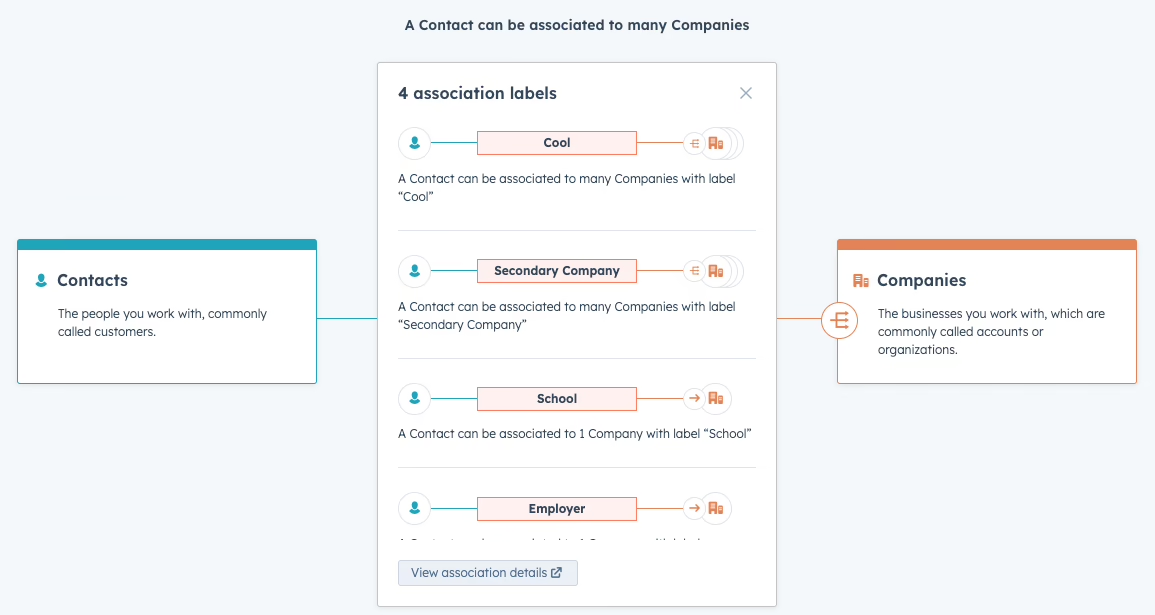
A customer record is a network of relationships. One contact can belong to several companies, sit on two deals, and hold different roles in each. HubSpot’s documentation reflects this. Custom objects need explicit schemas, relationships between record types need explicit association definitions, and those associations have documented limits. If your data model assumes one contact per company, every report and automation built on top of it inherits that mistake.
Keep the core objects small: contacts, companies, and deals, plus whatever your business truly adds, such as properties, campaigns, or memberships. Some practitioners go further and recommend logging every interaction as an event first and deriving fields and dashboards from that log later. The reasoning is that people never go back and fill in history. That’s practitioner advice, not a standard, but it becomes more persuasive once AI agents start acting on records. What an agent did, under which instructions, and with what authority only exists at that moment unless you record it.
Treat webhooks as unreliable
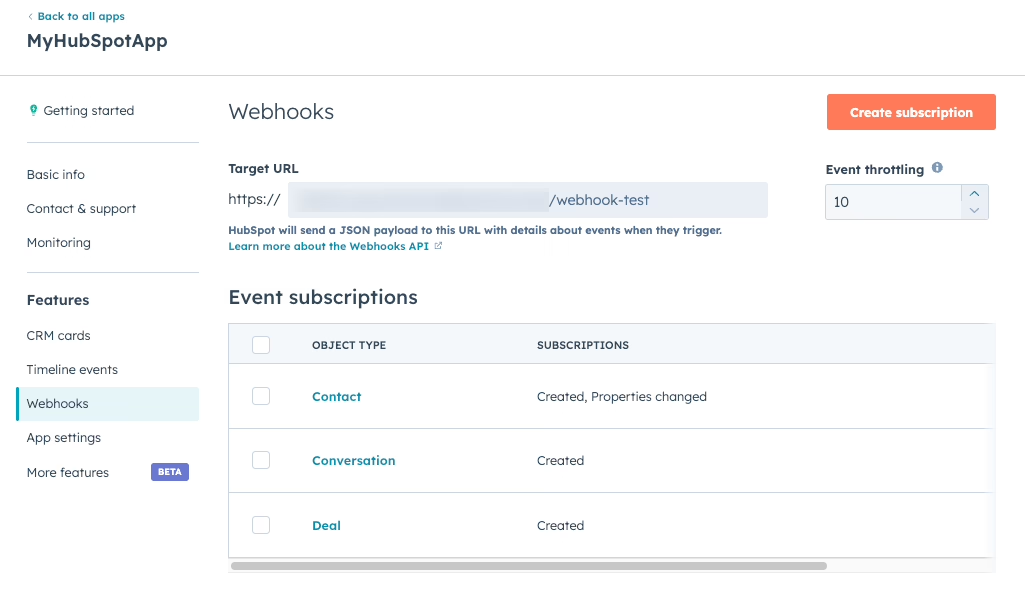
Most integration plans assume that when a record changes in one system, the other system hears about it. The documentation says otherwise. HubSpot limits webhook delivery to 10 requests in flight at once, with up to 100 events per request, and retries a failed notification up to 10 times over 24 hours. After that, the event is gone. Salesforce’s Pub/Sub API keeps events for 72 hours and notes that rare storage failures can make some events impossible to recover. HubSpot’s CRM Search API returns at most 200 results per page, allows 5 requests per second, and stops at 10,000 results per query, so a large backfill needs batching and cursor handling.
In practice, this means your integrations need:
- Idempotent handlers, so an event delivered twice doesn’t create two records or charge twice.
- Replay and event-state tracking, so you can re-read missed events while they are still retained.
- A scheduled reconciliation job that compares your data with the source and catches whatever real-time sync missed.
- Strict schema validation before any processing, with explicit error routing instead of automatic retries.
That last item comes from a painful anecdote on X. A malformed webhook payload got through an LLM parsing step, failed schema checks further along, and set off retry loops. The loops burned the month’s token budget, froze a client dashboard, and cost the agency a $12,000-a-month retainer. The lesson is to check inputs at the edge and never assume connected apps send clean data. The same discipline applies to enrichment. If you automate lead enrichment in CRM, the matching logic needs to update existing contacts without creating duplicates, and it should re-check records on a schedule so they don’t quietly go stale.
Test access control like someone trying to break it
Many custom CRMs run on PostgreSQL and use row-level security (RLS) to keep teams or clients from seeing each other’s data. The PostgreSQL documentation lists the sharp edges. If you enable RLS with no policy, every query is denied. Superusers and roles with BYPASSRLS skip policies entirely. Table owners normally skip them too. Referential-integrity checks also bypass RLS, which can leak information through side channels. “We enabled RLS” doesn’t prove your tenants are isolated.
Test isolation with the same database roles your application actually uses. Cover reads, writes, background maintenance jobs, uniqueness conflicts, and foreign-key behavior. Give privileged jobs only the access they need. Treat access control as core scope from day one, the way one 2024 build included role-based access, Microsoft two-factor authentication, and Active Directory sync in its first release. If your stack runs on Postgres, this is where experienced PostgreSQL development work pays for itself.
Data Trust Decides Whether Anyone Uses the System
New code doesn’t fix bad data. In Validity’s survey of more than 600 CRM administrators, 24% said less than half of their CRM data was accurate and complete. 31% said poor data costs them at least 20% of annual revenue. Validity sells data-quality tools, so read those figures with that in mind, but the direction matches what practitioners describe. If people stop trusting the CRM, they go back to spreadsheets, and the system slowly dies.
Before migrating anything, decide which system is authoritative for each important object. Your CRM doesn’t have to be the source of truth for everything, but every record type needs exactly one. Then decide what happens when two systems change the same field. The Australian audit found that the failed program’s CRM never became authoritative, so the legacy systems stayed in use alongside it indefinitely.
A migration sequence that protects the launch:
- Audit and clean the source data. Map old fields to the new schema, set deduplication rules, and flag records for manual review.
- Run a test migration on a representative subset that includes the messy records, not a clean sample that avoids them.
- Check record counts, relationships, ownership, permissions, and automations against the source.
- Cut over during a quiet period, keep the old records and migration logs, and monitor sync health afterward.
Migration is also when you decide what to leave behind. When we rebuilt Teton Gravity Research’s platform, the team first asked for a redesign. Before quoting it, we worked through what the platform actually needed to do. That led them to retire user-generated content features that had become a legal and moderation burden, before we moved 10,000 articles out of a failing legacy CMS. The same thinking applies to CRM fields, pipelines, and automations that nobody has touched in a year. You can read more about the Teton Gravity Research rebuild. If your current CRM needs a controlled move, CRM migration services and broader data migration services cover the planning and validation that launch checklists usually miss.
Why CRM Projects Fail Even When the Software Works
The best-documented CRM failure available is a governance failure, not a technical one. ACT Auditor-General Report No. 6 of 2024 examined the ACT Public Trustee and Guardian’s CRM program. It ran from 2017 to 2023 against an original target of May 2018 and cost at least A$1.46 million. By June 2023, 4 of 9 planned modules were live, and only 13 of 67.8 full-time-equivalent staff used them in any way. The auditors found undocumented roles, no reliable budget or timeline, no whole-of-life costing, sporadic risk management, weak user testing, progress reports that overstated development, scope that kept shifting, and no post-implementation review.
None of those problems is about code, and the surveys point the same way. In Freshworks’ 2024 survey, 25% of respondents named training and adoption as a major challenge. SugarCRM’s 2024 survey of more than 800 B2B leaders put integration at 41% and technology adoption at 34%. Both are vendor surveys, and neither is specific to custom builds. Still, together with the audit, they make a consistent case that adoption, data, and governance decide outcomes more than the software does.
One claim to be careful with: the often-repeated line that 70% of CRM projects fail isn’t supported by comparable data. What’s well supported is less dramatic and more useful. Adoption is ongoing work. Involve users in design and testing, train people by role, set up a feedback loop after launch, and check whether real work is actually being recorded in the system.
How to Scope, Contract, and Hand Off a Custom CRM Build
Most of the failure patterns above can be prevented at the scoping and contract stage. That’s also where they’re cheapest to fix.
Write acceptance criteria you can measure. In one account on X, a CRM contracted as “fully functional” worked fine until more than five people used it at once, then crashed. The buyer’s lawyer pointed out that “fully functional” isn’t a defined standard. Specify concurrent users, response times, sync behavior, and permission tests. Your contract model matters too, and it’s worth understanding fixed price versus time and materials before you sign.
Name an owner before launch. A migration consultant on Reddit described bespoke CRMs slowly declining until they were “no longer trustworthy.” Features break, governance concerns pile up, and the one person who understood the system leaves. Someone has to own the roadmap, fix bugs, and keep documentation current. If that person doesn’t exist, buy instead.
Use stage gates. Start with the one workflow that costs the most when it fails, prove that people adopt it, and expand only when you have evidence. Include real user acceptance testing and a post-implementation review. Those are the steps the audit found missing.
Start from existing foundations where you can. An open-source base like Twenty or Django CRM, or a configured platform, can remove months of reinventing basic pieces and the security mistakes that come with them.
When you talk to builders, their questions will tell you more than their demos. A good partner asks about record relationships, ownership rules, exceptions, adoption, and who will run the system after launch. A partner who opens with a feature menu will probably build a bigger version of the confusion you already have. Ask each one to explain their migration plan, their support model after launch, and what they would leave out. This guide to choosing a software development company covers the rest of that vetting, and our article on the custom CRM development process goes further into build phases.
Custom CRM software pays off when it encodes a process your team already runs well, for a workflow no product handles, with someone ready to own it for years. Without those three conditions, a well-configured platform will usually serve you better. If you aren’t sure which side of that line you’re on, settle it before you pay for any code. That early decision is what Refact’s product design and discovery work is built for, and it’s backed by a money-back guarantee.
Building a product and unsure what to scope first? Let’s talk. Free 30-minute call, no pitch.

Saeedreza Abbaspour is the CEO of Refact, where he works across product, engineering, and sales. He sets the studio’s direction while staying closely involved in the work itself, from shaping product strategy and UX architecture to helping define the technical systems behind Refact’s projects. His role connects business thinking with hands-on product execution, giving him a practical view of how software should be planned, built, launched, and improved. At Refact, Saeedreza focuses on building a studio that can move quickly, solve real client problems, and turn ideas into reliable digital products.
More from Saeedreza Abbaspour
