Shopify Data Migration: A 2026 Playbook
You will not see most Shopify migrations go wrong on the day of launch.


It is a pattern we see in nearly every serious source. We put 2.4 million live stores under a microscope and found that while only 2.2% of merchants made the switch in the first half of 2024, those who had the hardest time of it were the ones who thought of it as an export-and-import job. It is not. A data migration to Shopify is a systems change program. The risk is in the business logic, the integrations, the redirects and app data, and in the reconciliation. This is for the mid-market brands and operators who want to plan a move without finding out the true cost once they are live.
Why This Is a Systems Project, Not an Import Task
On the surface you have your products, orders and customers. But that is not what puts a store in jeopardy. What breaks you is all the things Shopify will not import: the discount and shipping rules, ERP write rules, the state of your subscriptions and loyalty, analytics, SEO and the app-level data that is sitting in a vendor’s database rather than your admin.
You can measure effort by the depth of your data model, not by the number of rows. Our numbers from ERP-adjacent work show a flat system will eat up 40 to 70 hours of your time. Do the math on a deep system with versioned bills of material, multi-warehouse inventory and user-defined fields and you are looking at 250 to 400. Tack on an integration and you add 60 hours; get to six or more and the conflict costs of multiple systems writing to the same fields are non-linear, pushing you toward 600 additive hours. Throw in 30% for dedup and reconciliation.
If there is one thing to take from this, it is that the CSV is the cheap part. Figuring out what should be moved, who has ownership of a field after cutover and how you are going to prove the job is done takes far more of your time than the transfer.
The 2026 pressure that changes the calculus
There are two platform events right now that put a premium on timing. Take Shopify Scripts, the old Ruby environment for your payment and shipping customizations. You have a hard stop: editing and publishing are off the table after April 15, 2026, with a forced 30-day window in May before it is end-of-life in June. If you are using Scripts for B2B pricing or cart discounts you are not just moving data, you are porting logic over to Shopify Functions which, with its typed inputs and outputs, is nothing like the Ruby you are leaving behind.
As for apps, the GraphQL deadlines are in the rear view mirror (February 1 for public, April 1 for custom). The silver lining for 2026 is that bulk queries are about four times faster, so an export that would have taken 40 minutes is done in 10. Good for ETL speed, but it won’t solve the harder problems.
Decide Scope Before You Open a Single CSV
The common error in any botched migration is to let the technical team discover the scope. That is a mistake. Scope is a business call and it dictates your timeline, your costs and your stability post-launch.
Make a list of what is moving and what is not. Most stores are sitting on five or ten years of debt – test orders, retired product lines, duplicate records, content no one has opened since it was put up. Putting all of that in Shopify doesn’t preserve value, it just moves the mess. A good way to think about it is to keep, clean or archive:
- Keep the high-traffic content and the live products, customers and orders your team is on top of every week.
- Clean up the inconsistencies: the broken image refs, the tags with three different spellings, the SKUs and variant names that don’t match.
- Archive the rest in a read-only system for the support team to search if they have to.
Then there is the matter of historical orders. Some will migrate the whole lot for the sake of continuity with returning customers and their analytics. Others will make do with 12 to 24 months and put the rest in external storage. There is no rule book on the percentage. Just make sure finance and support are in agreement on where to find anything older than your cutoff.
Inventory the programmable surfaces, not just the data
Don’t close the scope until you have accounted for every bit of custom logic. It is the checklist people forget:
- Any Shopify Scripts for discounts or payments that have to be reworked as Functions
- Workflows in Shopify Flow
- Private or custom apps with a line to your WMS, CRM or ERP
- Metafields and metaobjects running your product pages
- Theme work with structured data or SEO baked in
- Third-party apps that hold the reins on reviews, referrals, loyalty and subscriptions
Each of these is a mini-migration in itself. Your loyalty points and subscription schedules are in the vendor’s database, not in Shopify. Some will give you a path to move them, some won’t. You need to decide what to carry and what to reset and tell your customers about it. That is part of the scope.
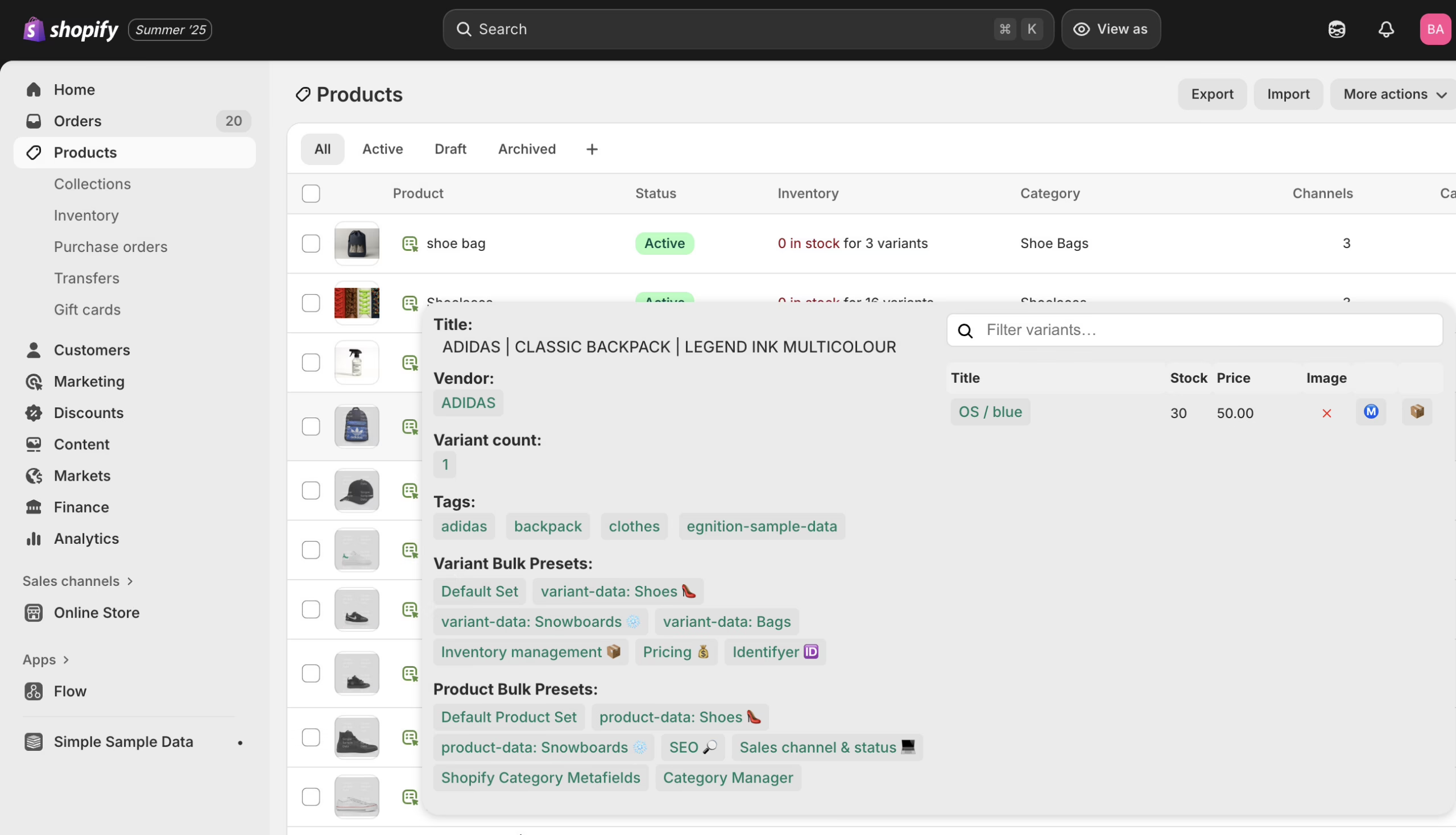
Products, Customers, and Orders: What Actually Transfers
For the most part the Shopify data model is narrower than what you are coming from. The documentation will tell you what migrates well. It won’t tell you what is going to break.
Products and variants
Sure, after the 2024 changes Shopify allows for 2,048 variants and three options per product. Seems plenty until you try to bring over a legacy catalog full of bundles and configurable kits. A bundle is an awkward fit, usually ending up as a separate SKU or a line item property. For your reporting and inventory logic, neither option is neutral. You will find the real risk in product data that is inconsistent yet right there in plain sight. “Blue / Large”, “Blue-L” and “Large Blue” will all be funneled into the same variant at some point, leaving you to make a call on which spelling gets to stand. From there it ripples out to your filtering, reporting, search and any app pulling variant metadata. The answer is to standardize option names prior to import, not in the aftermath.
Then there are the metafields which need their own attention. Teams have a way of remembering the size charts and ingredient lists but overlooking the warranty terms, compatibility notes, subscription flags or the custom content blocks that make for a high-converting page. None of that shows up in a default export. If you let it slip, your new store will go live with product pages that are quieter and less specific than what you had before.
Customers
Your customers’ names, tags, emails and phone numbers will move over, but not their passwords. There is no Shopify workaround for that; password hashes from elsewhere are simply not compatible. Every customer is going to need an account activation invite or a reset once you launch. Treat it as a communication job as well as a technical one and have the reset email drafted before cutover, don’t leave it to the morning of.
Don’t underestimate list hygiene. Old and bad addresses will cause your reset emails to bounce and put a spike in support volume, and you will be left debugging a deliverability issue of your own making for the first week. It is quicker to clean the list before you go live. We have an overview of what proper verification will catch in this guide to email verification.
Orders
Historical orders can be imported but they may not come through as native records. Some tools will give you archived orders that won’t behave like new ones when it comes to reordering or refunds. You want to know what you are getting before you migrate three years of data and are surprised by it during a return.
And the sequence of the import is important: Products, then Customers, then Orders. An order references the other two, so if you do it out of order you will have orphaned records that look fine in the admin but are misbehaving in your reports.
The SEO Work That Decides Whether Traffic Survives
The most obvious way a Shopify migration can fail is with SEO. Not because the platform is poor for it – Core Web Vitals tend to be better here – but because URL structures seldom line up with your source platform. A lazy approach to redirect mapping will show up in Search Console a fortnight later as a slow bleed.
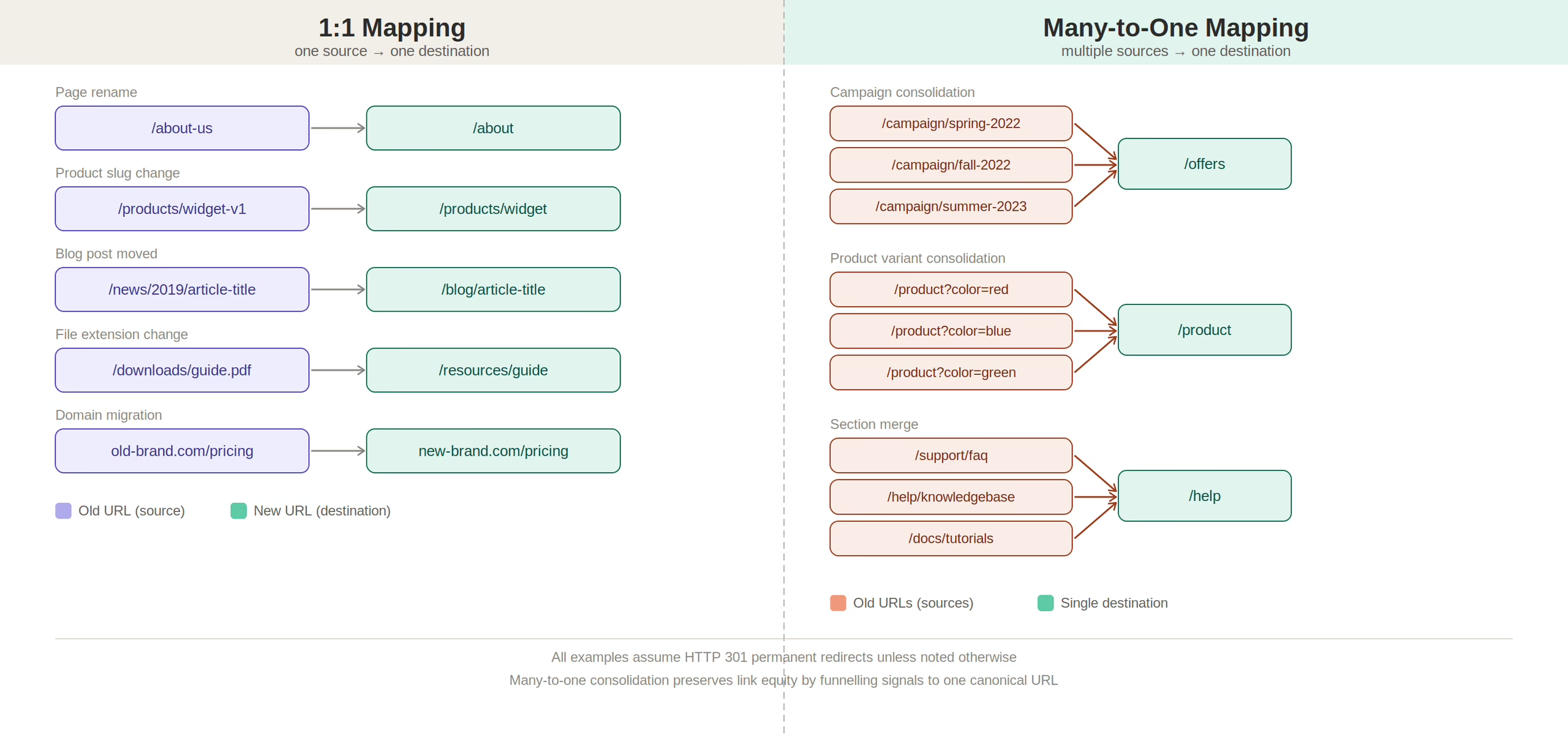
Start your redirect workstream with a complete URL inventory of the legacy site, not just what the CMS says is active. Crawl it, check analytics and backlink data and put together 301s for:
- Product pages with a history of conversion or rankings
- Collection and category pages where you see high-intent search
- Content like buying guides and FAQs that help close the sale
- Any old URLs in your paid campaigns or email flows
Where the redirect goes is key. Sending a retired product to the homepage is a 301 in name only; it is a dead end. A discontinued item should be pointed to its parent collection or a replacement. With AI search on the rise, the quality of your redirects is more important than ever. This guide to 301 redirects for 2026 has the details.
There are also two things people tend to skip: eliminate redirect chains so the old URL resolves in one hop, and make sure the destination page has its structured data and metadata intact. You can have a flawless redirect but if the meta description is gone you have still lost rankings. That is why the SEO workstream should run in parallel with development, not be shoehorned around it. See our guide on how to redesign a website without losing SEO for more.
“Imported successfully” is what most articles will tell you, but it is not the finish line. Reconciled is.
With API imports you are going to hit rate limits and partial failures. Unless your scripts are idempotent – meaning they can be run twice with the same outcome – you will be creating duplicate orders and customers that finance will spot on the first month-end report. It is unglamorous infrastructure but it staves off costly silent errors.
So you need proof. Before you call it done, verify:
- Record counts across the board for products, variants, orders and customers
- GMV for the last year or so, target against source
- Stock by SKU, spot-check the WMS
- Tax figures by jurisdiction
- Your top 50 high-value customers, end-to-end
If the admin looks clean but the numbers are off, something is amiss. Make your reconciliation queries automated and re-runnable. On a recent migration for the Keck School of Medicine we found the hard part was not moving ten years of newsroom articles but proving every article and backlink still resolved under load. Commerce data is no different.
Wondering how your store shows up in AI search? We put together a short visibility snapshot. Get the snapshot.
Idempotency, Reconciliation, and What “Done” Actually Means
As for timelines, they are fairly consistent but complexity is the deciding factor:
- 2 to 8 weeks for small and mid stores
- 3 to 5 months in the mid-market
- 6 to 12 months for enterprise and Shopify Plus
- If you are moving from Drupal to Shopify with 5,000+ SKUs, plan on 8 to 16 weeks on average
Timelines, Costs, and What the Numbers Actually Mean
You will find in Shopify’s own enterprise research that a migration is 36% quicker than with a custom platform, 74% more apt to be done on schedule and 56% cheaper. But these are directional figures put out by Shopify for marketing purposes; they have not been independently verified so don’t take them as a benchmark. If you look at what the practitioner data says, it is the logic complexity and number of integrations that set your timeline, not the size of your catalog.
Then there is cost, which is harder to quantify. Public sources will tell you the relative differences but are reticent on actual dollar amounts. Yotpo has a good breakdown: DIY CSV work is free in terms of software, an app will run you $50 to $500, while an agency will charge over $50,000 for a complex store. The numbers check out, but they don’t account for the real expense: the integration and cleanup the source data demands of you.
As for where things are headed, the signs are plain. A recent crawl of seven platforms found 31,946 stores making the move to Shopify in a given period versus 10,271 leaving. Shopify Plus alone has put on 34% year over year to about 47,000 enterprise accounts. What the stats won’t show you is how many of those were smooth and how many are still being put right six months down the line.
Phased Cutovers Beat Big-Bang Every Time
The research flags big-bang cutovers as the riskiest approach. The wiser, more economical choice is to phase it in so it can stand up in production:
- Do a bulk migration of your stable data in a sandbox first, then validate during a lull in traffic
- Use incremental syncs for orders, inventory and customers between the bulk load and cutover
- A delta migration just before you flip the DNS to pick up anything from the freeze window
- Put a freeze on the legacy platform a few hours ahead of time to keep source and target in step
- Have a rollback plan that has been tested, not one you are typing into Slack when support is in a panic
For a complicated store you might go blue-green or canary: send 10 per cent of your traffic to the new site and let it run for 48 hours before you ramp up. Multi-brand and enterprise types will often phase by region. And no one in their right mind migrates in Q4 if they can help it.
The Ground-Level CSV Pain That Wastes Days
If you read the community threads on Reddit about Shopify CSV imports you will come across two recurring headaches. Both are preventable.
Encoding is the first. Shopify wants UTF-8 but Excel and Numbers have a habit of defaulting to ANSI on save, which leads to “Illegal quoting” and rejected files. Open a plain text editor and save it as UTF-8, or script the encoding once and be done with it.
Then you have headers. Put a trailing space in “Variant Inventory Qty ” and the file is no good. Be exact with Shopify’s sample export. If you are going to be running this more than once, put together a normalization script for day one. Most practitioners in the know will use Mixtable or Airtable for a spreadsheet-first workflow rather than hand-editing a 30MB CSV that Excel is constantly trying to autocorrect.
When an Agency Actually Earns Its Fee
Do it yourself if your catalog is small and the team has been there before. An app is fine for a straightforward store with a supported connector. But when you have revenue-critical logic or an SEO-heavy catalog where a poor redirect map is a costly mistake, you let the agency have its fee.
Catalog size is rarely the indicator that you need a specialist. It is the mix of Scripts-to-Functions rewrites, live ERP or WMS integrations and subscription data. Take Broya Living’s five-year build on Shopify for instance; the work was as much about protecting the conversion rate as it was about launching.
Not sure which way to go? Our Shopify migration services playbook goes into the scoping in some detail, and we have an operational checklist for what to get through before cutover. For a WordPress move, our guide covers the plugin-to-app translation.
What to Do Before You Sign Off on a Migration Plan
There is a divide between the teams that make it and the ones that don’t. The latter tend to underplay the business rules and end up paying for it months later in the form of silent app misbehaviour or quiet SEO drift. The former put in the time on the audit, the planning and the reconciliation.
Before you start developing, decide on three things. What is moving and what is being archived. Who is in charge of each field once the ERP and Shopify have their say. And what “done” means in hard numbers, not just a green tick on a screen.
If you are unsure what in your current stack should be rewritten and what should be left behind, our development practice and data migration service are there to settle that early on.
Building or replatforming a store? Let’s talk. Free 30-minute call, no pitch.

Masoud Golchin is a backend developer at Refact, working on server-side systems, internal tooling, and infrastructure. He builds and maintains the services that support both client projects and the team’s day-to-day development workflow. His work includes backend logic, developer tools, system reliability, and the technical foundations that allow products to scale and operate consistently. At Refact, Masoud focuses on creating practical engineering solutions that help the team move faster while keeping systems organized, maintainable, and dependable.
More from Masoud Golchin

