Shopify Store Setup: A Practical Guide
You will find the median Shopify store has a 1.4% conversion rate.


We have written this guide for the operator who has put in the order and chosen a theme but has an inkling the store is not quite ready. Consider it the judgment layer: where to focus, what to let go of, and the places new stores tend to bleed revenue before they have spent an ad dollar. We are not here to rehash the mechanics; Shopify’s setup tutorial and 20-step launch checklist do that well enough.
Setup Is a Business-Design Project, Not a Design Project
There is a type of founder who will open an account Saturday, be seduced by a theme Sunday, put up some photos Monday and only give payments a thought when a friend hits Buy. By then, one has already made wrong guesses on currency or tax jurisdictions in Settings > General, and every downstream calculation is built on those errors.
The scale of the operation is no small matter. A Shopify snapshot puts active stores somewhere between 4.6 and 5 million, serving hundreds of millions of shoppers. During BFCM 2024 the system took 284 million requests a minute at peak without blinking. The infrastructure is sound; it is the store-level configuration that gives way.
Think of your setup as five distinct systems:
- Foundation: staff access, taxes, business identity and currency.
- Catalog: 3 to 5 SKUs with honest photography and clean variants.
- Checkout stack: the block of trust signals, shipping, tax and payments.
- Retention plumbing: subscriptions, reviews, email flows.
- Measurement: get your analytics in place before you remove the password.
Individually they are not difficult. The mistake is to handle them in sequence and put off the unglamorous work.
The Foundation Most Founders Get Wrong in the First Hour
Start in Settings > General. Verify the time zone, billing address, default currency and weight units. Should you be selling in kilograms from a warehouse set up in pounds, your shipping quotes will be off by a margin the customer will see at checkout.
Enforce a least-access rule for staff and put two-factor authentication in place. Let two people have full admin rights to edit products and a Sunday afternoon can turn into a support ticket on Monday over some missing collections.
This is also the time to plan for the build if you have not done so. The base plan is $29 to $39, but the true cost is in inventory, apps and the six to twelve months it takes to get to consistent profit. Have a look at our Shopify website cost breakdown for some realistic numbers by store type.
> Rule of thumb: you should be able to name the currency, the tax jurisdictions and the person responsible for each setting before you even consider a theme.
Pick a Theme, Then Leave It Alone
Founders waste more time and less money on the theme than anything else. Dawn and Symmetry are sensible choices for a new store; they are light and mobile-first. Some 80% of Shopify stores make the grade on Core Web Vitals, but that number drops quickly once you add unvetted apps and custom code. According to Shopify’s CrUX data, an extra 100ms in load time is a 3.5% hit to conversion. A 2.5s LCP theme will underperform a 1.5s one by roughly 30%.
On Reddit the advice is plain: “grab a simple theme and don’t touch it until you’re making sales.” For the first 90 days, follow that instinct. Put in some real hero copy and product names to preview the layout. You will spot problems with a 42-character title in a block meant for 18 that a demo would hide.
Concentrate on the homepage hero, the cart, the footer and one featured collection. The rest can wait. If you are debating between three button colours, you have missed the point.

Should you need to go beyond the basics, we have a guide to Shopify theme customization that delineates safe edits from where custom code becomes a liability. As a general rule, keep custom code to under 40% of the theme or you will find small updates from Shopify breaking things at the worst possible time.
Structure the Catalog Around How People Shop
Do not launch with the full range you own. Stick to 3 to 5 SKUs you can put a good face on. A broad catalog on a new store usually results in weak product pages. Build your collections on intent, not warehouse logic; “For sensitive skin” will outperform “SS26 Collection” every time.
Keep your variant structures simple. If you need a diagram to explain them, you will need one to maintain them. When we did a rebuild for Broya, the Canadian bone broth brand, the site had plenty of traffic. The issue was never the theme. There was a time when the product pages made no case for why bone broth was important, the collections left subscription-minded shoppers to their own devices and the checkout was not set up for a business predicated on recurring orders. The five-year Shopify build put an end to that by overhauling the merchandising layer to move the needle on conversion, rather than giving the homepage a facelift. It is a reordering of priorities most stores should make before they worry about new pixels.
Payments, Taxes, and Shipping Belong in One Sitting
Consider these three as one unit: a payment method in place, taxes only half-put together and shipping tables that are presentable. They can still come apart at the seams during checkout. The founder will have “settings complete” on his screen while the customer is confronted with a total at odds with what was on the product page.
Where possible, stick with Shopify Payments as the default. It is the key to Shop Pay, which is no small thing for mobile conversion. After that, limit the accepted methods to five at the most: PayPal, Apple and Google Pay, and perhaps a BNPL if your price points warrant it. Any more and you are adding cognitive load for little gain in revenue.
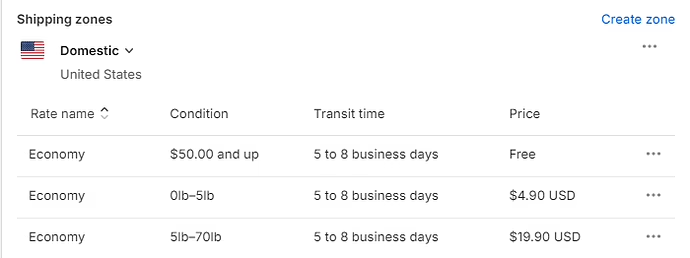
You will find the bulk of abandonments in shipping and tax visibility. Some 48% of them are due to costs the shopper did not see coming. No amount of clever copy will fix that; you need to show estimates on the cart, be clear about any free-shipping threshold your margins allow and have the tax logic work sensibly in every region. Shopify’s start-an-online-store guide has the mechanics down, but you have to decide which markets to turn on at launch and which to wait on until you have proven you can fulfill them.
A couple of rules to prevent a weekend firefight:
- If you cannot ship to a country and make a profit, do not enable it. There is no cost to turning it off and everything to be had in having to explain it.
- Before you take the password off, run a test order on an actual phone for each payment method. Emulators are not to be trusted.
Wondering how your store shows up in AI search? We put together a short visibility snapshot. Get the snapshot.
Build Retention Plumbing Before You Buy Traffic
New Shopify stores tend to under-invest in email, yet it is a critical system. For a mature DTC brand it is responsible for 25 to 35 per cent of revenue. In a 2026 review of 20 successful stores, not one had failed to build a list from day one. Pura Vida and Bombas will tell you that abandoned-cart flows alone put meaningful money in the bank. StoreInspect’s numbers for 897,000+ stores would suggest otherwise: 98.4% have no support app and 98.2% are without subscription tools.
A new store does not need much of a retention stack to get by:
- A welcome popup with a standard 10% off, triggered by delay and not on arrival.
- An abandoned-cart series at the one, 24 and 72 hour marks.
- A post-purchase flow to thank the buyer, outline delivery and solicit a review when the time is right.
- Something to win back the ones who bought once and vanished at 60 or 90 days.
Put this in place before putting money into ads. Without the infrastructure to retain them, paid acquisition is just a slow way to put customers on your competitors’ remarketing lists. Should Instagram or TikTok be the source of early traffic, a structured social plan is a good companion to the email work so visitors have cause to return.
Apps: Curate, Do Not Collect
Each app is a minor performance hit and an opening in your defences. Put in the essentials, measure and cull the rest. On day one the core stack is usually email marketing (Klaviyo or Shopify Email), reviews via Loox or the like, an upsell tool if the catalog allows and your analytics wired to GA4 and Search Console. Hold off on the all-in-one bundles. Check the page speed after you install anything. If an app puts 200 milliseconds on the Largest Contentful Paint of a product page, it had better be bringing in the revenue to justify it. Those in the Shopify know that conflicts are the late-stage problem, not a lack of apps.
The Pre-Launch Test That Catches What Design Hides
Design is only so good at concealing issues until a live transaction is attempted. The store may be polished on a laptop but fail on a phone or when the shipping math gets complicated with a heavy item. Make the final pass before removing the password exact and unexciting.
| Area | What to test | Why it matters |
|---|---|---|
| Payments | Real order on every method, on a real phone | Confirms money moves and confirmation emails arrive |
| Mobile | Checkout on three devices and two networks | Mobile is 75 to 78% of abandonment; layout and form errors surface here first |
| Shipping | Heavy items, multi-region carts, mixed weights | Rate logic breaks at edge cases before it breaks at averages |
| Refunds | Full and partial refund on a test order | The flow after money comes in is usually untested |
| Legal pages | Refund, Privacy, Terms, Shipping, Contact | Auto-generated templates rarely match real operations |
| Analytics | Product view, add-to-cart, checkout, purchase | Without these events, every post-launch decision is a guess |
Do not launch on a Friday afternoon. A weekday morning is preferable; if there is a break, you have a full day and the dev and support teams are around to put it right.
What Changes When the Store Is a Migration or a Rescue
Some setups are not a clean slate. Teams may be making the move from WooCommerce, Magento or Etsy, or they are rescuing a store that went live in a hurry and requires its foundations to be put right without losing the traffic. The work is as much data as design – moving products, orders, SEO equity and the like.
The redirect map is where most miss the mark. Let a launch quietly serve 404s on old blog category URLs and you will be down on organic traffic in a month or two. Our Shopify migration checklist details the kind of thing that breaks a store at cutover.
Then there are storefronts with a franchise story or a lot of content. With Kinfire Chronicles’ Shopify storefront, we found the catalog structure kept shoppers from moving from one product to the next even though each was a gateway to a larger world. We solved it with collection logic and navigation, a matter of setup not a redesign.
What To Read Once, Then Get On With It
You will find that the majority of errors in a Shopify store’s setup are a matter of sequence: putting the theme in place before the foundation, or apps before analytics, and ads before you have your email sorted. Put things in the right order and the store will not be its own worst enemy.
For the technical side of that process we have put together a guide to Shopify development for founders, while our piece on ecommerce UX best practices is where one can read up on the on-page choices needed to make a live store actually convert.
There is no need for more polish when a site is in that “almost live” but “not quite right” state. What is called for is a closer examination of the checkout and mobile experience, the retention flows and those settings most would rather not have to go back to. That is what our Shopify team does for operators; we help them build a store that puts its ad budget to work instead of just consuming it.
Building or replatforming a store? Let’s talk. Free 30-minute call, no pitch.

Saeedreza Abbaspour is the CEO of Refact, where he works across product, engineering, and sales. He sets the studio’s direction while staying closely involved in the work itself, from shaping product strategy and UX architecture to helping define the technical systems behind Refact’s projects. His role connects business thinking with hands-on product execution, giving him a practical view of how software should be planned, built, launched, and improved. At Refact, Saeedreza focuses on building a studio that can move quickly, solve real client problems, and turn ideas into reliable digital products.
More from Saeedreza Abbaspour

