Headless CMS Localization: What to Model
Most teams treat headless CMS localization as a checkbox.
 Masoud GolchinNovember 18, 2026

This matters because multilingual publishing is now ordinary. Storyblok’s 2024 State of CMS survey found 53% of respondents serve two or three languages and 31% serve four or more. This article is for the product, content and engineering leads making those decisions. It covers what to model, what to keep shared, and which checks catch the failures that feature lists leave out.
A Locale Setting Is Storage, Not a Localization System
A headless CMS stores content as structured fields and serves it through an API. Your website, app or portal asks for those fields and decides how to show them. That split is the reason teams choose headless in the first place. It’s also why localization ends up spread across four or five systems that each have their own idea of what “Spanish” means.
Picture the usual setup. The CMS holds an approved Spanish product description. A translation management system (TMS) is still waiting on two strings. The frontend’s routing only knows about /en/ and /de/. The CDN caches pages without taking locale into account. Analytics files Spanish visits under English. Every one of those systems works correctly by its own rules, and the customer in Madrid still gets an English checkout.
The audience you’re adding is large and spread out. W3Techs’ content language rankings put English at roughly half of websites whose content language is known, with Spanish and German around 6% each. That leaves a lot of readers who won’t buy from a page they can’t read comfortably. If you’re still deciding on architecture, our comparison of headless CMS vs traditional CMS covers what changes when content and presentation separate. If you’ve already picked headless and are choosing a platform, the Strapi and Contentful comparison is a useful starting point. Either way, the platform won’t make your market rules for you.
A quick vocabulary note, because these words get swapped all the time. Translation changes the words. Localization adapts the whole experience: dates, plurals, currency, URLs, legal copy and layout. Internationalization is the engineering groundwork that makes localization possible without rewriting components for every market.
Field-Level or Document-Level: Choose Per Content Type
The first modeling decision shapes everything after it. Field-level localization keeps one document with a value for each language on each translatable field, and every language publishes together. Document-level localization creates a separate document per language, linked together, and each one publishes on its own schedule.
Sanity’s documentation is clear that neither one is the right answer everywhere. Field-level suits content where most fields are shared and markets launch together. Document-level suits content where language versions differ in structure or need their own workflows. Contentful describes the same split at field and entry level, and adds patterns that separate locales by content type or by whole spaces.
The limits show up at scale. One practitioner on Reddit described field-level localization working well with two languages, then becoming cluttered at four (English, German, French and Polish). Editors faced a wall of tabs and published pages without finishing the Polish. Their advice was to move to document-level once locales need different slugs or different page sections.
Document-level has its own cost. Sanity’s document-internationalization plugin stores translation links in separate metadata documents, so 100 original documents in three extra languages become 500 documents: 400 language versions plus 100 metadata records. That affects quotas, query shape and migration effort. A localization plugin is a data-model decision, not a convenience add-on. Teams on Sanity CMS development projects should run that math before committing.
You don’t have to pick one model for the whole site. A product catalog where specs are shared and markets launch together can be field-level. Market-specific landing pages with different sections and campaigns can be document-level. Decide per content type, before you build or migrate, and estimate locale-based pricing at your expected locale count. Reddit threads from 2020 and 2023 describe extra Contentful locales costing more and DatoCMS getting expensive past two locales. Those aren’t current quotes, but they show the pressure is real.
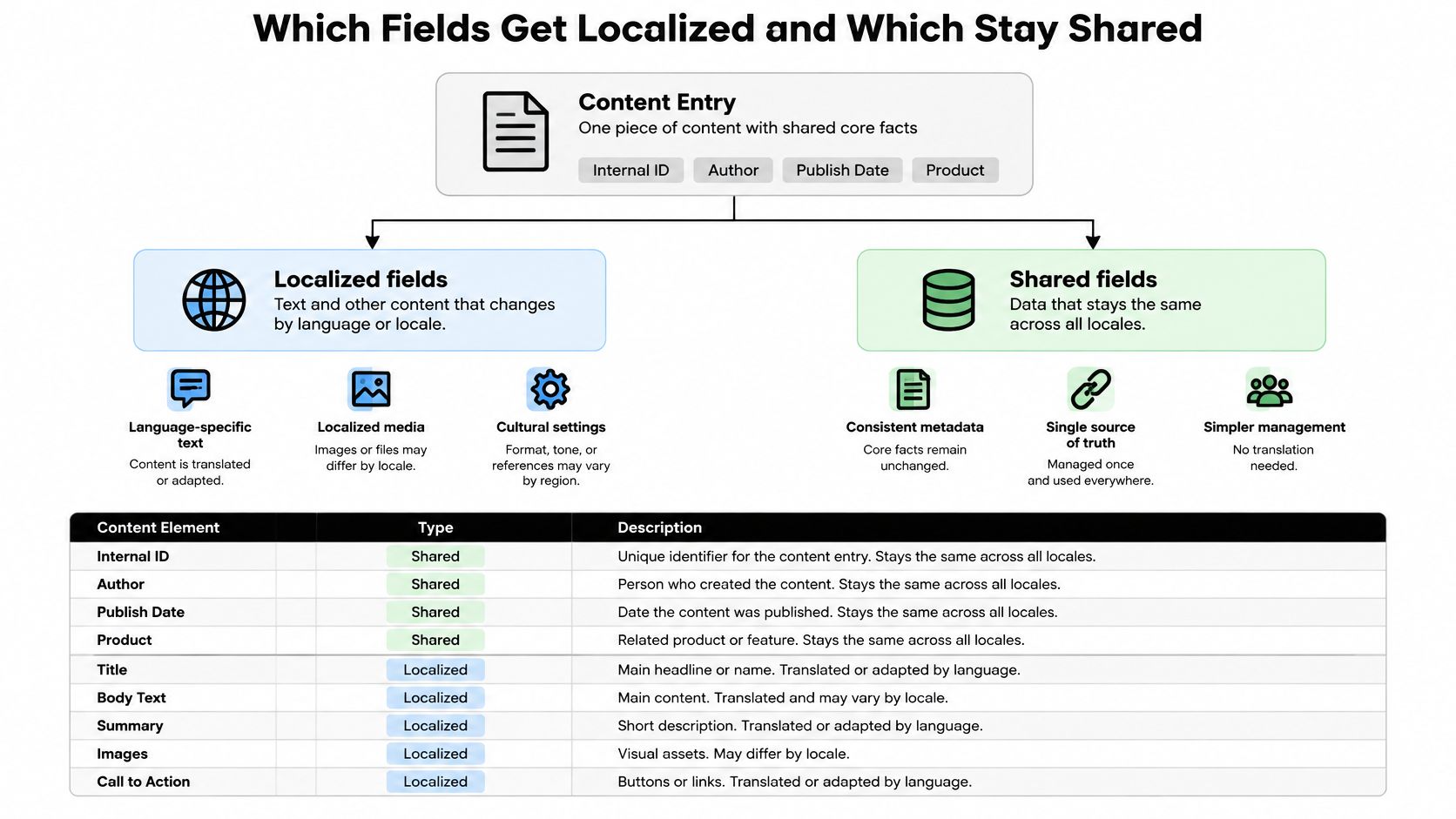
Duplicate the language, not the facts
Whichever model you choose, split each content type into what changes per language and what stays the same. A guide’s internal ID, author, publish date and product relationships belong to the guide itself. Its title, summary, body, slug, alt text and button labels belong to each locale.
| Content element | Localize it? | Why |
|---|---|---|
| Title, summary, body | Yes | Readers and search engines need each version |
| Slug and URL path | Yes | Paths like /fr/guide/ are readable and crawlable |
| Alt text, captions, ARIA labels | Yes | Screen readers need the page’s language, not the source language |
| SEO title and meta description | Yes | Search snippets show in the searcher’s language |
| Prices | Stored as numbers plus currency code | The app formats them. Market prices live in separate price records |
| Entry ID, author, publish date | No | One shared record connects the language versions |
| Related-content references | Shared relationship, resolved per locale | The frontend finds the matching locale version |
| Translation status and source revision | Per locale | Editors can tell approved work from stale work |
Store a price as an amount with a currency code, never as text inside a paragraph. The app can format USD 49.00 for a German reader, but formatting isn’t conversion. Swapping the symbol to EUR without changing the number is a pricing error. If markets have different prices, keep them in explicit market-specific records. Dates work the same way: share one timestamp when the publish date is common, and store each locale’s release time separately when markets launch on different days.
Missing, Blank and Unpublished Are Three Different States
Fallback is the feature teams reach for first and understand least. It’s a display policy. It tells the API what to return when a value is absent. It doesn’t make content translated, and in most platforms it doesn’t make content published.
Contentful’s documentation spells out the edge cases. Only an absent value triggers fallback. An explicit null or an empty string written through the API can block it, so a field meant to fall back to English shows up blank instead. A locale in a fallback chain can’t be switched off in a delivery response. With locale-based publishing turned on, a published fallback doesn’t make an unpublished requested locale visible. The Preview API silently ignores the locale-publishing header, so preview and production can behave differently. New locales need affected entries republished before they appear. Scheduled entries, assets and releases can’t be published per locale at all. Our guide to how Contentful handles governance and cost goes deeper on that platform.
DrSmile’s experience shows what happens when fallback becomes a quick fix. The team added locales months after launch, and missing localized fields broke their Gatsby GraphQL builds. A blanket German fallback fixed the build but risked German text appearing on non-German sites. They switched to seeding placeholder content so the schema could be generated. That works, but only if someone tracks which “content” is actually a placeholder.
So define the states before anyone writes content. Missing means no translation exists yet. Intentionally blank means the market doesn’t need that field. Not yet published means a translation exists but isn’t approved. Test absent, empty and null values on your platform, because each CMS treats them differently.

Make the fallback order explicit
Use standard language tags such as en, en-US and fr-CA, not labels like “Canadian French.” W3C’s language and locale guidance explains how tags identify content and how matching picks the best resource. A request for fr-CA should follow a written order: exact match first, then the base language if your policy allows it, then the configured default only for content types where that’s acceptable.
| Requested locale | Content served | Reason |
|---|---|---|
fr-CA, Canadian version exists | fr-CA | Exact match |
fr-CA, no regional version | fr | Falls back to the parent language |
de-AT, only German exists | de | Language match without a regional variant |
fr-CH, no French at all | Default, such as en, or a hidden item | Depends on the content type’s policy |
Falling back to a parent locale (Canadian French to French) is usually safe. Falling straight to English is a business decision, and it should be made per content type.
| Content type | Fall back to source language? | Block that market’s release until translated? |
|---|---|---|
| Blog articles and guides | Yes, with a visible notice | No |
| Help documentation | Yes, with a visible notice | No |
| Product and pricing pages | No | Yes |
| Checkout, terms, privacy notices | No | Yes |
| Navigation and buttons | No | Yes |
| Transactional emails | No | Yes |
Have the right business and legal owners approve this table. Blocking a release blocks that market, not every locale. And an English guide shown on the Japanese site is still an English guide. It shouldn’t be counted as Japanese coverage.
Give every locale its own cache entry
A correct API response can still turn into the wrong page. If the cache key ignores locale, one visitor’s French response gets served to the next visitor who wanted German. Include the locale in the cache key, and return both the requested and the resolved locale in the API response. Then the frontend knows when a fallback happened and can show a notice or hide the item. In a Storyblok case study, MAXXXIM named React middleware for language selection, environment detection and caching as its biggest technical challenge. That’s frontend work, and no CMS setting covers it.
Translated Fields Don’t Guarantee a Complete Page
A page can have every string translated and still be broken. Strapi 5’s documentation explains why: a localized relation resolves to the target-locale entry only if that entry exists. If the German author profile or the German category was never created, the relation is simply empty. Components and dynamic zones can differ between locales, and editing and publishing happen one locale at a time.
The result is a German article with no author, no category and a related-content block pointing at nothing. A completeness check that counts translated fields will mark it done. Your checks need to cover required references, assets and linked pages, not just text.
Environments add another quiet failure. Hygraph configures locales per environment, so a locale that exists in development may not exist in production. Its GraphQL API returns the default locale when no locale is requested, which means a missing parameter gives you English content instead of an error. A Strapi user on Reddit reported a similar pattern: ?locale=it worked on a collection request, but fetching a single entry by ID with a locale still returned English. That’s one unverified report, but it points to the right test. Check locale behavior for every query type you use, and add locale configuration to your environment promotion checklist.
Complex fields deserve their own prototype. Payload users have reported localization trouble with nested blocks, shared hero fields and arrays, where the localized flag had to sit on the parent field rather than the child items. These reports are version-specific, but the lesson holds. A basic text field working proves very little. Prototype your most complicated reusable block with real content before you commit.
Plurals, Dates and Currency Belong in the Application Layer
“1 comment” and “2 comments” look simple in English. Adding an “s” in code breaks in most other languages. Unicode CLDR’s number and plural rules define categories such as one, few, many and other. English uses two of them. Russian needs four. Arabic uses six, including zero and two. Japanese uses only other.
| Locale | Date (14 March 2026) | Plural categories |
|---|---|---|
en-US | 03/14/2026 | one, other |
de-DE | 14.03.2026 | one, other |
fr-FR | 14/03/2026 | one, many, other |
ru-RU | 14.03.2026 | one, few, many, other |
ar-EG | 14/03/2026 (Latin digits shown) | zero, one, two, few, many, other |
ja-JP | 2026/03/14 | other |
These are example outputs, not strings to save in the CMS. Store full ICU-style messages with every category a locale needs, so translators see the whole sentence and its placeholder. Then let the app format values with Intl.NumberFormat, Intl.DateTimeFormat and Intl.PluralRules. The MDN guide to Intl.Locale covers how these tools read regional preferences. The same number shows as 1,234.5 in a US interface and 1.234,5 in a German one, and editors shouldn’t have to memorize that.
Interface strings are a separate decision from editorial content. Buttons, form errors and empty-cart messages often fit better in a translation-file service or TMS that delivers keys through a CDN, so clients can edit wording without a developer rebuilding the app. Whatever holds them, use one key per meaning. A team that reused “Save” for both a button and a “Save 20%” promo got the wrong translation in one place, because many languages use different words for the two meanings.
URLs, hreflang and lang Are Frontend Work
A French version hidden behind a cookie or a language dropdown may never give a search engine a separate page to find. Google’s guidance for multilingual sites recommends distinct URLs for each language version. In a headless build, the frontend creates those routes. The CMS supplies the content and the relationships between versions, but it doesn’t make a localized page addressable.
Google’s localized-version documentation sets strict rules for hreflang. Each version must list itself and every alternate, using fully qualified URLs. If two pages don’t point at each other, Google ignores the annotations. Google also doesn’t use hreflang or the HTML lang attribute to detect a page’s language. It reads the content. Hreflang links equivalent pages together. It doesn’t rescue a page that’s half in English.
The lang attribute has a different job. It declares the language of the page’s own text for browsers and screen readers, while hreflang describes a linked page, as W3C’s language tag guide explains. This is where CMS locale codes cause trouble. A market code like emea-de may work fine inside your CMS and be an invalid tag for search engines.

Build one locale map and generate everything from it
Keep an explicit mapping for each locale: CMS locale ID, URL prefix, BCP 47 tag for lang, hreflang value, launch state, fallback policy and owner. Generate routes, hreflang, sitemaps and the language switcher from that single map, and from the set of URLs that are actually published, not the list of configured locales. A Reddit practitioner recommended exactly this after hreflang and sitemaps drifted apart on a Sanity build.
- Pick the URL pattern. Subdirectories like
/fr/are the easiest to run. Subdomains and separate domains work too, and Next.js supports both sub-path and domain routing. - Generate routes from approved entries. Each localized page should load directly, with no earlier browser session required.
- Render the correct
langattribute. Translated pages that keep the English default confuse screen readers. - Generate reciprocal hreflang sets. Build them from shared relationships, never from hand-maintained lists. Leave unpublished translations out.
- Set an x-default destination. Point unmatched visitors to a sensible default or a language selector, and keep it the same across the set.
- Validate at build or publish time. Fail the build on one-way annotations, invalid tags and alternates that point at redirects.
Slugs have their own lifecycle. Storyblok’s translated slugs are a separate feature, and a missing translated slug can fall back to the default-language slug. Payload users trying to build a language switcher on translated slugs ended up querying across locales for the matching document and then redirecting. One called it “not perfect, but it works.” Another’s switcher still sent visitors to the homepage of the new language. Decide early what happens when a translated slug is missing, renamed or deleted, and test the switcher on dynamic pages, not just the homepage.
The CmdCntr headless CMS localization guide names disagreement between CMS and frontend locale lists as a practical failure point, and that’s what a single locale map prevents. For deeper hreflang mechanics, CIQRA’s multilingual SEO walkthrough covers canonicals and per-language sitemaps. Our SEO cheat sheet for web developers connects those checks to deployment work.
Migrations raise the stakes. When we rebuilt the Teton Gravity Research platform, moving 10,000 articles out of a failing ExpressionEngine install was only part of the job. Mapping URLs, writing redirects and protecting what already ranked took just as much planning. On a multilingual site, every one of those tasks multiplies by the number of locales. Localized routes belong in the same inventory as the rest of your CMS migration work.
Machine Translation Is a Draft, and Review Needs Context
AI translation has made first drafts fast and cheap. It hasn’t removed the need for review, and the people using it most heavily know that. DeepL’s 2023 to 2024 marketer survey found 98% of respondents use machine translation and 99% pair it with human review. Trados’ 2025 survey, reported by Slator, found 90 to 98% of machine translation and LLM users post-edit the output.
Automated quality checks don’t close the gap. A 2024 MTUncertainty paper tested tools that predict which translated segments can be left alone. Among segments marked “leave as is,” 26% of English to Italian and 16.9% of English to German still needed edits, and larger models didn’t improve that much. If you skip review on everything the tool approves, you’re publishing roughly one error for every five segments it waved through.
The strong AI results still came with full review. Polhus, a DatoCMS and Crowdin project covering about 1.6 million words in seven languages, reported that 75% of AI output was publication-ready with no edits, and that eight reviewers still checked all of it. Cédric, a designer who documented a Framer multilingual project on X, reached the same conclusion from the other side. AI handled the general copy, but technical content needed so much rewriting that he brought in a human translation partner. “AI made translation fast and cheap; sounding right to a buyer still needs people who know the product.”
Set review by risk. Legal, medical, safety, pricing and brand-critical copy gets full human review. Low-risk help articles can get lighter checks. Translate your glossary first, so product names and key terms stay consistent before any page is drafted. Video tutorials need the same rule: tools like Trupeer’s translation feature can turn one screen recording into localized videos and guides, but treat the output as a draft until someone who knows the product has watched it in context.
Make each handoff visible inside the CMS
Translation usually stalls in handoffs, not in the translating itself. SumUp ran five offices on spreadsheets and copy-paste. Talkdesk duplicated its English site and emailed JSON files. Lindex’s reviewers saw isolated strings with no page around them, and translation locked modules for everyone else. These are vendor-published case studies, but the pattern repeats across them.
- Source approved. The editor marks the source entry ready for translation. For coordinated launches, every market stays unpublished until release.
- Locale entries created. Each starts as “not started,” linked to the source revision it came from.
- Draft. The translator works in the CMS or through a TMS connector that writes back to the matching fields.
- In review. A reviewer checks meaning, terminology and legal wording in a rendered preview, then approves or returns it.
- Approved and scheduled. The publish check confirms that linked content in that locale is ready too.
Tie each approval to a source revision. When the English page changes, the approved French version becomes stale and goes back into review. Otherwise “approved” tells editors something that’s no longer true. Our editorial workflow management guide covers how to make that kind of ownership visible across a publishing team.
Storing locales also isn’t the same as managing translation. Routing jobs, translation memory, glossaries and reviewer assignments are TMS work. Elevate Outdoor Collective’s Smartling case study is the clearest example in the research. Its storefronts supported multiple languages but sat at 25 to 30% translation coverage season after season. Coverage reached 100% only after the team added a connector, translation memory, brand profiles and a named owner. Better machine translation alone hadn’t fixed it.
That ownership point holds for AI-assisted work too. When we built a multilingual AI editorial coach for El Colectivo 506, a Costa Rican journalism organization, the aim was to take routine pitch feedback off senior editors’ desks without taking editorial judgment away from them. Language generation was the easy part. Deciding who answers for the result was the real design work.
Test the Rendered Page in Every Locale, Not the CMS Record
A page can pass an accessibility audit in English and fail in German or Arabic without anyone touching the component code. Longer labels hide controls. Right-to-left content breaks layouts. And alt text often stays in the source language. The 2025 LangCrUX study measured 120,000 popular sites across 12 languages that mostly use non-Latin scripts. Nearly 40% of sites in Bangladesh and India had no native-language accessibility text, even though their visible content was mostly in the native language. Standard automated checks miss this, because they confirm an attribute exists without checking what language it’s in. The study isn’t specific to headless sites, but the failure is easy to build into any CMS that treats alt text as a shared field.
The rules are tightening too. LanguageWire’s website localization guidance notes that the European Accessibility Act took effect in 2025 and created obligations for covered digital products and services in the EU. Check which obligations apply to your product instead of assuming they all do.
For each locale, test the published, cached page a real visitor would get:
- Route and switcher. The URL loads directly, and the language switcher lands on the equivalent page, not the homepage.
- Content and references. Linked authors, categories, assets and related pages exist in that locale.
- Publication state. Preview and production show the same thing, and unpublished locales stay hidden.
lang, hreflang and canonicals. Tags are valid, reciprocal and point at live URLs.- Accessibility text. Alt text, ARIA labels and button names match the page language, and a screen reader pronounces them correctly.
- Layout. Screenshots of the longest language and any right-to-left locale, including menus, buttons and form errors.
- Formatted values and edge states. Zero, one and many counts, an empty cart, a failed form, and dates near a timezone boundary.
- Cache and environment. The locale exists in production, and responses don’t leak between locales.
Split sign-off by discipline. Translators and editors approve the language, designers approve the layout, and engineers approve function and accessibility. Then one named release owner confirms all three are done for that market.
Launch two markets, then expand
The vendor case studies with the cleanest rollouts started small. HARTING built a six-month MVP for South Africa, its smallest market, before expanding to 19 languages. dormakaba moved lower-risk English pages first, then rolled out across 30+ countries in 12 months, reusing global content while giving local teams separate spaces to edit and translate. Cédric’s advice from his smaller project points the same way: get one locale working end to end before exporting everything for translation.
Clean up before you translate. Cédric deleted four unused collections before exporting. Every stale testimonial and placeholder FAQ you translate costs money and review time in every language. Localization multiplies whatever mess you already have.
A practical first release looks like this. Pick the two markets that matter most by revenue or intent. Write the fallback and release rules. Run the full test list on a representative page and its key interactions in staging. Add the next language only after both markets pass. Checking every discipline across two locales is a review a team can actually finish. Trying it across eight at once is how defects reach production.
Decide the Rules Before You Configure the Locales
The teams that do this well don’t have a better CMS. They decided what “missing” means, which content can fall back, who approves each market, and how locale codes map to URLs and tags before anyone opened the settings panel. The teams that struggle assumed “supports locales” meant “handles localization,” then found the gaps one support ticket at a time.
If you’re planning a multilingual build or adding markets to an existing one, start with your two priority markets and a list of key pages, then work out which content can fall back and which has to wait for approval. That early modeling work is where Refact’s headless CMS development engagements begin, before the content model is locked in and harder to change.
Building a product and unsure what to scope first? Let’s talk. Free 30-minute call, no pitch.

Masoud Golchin is a backend developer at Refact, working on server-side systems, internal tooling, and infrastructure. He builds and maintains the services that support both client projects and the team’s day-to-day development workflow. His work includes backend logic, developer tools, system reliability, and the technical foundations that allow products to scale and operate consistently. At Refact, Masoud focuses on creating practical engineering solutions that help the team move faster while keeping systems organized, maintainable, and dependable.
More from Masoud Golchin

