Marketing Automation Workflows That Hold Up
You will not find a marketing automation project that has failed on account of the software being incapable.


Think of a marketing automation workflow as an amplifier. It takes what is already true of your operation and makes it more so. A sound underlying process will be compounded by it; a flawed one will break with more noise and speed than you would see with manual methods.
We have put together this guide for the business owner, the operator, or the marketing lead who has moved on from the tool-selection phase and is looking for workflows with some staying power. We want to show you how to measure these things against revenue instead of opens and clicks, and to explain where they tend to come apart.
What a Marketing Automation Workflow Really Is
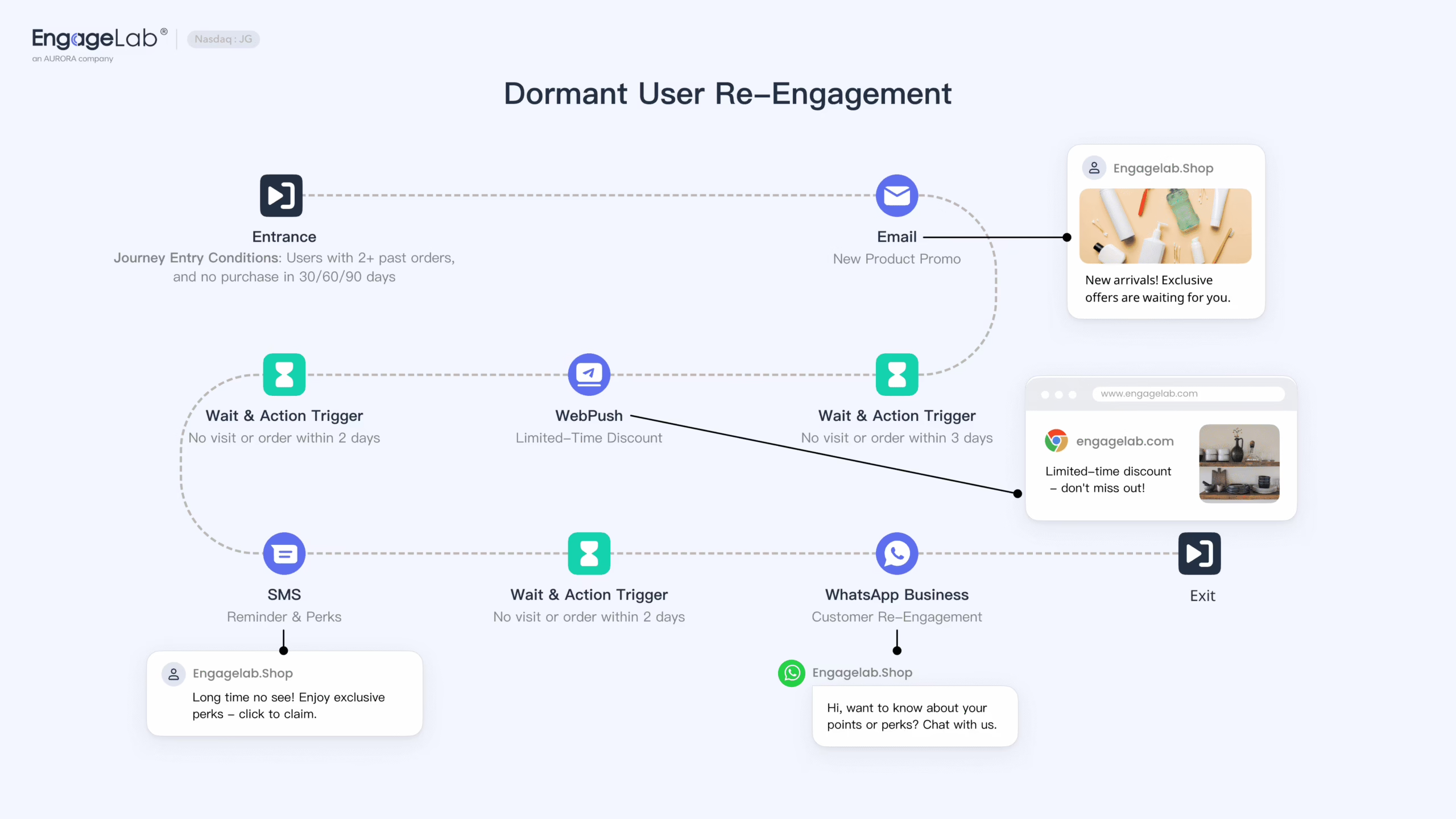
In technical terms, a marketing automation workflow is a rules-based series of actions set in motion by user behavior or an event, complete with its own delays and exit conditions. Today’s flows are seldom just about email. You will see them in SMS, in-app messaging, ad audiences and CRM updates, and increasingly in AI functions like send-time optimization.
The way to look at it is not as one large program but as a small system with a single purpose and three components:
- Trigger: The inciting incident, be it a form fill, a change in lifecycle stage or a cart left behind.
- Conditions: The rules of the road that determine the branch based on region, deal stage or plan tier.
- Actions: What the system does in response – an alert to a rep, a message sent, or a contact moved along.
Do not confuse the two sides of the house. Marketing automation is what the customer sees in their onboarding or cart recovery. Marketing workflow automation is the internal machinery of content approvals and asset routing. They may use the same platform and tooling, but they have different owners and different ways of failing. For a wider view of the operational side, we go into it in eight workflow automation examples.
Why Triggered Flows Beat Batch, and Why That Cuts Both Ways
Research is fairly uniform on the matter: behavior-triggered flows leave scheduled batch campaigns in the dust. Improvado cites Epsilon figures showing triggered emails with open rates 67.9% higher and click-throughs over 241% better than a standard blast. Then there are the 2026 benchmarks from EmailVendorSelection, which have automated workflows pulling in as much as 30 times the revenue per recipient of a one-off campaign. In the top decile of cart-abandonment flows, that comes to $28.89 per recipient compared to an average of $3.65.
But there is a downside to the mechanics that make these flows so effective. When a batch campaign misfires, it is a one-off. Let a triggered flow go wrong and it will do so every time the trigger is pulled, quietly for weeks, until sales is on the phone complaining about a lead who got a promo an hour after putting pen to paper on an order.
Automating a task is one thing. A workflow automates a decision. Get the decision wrong and you have built a machine to repeat the error at scale.
Where the fastest ROI actually lives
Not all of them warrant the same kind of investment. In ecommerce, the numbers are lopsided: 54% of automated flows are for cart abandonment and 31% for welcome sequences. B2B tends to focus on lead nurture and re-engaging the closed-lost. If you want to see a return quickly, start with one of these four:
- Welcome sequence: You will not get a more receptive audience from a new contact.
- Cart or trial abandonment: Intent is real here, but it cools off fast.
- Post-purchase or activation: Most teams do not make enough of this, yet it can be worth $5 a head in the top decile.
- Closed-lost re-engagement: Treat old CRM records as a live channel and segment by the reason for loss.
Pick one and prove it out with a revenue metric in 60 days or less before you think about scaling. Try to put six in the air at once and you will likely end up with none of them under proper control.
The Building Blocks, and Where They Break
On paper, triggers and conditions look tidy. In production they have failure modes you should be aware of.
Triggers: intent, not activity
A good trigger is a reflection of intent. A request for pricing or a download of a particular asset tells you where someone stands. “Visited the homepage” is a weak trigger; it drags in the wrong people and dilutes the sequence. If you cannot tie it to a business action, let it be.
Conditions: keep the message honest
It is the conditions that keep the automation from feeling robotic. Enterprise or SMB? First-time buyer or a repeat? If the rule changes the message, it is worth having. Otherwise it is just decoration that costs you in maintenance.
Actions: fewer, with clean exits
And then there is the issue of workflow spaghetti. The builder makes it easy to throw in another step, so the team does. Come eighteen months from now, no one will be able to tell you why there is a 46-hour delay on the third pass or why a branch is still pointing a webhook at a service you decommissioned last quarter. You will hear the folks on r/MarketingAutomation refer to them as zombie workflows: things that have been running for years with no clear owner and are prone to firing off a birthday email to someone who has long since unsubscribed.
There is a way to put an end to most of this. It comes down to two rules of thumb. The first is one workflow, one job; if you have a flow that is trying to onboard a trial and upsell a plan at the same time, make a split of it. The second is to have explicit exit conditions. A workflow needs to know when a contact has either succeeded (made a purchase, booked in) or failed (unsubscribed, bad fit) and then stop. That is what separates true automation from noise.
The Real Constraint Is Data and CRM Integration
While you will read plenty of articles touting features, in the field the real constraint is data quality and how deep your CRM is. A marketing dashboard may look in good shape, but cross reference those records in the CRM and they will be missing a consent flag or lifecycle stage, or attached to the wrong account. Finance is left unable to tie it to closed revenue. Such a silent failure can do more damage to your budget and credibility than anything else.
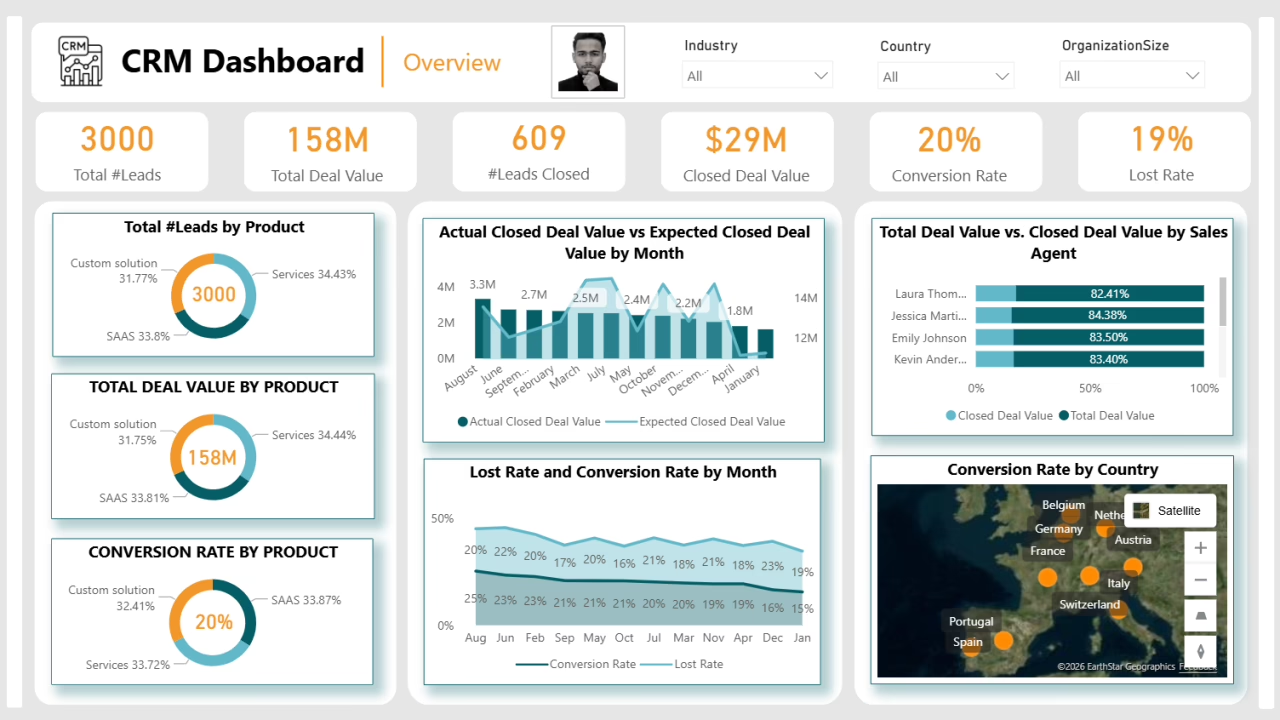
Before a flow is worth building there is some hygiene work to be done:
- Field discipline: You need agreed upon definitions for MQL, consent and the like, and they must be enforced in both sales and marketing tools.
- Event taxonomy: Keep it to a small set of events that are tracked and named the same way on the web, in product and in the CRM.
- Suppression logic: Put in global rules so a new contact is not barraged by welcome, promo and win-back flows in a single week.
- Fail-safes: Better to skip the flow if a required field is empty than to put out a wrong message.
Then there is the API. HubSpot, Marketo and Salesforce Marketing Cloud were designed for data sync, not to run your entire campaign. To create an email in HubSpot via API you are dealing with raw HTML and stitching together endpoints. There is no API equivalent for the complex branching you see in a visual editor. Teams that attempt to code everything generally wind up with a hybrid approach: the API for the data, and the UI for what it cannot reach. It is perfectly acceptable so long as it is properly planned and owned.
Curious whether your site is citable by AI assistants? We run a readiness check that shows what they can and cannot read. Run the check.
Treat It Like Software, Not a Campaign
The teams that have workflows still functioning after two years tend to handle marketing automation with the same mindset an engineering team brings to a production system. It is a matter of habit.
- Staging and test contacts: Run every flow against edge cases before it is allowed to touch a live list.
- Approval gates: For mass sends, particularly to any but the smallest segment.
- Change logs and ownership: Have a name on each active flow and a note as to why the branch is there.
- Sunset policy: Review and cull every six to twelve months. A zombie flow is a governance issue.
- Monitoring: Make a habit of looking at conversion, deliverability and the downstream pipeline.
When AI is brought into the mix, the discipline does not change. Predictive send suppression and subject line variants can be of use, but only once the rule-based version is rock solid. And there has to be explainability; if the team cannot put a finger on why an AI step picked a given contact, it is un-debuggable. We have written on AI automation for small business and the thinking holds at any scale.
Measuring the Right Things
Do not be fooled by open and click-through rates. They are diagnostic, they will tell you what happened, but they do not show if the workflow has earned its keep. Look further downstream for the metrics that matter.
| Metric | What it actually tells you |
|---|---|
| Conversion to next stage | Whether the flow moved contacts toward the goal, not just engaged them. |
| Response time | Whether automation shortened the gap between intent and follow-up. |
| Recovered pipeline | Revenue from abandoned carts, stalled trials, or closed-lost leads that came back. |
| CAC and payback | Whether the flow made customer acquisition cheaper or faster to recover. |
| Deliverability trend | Whether frequency and hygiene are being managed, or slowly poisoning the sender reputation. |
Take closed-lost re-engagement. Do not measure in aggregate, but by loss reason. A lead with a price objection might come around for a budget-cycle check-in, whereas one missing a feature will only convert post-update. Putting them in the same bucket obscures the work being done. Newsletter automation is the same; there is a temptation to gloat over list growth rather than the revenue per subscriber. For publishers we have a specific take on email automation benefits for newsletters.
An Example: The Automation Behind a Daily Newsletter
Not all of these problems are customer facing. We worked on an automated news pipeline for a daily newsletter publisher where the editorial staff was wasting more time hunting for stories across 30 sites than writing them. Our workflow did the discovery and deduplication and presented the editors with curated candidates in the morning. The API integrations were not the interesting part. It was the design work beforehand: coming to an agreement on what “relevant” was and where the human needed to be in the loop. The engineering is easy; the definitions and ownership are what make a workflow stick.
Build It Yourself or Bring in a Partner
A basic cart reminder in Mailchimp or a lead handoff in HubSpot does not require outside assistance. An in-house operator should be able to get a Klaviyo welcome sequence out the door in a week. But when the workflow crosses tools or custom data models and the cost of error is high, a partner is usually worth the fee.
Especially if:
- Your platform’s UI cannot express the custom logic and the API is only half a solution.
- You have data in three systems that do not agree on identity.
- The attribution has to stand up to the CFO.
- Industry rules and compliance mean a misfire is an expensive proposition.
Should you be in any doubt as to which side of the line you are on, we go into the decision framework at length in our workflow automation development and marketing automation agency guide.
There is more to be gained from marketing automation through discipline than from a software budget. You will find that teams making real returns on it have a way of starting small, regarding the workflow as a production system and putting revenue, not engagement, to the test.
Our automation and integration practice is there to put those questions to rest before code is written. We can help determine what must be in order with your data and CRM for a given workflow to stand up to scrutiny, and whether it is the one that warrants the investment.
Trying to work out where AI actually fits in your stack? Let’s talk. Free 30-minute call, no pitch.

Asghar Mirzaei is a backend developer at Refact, focused on the APIs, integrations, and infrastructure that power the studio’s products. His work spans data pipelines, third-party services, backend architecture, and deployment systems, helping ensure that products are stable, scalable, and ready for real-world use. Asghar works closely with the team to connect product requirements with reliable technical foundations, especially in systems where performance, automation, and integration quality matter. At Refact, he contributes to the engineering work behind the interfaces, making sure the products the studio builds can run smoothly and dependably
More from Asghar Mirzaie

