AI Automation for Small Business in 2026
For the small business owner, the issue is seldom an “AI problem”.


We put together this guide for the operators of small and mid-sized firms who want to know where AI automation delivers in 2026 on its own terms. Not the marketing pitch of an agent running your company overnight, but the practitioner’s reality: one workflow made 80% more efficient while a person still puts the finishing touches on the difficult cases and the P&L reflects it.
Where the Marketing Story and the Reality Diverge
The numbers bear out the adoption. JPMorgan Chase Institute has been looking at hard transactional data, not surveys, and they put SMB AI spend at 17.7% by late 2025, up from 5.2% in 2023. Self-reported figures are higher, in the 57-68% range, and climbing. At the same time the price of entry has all but vanished; what cost $50 a month in 2019 is now in the $20-30 bracket. And for 80 percent of those using it, the productivity gains are evident in the first year.
Then there are the success stories. Salesforce can point to sales teams with AI that are 1.3 times as likely to put more revenue in the bank year over year. A panel at Business.com saw U.S. small businesses putting money into AI hit 57% in 2025 versus 36% two years prior. An aggregated view of small business AI statistics for 2026 is available here.
But look at the other side. Deloitte’s State of AI research is blunt about it: the chief impediment to integration is a lack of worker skills, not compute or the quality of the model. In 2024, 42% of firms walked away from an AI initiative, compared with 17% the year before. Only one in five have any mature governance for autonomous agents. The message is plain: the tools are cheap and able, but the value is in the operational muscle to run them.
The Real Economic Driver: Automation Ratio
You will read blog posts on better prompts and models. Practitioners are more concerned with the automation ratio, the share of a workflow that proceeds without human intervention.
There is a pattern to it. Get an AI-assisted process to 80-90% autonomy in a narrow area and the unit economics make sense. But if a human has to rewrite every output, you have not automated anything; you have a drafting tool that requires a full-time editor. Some will say that is fine, others would call it a waste.
Take two solo builders. FlowWrite AI is doing $15k in MRR because 80-90% of what it produces ships as is. PromptCart could not make it because every customer needed rework and support. Same product category, different outcome based on the ratio.
If you find your people are having to do most of the work on what the AI turns out, either narrow the scope to let it succeed or move on to something else.
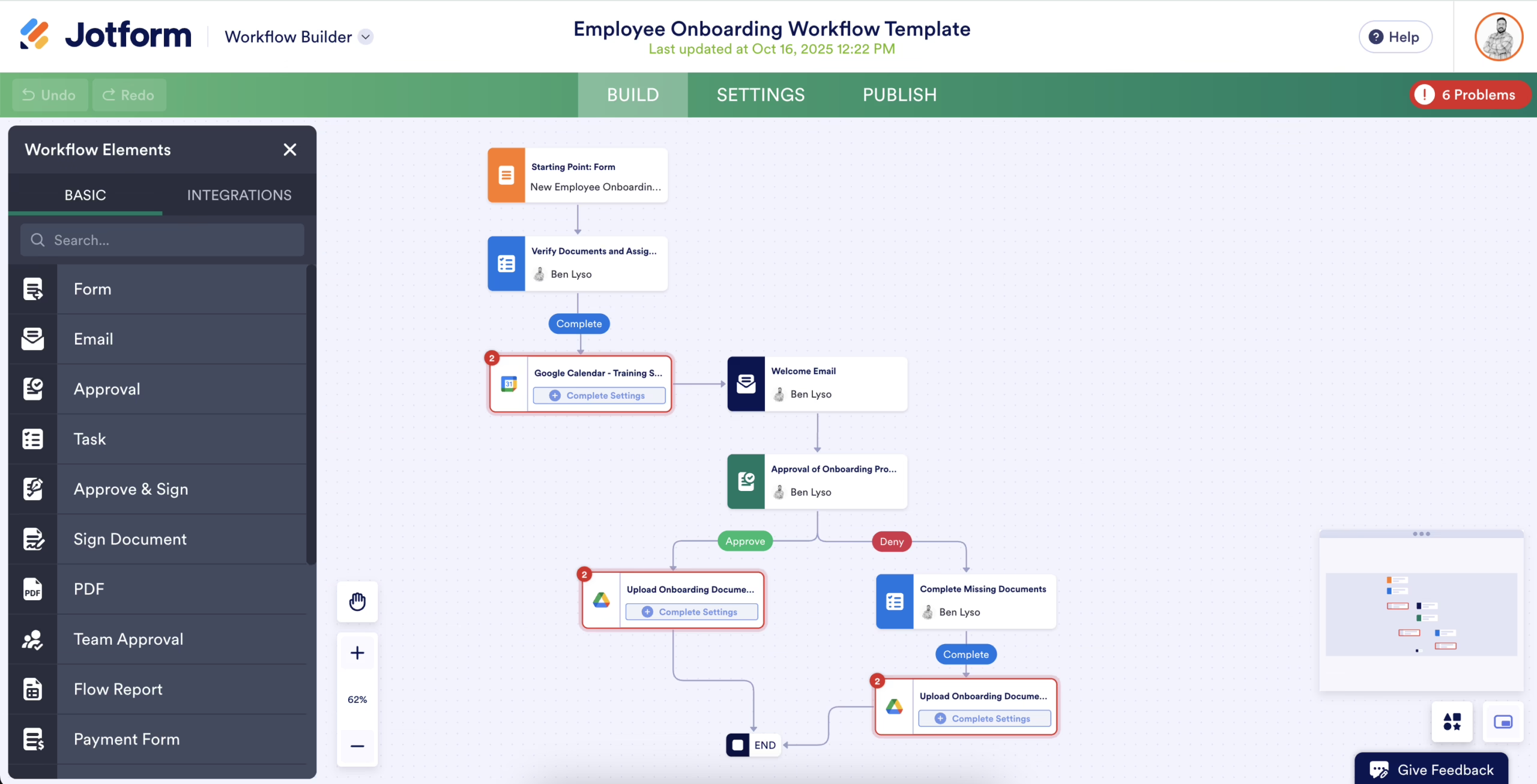
Start With One Workflow, Not a Transformation
Research shows the way to go is to be narrow and deep. Pick a handful of high-value workflows, assign an owner, set your KPIs and redesign the process. Do the opposite and you get a broad, shallow effort where a pilot is allowed to die for want of an owner or metrics.
A sound first pass at a workflow should be:
- High frequency. Something you do weekly or daily, not once a quarter.
- Rule-based. If you cannot put it on a checklist, leave it alone.
- Low blast radius. A mistake should mean a minute of cleanup, not an angry customer.
- Done by the owner or someone whose time is costly. That is how you save real money.
Some concrete examples:
- Speed-to-lead. This is where the ROI is. The difference between a 15-minute AI response and a four-hour manual one is right there in the booked jobs.
- Triage for support. Let the AI draft the routine stuff and route by intent. Escalate the refunds and legal wording.
- Invoicing and expenses. Have it extract the fields and flag the oddities.
- Meeting notes. Put a structured record from a call into the CRM.
- Content assist. For headlines and tagging, if nothing else.
We have seen property managers slash inbound response times by 90% with AI and a bakery put together a month of social content in 12 minutes. Not much of a transformation, just a well-run workflow. For a deeper look at the design tradeoffs involved, we have written up workflow automation examples covering eight cases and the failure modes that tend to surface after six months.
Data and Process Come Before Tools
Do not buy the tool before you fix your inputs. That is the priciest error. A model will not give you reliable results if your CRM is full of mis-tagged deals and missing fields. Leave your support inbox as a jumble of complaints and cold outreach with no system and an AI classifier will only inherit the mess. Most failed pilots follow that script. You do not have to look far for a cautionary tale. Take Precision Parts Co., which the OECD case work highlights: they put in a full quarter of effort to scrub their ERP and maintenance data before they would touch a model. Then there is SmallTech Fabrication, where the story is one of failure. Because their technicians were still working from paper and sensors were not part of the maintenance system, the company was out some €70k in 18 months. The models had nothing to do with it; the ground was simply not prepared.
The lesson is to put in the unglamorous work before you pick your tools.
- Get the fields in order. In whatever system your workflow runs on, fix the dropdown values, the required fields, the status names.
- Put events in the digital realm. You will run into a wall if you try to automate something that is still being done on paper or in someone’s head.
- Document what you are doing now. If you can’t put the workflow down in a checklist, you are not in a position to redesign or automate it.
- Establish a baseline. Be it error rate, average handle time or missed calls, you need to know where you stand. Otherwise there is no way to show the pilot was a success.
For the typical small business, the right stack is not going to be very exciting. You want AI in the tools you already have – Copilot in Microsoft 365, QuickBooks categorization, Gmail’s own assistance – and a no-code layer like Zapier or n8n to call on an LLM as the need arises. That will cover most of your bases without a custom build. Our AI for small business owners playbook and the starter stack budgeting guide we point to put the cost of such basic tools at $100 to $200 a month, with results you can measure in 60 days. We see that in practice. Should a vendor put a $5,000 per month price tag on your first workflow, they are selling you a program.
There is a time for custom development, when it justifies the expense:
- It is how you compete. A generic process does not warrant an off-the-shelf solution.
- Your systems are not playing nice. We are talking legacy ERPs, industry software, custom databases that no vendor has made a clean connection to.
- You require control. Generic tools will not give you the role-based approvals and audit trails you need.
- The integration is hard. Poor APIs, undocumented systems, low rate limits. A 2026 review of agency pricing shows this is the main thing driving up service costs.
To see how we advise clients on whether to go the vendor or custom route, have a look at our automation and integration services. And if you are considering a customer-facing bot for that first workflow, our guide on AI chatbots for small business will tell you where they add value and where they put the brand in an awkward position.
Curious whether your site is citable by AI assistants? We run a readiness check that shows what they can and cannot read. Run the check.
How to Choose the Right Tools
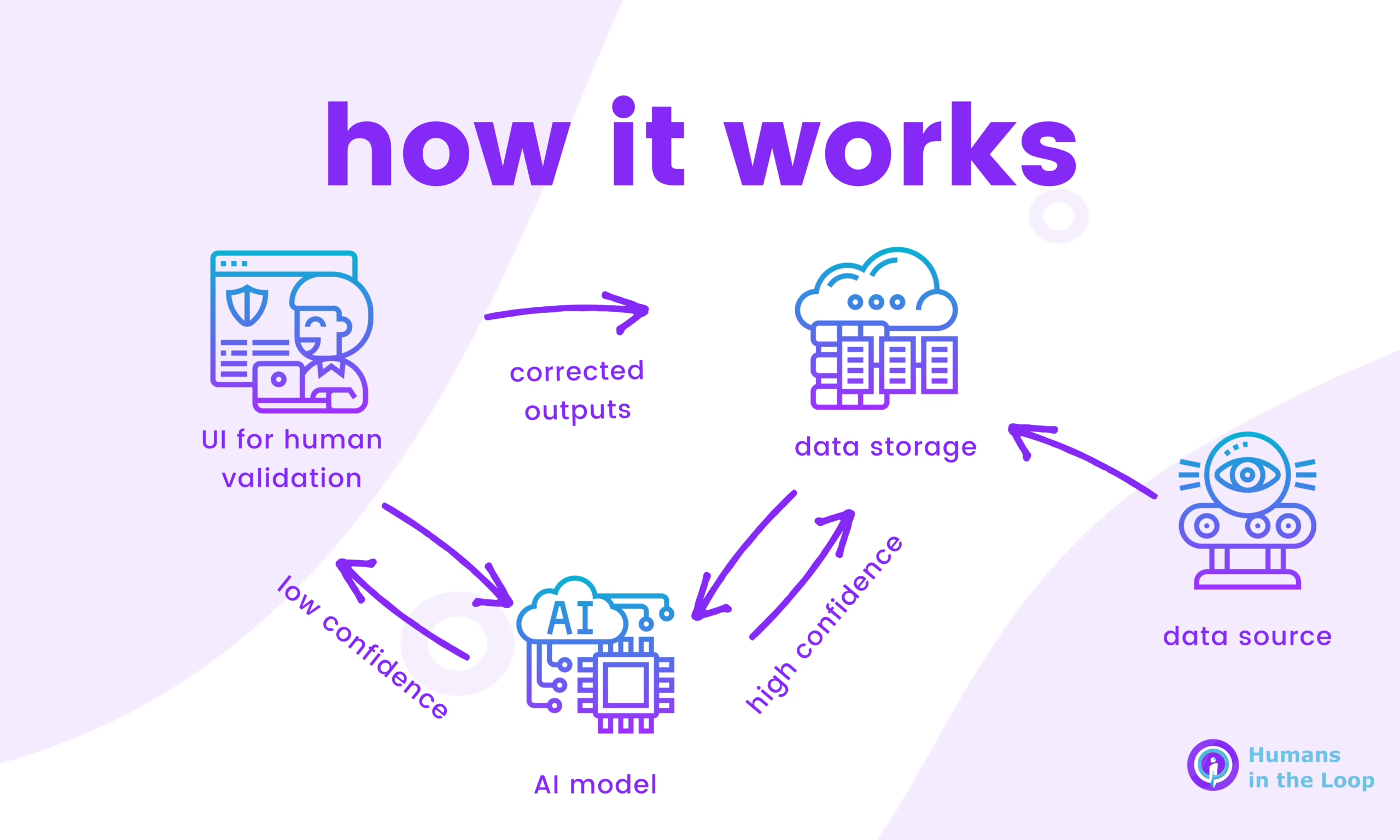
Full autonomy is not the default you should be aiming for; confidence-based escalation is. Let high-confidence outputs go through, but have a person handle the rest. It is a pattern that lets you increase automation over time without risking the brand.
We find the send-edit-escalate guidance to be a good model for small business AI:
- Send off the routine stuff: appointment confirmations, order status, an FAQ answer with a source.
- Edit the drafts. A non-standard reply to a customer or a meeting summary for a client gets a quick human eye.
- Escalate anything involving money, legal terms, a complaint or an odd situation. A person makes the call.
And keep a record of what the AI put down versus the final version. When things go sideways you want to know where the process failed. An instructive story from 2025 involves an AI running a cafe for two months; it was no match for suppliers trying to manipulate it on pricing and ended up over-ordering. The model was capable enough, but no one had defined its boundaries.
Governance is not just enterprise jargon. For a small business it is a matter of writing down on a single page what the AI is allowed to do and what requires a signature. Deloitte has found only one in five companies have mature governance in place, and that is why so many pilots end after a single hallucination.
Design for Human-in-the-Loop, Then Raise the Ceiling
Most SMB pilots come to a quiet halt here. The technology is fine, but the staff will not alter their ways.
The OECD case work has two examples. Maple Legal put AI in front of the whole firm yet adoption never got past 20 per cent because their billing model still incentivized lawyers to log hours. Acorn Accounting did the opposite, moving staff goals from hours booked to advisory value delivered, and saw capacity grow by 35% with no new hires.
If you are measuring a worker on task volume and AI trims a 40-minute job to five, you will meet resistance in the name of quality. Measure them on the outcomes that extra time allows and you will get buy-in. The numbers bear it out: a 2026 panel by Business.com showed 30% of small business workers put on an enthusiasm for AI they do not feel, while 45% have misgivings about the effect on the company’s reputation. Only 12% of SMBs think they are “very likely” to cut staff in the coming year, so the reassurance is real, but you have to be clear about it. It is a change management issue, not a tech problem.
Redesign the Role, Not Just the Task
Measure Something Specific in 60 to 90 Days
There is a distinction to be made: the pilots that survive are the ones with one or three metrics in place before a thing is even built. The ones that do not make it have no metrics at all.
So choose your numbers carefully. They should be boring enough to be truthful, but they must also shift when the automation is doing its job. Some good examples:
- Time-to-first-response for support or inbound leads
- Missed calls turned into bookings in a service business
- Average handle time on the same old requests
- Invoices processed without any human intervention
- Hours put back in the week from some recurring chore
Establish the baseline and check in every fortnight. Sixty days in and the figure has not budged? Then either your data or your workflow is off, or you have not automated enough of it. Correct the issue. There is no need to bring in another tool.
A Refact Example: Automating What Editorial Was Doing by Hand
Take the case of a daily newsletter publisher we put in with. On paper the editorial team’s role was to curate the best stories in their field, but in practice the act of finding them had come to overshadow the writing. Mornings were spent poring over 30 or more sites, copying links to a spreadsheet, seeing if the story was already done, and starting over in the afternoon.
Our solution was an automated news pipeline on n8n to do the heavy lifting of ingesting, scoring and deduplicating articles to their standards. Now the editors have a shortlist to review rather than the open web. The machine does the sourcing; the editors keep the judgment on what gets written. That is how you redesign a workflow with AI. Nobody is re-checking 30 websites at 9am.
The principle holds up elsewhere. You can automate the routing, the classification and the drafting, but leave the tone and exception handling to people. For teams with a lot of contracts or invoices to get through, the pattern in our document workflow automation guide is instructive.
The Realistic 2026 Picture
Then there is agentic AI. It makes for a fine marketing story and is a legitimate area of research, but it is not something a small business should default to just yet. Reliability can be spotty at the edges and the legal liability for what an autonomous agent might do is still up in the air. We find most success with graduated autonomy, where an agent is free to operate within strict limits and a human is there for the exceptions.
If you are looking at the next year for your operation, here is the reality. Costs to get in will remain low and adoption will climb. But you will see a divide between those who view AI as a shopping list and those who treat it as an operations matter. The former will not be the winners. The latter will take a single workflow, prepare the data and put a person on the exceptions.
You do not need a large budget for that sort of discipline. What is required is clarity on what you want to change and the restraint to not pursue every new gadget.
Should you want a second opinion on which workflow warrants the first real effort before you commit funds to a build or a tool, Refact’s discovery process is designed for that. Come in with a messy workflow and we will give you a scoped plan and a defined way to measure success, so you can tell if it is worth automating in the first place.
Trying to work out where AI actually fits in your stack? Let’s talk. Free 30-minute call, no pitch.

Asghar Mirzaei is a backend developer at Refact, focused on the APIs, integrations, and infrastructure that power the studio’s products. His work spans data pipelines, third-party services, backend architecture, and deployment systems, helping ensure that products are stable, scalable, and ready for real-world use. Asghar works closely with the team to connect product requirements with reliable technical foundations, especially in systems where performance, automation, and integration quality matter. At Refact, he contributes to the engineering work behind the interfaces, making sure the products the studio builds can run smoothly and dependably
More from Asghar Mirzaie

