Ecommerce Web Application Development
Most ecommerce web applications do not crash on launch day.


This guide is intended for use by technical leads, product owners, and operators who need to scope a system that will support the business for the next one to two years. It provides information on system architecture, tradeoffs made by ecommerce platforms, and the steps needed to develop a system that can grow instead of needing to be completely rebuilt.
What Ecommerce Web Application Development Actually Involves
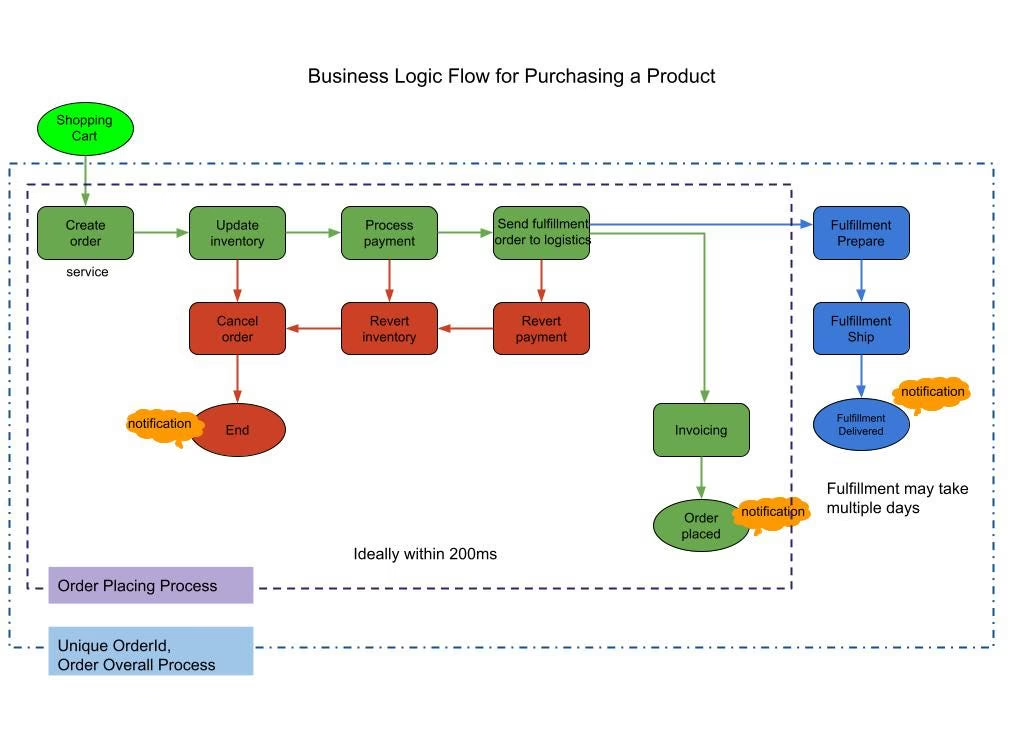
A brochure site is a document. An ecommerce web application is a distributed system with a shopfront stuck to the front of it. When a shopper clicks “Buy,” at least four things have to align: the product exists at that price, the inventory count is accurate, the payment has gone through, and the order got into the system that will fulfill it. Every one of those steps can fail independently, and that failure has an associated cost to the business.
Practitioners posting on X and in Stack Overflow threads keep coming back to the same point: most modern ecommerce back ends are event-driven systems, not CRUD systems. An order is processed, a payment is made, the inventory is decremented, and a fulfillment is initiated, and each of those needs idempotency keys, retries with backoff, and a dead-letter queue for events that will not process. Ignoring that “we are only doing a hundred orders a day” is how stores get charged multiple times when Stripe retries a webhook.
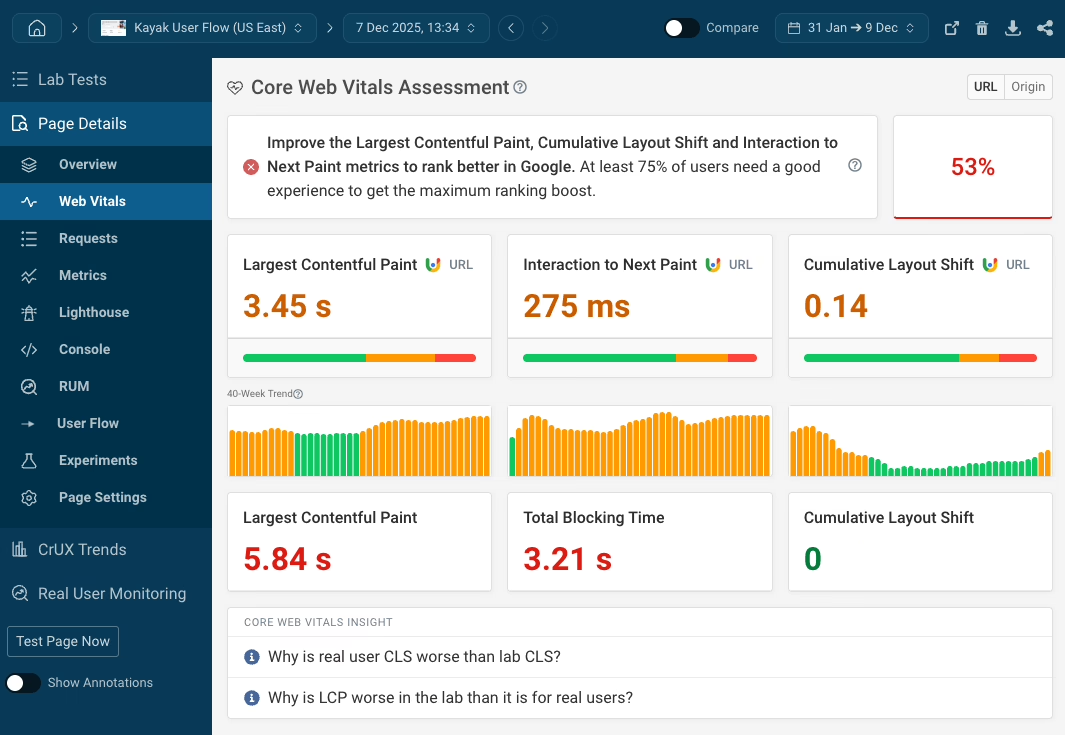
Even the shopfront application (which is the visible part of the application) has seen increased demands. Google has introduced Core Web Vitals, which set various guidelines for ecommerce sites. These guidelines affect the search engine rankings and actual sales conversions for web pages.
- LCP under 2.5 seconds is the main goal in ecommerce so the main product image and price can display before the shopper loses focus.
- INP under 200 milliseconds enables instant responses to user interactions such as product filter selection, variant selection, and the “Add to Cart” button.
- CLS under 0.1 keeps a late-loading trust badge or shipping estimator from pushing the checkout button almost out of sight for the shopper.
These aren’t vanity metrics. In a well-known story among practitioners, a large national parts distributor underwent a migration of their system and met every functional spec, but a tool to look up inventory once took at most a second and now took 20 to 30. Order velocity collapsed within a week and the team reverted the system. The lesson that was learned from similar situations is that performance is a spec, not an aspirational goal. If it is not load tested before launch with a substantial volume of data, it will not be able to handle the load once it is launched.
The Platform Decision: Shopify, WooCommerce, or Custom
Every platform pitch you receive is probably from someone who relies on your decision. It would be more practical to approach the decision by listing the limitations your business has and picking the smallest system that works with those limitations.
| Aspect | Shopify | WooCommerce | Custom / Headless |
|---|---|---|---|
| Time to first order | Weeks | Weeks with a WordPress team | Months |
| Product model | Capped at 100 variants per product | Effectively unlimited, hardware-bound | Whatever you design |
| Checkout control | Constrained outside Plus | Full control, plugin quality varies | Full control, you own every failure mode |
| Ongoing ownership | Shopify handles infrastructure | Your team owns hosting and plugin updates | Your team owns everything |
| Best fit | Standard catalogs, fast launch, DTC | Content-heavy stores, existing WordPress footprint | Custom rules, multi-brand, unusual checkout, marketplaces |
The 100 variant Shopify limit is documented in this Shopify and WooCommerce comparison, and is the unspoken reason many Shopify evaluations end. If you sell a product in twelve sizes across four materials in three colors, you are already at the limit. WooCommerce or a custom solution is the correct choice, and it is better to find this out in week one as opposed to month six. Our Shopify vs WordPress for ecommerce guide has a more in depth discussion of the pros and cons of each solution.
When headless earns its complexity
Headless commerce allows for the separation of the customer-facing frontend from the commerce backend. This approach is especially useful in larger catalogs and multi-vendor setups. A detailed example of this approach can be found in the headless commerce case study. Specifically, a mobile sale page load time decreased from 5.2 to 1.8 seconds, and mobile conversion increased 34 percent, after the specialty retailer separated its Magento connection from its React storefront and deployed edge caching. The separation cost $380K and took sixteen weeks to complete. Both the cost and the time should be considered. The results didn’t come from simply going “headless” — they came from careful engineering around hydration, deferred scripts, and a checkout flow that avoided adding new delays.
Headless is worth its complexity when:
- Content and commerce teams are required to publish independently at different frequencies.
- The current platform is a constriction on either performance or merchandising.
- You have either an internal or a partner resource that can manage more integrations, more performance control, and more release pipeline management.
- There is a specific business limitation, not a general feeling that the existing stack is outdated.
Our write-ups on headless CMS choices for ecommerce and our write-up on Next.js ecommerce architecture trade-offs provide more detail and perspective on how these builds produce a return on investment.
A Reference Stack, and Why It Matters Less Than You Think
The conversation around technology has narrowed and matured, particularly around ecommerce. On the frontend, most serious ecommerce web applications are built on some combination of Next.js or React with TypeScript, styled with Tailwind CSS, using a component library like shadcn/ui, and React Query for state management. On the backend, popular choices include Node, Django, or Laravel, coupled with PostgreSQL for the primary database and Redis for caching coupled with Kafka or SQS for asynchronous messages. Observability is built on top of this: structured logs, metrics collected in Prometheus and displayed in Grafana, and order fulfillment traces.
None of that decides whether the store works. What decides is whether the team applies the boring parts consistently:
- Postgres discipline, which includes indexes, query plans, partitioning, and zero-downtime migrations. Ecommerce workloads are query-heavy and can be uneven. A missing index on an order status join can turn a quick lookup into a task that takes thirty seconds.
- Idempotency has to be implemented everywhere money moves, including payment webhooks and order creation as well as inventory decrements. Each of those operations must have a unique key in order to avoid the unnecessary creation of a second order and a second shipment.
- API hygiene at scale is critical too, including cursor pagination, transparently limiting the field results, early results filtering, and data compression.
- Frameworks are cheap, but making a product page render fast on low-end devices is not.
There are not a lot of big brand names, but that is the point. The stacks merged, but the execution did not.
The Development Stages Where Projects Are Won or Lost
A good process will allow you to see the important decisions before the code irreversibly sets those decisions. The order of the stages below is more or less a standard, but the questions you ask during these stages are what really differentiate a successful launch from a failure that is bound to end in a redo.
Discovery
Bring something tangible. This could be a product spreadsheet. Bring a sample of last month’s orders. Bring the promotion rules or the shipping exceptions that make your support inbox overflow with emails. Bring the weird returns that confuse your support staff. Generic feature lists bring generic estimates. Bringing real data brings an actual chance for an accurate estimate. After discovery, you should have a feature list that is tied to defined business goals along with a risk register and a system map showing which application owns what data.
Design
Wireframes for the shopping path first with the other details coming second. The deliverable must include the sad paths. This means you need to show the design for the paths for cases like out-of-stocks, declined cards, expired discounts, interrupted checkouts, and fulfilled but unsatisfactory purchases. A checkout that only works in the happy path is not a design.
Engineering
An MVP requires a compromise. Select one payment method, one shipping option, one merchandising decision, and protect the buying path. Everything else can wait. In the WooCommerce build for NudFud, the difficult task was not the checkout. It was convincing the product, certification, and content structures to enable consumers to evaluate variants prior to purchase. That’s the kind of scoping call MVP engineering exists to make.
Testing
Test the corner cases, not the obvious success path. Declining payments, double submissions, race conditions on inventory, expired/partially processed webhook calls. A Stack Overflow thread on a Web application stress test (257 upvotes, thirty answers) exists because most development teams significantly underestimate this.
Launch and post-launch
Launch is not an event, it is a plan. Deployment order, data verification, analytics checks, a support owner on call, and a documented rollback. Once launched, the store will provide an indication on how well it is operating. Search queries with no results, failed steps of the checkout process, and support requests that repeat are worth your attention more than the roadmap you created a month ago.
Wondering how your store shows up in AI search? We put together a short visibility snapshot. Get the snapshot.
MVP Cost, Timeline, and What Moves Them
Founders want a single price and a single delivery date, but ecommerce projects rarely deliver either with certainty. A store with a standard catalog and a hosted checkout carries a much different risk profile than one juggling subscriptions, custom pricing, marketplace logic, and several back-office integrations. As a planning range:
| MVP approach | Typical cost range | Typical timeline |
|---|---|---|
| Shopify or WooCommerce MVP | $10,000 – $50,000 | 4 – 12 weeks |
| Custom or headless MVP | $50,000 – $150,000+ | 3 – 6 months |
Each of the aspects that contribute to the final cost — scope, migration volume, integration quality, content readiness, and how quickly your team makes decisions — can increase or decrease final costs by a factor of two. Clean product data and a single decision-maker can allow a team to make more progress on a project, whereas a team still establishing the process of order fulfillment may face more complex issues. For more breakdowns of specific features and platforms, see our final spreadsheet on the cost of developing an ecommerce website.
Signals that justify more investment
Scaling decisions should follow the evidence from your own store, not a competitor’s press release. The signals worth paying attention to are usually operational:
- When you promote your store and customer traffic spikes, errors may occur during the checkout process.
- Inventory updates arrive late enough that the storefront lies about stock.
- Search doesn’t understand the terms customers actually type in.
- Your store provides services to customers in new locations; however, your platform requires custom coding for new pricing, taxes, and shipping rules.
- Content releases and commerce releases end up blocking each other.
- The team spends more time fixing integrations than improving the customer experience.
If two or three of these issues are present on a continuous basis, then it is time to consider fully rebuilding your technology platform. For more detail on our process for rebuilding technology platforms, check out our playbook on ecommerce rebuilds.
The Failure Patterns That Cost the Most
Most projects that fail do so for the same reason: a set of repeatable process failures that are more often than not the result of operational issues rather than technical issues.
One popular example concerned a senior engineer whose two direct-to-main commits (without review) broke the deploy pipeline. The failure wasn’t a lack of skill — it was the missing review, staging, and CI gates that should have caught it. Another example is a contractor who takes two months to build something, and then claims “the site cannot be made responsive on large screens without breaking.” This is not a technical response. It is a communications failure, which most likely is a result of incomplete scope and the lack of acceptance criteria for different types of devices.
The patterns worth designing against:
- Backends built as CRUD. These lack idempotency, retries, dead-letter queues. Duplicated orders and silent failures occur.
- Migrations without rollbacks. Teams rebuilt everything after a mistake in export caused the previous state to be permanently lost.
- Direct-to-main deploys. Deploy breaks without a PR review, staging, or a gate. Revenue is lost during business hours.
- Performance treated as polish. Load testing is skipped, regressions in latency occur, and are found in production.
- Ignoring operations. Sales usually experiences performance issues before Engineering does. This was the case in the parts-distributor example, and the platform was reverted.
- Fragmented data ownership. No decisions have been made regarding which system is the source of truth for products, inventory, order, customer data, so these all disagree at some point.
Live chat, promotions, and personalization services can only be layered on top of a strong foundation. If a shopper needs assistance during checkout, live chat should be a core component of the service, not a plugin.
How Refact Approaches Ecommerce Web Application Development
We have built over 200 other projects in the ecommerce, publishing, SaaS, and MVP spaces. Our ecommerce work has shown that the available platform is rarely our biggest concern. Our biggest concern is the story the store needs to tell in the first 90 days and which restrictions will come into play on day 91.
Two examples from our work demonstrate our point. For NudFud, a Toronto-based plant-based snack brand, the hard part was the product story: certifications, ingredients, and variant comparisons all had to fit inside the buying path without slowing it down. That’s a content-modeling problem before it’s an engineering one. On the Shopify store for Broya Living, another startup specializing in direct-to-consumer, bone broth subscriptions, the difficulty was as much about the path as it was about the platform. Reducing friction in browsing, subscribing to, and checking out of the store was the main focus of the work. Different scenarios, different stores, same focus.
Our approach is “Clarity before code”: constrain scope and build the smallest system. We stay long enough to see the store through its first real season of use.
What to Ask Before You Sign Anything
Upon reviewing a proposal, you need answers to the following questions.
- What has to be demonstrated in the first release? Describe the customer journey from product discovery to an ordered and delivered product. Everything not on this journey can be done later.
- What platform aligns with the catalog? Assess the variants, subscriptions, pricing rules, tax logic, and the team’s capability in that order.
- Who owns each integration? Name the source of truth for inventory, orders, customers, payments, and shipping. If multiple systems claim the same data, you have a bug that will happen for certain.
- What happens when something breaks? There must be documented handling for payment declines, missing inventory, webhooks that time out, and deployment interruptions.
- What will you use to determine readiness? Agree on checkout, performance, accessibility, analytics, and security criteria before the start of development.
- Who owns the store post-launch? Clarify ownership of response and updates along with the cadence of updates.
Once the store is live, base your decisions on evidence rather than opinion. Using a tool such as Querio for data warehouse insights can help a team analyze LTV, CAC, and cohort data without having to wait for an analyst to create a report each time.
None of this is glamorous. Idempotency keys, PR reviews, load tests, and rollback plans are the less glamorous aspects of building an ecommerce web application. They are also the aspects that will determine if the store you launch will be the store you are still running in eighteen months. If you are having trouble figuring out which of these decisions to make before you embark on a year-long build, that early scoping work is exactly what Refact’s ecommerce development team is primed to do.
Building or replatforming a store? Let’s talk. Free 30-minute call, no pitch.

Masoud Golchin is a backend developer at Refact, working on server-side systems, internal tooling, and infrastructure. He builds and maintains the services that support both client projects and the team’s day-to-day development workflow. His work includes backend logic, developer tools, system reliability, and the technical foundations that allow products to scale and operate consistently. At Refact, Masoud focuses on creating practical engineering solutions that help the team move faster while keeping systems organized, maintainable, and dependable.
More from Masoud Golchin

