Shopify vs WordPress for Ecommerce: A Real Guide
You’re looking at two tabs, one with Shopify and one with WordPress.


This is what you get with Shopify vs. WordPress for ecommerce. It is not a comparison of a monthly fee and a free download. This is about who takes the work, the risk, and the cost of running a store. The guide shares the nitty-gritty details to compare the costs and ultimately the risks of both platforms to your business.
Why the Sticker-Price Comparison Misleads You
WordPress core and WooCommerce may be free to download, but that doesn’t mean the store runs for free. WordPress needs hosting. There are backups to consider, security, performance tuning, managed updates, licenses, and a tech lead. Shopify’s pricing bundles hosting and security, removing some of the burden for teams that lack development support. An excellent comparison from Website Builder Expert breaks down the pricing differences.
Instead of asking “what’s the cost per month of this service,” what we really need to understand is “what’s the total cost for running this store over the next 12 to 24 months when we factor in hosting, apps, maintenance, developer time, security incidents, and the operator’s time?”
If no one on the team can say who’s responsible for updates, backups, and 2 AM recovery, then the affordable platform isn’t actually affordable, it’s just hiding labor costs.
That labor is most noticeable when the business is still gaining traction. The time spent figuring out why a plugin is not talking to another plugin is time that could have been spent talking to customers, figuring out what the best price is, or running an ad. We think that the platform you use for your business should be more a part of your thinking around your product, as opposed to being your first consideration when you are shopping. Like we say in our guide on continuous product discovery, you should validate your assumptions before you begin a big project.
How Each Platform Actually Behaves Day to Day
Where Shopify shines is that operating a Shopify store is like running a tool for a focused business. You log in, open Products, post something for sale, add a payment method, manage orders, and call it a day. You don’t pay for a server, you don’t manage a server, you don’t configure caching, you don’t worry about PHP, you don’t worry about disrupting your cart by installing security upgrades, and you don’t worry about a broken security upgrade. The catch is that you’re locked into a managed platform, apps can stretch what Shopify does, but a truly unconventional checkout flow or a very specific data structure may run into limits you can’t get past. A developer who has a non-standard fulfillment flow will end up using a bunch of apps that communicate poorly with each other.
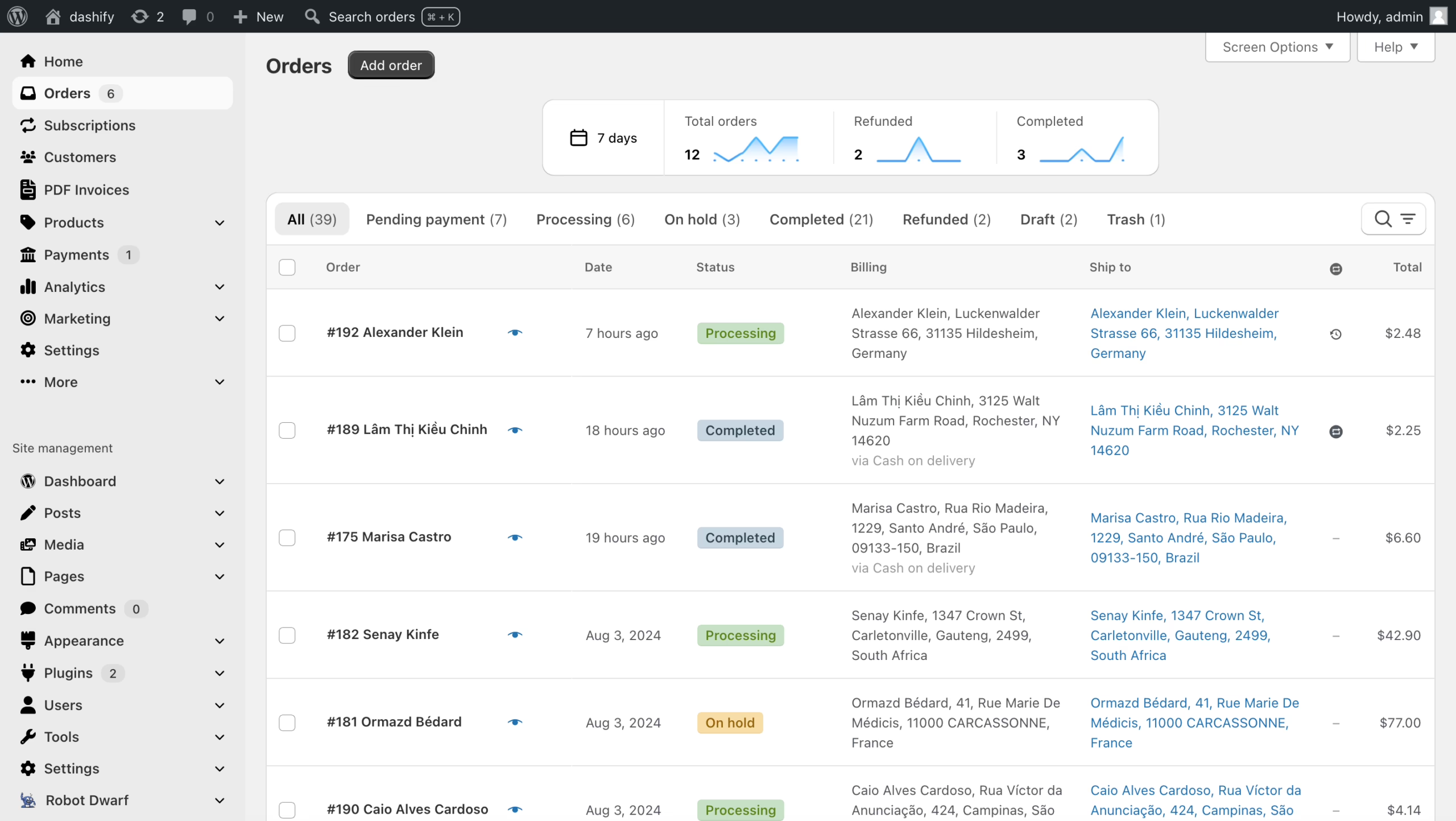
WordPress and WooCommerce feel more like assembling and maintaining a machine. You choose a host, you install WordPress, then WooCommerce, select a theme, configure payment and shipping, and pick how you’ll manage backups, caching, SSL, and updates. You get real ownership of the code and the content model. Teams that are able to run it get flexibility that Shopify cannot match. Teams that cannot operate it end up paying a developer to keep it stitched together.
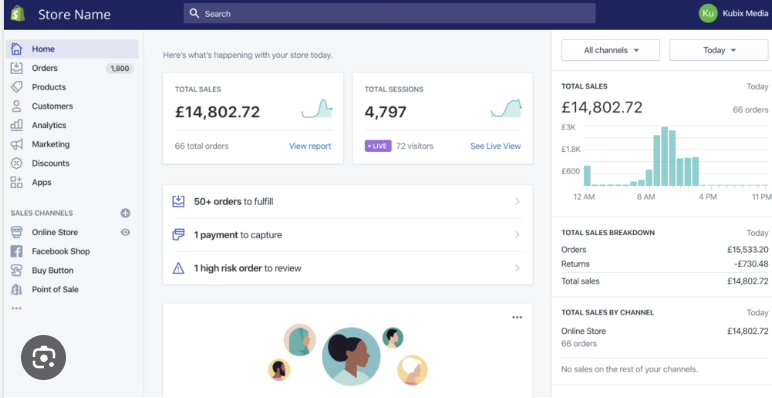
| Task | Shopify | WordPress + WooCommerce |
|---|---|---|
| Launching | Choose a theme, configure products, connect payments, publish inside a hosted system | Set up hosting, WordPress, WooCommerce, theme, plugins, payments, backups, and security |
| Adding products | One commerce-focused dashboard | WooCommerce inside the broader WordPress admin |
| Running a sale | Adjust discounts, collections, and campaigns from the admin | Configure WooCommerce rules, extensions, and sometimes theme code |
| Adding integrations | Install an app or connect a service | Select, configure, update, and test a plugin or custom integration |
| Handling outages | Shopify manages the underlying infrastructure | Your host, plugins, theme, and developer process all decide recovery |
| Control | Faster operation, tighter platform boundaries | More control, more responsibility |
Shopify gives you simplicity and puts limits on you. WooCommerce gives you control and maintenance. Neither is always right. The mistake a lot of founders make is choosing control when nobody on the team has time to maintain it. That is in part how a WooCommerce store slowly calcifies. Nobody dares to update the theme, a plugin update breaks variant pricing, and the marketing team stops asking for changes since every change needs a developer.
Performance, SEO, and Where Each Platform Breaks
Shopify tends to win in default performance. An independent benchmark showed median mobile Largest Contentful Paint in 2.1 seconds and desktop LCP in 1.4 seconds. WooCommerce stores on shared hosting brought up mobile PageSpeed scores of 25 to 40 and LCP of over 4 seconds. The benchmark showed that, with managed hosting, and an optimized theme, WooCommerce can beat those numbers. This means Shopify is fast without work, whereas WordPress is only fast when work is done.
There are some similar findings on checkout. One benchmark published in Shopify’s own eCommerce platform comparison indicates that the Shopify checkout is 17% faster than WooCommerce, and that 93% of Shopify stores are considered fast, in comparison to the 15% of WooCommerce stores. While these numbers should be taken with a grain of salt, the data shows what is apparent to most users: Shopify checkout is fast, while WooCommerce checkout is slow.
The WooCommerce team is well aware of this issue. They have acknowledged long-standing community problems in a discussion in a GitHub repository about their custom order table and in another concerning the redesign of checkout, which is also very old. WordPress is absolutely capable of supporting major 6- or 7-figure stores, it just requires an engineering effort to do so.
When it comes to SEO, the “Shopify vs WordPress” discussion is essentially flipped. WordPress actually gives editorial teams more control over content types, URLs, schema, and other important SEO tools, like Yoast or Rank Math. Shopify’s out-of-the-box setup handles SEO cleanly for straightforward catalogs, but any store publishing heavy editorial content, guides, comparisons, glossaries, expert Q&A, will eventually bump into limits WordPress simply doesn’t have. For teams with a solid content-based growth strategy, WordPress is the clear winner. For teams with advanced product offerings that use paid customer acquisition and limited product catalogs, Shopify is the clear winner. Some teams that want to improve their store’s search visibility even further bring in a specialist, for example, the Dublin SEO eCommerce team, who focus on getting products noticed inside AI-driven shopping answers.
What the 12 to 24 Month Cost Really Looks Like
Shopify Payment math is critical because that is where a lot of the “Shopify tax” complaints originate. Shopify’s Shopify Payments fee documentation states that in the case that Shopify Payments is a store’s only payment processing option, then that store is only charged the card processing rate and the subscription with no third-party fee for completing transactions. However, if another payment processing option is offered alongside Shopify Payments, then Shopify adds a per-transaction fee. That is the line item that frustrates and surprises customers the most.
In contrast, WooCommerce offers a free platform in which customers must provide their own hosting and build the rest of the components. This includes a premium theme, ongoing security monitoring and backups, extensions required for subscription and booking functionality, and many other line items that all cost money. While each component itself is fairly inexpensive, the overall cost of running a WooCommerce shop is comparable to, if not more expensive than, a mid-range subscription of Shopify.
| Cost category | Shopify | WooCommerce |
|---|---|---|
| Core platform | Monthly subscription | Free core software |
| Hosting | Included | Purchased and managed separately |
| Security and maintenance | Handled by the platform | Owned by your team or a partner |
| Extensions | Apps, often recurring | Plugins, often recurring |
| Payments | Card rate; third-party fee if you leave Shopify Payments | Depends on processor and setup |
| Developer time | Usually custom UX, theme, or integrations | Often infrastructure, conflicts, updates, and custom features |
| Main financial risk | Apps and payment choices creep upward | Internal labor and technical incidents exceed the “free” savings |
Industry claims of “35% ROI within 30 days after moving from Shopify to WooCommerce” are suitable for the marketing department, not actual performance data. That said, properly designed WooCommerce ecosystems run by teams capable of sustaining the system can offer substantial cost savings when scaled. The same WooCommerce ecosystem, in the absence of such a team, becomes a monthly cost and a stressor. If you’re looking to go beyond just software, take a look at how Crank11 rates growth operations models versus agencies, freelancers, and in-house staffing. For a pure cost-savings calculation, our ecommerce site development cost guide encompasses the real cost range.
Wondering how your store shows up in AI search? We put together a short visibility snapshot. Get the snapshot.
Match the Platform to the Business, Not the Trend
Begin with the business you run, not the platform you admire.
A small, focused catalog with limited technical support
You boast a curated product line, have no in-house engineer, and an aggressive go-to-market timeline of this quarter. Shopify is the clear play here. Buy a theme, configure the catalog, connect payments, test the user journey, and focus on user acquisition. You do not need to own all the tools in the stack. You need a system you can run without needing to hire a developer for routine tasks. In our engagement with Broya to create their Shopify D2C store, the greatest opportunity was not in the platform, but in strategically building product detail pages, collections, and subscription checkout to increase conversion of existing users.
A content-led business where commerce is one of several revenue lines
You publish articles, podcasts, videos, research, or member content. While commerce is a business support, it is not the only product. WordPress along with WooCommerce is likely the stronger answer because the heart of your business growth is likely to be editorial workflows, taxonomies, and SEO governance. This is applicable for media brands, education companies, membership organizations, and content engine category experts.
Market data, while seemingly conflicted here, is extremely beneficial. In an analysis of live Shopify stores, TechnologyChecker.io places Shopify at 45.99% of the ecommerce platform market compared to WooCommerce at 17.79%. A broader HTTP Archive read from GravityKit puts WooCommerce ahead across the whole web with 6.64% versus Shopify’s 4.76%, but the picture flips among the top million most-visited sites, where Shopify takes the lead. In this case, it is not the case that one platform is the clear winner. Both platforms are significant enough that the choice is not necessarily based on which is more popular. The core of your business should influence your decision.
A product with unusual commerce logic
You need complex product configurations, B2B pricing, tiered fulfillment, international operations, or an a la carte checkout experience that other vendors can’t provide. Consider a hybrid setup with Shopify (or WordPress) for commerce and the Next.js or Astro frontend for the store. This is a more expensive option, and it only makes financial sense when moving the needle on the customer experience, content model, or catalog rules justifies the additional cost. Most of the build for the WooCommerce platform for NudFud went smoothly, and the checkout wasn’t actually the hard part, the real difficulty was getting the product structure, certifications, nutritional data, and content model to click together so a shopper could truly understand what they were buying.
A Short Decision Checklist
Answer each question with yes or no.
| Question | Points toward Shopify | Points toward WordPress |
|---|---|---|
| Does the team lack engineering support? | Yes | |
| Do you need to launch quickly? | Yes | |
| Is content-led marketing your main growth channel? | Yes | |
| Do you need custom product or pricing logic? | Yes | |
| Do you expect complex international operations? | Yes | |
| Do you already have someone who can own updates and hosting? | Yes | |
| Is the first-year cash budget tight? | Yes | |
| Are you willing to treat the store as a piece of software you maintain? | Yes |
Having four or more check marks in the Shopify column increasingly suggests Shopify, while four or more check marks in the other column increasingly suggests WordPress. If the answers are split down the middle, additional comparison pages will not help. What is missing is more clarity around your product needs, which will help determine the best platform.
Before You Build, Pressure-Test the Choice
This should be addressed as a product framework decision rather than a vendor decision. Most of the time, clients can determine the best platform to use within a week.
- Confirm buyer intent. Talk to five prospective customers. Determine what they buy, what stops them from buying, and how you plan to meet their needs.
- Study competitors. Tear down the websites of five stores that are similar to yours. Take note of pricing, navigation, product information, checkout friction, content depth, and any products or services featured on the site.
- Set the boundary. Define the catalog of products you plan to sell, payment regions, shipping regulations, required integrations, content, and launch date.
- Compare prices on both paths. Consider the cost of a Shopify vs WooCommerce build with themes, apps/plugins, hosting, maintenance, integrations, and post-launch ownership. Budget for at least the first year, not just the launch.
If you’ve already launched on the wrong platform, there’s no need to panic-migrate. Our ecommerce replatforming playbook outlines the situations when a replatform is actually worth it. If you are still weighing both, our Shopify vs WooCommerce comparison goes one step deeper analyzing checkout and SEO and the failure modes of both.
For serious ecommerce businesses, Shopify and WordPress both work. However, the platform that will actually be working in a year is the one your team is able to run. If you’d like assistance shaping your catalog, content strategy, and payment requirements into a solid platform pick with a realistic scope, that’s precisely the early groundwork our ecommerce development team handles.
Building or replatforming a store? Let’s talk. Free 30-minute call, no pitch.

Saeedreza Abbaspour is the CEO of Refact, where he works across product, engineering, and sales. He sets the studio’s direction while staying closely involved in the work itself, from shaping product strategy and UX architecture to helping define the technical systems behind Refact’s projects. His role connects business thinking with hands-on product execution, giving him a practical view of how software should be planned, built, launched, and improved. At Refact, Saeedreza focuses on building a studio that can move quickly, solve real client problems, and turn ideas into reliable digital products.
More from Saeedreza Abbaspour

