B2B Ecommerce Website Design: A 2026 Plan
You will find that the majority of B2B ecommerce projects are set up to fail from the get-go because they begin with the wrong question.


Miss the mark there and you have a site that may look the part but is silently bleeding revenue. Reorders end up as emails. A quote request goes to languish in some sales rep’s inbox. You show a customer the wrong price or catalog and you have lost their faith in the channel. Good B2B ecommerce website design is not so much about hero imagery as it is about mirroring the way companies buy and making the workflow quick on a mobile device.
We have written this for those with a build, a replatform or a major upgrade on the books for 2026. We want to cover the decisions that put numbers on the board: account architecture, pricing, mobile, product data and the right sequence of work so you can ship the site without causing the sales team any grief.
B2B Ecommerce Is an Account Operations System
Do not think of your storefront as a brochure. It is an account operations product. What you are after is to take the work that is currently being done in spreadsheets and on rep phone calls – the POs, the invoices, the contract pricing and approvals – and put it online. Some visual polish is only a matter of credibility. What drives the revenue is how well the site manages these things for a company that has just logged in.
The figures back this up. McKinsey puts self-service digital channels at some 34% of B2B revenue, while DigitalCommerce360 has in-person sales down to 17% in 2024, a 22-point drop in two years. Surveys tell us 60 to 80 percent of B2B buyers would rather not involve a rep, and 67% will close a high-value deal without speaking to anyone. Deloitte Digital’s 2026 maturity study is even more blunt: suppliers with top-tier digital commerce programs outpace their annual sales targets by 110% compared to the rest.
That is not to say the visuals are irrelevant. They are simply the layer on top of the system people are buying through.
How B2B Buying Differs From B2C in Practice
There is a world of difference between a B2C store selling to a man with a credit card and a B2B store selling into an organization with its own history and rules. That is no slogan. Yet you see too many redesigns try to copy B2C patterns and come to grief.
B2B vs B2C Ecommerce at a Glance
| Factor | B2C | B2B |
|---|---|---|
| Buyer | One person | A buying group, often 6+ stakeholders |
| Pricing | Public and fixed | Contract, tiered, account-specific |
| Discovery | Browse by category | Search by SKU, spec, compatibility |
| Order size | Smaller, one-off | Larger, repeat, scheduled |
| Checkout | Card and ship | PO, approval, net terms |
| Success metric | First conversion | Time to repeat order |
It comes down to what you are optimizing for. In B2C it is first conversion. For B2B the metric is time to repeat order, or time to value. Can a buyer put in last month’s order in two clicks? Then you have saved an email thread. If not, you have built a cart and a brochure. NetSuite puts it plainly in their design tips for B2B ecommerce: in a few seconds a buyer decides if he can trust you with his procurement.
Design the Account and Pricing Model Before the UI
What passes for a “design” problem in B2B is usually a configuration issue in disguise. The purchaser can’t submit because you never modeled the approver role. The new branch has no catalog because you structured the hierarchy around the customer and not the location.
So before you are off wireframing a homepage or choosing a theme, put some thought into the data model. At the very least you need to have:
- Company and locations. One legal entity could have a dozen ship-to points with different rules.
- Roles. The admin, the approver, the purchaser. Maybe finance.
- Catalogs and price lists. Who sees what and for how much.
- Payment terms. Credit limits, vaulted cards, Net 30 or 60.
- Approval rules. Where the thresholds are for escalation.
Shopify’s native B2B is constructed around these very objects. Adobe Commerce and BigCommerce have their own version of the same primitives. With WooCommerce and a consumer-first theme you are left to piece the data model together with plugins and custom fields; the seams will eventually show as bug reports.
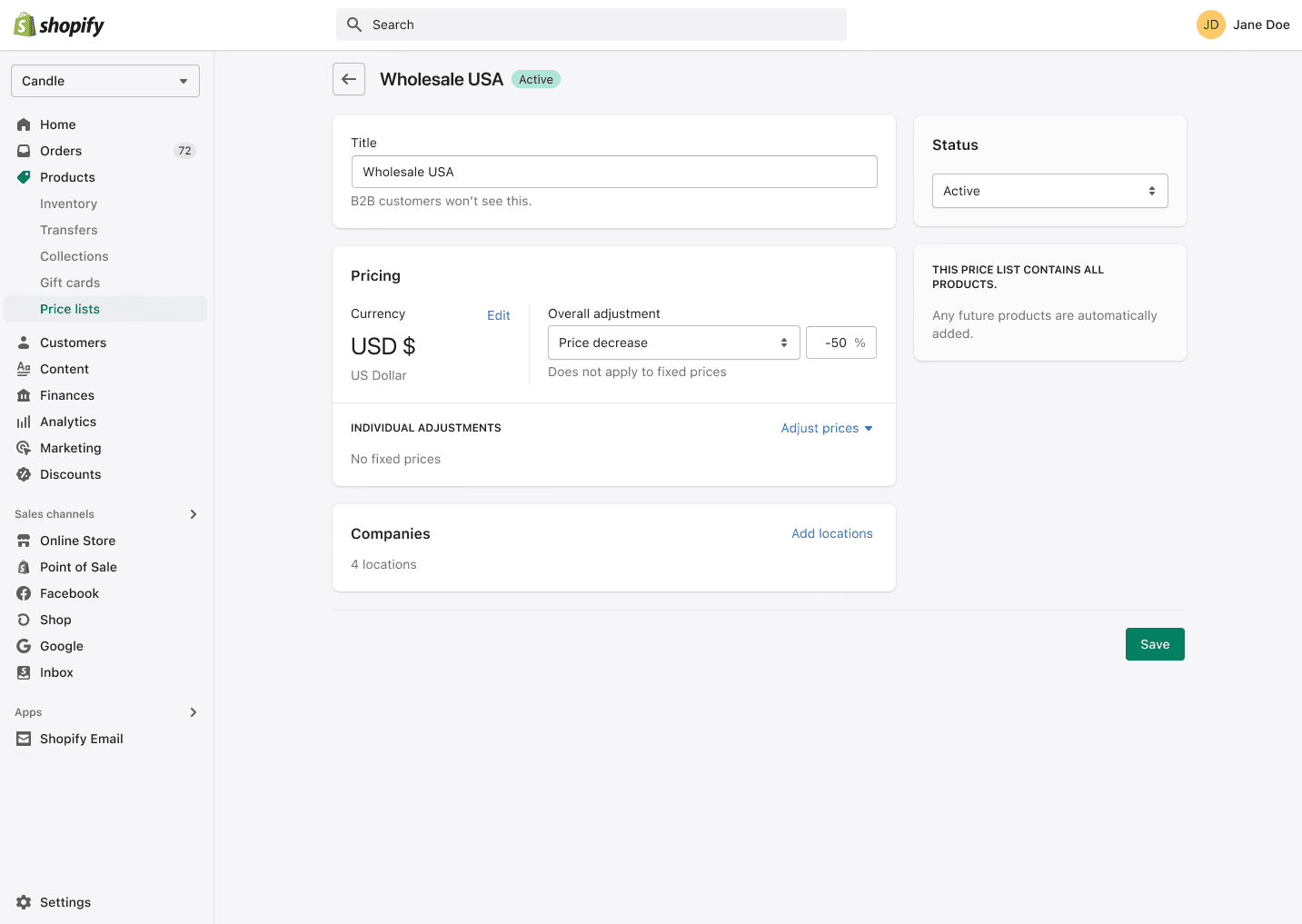
If you read the threads on Reddit you hear the same story from those who have been there. They faked tiered pricing with discount rules, or used email for approvals. Each is fine on its own, but put them together and you have an experience nobody can trust and a site you cannot support.
Quick Order, Reorder, and the Logged-In Experience
For the most part, the homepage is for search intent and first impressions. But once a customer is in, the best features are the unglamorous ones. A quick order form for a list of SKUs from a CSV. Sortable tables, not grid-style cards with lifestyle photos, because that is how they compare products. A reorder button. As any practitioner will tell you, the first complaint you get is never about the way the site looks. You can put it in a sentence: “I had to retype 100 SKUs since your bulk uploader wouldn’t take our part numbering format.” Fix that kind of thing and the digital channel will begin to make email obsolete. Don’t, and you are left with a site that is nothing more than a marketing piece.
Mobile is where you have to be. About 80% of B2B buyers are on their phones for research and to buy, having come from a job site or warehouse to check a supplier’s site. The whole flow for quotes, approvals and bulk orders has to function on a phone, not merely the product pages. If your test plan is desktop only, you are being complacent and testing the easy part.
We see this in our ecommerce UX best practices: put the user’s intended action front and centre, make tables first-class UI and consider performance a design element.
Serve the Buying Group, Not Just the Buyer
According to Forrester’s 2026 State of Business Buying, the B2B buying group is bigger and slower these days; you are looking at six or more stakeholders for any purchase of consequence. Your site needs to facilitate a group decision even if there is only one person with the mouse.
There are two ways to do it.
One is a role-aware UI. Put the purchaser in front of his order history and buy buttons. Let an approver see a queue of pending orders with the budget context he needs. An admin gets account-level settings. It is the same product page but rendered differently for different people in the company.
Then there is the advocacy kit. The guy on your site is rarely the one who signs off. He has to go back and put the case to procurement or finance. Give him the tools to do it. A shareable URL for the product page he doesn’t have to log in for. A PDF with the specs and a price. A case study with some named customers and a result to show for it. These aren’t frills. They are what your champion needs to win an argument you are not part of.
Product Data Is the Silent Foundation
Good design means nothing when your product data is bad. Have one supplier say “diameter” and another “width” and your faceted search is dead. The buyer can’t filter and the site feels broken, no matter how well the pages load.
And don’t forget that procurement is using Perplexity and ChatGPT to shortlist you. Those tools will pass over any listing with flimsy or inconsistent info. Structured data is an AI-discoverability issue now as much as an SEO one. You have to get down to the unglamorous work of normalising names and standardising attributes, feeding it from a PIM if you can. Do it before you start redesigning the product page. We did exactly that on a WooCommerce build for NudFud, structuring the data around the certifications buyers were actually comparing. The logic is the same in B2B, only with more roles and attributes to contend with.
Pick the Platform Against Real Requirements
Choosing a platform is not about feeling. It is a scorecard against the rules of your account model.
Shopify with B2B is the way to go for speed if your pricing and ordering are fairly standard. The native catalog and price list model sidesteps plugin risk. Try to impose custom logic on it and you will pay for it.
BigCommerce B2B Edition is in the same ballpark, though it has some native multi-storefront capability and B2B features that Shopify needs an app for.
If you have large catalogs and need heavy customisation, Adobe Commerce is the answer, but expect engagements in the six figures and the operational overhead to match.
WooCommerce is the most flexible and least expensive to start with for content-heavy sites where editorial and commerce live in the same CMS. But you will incur costs down the line for the custom B2B rules the core doesn’t give you.
For industries where the workflow is the product and nothing off-the-shelf will do, a custom or composable build is warranted. That is where headless and MACH earn their keep. We get into the tradeoffs of the headless ecommerce CMS in some detail. For a smaller or mid-market view, our WordPress vs Shopify for ecommerce notes cover the ground.
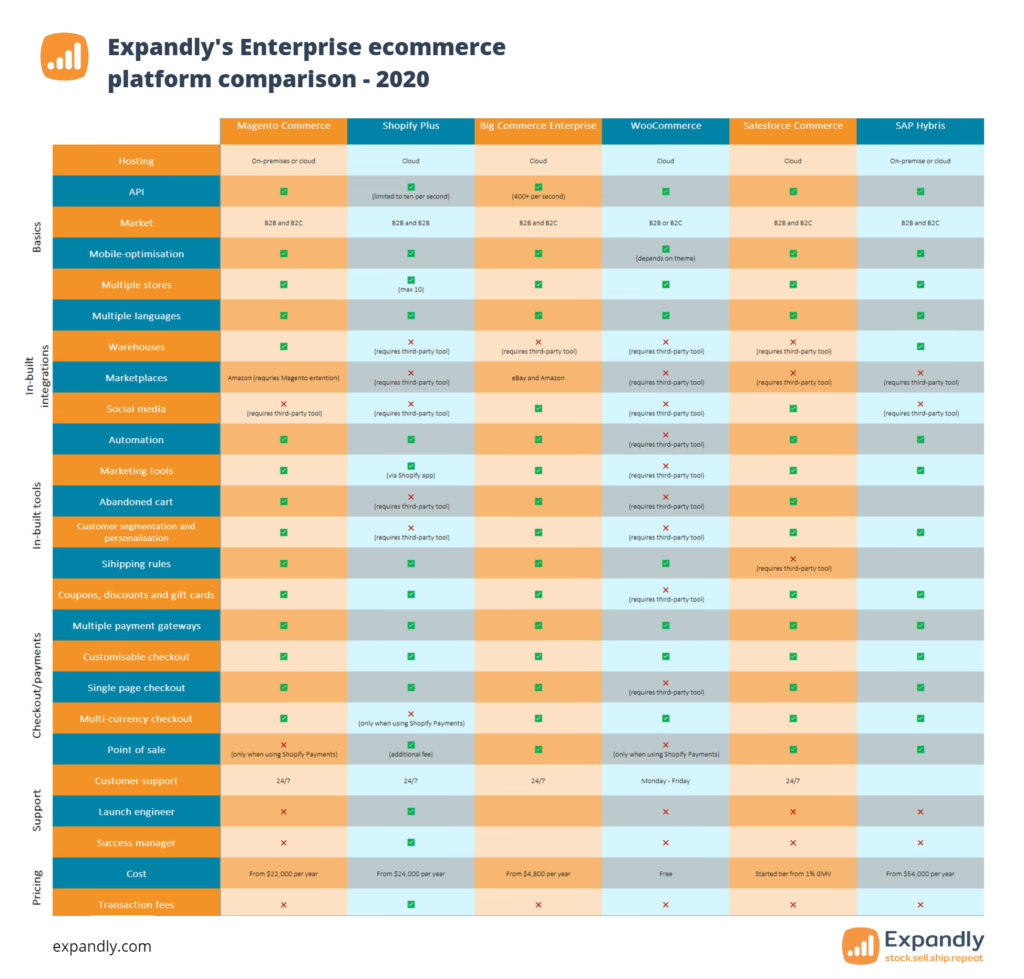
Talk to practitioners and you will find a B2B MVP on a configured platform is a 10 to 14 week job running $35,000 to $60,000. Get sophisticated with ERP integration and multi-region catalogs and you are well over $100,000.
Wondering how your store shows up in AI search? We put together a short visibility snapshot. Get the snapshot.
Integrations Are a First-Class Workstream
When a B2B project fails to deliver, it is seldom the platform’s fault. More often it is because the ERP and CRM integration was pushed to phase two. If the site’s prices don’t tally with the ERP, the buyer loses faith. If an order doesn’t go to fulfillment without a hitch, operations will create its own shadow process.
Make integration a primary stream in the budget from day one. Pick your source of truth for inventory, orders and customers and design the flow to suit. Our portals and dashboard development is built on those very patterns for sites that require more than just a storefront.
Ship an MVP, Then Iterate by Account
You will be hard pressed to find a big-bang B2B launch that does not disappoint. The feature list is invariably too ambitious for the schedule, or you put the whole thing in front of every customer at once and one configuration mistake turns into a support nightmare.
There is a safer way to go about it, one you will see time and again in B2B replatforming post-mortems. Ship an MVP with a narrow focus: account management, basic ordering, an authenticated catalog. Put it in front of a few friendly accounts and see what they do. Pay attention to where they bounce and what ends up in your inbox. You fix the friction points and then you make room to expand.
Doing things in this order has the added benefit of keeping sales on side. Nothing derailed a B2B ecommerce project faster than surprising the reps; if they think the site is going to eat their commission they will steer customers away from it. Make sure they are part of the rollout and compensate them on digital orders from their books. Do some ride-alongs to figure out the workflows the reps would rather not have to do by hand.
To get the scope right before you start burning budget in development, we have put together a product discovery process to make those calls. And the same goes for the roadmap after you have launched, as we detail in our best practices.
Trust Signals, Performance, and the First Three Seconds
An enterprise buyer will size up your credibility in short order. If your site looks like it is stuck in 2015 or is sluggish on a warehouse laptop, you have handed the deal to a competitor with a better design and an inferior product. It is not about decoration but the fundamentals: put a clear value proposition above the fold, show some named case studies with hard numbers, and have your security badges and inventory info in plain sight at checkout instead of a vague “contact us”.
Then there is performance, which is a matter of trust. We look for sub-1.5 second load times. Core Web Vitals count for both the ranking and the user’s sense of the experience. Let older hardware handle heavy parallax effects and you will be punished for it. Restraint is a sign of competence.
In service-led or logistics B2B, the portal often speaks louder than the storefront in terms of trust. A good example is how Logivo has written up the customer portal for logistics: give them live job visibility and document access and you are taking work off their plate that would otherwise clog their inbox.
What to Measure After Launch
Do not be fooled by pageviews and traffic, weak signals for a B2B operation. What you want to measure is the operational load the site is handling.
- Self-service rate. By account, are they ordering through the site or calling?
- Time to repeat order. How long for a logged-in buyer to re-order what they had last month?
- Search-to-order conversion. Is looking up an SKU actually resulting in an order?
- Mobile transaction parity. Can mobile complete the flow or does it just start it?
- Quote turnaround. From RFQ to quote, and the rate at which quotes become orders.
- Workflow exits. Where do they abandon the site to fire off an email?
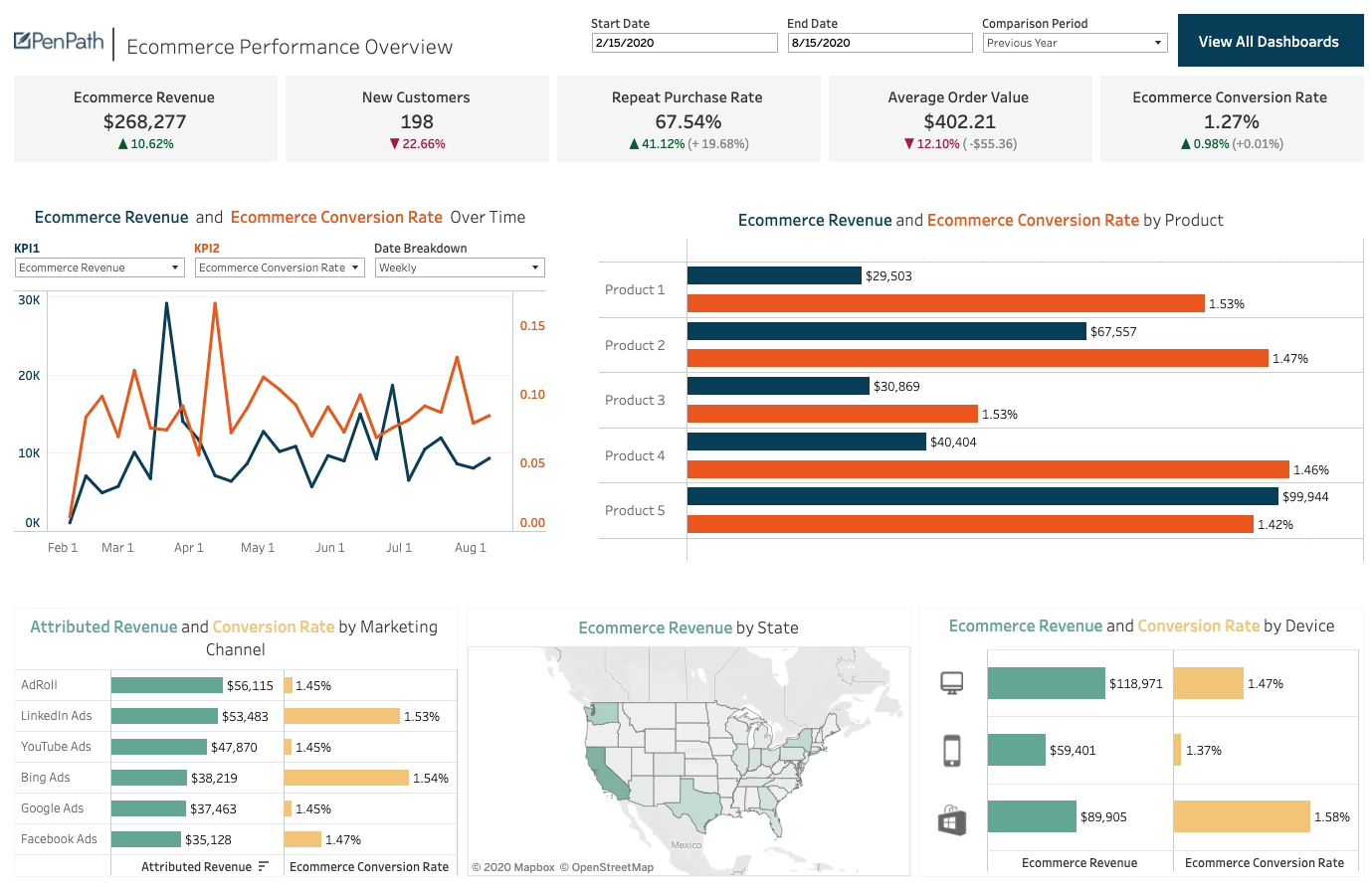
If those figures budge, you are in business. If only the traffic is up, you have made a nice brochure.
A Short Roadmap for Planning a 2026 Build
Sequence it properly and the work is straightforward.
- Start by mapping the way your customers buy now – the approvals, the pricing rules, the integrations.
- Put together the account and pricing model for the different companies and locations.
- Clean up your product data. Standardize the naming and attributes so you can have proper faceted navigation and AI discoverability.
- Test your platforms against your own rules, not a vendor demo. Whether it is Shopify, BigCommerce, Adobe Commerce or something custom.
- Define an MVP for the most painful workflows like quick order and the authenticated catalog.
- Make a line item in the budget for your ERP, CRM and PIM integrations.
- Roll it out to the friendly accounts first with the KPIs set and sales in agreement.
- Measure time-to-repeat-order.
It is no more expensive than any other redesign, provided you make the right calls early on. Our ecommerce development at Refact is designed to follow that sequence, using our discovery process to do the thinking before you are locked into a build.
The B2B sites that will have paid for themselves in 2026 won’t be the ones that are prettiest to look at. They will be the ones that take the most work out of a customer’s day.
Building or replatforming a store? Let’s talk. Free 30-minute call, no pitch.

Saeedreza Abbaspour is the CEO of Refact, where he works across product, engineering, and sales. He sets the studio’s direction while staying closely involved in the work itself, from shaping product strategy and UX architecture to helping define the technical systems behind Refact’s projects. His role connects business thinking with hands-on product execution, giving him a practical view of how software should be planned, built, launched, and improved. At Refact, Saeedreza focuses on building a studio that can move quickly, solve real client problems, and turn ideas into reliable digital products.
More from Saeedreza Abbaspour

