Product Discovery Techniques That Actually Work
Code is rarely the culprit when a product goes under.


We have put together this guide for those with skin in the game: the business owners footing the bill, the product leads and domain experts, and any operator for whom the risk of building the wrong thing is all too real. You will find ten techniques here that can be relied on when the pressure is on, along with the tradeoffs you won’t read about in most listicles. For a wider view of the discipline, our piece on what product discovery actually means makes a good companion to what follows.
Let us be clear from the outset: discovery is not a phase or a workshop to be checked off. The trend in 2026 is toward a continuous practice run by the product trio (design, engineering and product) with three or four customer touch points a week. It is becoming more strategic. A recent study of some 300 teams showed 80 percent of researchers are now using AI in their work, and the number who consider research vital to business strategy has leapt from 8 to 22 percent in a year.
1. Problem-Focused User Interviews
You know the market but not the day-to-day pain? Start here. The error most teams commit is to ask “would you use this?” and take the polite answer as gospel. Polite feedback is a trap.
Inquire into past behaviour. Put it to them: “Tell me about the last time this occurred. What did you do and what was the cost in time, money or stress?” Opinions don’t matter so much as proof of pain. If they are making no move to address the problem now, they are unlikely to part with your money for it later. But if you see them cobbled together a spreadsheet, a Slack channel and three other tools just to get by, that is a very strong buying signal.
Take a founder talking to project managers who say they want better reporting. Dig a little deeper and you may find the root of it is a workflow issue: leadership meetings are forcing them to reformat everyone else’s updates for three hours on a Friday.
The right interview can be a bit dull. You are after the unvarnished way work is done. Do four or five in a segment and the patterns will reveal themselves sooner than you think.
2. Ecosystem and Community Mining
There are times when you cannot get a direct line. Sales may be gatekeeping enterprise contacts or a regulated buyer will not allow you to record. Then you make do with the evidence on hand, which is often superior to a contrived Zoom.
Look at support tickets, CRM notes, NPS scores or what is being said on G2, Capterra and Reddit. A user is more candid with a stranger on the internet than with a vendor. A publishing platform would do well to pore over three months of support tickets to understand churn rather than hold ten exit interviews with people being polite.
Follow two rules. Be deliberate in your sampling and document the process so your colleagues can have faith in the results. And give your positioning a reality check against how AI summarizers and comparison sites describe your category. Some 94 percent of B2B tech buyers are using AI in their purchasing decisions. If an AI summary of your G2 reviews doesn’t do you justice, that is a discovery problem.
3. Usability Testing on Real Tasks
Watch a user try to invite a colleague with ten minutes to spare before a meeting. If they have to reread a label and click through the wrong screens, the issue is no longer academic.
Usability testing is for that friction. Set a participant to a task like “find last month’s invoice” or “send this draft back to the writer” and let them be. Do not coach them. “I like it” is not data. You want to see where they hesitate or need reassurance.
The Design Council’s Double Diamond framework has its uses in keeping problem definition and solution separate. If a nonprofit admin has trouble assigning volunteers, it is seldom the button label; the workflow is likely at odds with their mental model.
Some habits will make these sessions more productive:
- Be concrete. “Update your billing settings” will yield better results than an open invitation to “explore the dashboard.”
- Know your audience. A friend in marketing is no substitute for a warehouse supervisor.
- Note the expectations. The discrepancy between what they expect and the interface is where you will find the fix.
- Do small rounds. Five tests on an early flow are worth more than one big one once development is done.
4. Behavioral Analytics and Instrumentation
Then there are the problems that only appear at scale. Your interviews may indicate onboarding is in order, while analytics show 60 percent of new users have vanished before they have done anything of note. Both can be true, but only one is a predictor of churn.
Funnel analysis and cohort views will show you where the drop-off is. But be wary of instrumentation put in place after the fact. Inconsistent event names or a lag between action and outcome will quietly invalidate your numbers. You are not going to optimise what you have not instrumented properly. Put pen to paper and define your terms for “activation,” “engaged” and “first value” before you let the dashboards be built.
If you are following a qualitative-plus-quantitative approach, the Product Management Society has a good overview of data-driven product discovery that makes for a useful read. The idea is not to hoard data but to put a finger on the few actions that tell you if users are deriving any real value.
5. Surveys for Comparison, Not Discovery
Do not turn to surveys first; they are no good at uncovering problems you do not already know about. Their strength lies in putting a rank on known issues across a larger population, so use them in the wake of interviews.
Take a SaaS team that has fielded three varieties of onboarding complaint: a survey can tell them which one is affecting the most users. Or a membership platform aware of its confusing pricing might put a simplification to the test. For a more rigorous form of prioritization, there is the Opportunity Score from MYLES. A score over 12 means unmet needs are significant; above 15 they are extreme. It is a defensible way to put a number on things when you have three viable paths and the budget for only one.
There are three ways to keep survey data from being dishonest:
- Stick to a single decision area per survey. You will get better answers than with a mixed bag of topics.
- Do not ask double-barreled questions such as “was the onboarding and pricing clear?” Make two of them.
- Numbers can only point you in a direction. An interview is what will explain why. Never make the survey your sole evidence.
6. Competitive and Category Analysis
Think of competitive analysis as a map of user expectations and where the category’s assumptions fall apart, not some kind of feature checklist. Put yourself in the user’s shoes and sign up with the top three. Run through their onboarding, do the core work. Read the last hundred G2 reviews and a couple of dozen threads on the subreddit. Then have a word with those who have made the switch or given up.
You will see the pattern in the details. Nonprofits are a case in point. Most tools charge per user, a model suited to commercial teams that exacts a quiet toll on an organization run by volunteers. The opportunity is not merely to offer per-org pricing but to position for a buyer the rest of the category has overlooked. It is a matter of being simpler for a first-time admin or stronger for a distributed operation. Those are things people feel.
7. Jobs to Be Done
People hire products to get a job done; they do not buy features. The consultant purchasing CRM software is not after “deal tracking.” They want to put to rest the anxiety before a pipeline review and avoid dropping a follow-up. The writer on a collaborative editor is not buying “real-time comments” so much as trying to maintain his voice while still getting input.
Once the job is understood, the messaging and roadmap sort themselves out. You begin to talk outcomes instead of tools. It also serves as a check against the confirmation bias Chris Jones identifies as the chief anti-pattern in a piece by Teresa Torres on product discovery pitfalls. The fix is to score your assumptions on importance and evidence prior to testing and to focus on outcomes.
If you ask users to design the product you will get their opinions. Ask what they are after and you have your direction.
8. Landing Page and Fake-Door Tests
Test the promise before you start building. Set up a page with a single problem, a single outcome and a call to action – a waitlist, early access, a demo booking. This will not establish product-market fit, but it will tell you if the message is compelling enough to make the right people care.
The framing is as important as the offer. “Turn interviews into publish-ready drafts” has a different urgency to “Help your team put out expert content faster,” even though the tool is the same. One will win out and show you which problem is most acute.
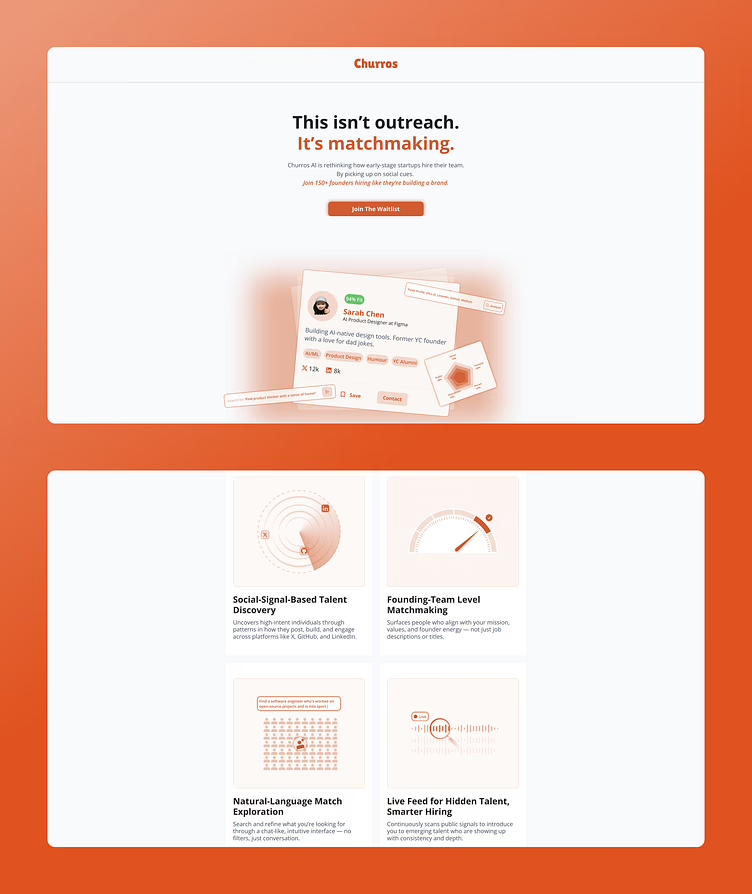
Keep two guardrails in mind. The source of the traffic colours the signal; a signup from a founder community or niche newsletter carries more weight than one from broad paid channels. And do not mistake a signup for a purchase. Treat it as intent and then follow up in person with the first twenty or so. Find out what they were using before and what they expected. That is how you turn a thin conversion into something you can learn from.
9. Problem Validation Interviews
Problem validation is a narrower affair than general user research. There is no room for exploring or pitching with lines like “would you use a platform for X?” You are testing if a particular problem is painful and frequent enough to warrant a solution. Inquire as to behaviour. What does it cost? What happens if you do nothing?
A strong signal is a nonprofit ops lead who has to manually put together volunteer schedules every week because the system does not accommodate shifting rosters. Or a publisher talking of an hour and a half of formatting clean-up per piece. A consultant will own up to losing two renewals this year to client follow-ups left in scattered inbox threads. That is more telling than a “yes, I would probably use that.”
It is at this stage that many an MVP is saved. We had an AI assistant in the works for a project management consultant that was originally conceived to help with “everything.” Discovery forced us to narrow the scope to one job: connecting Slack, Asana, email and meeting notes to give a full picture of the project. The result was a shippable AI MVP for Workform instead of something we would be building on indefinitely.
10. Prototype Testing and Iteration
You can have a team come away from a validation interview with all the confidence in the world, only to see it crumble the instant someone puts your proposed solution to work. A prototype will show you that discrepancy while the cost of making changes is still measured in hours and not weeks.
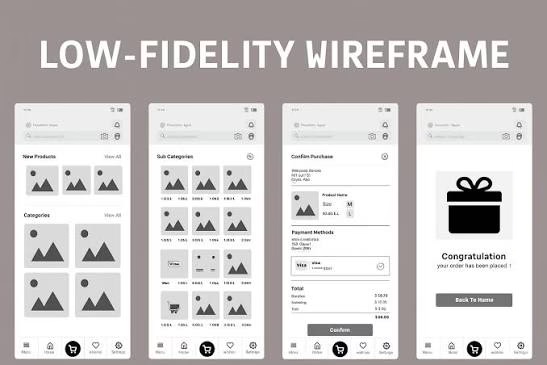
It is what you are asking that counts, not the format. A paper sketch will do if you want to see if users grasp a concept. For sequence or handoffs, put together a clickable Figma flow. But a stripped-down build is only justified when you need the realism for timing or trust. Take a payments flow for instance: a wireframe is fine for checking button order and labels, but it will not tell you if a user feels safe putting in card details.
Most teams misjudge the level of fidelity they need. Go too low and you get no answer; go too high and you end up with reviewers quibbling over colors instead of the flow. Set the fidelity to match the assumption at hand.
To keep iteration honest we follow three habits:
- Put one question to the test. Can they complete the task? Is there trust in the result?
- Note the friction. What made them hesitate, the language that did not make sense, what they did after.
- Retest quickly. The value is in the loop, not in a more polished file.
And before you put any engineering time on the line, our piece on what an MVP means in software development should be read.
How These Techniques Fit Together
Think of these ten techniques as a menu rather than a checklist. You run two or three depending on your position.
Pre-build? Do some problem validation interviews, mine the ecosystem and run a landing page test. Make sure the problem is there and that people will move toward a solution. With early users you can pair analytics and usability testing. The data will point to where the drop is; watching five users will explain why. If you are torn between a few credible paths, rank them with JTBD interviews and opportunity scoring surveys, then use a lightweight prototype to test the riskiest part of the top contender.
There are two ways to fail at any stage. One is to let discovery die once building commences. We have seen it in hundreds of product launches on X: obsessive discovery for funding, then radio silence for six weeks, and finally shipping February’s findings in April. Discovery must be done in parallel with delivery. The other is pilot proliferation. PwC was direct in their 2026 guidance: the organizations that create value stick to a few priorities, they do not scatter themselves with disconnected experiments. The case studies bear it out. A tier-one bank reduced false-positive fraud by 45 percent in under a year by scoping tightly. Another saw an 18 percent revenue gain in retail personalization in thirteen months. In manufacturing you get 25 to 55 percent throughput gains from a well-instrumented project, not from running six pilots side by side.
What Discovery Cannot Do
Discovery is about reducing uncertainty, not erasing it. Look at Editas Medicine closing its CRISPR trial in late 2024. The science was sound and the results were on par with an approved rival, yet they pulled the plug because the commercial position was not. It is a good reminder that even solid discovery can be undone by a shift in the market or business model.
Then there is the matter of AI. It is in nearly every workflow now and excellent for search or summarization, but do not rely on it to form a hypothesis. Teams that put too much stock in its synthesis will find it has quietly flattened the uncertainty. Let it handle the drudgery, but you decide what is important.
Where to Go Next
The pattern holds across the 200 or so projects we have put out in SaaS, WordPress, ecommerce and AI tools: the teams that are clear from the start build better. The cadence and the quality of the questions are what count, not the particular technique.
Our product design and discovery process is meant to settle the matter of which problem to fund and what goes into version one. We back it with a money guarantee since the idea is that you walk away knowing more than when you began. Before you get an estimate from engineering, write the problem down in a sentence, talk to five users and put together a product brief. If the signal is there, build with some assurance. If not, keep at it. That is clarity before code.
Building a product and unsure what to scope first? Let’s talk. Free 30-minute call, no pitch.

Parnia Sebti is a project and account manager at Refact, coordinating teams, clients, timelines, and delivery across the studio’s work. She helps keep projects organized from planning through execution, making sure communication stays clear and priorities stay aligned. Her role connects client needs with the internal team’s workflow, helping turn requirements, feedback, and moving parts into structured delivery. At Refact, Parnia also contributes to shaping the internal tools and processes the team uses to manage projects more effectively and keep work moving with clarity.
More from Parnia Sebti
