Next.js Website: An Operator’s Guide
When agencies are just coming up with a proposal, they often include a Next.js website.


This guide is for operators doing proposal comparisons and evaluations, as well as helping with the decision whether or not a suggested framework will serve the business. It includes useful information about Next.js websites, how rendering effects SEO and site speed, when to use Next.js, and when to look at a more straightforward alternative.
What a Next.js Website Actually Is
Next.js reads React components and converts them to production sites. Next.js makes the decision for you on how users will view your pages and how pages will be made available to users. A page can be made at the time of deployment, built on demand, updated on a recurring basis, or assembled in the browser. This decision can be made on a per page basis, and in the newer App Router, it can be made on a per component basis. The official Next.js rendering the component rendering spectrum states that static and dynamic are not two distinct categories, rather, it creates a gradient that ranges from fully static to fully dynamic, and how each component of the interface is configured.
The comparison most people make is inaccurate. WordPress is a publishing tool for content management. Site builders are closed, hosted systems. Plain React is a user interface builder. Next.js gives routing and control to React frameworks for metadata, rendering, and requests for server behavior and image optimization. It also includes the framework to implement basic server-side APIs. The default for Next.js is the App Router with React Server Components, but the Pages Router is also documented in the official Next.js routting guide.
In general, Next.js is not a website subscription. It helps you customize how each page of your website is built and served. Don’t use Next.js just because a consultant suggested it. Next.js has a good bit of technical flexibility.
How SSR, SSG, and ISR Fit Together
Most of the pages you build will be covered by the following three rendering modes.
With Static Site Generation (SSG), pages are built and compiled at deploy time. This is good for pages that you just need to publish, as there is no server work needed to fulfill a request for a page, as they are already fulfill files. Page examples can include campaign landing pages, service pages, documentation, and home pages.
With Server-Side Rendering (SSR), pages are built on a per request basis. This mode is for pages that require the context of the requesting user such as an account page, a pricing page, a dashboard, etc. With SSR there is a real tradeoff, as every request to serve a page is work that needs to be done, and therefore, the page may feel slow if the caching strategy is bad.
Incremental Static Regeneration (ISR) pre-loads a version of a page and quietly rebuilds it in the background on your scheduled revalidation interval. This technique works well for publications that are generated from content management systems (CMSs), product catalogs, or blogs. ISR allows you to gain the benefits of the accelerated perceived performance of a static page and the editorial flexibility of a dynamically generated page, as long as your revalidation interval is aligned with the needs of your business.

In the wild, things are usually a combination of all three. A static marketing page is a good example. So is a dashboard that is rendered on the server, as it requires the user to be logged in. So is a home page of a publication. That page would regenerate automatically every couple of minutes as new stories are published. The App Router allows a static shell of a page to be streamed as slow, dynamic page components resolve behind that shell. The most important thing of all to pre-development is to label each individual important route as either publish rarely, depends on the visitor, or changes often, but not on request. That first important labeling exercise will encourage your team to think about caching and resolve the debates that usually come up during a project.
The majority of Next.js performance problems start with some kind of caching issue. ISR is a higher-order primitive, and undoubtedly the more complex use case scenarios tend to bring out the nuance and edge cases that are difficult to reason about. Like a useEffect footgun in an entire application, it is easy to reason about and get wrong, and it is very difficult to notice the effect. The most important concept your team needs to know is stale-while-revalidate, which underlies most CDN and ISR behaviors. Your engineers should be able to explain why a certain request resulted in a stale cache response, and why a response was not stale and resulted in a regeneration. If not, your site will suffer a range of performance issues that will be difficult to diagnose.
SEO and Performance, Honestly
A next.js site can improve its SEO. However, next.js sites can also fail Core Web Vitals due to the team’s mistakes. These both happen often.
Next.js mitigates the risk that comes with a client-only React application by rendering the server and generating static content which gives crawlers the full HTML on the first response. Next.js also has a highly valued Metadata API. You can set titles, descriptions, canonicals, open graph images, and Twitter cards by using metadata that is either static or generated. Next.js also uses file-based conventions and favicon.ico, openGraph-image.jpg, robots.txt, and sitemap.xml. The Next.js metadata lesson goes over all of this.
The problems with Next.js come from the opt-in nature of these controls. An audit by Salt Agency of 50 Next.js sites found common SEO issues due to missing metadata and large client-side JavaScript, misconfigured sitemaps, truncated canonicals, etc. These frameworks fail much less often. These issues are due to a checklist that was never made.
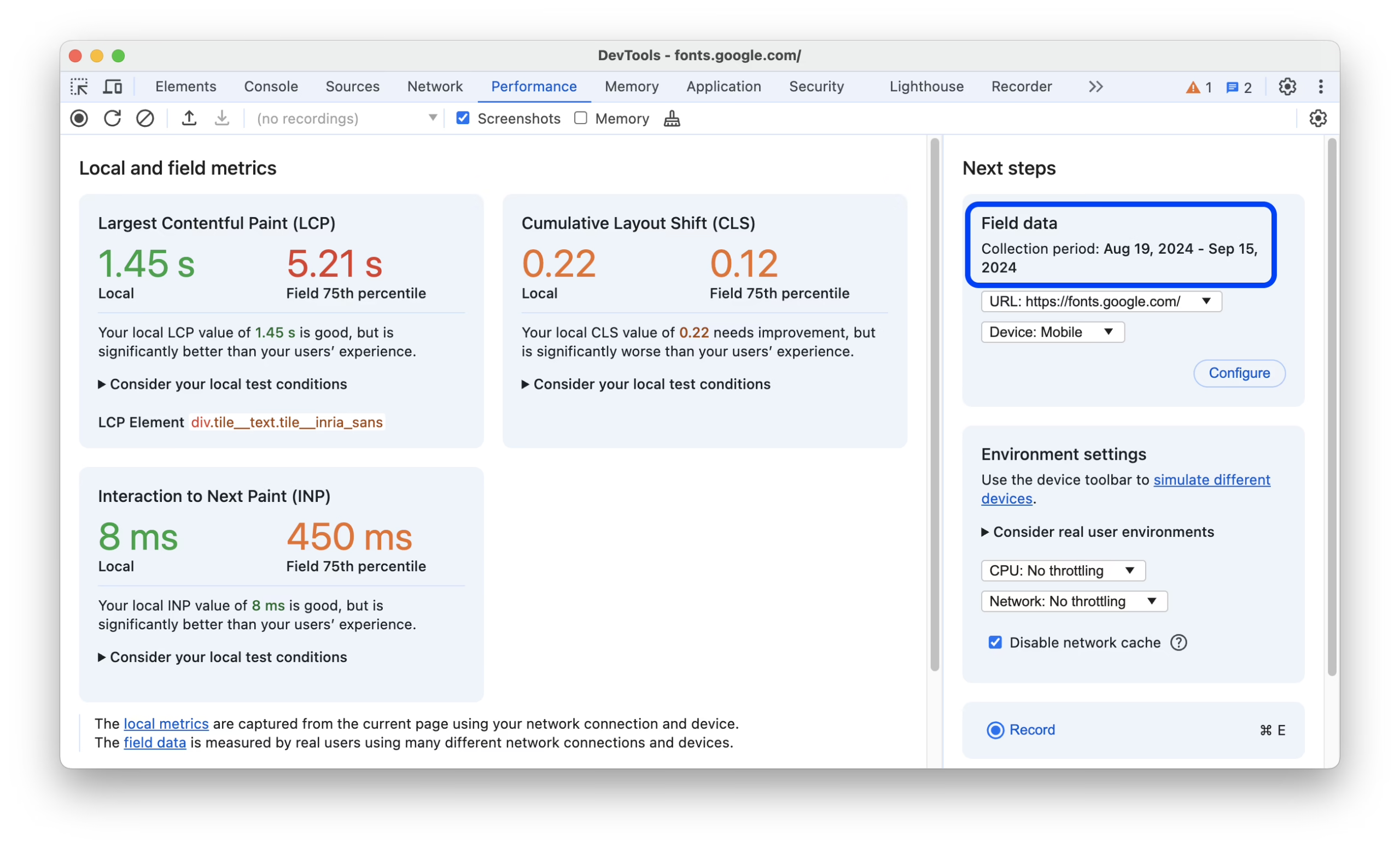
To fix performance issues, the answer is almost always the same. Use default server rendering. Only use Client Components when a part of the UI needs state, events, or a browser API. Monitor what you cache, and for how long. Then measure real users, not just Lighthouse. Next.js incorporates a useReportWebVitals function that taps into your analytics to send real-time data on TTFB, FCP, LCP, INP, and CLS. Google’s p75 goals for these metrics are LCP occurring in under 2.5 seconds, INP in under 200 milliseconds, and CLS in less than 0.1. Base your shipping decisions on field data, not laboratory audits.
Switching frameworks rarely, if ever, should be the first option to consider. Most robust comparisons of Next.js and Remix for Core Web Vitals place the two frameworks within 10 to 15 milliseconds of each other in the top percentile, and the same pattern emerges in most reasonable, thorough reviews, including this framework and engineering comparison. Rectify client JavaScript issues, hydration issues, and cache boundaries before touching stuff.
When Next.js Earns Its Place, and When It Doesn’t
Next.js is worth the added complexity when a site has multiple audiences, changing data, an important content operation, or when the site will eventually require product features. Next.js is often overkill for sites that are small, little brochure-ware sites that staff doesn’t want to spend time on development for.
| Business shape | Where Next.js fits | Where a simpler stack fits |
|---|---|---|
| B2B SaaS marketing | Custom flows, product education, in-app previews, page testing | Small feature set, standard funnel, no roadmap toward interactive pages |
| Content publication | Large archive, custom taxonomies, editorial previews, ad and paywall logic | Fewer than 50 pages, small team, no CMS integration work |
| Ecommerce | Custom storefront on top of Shopify or a headless commerce API | Standard catalog and checkout with no design-led differentiation |
| Membership or community | Public SEO plus authenticated dashboards in one codebase | Fully private product with no public marketing surface |
A good rule of thumb: if your team can’t identify which pages require server-side rendering, who manages content, or who is on-call when the deploy breaks, then your project isn’t ready for Next.js. It’s ready for a plan. That’s what our Next.js buyer’s guide covers in more detail as well as how to evaluate a studio before signing anything.
There’s a credible (though small) opinion among senior developers that Next.js is overengineered for most websites. For content-first websites, Astro or plain React with Vite may be a better option. That opinion is worth considering when the website does not require server-side logic. However, it is worth ignoring if a developer mentions it in the middle of a project as a reason to switch frameworks. Frequent framework swaps waste more time than they save.
Hosting and Deployment Options
Post-launch operational burden is hosted framework-specific. There are three viable options.
Vercel is by far the easiest since it’s made by the company which builds Next.js. Preview deployments, image optimization, edge functions and deployments are all fully automated. The cost is dependency on their platform and a bill that can rapidly shift if there’s an unexpected surge in traffic or if images become too big. For that path, we’ve written Vercel for deployment to detail how it works and how to avoid common issues.
Using AWS Amplify, ECS containers with CloudFront, or the Vercel architecture with Custom Compute, provides control and compliance in exchange for more fundamental infrastructure work. Somebody manages IAM, logging, scaling policies, and incident response. This works well for a company with internal engineering ownership. It’s not an escape from the costs associated with Vercel. It adds a different cost and operational surface.
For teams wanting predictable costs and runtime ownership, a self-hosted Node on Render, Railway, Fly.io, or a Linux server, can work well. But someone has to manage releases, backups, monitoring, security updates, and failure recovery. The cheapest hosting cost is not always the cheapest ownership cost. Ownership cost and lost productivity can be substantial and should be accounted for in the budget.
There are four questions to consider before signing any contract. Which hosting option will involve the least operational tasks your team is willing to do? What does the bill look like for 3x current traffic? If your key employee decides to leave, where are deployment credentials, DNS, and secrets? If the company is sold in the next 2 years, will a potential buyer be able to understand the setup without needing to do an archaeology project?
Connecting Next.js to a CMS or Store
Content-centric Next.js sites usually rely on a headless CMS. Editors work in the CMS and manage the site. Next.js fetches data through an API and renders the site. Developers allow editors to work independently of code and retain control of performance and structure.
Hosted CMSes like Sanity and Contentful charge a monthly fee for managed infrastructure, previews, and editor tooling. Most open source offerings, like Strapi and Payload, place more responsibility and more control in your hands, including hosting, upgrades, and backups. For simple applications, such as documentation and small marketing sites, a Git based approach with Markdown files works well. The main issue becomes if non-developer users are tasked to publish content without developer intervention.
First let us discuss commerce. If you have a commerce backend, like Shopify or WooCommerce, you can use Next.js Storefront to build an ecommerce storefront on top of Shopify’s Storefront API, meaning orders, taxes, inventory, and payments stay on the backend. If you are starting a new project, Medusa or a Shopify base are more secure options than creating your own checkout. The same applies to auth, search, and payments: if a service solves a problem, it is safe to integrate the service. We discuss this in our headless CMS with React article.
Two case studies exemplify the variety of our work. For the Teton Gravity Research rebuild we migrated roughly 10,000 articles to the new CMS while preserving the original editor experience. During the St. Louis Magazine migration, 30,000 articles made it to the new CMS without breaking any news updates, ad inventory, or the workflow of the newsroom. The hard work was in the new URL structure and redirects, while the CMS framework was just one choice among many.
Migration, Timelines, and Cost Realities
The most difficult part of most Next.js projects is not the new interface. It is the migration. Users that have been on WordPress or another similar platform leave with a lot of assumptions they built up over the years. They assume there are years of undocumented route rules, editor habits, and publishing assumptions. A frontend that was built with Vue or React can not solve broken redirects or the inability to preview posts.
Before design even starts, do the inventory work. That means mapping all URLs that need to be 301 redirected, preserving the titles and canonicals, checking the sitemaps and robot rules, and reviewing all the outputs that crawlers will see in staging. This work also means rebuilding all the workflows the newsroom or marketing team relies on. That work is what a real, proper website migration engagement should cover. It is where cheap quotes usually hide the cost.
| Project type | Timeline | Cost range (USD) | Biggest risk |
|---|---|---|---|
| Marketing site | 6 to 10 weeks | $15,000 to $45,000 | Undecided content and approval flow |
| CMS-driven publication | 10 to 16 weeks | $40,000 to $120,000 | Editorial workflow and migration gaps |
| Headless commerce | 4 to 6 months | $150,000+ | Integrations, catalog rules, checkout behavior |
Factor in the total cost of ownership when you budget for design and code, not just hosting. Maintenance and engineering, updates for the content management system (CMS) and plugins, analytics services, and the hours lost to customizations and requests for editors all count. When looking at studios before signing the contract, you should ask what happens to the site if there is a threefold increase in traffic, and who is responsible for addressing that?
What to Do This Week
Before jumping into comparing frameworks, provide a brief for your site describing three main jobs, three primary pages, and one main metric that will signal if the rebuild was successful. For a B2B SaaS site, the jobs could be forms for qualified demos, clarifying information about product pages, and sales team posts for pages after calls. The metric could be form submissions via organic traffic. The answers will be unique for each business, and the exercise will refocus the project on outcomes.
After the brief, do short reviews on the site. What pages convert, what pages leak. What content ranks and what content provides no value. What the path a visitor follows is to submit a form or complete a transaction. Who is responsible for publishing, approvals, measurement and fixing issues. After completing the framework talks, you should only consider Next.js if you are still comparing options. Our notes on how to hire a Next.js agency have some vetting questions that are useful separators for a real partnership.
The best decision is the last one. Define jobs, content workflows, risk, and ownership models before opting for technology. Select a tool that supports your requirements. Do not give your teams systems they can’t work with. If you need the decision made prior to coding, Refact’s discovery process is designed to do just that with a money-back guarantee for the phase.
Building a product and unsure what to scope first? Let’s talk. Free 30-minute call, no pitch.

Masoud Golchin is a backend developer at Refact, working on server-side systems, internal tooling, and infrastructure. He builds and maintains the services that support both client projects and the team’s day-to-day development workflow. His work includes backend logic, developer tools, system reliability, and the technical foundations that allow products to scale and operate consistently. At Refact, Masoud focuses on creating practical engineering solutions that help the team move faster while keeping systems organized, maintainable, and dependable.
More from Masoud Golchin
