Client Portal for Agencies: 7 Tools Compared
Most agency client portals don’t fail at launch.
 Saeedreza AbbaspourOctober 10, 2026
This guide is for agency owners and operations leads choosing a client portal for agencies. It compares seven tools that suit different agency models. It also covers what decides whether any of them works: which client task the portal takes over, which system owns the data, and whether each client can only see its own work. With 40% of agencies running ten or more tools on client campaigns, according to Basis’ 2025 report, those questions matter more than the feature list. If you want a broader market view first, our comparison of client portal software options covers the general category.
What a Client Portal for Agencies Actually Has to Do
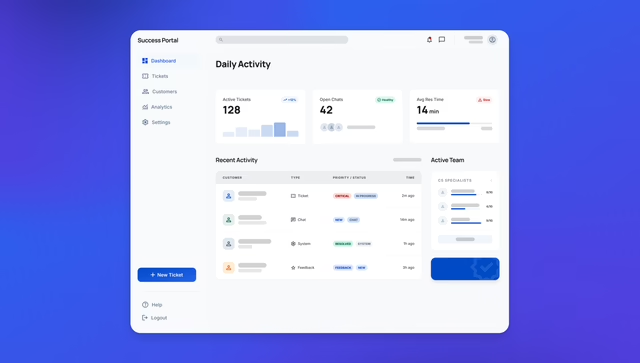
An agency client portal is a branded, private space where clients see project status, files and deliverables, approvals, budget or time, reports, and invoices. That is the definition. In practice, it only earns its keep when it makes a client job that repeats every week easier than the email route it replaces.
Practitioner accounts are consistent on this. In one r/freelance thread, an agency described an Airtable portal clients “thought was cool” but rarely opened, because the reports already arrived in their inbox. The portal was eventually switched off. In another discussion, a web designer estimated that about 90% of users still emailed questions after a dedicated resource was built for them. Neither number is a benchmark. Both describe the same pattern: a portal that only copies what email already delivers turns into a digital filing cabinet.
General self-service data points the same way. Gartner’s 2024 survey of 5,728 customers found 73% had used self-service, but only 14% of issues were fully resolved there. In 43% of failures, people couldn’t find the content they needed. For wider context, AMW’s compilation of customer portal statistics shows strong stated demand for self-service. Stated demand and resolved problems are different measures, and neither one is specific to agencies.
The agency surveys add another warning. In AgencyAnalytics’ 2026 survey, 59% of agencies preferred live dashboards for reporting, but only 27% of clients did. Clients split evenly between static reports (35%) and meetings or calls (35%). The same survey found agencies rank strong relationships (80%) and communication (69%) as their top retention factors. A portal can support that relationship. It cannot replace the account manager who explains what the numbers mean.
Three Checks to Run Before You Compare Any Tool
Name the client job the portal removes
Write down the two or three tasks clients must do anyway: approve a design proof, upload onboarding documents, check remaining retainer budget, pay an invoice. If the portal makes one of those the easiest path, people use it. If it adds a login before something they could already do in Gmail, they won’t. Onboarding is often the best first job because clients have to finish it. Our guide to building a client onboarding portal covers that workflow in detail.
Decide which system owns each fact
The clearest wins in this space come from consolidation, not interface polish. FlowState Labs, an automation agency, ran into trouble once it passed ten active clients and was maintaining a separate portal for each. It replaced them with one Airtable-backed hub. In a case study published by its vendor, Crust AI, it reported that a round of client updates dropped from about two hours to roughly ten minutes. That figure is vendor-published. The mechanism still makes sense: one source of truth feeding client-specific views, with no copying by hand.
Before you shortlist tools, decide where project status, logged time, invoices, and files actually live. If the portal holds a second copy of any of them, someone has to keep that copy current. That job usually goes unassigned until a client spots an out-of-date invoice.
Write the permission map before inviting anyone
“Client” is not a permission model. A single client account might include a marketing lead who approves creative, a finance contact who only needs invoices, and an executive who wants reports but not working files. List every person who will log in to a typical account and what each one can view, comment on, approve, or download. Then check every tool against that list. This one exercise rules out more products than any feature comparison.
The 7 Agency Client Portal Tools, Judged on Fit
These seven tools take different positions. Some are full work-management platforms with a client view on top. Others are dedicated portals, and some are built mainly for secure file exchange. The right choice depends on where your agency’s real work already happens.
1. Teamwork: when the portal should be your delivery system
Teamwork’s agency platform makes the most sense when client visibility should mirror the projects your team manages every day. Client users can view selected projects, tasks, files, proofs, comments, and status updates, and they don’t need paid seats. You control access at the project level, which helps when one client runs several engagements or has stakeholders who need different access.
The platform links client visibility to agency operations. Proofing keeps feedback attached to the deliverable. Time tracking, budgets, retainers, invoices, and client-level rates stay connected to delivery. Teamwork lists SOC 2, two-factor authentication, and US or EU data hosting among its controls.
The tradeoff is commitment. Teamwork only becomes a single source of truth if your team actually runs delivery inside it. A client who just wants to download a monthly report may not want to move around a project system, and may still ask for a PDF by email. Choose Teamwork when internal project management and client visibility need to be the same system.
2. SuiteDash: a branded all-in-one client environment
SuiteDash suits agencies that want clients to see a polished branded environment, not an exposed project workspace. It combines white-label branding, custom dashboards, CRM, proposals, contracts, billing, projects, support tickets, learning content, and messaging. Every plan includes unlimited clients and staff, which keeps pricing easy to predict as the client list grows.
That breadth is both the attraction and the warning. Individual modules may not match specialist tools, and setup takes real time. A branded portal only feels professional when the dashboards, labels, notifications, and workflows match how your agency works. A white-label client portal should hide internal complexity, not just put your logo on a crowded interface. SuiteDash can do that if someone owns the setup and keeps it current. It’s a poor fit if your team already depends on dedicated tools for planning, finance, and support and doesn’t want to rebuild those habits.
3. Copilot: a dedicated portal layer over your existing stack
Copilot is a client-portal product, not a project-management suite. It brings secure messaging, file sharing, billing, payments, contracts, forms, a help center, and embedded dashboards into one client-facing space. Clients can sign in with email and password, Google, two-factor authentication, or selected magic-link flows. Its App Directory handles simple embeds, and its API and Custom Apps support more involved workflows.
The advantage is speed. You get a polished portal without building authentication and basic client areas from scratch. The risk sits at the handoff. Copilot presents information from other tools, so test whether status, invoices, approvals, and files update automatically or need someone to update them by hand. A clean portal with stale project data loses client trust fast. Pricing isn’t prominent on the public site, so ask directly about user limits, branding, API access, and the cost of the workflows you need.
4. Accelo: from signed quote to paid invoice in one record
Accelo is for agencies that want one line from the first sales conversation through delivery, support, retainers, time, and payment. Its branded portal can expose quotes, projects, tickets, requests, retainers, invoices, files, and approval sign-offs. That addresses a common agency failure: sales data copied into project tools, project updates copied into emails, and billing living somewhere else.
The cost is broad adoption. If only the portal runs in Accelo while sales, tickets, and billing stay in other systems, the connection falls apart. Pricing varies by configuration, so budget time to map your requirements to plans and modules. A useful test is one real client request. Can the client submit it, can your team assign it, can the client follow its status, and does the final charge land on the same record? If any step needs copying between systems, the portal adds a layer of work instead of removing one.
5. Clinked: secure collaboration when document control comes first
Clinked focuses on structured client workspaces, file exchange, reviews, approvals, tasks, and discussions. White-label options, mobile apps, SSO and SAML, granular permissions, file versioning, and activity controls suit teams that need careful access boundaries. Consulting firms, membership organizations, nonprofits, and agencies working with sensitive material are the natural fit.
You give up project and financial depth. If your main need is retainer billing, utilization, or detailed delivery planning, you’ll need another system alongside it. Pricing scales with users and portal size. That works for a small number of high-value client workspaces, but it deserves a closer look if you expect many client organizations or outside collaborators.
6. Plutio: one simple flow for small studios
Plutio is aimed at smaller agencies that want lead, proposal, project, invoice, and payment in one place. It includes projects, tasks, time, contracts, subscriptions, forms, CRM, and a branded portal on your own domain. Clients can see progress, access files, approve proposals, and pay invoices. Plans differ mainly by capacity rather than by locking features behind higher tiers.
The limitation is the simpler client role. It works when everyone at the client needs similar access. It breaks down when the finance contact, the creative approver, and the executive each need different views. Run your permission map against Plutio first. If one fixed client role can’t represent those boundaries, the low setup effort won’t make up for the access compromises.
7. Onehub: file-first sharing with an audit trail
Onehub is built around secure file sharing and client workspaces, with branded workspaces, granular permissions, activity tracking, and document review. Its Data Room mode adds watermarking, NDAs before entry, indexing, stealth mode, and audit trails. Enterprise customers can use white-label and custom-domain options. Published pricing, including a separately priced Data Room Edition, makes budgeting easier.
Onehub is a sensible pick when you handle due-diligence documents, confidential deliverables, property records, or legal material, where knowing who viewed or downloaded a file matters more than a project timeline. It won’t run resource planning, time tracking, or retainer invoicing. Our guide to a secure portal for clients goes deeper on the controls to demand when confidential files are the main job.
How the seven compare
| Tool | Best fit | Setup effort | Main strength | Watch out for |
|---|---|---|---|---|
| Teamwork | Project-led agencies running delivery in one system | Medium | Free client users, proofing, time and budgets tied to delivery | Low value if work is managed elsewhere |
| SuiteDash | Small and mid-size agencies wanting one branded login | High | White-labeling, proposals, billing, unlimited users | Shallow modules, heavy configuration |
| Copilot | Teams wanting a fast, polished portal over existing tools | Low to medium | Quick launch, API and Custom Apps | Stale data if integrations aren’t automated |
| Accelo | Established agencies with repeatable sales-to-billing processes | Medium to high | CRM, projects, retainers, and invoicing in one record | Only works with adoption across teams |
| Clinked | Sensitive work and controlled collaboration | Low to medium | Granular permissions, versioning, SSO | Light on project and finance features |
| Plutio | Boutique studios with simple client structures | Low | Cohesive lead-to-payment flow, good value | One fixed client role |
| Onehub | Due diligence and audited document exchange | Low to medium | Data Room features, audit logs, clear pricing | Not a project or billing system |
Whichever you shortlist, check notification controls before you commit. In one Reddit thread, an agency described ClickUp sending clients far too many emails, with no way for the agency to control notification preferences. Another said Notion became cumbersome as the client list grew. Neither problem shows up in a demo. Both show up in month three.
Why Approvals Stay Slow Even With a Portal
Practitioners on r/agency are blunt about this: no software fixes a slow client. A portal can make approval easier to give and easier to prove. It cannot make someone decide.
The fix is process first, tooling second. Name one decision-maker on the client side. Put approval deadlines in the contract, and say in writing that late feedback moves the delivery date. Then use the portal to tie every comment to a specific deliverable and version, offer explicit “approve” and “request changes” actions, and record who approved what and when. That record settles scope disputes, and it’s the part email handles worst.
Be careful about exposing internal ticketing to clients. One agency on Reddit found that letting clients file tickets directly turned every typo email into a duplicate request. It switched to having clients contact an account manager, who sorted requests internally. The portal showed status. A person handled the triage.
Where Agency Portals Quietly Expose Client Data
Once a portal holds files, approvals, budgets, or invoices, it becomes a security boundary. The screens can look perfectly separated while the system underneath isn’t. A 2024 ACM CCS study of 101 real broken object-level authorization (BOLA) vulnerabilities found that 62.37% involved a missing ownership check. In one example, an app checked permissions on delete but not on update. In another, it checked project membership but never confirmed that a folder actually belonged to that project.
For an agency, that means Client A changing an ID in a URL and opening Client B’s invoice. Hiding a button doesn’t prevent it. The check has to happen on the server, for every object and every action, including state: a client can comment on a draft but can’t approve an invoice or see internal notes.
If you buy, ask vendors how they enforce client separation and whether they test cross-client access. If you build, primary sources flag specific traps:
- Database policies have bypasses. Supabase’s documentation notes that the
service_rolekey bypasses row-level security, exposed views can bypass it by default, and policies don’t remove existing grants. Row-level security is one layer, not proof of isolation. - Signed file links are bearer tokens. AWS documents that anyone holding a presigned URL can use it until it expires, and upload links can overwrite an existing file. Authorize each download before issuing a short-lived link.
- A client-supplied tenant ID is not proof of access. The OWASP Multi-Tenant Cheat Sheet recommends binding client context to verified identity and current membership, then testing that cross-client requests fail.
- Offboarding has to revoke access. Microsoft’s multitenant identity guidance stresses immutable user IDs and clean revocation. When a client contact leaves, or the engagement ends, their access should end that same day.
Accessibility belongs on the same checklist. WCAG 2.2 covers complete processes, so test the login, invitation, upload, approval, and payment flows with a keyboard and a screen reader. Make sure password managers and paste work on the login screen.
When Building a Custom Portal Beats Buying One
The cost range in practitioner discussions is wide. One agency on Reddit built a Bubble portal for 20 to 30 PPC and ecommerce clients for about $32 a month, after rejecting all-in-one tools that came to $300 or more. Its clients liked having everything “nice and simple and all in one place.” At the other end sits the $100,000 portal nobody used. Custom builds also carry a maintenance bill. On X, a recurring warning is that a custom portal is fun “until you actually have to maintain it,” usually followed by a story about a developer who disappeared.
Buy when your workflow fits a product’s records and permissions, and you can show clients the same project, billing, and file data your team uses without copying it. Build when the portal is part of what you sell, when your client roles don’t fit standard permissions, or when the portal has to join several systems around a data model no off-the-shelf tool represents. Our custom client portal build guide covers scope and cost ranges, and the guide to custom web portal development covers timelines.
AI app builders now claim a working portal in about 20 minutes. That claim is promotional, and it skips the hard part. The screens were never the expensive piece. Authorization, client separation, file handling, and integrations are. If you’re also reworking the rest of your stack, Agentable’s roundup of AI tools for agencies covers the reporting and automation side, where AI tools help more directly.
Some agencies don’t need a portal at all. One practitioner whose clients are mostly older local business owners sticks with Google Drive and email because “the simpler the better.” If you run a handful of clients with occasional file exchange, that may be the honest answer.
How to Tell Whether Your Portal Is Working
Logins are a vanity metric. Measure against a baseline you record before launch: follow-up emails per project, hours spent on client updates, days from deliverable to approval, and onboarding time. Then track the share of approvals completed inside the portal and how often clients come back without being reminded.
Zendoc’s analysis of why client portals fail names three causes worth checking: login friction, passive notifications, and staff who route around the tool. The last one is the one agencies miss. If your account managers keep emailing files “just this once,” clients learn that email is the real channel. Run one live client and one active engagement through the portal before rolling it out across the agency, and fix what breaks there first.
Treat every ROI figure in this market, including the ones quoted here, as a vendor claim until your own baseline confirms it. No independent study yet shows how much a portal on its own cuts churn or speeds approvals. What the evidence does support is narrower: portals work when they take over a task clients have to do anyway, sit on a single source of truth, and come with an account manager who still picks up the phone.
A portal is a decision about workflow before it’s a decision about software. If none of these seven fits your permissions, integrations, or client journey, Refact’s portal and dashboard development work starts with discovery. We map the client jobs, data ownership, and access rules first, so you know whether to buy, configure, or build before anyone writes code.
Building a product and unsure what to scope first? Let’s talk. Free 30-minute call, no pitch.

Saeedreza Abbaspour is the CEO of Refact, where he works across product, engineering, and sales. He sets the studio’s direction while staying closely involved in the work itself, from shaping product strategy and UX architecture to helping define the technical systems behind Refact’s projects. His role connects business thinking with hands-on product execution, giving him a practical view of how software should be planned, built, launched, and improved. At Refact, Saeedreza focuses on building a studio that can move quickly, solve real client problems, and turn ideas into reliable digital products.
More from Saeedreza Abbaspour
