White Label Client Portal: A Buyer’s Guide
You will not find many teams out shopping for a white label client portal on the strength of some strategy meeting.


A portal is meant to put an end to that. But it can also just be a way to paper over the problem. The logo on the login page has nothing to do with it. What counts is what is happening under the hood: does the staff default to the portal or go back to email? Can a client stumble upon another’s records? Do the emails actually originate from your domain? All of that determines if the portal is worth the price of admission; the branding is the thinnest part of the job.
We have put together this guide for product teams, agencies and service firms to consider before they commit to building, embedding or buying a white label solution.
What “White Label” Actually Covers
The industry has yet to agree on what “white label” means. One vendor will apply the term when you can change a colour and a logo; another will claim it for the whole identity stack. The line you need to draw is between surface white-labeling and the operational kind.
Surface level is easy enough to spot in a demo: your colours, your logo, a CNAME pointing portal.yourfirm.com at the vendor. Operational white-labeling is tested at 11pm when a client needs a password reset. Will the sender be your domain or the vendor’s? Is there a “Powered by” footer on the PDF exports? Does the mobile view shed your identity at the top of the screen? You might even see the vendor’s name in small type on the login.
Both Fastio’s setup guide and Omni Online Strategies’ no-code breakdown will tell you the branded illusion tends to fail at the edges. In error pages, notifications and invoices the vendor’s hand is often visible. So before putting pen to paper, put yourself in the client’s shoes: register, get the welcome email, upload and download a file, get billed, try it on a phone. If the demo does not show you those surfaces, count on them leaking.
DNS and Email Are Part of the Product
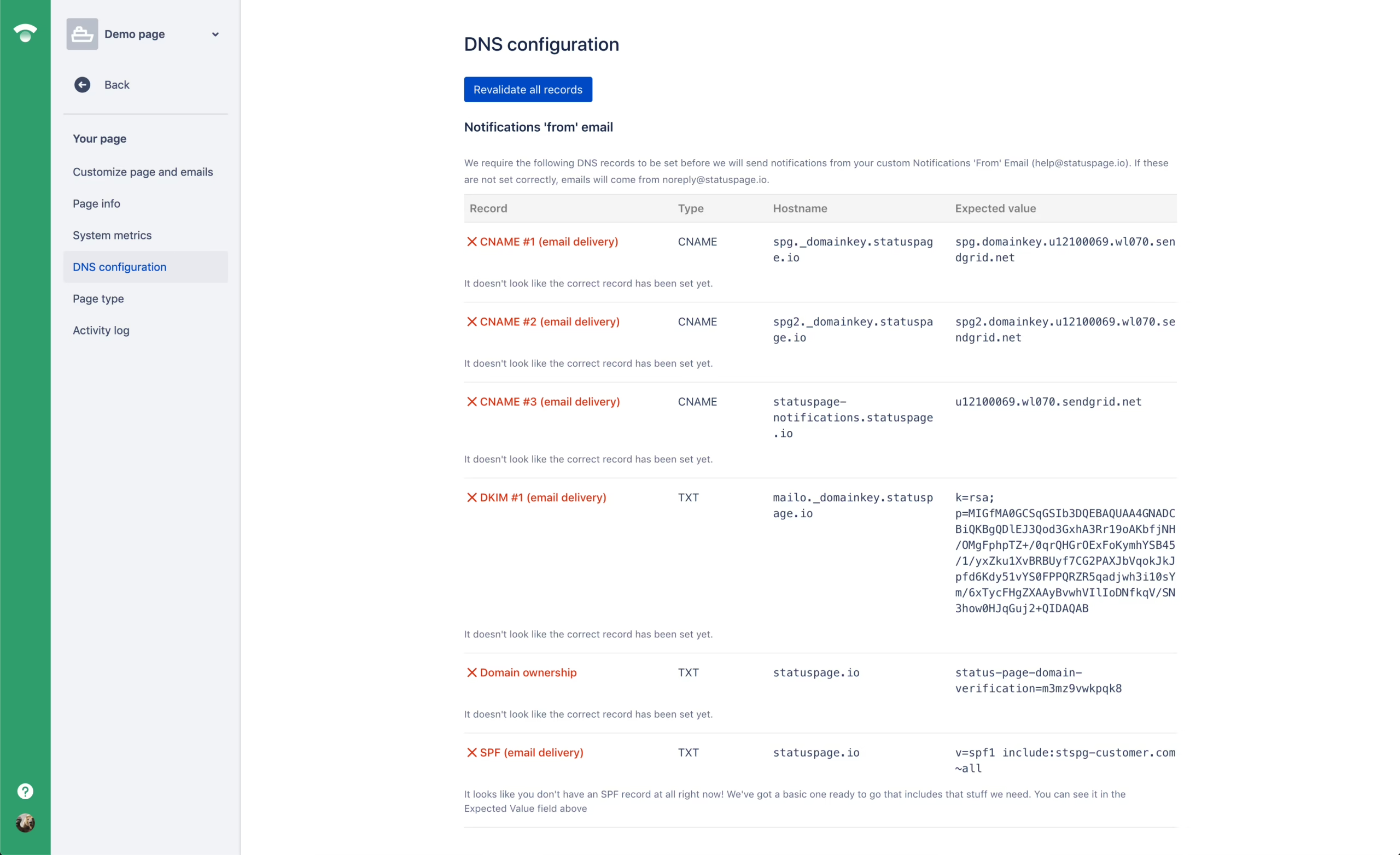
Having a branded domain with no email authentication is unprofessional and will be marked as spam. Proper white-labeling demands three things be in place:
- A CNAME to point your subdomain to the vendor.
- SPF and DKIM records so your notification emails authenticate correctly.
- A matching sender identity so the “from” field is yours and not
no-reply@vendor.com.
Platforma has a good look at the mechanics of how SSL, cookie scope and domain routing must align for the branding to hold. It is straightforward work if the product was designed for it, but with a vendor that only offers half-measures on custom domains it becomes a constant headache. Make sure to ask who is responsible for issuing and renewing SSL and where the transactional mail comes from. These are the details that make a portal truly yours rather than one that merely resembles it.
The Security Question Nobody Wants to Ask
Forget the UI for a moment and ask the vendor this: is there any scenario where one client can view another’s data? Be it a mistyped URL or a manipulated query parameter.
That is tenant isolation and it must be handled at the request layer, not in the interface. The old bug is an API that returns a record the UI is hiding because the query did not filter on the authenticated tenant. On Stack Overflow the debate over shared versus individual databases for white-label products is a perennial one. Shared schemas are economical; isolated ones are secure but present scaling challenges.
As we note in our guide to multi-tenant SaaS architecture, most cross-tenant issues do not stem from an absent WHERE tenant_id = ?. They come from cache keys without a namespace or a background job running with the wrong context.
Get straight answers to these five questions:
- Where is the data located, in both a physical and legal sense?
- Who has ownership of the data and the means to export it should we part ways?
- How do you enforce tenant isolation in the API?
- What is the audit trail and is it accessible to us?
- What are your disclosure obligations in the event of a security incident?
If they cannot put tenant isolation into plain terms, they likely do not have the reins on their own system.
The Features That Actually Move Work
There is no point in buying a portal for the sake of a long feature list. The right tool is the one that takes away the work your team has to do on a weekly basis. If a feature does not stand in for a spreadsheet, a re-uploaded file or a call for a status update, it has not earned its keep. Method’s client portal guide and Clinked’s honest comparison for 2026 run through the usual capabilities. The question is which ones are load-bearing.
| Feature | What it replaces | Priority |
|---|---|---|
| Secure file sharing with role-based access | Email attachments, shared drives, ad hoc permission checks | Load-bearing |
| Document version control | “Which file is final?” | Load-bearing |
| Messaging next to the work | Long email chains detached from context | Load-bearing |
| Approvals and e-signatures with an audit trail | External signing tools and manual reconciliation | Load-bearing in regulated work |
| Status dashboards visible to the client | “Where is this at?” messages | Load-bearing |
| Automated onboarding checklists and reminders | Copy-pasted intake instructions | Load-bearing |
| Billing and invoice views | Separate invoice emails | Useful |
| Time tracking | Standalone timers | Useful |
| Deep integrations with your CRM and accounting | Manual data re-entry | Depends on volume |
Portals make their name on structured requests and approvals. Take the case studies Moxo has put out: they have Standard Chartered putting over 65% of approvals in a branded portal, or Falconi Consulting bringing due diligence down from weeks to days. One should view those as vendor figures and not hard promises, but there is a consistency to them in banking, law, wealth management and consulting. Put the files, status and approvals in one spot with an audit trail and the operational burden eases. For a more thorough examination of the design work that must precede any tool configuration, we have covered how to shape those workflows in our piece on document workflow automation.
Adoption Is the Real Test
Deployment does not mean the portal is live. It is only live when staff and clients make it their default.
Projects tend to fail quietly through lack of adoption. The portal is set up, the launch email is sent, and a month later you find everyone has returned to email because a member of the team answered a client in a reply chain rather than directing them to the portal. Do that twice and it becomes a parallel system no one puts much stock in.
There are three things that will tell you if a project is going to hold or drift:
- Put an internal owner in charge. A single person for training, enforcement and configuration. Not a committee.
- Staff need to be portal-first. When a client emails something that should be in the portal, the response is “I have posted this in the portal, here is the link,” not an inline answer.
- Run a pilot with a small group of amenable clients. Two or three you can call to ask what is not working. Observe the sessions and smooth out the friction before you scale.
We go into the adoption gap in some detail in our B2B customer portal buyers guide, noting Gartner’s observation that while buyers say they prefer self-service portals, actual use comes in at number four. That discrepancy is usually a matter of design and enforcement.
Buy, Embed, or Build
It is a simpler decision once you factor in deal size, client count and how integral the portal is to the service.
Buy off the shelf if your deals are of moderate size and the portal is largely a vessel for messages and files. You can be up and running in a matter of days or weeks. Vendor comparisons show white-label tiers from $50 to $200 a month, with a three-year tab of $30K to $150K. You trade speed for the vendor’s design choices.
Embed where you already have an app or product and the portal is an extension of it. If your clients are logging in elsewhere, a second login will be an adoption killer. An embedded portal is part of your session and data model, though it requires more engineering to maintain.
Build custom when the data is too sensitive for a vendor tenant model, the workflows are idiosyncratic or the portal is something you are selling in its own right. Expect to pay five times as much as buying, in the order of $150K to $750K over three years for a proper system, and for it to take longer. In return you get tighter integration and the option to exit.
What we see most is the error of purchasing an off-the-shelf solution for a workflow it was never meant to handle and then spending a year customising around its limitations. Should your top three client needs not fit the vendor’s building blocks, the cheap alternative will cost you.
For the fundamentals of how a portal fits a service business, start with the customer portal guide. And if you are trying to decide between building and buying, our guide to choosing a portal development company lays out the questions to consider before making a commitment.
The Small Firm Angle
A firm of five looking to do enterprise work uses a portal as a signal of credibility. Unycorn is blunt about it in their small-firm validation writeup: small firms lose business by appearing small. A branded portal makes the delivery process orderly and visible, and the buyer takes that as proof your operating model is sound.
Then there is the argument from TkTurners in their summary on retention that branded portals cut support volume and churn when they become the self-service norm. The numbers are vendor-adjacent so do not quote them as fact, but the trend is clear: less friction in billing and onboarding means you retain more of your existing clients.
That said, a weak service is not fixed by a pretty portal. It will make good service look professional, but it will not save a firm that is unclear or slow.
A Realistic Rollout
Building or buying without knowing which workflow you are supplanting is the costly mistake. Having a brief scoping conversation is the inexpensive one.
Here is a practical way to go about it. Put in a week to put names to the top three client jobs and the workflows that drive them. Select one for the portal to start with, and let your team’s grievances be your guide as to which one. From there, you determine whether to buy, embed or build; base the call on the workflow itself rather than some grand feature list. Build or configure for the pilot only. Let two or three of your clients put it through its paces for a month and make the necessary repairs. After that you can bring in the next workflow.
There is no point in launching the works on day one. Portals that attempt to cover all bases tend to just put a new face on the old chaos.
Once you have launched, keep an eye on three metrics: how well you are retaining the accounts on the portal, the volume of support tickets for the relevant workflows, and the proportion of staff answering from within the portal as opposed to over email. Should those numbers not shift in any tangible way for the team, then either the wrong owner is at the helm or the portal is addressing the wrong issue entirely.
The hard work is in scoping out what should come first and if a white label solution needs to be built, embedded or purchased; that is where the value is. Refact has made portals and dashboard development about making that call early on, well before any code is written or contracts signed, so the right vendor is chosen and does not become a two-year headache.
Building a product and unsure what to scope first? Let’s talk. Free 30-minute call, no pitch.

Saeedreza Abbaspour is the CEO of Refact, where he works across product, engineering, and sales. He sets the studio’s direction while staying closely involved in the work itself, from shaping product strategy and UX architecture to helping define the technical systems behind Refact’s projects. His role connects business thinking with hands-on product execution, giving him a practical view of how software should be planned, built, launched, and improved. At Refact, Saeedreza focuses on building a studio that can move quickly, solve real client problems, and turn ideas into reliable digital products.
More from Saeedreza Abbaspour

