Secure Portal for Clients: A Buyer’s Guide
Your company has reached the limit of using email.


A client portal is a useful solution for this problem. Not because email is an unsafe solution, but because email and shared drives along with chat solutions have never been designed to manage continuous work that involves permissions and sensitive data of the client. This guide helps outline the purpose of client portals, define security controls each portal should have, assist with compliance thinking, and help determine if you should buy, build, or further extend an existing solution.
When Email Stops Being Enough
A small firm can use email for a long period of time. One person sends a report, another person sends an invoice, and the owner manages an important attachment folder. This system works well until multiple clients need multiple documents, several users access a shared account, and none of your employees know the answer to the question, “who saw what?”
The warning signs tend to arrive in a cluster:
- A contract lands with the wrong recipient.
- A confidential file is still sitting in a shared inbox weeks later.
- A former employee still shows up on a shared drive.
- A client asks for an access history you cannot produce.
- A compliance questionnaire asks where data is stored and how access is revoked.
These signs do not mean your employees are negligent. It means the tools that your employees rely on the most are stretched beyond their original purpose. Email can be a great informal solution for company communication. Using email, however, gives almost zero control of files, permissions, retention, and even the identity of the file’s owner.
With a secure client portal, you create a secure workspace for each client. Documents, information collection forms, and question answer forms can be sent, approvals can be managed, and records can be kept without losing information to scattered emails that litter individual hard drives. If your issues look more like a flood of repeat questions rather than a document-handling problem, a customer support portal may be the better first solution.
The scale of the portal model is not theoretical. Red Hat’s customer portal was visited by 13.1 million unique users, performed 2.4 million searches, and generated 108.3 million page views in one year, according to published portal statistics. Government systems such as the CARM Client Portal in Canada, now manage finances, payment, tariff tools, and full transaction history, all on an authenticated surface. Portals stopped acting as document repositories many years ago. They are the place where work happens.
A good practice is to stop email patching whenever a client’s work is continuous, more than two people coalesce around the same document, or a client asks a security question that you are unable to address.
What a Secure Portal for Clients Actually Is
Think of a secure portal as a private mailbox that is locked behind a front door. Each client receives a secure workspace, and your business dictates what a client can see, upload, approve, and download. It can hold messages, signatures, forms, invoices, and documents. The portal is a secure channel between your business and an external client, and is not an internal workspace that permits access by many.
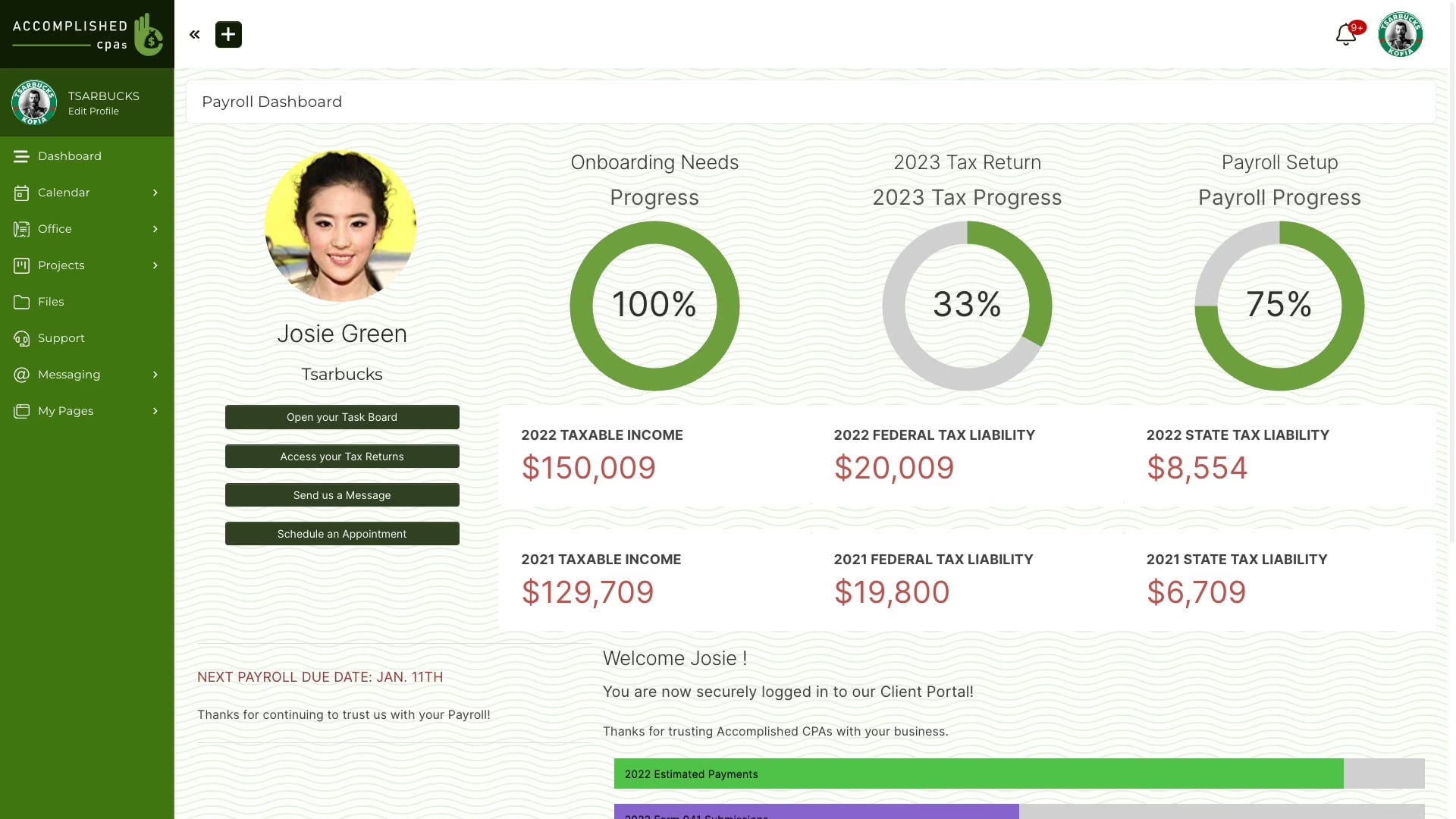
The four jobs a portal should handle
- Private access. Each client gets a unique login with identity checks before they reach their workspace.
- Controlled file exchange. Documents live in a known location, with permissions assigned and download activity reviewable.
- Client communication. Messages stay attached to the account or project instead of disappearing into separate email threads.
- Approvals and signatures. Clients can review and sign without the print, scan, and email loop.
A file-sharing tool allows documents to be stored, but is not designed to address individual client workflow concerns. A CRM stores contact records, but is not automatically a secure document transfer tool. A project management application is useful for managing the company’s internal work and tasks, but tends to give external users too much visibility.
Tools depend on what clients want to accomplish. Legal practices share case files. Accounting firms share files related to taxes and statements. Consulting firms share reports and request approvals. Membership organizations share private content. The common requirement is simple: one authenticated and secure entrance, one record of activity, and one place to administer access control.
If you are still trying to figure out the shape of the product, our comparison of client portal software addresses real trade-offs for seven main types of client portals.
Security Controls That Actually Earn Their Keep
Security controls only become important if they prevent a failure that the team can imagine. A badge on a sales page will not protect a client file. Design has to make the common mistakes less tricky, and suspicious activity easier to investigate.
MFA is the baseline. OWASP’s guidance recommends TOTP as a minimum, phishing-resistant methods for privileged accounts, regenerating the session identifier after MFA succeeds, re-authentication for sensitive operations, and hardening account recovery. Recovery is where most MFA implementations quietly break, because a lax recovery flow undoes the entire control.
Encryption functions at two points in the information lifecycle. Files that cross systems should be encrypted with TLS 1.3, while TLS 1.2 should be the minimum. For files that are stored, such as files saved to disk or backups, encryption should use AES-256. Other guidance on credential-stuffing prevention is available, in conjunction with MFA, from OWASP. Many portals are attacked using reused/weak passwords. MFA will not stop all variants of these attacks.
Match each control to a failure
| Control | Failure it prevents | Why it matters |
|---|---|---|
| MFA | Stolen-password logins | A password alone should not open a client workspace. |
| TLS 1.2 or higher | Intercepted traffic | Files and credentials need protection between browser and server. |
| Encryption at rest | Exposed storage | A stolen disk or backup should not reveal readable documents. |
| Server-side RBAC | Excessive access | A junior staffer needs one client’s records, not everyone’s. |
| Session protection | Stolen sessions | Forced re-authentication limits damage after a session is exposed. |
| Audit logs | Unclear activity | Logins, downloads, exports, and permission changes need a record. |
| Lockouts and rate limits | Brute-force attempts | Temporary lockouts and host restrictions cut off easy entry paths. |
To mitigate exposure of sensitive information to unauthorized users, configuration on the application server needs to implement server-side role-based access controls. Making buttons or functionality unavailable in the user interface is insufficient if a user can bypass that control and download another user’s sensitive information by manipulating a URL. Care must be taken with file links as well.
Two new threats should be considered when designing secure portals. Verification methods such as voice calls and look-alike emails may become ineffective and should not be considered secure. If your portal supports high-risk actions such as transfers, do not use “we called them back” as your verification method. The second threat is AI. If your portal talks to an AI assistant or agent, injection attacks are a risk. An example of this was shown last year with Microsoft 365 Copilot. Data was exfiltrated without user interaction. Portals that have AI should have permission controls, audit logs, human approval for sensitive actions, and a kill switch that can be used without support tickets.
Use our secure web application checklist while you review the build. This includes many aspects beyond just the built-in login.
Compliance Without the Headache
It is easier to understand what the frameworks are asking you to accomplish if you treat them as design decisions. You do not have to know all of the wording of all of the different laws. You do have to know what kind of data your portal is going to be collecting that might have to be shared later to meet lawful requirements.
GDPR is in effect when you have personal data on customers in the EU. Your portal should support data minimization, controlled access, subject rights requests, clear retention rules, and a defined breach response. HIPAA applies to portals serving US healthcare clients, usually with a Business Associate Agreement in place. Detailed access and activity records give you evidence when clients ask how protected health information was handled. PCI DSS applies to card data that the portal is in contact with. The best design encourages portals to hold the least amount of payment data possible and encourages portals to push payment requests to a well-defined payment service, rather than making the portal a card storage facility.
SOC 2 is unique. It is not a legal requirement, but B2B buyers routinely ask for evidence that your security processes operate consistently over time. If a customer mentions it, know the difference between a Type I vs. Type II audit when deciding on what you need to gather.
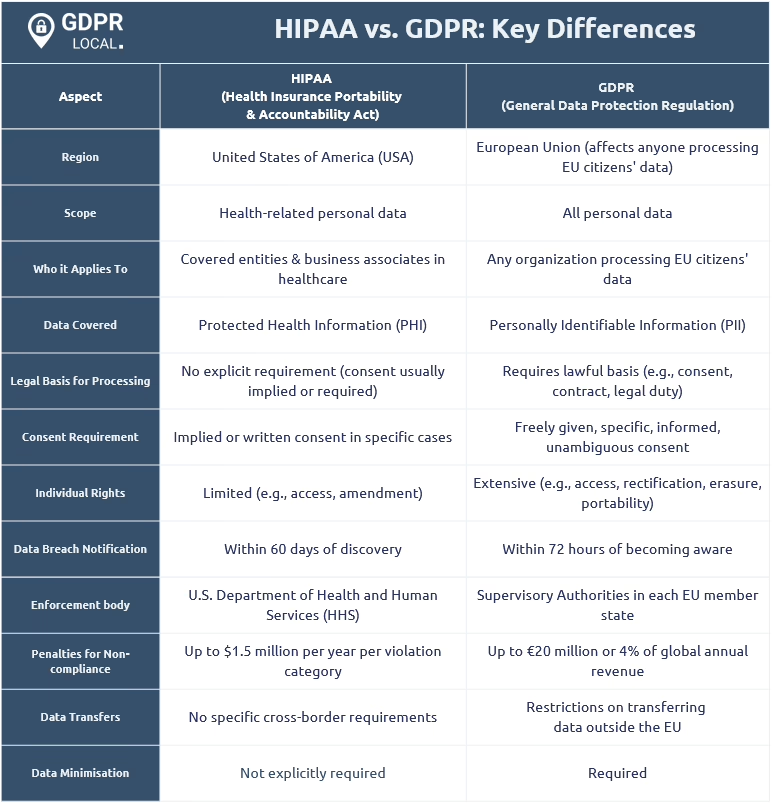
Regulation is shifting like the wind across the industry. Legislation like the EU Digital Identity wallet framework and the EU AI Act and India’s Digital Personal Data Protection Act advocate for the rights to consent, disclose selectively, and have a digital identity that is portable. You will not solve all of these requirements in one release. Track them, and design your portal so that reducing what you store is easier than fighting your own schema later. The following guidelines apply:
- Health data. Plan for stricter access, audit records, agreements, and incident handling from day one.
- Financial data. Limit storage, control exports, and document who can access statements or reports.
- Children’s data. Get specialist legal advice before launch and minimize collection.
- General client data. Start with clear permissions, strong authentication, encryption, retention rules, and an incident plan.
Be careful buying compliance badges. A portal satisfies only part of the requirement. The rest comprises the contracts, policies, staff, and your response management.
Build vs Buy Without the Regret
The build vs. buy decision is an ownership decision. Who will manage the system, approve access, examine log events, verify authentication, and address breaches when the system fails at 9pm on a Friday?
A SaaS portal usually wins for a small team. You launch faster, pay a predictable recurring fee, and let the vendor handle much of the infrastructure work. You give up some control over the workflow, and recurring cost tends to grow as users and clients join.
A custom portal allows you to develop a unique client experience and build your own business logic. It can accommodate unconventional approval flows, integrate with your systems, and provide you with the ability to design the solution without being constrained by another vendor’s product. You would also be responsible for managing the security of the portal, updating it, resolving vulnerabilities, monitoring it, backing it up, and responding to any incidents. There is a consistent failure pattern in these discussions. A small firm pays around $5,000 for a bespoke solution, the developer vanishes, the application crashes when 10 users connect to it, and the project is abandoned. “Custom” is not the issue. The issue is “Custom” without a responsible owner. Our “custom client portal” design guide addresses scope, cost, and adoption/implementation challenges that subtly disrupt client portal projects.
| Dimension | Buy (SaaS) | Build (Custom) |
|---|---|---|
| Launch speed | Days to weeks | Weeks to months |
| Workflow fit | Fits available settings | Matches your exact process |
| Maintenance | Vendor handles the platform | Your team owns patches and reviews |
| Cost shape | Recurring fees rise with usage | Larger upfront, ongoing engineering cost |
| Control | Bounded by vendor | Full control over data and behavior |
| Best fit | Small teams without engineering | Teams with engineering and a distinct workflow |
A rough rule of thumb: fewer than 50 active clients with no engineering owner means buy first and build later. Build only when your workflow offers a real business advantage and you can sustain the system for the long term. The hybrid path works well in these situations. Buy managed services for infrastructure and identity and customize the front end and workflow that clients see. The right partner is more important than the stack. Our additional resources on vetting a portal development company outline the questions that distinguish a good engagement from an expensive one.
An Eight-Week Path to a Working Portal
Where there is sufficient focus and availability of stakeholders, an eight-week launch is realistic. That said, it is not always the case. A migration of complex records, billing information, or regulated workflows requires additional prep.
Weeks 1 and 2: discovery
Invite five clients and watch how they send files, approve work, and access old documents. Describe the limitations and existing functional gaps. Summarize with a one-page buy-versus-build recommendation.
Weeks 3 and 4: design
Map how and where users log in, what they see and interact with within the system, how permissions are set, and how files are accessed. For SaaS, test what the vendor can offer and what gaps exist for your workflow within the system. For custom, an Auth0 or Clerk identity service with React or Next.js along with PostgreSQL is a good starting point. Set permissions early to avoid last-minute workarounds.
Weeks 5 and 6: build and integrate
Focus the build on four things:
- Secure uploads. Store files in S3 with server-side encryption. Validate file type, size, and ownership on the server.
- Server-enforced permissions. Tenant-scoped access checks on every request, not just in the UI.
- Audit history. Record logins, downloads, exports, edits, and permission changes.
- Integrations. Add SSO, billing, CRM, or document systems only where they remove a real manual step.
AWS or Vercel gives you the options for easy hosting. Datadog or Sentry helps alert the team to errors and service issues early on. If you are still considering how infrastructure will evolve with the growth of your clients, we have a helpful starting point for considering cloud infrastructure that scales with a portal.
Week 7: QA
Prior to moving sensitive client data into production, custom builds should go through penetration testing. Additionally, other standard scans and tests should include vulnerability scans, accessibility scans, authorization testing, and user acceptance testing.
Week 8: pilot and launch
Invite three friendly clients to perform real-world tasks, and watch where they hesitate. Support staff should be trained. High-risk issues should be resolved before opening the portal to everyone else.
What Happens After Launch
The first moments after the launch email can be the most anxious because the work has been done, the new portal is patiently waiting for clients, and attention has shifted back to the sales and delivery of service. Access reviews, dependency updates, backup checks, support tickets, and unexplained logins will remain undone until a new owner is assigned. Before launching, the ownership for each request should be assigned. A portal without an operating routine looks safe until someone needs an answer quickly.
A routine, no matter how mundane, is necessary:
- Access reviews. Check staff and client permissions on a regular cadence. Remove access when roles change.
- Patch cycles. Apply security updates promptly, then confirm the portal still works.
- Backup verification. Test restoration. Do not assume backups are usable.
- Incident practice. Decide in advance who investigates, who communicates with clients, and who preserves evidence.
- Feedback reviews. Ask clients where uploads, approvals, and account tasks are still confusing.
- Service reporting. Track support requests, failed logins, availability, and notable file activity.
For operational controls, this is a solid starting point for assigning ownership and reviewing the controls.
None of this will work as a one-time project. Client trust is built by the quiet consistency of small things. For example, access is revoked when a staff member leaves, an audit is produced within an hour when a client requests one, and an update is deployed before a headline vulnerability makes the news. If you are thinking about purchasing, extending, or building a portal that your team can use for the next three years, Refact’s portals and dashboards development service is designed specifically to help you with that decision.
Building a product and unsure what to scope first? Let’s talk. Free 30-minute call, no pitch.

Saeedreza Abbaspour is the CEO of Refact, where he works across product, engineering, and sales. He sets the studio’s direction while staying closely involved in the work itself, from shaping product strategy and UX architecture to helping define the technical systems behind Refact’s projects. His role connects business thinking with hands-on product execution, giving him a practical view of how software should be planned, built, launched, and improved. At Refact, Saeedreza focuses on building a studio that can move quickly, solve real client problems, and turn ideas into reliable digital products.
More from Saeedreza Abbaspour

