Client Portal Software: 7 Options Compared
Client portals are quietly failing.


This analysis is not meant to be a review of the best seven client portal software solutions, from an out-of-the box SaaS solution to a fully custom built solution. The goal is to show how each of the seven solutions most closely aligns with what a client may need based on their workflow, how their clients interact with the solution, and what integrations are the most important. If the more pressing concern is whether purchasing a client portal is necessary, our practical guide to customer portals addresses the build versus buy quandary and how to select tools prior to that analysis.
How to Read This Comparison
All of the client portals that exist can technically upload files, messages, invoices, and statuses. These are the bare minimum requirements. The real differentiators come in how they manage work processes that have a defined workflow (onboarding, approval, and KYC), how they integrate with the business systems that the company already uses (CRM, billing, and scheduling), and how they scale as a client list expands.
Signals from agency owners indicate an inflection point around $5,000 a month in recurring service revenue. Below this number, teams make do with shared drives and email. Above this number, portals cover their costs on retention, speed of onboarding, and the perceived professionalism of the relationship. The buying pattern above this number is not usually due to a feature gap. It is the purchasing of a suite that assumes a process, followed by months of effort to shoehorn the purchased process into the suite.
Two questions will help you frame your observations as you read. Does your portal primarily serve as a secure client visit location, or is it a component of a business process that you run? Does your business process logic resemble a service business?
1. Custom Portals and Dashboard Development
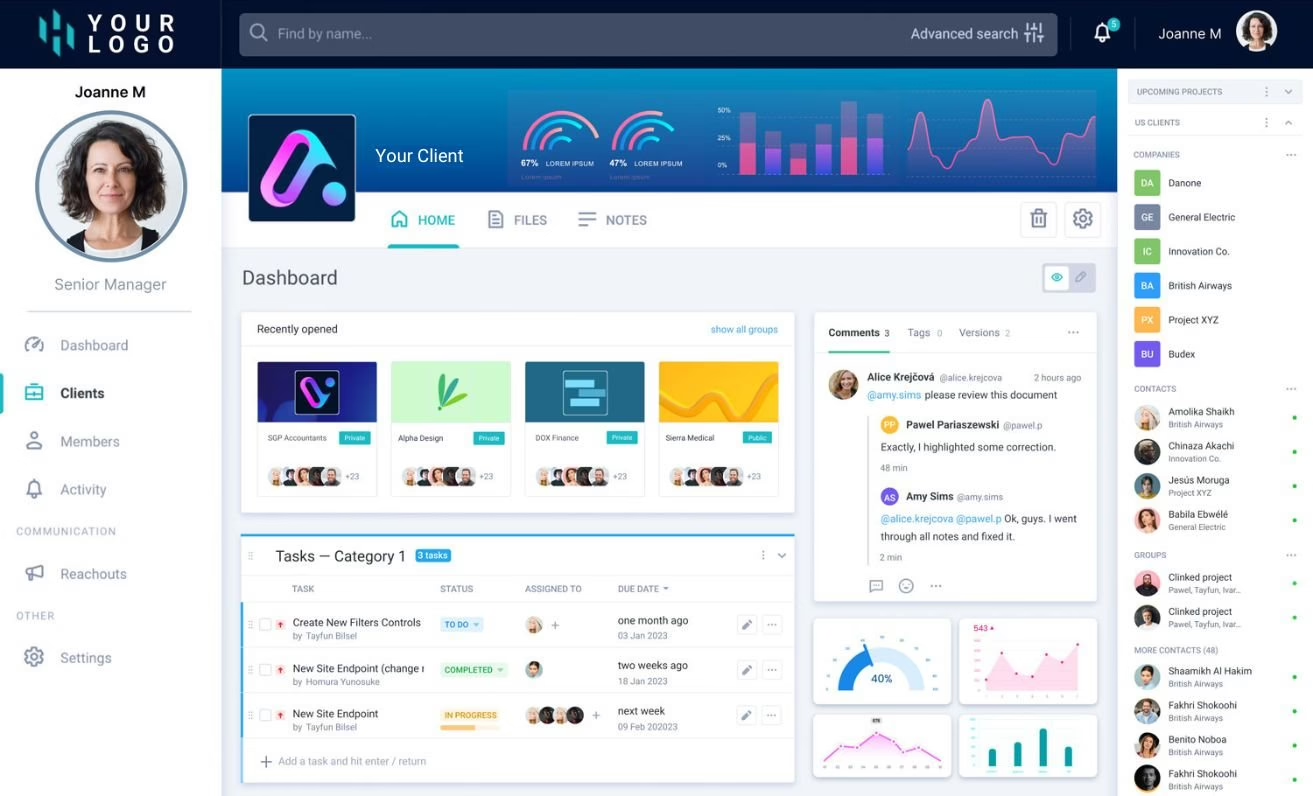
Where the portal is integrated into the product, custom is typically the solution. This is true for permission-based portals, billing portals, and portals that sit on top of internal systems that no SaaS vendor will integrate with. We build custom portals and dashboards for SaaS, publishing, membership, ecommerce, consulting, education, nonprofit, and other service-centric industries at Refact.
It’s usually the same sound telling you’ve reached custom territory. The team says we’re almost there. You have three overlapping tools because none of them cover the full process. Or a client-facing feature that the sales team keeps promising is something that no off-the-shelf portals provide.
The trade-offs are transparent. Custom is more expensive and takes longer. The process needs your input. A portal built around your workflow is only as good as your workflow. If you haven’t guided clients on their journey and outlined it clearly, custom development will only create confusion. Our custom client portal build guide goes through the different costs and ranges before any code is written and our portal development company vetting guide outlines the harder questions you need to ask any company you’re considering.
Where custom pays back:
- Workflow that no template models cleanly, especially staged approvals, conditional access, or role-specific dashboards
- Deep integrations with a CRM, billing platform, or internal ops system where field mapping and error handling matter as much as connector counts
- Multi-tenant needs where each client sees a workspace with different data, features, and branding
- Products where the portal is what clients pay for, not a bonus around the real service
Where custom is the wrong call:
- You are still testing whether clients want a portal at all
- Your workflow is standard enough that a configured SaaS platform gets you to eighty percent in a week
- You do not have someone on your side who can own decisions during the build
2. Assembly
Assembly is a good choice when you want a white-label portal without the need to stitch together six other tools. Everything from messaging to files and contracts, e-signatures and task creation is available along with a light app builder within a single branded workspace. Clients don’t need to jump between several logins, thereby improving the client experience. The pricing model is helpful since Assembly charges clients directly and not per client. This makes Assembly a good choice for service businesses where the client list is growing more quickly than the staff.
Custom branding and app embedding: integrating custom domains, QuickBooks, Xero, and Dropbox. This offering does not require a custom build for each integration. The starter tier only allows for one internal user, making most teams need an upgrade. Full removal of the Assembly branding lives on the higher tiers. Assembly is appropriate for businesses whose back-end operations are standard, but client-facing operations require a high degree of polish. It has less functionality for portals that need to implement a workflow with conditional logic requiring complex usability.
3. SuiteDash
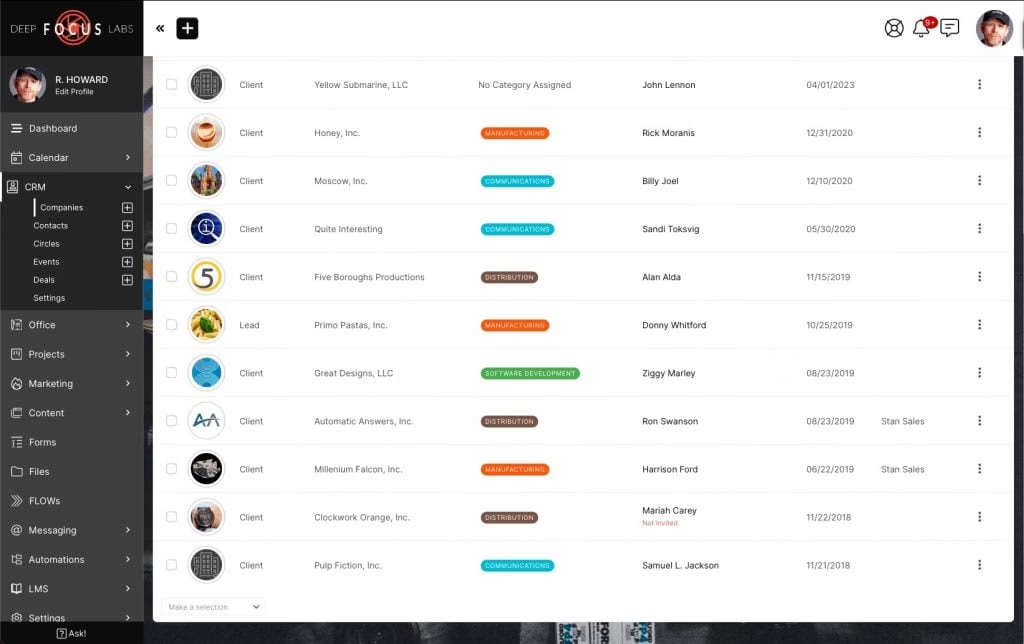
SuiteDash is the most feature-rich option on the list. Their solution includes a white label portal along with CRM, projects, billing, subscriptions, help desk, support tickets, learning management, email marketing, and automation. If you have a rudimentary stack of services, SuiteDash offers a suite of products at a single service price. Their offer includes unlimited customers and employees, as well as heavy white labeling and a custom domain. The pricing page is very simple, and shows plans at SuiteDash’s pricing page.
The ‘all-in-one’ problem has a tradeoff. Individual tools can be sharp, but dedicated ‘best of–breed’ solutions are still the best. Thoughtful setup is part of the process, and some of the best automations and marketing tools are available at higher tiers. Teams invest in SuiteDash because it looks like a cheaper option than custom software, then spend 3 months faking a workflow with the provided templates. The rule of thumb is blunt: SuiteDash is best if you want one system that can do a lot, but not that well. A custom solution is the best option to do a single task very well.
4. Clinked
Clinked shines when security and auditability cannot be compromised. The base solution features branded portals for managing documents, configurable permissions, audit trails, two-factor authentication, SSO as an add-on, and the capability of a virtual data room when the case requirements shift to deal collaboration or regulated file transfers. Along with document management features, the portal supports task management, calendars, chat, and discussion tools, making it sufficient to manage both the tasks and your documents.
When it comes to deeper workflows, Clinked is lacking. Process-first portals would be more appropriate for onboarding flows with multiple, evolving next-actions. For issues with documents that contain sensitive data getting distributed to the wrong places, and needing documentation audit trails and role-based accessibility controls, Clinked is a more adequate solution on the market. Clinked’s pricing should be examined carefully against the specific security features of your request, as many of the enterprise controls are in the upper-tier plans.
5. Moxo
Moxo is more appropriate for designing clients-centric process portals, and therefore files are stored in other locations. AI assistants, integrated workflows, and e-sign are some features that target clients onboarding, KYC automation, and routing approvals iterative tasks. Users are able to access the portal via a magic link. Additional features at higher subscription levels include SAML SSO, audit logs, and template library for regulated industries.
Moxo is also a common point of comparison for 2026, which is an indicator of more thoughtful consideration of the product around Medium listicle posts and X practitioner forums. That should not be interpreted as a negative indicator of Moxo, but rather that the configuration burden and cost of the top subscription levels has become more of a concern. Moxo is the most appropriate choice for traditional delivery models that have a clear staged workflow that is the same for all the stakeholders involved. Typically a more flexible solution should be used for document portals with a chat integration.
Our client onboarding portal guide tackles the automation and manual separate workflow steps for our client onboarding portal.
6. Onehub
If your primary need is secure document exchange, Onehub is a solid choice. Onehub offers white-label branding, custom domain usage, role-based access, audit trails, file previews, and integration with DocuSign as well as data room controls like digital watermarks, NDAs, and stealth mode. Onehub is a good fit for document-centric deal rooms, legal reviews, and financial services work that is more about document control than collaboration.
In Onehub, external viewers do not consume licensed seats, so when many viewers are required but only a few need full access, this tradeoff works out to be a benefit. Because Onehub is not attempting to cover project management and CRM tools, the portal is a good secure document vault with a client-facing professional interface that is a good choice when you do not want a small operating system.
7. Wayfront
Wayfront is designed for agencies that sell productized services, retainers, and packaged work. The portal integrates CRM, order forms, subscriptions, invoicing, client support, tasks, projects, and a referral program, so work and revenue management co-exist in the same place. If your business model is buy a packaged service and pay by subscription, engage in a service that is defined and structured, Wayfront will do this programming for you.
Having multi-language support, editable UI copy, webhooks, Zapier and Make connections, Slack integration, and an API on higher tiers means that this solution has a lot more features than a single purpose portal. Seat-based pricing after the free headcount and the API add-on on the Pro tier are the pricing factors to watch. Wayfront is less compelling for most general enterprises with atypical internal structures or workflows that will not be met by a productized-service template.
The Seven Options at a Glance
| Option | Best when | Weakness | Pricing shape |
|---|---|---|---|
| Custom (Portals and Dashboards) | Portal is part of the product; unusual workflow or integrations | Higher upfront cost; needs engaged owner | Project-based, then support |
| Assembly | Branded client experience with standard process | Starter tier limits internal users | No per-client fees |
| SuiteDash | Replacing several tools with one broad suite | Individual modules less polished than specialists | Flat plans, unlimited users |
| Clinked | Security, compliance, audit-heavy collaboration | Lighter workflow automation | Tiered, enterprise controls higher up |
| Moxo | Staged workflows: onboarding, KYC, approvals | Configuration effort; higher tiers for SSO and AI | Tiered, workflow-oriented |
| Onehub | Secure document exchange and data rooms | Narrow scope beyond files | Seat-based with viewer allowances |
| Wayfront | Agencies selling packages, retainers, subscriptions | Seat costs; API on higher tier | Tiered plus add-ons |
The Failure Modes Worth Naming
Every category has a predictable way of spending money beyond the absence of a working portal. Those ways are consistently posted in practitioner forums and threads.
Building custom solutions without engineering resources is an expensive and time-consuming endeavor. One example repeatedly cited is that of a small business owner who spent around $2000 over three months to build a custom portal. The developer stopped communication, the application started crashing at 10 users, and the project was abandoned. The lesson is not that custom projects are bad. The lesson is that custom building is expensive theater and a not a real engineering partnership.
Some fragile payment integrations create trust and accounting issues that outlive portals. Ask vendors how their payment integrations support automated retries and track disputed payments and how they support the integration of payment records.
One practitioner discussion phrase captures the design issue well. A client portal should not be a scavenger hunt. If clients cannot immediately log in and view the files, messages, and the next tasks to complete, adoption will quickly stop, even if there are many features behind the menu.
Integration depth mistaken for connector count. Simply listing 200 integrations over 20 does not mean a portal is better. Rather, consider the workflow triggers, field mapping, error handling, and the position of the service in the cloud. Ask for specifics on how the portal addresses a sync failure. Avoid answers that skirt the question.
Portals that disregard the new way of working. Buying portals is not done solely by humans anymore. Drafter X writing in 2025 and 2026 proposes that, more than likely, AI agents will engage on behalf of their clients and internal teams and that portals will need scoped API access and usage-based pricing. Traditional dashboards will persist. Portals that only offer dashboards will be felt as successive and narrow in a few years.
A Short Buyer’s Checklist
Before signing anything, invest one workday in this exercise. This mapping will save you weeks of commitment to the wrong tool.
- Users and roles. Who logs in, what they see, and where their permissions stop
- Must-have features. Files, messaging, approvals, payments, notifications, API access, and whichever integrations your team actually uses daily
- Data and security. Ownership, backups, encryption, authentication, audit logs, and any privacy obligations the industry requires
- Growth costs. How pricing behaves at ten clients, one hundred clients, and one thousand clients
- Exit terms. How you export data if the vendor disappears or your process outgrows the platform
Prior to a platform-wide launch, run a pilot. Capture one client journey. Map the configured portal, extend a portal invitation to three to five clients, and track logins, goal accomplishment, and support calls. Adoption during the first month is indicative of success. Portals that are uncomfortably unwieldy during the pilot remain so upon a full launch.
Buy, Assemble, or Build
Three answers are honest, depending on your current vantage point.
Buy when you have a standard process with mostly common integrations and need something operational this quarter. For different needs, consider Assembly, SuiteDash, Clinked, Moxo, Onehub, or Wayfront.
Assemble when you require branded control, but don’t wish to undertake a full-scale development effort. This usually pertains to the use of broad platform SuiteDash, along with subscription automation tools that connect your CRM, billing, and file storage. When compared to other options, Assemble is fast to implement, flexible, and low-cost enough to justify a trial.
Build when your portal is a significant aspect of your product. This is applicable when your workflow differs from what is offered in a service, and when the required integrations don’t exist. For this, the more important question is not what you build. Rather, it is how well defined the customer journey is. Both our B2B customer portal buyer’s guide and the white label client portal guide can help you answer that question before preparing a project proposal.
The best portal is one that clients open without prompting. If clients keep going back to email, then the portal is likely too complex, disconnected from their tasks, or too far away from the process that it was supposed to replace. If you are trying to figure out which of these that may be the case, that is exactly the kind of early feedback that our discovery process is designed to give. Begin by making your three biggest rough spots for client friction and choosing two SaaS options that align with these spots. Only consider custom development as an option if the shortlist of two SaaS options bridges the rough workflow spots before the friction is fully addressed.
Building a product and unsure what to scope first? Let’s talk. Free 30-minute call, no pitch.

Saeedreza Abbaspour is the CEO of Refact, where he works across product, engineering, and sales. He sets the studio’s direction while staying closely involved in the work itself, from shaping product strategy and UX architecture to helping define the technical systems behind Refact’s projects. His role connects business thinking with hands-on product execution, giving him a practical view of how software should be planned, built, launched, and improved. At Refact, Saeedreza focuses on building a studio that can move quickly, solve real client problems, and turn ideas into reliable digital products.
More from Saeedreza Abbaspour
