AI Workflow Automation: A Working Guide
The support queue keeps growing.


That is where AI workflow automation earns its place, and where it usually fails. According to World Metrics’ AI workflow automation report, the category was valued at USD 12.65 billion in 2022 and is projected to reach USD 35.72 billion by 2030 at a 14.1% CAGR. In the same period, S&P Global found that 42% of companies scrapped most of their AI initiatives in 2024, up from 17% the year before. The technology is not the bottleneck. The workflow, the schema, the ownership, and the review loop are.
This guide is for operators, product leaders, and business owners who want to ship one useful AI workflow without creating a new mess. It covers what actually counts as an AI workflow, how the parts fit together, the patterns that hold up in production, and where projects quietly die.
What AI Workflow Automation Actually Is
Anthropic draws a useful line between two things people call AI automation. A workflow runs an LLM inside a predefined code path: the system decides when to call the model, how to check the output, and what to do next. An agent gives the model authority to pick its own next step. Most teams should start with the first and stay there longer than they think.
Traditional rule-based automation handles work where the inputs are stable. If a form field says “refund,” send it to the refunds queue. AI enters the picture when the input is messy. It can classify a request written in three different ways, pull fields out of a PDF, summarize a long thread, or draft a response that a person will then approve.
A workflow with AI in it has three qualities:
- It starts with a real business event, such as a new ticket, an uploaded file, or a completed form.
- It asks the system to interpret something, not match an exact phrase.
- It takes a controlled next step in a tool the team already uses, with a person responsible for exceptions.
Practitioner discussions on Reddit and X keep landing on the same warning. Syed Balkhi puts it directly: “AI amplifies your existing understanding. If you don’t understand the process, AI will just amplify your confusion.” Automating a messy process gives you a faster mess. That is not a slogan. That is what shows up when a support workflow starts sending duplicate replies or when an inbound router keeps escalating the wrong cases to the wrong owner.
The Five Parts of a Working AI Workflow
Every AI workflow that survives has the same five parts. Naming them separately is useful because it forces you to design each one instead of hoping the model covers for the weak layers.
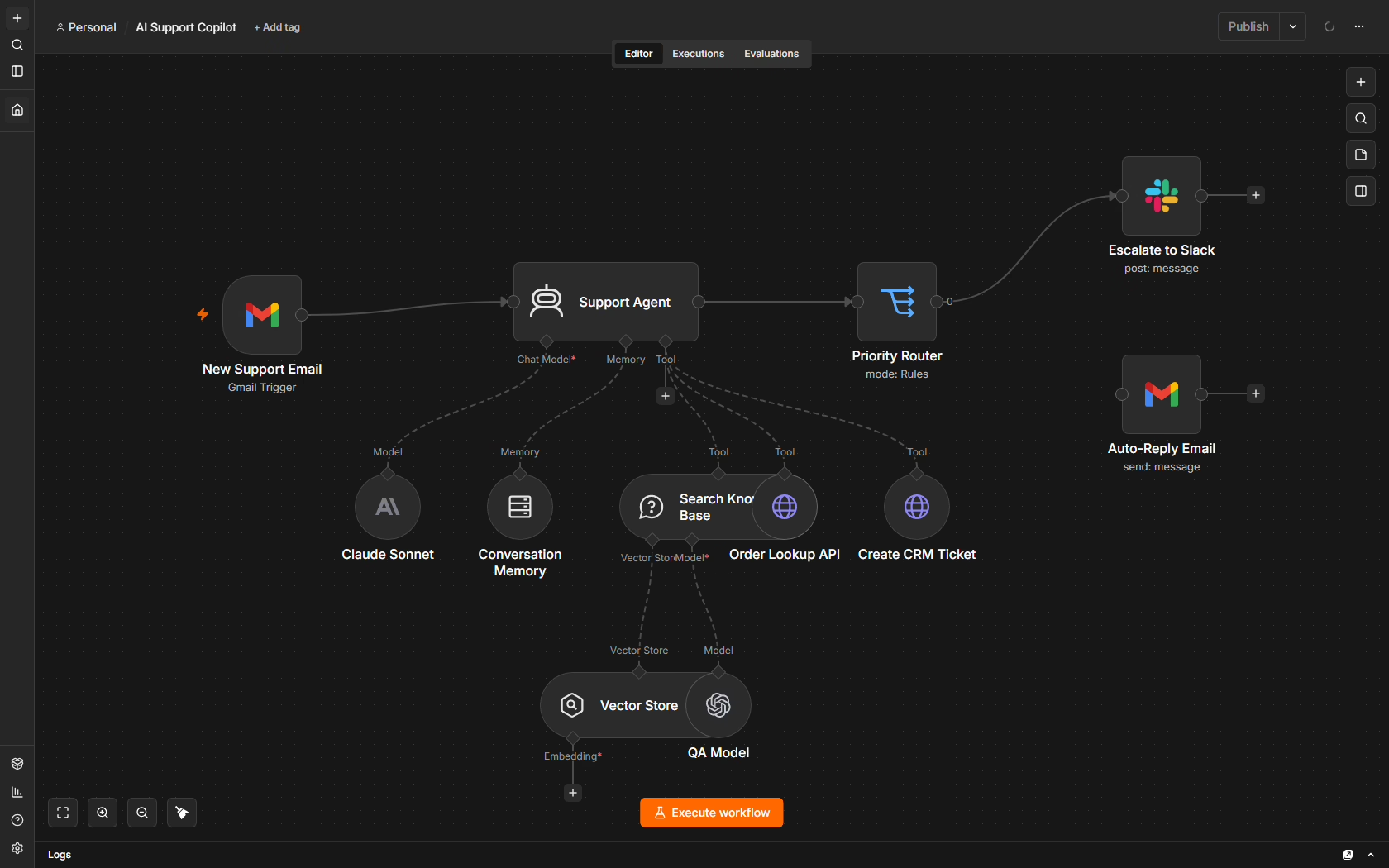
- Trigger. A ticket, message, upload, form submission, or scheduled job starts the process.
- Input layer. The system gathers structured fields plus the unstructured text, files, or context the model will read.
- Model layer. The LLM classifies, extracts, summarizes, or drafts. This is one step, not the whole workflow.
- Action layer. The result gets written into the CRM, helpdesk, project tool, or system of record.
- Guardrail layer. Validation, logging, permissions, confidence thresholds, and human review sit here.
The trigger and action layers usually look familiar. The three that decide whether a project lasts are the input layer, the model layer, and the guardrail layer, and most of the engineering work lives between the model call and the next action rather than inside the call itself.
A retrieval-focused study of three real LLM deployments identified seven distinct failure points that have nothing to do with hallucination: missing content, missed top-K, not in context, not extracted, wrong format, incorrect specificity, and incomplete answers. Each one is a workflow problem, not a model problem. Add a loose JSON contract between two steps and you get null propagation bugs that no one notices until a customer complains.
The Yalc team, writing about the control layer between models and tools, calls this the “governed” part of the workflow. Whatever you call it, it is where most of the code lives and where most of the failures start. We wrote about the same idea in our practical guide to AI systems integration, which covers how to keep model outputs safe inside real permissions and approval chains.
If you cannot describe the data your system receives, the actions it can take, and the moment a person must intervene, you are not ready to automate the workflow.
Workflows, Pipelines, and Agents: Pick the Smallest One
You do not need the most impressive architecture to get value. You need the smallest one that solves the pain without making failures hard to trace.
| Pattern | Best for | Failure mode |
|---|---|---|
| Single-task assistant | One judgment step inside an existing tool | Output drifts and no one notices |
| Orchestrated pipeline | Several steps with routing, retries, human review | Silent errors between steps |
| Multi-agent system | Specialized tasks that must coordinate across systems | Agents work in silos, outputs go unused |
A single-task assistant is the safest place to start. It classifies a support ticket, drafts a product description, or summarizes a customer thread. You can compare its output to the current process and cap what it is allowed to change.
An orchestrated pipeline chains several steps: one extracts, one validates, one routes. It fits teams that already have a documented process and someone who owns the exception queue day to day. Cyndra’s overview of workflow automation examples across departments is a useful catalog for spotting patterns you might reuse.
A multi-agent system is where evidence turns mixed. A 2025 paper on incident management reported a 100% actionable recommendation rate for a multi-agent design against 1.7% for a single copilot across 348 trials. That is a real gain, but only with disciplined design. A widely shared Vox post-mortem from March 2024 describes an AI company that mapped a human org chart onto agents and watched them work in silos, with some “roles” producing outputs that nobody consumed. If you go multi-agent, do fewer agents with deeper, actually consumed responsibilities. For the mechanics of building one that survives, our guide on how to build an AI agent that works covers the design choices in detail.
Where AI Workflow Automation Actually Pays Off
Successful case studies share a pattern: narrow scope, embedded in existing tools, hard financial metric, human gate at the risky steps. Four categories keep showing up.
Publishing and editorial operations
A publisher receives drafts, transcripts, or source documents. The workflow extracts key facts, drafts a summary, suggests tags, and hands an editor a starting point. The editor still owns tone, accuracy, and publication readiness. The metric to watch is time from accepted draft to published article, together with the number of edits an editor makes after the AI hand-off.
We built an automated news pipeline for a daily newsletter where the editorial team was spending more time hunting stories than writing them. The pipeline monitored dozens of sources, deduplicated against past coverage, and delivered a shortlist into the same tool the curators already used. The gains came from removing the manual scanning, not from replacing the editorial judgment.
Support and catalog work
A new ticket enters the helpdesk. The system classifies it, checks the relevant order, and drafts a reply. Sensitive actions such as refunds or account changes wait on a human approval. Klarna reported handling 2.3 million conversations in the first month of its assistant, roughly 700 FTE-equivalent, with sub-two-minute resolution and a $40M profit improvement. Those numbers are attractive, and the design choices behind them are the point: it lives inside the existing channel, not a new one.
Internal ops for services and consulting
An inbound email triggers the workflow. AI extracts the client’s request, identifies the service line, checks CRM context, and assigns an owner. A person reviews the assignment. The metric is time from arrival to ownership. An unassigned request creates a delay even when the eventual answer is good. Ryware’s explainer on production AI applications covers the integration patterns for this kind of internal work.
Product feedback
Comments arrive from Intercom, an app store, and Discord. AI clusters them into themes and prepares a weekly summary for the product manager. The manager decides which themes deserve action. Track how quickly feedback becomes a clear product decision and how many duplicate themes the team has to merge by hand.
For more of these teardowns, our collection of workflow automation examples that hold up covers the design choices behind each one.
Curious whether your site is citable by AI assistants? We run a readiness check that shows what they can and cannot read. Run the check.
Why Most AI Workflow Projects Stall
The failure pattern is consistent across surveys, case studies, and practitioner posts. It rarely starts with the model.
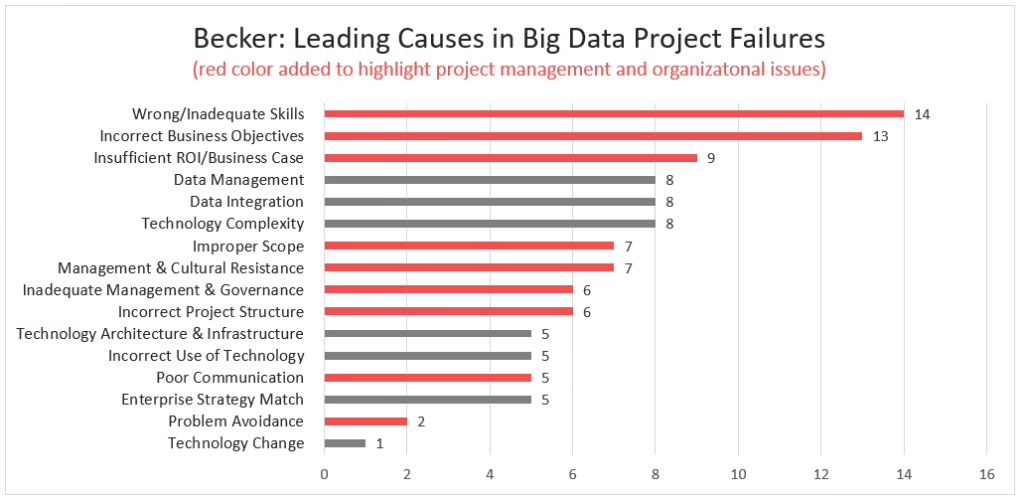
The G2 AI Agents 2025 insight report found that nearly two-thirds of organizations using AI agents need more human oversight than they expected, and identified specific organizational blockers: connecting agents across applications and workflows (19%), organizational change (17%), and employee adoption (14%). Compliance, data leakage, hallucinations, and security incidents all show up as recurring concerns rather than solved problems.
The most common ways projects die:
Integration debt. The output lives in a separate tool. Staff copy it into the system of record or ignore it. The cheapest fix is to write the result directly into the tool people already use and log every transfer. Do not add another place for them to check.
No daily owner. A leader approved the project, but no operator owns its performance. Accuracy drifts, prompts get tweaked, and failures sit unresolved. Name one owner. That person reviews exceptions, tracks overrides, and decides when the workflow needs a scope change.
Missing review loops. Someone removed human approval before the workflow had a track record. One bad result makes the team distrust every result. Keep human approval on risky steps. Loosen it only after you have reviewed real output over several cycles.
Loose contracts between steps. Free-form JSON between agents causes silent null propagation. The downstream step gets nonsense and produces a plausible-sounding wrong answer. Use typed schemas between every step. Every node should accept a defined input and emit a defined output.
Model version drift. Providers upgrade models and outputs change without your code changing. Pin versions. Stage upgrades. Run evaluations on production-representative samples, not public benchmarks.
A Springer chapter on constrained workflow generation for IT automation ran 2,784 executions across 29 real-world scenarios and found that structured DSL constraints produced improvements of up to 48 percentage points over unconstrained prompt execution. A 2B model reached 69.1% correctness against 82.6% for a 20B model under the same conditions. The lesson worth carrying forward: structure and validation often matter as much as model size.
The AutomationBench-AA agentic SaaS workflow benchmark makes the same point on a broader test set: 657 tasks across six business domains, scored on objectives completed without guardrail violations across Gmail, Google Sheets, Slack, Salesforce, Zendesk, Jira, and HubSpot. Completion alone is not enough. A workflow has to stay inside its rules.
A 90-Day Rollout for One Workflow
You can make real progress in a quarter without buying an enterprise platform. The point is to ship one workflow, learn from it, and decide whether to expand or stop.
Days 1 to 30. Pick the workflow with the most repetition and the lowest risk of harm from a wrong action. Write down the current steps, the failure modes, and the data the workflow needs. Choose one metric that matters to the business: routing time, approval time, tickets resolved without escalation, corrections per hundred outputs. Ship a human-in-the-loop pilot in the existing tool.
Days 31 to 60. Instrument every step. Log inputs, model outputs, and the actions taken. Review failures weekly. Improve the prompt, the schema, or the retrieval. Formalize the hand-off to the operator who owns the workflow day to day. Decide what the system may draft, what it may update, and what always needs approval.
Days 61 to 90. Attempt a second workflow only if the first one earned trust on its metric. Set kill signals in writing before you start: time to value slipping more than six months, operating cost more than three times the pilot estimate, or adoption plateau. If any of those trigger, review or cancel. A structured post-mortem on a canceled workflow is worth more than a stalled one that keeps consuming attention.
Buy standard capabilities where they already work. Existing tools handle intake, storage, and basic orchestration. Reserve custom development for the business logic that makes your product different. If you are comparing platforms, our buyer’s guide to workflow automation companies covers what each category actually solves and where each one tends to break.
When to Bring in a Partner
The moment for outside help is not the pilot. It is when the pilot has earned trust and you need product strategy, design, and engineering to turn a working workflow into production software the business can rely on.
Refact is a US-based product studio with 12+ years in business and 200+ projects delivered. Our discovery phase carries a money-back guarantee because the early decisions on scope, data, and ownership are what decide whether the build is worth doing at all. If you have one painful workflow and one metric worth defending, our automation and integration practice and our writeup on AI integration services are the right places to start.
The teams that make AI workflow automation pay do the unglamorous work first: they master the manual process, design the failure-aware graph, embed the output where people already work, keep humans on the risky steps, and instrument everything. Clarity before code.
Trying to work out where AI actually fits in your stack? Let’s talk. Free 30-minute call, no pitch.

Asghar Mirzaei is a backend developer at Refact, focused on the APIs, integrations, and infrastructure that power the studio’s products. His work spans data pipelines, third-party services, backend architecture, and deployment systems, helping ensure that products are stable, scalable, and ready for real-world use. Asghar works closely with the team to connect product requirements with reliable technical foundations, especially in systems where performance, automation, and integration quality matter. At Refact, he contributes to the engineering work behind the interfaces, making sure the products the studio builds can run smoothly and dependably
More from Asghar Mirzaie

