Ecommerce Replatforming: A 2026 Playbook
The numbers from Swell’s 2026 replatforming statistics tell a story of restlessness in the ecommerce space


We put together this guide for the operator considering a replatform in 2026 to get at what the work really is, when the pain is more than skin deep, and where one might find the money and traffic slipping away. Our position is straightforward: a replatform is an exercise in change management, integration and data. Design and features are the easy part.
When Replatforming Is the Right Call, and When It Isn’t
For the majority of stores, a new platform is not the answer. A better use of the existing one is. Whether it is a leaky checkout, slow page loads or a hole in your reporting, these are configuration issues, not platform ones. You can fix them with less risk and cost than a full-scale move.
You only justify a replatform when you have run up against a structural ceiling in your current stack. We are talking about things you cannot configure around: a business model the system won’t accommodate (be it B2B pricing, subscriptions or multi-warehouse), scalability that breaks down at peak times, a vendor who is sunsetting the product, or integration costs that climb every quarter. Put another way, if it is not one of those, it is merely optimization in disguise.
The test is simple. Do the same limitations keep showing up in unrelated corners of the business? If a new SKU model, a new channel and a new market all demand a workaround, you have hit a ceiling. If a single workflow is broken, call it a bug and leave it at that.
Signals it is time to move
There are signs the platform is dictating the pace of your business, at which point the workarounds cost more than a move:
- You are blocked by the same bottleneck in two or more places, be it the catalog, checkout or integrations.
- Every new tool demands a custom bridge or an app subscription because integration churn is on the rise.
- Your operations team is manually doing the platform’s job each week, retyping orders and reconciling stock.
- The vendor’s roadmap has left your business model behind, or the platform is due for end-of-life.
Signals to stay and optimize
Where there is friction in the checkout or a speed issue, address that first. Contentful would have you treat any page loading in over three seconds as a cause for concern, but we see it as a prompt to look into why, not to start packing up. A bad extension, a heavy theme or a slow host will look the same to the shopper and do not warrant a new platform.
Do not let a marketing problem drive the decision. Replatforming to improve conversion, retention or AOV is costly and seldom has the desired effect.
What Ecommerce Replatforming Actually Involves
Make no mistake, this is not an upgrade or a redesign. It is the coordinated transfer of the store’s logic, data and integrations to an entirely different system. The frontend is what is seen; the rest is what matters.
A proper scope covers everything from product and variant data, customer accounts and order history to payment and tax set up, ERP and CRM ties, PIM and OMS handoffs, URL structure and analytics continuity. Each is its own workstream. If you put them on a spreadsheet as line items, you will watch the budget double.
The industry is moving in that direction. The commercetools report from 2024 shows a shift from monolithic systems to SaaS and headless API-first models. Take the adoption figures for what they are, directional at best, but the pattern is clear: teams want components they can swap, not a tightly coupled stack.
The Data Migration Is Where Most Projects Break
Then there is the 83% figure for data migration failures. On live projects we see the reason for it. The errors at cutover – an order with the wrong tax, a blank account, missing images – can be traced to choices made on field mapping months prior.
A clean migration is separated from a messy one by three factors.
Have a canonical data model in place before you export. When products are in Shopify and enrichment in a PIM, one must be the authority for each field. The same goes for customer records in an ESP versus the platform. Leave that ambiguous and the records will be corrupted down the line.
Run the migration more than once. Do a test on a subset, a full QA in staging and then the production run at cutover. Reconcile after each pass. That is how a CartCoders-style runbook should be followed. Try to do it in a single pass and you will find CJK characters mangled or variants flattened without anyone being the wiser until a customer contacts support.
Reconcile the numbers. Product count, revenue by month, active subscriptions – if the figures do not match on both sides, you have a hope, not a launch.
And then there is the matter of historical data. For reorders and support, the new system is where two or three years of orders will live. Anything older should be put in a warehouse or archive, though you will find that B2B and the like require the complete history. Make a call on this early; it will dictate the pipeline’s shape.
SEO and Analytics Continuity Is Not a QA Step
Then there is search traffic, which is where migrations have a habit of bleeding out. You will see 40%+ organic drops talked about on Reddit time and again following a cutover gone wrong, and it is invariably due to some oversight with 301 redirects, a change in URL structure, or an SEO defect at the template level from the rebuild.
The answer is to do the legwork before the site is built. That calls for a full inventory of old URLs, a 301 mapped for each one, metadata and canonicals in place, and structured data vetted in staging. Have a plan for Search Console monitoring for the first few weeks post-launch. Redesigning the site only compounds the risk, so we treat redesigning a website without losing SEO as a workstream in its own right.
Analytics requires the same sort of discipline. Let the tags and goals carry over poorly and the first month of data is useless; teams are left making product decisions on broken tracking, which is no better than being in the dark. Baseline against the old site for the first fortnight and verify your events in staging.
The Lift-and-Shift Trap
We hear more regrets from teams after launch about moving their broken workflows as they were than about choosing the wrong platform. The new stack ends up running the old bottleneck and the speedup never materialises.
So separate the concerns. On the first cutover, keep the scope tight and match feature parity. Once the platform is stable, then you can go back and redesign the workflows in a second phase. Trying to do both is how you lose your timeline and the team’s confidence. It is not exciting advice. Stakeholders want the new IA, the loyalty program and the checkout on day one. But the ones who ship those changes without issue do so in the six months that follow.
Wondering how your store shows up in AI search? We put together a short visibility snapshot. Get the snapshot.
Choosing Architecture for the Stage You Are In
Headless commerce has its uses but it is oversold. Talk to buyers in the community and you will come to the same conclusion: the complexity is only justified if you have a proper engineering bench and a need the SaaS layer cannot fill. Otherwise you are paying a premium for hosting and build time on what should be simple changes.
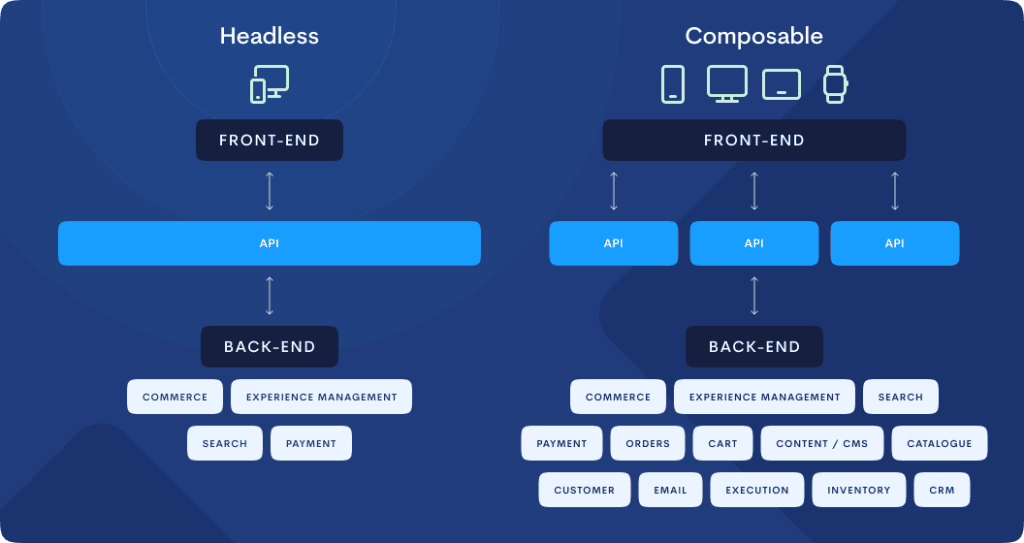
| Architecture | When it fits | What it costs you |
|---|---|---|
| Traditional SaaS (Shopify, BigCommerce) | Stable model, small team, wants to focus on merchandising not engineering. | Ceiling on customization; app sprawl over time. |
| Headless on SaaS backend | Marketing needs custom frontends, storytelling, or omnichannel with a real dev team. | Higher build cost; longer lead times for simple changes. |
| Composable / API-first | Complex catalog, multiple channels, business logic that spans systems, engineering-heavy org. | Highest complexity; needs sustained platform investment. |
Our rule of thumb is to choose the architecture that is simple enough to clear the ceiling you are up against. If SaaS does the job, use it. Do not move to headless because a presentation tells you it is “future-proof.” The Shopify enterprise replatforming guide makes the point indirectly with case studies of companies going to a hosted platform, not away from one. For a content-heavy store that is as much a publication as it is a storefront, the CMS is as important as the commerce side and the two should be decoupled.
Cost, Timeline, and What Founders Underprice
Cost bands are wide since scope is the variable, not the platform. A straightforward SaaS-to-SaaS might be $30K–$50K, a mid-market Shopify or WooCommerce project $30K–$60K, while a complex B2B with ERP integration can run $150K to half a million. Netguru’s practice of multiplying vendor quotes by 2.5x is not cynicism; it accounts for the internal time, data cleaning and refactoring that the SoW leaves out.
As for the schedule, J.Lindeberg did a Shopify migration in 16 weeks and saw a 7% lift in conversion, according to commercetools. That is the fast end of things and was a well-scoped move. An enterprise B2B with localisation will take 9 to 18 months. Put 15–20% in the budget for contingency and a couple of sprints in the timeline. If you do not need them, so much the better. The ecommerce website cost breakdown we put together shows the true TCO over three years.
Launch Is the Midpoint
The problem with the narrative that launch day is the finish line is that B2B data will tell a different story. Revenue can fall for three to six months once key accounts discover the new portal is missing contract pricing or EDI, or simply stop using it because they were not told what had changed.
Good teams stay on for 6 to 12 months after the fact. They have a budget for adoption, not just for putting out fires. They get in front of their biggest customers to discuss what has improved and what has not. It is unglamorous but it is what puts the migration on the P&L.
How Refact Approaches Replatforming
We prefer to earn the right to replatform before any code is written. We did not find the theme to be the hard part on our recent Shopify build for Broya’s subscription-first store. The challenge was in the migration itself, reshaping the product model and checkout logic so the conversion rate would continue to climb once we went live.
You will find a similar dynamic at work with Oh La La! Macarons’ departure from Squarespace. On the surface it was a Shopify build, but in truth the project was about making sense of a business that had outgrown its platform and expanded into wholesale, corporate, events and DTC. The question was never simply what Shopify plan to put in place; it was determining which elements of the operation the new store needed to model natively and which were better left to ops.
For those further down the road and weighing partners, we have put together a Shopify migration checklist and data migration playbook to outline the kind of work that is prone to fail at cutover. There is also our guide on moving from Magento to Shopify for one of the enterprise transitions we are seeing most often in 2026.
Where AI tools fit
Do not mistake automation for a reason to replatform, though it does alter the numbers after launch. When the stack is sound, you can let AI agents for Shopify take over the catalog and order-handling chores that would otherwise need staff. But the principle works both ways: clean data gives you operational leverage, whereas if the flow is broken, all the automation in the world will do is hasten a flawed process.
The Decision, Framed Simply
Put three lists together before giving the green light to a migration. Start with the platform constraints eating into your time or revenue and put a dollar value on them. Then note the integrations that must not be compromised during cutover. Finally, make a list of the things that are a source of frustration but may in fact be optimization issues.
Should the first list outweigh the third, then there is a genuine case for a new platform. If not, the prudent move is to put the current stack in order. In any event, sorting out the decision is what makes or breaks a migration. That is the purpose behind Refact’s ecommerce migration services, and why we stand by our discovery phase with a money-back guarantee. The toughest decision in a replatform is the one made prior to commitment.
Building or replatforming a store? Let’s talk. Free 30-minute call, no pitch.

Saeedreza Abbaspour is the CEO of Refact, where he works across product, engineering, and sales. He sets the studio’s direction while staying closely involved in the work itself, from shaping product strategy and UX architecture to helping define the technical systems behind Refact’s projects. His role connects business thinking with hands-on product execution, giving him a practical view of how software should be planned, built, launched, and improved. At Refact, Saeedreza focuses on building a studio that can move quickly, solve real client problems, and turn ideas into reliable digital products.
More from Saeedreza Abbaspour

