Webflow to WordPress Migration: A Practical Plan
You will not find a one-click solution for moving a site from Webflow to WordPress.


The trouble with most Webflow to WordPress migrations does not come on launch day but three weeks down the line. A form ceases to talk to HubSpot without fanfare. A soft 404 appears on a category page. Or a blog archive that was once on page one falls out of the index over some slug that was altered without notice. We put this guide together to head off those kinds of problems rather than to show off an export button.
Why Teams Actually Leave Webflow for WordPress
Then there is the question of why one would do it at all. The market has been going the other way in 2025 and 2026; agencies are touting WordPress to Webflow moves and you will be hard pressed to find a public case study for the reverse. “More flexibility” is hardly a business case. If you are thinking of making the switch, be precise about your reasoning.
In practice the valid reasons are few:
- Scale. Webflow Collections have their limits. For a publishing operation with thousands of items and complex references, WordPress handles the load.
- The ecosystem. You get mature plugin paths on WordPress for memberships, LMS, subscription billing, WooCommerce and multilingual work that Webflow either cannot do or does so awkwardly.
- Portability. With a self-hosted WordPress you own the database and codebase and can version or re-host it. Not so with Webflow.
- Technical SEO. WordPress is more open when it comes to custom schema, edge caching and header manipulation.
If your motivation is not one of the above, think again. WordPress gives you the room to work but it requires maintenance. Plugin updates, security and hosting are no longer someone else’s problem. Teams that approach WordPress with the set-and-forget attitude they had with Webflow will see the site deteriorate in short order.
Design the Content Model Before You Touch Content
Translating Webflow’s CMS Collections into the WordPress content model is the heaviest technical lift of the job. This is where a shoddy migration gets stuck; once you have put content into the wrong structure, you are better off starting over than cleaning it up.
A Webflow Collection becomes a custom post type in WordPress. Reference fields turn into taxonomies or post-to-post relationships. Multi-references require you to handle the relationship explicitly. Nothing is automatic.
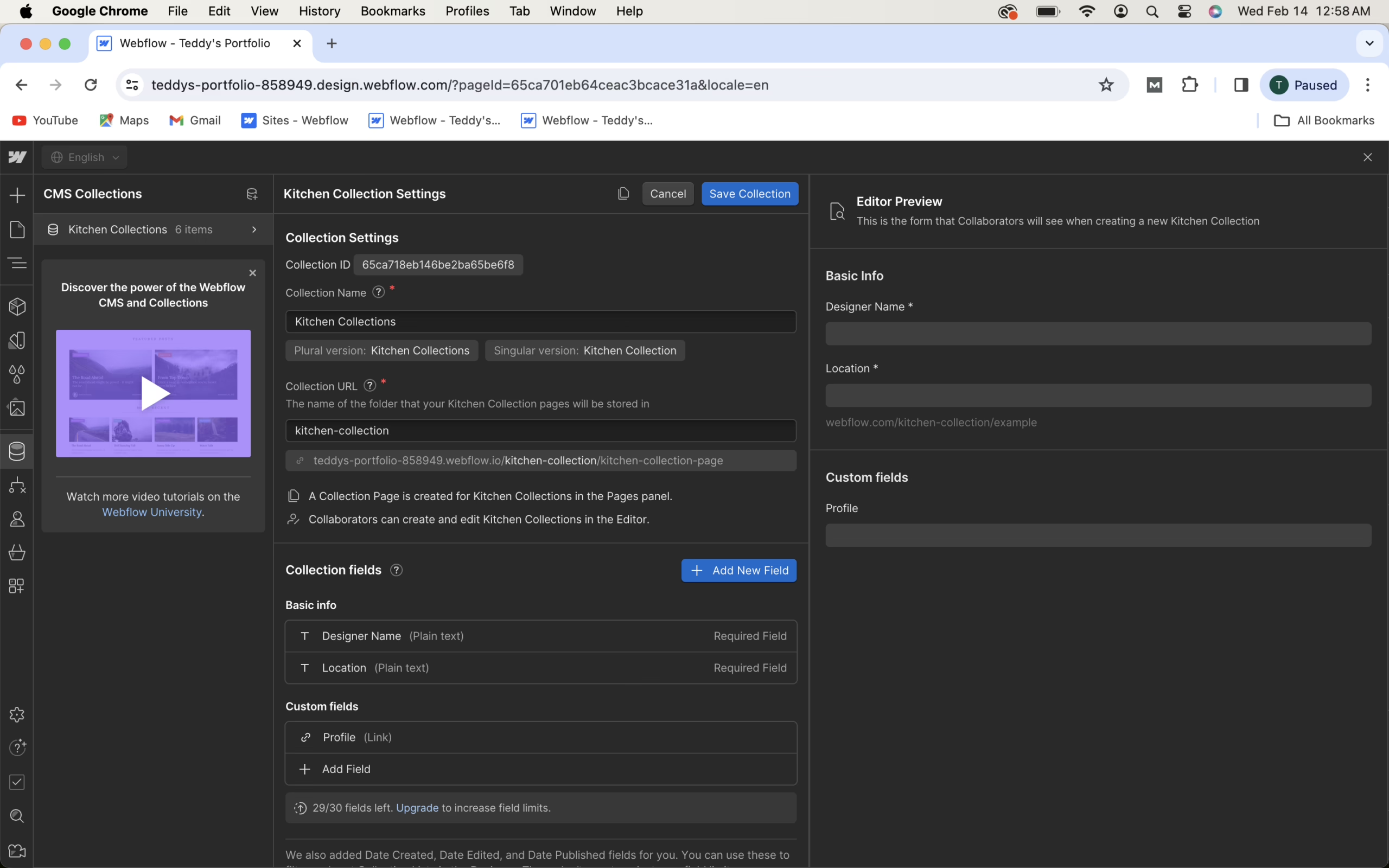
Put pen to paper on the target model before you export a thing. Note every Collection and its custom post type equivalent. Determine for each field if it is to be a native WordPress field, an ACF field or a taxonomy term. Map out the references. Pay attention to rich-text fields, as Webflow’s output seldom makes a clean round-trip to Gutenberg blocks without some parsing.
Fail to do this and you will have a WordPress site where case studies and authors are just generic posts propped up by tags. It may seem fine until day sixty when marketing asks for a resources page filtered by industry and you have no taxonomy to speak of.
CSV Export, Import, and the Cleanup Nobody Budgets
As for the mechanics, there is a well-trodden path. Themeisle’s step-by-step guide lays out a sensible order: get WordPress on a host, export the Webflow CSVs, use WP All Import to map them to your post types and ACF, put the media back, do your QA and then point the DNS.
But that sequence does not tell you where the hours go. Reddit users call it “a weekend of CSV hell” for good reason. Featured images rarely come over right given how Webflow mangles the filenames on its CDN. You must preserve slugs exactly, not let WordPress make new ones from the title. Internal links in the body still point to Webflow and need to be replaced. Meta descriptions and Open Graph data have to be placed in your SEO plugin of choice. Allow a full day for every hundred CMS items to verify and put things right.
Rebuild the Design; Do Not Try to Reuse the Export
Webflow will let you export static HTML, CSS and JavaScript, but do not mistake that for a WordPress theme. There is no loop, no template hierarchy, no way for a block editor to touch it without being dismantled first. Treat the export as a visual aid and rebuild your templates in WordPress using a single system.
Some teams prefer Gutenberg with a block theme for an experience akin to Webflow’s editor. Others want the visual builder of Elementor or Bricks and the plugin dependency that entails. For editorial control and performance a custom theme with ACF is the way to go. Make a choice and stick with it. Worrying over which page builder to use is a time sink and mixing them leads to conflicts you will regret later.
And as for interactions and animations, they do not export in any form you can use. Take an inventory of the site’s Webflow interactions and cull any that do not bring real value to the table. A mega-menu or a pricing table that responds to scroll are worth keeping; the rest can go. There is little point in incurring the cost of replicating decorative motion in WordPress, only to have it complicate every template revision down the line.
Treat the Redirect Map as a Deliverable, Not a Cleanup Task
The single greatest structural risk when you migrate is to URL and SEO continuity, yet it is one you can entirely avoid. The way these things tend to fail is with a certain predictability: the team will map the top ten pages for the launch and then find out weeks on end that Google is being served 404s from some long tail of old campaign URLs, filter pages and blog posts.
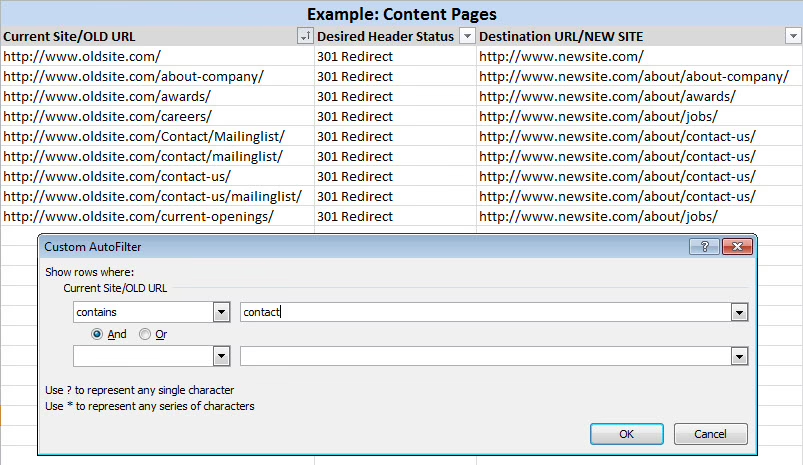
Make no mistake, “top pages only” is an insufficient plan. Even a case of slug drift, be it a category prefix WordPress puts in by default or a trailing slash, can put rankings at risk on pages nobody bothered to look at. And while redirect chains dilute signals and slow down crawlers, a single 301 hop is what is called for.
The best approach is to crawl the whole of the Webflow site with Screaming Frog or the like prior to going live and export all indexable URLs. That is your source of truth. From there, each URL has two options: it retains its path on WordPress or it is given a 301 from the old location. There is no third option.
Phil Tinembart makes this plain in a post he put on LinkedIn after moving dozens of sites: the teams that hold their rankings are those that see sitemap and redirect mapping as first-class work, not something to clean up in the week of the launch. Those that do not make the effort lose traffic and seldom see it again. We put forward the same idea in our guide to redesigning a website without losing SEO.
With the redirects set, put the new sitemap in Search Console and keep an eye on the Coverage report for the first fortnight. You can expect a 10 to 30 per cent dip in impressions as the recrawl happens; provided the fundamentals are in order, recovery should be complete in 60 to 90 days.
Planning a move of your own? Our Migration Blueprint maps the content, redirects, and risks before anything is touched. Get the blueprint.
Rebuild Every Integration Explicitly
Do not assume anything makes it through the migration. Your lead-capture flows, analytics, Zapier or Make automations, and embeds will not survive. Before the cutover, list them all:
- Forms and where they submit. Rebuild them in a WordPress plugin. If you have not already settled on a stack, this comparison of contact form options is a good place to start.
- Analytics pixels, tags and conversion events. Put them back in and run a test before the DNS switch.
- Third-party embeds such as Typeform, Wistia or YouTube. Check that they track and render.
- Automations. Rewire the webhook or endpoint to the new form.
As for search, Webflow’s own documentation will tell you their solution does not work on exported code. WordPress requires its own, so pick an implementation and get the new content indexed.
Constrain Your Plugin Count Deliberately
You will hear about the “plugin spree” in the WordPress migration threads on Reddit with some frequency. It is a common regret. The moment you can install anything, the urge is to do so, but every plugin is another update risk and potential point of failure when WordPress rolls out a core release.
A sensible starting stack for a move from Webflow would be one page builder or block theme, a forms plugin, an SEO tool like Yoast or Rank Math, and perhaps a caching or backup solution if the host does not cover it. Add to that ACF or the like for custom fields. Only add more when you have to. For teams without the in-house know-how, managed hosting from WP Engine, Kinsta or WordPress VIP is money well spent to take the burden of security and updates off your plate.
What This Looks Like in Practice
Discipline is what counts when you are doing this at scale. We saw it with Teton Gravity Research when we moved 10,000 articles from a legacy CMS. The mechanical side of the export was straightforward; the challenge was in defining the content model for the new site and preserving editorial workflows. Our work with St. Louis Magazine to get 30,000 pieces off MetroPublisher was much the same: because the editor workflow and redirect map were the deliverables and not the theme, the site went live and the traffic did not waver.
Those were not Webflow migrations, but the principle holds. The platform change is the part everyone sees. What determines whether the launch is uneventful or your traffic vanishes is the integration inventory and URL preservation.
A Launch Week That Should Feel Uneventful
If the day of the launch is dramatic, chances are something was left too late. A well-staged migration is largely a matter of switching the DNS, monitoring the screens and fielding an odd question here and there.
Your pre-launch review should be thorough:
- Test every URL in your inventory against the redirect rules.
- Submit a form from staging and confirm the notification hits the right inbox or CRM.
- Go over the templates – homepage, archive, single post, etc. – on desktop, tablet and mobile.
- Verify in the reports that analytics are firing on the key pages.
- Validate the schema and structured data on the templates responsible for rich results.
- Have a rollback plan on paper, with the old Webflow project intact and the DNS TTL lowered for the switch.
You will find the finer points of this pass in our full WordPress migration checklist, not to mention the failure modes that tend to surface once payment, email or webhook systems are in play. For those coming from a marketing-heavy Webflow site, there is some common ground with the Wix to WordPress migration guide we have put out for similar closed-platform departures.
The Real Question Before You Start
One could say a move from Webflow to WordPress is reasonable for certain applications and yet it runs counter to where the market is heading. It is not wrong to do so, but it should be underpinned by an explicit business case. The question is what you stand to gain and what you are taking on, and who will be left to look after WordPress when the developer is gone.
Where scale, SEO control or ownership are at stake and cannot be had on Webflow, the work is straightforward if somewhat tedious. But if the motivation is a nebulous feeling that WordPress is more “professional,” the truth is often no. You are moving to a platform that requires a level of upkeep Webflow was handling for you, and that has a cost attached.
Before putting in the months required for a rebuild, it is worth determining if the business case is sound. Refact’s website migration engagements are designed to do just that; we handle the scope and risk analysis so the matter is resolved before any code is put down.
Migrating off a legacy CMS? Let’s talk. Free 30-minute call, no pitch.

Masoud Golchin is a backend developer at Refact, working on server-side systems, internal tooling, and infrastructure. He builds and maintains the services that support both client projects and the team’s day-to-day development workflow. His work includes backend logic, developer tools, system reliability, and the technical foundations that allow products to scale and operate consistently. At Refact, Masoud focuses on creating practical engineering solutions that help the team move faster while keeping systems organized, maintainable, and dependable.
More from Masoud Golchin

