WordPress Ecommerce: What It Takes to Run
One store owner on Reddit described finding out that an email plugin had failed and no customer had received an order confirmation for two weeks.
 Masoud GolchinOctober 3, 2026
This guide is for teams deciding whether to sell on WordPress, or already running a store and wanting it to stay reliable as it grows. In practice, WordPress ecommerce means WooCommerce. Whether WooCommerce can work is settled: it runs stores with millions of orders. What still needs deciding is whether your team can carry the operating work that comes with it, and which parts of that work matter most.
WordPress Ecommerce Means WooCommerce, and WooCommerce Is a Plugin
WordPress has no store built in. WooCommerce is an open-source plugin that adds products, carts, checkout, orders, customer accounts, taxes, and shipping. Other options exist. Easy Digital Downloads is a cleaner fit for selling software licenses and downloads. Dokan turns a WooCommerce site into a multivendor marketplace. For a general store with physical products, subscriptions, or a mixed catalog, though, WooCommerce is the default.
It has been around long enough to have a deep ecosystem. WooCommerce’s 10-year retrospective traces its growth from a single line of code in 2011 to more than 150 million downloads by 2021. How big it is today depends on what you count. As of October 2026, W3Techs put WooCommerce on 8.0% of all websites and 47.7% of sites where it could detect an ecommerce system. BuiltWith counted 18.2% of the top one million ecommerce sites. StoreLeads counted about 4.53 million stores out of 13.6 million it tracked.
All four numbers are correct for what they measure. None of them tells you WooCommerce’s share of actual online sales, which no source reliably reports. Also worth knowing: W3Techs shows WooCommerce’s share of ecommerce sites easing slightly since a 2024 peak while Shopify’s rose. This is a big, mature platform. It is not the default answer for every store.
| Option | Works well for | Main tradeoff |
|---|---|---|
| WooCommerce on standard WordPress | Physical goods, subscriptions, content-heavy stores, mixed catalogs | You own hosting, extensions, updates, and testing |
| Easy Digital Downloads | Software, licenses, digital files | A poor fit for shipping and physical inventory |
| Headless WooCommerce | Custom storefronts, multiple frontends, unusual buying flows | Two systems to build, host, and monitor |
The Real Tradeoff Is Control Against Responsibility
Practitioner discussions keep landing on the same split. People who already know WordPress say they can change a WooCommerce store faster than a hosted one, and that they pay less in platform fees. People who don’t want that work say the hours spent hunting for plugins and fixing broken add-ons came out of the hours they meant to spend selling. One Reddit commenter put the question well: would you rather spend an extra hour on technical management, or on ads and conversion copy?
Both camps are right about their own situation. Landyachtz, the skateboard brand, told WooCommerce it cut annual platform costs from about $45,000 on Shopify Plus to under $10,000 after moving. That is a vendor-published story, and it leaves out what the company spends on development and upkeep. That gap is the point. WooCommerce is free software, but a working store still needs hosting, paid extensions, development, and someone responsible for keeping it working. “Free” describes the license. It doesn’t describe the bill.
Here is the practical rule. Choose WordPress ecommerce when control matters to how you sell: you publish a lot of content, your products need explanation, or your checkout and pricing don’t fit a template. If you want a standard catalog and the least possible upkeep, a hosted platform’s monthly fee buys you something real. Our Shopify vs WordPress comparison goes through that decision in detail.
The content case is stronger than people expect. In our WooCommerce build for NudFud, a plant-based snack brand, the hard part was not the cart. Shoppers needed full nutritional panels, certifications like USDA Organic and Keto, and a way to compare variants before buying. WordPress handles that kind of structured, explanatory product content well. It is also why NudFud fit WooCommerce better than a template store would have.
If you’re still researching extension choices and product behavior, Wonderment Apps’ WooCommerce articles are another practitioner view worth reading next to platform comparisons.
WooCommerce Scales, but Only When Someone Engineers It To
The evidence that WooCommerce can run large stores is solid. WooCommerce’s own benchmark used a store with more than 1.2 million orders, 15,000 products, and 60,000 customers. Universal Yums, a subscription snack business, processes more than 120,000 renewal orders on the first of each month. Ultra Events, a charity events company, reported peaks of up to 60 orders per second. A Reddit operator described a 500,000-order store running on horizontal scaling and object caching.
Every one of those stores got there through architecture and infrastructure work. None of them just installed the plugin and added a caching layer. The failures in the research almost never happen on the product page. They happen in places a speed test never reaches: database writes under heavy background load, order data migrations, background job queues, and outside systems asking the store for data too often.
HPOS Is a Data Migration, Not a Settings Toggle
For years WooCommerce stored orders in the generic WordPress posts and postmeta tables, the same tables used for blog posts. High-Performance Order Storage (HPOS) moves orders into dedicated, indexed tables. For large stores the gains are real. Universal Yums saw its customer dashboard slow down at four to five million orders because of queries joining many metadata rows. After moving to HPOS, the team removed many of the database workarounds it had built.
The same company also shows the risk. Devin Price, an engineer on the store, reported that about 25% of renewals failed in the first billing cycle after the HPOS switch. A database deadlock while writing customer addresses meant renewal orders were never created. Before the switch, the store had processed 12,000 to 15,000 renewals an hour without queue failures. WooCommerce’s own interview with the company confirms there was an early high-scale renewal bug. The fix was not published, so don’t assume your setup is immune.
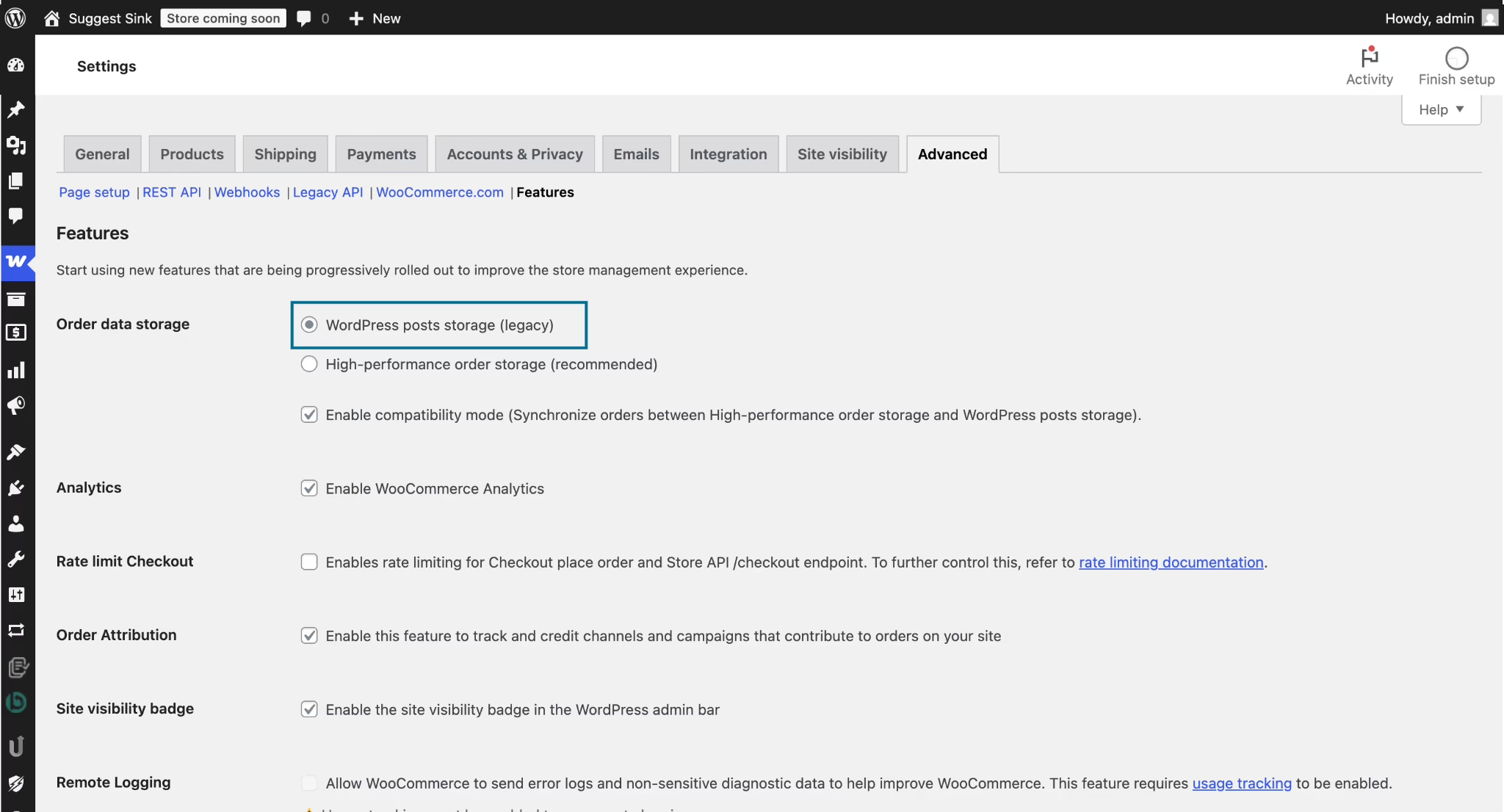
WooCommerce’s documentation describes how to do this safely. A compatibility mode keeps the old and new tables in sync. Any extension or custom report that reads postmeta directly can show stale or missing orders once HPOS becomes the source of truth. Heroic Thread, a merch store, traced a checkout problem to an order-tracking plugin that didn’t support HPOS. Treat the switch like any other migration:
- Audit every extension and custom report for HPOS compatibility.
- Replace direct database reads with WooCommerce’s order APIs.
- Run compatibility mode and let synchronization finish before switching.
- Load-test renewals and concurrent orders on production-like data.
- Watch failed background actions closely during the first real billing cycle.
Why a Fast Homepage Proves Almost Nothing About Your Store
WooCommerce itself treats performance as a property of the whole system: extensions, hosting, theme, integrations, customizations, and store size. Its own reported core improvements are real but narrow. WooCommerce 9.9 cut load time on the admin Orders screen from 22 seconds to under one second on the 1.2-million-order benchmark store. That is a gain for your staff, not your customers. Storefront time to first byte improved by “as much as” 9% in lab tests.
Caching is where most stores go wrong. A cached product page loads quickly for everyone. Cart, checkout, and My Account pages hold one shopper’s state, so they have to stay dynamic. WooCommerce documents the session cookies its caching rules must respect, and it recommends excluding _wc_session_ from database caching. Get this wrong at any layer (plugin, host, reverse proxy, or CDN) and shoppers can see someone else’s cart, or get stuck in a password-reset loop. After any caching change, test as a guest, as a logged-in customer, with a cart, through checkout, and through a password reset.
Load tests should follow the same logic. WordPress load-testing guidance recommends testing cached and uncached traffic separately, along with logged-in sessions and real transactions, because those paths hit the database and session handling much harder than a cached homepage does.
The Background Queue Is Part of Checkout
Subscription renewals, order emails, webhooks, and fulfillment exports all run through Action Scheduler, WooCommerce’s background job queue. Its defaults are conservative on purpose: batches of 25 actions, at most 30 seconds of processing per request, and one queue at a time, triggered by WP-Cron. Its documentation recommends running the queue from WP-CLI (WordPress’s command-line tool) when you need more throughput. It also warns plainly that adding more runners can overload a server or take a site down.
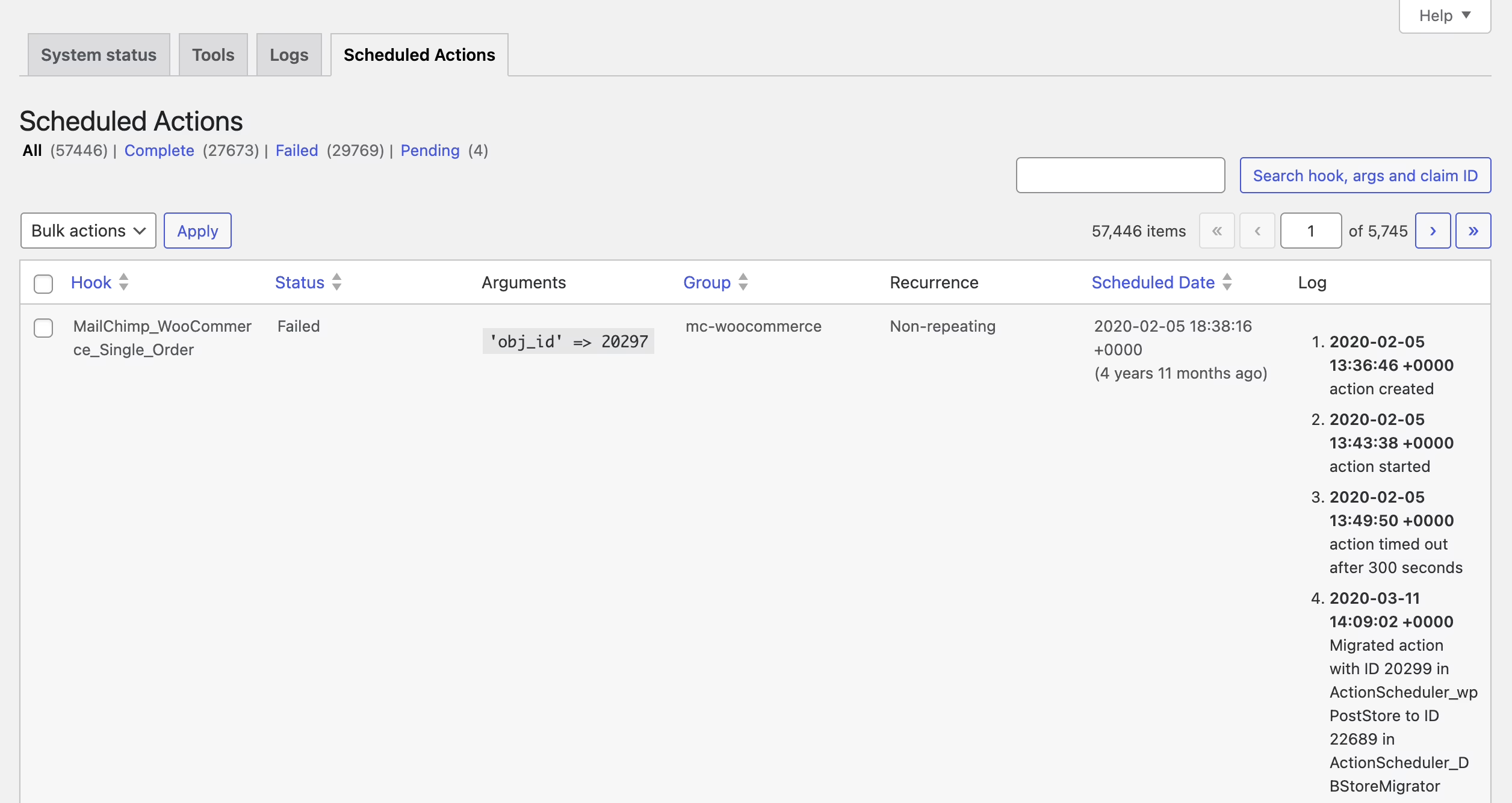
A growing backlog is an operations problem even if customers can still check out. If renewals or confirmation emails sit in the queue for hours, the business is already failing in ways customers will notice later. Check the number of pending and failed actions as routinely as you check the sales numbers.
Integrations and Traffic Spikes Can Overload the Store
Universal Yums’ CTO said one shipping provider pulled order data so often that it was “basically like a DDoS attack.” The company built a separate Laravel data service that reads from WooCommerce once and passes the data to every outside system. Before that, a spreadsheet export into ShipStation took hours. Smaller stores don’t need a custom service. Every integration does need defined polling frequency, batching, and retry behavior. Once order volume makes admin work painful, sending orders to an ERP or order management system is common advice.
Traffic bursts work the same way. In July 2026, a WooCommerce.com newsletter went to about 800,000 people. Corporate email scanners opened the links almost at the same moment, edge requests jumped from about 250,000 to 530,000, and parts of the site were down for three to four minutes. Autoscaling worked, but it took minutes to respond to a spike that arrived in seconds. Staggering the sends fixed it. Ultra Events took a similar approach for ticket launches and used a virtual waiting room that let in 20 shoppers per minute. Spreading out the demand usually works better than buying more server capacity.
Wondering how your store shows up in AI search? We put together a short visibility snapshot. Get the snapshot.
Plugins Are Both the Main Security Risk and the Main Source of Breakage
Patchstack’s 2026 report counted 11,334 vulnerabilities across the WordPress ecosystem in 2025, and 91% of them were in plugins. Its 2024 report put the share at 96.77% for plugins and 0.22% for WordPress core. The speed of attacks is more worrying than the count. Patchstack found that about half of high-impact vulnerabilities were exploited within 24 hours, with a median of five hours to first exploit. These are a security vendor’s own tracking numbers, not WooCommerce-specific rates, but they show how little time you have to patch.
Plugins are also what breaks commerce day to day. One Reddit operator listed a PayPal integration sending duplicate orders to a fulfillment partner, a variation-swatches plugin that stopped customers adding items to the cart, and WooPayments charging cards without moving orders to processing. When Stripe for WooCommerce 10.8.0 turned on its Optimized Checkout feature automatically, it broke at least one custom checkout. Orders were submitted before Stripe confirmed the payment session, and customers saw “payment cancelled.”
Updates Need an Owner, Not Just a Toggle
That leaves a real dilemma. Automatic updates can break checkout without warning. Delaying updates leaves you exposed to vulnerabilities that attackers use within hours. One operator turned off auto-updates and found security patches harder to keep up with. Another suggested holding noncritical updates for about a week on a simple shop. Neither choice is safe by default. Pick one deliberately, and if you delay updates, write down how you’ll handle security fixes that can’t wait.
What holds up is treating plugins as a supply chain. Keep a current inventory. Remove anything you don’t use. Assign one person who approves, tests, and can roll back changes. A plugin supply chain audit is a useful model: list every plugin, gather evidence on maintenance and risk, and make a clear keep-or-remove decision for each one. Test changes on staging, and after every update, place a real test order through checkout. A store can look healthy while payments, emails, or fulfillment have quietly stopped. Our WordPress website maintenance guide covers what that routine should include and what it costs.
When Payments and Orders Disagree
Two problems show up again and again: paid orders stuck in “pending,” and orders marked paid with no matching transaction. The causes that have been identified include payment webhooks still pointing at an old server after a migration, and a gateway update that changed checkout behavior. In one WordPress.org thread, a store saw the problem on about every fourth order, across different gateways, and never found the root cause. The diagnostic order is boring but it works. Check the gateway log first. Confirm the webhook URLs. Then recreate the problem on staging with only WooCommerce and the payment gateway active, adding the other plugins back one at a time.
Headless WooCommerce Solves a Narrower Problem Than Its Pitch
A headless setup keeps WooCommerce for the catalog, orders, and admin, and builds the storefront separately, often in React or Next.js. On X, agencies promote it heavily as the path to speed and to “AI-ready” catalogs. The research turned up no measured evidence that it improves conversion or performance across stores. What it does add is guaranteed: frontend hosting, API work, a second deployment pipeline, and separate testing. Checkout and many plugins also behave differently once the frontend is decoupled.
Headless makes sense when the problem is specific: a product configurator the theme layer can’t handle, or one commerce backend serving several frontends. If the reason is just “it will scale,” ask what kind of scale you mean. Is it more orders, more products, more editors, or more channels? Most of the scale problems above live in the database and the queue, and headless leaves those untouched. Our breakdown of headless WooCommerce tradeoffs covers when optimizing the current store is the better move.
Product Pages Still Decide Whether the Store Sells
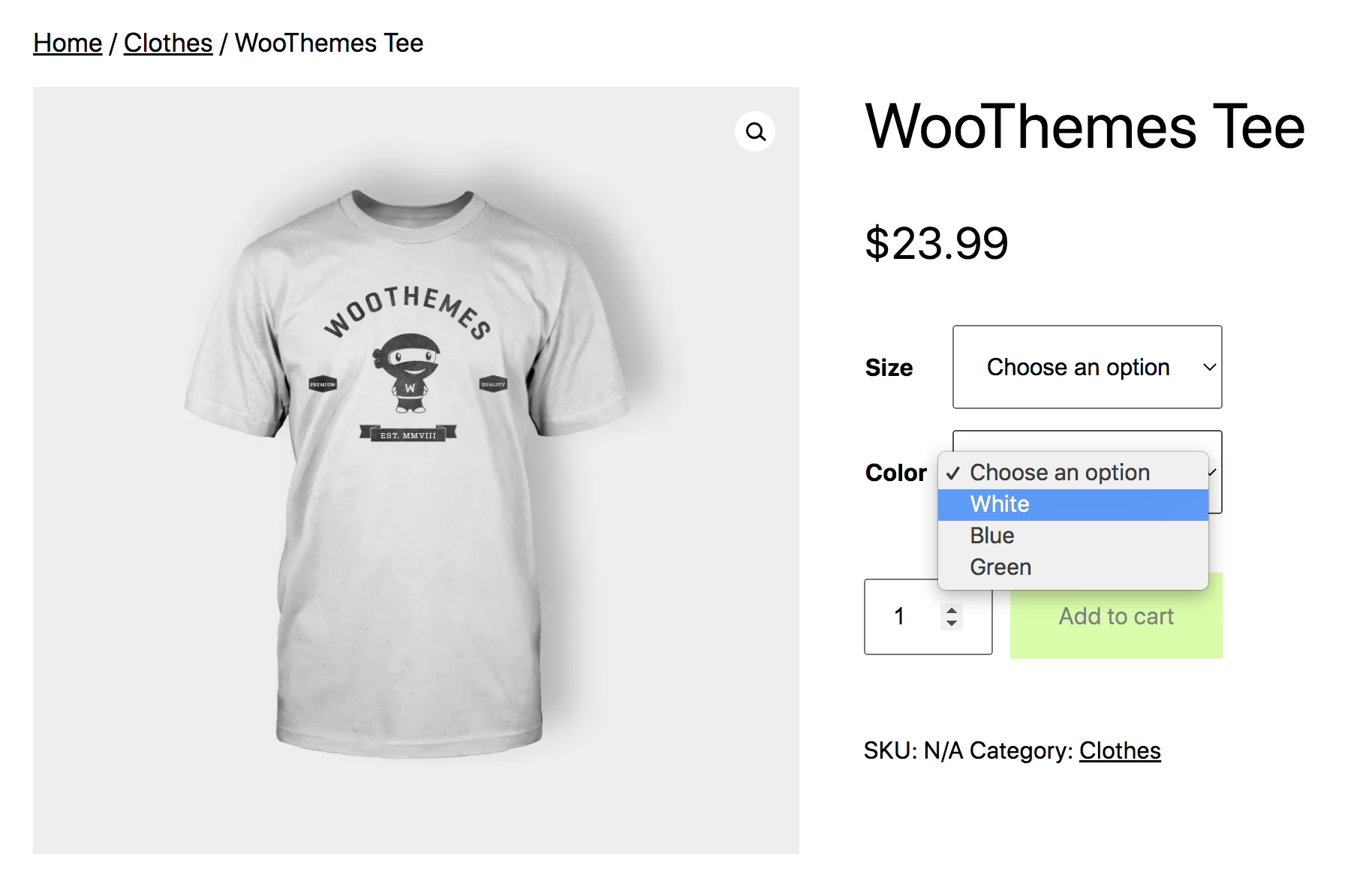
A store can be technically sound and still lose buyers on thin, confusing product pages. Each important product needs a clear name, a description that answers the questions buyers actually ask, accurate stock status, good images, and a short path to purchase. Theme defaults can work against you here. One practitioner found that 54% of a store’s product images carried the same generic “Product preview” alt text the theme had generated.
Practitioners report gains from basic fixes, though these come from single unverified posts: cutting checkout fields from 12 to 6 lowered cart abandonment by about 15%, and real-time stock updates reduced refund requests. PickandMix, a UK sweets retailer, credits better photography and product copy, not just more ad spend, as part of a 24x revenue increase over three years. That is a vendor-published story, so treat it as direction, not proof. If your catalog lacks consistent imagery, AI product photography tools can generate on-model and lifestyle shots from packshots. Have a person review every image against the real product before it goes live.
Buy, Customize, or Build: Matching the Store to the Business
Start with the simplest system that supports how you actually sell. If your products, checkout, shipping, and customer accounts follow familiar patterns, an established theme and a short list of reputable extensions is the right call. Customize selectively when one or two business rules set you apart, such as wholesale pricing or a subscription bundle. The rest of the store can stay standard. Our WooCommerce B2B setup guide shows how one such rule set spreads into pricing, approvals, and ERP sync.
Plan custom work when the store is also a membership portal, a publishing system, or an operational workflow. Forcing that through a stack of overlapping plugins usually produces fragile workarounds that break at the next update. Several developers in the research ended up writing their own plugins for product variations and integrations anyway. We’ve written about when custom WooCommerce development pays off and how to scope it.
The failures in the research also make a case for discipline over ambition. Austin Natural Mattress had a performance audit with 250 recommendations. A later rebuild by another party implemented none of them, made the largest content load slower (from 16.5 to 18.6 seconds), and lost the store’s historical order data, with no revenue tracking in place to show the damage. The stores that did well shared plain habits. Top Life Project set a €500,000 annual target and measured against it. Ultra Events tested WooCommerce on smaller events before moving off Eventbrite. No Pong changed hosts when real bottlenecks showed up, not before.
If you’re moving an existing store, the same discipline applies at cutover. One practitioner’s account of a migration with 8,000 products found that the sessions table took up 1.8 GB of a 4.2 GB database. It holds carts, not orders, so it could be cleared before export. Repoint payment webhooks, re-save permalinks, run a full sandbox transaction before switching DNS, and freeze edits before taking the final snapshot. Our WordPress migration checklist covers the rest.
Before any of this, you should be able to answer four questions. Who owns the payment gateway account and its recovery access? Who approves and tests updates? Where are the backups, and has anyone restored one? Which numbers tell you the store is working, beyond the fact that the homepage loads?
WooCommerce works well for teams that treat their store as a system they run, and badly for teams that install it, cache it, and forget it. The difference shows up in orders, renewals, and payment records long before it shows up as downtime. Refact has spent 12 years and more than 200 projects on WordPress development work like this. If you’re deciding what to buy, what to customize, and who will own the store after launch, Refact’s ecommerce development team starts with a discovery phase built to settle those questions before any code is written.
Building or replatforming a store? Let’s talk. Free 30-minute call, no pitch.

Masoud Golchin is a backend developer at Refact, working on server-side systems, internal tooling, and infrastructure. He builds and maintains the services that support both client projects and the team’s day-to-day development workflow. His work includes backend logic, developer tools, system reliability, and the technical foundations that allow products to scale and operate consistently. At Refact, Masoud focuses on creating practical engineering solutions that help the team move faster while keeping systems organized, maintainable, and dependable.
More from Masoud Golchin

