Shopify vs WordPress: A Practical Choice
You will hear the Shopify versus WordPress debate put in terms of software.


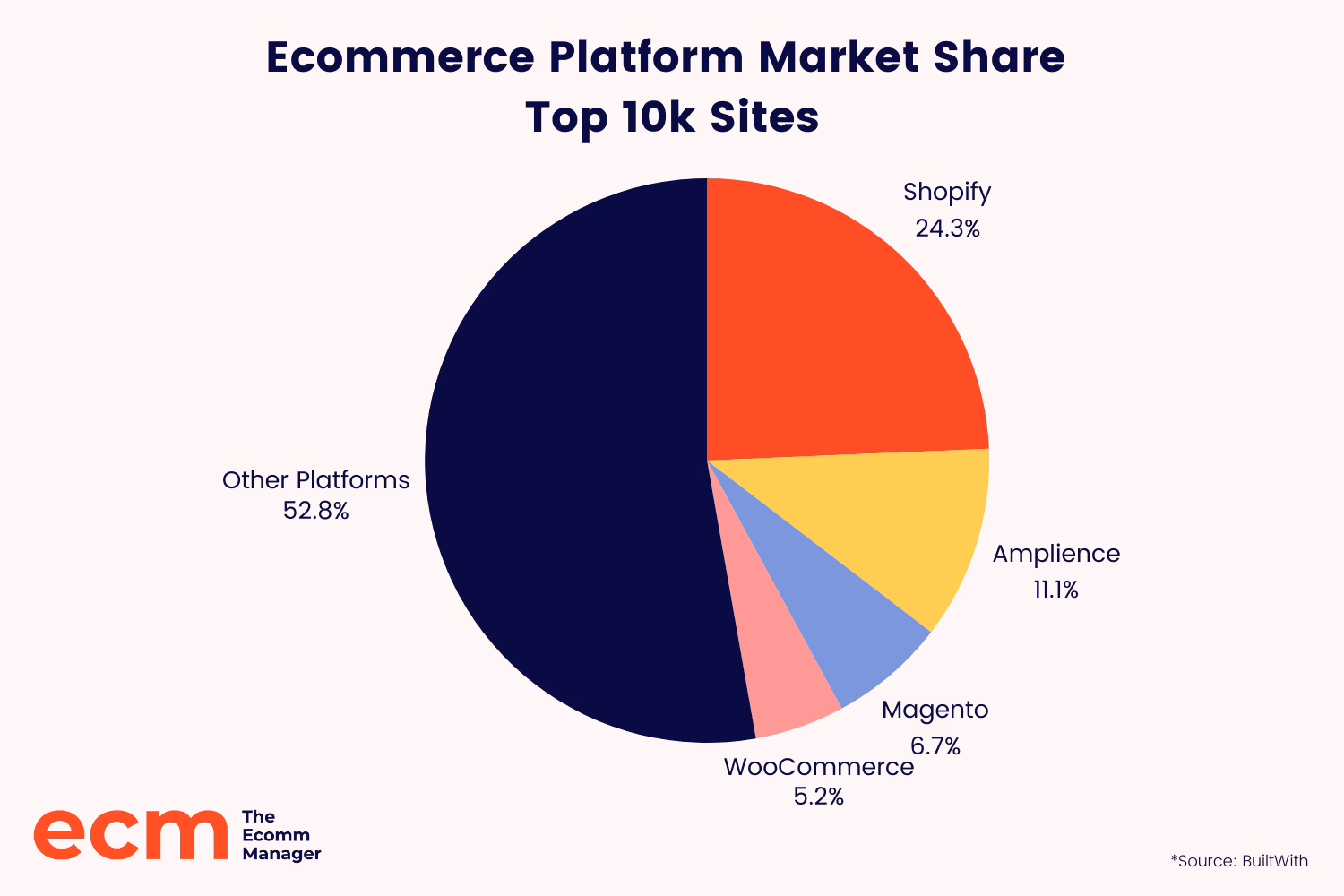
The easy talking points are there for anyone to make. WordPress has some 43% of all websites under its belt. Then there is WooCommerce, the plugin that makes a WordPress site into a store; it powers about a third of online shops. On the other side, Shopify is the king of managed ecommerce with some 26% of stores on dedicated platforms and nearly 29% of the US software market. The statistics are proof of popularity, but they won’t tell you which one is right for the store you have in mind.
What you need to consider is the operating model of each platform, what they do for you and what they will quietly pass off as your problem by month twelve. This piece is for the operator who is weighing that call now, before you get sidetracked by app stacks or theme shopping.
Two Operating Models, Not Two Versions of the Same Product
Think of Shopify as a managed commerce runtime. They own the hosting, the security patches, the checkout and most of the failure modes. You work within the extension points they provide: the themes, the apps, Shopify Functions. It is why you can be up and running in a hurry, and also why you will eventually run up against a wall if you want to customize things too deeply.
WordPress is open-source. With WooCommerce you have a store, but you are the one picking the hosting, the update schedule and the people to call when something goes wrong. Nothing is done for you. That is the cost and the appeal in equal measure.
A handy way to see it: Shopify is like leasing a storefront in a mall. The rules are set, the lights are on, the building works. WordPress is a plot of land. You can put whatever you want on it, but you are paying for the foundation, the plumbing and the inspector. To treat them as two versions of the same thing is the usual error. They are built to different constraints and they break differently.
If you haven’t even made up your mind on a platform yet and are still wondering what to launch, we suggest this guide on how to start an online shop for a reality check on what needs to be in order first.
What the Market Share Numbers Actually Tell You
Don’t put too much stock in the market data for this comparison, it is noisy because you are measuring two different things. W3Techs has WordPress at 60.8% of sites with a known CMS and Shopify at 6.7%. BuiltWith will show you 31.8 million live WordPress sites to Shopify’s 5.8 million.
On paper it is a landslide for WordPress. Not so in ecommerce. WordPress is everywhere because it is blogs and news and brochure sites. Narrow it down to stores and the story is different. Shopify has about 26% of the global ecommerce market and 29% in the US. WooCommerce is around 20%, maybe more if you count every WordPress site with a buy button on it.
Then there is the matter of WordPress’s trend line. Some will tell you it is stable. Search Engine Journal, using W3Techs numbers, had it in decline for six months running through mid-2026, from 43.20% to 41.90%. Change the sampling date and you get a different narrative. For a founder making a 24-month bet, the point is to remember no platform is permanent. Plan for what you can run today and leave yourself an exit.
What Shopify Trades, and What That Saves You
Shopify gets you out the door fast because it takes most of the early decisions off your plate. No hosting to choose, no SSL certificates to manage. Plans run from $39 to $399 a month and agencies will have a straightforward store live in three days at most. If you don’t have an engineering team, that speed is worth its weight in gold.
But there are three sharp edges to that trade-off that you will come to later.
App and fee creep is the first. Between reviews, email and subscriptions, a typical store is putting down $50 to $150 a month in apps. Get serious with your customization and you are looking at low four figures. And if you don’t use Shopify Payments you are on the hook for an extra transaction fee, 0.5% on Advanced up to 2.0% on Basic. Easy to miss in the first month.
Second is the ceiling on what you can do. Shopify is a constrained environment by design. There are things you would write a few lines of PHP for on WordPress that just aren’t an option here. Most product-first stores don’t mind. A business with odd fulfillment logic or complex pricing will find the limits quickly.
Finally, there is the issue of structural SEO. Shopify has a weaker blogging tool than WordPress and it will force you into /collections/ and /products/ URL patterns while churning out variant URLs that are nothing but duplicate content. You will find that some 55% of Shopify storefronts clear the bar for Core Web Vitals. Not a fatal flaw by any means, but it is something to take note of if you are relying on organic content for growth.
Take Broya Living for instance. When we put together their Shopify store, the platform made sense because the business is product-first and subscription-led. The team had better things to do with their time than worry about infrastructure; they wanted to focus on conversion and content. So let Shopify handle the undifferentiating parts of the build. The work that actually moved the numbers was done in the cart, the collections and the product pages, not under the hood.
We tend to ask the same question at the outset of our Shopify store development: before you commit to a theme or an app, what should your operating model look like in a year’s time?
What WordPress Trades, and What That Costs You
Then there is WordPress with WooCommerce. It has a higher ceiling but also puts a much larger floor of responsibility at your feet. The software itself is free, but the stack around it is not. You have to factor in proper hosting, security, premium plugins and the like. Whether it ends up being cheaper than Shopify is a matter of discipline and which way the wind blows with your team and the store.
Structurally, the argument for WordPress is strong. If you sell through content, WordPress is made for it. You get control over URL structures, schema, editorial workflows and internal linking that Shopify can’t touch, courtesy of SEO tools like Rank Math or Yoast. And if your business has idiosyncrasies – B2B pricing tiers, memberships, courses or some non-standard fulfillment logic – WordPress can be bent to accommodate them. With Shopify, the business has to conform to the template.
But the real cost is operational. A well-run WordPress site is safe, but the onus is on you, not the platform. Industry analysis puts some 97% of WordPress vulnerabilities in themes and plugins, and telemetry shows the ecosystem fielding 90,000 attack attempts a minute on average. Performance is the same story. PageSpeed Matters has the figures: out of the box a Shopify store is looking at 320 ms TTFB, whereas a WooCommerce site might run from 400 ms to 1.2 s depending on the weight of the theme and your host. That variance is the price of admission.
Operators get caught by plugin sprawl more often than not. Every new feature request becomes a plugin, each one a risk to compatibility and memory. We see the pattern: a store chugs along for half a year and then on a Tuesday morning an update causes a conflict and no one knows which one to roll back.
The way to make it work is with discipline. A curated stack, a staging environment, and someone who owns the maintenance. In building the NudFud ecommerce platform on WooCommerce, we were running the system as production software rather than a publishing tool. For the brand, the control we had over how to merchandise and explain a complex, certification-heavy product was worth the tradeoff. For others, it would not be.
Wondering how your store shows up in AI search? We put together a short visibility snapshot. Get the snapshot.
The 24-Month Cost Question
People don’t give total cost of ownership enough thought. They will compare a monthly plan to a free download and call it a day. An honest comparison covers everything you will put out over a realistic period, time included.
With Shopify you have your subscription, transaction fees on third-party processors, apps and the odd bit of development. It is easy to model and predict, though you can easily underestimate it as the app stack swells.
WordPress line items are less predictable: hosting, licenses for themes and plugins, backup and security tooling, and the staff hours to manage it all. It may be cheaper at a very small scale, but at a modest one it is often comparable or more.
One guide puts it well: the question is not which is cheaper this month, but at what point does the fee optimisation of WooCommerce justify the technical overhead. The suggestion is that once you are processing $100,000 a year, the saved fees make WooCommerce more appealing. But that is a rule of thumb, and it assumes you can run WordPress properly. If you can’t, the numbers go the other way.
In most stores we have seen, the bottom line is that cheap to launch is not cheap to operate. What you want to model is 24 months of operating cost at your expected order volume, with a clear head about the fees and the hours your team will be putting in.
When Shopify Is the Right Answer
When is Shopify the right call? Generally when:
- Your catalog is focused and the checkout is standard.
- You have no developers on staff and have no intention of hiring for technical support.
- Your growth is coming from paid channels, social or wholesale, not organic content.
- You need to be up and running in a matter of weeks.
- You want cross-border tax and localisation to just work without having a developer on speed dial.
There is value in looking at a case study to see where Shopify excels and where it doesn’t. Take Fiore Designs, the high-end florist in L.A. for instance. We came on board after they found that what was once a growth engine had turned into a bottleneck. In the beginning, the platform made sense. But as the business matured, it required delivery logic that Shopify’s checkout simply wasn’t designed for: same-day cutoffs, time windows, zip-code zones. That is how it goes. Shopify will do fine for most stores for years to come until the model of your business starts to chafe against the assumptions the platform was built on.
When WordPress Is the Right Answer
Then there are times when WordPress with WooCommerce is the obvious call. For example:
- When content is integral to the sale. Whether it is a brand with a blog that brings in organic traffic, a coach with courses or a publication with an attached store.
- Unusual rules are part of the equation. We are talking complex memberships, B2B pricing, non-standard subscription or fulfillment logic.
- You have the technical know-how (or can put someone on it) and want to own the code.
- Vendor lock-in is a genuine strategic worry for you, not just something you say.
- You are prepared to put in the work on hosting, a well-chosen plugin stack and maintenance.
Put simply, if the things that matter most about your store are the least like a run-of-the-mill Shopify setup, you will be better off with WordPress.
The Mistakes That Make This More Expensive Than It Needs to Be
You can make a costly mistake out of a routine platform choice in three ways.
One is to pick for launch day rather than year two. Sure, Shopify is the easy option in month one. But by the second year you will want the flexibility of WordPress. Make the wrong call on the horizon and you are facing a migration. And those are always under-scoped. You lose SEO to a missed 301 redirect, weeks to feature parity and trust over lost media. We treat any move as an engineering project – audit, staging, QA on the checkout, a rollback plan – as you can see in our website migration work. The other way is to pay for the move twice.
Another is to buy into flexibility you aren’t going to use. A small DTC brand has no need for the WooCommerce ceiling. If you go with WordPress because it is more powerful in theory but have no discipline to maintain it, you will end up with a broken checkout and unhappy customers. In that case, let the team’s ability to operate the system be your guide; if they can’t handle WordPress, take Shopify.
Or you can buy convenience and find it becomes a tax on your growth. A content-heavy brand on Shopify can rank, but the platform works against you. A B2B operation can be cobbled together with apps for their complex pricing, but then the app stack is a problem of its own.
The rule of thumb is fairly blunt but holds true: no development team? Shopify is easier to live with. Have a team and your growth is driven by content or SEO? WordPress is the stronger long-term play. There are exceptions, but they are few.
A Short Checklist Before You Commit
Do this before you commit to either side. Put pen to paper on five items:
- In plain English, what must the store do on day one?
- What is likely on the table in 24 months? Think international, B2B, content.
- Who is left to own the system post-launch and what are their actual hours?
- Is your growth channel paid or organic and what does the platform have to offer for it?
- Do you prefer to absorb variable maintenance time or a predictable monthly fee?
If the answers are clear, you are done. If not, you are probably better off clarifying your operating model than comparing themes – which is what we get to in our ecommerce development before a line of code is put down. Pick the one you can put to good use today and plan for what you may need in a couple of years. Both platforms have well-known failure modes that you can avoid; it is mostly a matter of choosing the ones you can tolerate.
Building or replatforming a store? Let’s talk. Free 30-minute call, no pitch.

Saeedreza Abbaspour is the CEO of Refact, where he works across product, engineering, and sales. He sets the studio’s direction while staying closely involved in the work itself, from shaping product strategy and UX architecture to helping define the technical systems behind Refact’s projects. His role connects business thinking with hands-on product execution, giving him a practical view of how software should be planned, built, launched, and improved. At Refact, Saeedreza focuses on building a studio that can move quickly, solve real client problems, and turn ideas into reliable digital products.
More from Saeedreza Abbaspour

