Customer Support Portal: A Practical Guide
When a customer reset password question reaches your inbox for the fourth time on a Tuesday, the actual issue isn’t the question.


This guide is for teams that provide support in email, Slack, and DMs, and have not formalized or automated any of these processes and are wondering what options exist and which to pursue. This guide explains what a support portal is, why a support portal is needed, what features drive engagement most, and what success looks like.
Why Support Volume Outgrows an Inbox
Support in a young product usually starts in one person’s head. Someone on the team answers fast, the answer is good, and customers appreciate the direct help. The trouble arrives quietly. The same question gets answered five slightly different ways by five different people. A billing edge case gets explained perfectly once, then never written down. When the person who knew the answer is on vacation, the queue stalls.
The time cost is obvious. The real problem is the opportunity cost. Questions that should be easily answered create delays and cause escalations. Answers become outdated and the team starts avoiding the inbox because they fear it more than they learn from it. All of this can be alleviated by taking the support portal seriously as the single source of truth for how the product behaves.
If more than 3 people ask the same question, the answer is now a feature of the product. Enter it in the product once in the location where the answer to the question is sought and stop copy/pasting.
A working support portal combines help content, ticket submission, and the ability to check the status of a submitted ticket. Jitbit’s Customer Portal Overview provides a good example of this type of support portal. Customers are able to find answers to their questions and, when they can’t, submit requests. Customers can check the status of their request without contacting support.
According to portal statistics from AMW, 67% of customers prefer to resolve their issue through a self-service support portal, and 91% of customers will use a support knowledge base when it’s available. On average, a self-service support portal will reduce incoming support tickets by 40%. Gartner’s research shows that, despite the number of available support self-service portals, the caller support line is still the most popular option and only 19% of customers will resolve their issues through a self-service support portal.
What a Customer Support Portal Actually Is
A Portland that reduces ticket volume is built in three layers. Skip a layer and customers fall through to your inbox.
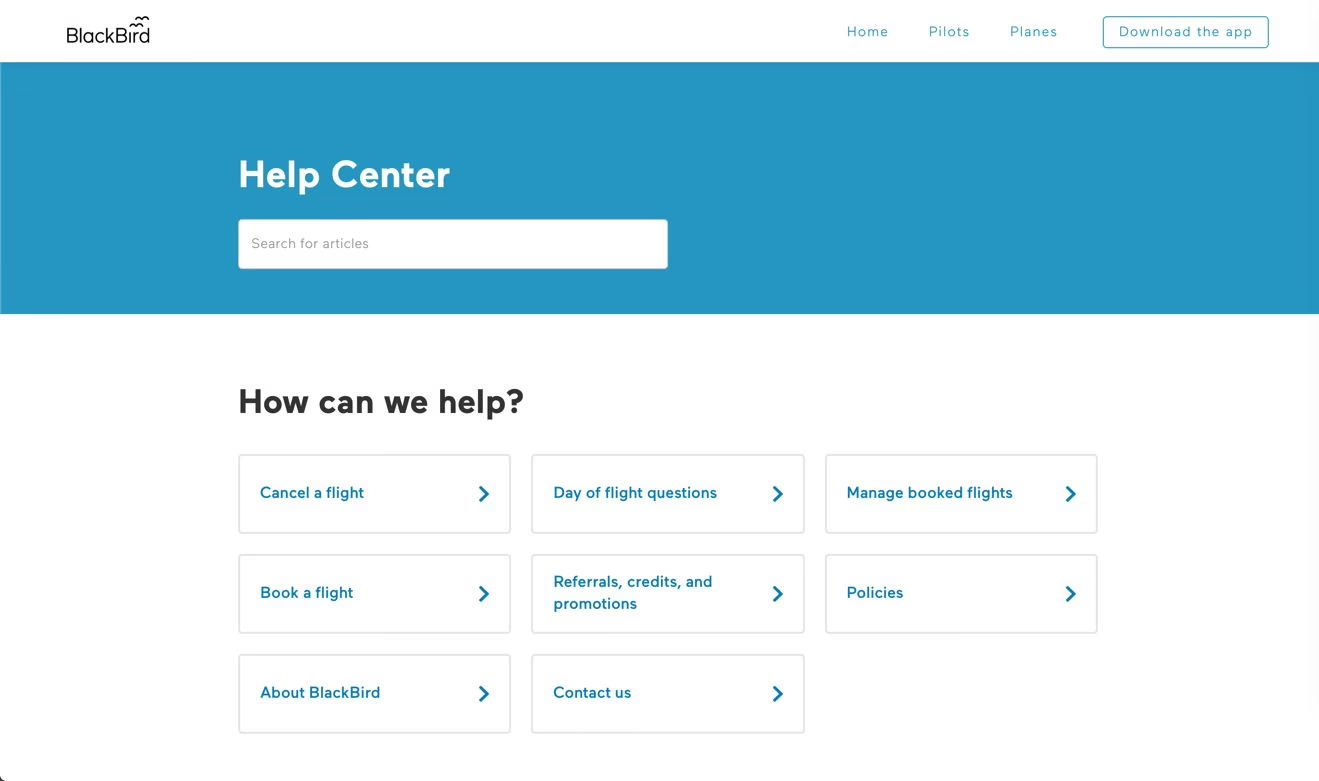
Layer one: the knowledge base
Articles, setup and troubleshooting guides, and policy explanations are the first level. These help customers find answers to simple questions without exposing sensitive account information. Articles are written around tasks. Examples are “Why did my payment fail?” instead of “Billing exceptions,” or “How do I invite a teammate?” instead of “User administration.”
Two great examples of help portals are Notion’s and Stripe’s. Notion is for typical end users and Stripe is for developers. They can’t be for both. Searching should bring the customer to the answer, not to three articles.
Layer two: help inside the product
This is where most portals fall short. A support link in the footer sends the customer to a different page from the one on which they are currently stuck. Contextual in.line help with error messages, with related articles, guided setup tours, and walkthroughs of the first screen in a product, should be the basis for a modern help system. This is true for service businesses as well. Expressify has a good example in their article on Live Chat with AI. They recommend putting the live chat system integrated into a website instead of making the visitor navigate to the support site.
Layer three: escalation that carries context
In the case of more complex problems some interaction with a human is necessary. The customer should not have to fill out a ticket with a description of their problem. When a customer clicks for more information, the information should contain their identity, their plan, their workspace, their recent activity, and the error screen. There should be no need for the customer to fill in that information. If it is not available to the agents, the customer will complain.
This is where practitioner data from the research is most evident. Teams who set a goal of sending 100% of tickets to AI agents saw a drop in satisfaction, and as they moved more toward roughly a 60/40 split, they also improved both cost and CSAT. Repetitive tickets were sent to automation. The 40% of tickets requiring empathy, judgment, and exception handling remained with humans. If your escalation path is buried underneath a chatbot loop, then you have built the wrong system.
Build, Buy, or Stitch: The Real Decision
There are three practical paths. The first is purchasing a support suite such as Zendesk, Intercom, or Help Scout. The second is combining a docs platform such as Notion, GitBook, or Document 360, with a shared inbox. The last option is creating a custom portal that connects directly to your product data.
There is no best option out of the three previous mentioned. The option you choose is determined by how much of your support can be answered by content, how much needs customized workflows that are account-centric, and whether the platform offers actions such as invites to a product, plan changes, or refunds.
| Criteria | SaaS help center | Docs + shared inbox | Custom build |
|---|---|---|---|
| Time to launch | Weeks, mostly content and configuration | Days for content, longer to stitch tools | Months, product and engineering work |
| Maintenance | Vendor runs the platform, you own content and rules | Low platform cost, higher manual ops | You own fixes, hosting, and security |
| Customization | Strong within the vendor’s structure | Fine for content, thin for workflow | Matches your data model exactly |
| Integrations | Common ones out of the box | Zaps, glue code, manual work | Designed to fit, must be maintained |
| Cost shape | Recurring per seat and contact | Low starting cost, tools multiply | Higher upfront, lower per-user later |
A shared inbox with a docs platform is usually the best initial option for a product with a small user base, as it allows the product to publish content for users before the product implements ticket routing, SLAs, or macros. Reporting will be rudimentary, but this is acceptable until the volume justifies an improvement.
A help center is a SaaS solution if several agents are sharing queues, routing rules, audit trails, and access to customer surveys. You have to accept the vendor’s UI/UX and pricing in this solution.
Portal customization is necessary when the portal needs to provide options that standard tools do not support, such as product data, billing and permissions management, or workflow modifications. Building a portal to publish articles or manage tickets does not require customization. Customization is typically the only solution when the portal is needed to manage account usage, initiate refunds, or guide customers through a multi-step onboarding process. Callzent’s help desk software comparison is a helpful resource for you to add to your evaluations when selecting tools. For a more detailed analysis of the complexity and integration considerations, our client portal software options resource may be more helpful. If you are still considering whether a support portal is the appropriate solution, our what a customer portal is resource provides more information about where support portals and account portals overlap.
Features That Actually Reduce Ticket Volume
Most help centers are like libraries. Answers are stored somewhere. They just need to be found. A solid portal acts more like a nurse triage to guide every person to the least supportive answer that will work.
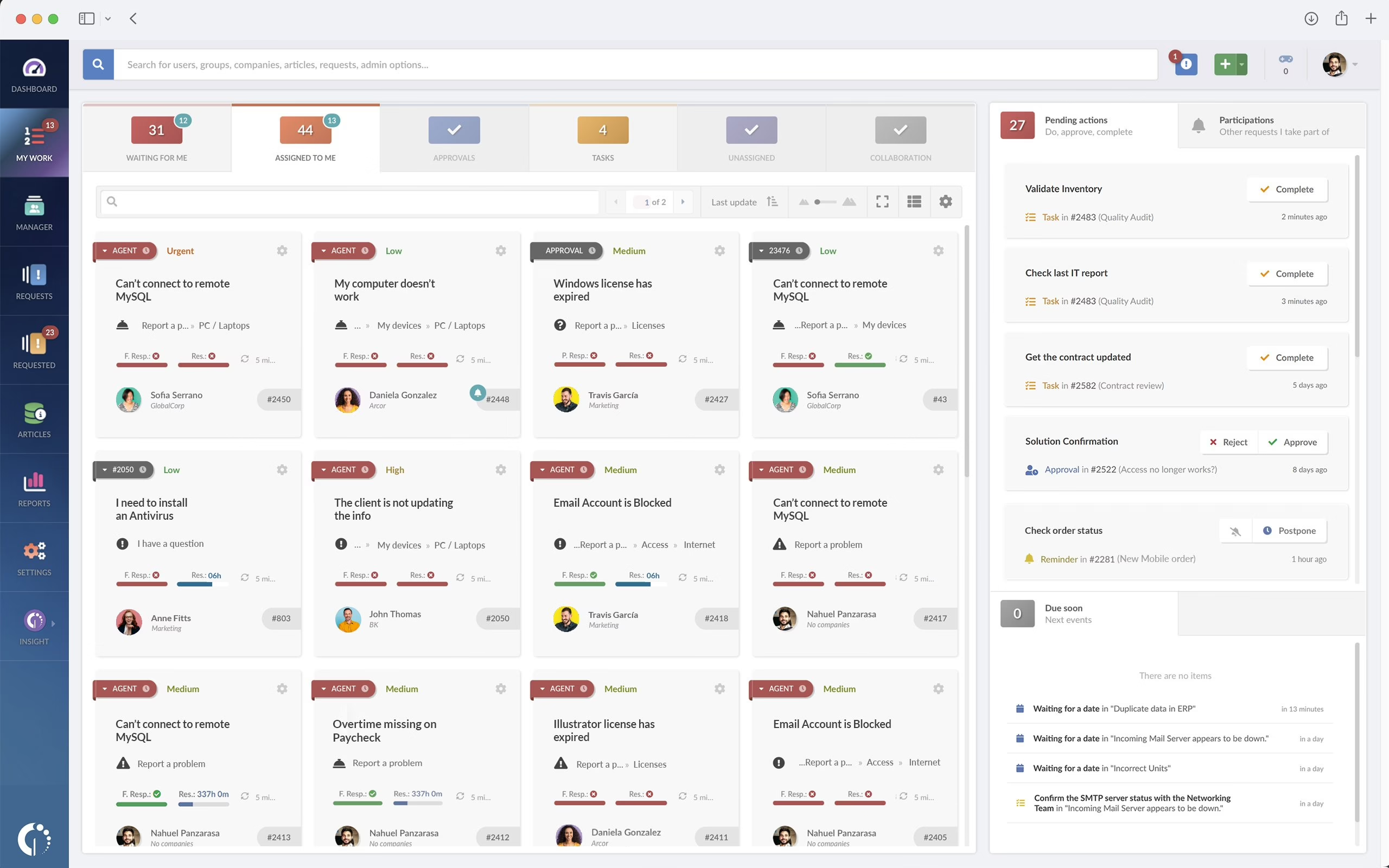
Search that assumes bad queries
Customers do not type articles. They type things like “invoice broken” or “cant login.” Search has to deal with short, misspelled and vague queries. It should suggest results as they type. Additionally, search should surface the highest-intent article first. Track two signals. First, searches that result in zero clicks. Second, searches that result in a submitted support ticket. Both are coverage gaps. Based on knowledge base statistics from Stealth Agents, a well-structured knowledge base can deflect 20% to 40% of support tickets. More mature deployments even see deflection rates exceeding 50%. High performers versus low performers are largely attributable to search relevance and coverage of common, high-intent use cases.
Help placed next to the problem
An in-product help widget is better than an entire support site if it offers the right article when viewed in the right context. A billing article on a billing page. A setup guide on a setup page. A diagnostic prompt after a known error. Interactive guides should be written in a step-by-step format to avoid long articles.
Chatbots that hand off cleanly
A chatbot that traps someone in a series of scripted responses by a support agent is worse than a slow response by email. The pattern that works is narrow, collecting context and offering two or three ranked articles. A decision to incorporate this layer would position this automation as an add-on to the existing helpdesk. Ay Automate has a good page on their AI chatbot development work for this type of work. Refact has a portals and dashboards development page if a chatbot has to be built into a custom application.
Community answers, with a warning
Answer discussions can assist in boundary cases, but user generated posts without moderation decay rapidly. Outdated workarounds are posted as solutions and a wrong answer that gained traction is worse than no answer at all. If you enable community, someone in the team needs to ensure that answers are properly pinned and old discussions are closed.
The Architecture Behind a Portal That Works
A blog that is designed well but cannot access your product data is a well-styled blog. The user reads generic content while your agents are still asking for account IDs and screenshots.
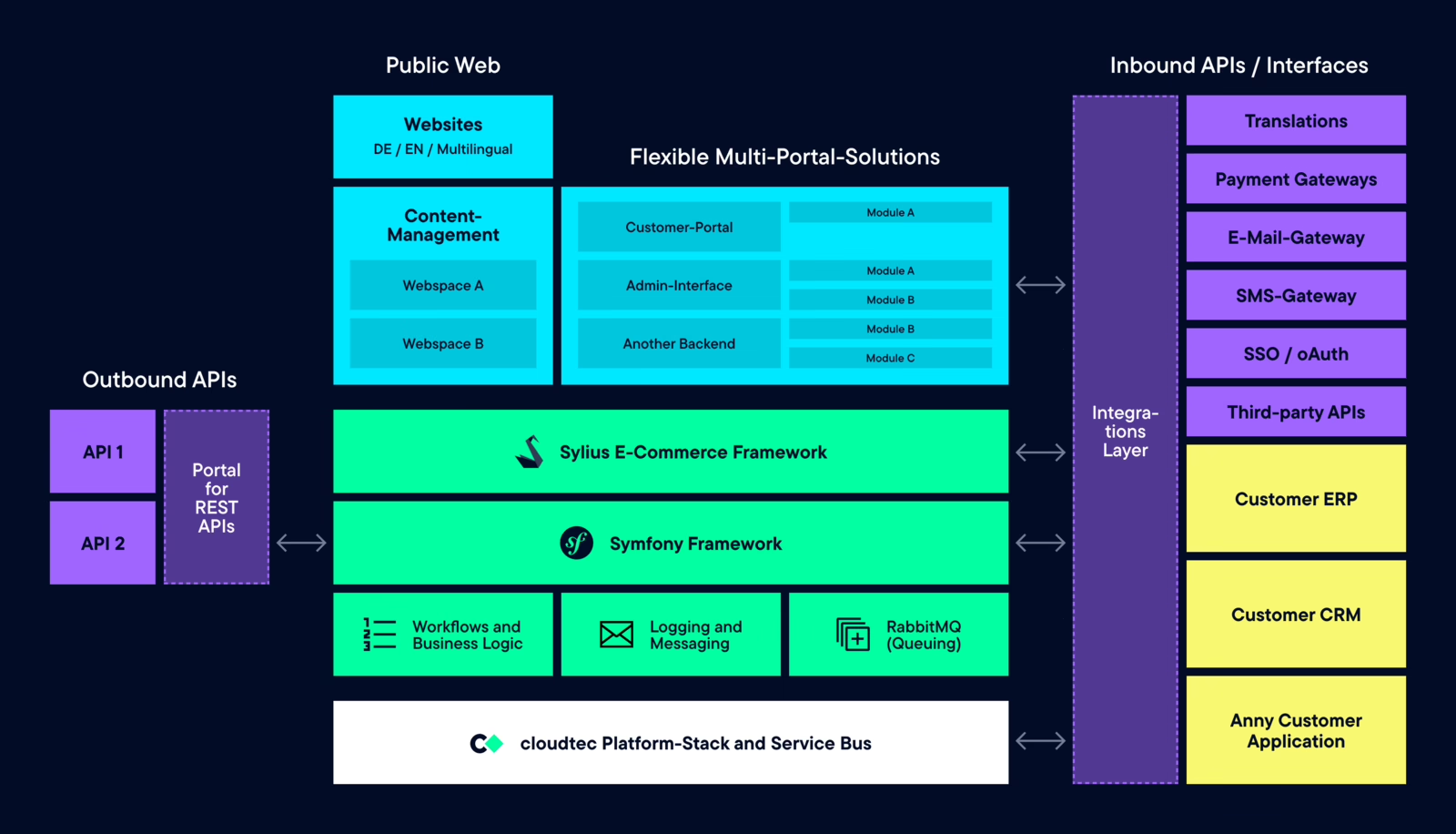
The clean split is the following. Your application is the source of truth for account, plan, and usage data. The support application is responsible for articles, tickets, and conversations. The CRM stores the history of relationships. Analytics links the behavior across all three. Each system focuses and performs only one function, and they communicate the minimum data required.
Identity is the first hard decision
Customers should not have to memorize a second password. Single Sign-On tied to your product or to Google, Microsoft, or Okta helps control access and reduces password-reset tickets, which account for 20% to 30% of all tickets by themselves. The portal security best practices guide provides a list of items to consider. For enterprise contracts, pair SSO with MFA for any portal access to billing, infrastructure, or account settings. Equinix has this documented in their identity and access management documentation. It is a solid model for anyone building B2B product support.
Security is not paranoia. In February 2024, Krebs on Security reported that Juniper’s support portal had exposed customer device information and is a good reminder that the typical support portal contains a lot of information that an attacker may find valuable. If the support portal is treated in a less secure manner than the primary application, that becomes the attack surface.
Context should ride with every ticket
When a customer creates a ticket, the ticket should already know customer information, subscriptions, current user workspace, and the error that was just encountered. Webhooks can be set up for a more proactive approach to support. A billing prompt can be shown in the application should a payment fail. A guided diagnostic can be set up to help the customer should the same error occur during the setup. Rate limiting and backfill integrations affect how quickly those prompts are set up. Be sure to test the application in the failure state, not just the happy path.
Early on in the design process for instrumentation that serves many customers, tenant boundaries should be defined. Each customer should be able to see only the information relating to their users, tickets, and their account status. If you’re building for a B2B audience, our B2B customer portal buyer’s guide provides information regarding adoption and integration for B2B customer portals.
Launching Without Breaking Trust
There are three primary causes for a failed launch of a self-service portal. Convention mandates that teams publish new, updated content. They fix broken links. Customers are sent an email and told about the new self-service portal, but customers are expected to determine for themselves how and why the new portal will affect their behavior. This is a failed strategy.
A launch sequence that does work:
- Audit your last 90 days of support. Group the actual conversations by intent. You will find that 15 to 25 questions cover 70% of volume. Those are the articles that ship first.
- Write for the question, not the feature. Rewrite each article around what the customer typed, not what the team calls the module.
- Test with real users before you promote it. Ask power users and your own agents to search, submit, and escalate. If the agent cannot find the right article, neither will a customer.
- Point at the portal from where questions start. In-product help, onboarding emails, transactional emails, and support replies should link to the specific article, not the homepage.
Page views should not be used as a self-service portal metric. Track page view abandonment, escalation after a search, first-contact resolution, CSAT, and effort scores on closed tickets. The KMS Lighthouse self-service performance guide provides a more robust view of self-service performance metrics. Compare the live tickets for the top 20 intents before and after the self-service portal was introduced. Inspect failed searches on a weekly basis.
Do not underestimate the first 60 days. Replace placeholder text. Answer existing articles. Reduce purposeful navigation. Agents should learn to send articles instead of typing lengthy replies. Habit creation is where most deflection occurs.
Where This Fits at Refact
The difference between “portal exists” and “portal reduces tickets” is almost always a product decision rather than a plugin decision. Our work on CinemaAssist for Pruneyard Cinemas serves as a recent example. Most of the value we delivered was derived from understanding the customer’s context (showtimes, available seats, purchases). Because of that, support tickets started with “this is how I did this” rather than “who are you?” Support portals should adopt this same principle. The interface is the last 5%. The plumbing is the rest.
Determining which of the three options (buy, stitch, build) fits your support volume and product shape is the main focus of our article on how to select a portal development company. If, on the other hand, your primary concern is self-service, rather than ticketing, our article on building a customer self-service portal may be more useful. As our Discovery phase suggests, that initial decision is the most important.
Building a product and unsure what to scope first? Let’s talk. Free 30-minute call, no pitch.

Masoud Golchin is a backend developer at Refact, working on server-side systems, internal tooling, and infrastructure. He builds and maintains the services that support both client projects and the team’s day-to-day development workflow. His work includes backend logic, developer tools, system reliability, and the technical foundations that allow products to scale and operate consistently. At Refact, Masoud focuses on creating practical engineering solutions that help the team move faster while keeping systems organized, maintainable, and dependable.
More from Masoud Golchin

