Contentful vs WordPress: How to Choose
You have a website, a content backlog that keeps growing, and staff who need to publish without waiting on engineering.


There isn’t really a head-to-head comparison of Contentful vs. WordPress in terms of features. This decision reflects how your content operation will function on a daily basis 2-3 years after implementation. WordPress provides a single system that can handle content editing and content publishing for a smaller team. Contentful gives developers control of the presentation layer. You are either in a constant plugin management nightmare (and your system probably doesn’t scale) or you end up treating every request to change the layout as a sprint ticket.
This article adopts a pragmatic view. If you want a more detailed analysis of this distinction, read our headless CMS comparison.
The Real Decision Is a Philosophy, Not a Feature List
WordPress joins the database, editor, theme, and public site into a single application. An editor logs in, changes a headline, and the page updates. That coupling is why WordPress still runs a large share of the web. It is also why plugin conflicts, host migrations, and core updates occasionally take entire sites down at 2am.
Contentful takes the opposite approach. Content is stored as entries that contain fields and can have relationships to other entries. Entries are kept in a hosted workspace. A frontend, built with Next.js or another framework, makes requests to the CMS with the help of APIs. The frontend can display the content as needed. This results in a content model that really shines when you need to deliver content to various channels, such as your website, mobile application, or partner portal. However, you now have two systems that must be developed and maintained, the CMS and the front end.
This isn’t about the CMS that looks more modern. It’s about which one will have you sweating more once it’s launched.
The agencies that have built projects with Contentful and WordPress have a similar view on this subject. Lucky Media is one example of such an agency. They describe this not as a comparison of tools, but as a choice between two philosophies. We have also noticed that this is the most common way that teams think about this issue during a discovery call. Teams that think about this as a problem of building tools end up building alternatives to the system in 12 to 18 months. Teams that view this as a problem of building systems end up using the same system for many years.
How Each Platform Is Actually Built
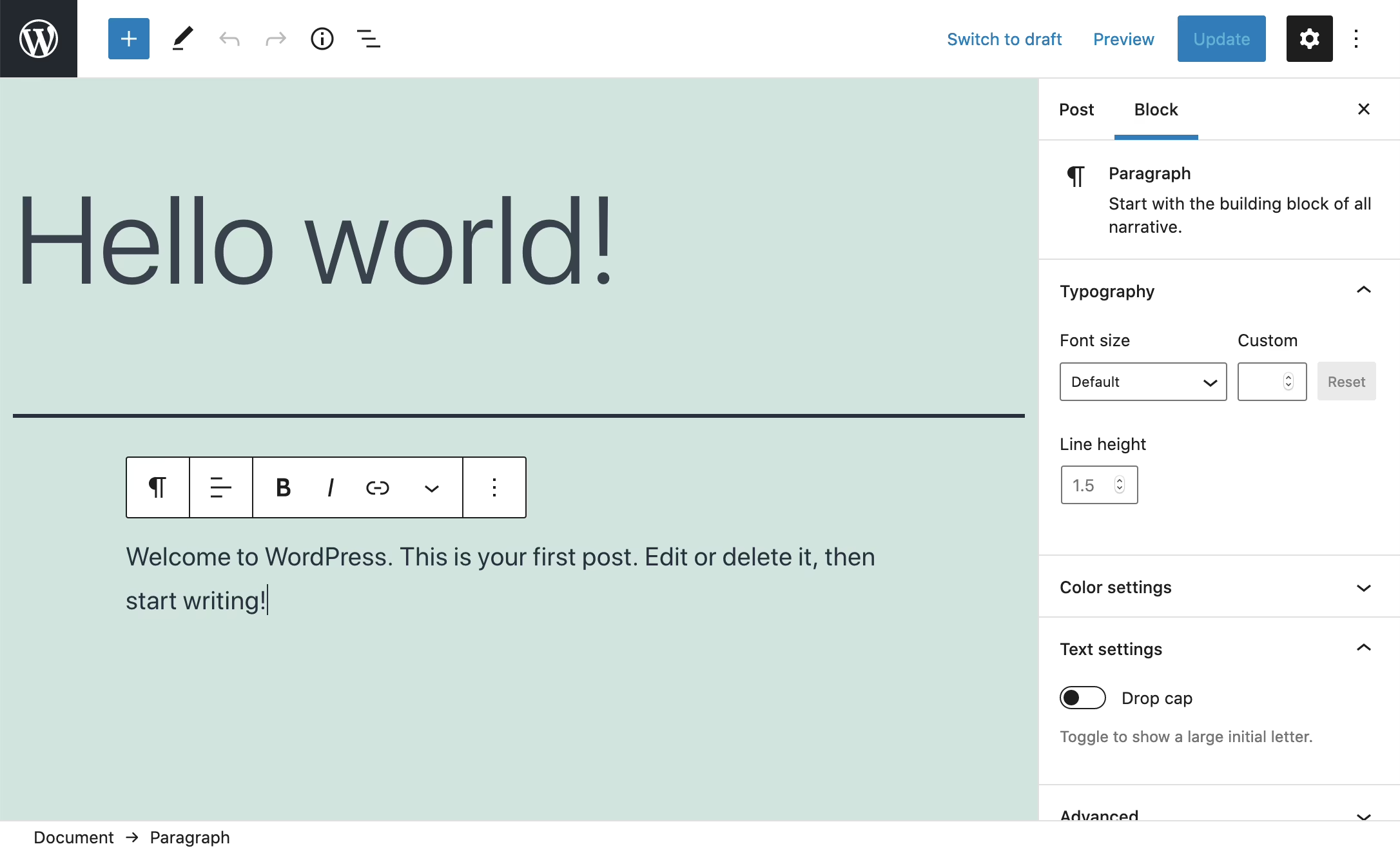
WordPress is a PHP application and leverages MySQL for its database. It uses a theme system and has a plugin architecture. Content, presentation, and business logic all reside in WordPress. This has allowed WordPress to power 40 percent of the internet and 58.9 percent of the websites using a known CMS, according to data from W3Techs summarized by Popupsmart. According to TechTide Solutions’ 2024 WordPress usage report, the WordPress.org plugin directory contains over 68,000 free plugins. This explains why a lot of commonly needed tasks, including SEO, form building, and membership site construction, can be completed without writing custom code.
Contentful has a hosted content delivery system where users are provided the ability to create content types and content blocks, and are then given REST and GraphQL APIs. There is no default frontend. It is your organization’s responsibility to determine how the content will be rendered and deployed, as well as how changes will be visible to editors. It can scale to high traffic and is useful when multiple products rely on the same content. Contentful claims to serve over 180 billion API calls per month with an uptime of 99.9 percent.
A publishing example
Let’s imagine your editor is publishing an article titled “How to Choose a Membership Platform.”
With WordPress, the editor opens the editor, types the title, drops in the text, sets a featured image, and clicks publish. A theme controls the layout of the article, and therefore, the article is available at its permalink. If they want a callout box, they just drop in a block.
An entry on Contentful can have a title, slug, hero image, body, related articles, and author reference. The frontend requests the entry, maps each field to a component, and then renders the page. Should a callout be requested that is not yet available in the content model, then the schema must first be updated, a frontend change shipped, and only then will the editor have the new option. Should an article also need to be available in an app, the app requests the same entry via the API and renders it as it sees fit.
If you want Contentful, then structure and multi-channel delivery would matter, and editorial speed would be less important. If you want the opposite, then the answer is WordPress. If you are looking at Contentful, then check out our honest Contentful assessment to see where Contentful works and where it doesn’t.
The Criteria That Actually Matter
Most comparison tables are useless because they assign equal importance to each criterion. In reality, three main criteria end up shaping whether or not a tool gets chosen: who is going to edit content on a weekly basis, how many surfaces the content must reach, and how much a team is willing to sacrifice for maintenance.
| Criterion | WordPress | Contentful |
|---|---|---|
| Editor workflow | Direct publishing, familiar dashboard, blocks and templates | Structured entries, cleaner UI, dependent on how the frontend maps fields |
| Developer workflow | PHP, themes, plugins, a mature but opinionated ecosystem | APIs, TypeScript, your choice of frontend framework |
| Performance | Depends heavily on hosting, caching, plugin count | Predictable through CDN and API delivery |
| Multi-channel delivery | Possible with headless WordPress, not native | Built for it |
| SEO | Strong out of the box with Yoast, Rank Math, and mature themes | Flexible, but your team builds the metadata, sitemaps, and structured data |
| Integrations | Vast plugin ecosystem, uneven quality | API-first, favors custom integrations |
| Maintenance | Plugin updates, security patches, hosting, backups | Platform handles content service, your team owns the frontend |
| Entry cost | Low | Higher, both in licensing and initial build |
The performance numbers make the story pretty clear. At Kiwop’s 2024 headless comparison, Contentful ran roughly 2-6x faster than Redis object caching and WPGraphQL Smart Cache combined with WordPress when put to the test with a load of 10,000 concurrent requests. This is not necessarily an indicator that Contentful outperforms WordPress in every scenario. When faced with high concurrent loads, Contentful’s API and CDN relays commands faster than WordPress, where the performance is likely impacted by the hosting and caching setups. For a website like a marketing site designed for low to moderate traffic, WordPress and Contentful have comparable performance. However, if the website is intended for a product surface that spikes traffic, Contentful is the better choice.
SEO is often cited as a WordPress advantage, and for good reason. The default templates, the plugin ecosystem, and the fact that most SEO tooling was built with WordPress in mind mean a small team can ship a technically sound site without much custom work. On Contentful you can achieve the same result, but someone has to build it. That work is not exotic. It is just work that your budget and your engineering calendar have to absorb.
Where WordPress Wins
WordPress is the right default for teams whose content lives on one website and whose editors need to move without engineering in the room.
WordPress is a commonly accessible publishing platform and is ideal for most regional operations with three editors and a small developer team. Writers are able to manage their own pages and posts and do not require tickets to be filed. For example, St. Louis Magazine had over 30,000 pages and articles migrated to WordPress. We were not trying to showcase how trendy WordPress was. We wanted to show how a newsroom could move faster on a platform its own team could run day to day.
This logic applies to most membership groups, non-profit organizations, and B2B marketing websites. If your organization has a small team and your primary channel is a website, then WordPress takes out barriers from the writer to the reader. Our CMS for Publishers Guide provides additional details for the publishing operations we usually encounter.
In the race for speed to market, a good team can have a marketing website up and running on WordPress in under a month. Contentful requires a content model, a frontend build, a deployment pipeline, and an editor preview before any launch.
Choose WordPress when the focus is on publishing quickly and the architecture comes later.
Where Contentful Wins
Contentful is a better choice when publishing starts to evolve to become the product itself and not just website content.
A software company that needs the same content to power its marketing site, in-app help, product docs, and a partner portal all at once is a genuine Contentful case. Model each content type once, and every surface can pull the fields it needs from it. The alternative is pasting the same feature description into four separate places and hoping nobody forgets to update all of them.
Similarly, multi-brand, multi-region efforts would prove beneficial as a Contentful space would allow a holding company, for instance, to possess one space for brand-independent content to be shared among six regional sites, while each site would be able to define its own design system. Frontend development for this structure would be more intensive, but the overall company coordination would be easier once the model was established.
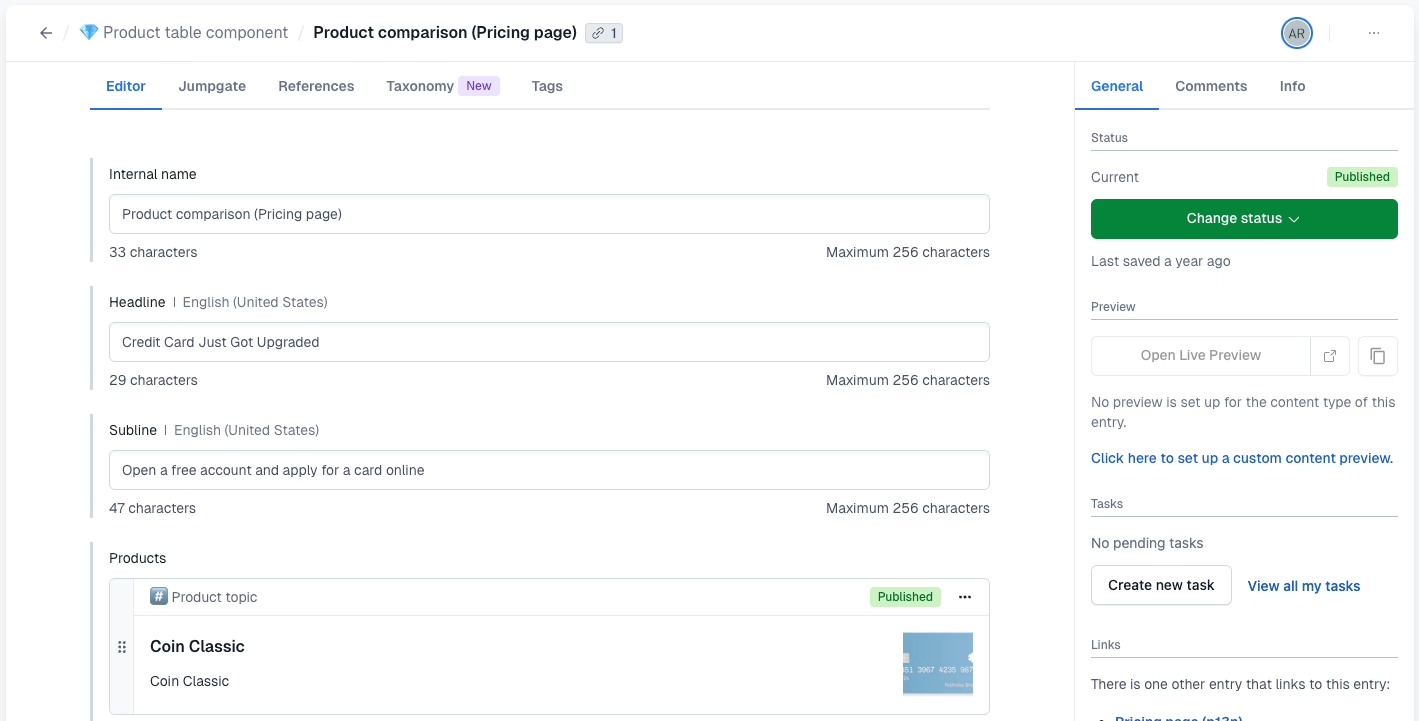
Editorial teams above roughly fifteen people also start to see the workflow benefits. Structured content, roles, publishing states, and preview environments hold up better than a WordPress dashboard with dozens of plugins layered on top.
Contentful’s pricing is steep: one practitioner cited plans running over $300 a month, with enterprise contracts costing considerably more. Add in the frontend team, and the two-year cost looks very different from WordPress. Contentful is worth it when content actually needs to serve multiple products. This would not be the case for content that just needs to look “modern.”
Use Contentful when content needs to serve multiple surfaces and you have an existing frontend development system.
What Each Option Really Costs Over Two Years
The license is just one line item of a larger deal. Looking at the total cost over 24 months is the best way to compare to other solutions.
| Cost area | WordPress | Contentful |
|---|---|---|
| Initial build | Lower for standard sites, higher for custom themes | Higher because frontend and content model are both scope |
| Hosting | Your team owns it, from shared hosting to managed WP | Platform handles core, your team hosts the frontend |
| Licensing | Free core, paid plugins add up | Tiered plans, meaningful cost above the free tier |
| Maintenance | Ongoing plugin updates, security, backups, tuning | Frontend deploys, schema changes, preview environments |
| Editorial dependency | Low for standard changes | Higher for anything outside the modeled fields |
What people call WordPress Tax is the most significant hidden cost of WordPress. WordPress Plugin conflicts and core updates cause problems. Musty plugins created from two-year-old host migrations silently take websites offline. A theme update destroys files. These problems all happen and result in teams migrating to more headless approaches.
The largest hidden cost of Contentful is the engineering dependency. With every layout change, new content type, or added field, developers must be involved. If your marketing team makes a request for a new landing page for a campaign in a week and the frontend developers are too busy with the product development, then the campaign must wait. That request may have been invisible in the proposal and becomes very visible in the second quarter of the operation.
Headless WordPress: A Middle Ground Worth Naming
There is another option. You can keep WordPress as the editing backend and endeavor to create a decoupled frontend that consumes content via the REST API or WPGraphQL. Editors maintain their interface. Developers receive API-driven content for whatever surface they need to build.
It is not a completely free solution, and you take on the maintenance of a new frontend, and some WordPress fragility. For teams that want to provide API extensibility and avoid the burden of teaching non-technical editors a new tool, it is a good solution. Our take on this can be found in our assessment of headless WordPress, where we discuss how and when it’s worth it to implement this.
We migrated 10,000 articles off ExpressionEngine for Teton Gravity Research, and that case study didn’t provide us with an opportunity to decide which stack we thought looked cleaner. The interesting questions were about which platform the editorial team could operate while the engineering team could work on the foundation. That is the type of question this comparison should encourage.
A Decision Checklist Before You Sign Anything
Answer these in writing before you commit:
- Who publishes weekly? If it is writers and marketers without a developer on hand, then start with WordPress unless there is a strong reason not to.
- How many surfaces need the same content? One website equates to WordPress. A website, an application, a portal, and a documentation site would equate to Contentful.
- How often will content models change? WordPress is a better option if you are likely to make a lot of changes to content models. Contentful is a better fit for structured content that will not change much.
- What is your launch window? WordPress is a better choice if you need a quick launch. Contentful is a better choice if you plan to work on modeling and the front end after launch.
- Who owns releases after launch? If you do not have a frontend engineering owner, do not choose a platform that makes each and every layout tweak a new sprint.
- What are you willing to pay for maintenance? Contentful and WordPress both make trade-offs with their pricing models. WordPress trades a low license cost for ongoing plugin and hosting work. Contentful trades its license cost for ongoing frontend and schema work. Take the trade you are actually staffed for.
If You Are Migrating Between Them
Both ways are possible, neither way requires a button, and both directions take time. Moving from WordPress to Contentful requires auditing posts, pages, media, custom fields, categories, tags, authors, and URLs. A content model would need to be designed to map the information and the frontend would need to be rebuilt. In the migration from WordPress to Contentful, as described in the move walkthrough on Medium, WordPress categories usually get mapped to Contentful tags. This is significant because Contentful tags can cross models, as opposed to WordPress categories and tags which are separate taxonomies.
The other migration, from Contentful to WordPress, usually means flattening the content of each structured entry into a WordPress post, page, custom field, or ACF group. This means rebuilding the editorial workflow instead of mindlessly migrating fields. For the extraction side, migration tooling notes from WebscrapingHQ are good starting places when the source site lacks a clean export.
Regardless of the direction of migration, the process of protecting revenue stays the same. The content audit and migration of one representative section in parallel, checking URLs and metadata, and placing redirects to the new site before switching traffic are the steps of the process. Our WordPress migration checklist contains the issues that have been found during migrations in the past, and it is applicable no matter which of the two directions a migration is done in.
The Honest Recommendation
For many teams with small content development teams, WordPress is a solid choice as a content management system (CMS). It offers a quick time to market, independent workflow and content publishing for editors, and a robust ecosystem that usually has your needed functionality as a plugin. You must consider expected maintenance and hosting costs. Choose a stack that you can manage. When our team helps clients launch high value premium products, such as The Hustle’s Trends newsletter on WordPress in two weeks, the platform is able to do what it is best at.
For teams whose content requires delivery across multiple products, or for teams with large enough editorial staffs to feel the pain of WordPress plugin fatigue, Contentful is a solid choice and worth the expense. However, it is very important that a frontend developer and content model are budgeted. Contentful without a frontend owner produces the worst of both worlds: high licensing cost and high engineering involvement, and a content model that no one will keep clean.
In situations where there is no clear choice, the fastest and usually the cheapest choice is to build one example page in both systems, and let the people publishing content weekly test out both systems. A prototype that takes a week usually settles more arguments than months of debate.
Our discovery process is also designed to give clients the clarity they need to decide if the answer is WordPress, a headless CMS, or something in between, and help them avoid any regrets with their build contract.
Building a product and unsure what to scope first? Let’s talk. Free 30-minute call, no pitch.

Saeedreza Abbaspour is the CEO of Refact, where he works across product, engineering, and sales. He sets the studio’s direction while staying closely involved in the work itself, from shaping product strategy and UX architecture to helping define the technical systems behind Refact’s projects. His role connects business thinking with hands-on product execution, giving him a practical view of how software should be planned, built, launched, and improved. At Refact, Saeedreza focuses on building a studio that can move quickly, solve real client problems, and turn ideas into reliable digital products.
More from Saeedreza Abbaspour

