WordPress vs Webflow: How to Choose
A platform choice looks like a small decision at the start of a project.


This piece is for the person deciding what to build on next. A marketing lead scoping a rebuild, a product manager sizing an MVP, an operator inheriting a site that no longer fits the business. The useful frame is not features. It is architecture, ownership, and who runs the site the day after launch.
The Choice Is Architectural, Not Aesthetic
WordPress is a programmable PHP application. Every page request runs code on your server, hits your database, and returns HTML. That is what makes it flexible, and what makes it fragile when nobody is paying attention to hosting, plugins, or caching.
Webflow is a closed SaaS platform. Every published page is pre-rendered to static HTML, CSS, and JavaScript, then served from Fastly and Cloudflare on top of AWS. There is no server-side code you can run, no plugin marketplace, no database to tune. That is the source of its default speed, and the source of its ceiling.
Everything else in the debate flows from that split. Extensibility, performance, security, cost, and migration risk all trace back to how much of the stack you control versus how much is managed for you. One 2026 comparison of the two platforms makes the same point with a longer feature matrix, but the tradeoff is the one to hold onto.
| Dimension | WordPress | Webflow |
|---|---|---|
| Architecture | Dynamic PHP, self-hosted or managed | Static output on managed edge |
| Extensibility | Arbitrary code, ~60,000 plugins | Client-side JS and external APIs only |
| Default performance | Bimodal, depends on stack | Fast by default, harder to break |
| Content ceiling | Bounded by database and hosting | Hard caps per plan tier |
| Security model | Distributed, patch discipline required | Locked down, low CVE surface |
| Ownership | You own the stack and the risk | Vendor owns the stack and the lock-in |
Market Position Tells You Who Each Platform Is For
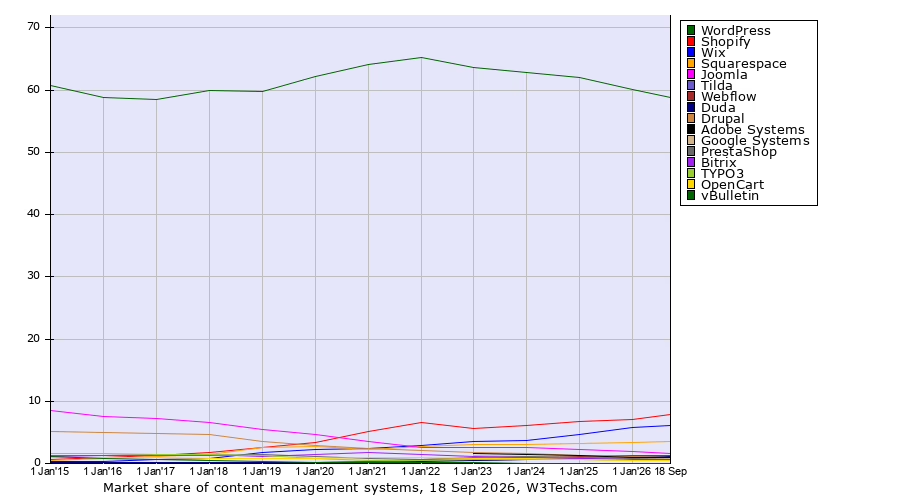
WordPress CMS share has slipped from about 65% in early 2023 to 58.8% in September 2026, according to W3Techs market share data. It is still adding sites in absolute terms, but growing more slowly than the web itself. Webflow has moved from roughly 0.6% to 1.2% CMS share over the same window. An independent 2026 analysis of WordPress adoption reads the trend the same way: dominant, but no longer expanding unchecked.
The practical reading is simpler than the trend line. WordPress is the mainstream default with the deepest talent pool, the largest plugin ecosystem, and the most retainer-ready hosts. Webflow is the narrower option built around a specific team shape: design-led marketing sites with limited engineering capacity.
Neither position makes one platform better. It changes who they are cheapest to hire for, easiest to hand off, and safest to build against over a three-year horizon.
Performance Favors Webflow by Default, Not by Ceiling
Field data in 2026 shows Webflow sites pass all three Core Web Vitals about 58% of the time versus roughly 42% for WordPress. Median mobile LCP sits near 2.4 seconds on Webflow and 3.2 seconds on WordPress. A 2026 benchmark summary attributes the gap to what Webflow ships out of the box: Brotli compression, HTTP/2, automatic WebP and AVIF conversion, lazy loading, and edge caching without any configuration.
The ceiling story is different. A poorly hosted WordPress site with a bloated theme and thirty plugins loads in 3.5 to 4.5 seconds. The same content on a stack with Cloudflare APO, an NGINX FastCGI or Varnish reverse proxy, Redis object cache, and a tuned MySQL primary–replica setup lands in 1.5 to 2.0 seconds. WordPress 6.5 added selective block asset loading that cuts page weight 40 to 60% on block-heavy templates, plus client-side media processing via libvips to work around PHP memory limits.
The honest version of the SEO question is the same. Webflow is easier to get right by default. WordPress has the higher ceiling but more surface area to misconfigure. If you want a checklist for what makes any CMS treat SEO well, this 2026 guide to CMS SEO fundamentals is a useful reference before you commit either way.
Where Webflow Runs Out of Room
Webflow’s plan structure has hard limits that only start to matter when you cross them. The Premium plan allows 20,000 CMS items across 40 collections and 50 GB of monthly bandwidth. Business raises the cap to 10,000 items per collection. Enterprise (2026 update) goes up to 1,000,000 CMS items, with 40 Collection Lists per page and 100 fields per collection. API rate limits sit at 60 requests per minute on lower tiers and 120 on CMS, Business, and Ecommerce plans. A recent breakdown of Webflow CMS limits covers the tier-by-tier detail.
The harder constraint is structural. Webflow has no cross-collection queries. Any content model that needs relational logic across taxonomies, or a query that joins editorial pieces with authors, tags, and related products, hits the wall fast. Teams that try to run large content operations on Webflow usually end up bolting on an external headless CMS and treating Webflow as the frontend, which defeats the reason they picked it.
Webflow Ecommerce is fine for small catalogs and clean product flows. Practitioners consistently push back on running catalogs above two thousand SKUs on it. A 2024 fashion retailer case has been cited as the reference example of what goes wrong when a Webflow store outgrows the platform. WooCommerce, BigCommerce, or a dedicated commerce stack is the safer call once complexity climbs.
Where WordPress Punishes Neglect
WordPress does not have content caps. It has an operational tax. Plugin updates break sites. Themes accumulate. Security patches lapse. The public CVE record for WordPress core and plugins runs into the thousands, and most breaches trace back to plugin or hosting failures rather than the core project itself.
The other quiet failure mode is the hero-developer pattern. One person builds the site, knows how it holds together, and eventually leaves. The next team inherits a Frankenstein of custom code, expired licenses, and half-documented workflows. That is the reason real WordPress maintenance looks less like a checklist and more like an operating contract: monthly patching, staging discipline, a WAF at the edge, monitored backups, and someone accountable when a plugin update goes bad.
WordPress rewards teams that treat the site as a product. It punishes teams that treat it as a launched project.
Not sure how exposed your own site is? We run a free WordPress vulnerability check that lists what needs patching first. Request the check.
Migration Is the Highest-Risk Decision Either Way
Search Engine Journal reported in 2024 that the average site migration takes 523 days to recover organic traffic. Seventeen percent never recover. Today’s Closeout, in a widely cited 2024 case, launched with 15,000 misimplemented redirects. Indexed pages fell from roughly 6,200 to 1,400 and clicks dropped to zero.
Webflow-to-WordPress and WordPress-to-Webflow moves inherit the same failure modes. Static HTML exports do not capture dynamic CMS logic. CSV exports of Webflow collections need to be mapped to WordPress custom post types and taxonomies by hand. WordPress migrations more often fail at extraction (PHP timeouts, memory limits on the source or destination host) than at the download step.
What works is boring. Complete URL inventory before you start. Redirect map reviewed against the top 500 organic landing pages. Metadata, canonicals, hreflang, and structured data preserved deliberately, not copied by luck. Staging dry runs. Post-launch monitoring for crawl errors and ranking movement for at least ninety days, not a launch-week check. Our own Webflow to WordPress migration guide walks through the tradeoffs at each step for teams that have decided to switch.
The best time to decide the site needs to move is before the current platform starts to fail. The worst time is after the marketing team is already filing tickets.
Cost Is a Labor Question, Not a License Question
WordPress software is free. Hosting, plugin licenses, security tooling, and developer time are not. Webflow charges per site and per plan tier; the per-site number is predictable, but hosting costs stack fast at agency or multi-site scale. A common practitioner line captures it well: WordPress is free until your time isn’t.
The real cost driver on either platform is labor and complexity, not the sticker. A five-page marketing site on Webflow that a designer can update in-house is cheaper to run than a WordPress site that needs a developer for every content model change. A hundred-page publishing operation with editorial workflows, memberships, and third-party integrations is cheaper on WordPress than on Webflow plus three glue services. Match the platform to the shape of the work.
Two Situations That Show the Split
When we rebuilt Teton Gravity Research’s publishing platform, the core problem was that 10,000 articles sat locked inside ExpressionEngine, a legacy CMS barely staying online. Previous migration attempts had stalled. The site needed custom content types, moderated commenting, video integrations, commerce, and editorial workflows for a working newsroom. That is a WordPress problem. Webflow’s content caps and lack of server-side logic would have pushed the team into a hybrid stack before the first article shipped.
The Trends premium newsletter build for The Hustle had a different shape. Custom CMS, custom payment platform, and email tooling all sat in separate systems and refused to talk to each other. Two weeks to launch, an existing million-subscriber audience to convert. The right call there was a WordPress build with a clean payment integration, because the roadmap was going to include memberships, tiered access, and editorial tooling that a static SaaS platform cannot host.
Neither project could have shipped on Webflow. Not because Webflow is weak, but because both were operations-shaped, not marketing-shaped.
A Short Decision Frame
Choose Webflow if most of the following are true. The site is marketing-led. Designers own the visual language. The content model is stable and modest in size. The team wants to update pages without a developer in the room. Backend logic lives elsewhere, in a product, an app, or a third-party SaaS.
Choose WordPress if most of the following are true. The site is content-heavy or role-heavy. Editorial workflows need custom post types, taxonomies, or permissions. Integrations run deep, from CRM to payments to member logic. Someone on the team, in-house or on retainer, owns hosting and plugin discipline. The three-year plan involves memberships, ecommerce beyond a small catalog, or a portal.
Choose a hybrid if the marketing site and the product are genuinely two things. Webflow for the brand surface, WordPress or a dedicated stack behind the login. That works when the seam between the two is designed on purpose, not stumbled into.
If you are still weighing this, the deeper reading on our side is where Webflow quietly breaks under product-scale work and where WordPress development earns its keep.
Decide Before You Build, Not After
The organizations that succeed on either platform treat the site as a product with continuous investment in performance, SEO, and editorial workflow. The ones that fail treat CMS selection as a one-time decision and launch day as the finish line. WordPress vs Webflow is the wrong question in isolation. Who is running this site in eighteen months, and with what tooling, is the right question.
If you want to pressure-test that decision before writing code or committing to a rebuild, that is exactly the kind of early call Refact’s discovery process is built to settle.
Running a WordPress site that has outgrown its build? Let’s talk. Free 30-minute call, no pitch.

Saeedreza Abbaspour is the CEO of Refact, where he works across product, engineering, and sales. He sets the studio’s direction while staying closely involved in the work itself, from shaping product strategy and UX architecture to helping define the technical systems behind Refact’s projects. His role connects business thinking with hands-on product execution, giving him a practical view of how software should be planned, built, launched, and improved. At Refact, Saeedreza focuses on building a studio that can move quickly, solve real client problems, and turn ideas into reliable digital products.
More from Saeedreza Abbaspour

