WooCommerce Maintenance Service: What It Should Cover
Most WooCommerce failures don’t look like outages.
 Masoud GolchinOctober 4, 2026
This guide is for store owners and operators who are deciding what to buy, what to expect from a provider, and what the work should cost. Our position is simple. You are paying for proof that the store still works after every change, plus a tested way to recover when it doesn’t. A list of completed tasks is not that proof.
Why an Update That “Succeeded” Can Still Cost You Sales
A WooCommerce store is many pieces of software working together: WordPress core, WooCommerce, a theme, payment gateways, shipping and tax extensions, caching layers, and usually some custom code. TechnologyChecker’s WooCommerce adoption data tracks 1,463,627 domains running the platform and puts it at about 22% of the ecommerce platform category, second only to Shopify. Each of those stores uses its own mix of extensions, so no two maintenance jobs are quite the same.
Most of the risk sits in those extensions. Patchstack counted 7,966 new WordPress vulnerabilities disclosed in 2024, and Wordfence counted 8,223. Both found that about 96% were in plugins. These figures count problems across the whole WordPress ecosystem. They don’t tell you the odds that your store gets hacked. They do tell you where to look: the third-party code your store chose to install.
A change to any one piece can break the path to payment while the rest of the site looks fine. The failures that cost the most money tend to be partial:
- A gateway update rejects transactions, but the checkout page still renders normally.
- A theme hasn’t caught up with new WooCommerce hooks, so the mobile pay button sits hidden under a sticky footer. The desktop test passes.
- Order confirmation emails stop sending. Orders still come in, so nobody notices.
- Subscription renewals sit in a queue that never runs on time.
- A caching rule serves one customer’s cart state to another.
We have written before about how WordPress ecommerce fails quietly, and the pattern holds here. The first warning usually comes from an annoyed customer, not a dashboard.
If nobody is responsible for testing a real purchase after a change, nobody is responsible for protecting the checkout.
What a WooCommerce Maintenance Service Should Cover
Most provider pages list the same items: daily off-site backups, malware and vulnerability scans, plugin and core updates, uptime monitoring, and a few support hours. Those are a reasonable floor. Seahawk’s WooCommerce maintenance guide groups security, updates, and monitoring into one recurring routine, and most care plans are built on a similar baseline. The difference between plans is whether anyone checks the outcome of that routine.
An inventory with an owner for every extension
Good maintenance starts with a written list of the WordPress version, WooCommerce version, theme, every active plugin, each payment gateway, the shipping and tax tools, and any custom integrations. Each item should have its license status, its update status, and a note on who supports it. Without that list, a provider can’t predict what an update will touch. They also can’t spot two plugins doing the same job, which is one of the more common reasons a store is “one plugin update away from disaster.”
Tested change windows instead of “updates included”
“Updates included” describes an activity. A tested change window describes a result: changes went through staging, someone tested the buying flows, the results were written down, and a rollback path was ready before anything reached the live store. WooCommerce’s own update guidance recommends updating WooCommerce, its extensions, gateways, and themes together as one set, then testing product pages, cart, checkout, payments, shipping, taxes, emails, and extension behavior.
Monitoring that watches orders, not just the server
Uptime checks confirm the server answers. They can’t tell you whether orders are completing, whether renewal jobs are falling behind, or whether error logs are filling up. Fast detection is also harder than it looks. In a recent WooCommerce.com engineering post-mortem, a newsletter sent to about 800,000 recipients caused corporate email scanners to fetch links all at once. Edge requests jumped from roughly 250,000 to 530,000 and caused a few minutes of partial outage. A person reported the problem at 09:18 UTC. Automated monitoring alerted at 09:22. The fix was to spread the email sends over several hours, not to buy more servers. Having monitoring and detecting problems in time are two separate things, and marketing launches need to be planned with the people who run the infrastructure.
Caching rules that keep carts correct
WooCommerce’s caching guidance says Cart, Checkout, and My Account must stay dynamic, and the session and cart cookies need to be excluded or handled specially. If a cached My Account page gets through, password resets can break. A faster store that shows the wrong cart is a bug, not a performance win. Every caching layer needs auditing: the plugin, the host, the CDN, and the server. Then test logged-in flows, not just anonymous page speed.
Security prioritized by real exposure
Given the plugin numbers above, security work means tracking advisories against your actual inventory, removing software you don’t need, and patching first whatever is both exposed and important to the business. Staging tests show that a store works after a change. They don’t show that it’s secure. That takes separate work.
How a Safe WooCommerce Update Actually Runs
Almost every serious source agrees on the order of operations: WooCommerce’s documentation, a Themeco forum moderator, Reddit maintainers who “never update directly on the live site,” and practitioners on X. A sound process looks like this:
- Take a fresh backup of both the database and
wp-content. - Refresh staging and apply the full update set: core, WooCommerce, extensions, gateways, theme.
- Read the changelogs, especially for payment and subscription plugins.
- Test the buying path the way customers use it: product page, cart, coupon, checkout, every active payment method, shipping and tax totals, order status, stock changes, confirmation emails, and anything that sends orders to fulfillment, accounting, or a CRM.
- Repeat checkout on a real phone.
- Deploy to the live store, run a smoke test, and keep the rollback ready until the next real orders come through cleanly.
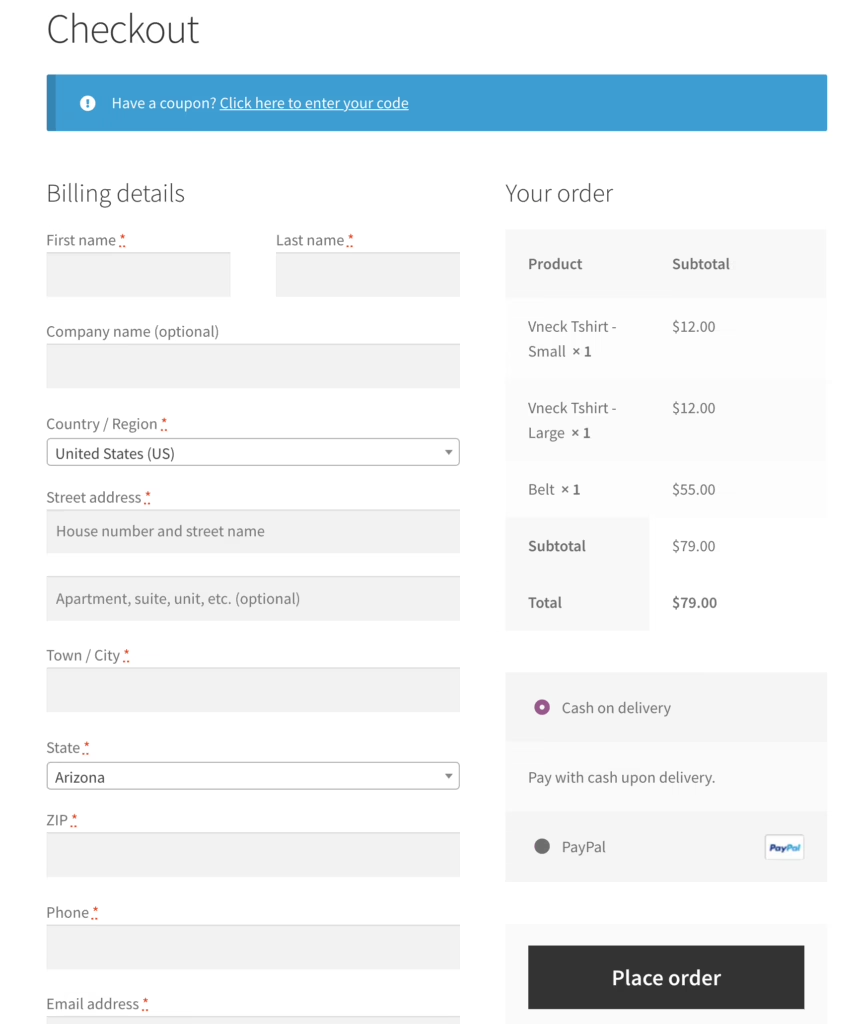
Testing the checkout means testing the details your store actually depends on. When we built NudFud’s WooCommerce store, much of the work was in the product structure: variants, full nutritional panels, certification details, and selling across Canada, the US, and Asia. On a store like that, “checkout loads” is the wrong test. An update can leave checkout working while breaking how variants display or how a regional order is totaled. The test plan should follow the store’s own revenue logic.
How often to update depends on what the update fixes
Practitioners don’t agree on a single schedule, and they shouldn’t. A monthly window is a sensible default. Security fixes and broken core functions need a faster path, which WooCommerce’s own guidance supports. Many maintainers wait a few days after a major release so extension authors can catch up. Automatically applying minor, low-risk updates is defensible. Auto-updating WordPress core, WooCommerce, and payment plugins together, with nobody watching, is how stores go down.
Some breakage isn’t caused by anything you did. In May 2025, WooCommerce acknowledged fatal errors caused by bad block-pattern data from a remote service, and cached copies of that data could keep causing errors. Fixes shipped in versions 9.8.4 and 9.8.5, along with recovery steps. A maintenance provider should be watching vendor advisories for exactly this kind of problem.
Staging has limits at scale
Staging is only as useful as it is close to production. DevPress’s write-up on Universal Yums, a subscription merchant processing more than 120,000 renewals a month, describes a production database over 100 GB. Developers worked with a local copy cut down to under 1 GB. A full-data staging refresh took hours and happened only a couple of times a month, so it was used mainly for performance checks. The same write-up makes a rule every store should follow: never overwrite the live posts or postmeta tables from staging, because orders keep coming in while you develop. Code moves to production. The live order database stays where it is.
Backups Only Count If Someone Has Restored One
A backup is a file. Recovery is a process, and most stores have never run it. In Melapress’s 2025 survey of 264 WordPress users, only 27% had a recovery plan. The sample is small and self-selected, but the gap matches what maintainers report: plenty of stores have “files that are probably backups” and no proof they restore.
For WooCommerce, recovery is also a data problem. Restoring a database snapshot from six hours ago deletes six hours of orders. Stores running WooCommerce Subscriptions face more risk than that. WooCommerce’s documentation on restoring backups warns that an older database can remove subscriptions, customer records, payment tokens, and renewal orders created after the backup. It can also put already-processed renewal actions back in the queue, which risks charging customers twice. Blocking those actions can leave next-payment dates wrong.
So a credible plan includes three things:
- Restores tested on a schedule, not just backup jobs that report success.
- A known recovery-point age. You should know how many hours of orders a restore would lose. High-volume stores usually need more frequent or incremental backups than one per day.
- A reconciliation step for subscription stores. Before processing restarts, check orders, payments, scheduled actions, and tokens created after the backup.
If an update breaks checkout, the first move is usually to stop customers from paying into a broken flow. After that, either roll back the code or restore, depending on what the backup contains. Investigate the conflict on staging before trying the update again. “Restore and you’re done” is rarely true on a store that takes orders every hour.
The Background Jobs That Fail Without a Sound
WooCommerce runs a lot of work out of sight through Action Scheduler: subscription renewals, emails, webhooks, and database updates. By default it often depends on WP-Cron, which only fires when someone visits the site. On a quiet store, tasks run late. On a busy one, the same mechanism can cause performance problems. WooCommerce’s scheduled actions documentation recommends considering a real server-side cron, and the Scheduled Actions screen shows pending, in-progress, and failed jobs.
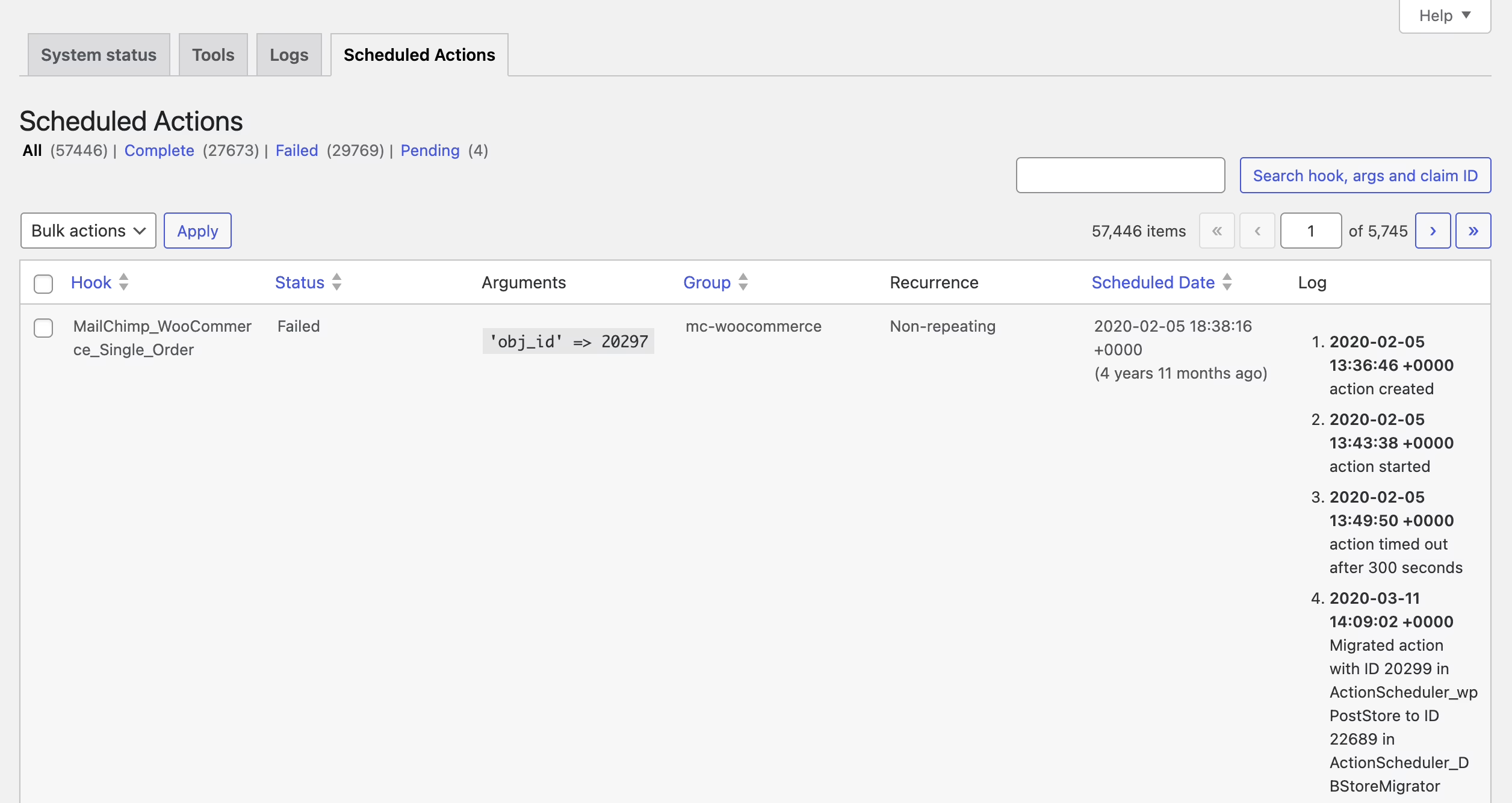
Maintenance should track four numbers: pending actions, past-due actions, failed actions, and the age of the oldest pending action. If the oldest action is three days old, renewals or emails are already late. Someone should also confirm that the server-side cron is configured and actually running. A job set up years ago and never checked doesn’t count.
At high volume, the queue becomes a capacity decision. After its HPOS migration, Universal Yums saw about 25% of renewals fail in the first cycle. The cause was database deadlocks during simultaneous inserts into the HPOS address table. DevPress reported this tradeoff:
| Concurrent Action Scheduler batches | Renewals per hour | Failure rate |
|---|---|---|
| 20 | ~12,000 | 25% |
| 10 | ~10,000 | 10% |
| 5 | ~7,000 | 5% |
This is one merchant’s production setup, not a benchmark, and a store with 200 subscribers will never see these numbers. The lesson still applies to everyone: pushing more work through the queue at once can make more jobs fail. Retries also have to check whether a renewal order already exists before rescheduling. A simple retry can charge the same customer twice.
Not sure how exposed your own site is? We run a free WordPress vulnerability check that lists what needs patching first. Request the check.
HPOS Is a Data Migration, Not a Settings Toggle
High-Performance Order Storage moves WooCommerce orders out of the generic WordPress posts and postmeta tables into dedicated order tables. During the transition, one store is “authoritative,” meaning WooCommerce reads from it, and the other is kept in sync as a backup. WooCommerce won’t let you switch authority while orders are still waiting to sync. Its background sync processes 25 orders per batch, and its documentation recommends leaving compatibility mode on for a while after the switch.
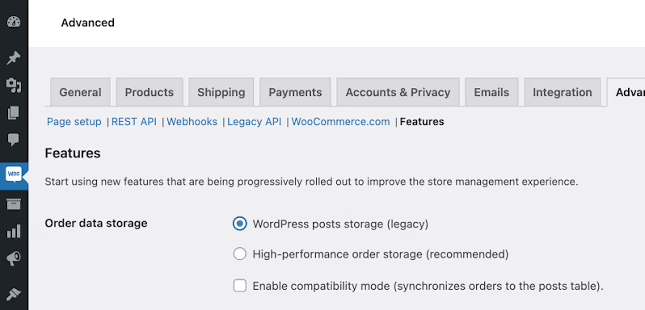
The common misunderstanding is that “HPOS compatible” labels on your plugins make the store safe to migrate. Those labels say nothing about your own custom code. Any snippet or integration that reads orders with direct SQL against the old tables can read stale data or write to the wrong place. The fix is to audit that code and move it to WooCommerce’s supported order APIs, such as wc_get_orders(). Universal Yums audited more than 100,000 lines of custom code. In a smaller case, a store called Heroic Thread traced a persistent problem to an order-tracking plugin that was HPOS-incompatible and also improperly licensed.
Don’t expect the migration to make the store faster for customers. WooCommerce 9.9 reported admin page loads up to 95% faster on some critical screens, with the Orders screen count on large stores dropping from 22 seconds to under one second. Some of those gains depend on HPOS. Universal Yums, which had already tuned its old setup, reported no noticeable speed gain. HPOS mainly makes the store easier to scale and the data easier to handle. If the store depends on heavily customized order logic, that’s a point where custom WooCommerce development decisions and maintenance overlap.
What WooCommerce Maintenance Costs and Why Quotes Disagree
There is no reliable market average, because “maintenance” covers very different amounts of work. Published and anecdotal figures run from about €300 a year to $3,000 a month. Codeable lists plans from $240 a month and puts more involved retainers at $500 to $3,000 a month. Reddit maintainers describe $150-a-month packages, $350 a month including three hours of development, and $500 a month for roughly four hours of work. Practitioners on X say high-stakes stores pay several hundred euros a month. None of these is a benchmark. Together they show that price follows scope.
For the full cost of the platform, the 2026 WordPress pricing index estimates that a WordPress site really costs $1,200 to $9,700 a year once you add hosting at renewal rates, plugins, security, maintenance, and your own time. A WooCommerce store with paid extensions and payment integrations usually lands toward the upper end.
| Store profile | What maintenance needs to include | Where pricing tends to sit |
|---|---|---|
| Small catalog, few extensions, one gateway | Backups, scans, monthly updates, a test order after each change | Low end of the published ranges; some owners do it themselves in minutes a month |
| Growing store with campaigns and integrations | Staging-first updates, checkout tests on every payment method and on mobile, cache audits, defined response times | Mid-range retainers with a few hours of developer time |
| Subscriptions, high order volume, or heavy custom code | Queue monitoring, restore reconciliation, HPOS and custom-code audits, capacity planning around launches | Developer-led retainers at the top of the published ranges |
To see how agencies package these tiers, an overview of maintenance plans is a useful comparison. Read every tier for what it verifies, not how many tasks it lists. Our guide to website maintenance services pricing goes deeper on reading those contracts.
Managed hosting covers less than people assume
Managed WooCommerce hosting usually covers the infrastructure, and often backups and some security scanning. It rarely covers checking whether a plugin update broke your gateway or whether the renewal queue is running. That depends on the host’s actual plan terms. “Managed” by itself doesn’t promise anything at the application level. On Reddit, one $150 package was challenged because the host already did half of it, and that’s a fair challenge. A provider should be able to say exactly which work overlaps with your host and which doesn’t.
When a Maintained Store Keeps Breaking, the Plan Is Not the Problem
Some maintenance looks busy while the store stays broken. Blaze Commerce’s Shine Trim case study describes years of support tickets and developer changes that never fixed 524 checkout timeouts, duplicate charges, or missing mobile search. Once the team traced those symptoms to their causes, checkout timeouts reportedly fell from 524 to zero and mobile PageSpeed rose from 51 to 93. The agency published those numbers without a methodology, so treat them as indicative. The pattern is common, though.
In a Reddit thread from operators managing 50 to 200 sites, the advice to someone dealing with daily problems across 20-plus sites was blunt: fix the sites first. Breakage that frequent isn’t normal maintenance. It points to poor build quality, weak hosting, overlapping plugins, loose access control, or a security problem. One former Automattician described fixing a partner agency’s WooCommerce build where an authentication cookie was set from an email address typed into a public form. Weekly updates don’t fix problems like that.
This is why WisdmLabs’ guide to WooCommerce maintenance realities treats checkout verification, gateway monitoring, subscription renewal tracking, and HPOS auditing as separate jobs. A store can pass every uptime check while customers can’t pay. When a store keeps failing for the same reasons, the next step is a diagnostic audit, and sometimes a conversation with WooCommerce development companies about fixing the code before routine maintenance can work.
Inherited stores need discovery before a quote
If you’re moving a store to a new provider, expect them to spend time on investigation first. A quote without that work is a guess. On Reddit, $250 to diagnose a neglected five-year-old custom build was debated, and most commenters called it reasonable. A good provider will map the customizations, the plugins with active support plans, and the custom code before committing to a monthly price.
Removing plugins helps, with one tradeoff. Replacing three overlapping plugins with a few custom functions means fewer things can conflict during updates. Those functions are now your code, though. Someone has to maintain them, and someone has to audit them the next time WooCommerce changes how orders are stored.
Questions to Ask Before You Sign
A capable provider should answer these without hedging:
- Where do updates happen first, and what gets tested? Ask for the actual checkout test list, including mobile and each payment method.
- When did you last restore one of my backups? Ask how many hours of orders a restore would lose.
- Do you monitor scheduled actions? Ask what threshold triggers an alert, and whether a server-side cron is running.
- What is the response time for a broken checkout versus a cosmetic bug? Ask for a named owner and how issues get escalated.
- What is included, and what is billed separately? Development, malware cleanup, and performance work are the usual gray areas. Many providers cap support at short tasks, such as 30 minutes or less each.
- Which of these tasks does my host already do?
The monthly report should state what changed, what was tested and passed, what failed and how it was handled, the most recent restore test, and any risks the provider is tracking. A report that only says “47 updates applied” measures activity. Our website maintenance and support guide covers how to hold a provider to that standard. A partner directory listing alone doesn’t prove quality. Ask for the process instead.
Start With a List and One Test Order
You can check your current setup this week. Write down every component connected to the store: core, WooCommerce, theme, plugins, gateways, subscriptions, shipping, tax, inventory sync, email, fulfillment, and custom code. Then place a real test order on your phone with each payment method. Ask whoever maintains the store for the last update report, the last restore test, and the current count of failed scheduled actions. If those answers don’t exist, the store is running on luck. For a general refresher, see our WordPress website maintenance overview.
Good maintenance doesn’t feel dramatic. Releases are tested, recovery has been rehearsed, and problems turn up in a report before a customer finds them. If you want a second opinion on where your store is exposed, Refact’s website maintenance and support work starts with that audit. It maps the integrations that matter to your revenue before agreeing on a monthly scope.
Running a WordPress site that has outgrown its build? Let’s talk. Free 30-minute call, no pitch.

Masoud Golchin is a backend developer at Refact, working on server-side systems, internal tooling, and infrastructure. He builds and maintains the services that support both client projects and the team’s day-to-day development workflow. His work includes backend logic, developer tools, system reliability, and the technical foundations that allow products to scale and operate consistently. At Refact, Masoud focuses on creating practical engineering solutions that help the team move faster while keeping systems organized, maintainable, and dependable.
More from Masoud Golchin

