Website Maintenance and Support: A Practical Guide
A DNS record drifts.


These are the failures that website maintenance and support are designed to mitigate. Not zero day exploits. The boring, invisible, revenue losses that occur because no one took charge of the site after it was launched.
Why Website Maintenance Is a Revenue Function, Not IT Overhead
A founder realizes the need for maintenance and support once something within their site breaks. A campaign directs users to a landing page, a partner shares the product link, or an uptick in demand due to a promotional event occurs. If the site is unprepared for the surge, the marketing expenditure is made and the path for conversion is lost.
The financial exposure of downtime is not abstract. According to ITIC’s 2024 survey summarized in the downtime cost breakdown, 90% of mid-sized and large firms reported hourly downtime losses of at least $300,000, with 41% reporting losses between $1 million and $5 million per hour. Another cost analysis of downtime places the average loss per minute at $5,600. While these case studies are focused on enterprise-level infrastructures, the same trend applies to small businesses: downtime will always be more costly than the maintenance to prevent it.
The impact of downtime is different for different types of businesses. An e-commerce business, for example, will lose revenue from downtime on product pages, checkout, payment systems, inventory, and shipping. An SaaS business will lose revenue from downtime on signup/login, user portals, and billing pages. A membership business will lose revenue from downtime on renewal pages, member access, and event registration. An editorial business will lose revenue from downtime on workflow, search results, and ad or subscription systems.
Another very important reason to have a maintained site is the security of your site. The 2025 vulnerability data from Patchstack (referenced in this WordPress maintenance guide) shows why infrequent updates to your CMS that rely on an active plugin ecosystem are a losing proposition. It is not just one big, exotic CVE that will take your site down. It is a thousand smaller, unpatched dependencies that, in the end, will allow one of them to take your site down.
The mental model to hold
Do not frame the cost of maintenance as a question. Instead, consider whether your business can afford to experience an outage when your most important client is using your service. Answering this question will explain why the cost of maintenance is justified. What is yet to be decided is what you are going to buy with this budget, and more importantly, from whom.
What Real Maintenance Actually Covers, and How Often
The scope of the term maintenance can mean many things, from the monthly update of the core of a WordPress site, to undertaking site reliability. The correct frame is not what tasks the provider does, but on what frequent basis, and who is responsible for the outcome when a payment fails. Our WordPress Maintenance in 2026 walks you through the pros and cons of the approach; the summary is below.
Daily: monitoring that pings a human
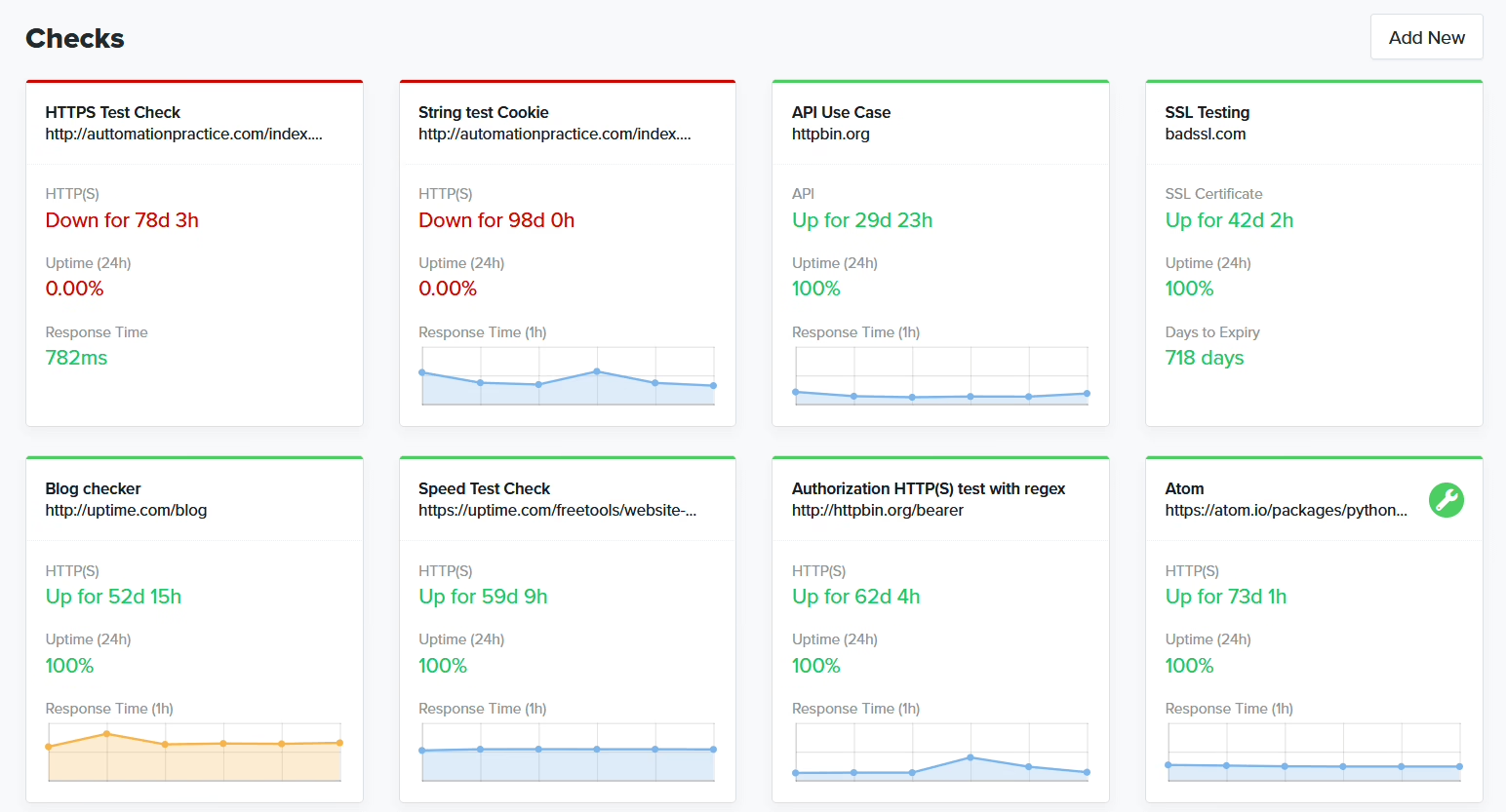
The availability of critical pages and forms, checkout, integrations, and other services that sit outside of your infrastructure should be monitored from the outside. Internal logs will not capture the break in front-end to back-end communication that occurs when a certificate expires at 3 am. Alerts should reach an on-call person. They should not accumulate in a dashboard until a customer opens a support ticket. Login attempts, authentication failures, malware, and unauthorized data changes should be monitored at the same frequency.
The content and outbound teams should also check domain-level signals that impact delivery and search. This list of website information every sender must check provides details of DNS, authentication, and identity records that can destroy email and SEO.
Weekly: updates with a staging step
Work done on a weekly basis is focused on the core of WordPress, themes, plugins, server-related work, libraries, and dependencies. Do not make upate20 blind updates to production. Check the release notes, perform change1 work in a staging environment, examine the user flows that drive revenue, and set the release. Critical security updates should have a stated deployment or mitigation window of 24 to 72 hours from disclosure. Regular updates should be done in a 14 to 30-day testing window. Include the former and the latter in the contract, as a verbal promise from your account manager is not legally binding.
Monthly and quarterly: cleanup and proof of recovery
The work performed on a monthly basis includes cleanups related to databases, logs, caches, broken links, page speed assessment and a storage audit. This work is required and is boring.
Quarterly restore tests are less boring. A backup that has never been restored is not a backup, it is an assumption. Providers should run a restore to a staging environment and provide evidence of recovery, not a screenshot of a scheduled job. This is where most retainers silently fail. Backups are performed, but a restore is never performed. The first restore is performed due to a failure and it is never done successfully.
What Maintenance Costs, and What Actually Drives the Number
“How much should I budget?” is the right question. The number of pages on the website is not the answer. A five-page site that has payment integration and inventory sync creates a larger support burden than a fifty-page brochure site. The number is dependent on the release, how a checkout can fail, and the number of integrations as well as how busy a website is and how quickly a business needs to recover.
Working benchmarks look something like the following:
| Site type | Monthly range | What drives the cost |
|---|---|---|
| Small business site | $95 to $400 | Routine updates, backups, monitoring, minor fixes |
| Active marketing site | $300 to $1,500 | Campaigns, landing pages, analytics, SEO, performance checks |
| Ecommerce or membership site | $500 to $2,500 | Checkout, accounts, integrations, release testing, incident response |
| Enterprise or compliance-heavy | $2,500 to $5,000+ | Governance, approvals, reporting, security controls, higher-touch response |
These are ranges, not quotes. A helpful reference point is FatLab’s analysis of maintenance contract clauses, which explains how pricing bands correlate to scope and where the “unlimited support” language typically masks an inadequate process.
For a marketing site, a fixed monthly retainer is likely appropriate. It becomes a problem for both the buyer and provider when the contract treats both an e-commerce site and a brochure site as being of roughly the same risk. Pricing should be based on the likely failure mode and the recovery time, and the buyer should ask for this failure mode analysis.
What the budget should buy
Basic support includes updates, backups, and uptime checks and allows some minor content updates. More advanced support includes staging, regression testing, performance and accessibility work, and campaign and integration support and is prepared for peak traffic.
Be sure to get a good definition of the included support versus any additional charge support. A provider that charges each support request is an indirect encouragement to delay support. A provider that offers unlimited development for a flat fee is likely to have inferior maintenance work. Neither of these serve a business that is trying to serve its customers.
For a site that is a significant portion of your revenue, more important is testing and monitoring and support response in the event of a failure. A newly fancy homepage is less important than a functioning payment flow and recovery backup and a provider that is available to help.
Not sure how exposed your own site is? We run a free WordPress vulnerability check that lists what needs patching first. Request the check.
The SLA That Actually Protects Revenue
Incidents have already impacted revenue, which is why an uptime percentage on its own does not provide protection of any kind. A good SLA contains four measurable commitments: uptime, incident response time, recovery time, and patch management.
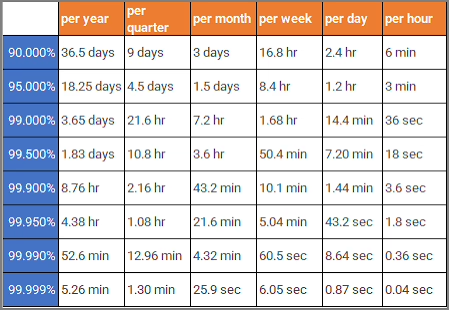
Uptime goals are contextual. At 99.9% uptime, you can expect 8.77 hours of downtime per year. Set your target at 99.5% uptime and you can expect 44 hours of downtime per year. Based on their 2025 benchmarks for monitoring, which include over 1000 DevOps teams, Odown places the industry average expectation somewhere between 99.95% and 99.98%. Going beyond this, while it may seem like a better target, almost always becomes prohibitively expensive, and the marginal cost between 99.9% and 99.99% is where most founders overspend on insurance they will never claim.
Tier the SLA to the site
A marketing site that is only used for basic functions may target 99.9% uptime, which puts an upper bound of 43 minutes of downtime per month. Exceptions for simply planned maintenance should be applied when vendor has advanced notice, which is at least 48 hours. DevStudio’s SLA framework shows value as a reference for how priority classes and response windows should be constructed.
A tighter control is required for an ecommerce or a membership site. Synthetics should test the checkout, login, registration, and forms. The support contact should also be named. The provider should be held to acknowledging the incident within a certain time frame rather than just a time to resolution. A recovery time objective (RTO) should be communicated for severe outages along with the SLA. Legal and regulated industries will add more strict escalation and reporting language along the lines of the examples provided in the legal sector SLA examples.
Read the exclusions before you sign
Do hosting failures, third-party payment systems, planned maintenance, client-made changes, or force majeure fall under the exceptions? Exceptions are fair. The contract still has to state what the provider does when an exceptioned system fails. “Not our problem” is not an answer when Stripe goes down and your checkout stops taking money.
The strongest test for any SLA: if the provider can’t produce the promised metrics for the last 12 months, does the SLA actually reduce risk? If not, it is marketing language on letterhead.
Onboarding: Where Most Maintenance Relationships Break First
The first maintenance failure usually happens during onboarding. No one knows where the hosting account is. The staging site is MIA. Backups were never done. The previous developer has an admin account. Fix these five things before any real work is done.
- Collect access safely. Provide named admin, hosting, analytics, repository, and third-party service access. Use a password manager and named accounts, not a shared login on a sticky note.
- Confirm a staging environment. Updates and feature changes need a safe place for review. Know how staging data is refreshed and how closely it mirrors production.
- Verify backups by restoring one. Ask where backups live, how often they run, how long they are retained, and when the last restore actually completed. A backup that has not been restored is a hope, not a plan.
- Set communication rules. Name the primary channel, backup channel, decision-maker, and emergency contact. Nobody can approve a rollback at 2 a.m. if the escalation list is only in someone’s head.
- Write the escalation path. Define severity levels, response times, recovery targets, and who owns incident communication. Include what happens outside business hours.
For work that falls outside routine maintenance, approve and agree to a billing procedure prior to the first request being made. This is where the retainer either holds or turns into a monthly argument.
Migrations: The One Maintenance Event Worth Extra Attention
Site migrations are the highest-risk maintenance the majority of businesses will undertake. A bad migration loses rankings, orders, and email delivery at the same time. A good migration improves everything else. The difference lies in planning.
When we rebuilt Teton Gravity Research’s platform, the visible work was a redesign. The not-so-visible work was migrating 10,000 articles out of an unstable legacy CMS that kept going down, all without disrupting editorial workflow and visibility in search. Maintenance work, in this case, encompassed much more than what we normally think of as maintenance work. The choices made during the migration (keeping URLs, redirect strategies, media, and publishing workflows) dictated the maintenance work for several years that followed.
Our WordPress migration checklist outlines typical problems that appear three weeks after you cutover. These include soft 404s on category pages that used to drive traffic, Stripe transactions that do not reconcile with WooCommerce orders, and webhooks that ceased firing. Treat every migration as a maintenance event with its own SLA and redirect plan.
KPIs and How to Tell If Your Provider Is Actually Working
A monthly report recording closed tickets is helpful because it indicates what was worked on, or at least what was touched. This, however, does not illustrate whether the business was protected. It is worthwhile to monitor a few operational KPIs.
- Uptime from external monitoring, not from hosting self-reports.
- Patch velocity against the SLA for critical fixes.
- Incident response measured on acknowledgement and recovery, not just resolution.
- Restore confidence from actual, completed restore tests.
- Release quality from staging QA results, rollbacks, and production defects.
- Business-path checks on the actions that create value: checkout, lead forms, login, renewals, publishing.
Refact’s website maintenance service is structured so that a retainer cannot reasonably cover a publishing, ecommerce, and consulting site.
When the same incident reoccurs, when critical patches are not installed, when restore tests fail, and when your team repeatedly experiences outages before your provider does, we suggest you escalate. Switching to a new service will help mitigate disruptions. Staying with an unmeasured service is more expensive in the long run.
What to Do This Week
Ask your current service provider for the maintenance scope, their uptime record, the backup evidence, restore-test results, the target for response times and exclusions. Once you have this, test the user journey that you have identified as your most valuable. Checkout, Lead capture, Login, Renewal, Publish. If your provider’s maintenance checks do not include the revenue generating user journey, then the SLA does not cover it.
If you need administrative coverage that does not include technical work, consider using Virtual Assistant Services. They will help with routine coordination and content administration. Technical ownership should remain with the partner that is able to provide the metrics, on request, to you.
If you are trying to determine if your current arrangement actually minimizes the risk, then you should take a look at our Website Maintenance Plan. Our plan has been designed to answer this very question.
Running a WordPress site that has outgrown its build? Let’s talk. Free 30-minute call, no pitch.

Masoud Golchin is a backend developer at Refact, working on server-side systems, internal tooling, and infrastructure. He builds and maintains the services that support both client projects and the team’s day-to-day development workflow. His work includes backend logic, developer tools, system reliability, and the technical foundations that allow products to scale and operate consistently. At Refact, Masoud focuses on creating practical engineering solutions that help the team move faster while keeping systems organized, maintainable, and dependable.
More from Masoud Golchin

