Shopify Theme Development: A Practical Guide
You will not see a Shopify theme project fail on the day of launch.


The Liquid syntax is simple enough. What is difficult is making the right calls on what stays in the theme and what is ceded to an app, what the merchant can handle and what your team will be running a year from now. We have put together this guide for the operators and owners who are set to approve or commission some work and want to get ahead of it before any code is written. You will find here the architecture that has been the standard since Online Store 2.0, the Theme Store rules that catch first-time submitters out, and the hard truths of performance post-launch. (For those still on the fence between platforms, we would point you to our Shopify vs WooCommerce guide first.)
What Shopify Theme Development Actually Means Now
Forget the old notion of theme work as a matter of Liquid tweaks and CSS overrides. With the Dawn reference theme and the rest of what came with the Shopify 2021 launch notes, the theme has evolved into a product of sorts. Templates are nothing more than configuration files; sections are modules you can reuse. The editor is where the merchant spends his time.
Take a product page for instance. In concrete terms, the template is a JSON file dictating the order and settings of the sections that render. Shopify’s JSON templates documentation puts a cap of 25 on the number of sections per template and 50 blocks per section. All the layout logic in Liquid is in the sections. It is a design choice that allows a merchant to reorganise a page in the editor without bothering a developer. A good theme is light; a bad one is heavy from week one.
Owners should understand that the theme is an architecture with a public face, not a skin. Section schemas are like versioned APIs. Change a setting key and you have wiped out the merchant’s configurations across the board in silence. Introduce a block type carelessly and the editor will lag. Senior developers on Shopify will talk of section versioning (hero-banner, hero-banner-v2) and additive-only schema changes with the same reverence backend engineers have for database migrations. It is not exciting work, but it is what keeps the store from falling apart half a year in.
The Stack A Founder Should Understand Before Signing Off
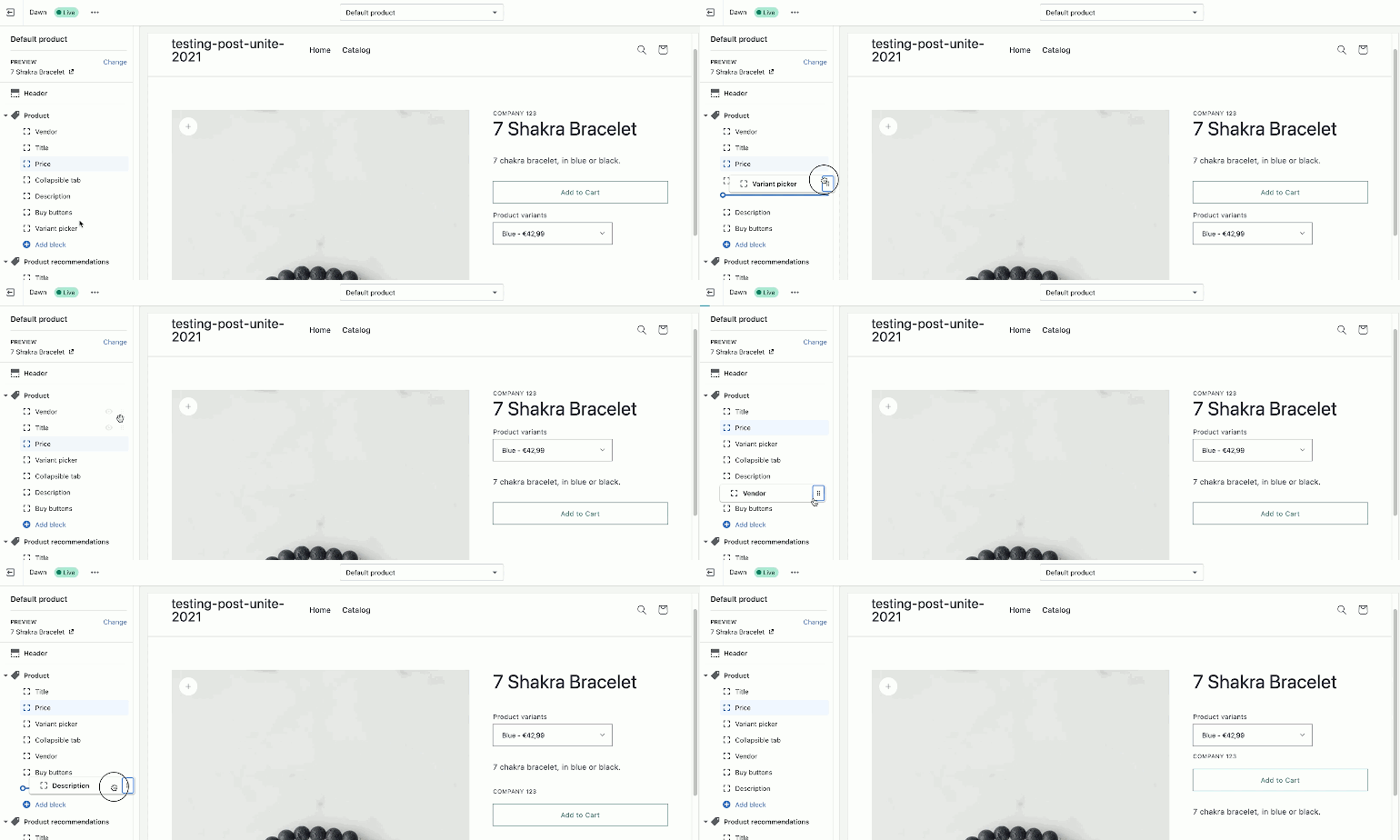
There are four elements to consider. Liquid makes the HTML from the data. JSON does the orchestration. The merchant works with sections and blocks. And then there are Theme app extensions, which allow an app to do its job without mucking about in the theme code – something Shopify now insists on for new App Store listings.
Merchant control is defined in the section schema. As per the reference, you set your presets and limits there. Without a preset, a section can only be put in via the JSON template, not the editor. That is a distinction with consequences: if your team cannot add it themselves, they will be pinging your developer to do it.
Metafields and metaobjects are part of the picture too. They hold the structured data the theme needs to display – size guides, care instructions, specs. You should treat them as a public API: namespace them, document the keys in the repo and have the theme deal with missing values. On the plant-based snack brand we did for Shopify, everything from variant comparisons to certification badges was in the metafields so the in-house team could make updates on their own. That is how it should be.
As for headless, unless you have the engineering resources to back it up, it is not going to change much. Our breakdown on Shopify headless commerce will tell you where Hydrogen is worth the GMV. For a brand under $5M, a solid OS 2.0 theme is the way to go.
Custom Theme, Extended Premium, or Something In Between
It is the decision that will determine your timeline, your budget and the maintenance bill. There is no one-size-fits-all, though the conditions for each path are plain to see.
| Approach | Cost band | Typical timeline | When it fits |
|---|---|---|---|
| Premium theme, light customization | $3K – $8K | 3 – 6 weeks | Standard catalog, tight budget, launch pressure |
| Extended OS 2.0 base (Impact, Dawn, Horizon) | $8K – $25K | 6 – 12 weeks | Distinct brand, some custom sections, subscriptions |
| Fully custom theme from skeleton | $25K – $80K+ | 3 – 6 months | Complex catalog, multi-market, strong CRO focus |
| Headless with Hydrogen | $80K+ | 4 – 9 months | Content-heavy storefronts, engineering-heavy team |
Do not fall for the half-custom hybrid, the premium theme that has been dismantled to the point of being neither flexible nor maintainable. People on r/shopifyDev will tell you it is like “working inside a trash bin.” If you are planning to gut 30% of a theme, build from the skeleton or extend a clean base instead.
Look at GHOST, the supplement company. They went fully custom and in 30 days had 2,210 subscription orders and a 7% conversion lift with zero marketing behind it. Tonic Health made the opposite move, switching from a hardcoded solution to an extended Impact theme and got a 20% lift at checkout. Both were sound decisions for their circumstances. Put either in reverse and they would have been wrong. You can get a better sense of the kind of work customization entails at every level by way of our Shopify theme customization guide.
The Theme Store Rules Nobody Warns You About
Those with designs to put on the Shopify Theme Store will find the rules are more unforgiving than most tutorials let on. Developers are taken aback by two hard and fast gates.
There is the matter of the base theme. To be accepted by the Store, your code has to be original or built on the skeleton theme; anything you make from Dawn or Horizon is out of the question. This puts you at odds with the majority of public tutorials that have you start with Dawn. Such counsel is acceptable for a private client but it is a mistake when you are looking to submit to the Store.
Then there is performance. You need an average Lighthouse score of 60 or better on the home, product and collection templates. The performance guidance from Shopify is clear on how they measure it: run the audit several times per page to eliminate any environmental noise and conform to their weighted formula for speed. Fall short and your submission is returned.
Do not be surprised by slow review cycles and rejections met with little in the way of feedback. Community accounts are full of them, and for good reason: the team reviewing themes is not as large as the one for apps. If this is your business model, you should expect a three to six month wait for first approval and view that as a risk to plan for rather than a triviality.
Why Stores Get Slow, And What Actually Fixes It
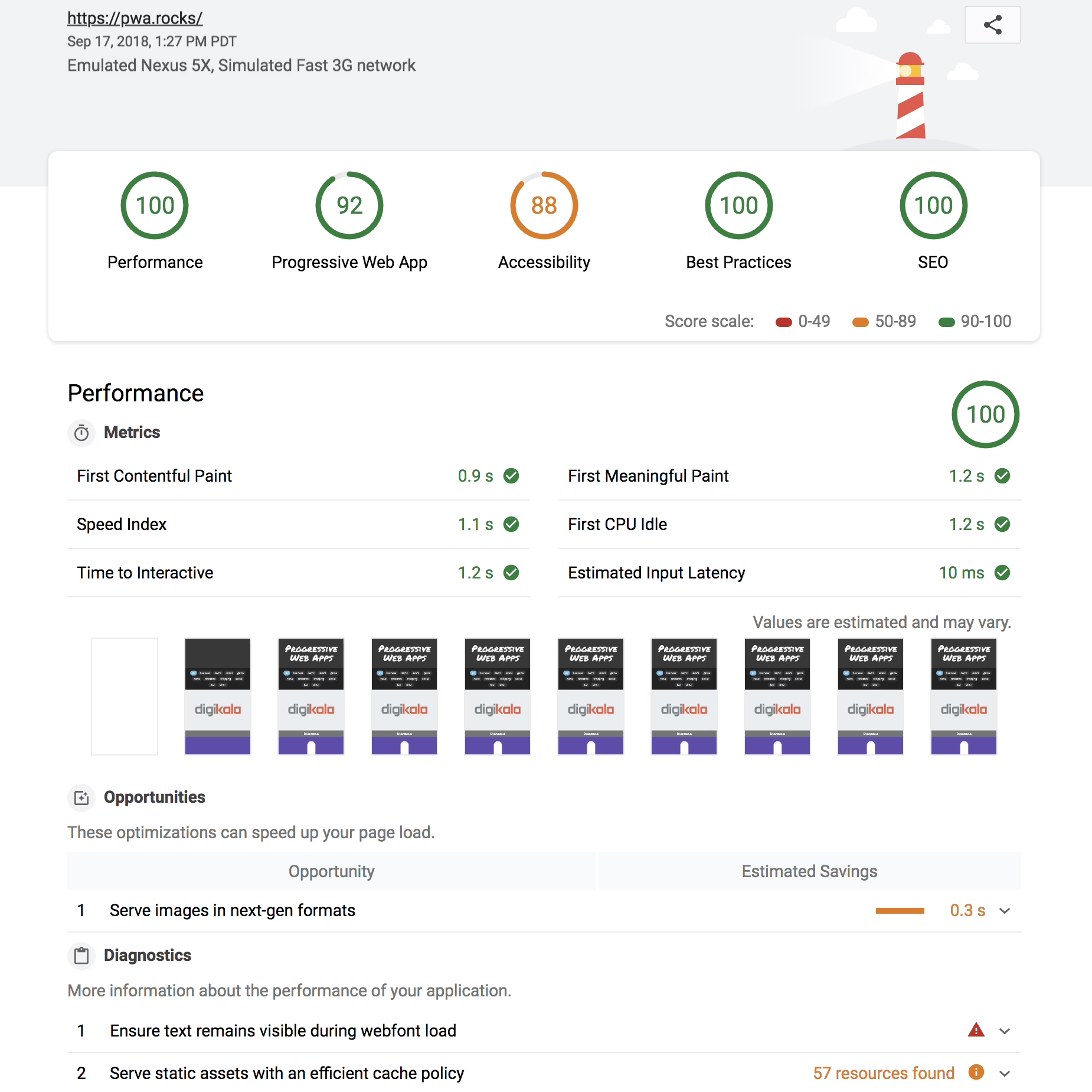
When a store’s numbers are down, the temptation is to point the finger at the theme. But the data does not support that. Shopify’s own figures show modern themes pass Core Web Vitals in spades: 94.5% for LCP, 94.0% for CLS, 97.2% for INP. In studies of hundreds of thousands of stores, it is the tracking pixels and apps that are the culprits, not the theme.
Take an external audit from Jhango’s checklist: a clean install of a theme will put you in the 88 to 98 Lighthouse range. Add five or ten apps and you are looking at 42 to 68. Remember the pattern: the benchmark of your theme is not the reality of your store. The latter is determined by your apps, third-party pixels, heavy hero images and JavaScript loading on pages where it is of no use.
The remedy is effective if unglamorous. A fashion brand in a 2026 case study made some simple moves: they swapped the theme, did away with 12 apps, compressed images and deferred non-critical scripts. The result was mobile load time dropping from 6.2 to 2.1 seconds and conversion moving from 1.4% to 2.6%, putting $312K in monthly revenue in the bank instead of $180K. It is all about discipline.
To keep a store running at speed over time, adopt these habits:
- Do a quarterly app audit. Uninstalling an app does not always mean its script is gone, and teams do not realize this enough.
- Put a cap on your images. Use WebP or AVIF and responsive markup with a hard limit on the hero (200KB or less) to stave off homepage regression.
- Defer what is not critical. Let analytics, chat widgets and reviews wait; they have no business blocking the first paint.
Wondering how your store shows up in AI search? We put together a short visibility snapshot. Get the snapshot.
The Workflow That Separates Serious Builds From Amateur Ones
OS 2.0 has brought some maturity to the tooling for theme development. The proper way to handle local development is with the Shopify CLI (shopify theme dev), Git, staging for tests and Theme Check for linting. One does not edit the live theme by hand, nor ship without a preview URL and a mobile audit.
A sensible workflow runs from discovery to build in a dev store on the skeleton, then to a shopifypreview.com link for the stakeholders. From there you do your Lighthouse audits on the key templates, a methodical QA of the cart and checkout, and set up a redirect map for any migration. Omit a step and the launch will expose it.
Migration is where stores tend to suffer. You will see the same failures: unmapped redirects, missing metadata, section references to old collections and the odd bit of cart-data corruption that eludes a cursory check. Run a crawl comparison before and after and look at your Google Search Console for the last 30 days to see what needs protecting. Our Shopify migration checklist goes over the mundane things that will break a store if left to chance.
For the handoff, document the theme in the repo with a README on metafield namespaces, a section reference for safe editing and a CHANGELOG. Figr’s developer handoff playbook is a good example of how it should be done. The rule is straightforward: if your team cannot account for how a section is edited, it is not finished.
Merchant Ergonomics Is An Engineering Problem
Ask around r/smallbusiness and the grievance with premium themes is not a lack of features but an excess of them. Sections with 40 settings and editors that take 15 seconds to render are evidence of code that sees configurability as a virtue.
Well designed sections are the reverse. They are opinionated so a merchant gets a working page even if he makes no changes. Settings are grouped for ease of scanning. And you will see blocks used for repeatable units like FAQ or PDP tabs rather than a stack of six near-identical sections.
There is a discipline to it that drives conversion. Take the Broya’s Shopify build: when we put in the work to rebuild it, the team was able to change collection layouts, hero content and subscription bundles on the fly with configurable blocks, no code required. Or consider the Kinfire Chronicles storefront. We set up reusable section patterns for every game franchise so the studio did not have to commission a new template to put out a product. That is the kind of control a merchant should have.
Apps are part of the system, but they must be given their own space. App blocks have the same performance and layout constraints as your native sections, so you need to isolate the CSS, document where they go and set clear expectations for integration zones. If you are after lead capture, do the legwork to see if a lightweight tool is better than something more cumbersome (the Shopify form builder comparison is a good place to start), but ultimately one has to decide if the feature is best served by the theme or an app block.
What The Horizon Era Actually Changes
Then there is Horizon. Shopify made it available in May 2025 and for any new store not using the Theme Store it is the sensible baseline. With ten themes on a single foundation, AI effects and over 30 drag-and-drop blocks, it is the most expedient path from brief to a functional editor, which is where merchant expectations are going.
But the more telling change is the move toward agentic commerce. A theme these days is expected to put forward standardized events and actions so that AI agents can make sense of the store. The standards are still in flux, but a 2026 build that does not account for this will be obsolete in eighteen months. It is worth paying attention to if your developer has nothing to say about it.
On the flip side, you have legacy themes. A study of some 385,000 stores in 2026 turned up 77,134 still on the likes of Debut or Brooklyn. They are slow and cut off from the metafield content and app blocks that are now table stakes. Over the next couple of years the real opportunity in commercial theming is modernization, not building from scratch.
When to Hire, and What A Real Engagement Should Look Like
When revenue is at stake and the team has no time for trial and error, bring in help. You want judgment, not just hours from a person who can “do Shopify.” An agency should be covering strategy through to post-launch support.
Any worthwhile engagement will begin with discovery. Which pages drive the revenue? What are the hard lines on integrations? Can the in-house team handle maintenance once we hand it over? If a partner puts a number on wireframes without asking those questions, they are either underpricing or missing the scope; you will find out the cost of that later. For a sense of what proper scoping looks like, read up on how ecommerce services get priced.
Be wary of a few things:
- A lack of opinion on whether to use an extended OS 2.0 base or go custom. They will build whatever they can bill for.
- Treating performance as an afterthought to be cleaned up after launch rather than a KPI.
- No plan on paper for handing off schema or app placements.
- Numbers that are too good to be true, like $500 to $800 for a full store, or exorbitant fees with no justification.
At Refact we keep our Shopify work in a discovery-first model. Our client relationships tend to run two years or more because we have the engineering, design and strategy under one roof. We even back our strategy phase with a money-back guarantee since the goal is to mitigate risk before a line of Liquid is written. Have a look at our Shopify store development services to see how we handle scope and timelines, or check the development team page for our approach to architecture.
In the end, the right theme is one your people can operate a year down the road on their own. The rest is window dressing. Our discovery process is there to sort out what stays in the theme and what goes to the apps so you do not have to wonder about it when the coding starts.
Building or replatforming a store? Let’s talk. Free 30-minute call, no pitch.

Masoud Golchin is a backend developer at Refact, working on server-side systems, internal tooling, and infrastructure. He builds and maintains the services that support both client projects and the team’s day-to-day development workflow. His work includes backend logic, developer tools, system reliability, and the technical foundations that allow products to scale and operate consistently. At Refact, Masoud focuses on creating practical engineering solutions that help the team move faster while keeping systems organized, maintainable, and dependable.
More from Masoud Golchin

