Membership Platform: How to Choose One
A member’s card declines on the third of the month.
 Saeedreza AbbaspourSeptember 27, 2026
This guide is for publishers, associations, course businesses, and community operators who are choosing one. It covers what the software actually does, how seven common options differ, what they really cost, and the migration and retention problems that tend to show up after launch.
What a Membership Platform Actually Does
People use “membership platform” to mean at least three different products. Creator tools like Patreon and Ko-fi sell fan subscriptions. Association management systems like WildApricot and iMIS handle dues, renewals, events, and directories for clubs and nonprofits. Then there are subscription, community, and course tools such as Ghost, Circle, Kajabi, and MemberPress, which sell paid access to content or conversation. A search for “best membership platform” mixes all three, which is one reason the comparison lists feel so contradictory.
Under the labels, every membership platform does the same five jobs:
- Identity: accounts, logins, and profiles.
- Billing: recurring charges, failed payments, refunds, and plan changes, usually through Stripe.
- Entitlements: the rules that decide which content, spaces, events, or features each member can use.
- Delivery: the articles, courses, community, or resources members pay for.
- Communication and reporting: onboarding emails, renewal notices, and the numbers that show whether people stay.
Hosted tools bundle some or all of these. WordPress plugins put them inside your CMS. Custom builds split them across services you choose. The right setup depends on which of the five jobs is the core of your business and which ones you are happy to rent.
Recurring revenue models have spread well beyond software. Roundups such as this collection of membership site statistics show how far they now reach across courses, media, and communities. Market growth tells you nothing about whether your own members will renew, though. That depends on the offer and on how well the platform carries it out, which is what the rest of this guide covers. If you are still weighing the offer itself, our membership platform development page shows how we scope these projects for associations, communities, and paid content brands.
Billing Status Is Not the Same as Access
The most common technical mistake in membership products is a single “is paid” flag. It looks fine in a demo. It breaks during trials, failed first payments, grace periods, and cancellations, and those are exactly the moments members contact support.
Stripe’s subscription documentation lists seven statuses: incomplete, trialing, active, past_due, unpaid, canceled, and paused. Two details catch teams out. First, active does not mean every outstanding invoice has been paid. Second, Stripe says to revoke access at unpaid, but it gives no blanket rule for past_due. That decision belongs to you.
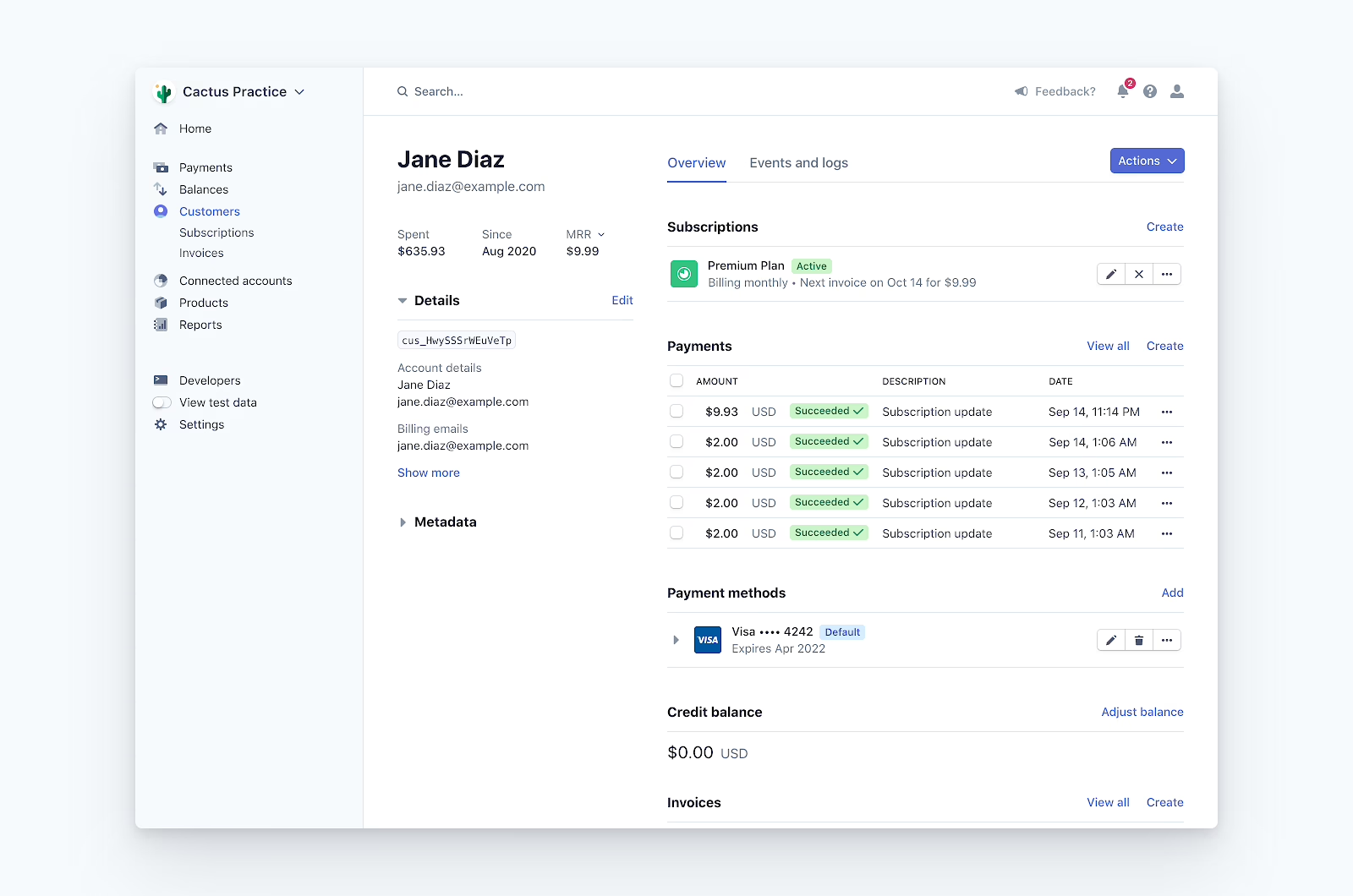
So write an access policy before anyone configures a plugin. It can be a one-page table:
| Billing state | Decision you need to make |
|---|---|
| Trialing | Full access, or a limited preview of the paid tier? |
| Incomplete | Does a failed first payment create an account at all? |
| Past due | How many days of grace before access narrows? |
| Unpaid | Revoke access (Stripe’s explicit guidance). |
| Canceled | Access ends immediately, or at the end of the paid period? |
| Paused | Keep the account and community profile, remove paid content? |
The second trap is how state changes arrive. Stripe notifies your system through webhooks, and its documentation is blunt about their limits. Live-mode events are retried for up to three days, they can arrive more than once, and their order is not guaranteed. A handler that assumes “one event, once, in order” will eventually give a canceled member access or lock out a paying one. The standard fix is to verify the signature, acknowledge the event quickly, queue it, skip event IDs you have already processed, and check your records against Stripe’s current data on a schedule. Our payment gateway integration guide goes deeper on that setup.
Don’t assume every platform sends every event, either. Patreon’s webhooks cover new members and changes to or deletion of pledges, which is narrower than many integrators expect. Check the event list before you promise automation that depends on it.
Finally, keep entitlements separate from plan names. Ghost is a useful reference here. It separates public, members-only, paid-members-only, and specific-tier access, and it tracks whether a member is free, paid, or complimentary. When access is tied to what a member is entitled to, you can add a tier, gift a membership, or bundle a course without rewriting every rule. At much larger scale, Netflix moved its 238 million memberships toward an append-only history of every state change, because a current-state record can’t explain how an account got into a broken state. Most membership businesses don’t need Netflix’s architecture. They do need a log that shows why someone lost access.
Seven Membership Platforms and What Each Is Built For
None of these tools is the best membership platform in general. Each is built around a different core job, and practitioner reviews of the same tool range from glowing to furious. Read each one against the five jobs above.
Memberstack: a membership layer for a front end you own
Memberstack adds logins, member profiles, gated content, and Stripe subscriptions to a site you already have. It works especially well with Webflow, and its JavaScript SDK gives developers room on React or Next.js builds. You can set up free trials, paid tiers, and separate Stripe price IDs without building authentication yourself.
It fits when the front end is part of the product: a designed resource library, a focused MVP, or a branded account area. The tradeoff is assembly. Email, courses, analytics, and community each need their own tool, which means more integration points for your team to own.
Memberful: subscriptions for publishers on their own domain
Memberful is built for paid subscriptions for publishers, podcasters, and creators. It connects to your own Stripe account, restricts content in WordPress through a plugin, and keeps members on your domain rather than on a marketplace with its own brand.
That focus is the strength and the limit. A publication or expert newsletter gets a clean path from free article to paid member. A product built around complex learning paths or a large member directory will need other tools alongside it. Fees vary by plan, so check the current terms before you build a margin forecast.
MemberPress: memberships inside WordPress
If your organization already runs on WordPress, MemberPress keeps paywalls, tiered access, recurring Stripe billing, pricing pages, and a course module next to the content your staff already manages. Nonprofits, associations, and education sites often choose it for that reason.
Fine-grained rules matter here. Paid Memberships Pro, an open-source alternative, documents how admins can restrict posts by tag or category instead of applying one sitewide rule. That distinction matters as soon as one tier should see research reports but not event recordings.
The cost of control is upkeep. Someone owns hosting, updates, plugin compatibility, backups, security, and license renewals. If WordPress is already central to how you operate, that work is familiar. Starting a new product on it when nobody wants to own a CMS adds maintenance you didn’t need. An experienced WordPress development team can tell you early which side of that line you are on.
Ghost: publishing-led memberships
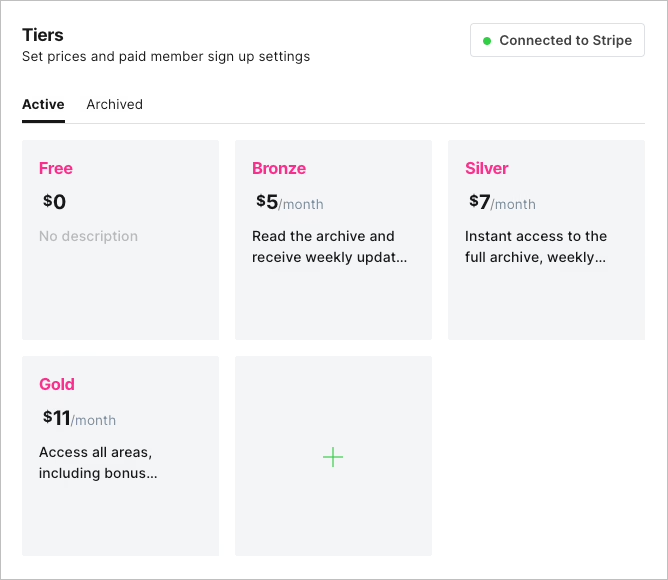
Ghost is a publishing platform first, with memberships, newsletters, and Stripe payments built in. Its hosted service, Ghost(Pro), removes most routine server work. Two design choices make it stand out for portability: member data can be exported, and billing runs through the publisher’s own Stripe account rather than the vendor’s.
Ghost fits media teams, newsletter businesses, and expert publications. It fits less well when the membership depends on a full LMS, detailed account workflows, or a busy community, since those need add-ons or custom work. Self-hosted teams also carry sign-up and email delivery risk, so spam protection and sending setup become their job. For the wider decision, see our comparison of Ghost versus WordPress, and this independent Ghost newsletter review for an outside test.
Kajabi: one vendor for courses, email, and checkout
Kajabi bundles courses, memberships, communities, email, landing pages, checkout, and automations. A course purchase can lead straight into a community and an email sequence without anyone maintaining connections between tools.
Practitioner reports show where that gets expensive. One Reddit user paying $179 a month planned to move to a self-hosted setup at about $50 a month once they realized they weren’t using Kajabi’s website features. Another described hours spent with support on bugs and feeling like “part customer and part software tester.” Other users are happy. The point is that one vendor doesn’t automatically mean less effort. Count the support time and the unused features, not only the invoice.
Circle: when members pay to take part
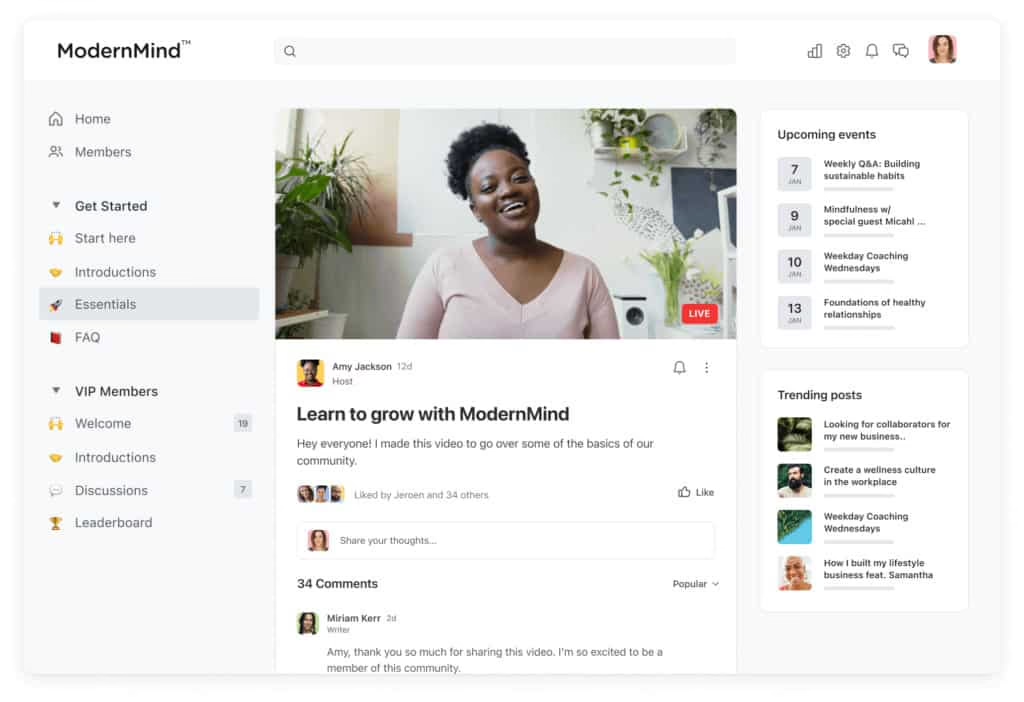
Circle puts community at the center, with discussion spaces, events, live rooms, courses, and paid access through Stripe. Granular permissions let you separate a public group, a paid group, and a higher tier. That makes it a strong fit for cohort programs, professional networks, and creator businesses where conversation is the product.
Circle’s own platform roundup reports that 44.6% of community builders consolidated their tools in the past year. Treat that as vendor data, but the trend is real. Reviews are mixed. Users praise the automations and member experience and complain about basic features locked behind higher tiers. One Enterprise customer paying $5,000 a year called the product “decent” and still didn’t renew, citing unresolved bugs and upsell pop-ups. Circle is also not a full publishing CMS, so many teams pair it with a separate website or newsletter tool.
Mighty Networks: community, courses, and events in one space
Mighty Networks combines spaces, courses, events, messaging, payments, and branded mobile apps. It suits associations and cohort programs where members meeting each other is the point of paying.
The feedback splits here too. Some users found it hard to run without a team and struggled to get past AI-first support. Others reached a person who fixed their problem quickly. If you plan to run the community alone, test support before you commit, not after your first outage.
The seven options side by side
| Platform | Setup effort | Core job | Best fit | Main tradeoff |
|---|---|---|---|---|
| Memberstack | Medium, needs developer time | Auth, gating, and Stripe on your own front end | Webflow, React, or Next.js sites with a custom journey | Separate tools for email, courses, community |
| Memberful | Low to medium | Paid subscriptions and content gating | Publishers and creators on their own domain | Thin on courses and community |
| MemberPress | Medium, plus ongoing upkeep | Paywalls, tiers, and courses inside WordPress | Organizations already running WordPress | Hosting, updates, and plugin maintenance |
| Ghost | Low on Ghost(Pro), medium self-hosted | Publishing, newsletters, and paid tiers | Media teams and newsletter businesses | Needs add-ons for LMS or deep community |
| Kajabi | Low | Courses, email, checkout in one tool | Course and coaching businesses wanting one vendor | Cost and less front-end control |
| Circle | Low | Paid community, events, courses | Networks and cohorts where discussion is the value | Tier-gated features, no full CMS |
| Mighty Networks | Low to medium | Community with courses and mobile apps | Associations and cohort programs | Less ownership, mixed support reports |
For a broader look at cost and control across more tools, our membership site platform comparison is a useful companion.
All-in-One, Assembled, or Custom
This is the decision that sits under every platform choice. An all-in-one tool like Kajabi or Circle is quick to launch and has fewer moving parts. An assembled stack, such as WordPress with MemberPress or a Webflow site with Memberstack, gives you more control and means more parts to maintain. A custom build shapes the data model, access logic, and integrations around your workflow, and puts design, engineering, security, and hosting responsibility on you or your partner.
Hosted tools are usually the right start when the member experience is familiar and you still need to prove demand. Custom work makes sense when the membership is tangled up with other systems: a CRM, an event platform, a certification database, or a publishing workflow editors rely on every day. Integration is where these projects hurt. In the iMIS 2026 benchmark, a vendor survey of more than 400 membership professionals, connecting systems to the website was the top reported challenge.
We saw that pattern when we launched Trends for The Hustle. The Hustle already had more than a million free newsletter subscribers and wanted a paid tier with research reports and community access. The blocker wasn’t a missing feature. A custom CMS that editors struggled with, a payment platform that didn’t integrate properly, and an email system that felt bolted on made the premium product impossible to run. Fixing how those pieces talked to each other is what got Trends live in two weeks.
If your model is mostly gated content with a simple account area, you probably don’t need that level of work. Our guide to building a members-only website shows how far a simpler structure can go.
Leaving a Membership Platform Is Harder Than Joining One
Every vendor makes signing up easy. Few make leaving easy, and the difficulty isn’t obvious until you try. In a Reddit thread about moving from Patreon to WordPress, the warning was plain: exporting member information is not the same as transferring subscriptions. Every member has to sign up again on the new platform, and some never do.
The billing side is harder still. When Paddle’s engineering team documented moving customers between billing models in late 2025, localized prices, tax settings, discounts, currencies, and customer workarounds didn’t map one-to-one. Bulk imports set off bursts of webhooks that overloaded their notification service, and retries risked making it worse. Their fix was to validate data in layers, use IDs so imports could safely run twice, separate import traffic from normal traffic, and cap each import at 20,000 subscriptions. They also migrated early customers by hand to find edge cases before automating.
You can reduce this risk before launch. List what you must be able to export, reconcile, and restore: member records, active subscriptions, payment methods, content, and permissions. Then check the vendor’s actual boundaries. A platform where billing runs through your own Stripe account, as Ghost’s does, leaves you with far more options than one where the vendor holds the payment relationship. If you are already facing a move, our notes on planning a platform migration cover the cutover side.
Association projects add an operating layer on top of the data work. The i4a’s guidance on switching association software names three recurring failure causes: no internal owner, migrating dirty data unchanged, and leaving training until launch. The implementations that went well in the research share the opposite habits. One team secured and cleaned four decades of legacy data before the build and held weekly feedback sessions with staff. A small club let a volunteer champion demo the new system to reluctant members and kept offering short tutorials after go-live.
Decide on Mobile Before You Design Checkout
Many teams assume a subscription bought on the website will unlock their app. Often it can’t, at least not freely. Apple’s App Review Guidelines generally require in-app purchase to unlock digital content, subscriptions, or premium features. Google Play requires its own billing for many digital subscriptions. Both have exceptions, including reader apps and region-specific rules for external purchase links.
If a mobile app is anywhere on your roadmap, decide that now. It affects pricing, since app store fees change your margin. It also affects entitlements, since a member could pay through Stripe, Apple, and Google, and your system has to recognize all three as the same person with the same access. Check the current rules for your specific product and markets, because they change.
What a Membership Platform Really Costs
A plan price is the smallest number in the budget. The real cost includes payment processing, platform transaction fees, features locked behind higher tiers, email delivery, hosting, integrations, migration, and staff time. Fee structures can stack in ways that surprise people. Quora Spaces, for example, took 5% for Quora plus 3% for Stripe on subscription revenue.
Practitioners keep raising two complaints. Basic features sit behind upgrades, and bundles charge for tools you won’t use. Creator platforms add cash-flow rules too. One SubscribeStar creator had $260 in earnings but couldn’t withdraw it, because the platform requires five active subscribers before paying out.
Build your estimate from current pricing pages for the setup you will actually run. Then test it against real scenarios: 500 free members and 80 paid, a second tier, a month with failed payments and refunds, and the hours someone spends on support. If a vendor doesn’t publish a price for a feature you need, mark it as unknown rather than guessing. If you are connecting Stripe to anything custom, budget for the webhook and reconciliation work described earlier. It is the part of Stripe integration work most often underestimated.
Retention Decides Whether You Chose Well
Checkout working on launch day proves very little. The platform is doing its job if members stay, and the numbers show where they leave.
For associations, Marketing General Inc.’s benchmarks are the most consistent data available. Median overall renewal was 84% in 2025 and 85% in 2024, but first-year renewal sat around 74 to 75% in both years. That gap of roughly ten points is where most associations lose people, and it points straight at onboarding. Only 11% of associations rated their own value proposition “very compelling.”
Subscription data shows how cyclical the relationship has become. Recurly’s 2025 report, based on 67 million subscribers across its merchants, found that 20% of new acquisitions were returning subscribers. Where a pause option existed, 25% of subscribers paused instead of canceling. Mastercard and FT Strategies found that 31% of consumers frequently cancel and resubscribe, and 74% were more likely to subscribe when cancellation was simple. Your platform needs to support pausing, easy cancellation, and smooth win-back, or it works against the way people actually buy.
Be careful with industry churn figures. The same two sources put subscription churn at a 20% monthly average (a survey) and a 4.1% median (platform data). They measure different things and shouldn’t be compared, and neither compares cleanly with annual association renewal. Track your own baseline instead.
Small frictions add up. Association operators describe renewal portals that fail to load and forms that ask for data the organization already has, which makes staying a member feel like work. Sign-up breaks in similar ways: one-time passcode emails land in junk, retries fail, and nobody watches the support inbox. Free tiers can go either way. One Patreon creator watched 3 of 12 supporters drop to free, while another gained 10 upgrades after making teasers visible to free members. Free members need a visible reason to pay, which our piece on freemium versus premium paywall models covers in detail.
Finally, delivering value every week is the real product, and it wears people down. Operators who shut down paid communities often cite that burden, especially when the community runs next to a full-time job. Sam Parr, who has run the Hampton community, argues for charging fees instead of taking sponsors, keeping a strict admission bar, and growing more slowly than feels comfortable. That is one operator’s opinion, but it is a useful check on any plan that assumes the software will create engagement for you. It won’t. For the offer and onboarding side, see our guide to building a membership website that lasts.
Choose the Smallest System That Can Grow
The best membership platform for you is the smallest one that delivers your member promise, collects payment correctly, enforces access, and shows you why people leave. Work through these steps before you sign anything:
- Map the first member journey. Write down what a visitor sees, what they buy, what they get, what happens when a payment fails, and how they pause, cancel, or change plans.
- Write the access policy. Decide trial access, grace periods, and when cancellation takes effect, separate from any vendor’s status labels.
- List the systems that need member data. CRM, email, events, accounting, and any mobile app. Each connection is a place where records can drift apart.
- Run the portability check. Confirm what you can export, who holds the Stripe relationship, and whether subscriptions can move or members must sign up again.
- Pilot with real members. Put a small group on the platform and watch whether they log in without reminders. One operator worried members “won’t even remember to log in” to an unfamiliar tool. If that is your audience, a familiar space may beat a better feature set.
- Test support before you depend on it. File a real question during the trial and time the answer.
- Name an owner and plan training past launch. Someone inside the organization should be accountable for the platform, with training that continues after go-live.
- Set a review point. Three months in, compare activation, first renewals, and support volume against the promise you made members.
Most platform regrets start before any code is written. Teams pick a tool before deciding what happens when a payment fails, which data they need to keep, or who will run the community every week. Refact has spent 12 years and more than 200 projects working through decisions like these, and you can read more about how Refact works. If you are choosing between a hosted tool, WordPress, or a custom member experience, our membership platform team can map the access rules, billing states, and integrations with you first, so the build answers the questions you already know you have.
Building a product and unsure what to scope first? Let’s talk. Free 30-minute call, no pitch.

Saeedreza Abbaspour is the CEO of Refact, where he works across product, engineering, and sales. He sets the studio’s direction while staying closely involved in the work itself, from shaping product strategy and UX architecture to helping define the technical systems behind Refact’s projects. His role connects business thinking with hands-on product execution, giving him a practical view of how software should be planned, built, launched, and improved. At Refact, Saeedreza focuses on building a studio that can move quickly, solve real client problems, and turn ideas into reliable digital products.
More from Saeedreza Abbaspour
