Squarespace to Shopify Migration Playbook
It is rare for a Squarespace to Shopify migration to go wrong on launch day.


You will find the cause is invariably the same: the team has made the mistake of viewing this as a data transfer instead of what it is, a rebuild. There are hard limits to what you can move. Squarespace will give you a partial export and Shopify’s product CSV follows its own schema. You cannot port over themes and blocks, and things like memberships, bookings and reviews must be put in place from scratch rather than copied. A migration of this sort only succeeds with clear ownership and the planning of a business-change project; treat it as a weekend exercise with a CSV file and it will slip.
For operators looking to make the switch to Shopify without writing off the cost in broken records or lost SEO, this playbook is meant to set out what can be transferred, what requires a rebuild and where the launch is apt to break.
Why Merchants Are Moving to Shopify
The numbers back this up. In a 2026 crawl of 2.4 million active Shopify stores, TechnologyChecker found the platform accounts for some 46% of the ecommerce market. They documented 1,808 moves from Squarespace in a 90-day period alone (8.7 percent of all inbound), while the ratio of Shopify’s inbound to outbound migrations was 3.1 to 1. It is not a census of the market, but unlike the self-reporting one gets from agencies, it is a public dataset based on actual domain observation. See TechnologyChecker’s 2026 Shopify crawl for the methodology.
On discovery calls the reasons for leaving Squarespace are always similar. The platform is fine until the catalog hits 100 SKUs or there is a need for genuine shipping logic and integrations for Google Shopping or subscriptions. With an app ecosystem of nearly 17,000 versus Squarespace’s 50 or so extensions, the difference is one of capability, not just taste, once a store is intent on growing. And does Shopify hold on to them? The data would have you think so; departures are a small fraction of arrivals. It is hardly proof positive that the platform is right for your operation, but it is enough to dissuade anyone from thinking the move is easily reversed. For those still on the fence, our ecommerce replatforming playbook goes into the finer trade-offs.
What Actually Transfers, and What Doesn’t
Before any plan is drawn up, the best course of action is to put the store into three columns: migrates, rebuilds, retires. Confusion between the first two is the source of most errors.
Order history, basic customer data and products will migrate. You can run customers and orders through an importer or a tool such as Matrixify or Cart2Cart, and get a product CSV from Squarespace Commerce. Blog posts can be exported, but do not expect the formatting to hold up.
Beyond that you are rebuilding. Custom code, form logic, review histories and the like have to be redeveloped or handled by a Shopify app. As for passwords, they do not transfer. Every customer will have to reset on their next login. That is a communications issue, not a technical one, and if it is not handled properly it will create a support spike in week one.
Then there are images, which have a way of causing quiet problems. The product exports from Squarespace will often point to URLs on their CDN. When the DNS changes and those links are still in place, the images are gone. Make sure to save the originals at full resolution and verify associations after the import.
A working inventory before anything moves
An audit prior to migration ought to be exhaustive. List every URL, page, variant, asset and indexed item. Then list the non-catalog features the business runs on: gift cards, referral logic, gated content, memberships. Put an owner and a disposition against each row. Does it migrate? Is it being rebuilt with app X or custom code? Or is it retired because it is not used?
That last column is more important than most teams realise. Many a Squarespace store has features left over simply because there was never time to take them out. This is the time to cut them.
The Redirect Map Is the Real SEO Deliverable
This is where a migration can make or break your revenue. Any Squarespace URL with backlinks or search equity demands a 301 redirect to the equivalent on Shopify. We are not talking about a blanket send to the homepage or something that is “close enough” on a collection page. Each old path of consequence needs a specific destination.
There is nothing theoretical about the downside of neglecting this. According to Google and those who have been there, you are looking at three to six months to recover your SEO from a poor URL migration. That is a quarter of organic revenue on the line over a spreadsheet someone put low on the priority list.
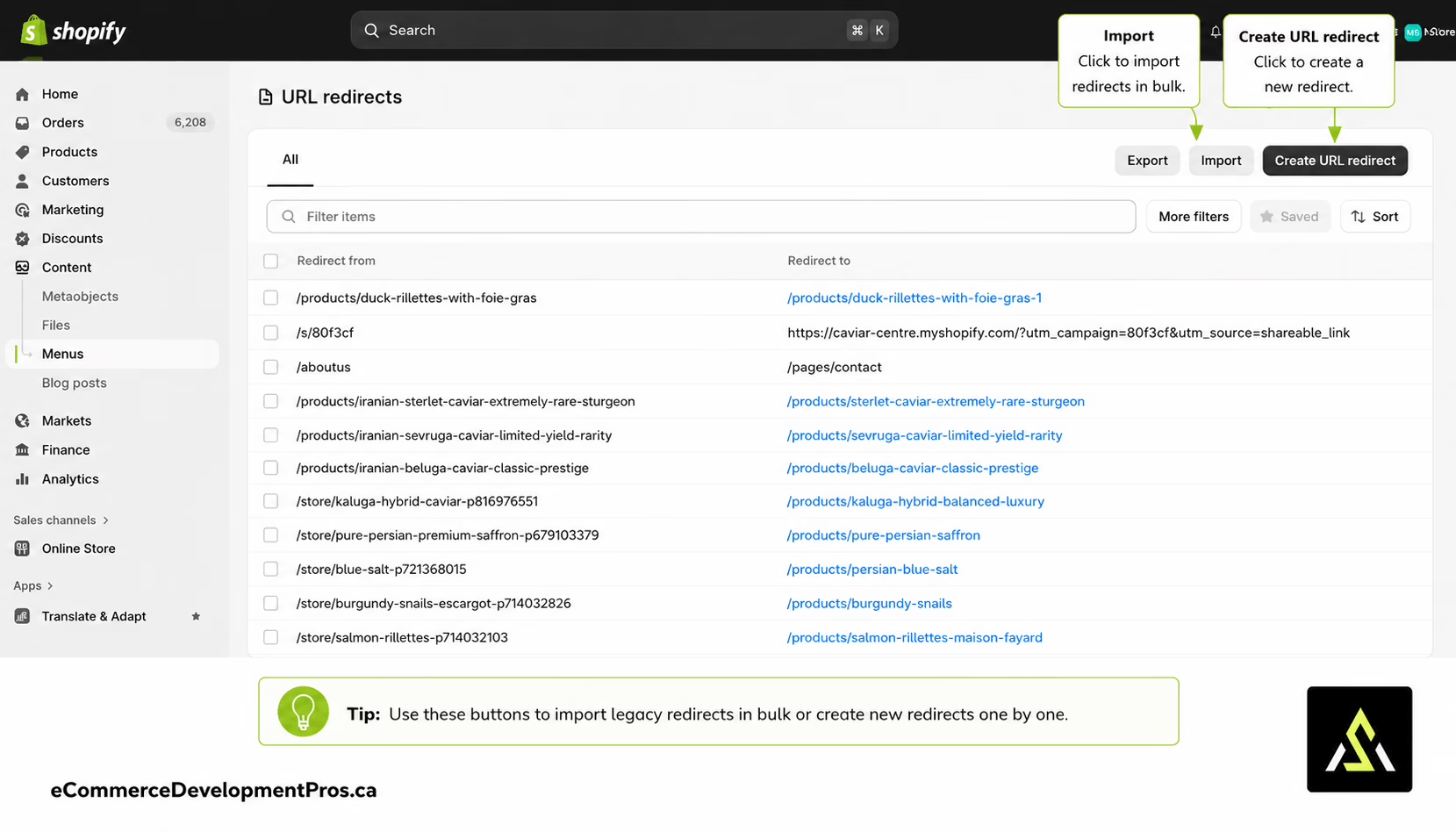
Do not rely on your CMS export to build the redirect map; crawl the live site. The way Shopify structures its handles for collections and products can be opaque in the source data. What was a category-style URL may now be a collection URL, and handles with the shop path may have moved. You will find that blog post paths have a way of changing. A crawl-based inventory is the only way to be sure you have it all, since it is based on what search engines are actually seeing.
Then there are the redirects. Shopify will take them in a two-column CSV so bulk importing is no trouble for a store running into the thousands of URLs. Get those in and put the new sitemap before Search Console. For the first month keep an eye on the coverage report and put a 404 check on the calendar. If a site has been launched with active 404s where ranking pages used to be, it is not done; it is under repair.
Confidence is what undoes more migrations than any technical glitch. The homepage comes up, checkout is fine and the team figures they are finished. But somewhere a soft 404 is being returned by a blog category page that was good for 40 per cent of organic traffic and it goes unremarked until the monthly numbers come in. We have put together a Shopify migration checklist with the URL checks that ought to be on someone’s desk at launch time.
Getting the Data Import Right
Do not think of the import as one and done. It is a workflow: export, normalize, do a dry-run, inspect, fix, re-import and validate. You have to go through the motions because Squarespace’s export does not conform to the rigidity of Shopify’s CSV schema.
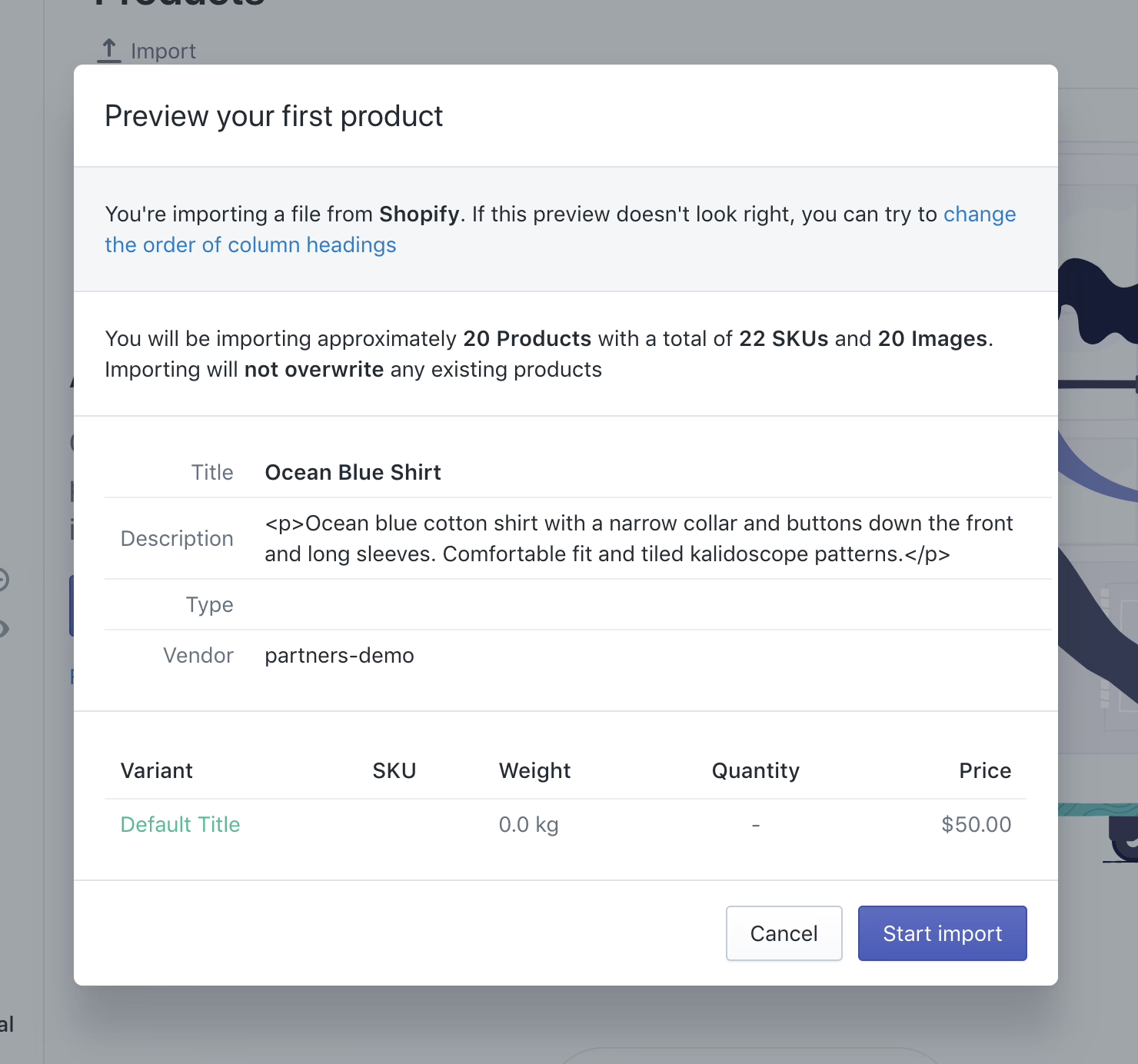
There are predictable ways things can go wrong. Put in the wrong CSV headers and a variant structure that was fine in Squarespace will become two products in Shopify. A missing shipping weight and the carrier calculations at checkout fail. An image association is lost if the CSV points to a URL Shopify cannot make sense of. These do not register as import errors. They manifest as broken pages or a shipping failure on the first order from a customer.
The discipline is not exciting but it works. Run a complete dry-run in a development store, never the live one. Pick ten products to spot-check against the source, three of them with complicated variants. Place a test order and see that the customer gets the email and the admin shows the right fulfillment record. Do the same for your tax rules and any gift-card or subscription flows. For the nitty-gritty of data reconciliation and field mappings to ensure GMV and inventory are in line, our Shopify data migration guide is a good reference.
Wondering how your store shows up in AI search? We put together a short visibility snapshot. Get the snapshot.
Rebuilding Features Shopify Doesn’t Cover Out of the Box
What was easy in Squarespace will likely require some effort on the other side. Memberships call for Bold Memberships or something custom. With Sesami for bookings the confirmation flow is going to be different. Reviews might come over as text but star ratings and verified status need an app on both ends. And any custom code in your Squarespace pages has to be reworked for the Shopify theme.
One should ask not whether Shopify can handle a feature, but whether it can do so without altering the way a customer signs in or makes a return. A membership rebuild that discards purchase history is a churn event. A booking system with different logic creates support work for every repeat visitor.
And do not forget customer notifications, which tend to fall outside the scope of migration until they cause problems. Where SMS is involved the compliance requirements are different with the new stack. This primer on Shopify SMS compliance details the consent language that must be in place before the store starts sending. One does not want to find out about that after the fact.
Take the case of Oh La La! Macarons. Moving the catalog was a day’s work. Rebuilding the gifting and workshop bookings on Shopify while keeping the operational logic intact was the substance of the project.
Domain, DNS, and the Cutover Nobody Rehearses
Keep domain transfer and DNS routing as separate tasks or you will break your email on launch day. To move the domain you unlock it in Squarespace and get the auth code for the new registrar. To direct the domain to the store you update the A and CNAME records to Shopify. For email to function you have to have your MX, SPF, DKIM and DMARC in order with your provider.
Give it 48 hours for propagation to be consistent worldwide and plan the cutover when sales are quiet. Verify deliverability before you lift the storefront password. A silent misconfiguration of the MX means your transactional and support emails just vanish with no error to tell you why.
Launch, and the First Thirty Days
It is poor form to uncover a faulty tax rule in the final hour. Payment providers should be tested with a real transaction, analytics and pixels confirmed to be firing, the Merchant Center feed reconnected and email templates reviewed. If the list does not include these it is not much of a checklist.
On cutover day follow the sequence: freeze the old store, sync the data, apply the redirects, remove the password and let the search engines have at it. And avoid a Friday launch. Should a bug in the checkout pop up at 4pm, you want the founder and the rest of the team at hand, not off for the weekend.
Do not mistake the first fortnight for a time to celebrate; it is for stabilization. You will be monitoring 404s, error logs, support tickets and checkout completion rates. A migration is only done when the store is back to its pre-migration sales numbers, the error logs have gone quiet and redirects are doing what they should. Until then, consider it in repair. After you have put things on a steady footing, it makes sense to do a full store audit. We would point to this Shopify performance audit walkthrough as a good way to see what can be trimmed now that the dust has settled.
How Long, How Much, and Who Should Do It
Of all the figures in this project, the timeline is the one with the most variance. A small catalog can be moved with some tools in three to fourteen days. An agency will need four to seven weeks for a standard job. Put in more design or go enterprise and you are looking at sixteen weeks minimum. The costs track accordingly: a DIY approach means $300 to $1,000 in tools and 60 to 150 hours of effort. For an agency it is $3,000 to $15,000, while a custom rebuild is $15,000 to $35,000 and beyond.
One does not make these calls on preference but on scope. Where there is no membership program or subscriptions and the design is unremarkable, a tool-assisted move is fine. But if there is SEO equity to guard, order history to keep or any bespoke feature, a misstep will cost more than hiring a specialist. Refact handles such matters via our website migration services and Shopify development, yet the truth is the decision comes down to what happens if the launch is not smooth.
Successful projects have a single owner and a validation period that outlasts the import; they view the work as a business change. Those that fail see it as a box to tick. It is that kind of framing which protects revenue. And for the scoping required to determine the redirect map or what must be rebuilt before development, a discovery pass is what you need. It is the line between a launch you can watch and one you have to contend with.
Building or replatforming a store? Let’s talk. Free 30-minute call, no pitch.

Masoud Golchin is a backend developer at Refact, working on server-side systems, internal tooling, and infrastructure. He builds and maintains the services that support both client projects and the team’s day-to-day development workflow. His work includes backend logic, developer tools, system reliability, and the technical foundations that allow products to scale and operate consistently. At Refact, Masoud focuses on creating practical engineering solutions that help the team move faster while keeping systems organized, maintainable, and dependable.
More from Masoud Golchin

