Shopify to Magento Migration Playbook
Moving from Shopify to Magento is virtually unheard of.


This playbook has been written to assist ecommerce leads, operators, and decision makers evaluating the migration to Magento from Shopify. This book covers the technical and business sides of that decision, not to push you toward Magento or away from it, but to help you decide with clear eyes and then carry out the move without losing revenue.
When a Shopify to Magento Migration Actually Makes Sense
Magento allows a level of control that Shopify lacks in several key areas. That control comes at a greater operational burden. A shift from Shopify to Magento will mean managing security, patches, deployment, extending Magento, monitoring, and a team that can help you figure out how to debug Magento in the middle of the night.
Public data shows this is an even more unique choice. Visionary Marketing’s 2026 crawl of 84,000 stores placed Shopify at 42.6% market share while Magento fell to 8.4% share from 18.6% in 2022, and even among stores with over $635K revenue, Shopify was at 38.4% as opposed to Magento’s 24.8%. (2026 ecommerce platform market data) Of course, this doesn’t mean that Magento is the wrong choice for you. It does mean “we need more flexibility” is an argument that does not warrant a switch.
There are three situations where moving to Magento is actually a justified option.
- 1) Complex B2B or multi-store operations. Magento’s solution beats Shopify’s apps for bespoke catalogs, pricing, quotes, approval workflows, and purchase order management.
- 2) Complex product or pricing logic that Shopify can’t easily support. If you are using five apps to emulate one workflow and each subsequent app breaks prior releases, then the constraint is the platform.
- 3) Custom checkout requirements and constraints. Regulated verticals, or obligations to implement your own custom stack, may preclude SaaS.
If none of those apply, then before you choose Magento, check out Shopify Plus, headless Shopify, or a process-centric change before you commit to Magento. Our ecommerce replatforming playbook provides guidance and resources to help you think about this decision in terms of business outcomes rather than options within a platform.
Testing decision: If Magento will not give you more control in how you sell, price, fulfill, or serve customers, then do not buy the operational burden.
| Decision Factor | Stay on Shopify | Move to Magento |
|---|---|---|
| Custom rules | Apps or a process change solve it | Native customization is a core requirement |
| Infrastructure | Shopify handles hosting and uptime | You or your partner owns the stack |
| Multi-store | Shopify’s structure fits | Separate storefronts with shared logic matter |
| B2B workflows | Existing tools cover the buying process | Pricing, accounts, approvals need deeper control |
| Team | Lean team wants fewer technical duties | Magento skill is available or funded |
Planning the Migration Before You Touch a CSV
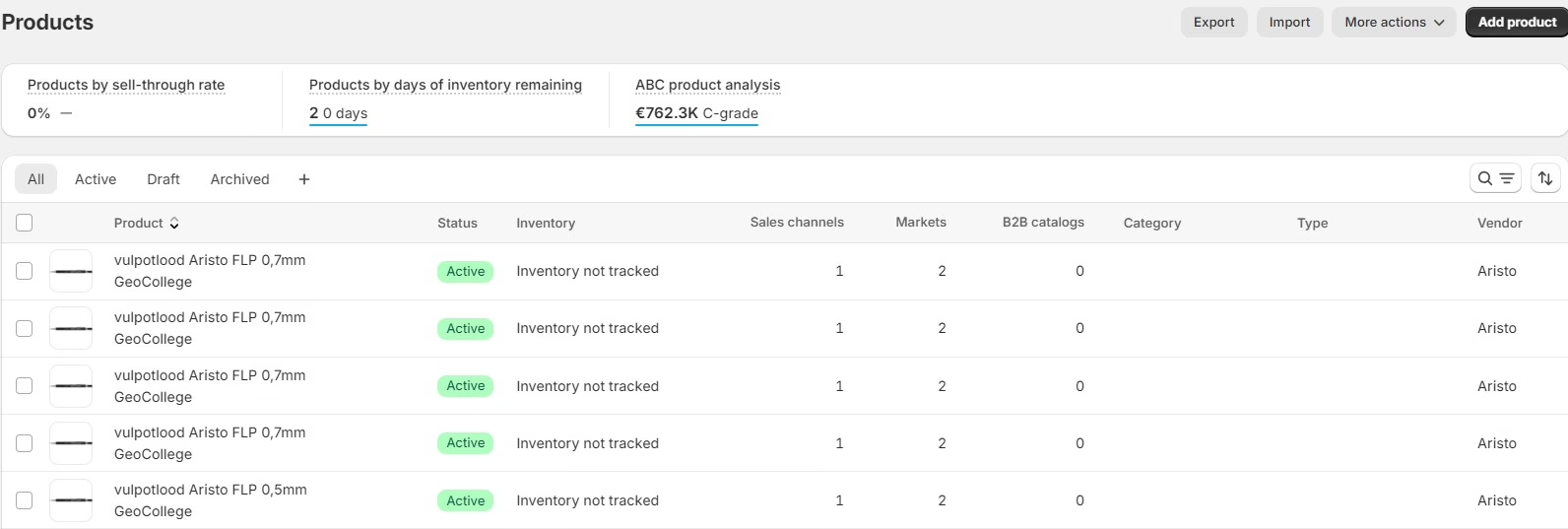
The process begins before data export. The first thing to tackle is the current state of the Shopify store. Your inventory includes all products, variants, collections, customers, orders, pages, blog articles, site navigation, redirects, media, discount codes and subscriptions, apps and integrations, analytics, and custom automation. The output will be a shared document with each item assigned to a team member, not a folder of unsorted CSVs.
Shopify advises against expecting an easy CSV migration. Most content, custom fields, and app integrations will require additional planning because they do not map to CSV columns.
The pre-flight checklist that saves budget
- Access confirmation. This includes your domain registrar, Shopify admin, theme files, app accounts, payment integrations, analytics, email service, and customer data. It can take days to organize missing credentials.
- Freeze content and settings. Designate a period when there will be no changes to navigation or key settings. Migrations will fail if the source data is being edited.
- Write success criteria. What is considered having “zero data loss?” How will we measure how complete our redirects are? Which instructions must be the same for the checkout process as the current store?
- Secure exports. Verified backups of orders, customers, products, media, content, configuration. Store these exports somewhere the migration team cannot delete.
- Decide. Coordinating across all areas of the business (marketing, operations, finance, engineering) will yield several suggestions. One person will have to make the final call and resolve all disputes.
The stakes are high enough to name them. Swell’s 2026 ecommerce replatforming study notes most migration initiatives go over budget, take longer than planned, or lose data in the process. Poor execution of replatforming efforts have been associated with losses of organic traffic in the range of 30%. (Migration risk benchmark) That could mean the difference between a robust Q3 and a hiring freeze.
Prior to any data migration, you should have a URL Inventory, a mapping workbook, a list of integrations, a content ownership matrix, a freeze calendar, a backup record, a testing plan, and a rollback plan. The absence of any of these indicates the project is not ready for a Magento import.
Mapping and Moving Store Data Without Losing Records
Both Shopify and Magento cover the same concepts, but in a different way. For example, a Shopify metafield and a Magento attribute are not the same. A Shopify collection and a Magento category are not the same. The fulfillment state of an order in “cancelled” status may be something completely different in the other system. You will inherit those mapping issues as production bugs if you skip the mapping discussions and proceed with an import.
The first stable entities should be products, categories, CMS content, and navigation. Customers and orders should come after the stable structures are built. A final delta sync should be performed at cutover to ensure all orders and accounts that were created after the first export are processed. Transactional records rely on stable product and customer references; therefore the order in which stable entities are set matters.
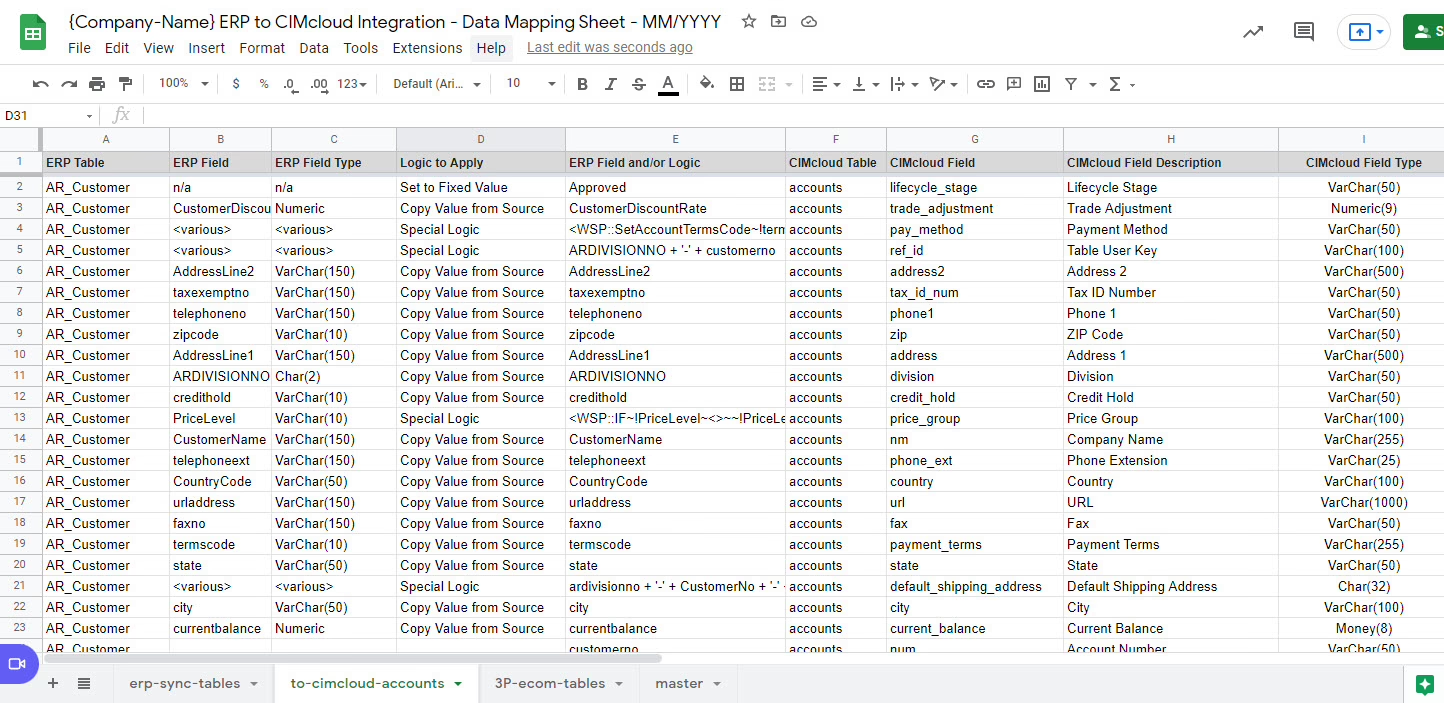
Design a mapping sheet that non-technical users can read. For each field, capture the Shopify source, Magento destination, transformation rule, validations, and the person who approves it. For fields that do not have a Magento equivalent, determine if this will be an attribute, an extension, an integration, or a manual process. This decision informs the stakeholders of where they need to focus future maintenance efforts.
| Shopify Entity | Magento Equivalent | Common Gaps |
|---|---|---|
| Product | Simple or configurable product | Variants, options, images, and metafields may need new attribute rules |
| Collection | Category | Automated collection logic may not translate to category rules |
| Metafield | Custom attribute | Data types, scopes, and attribute sets need review |
| Customer | Customer account | Password hashes are not portable; plan for a forced reset |
| Order | Order and sales record | Status names, taxes, refunds, and fulfillment states can differ |
| Discount code | Cart price rule | Conditions and usage limits rarely translate one-to-one |
| Subscription | Third-party module | Recurring billing tokens usually do not transfer between apps |
Test batches beat trust
The most common advice from migration professionals who have led large ecommerce transfers, including those going in the far more common Magento-to-Shopify direction, is to do a limited test import. One migration from WooCommerce to Shopify imported 300 orders as a test, and this caught edge-case corruption of refunds and coupon codes that the automated tool had silently mangled during the first iteration. Use a similar strategy. Pull 200-300 orders, a few customers with complex orders, and some of the catalog. Have someone outside of the migration team validate the migration results against Shopify.
Review the records that carry significant operational risk, such as a customer with a lengthy order history, a refunded order, an order that was partially refunded, a discounted order, and a subscription customer. Failure of any of these will result in failure at scale.
Here is what you need to know about password migration. In Magento and Shopify, passwords are hashed and cannot be converted, meaning there is no way to migrate a password. Members of Stack Overflow have written about how to decrypt Magento 2 export passwords, but received no answers because it’s impossible. Anticipate that when you launch the site, you will have to send out emails to reset passwords and you will temporarily increase the number of customers leaving your site. This uptick will be measurable, but manageable.
If your model is simple, you can use a migrator, such as Cart2Cart or LitExtension. If your relationships or logic is not simple, you will have to make sure to include ETL (extract, transform, load) scripts. The mechanics of data migration from Shopify to Magento 2 describe the standard path of how to export products and customers, how to map and format the data for import in Magento, and how to import the data using the admin interface or CLI. Which path you choose is not important, but you will need to verify the data by checking a sample of rows, running login tests, and batch checks of the data before you approve the data. Our Shopify data migration guide describes the reconciliation process.
Rebuilding the Store Experience and Connected Systems
The design choices that go into a Shopify theme cannot be separated from your site’s merchandising, signposting, customer engagement, search, content, and cart. Rebuilding your Shopify theme in Magento is not just a cosmetic reskin. It is a design and product decision.
Begin with an audit screen by screen. Label each case as rebuild, reskin, or remove. A section of the product that requires a custom solution may call for work in the Magento template. An app-driven suggestion block may need a Magento extension or a fresh API integration. A feature that is not used should not be rebuilt. Migrations offer a rare opportunity to reduce surface area.
Choose the approach based on the way the customers actually shop. A well-maintained Magento theme is appropriate for a traditional catalog. A custom PWA or Hyvä offer a different performance and interaction model, but each comes with its own build and maintenance cost. Do not choose a front end because you think it is current. Choose it because it fits the different journeys through the site that result in transactions.
Make every dependency visible
The plumbing is largely hidden in Shopify with managed services and apps. Magento exposes it. For every integration, you must document:
- Payments. This includes the payment gateway and fraud rules, payment methods and payment data, how refunds are processed and what happens when payments fail. There are many issues documented in GitHub relating to Magento and PayPal, specifically, about getting Express Checkout initialized and orders that are cancelled and are not visible in the admin. Test the unhappy path.
- Shipping. Carrier rates, the rules relating to warehousing and fulfillment, label printing, and tracking, and how returns are processed.
- Tax. The tax engine and how exemptions are done and what regional considerations are. What must be included in an invoice.
- Operations. Integration of fulfillment and inventory and customer service systems and your CRM and ERP.
- Measurement. Analytics, ad pixels, consent, feeds, and reporting.
Every integration needs an owner, a license decision, a test case, and a fallback plan. An integration that passes staging but breaks on a partial refund is not complete.
Wondering how your store shows up in AI search? We put together a short visibility snapshot. Get the snapshot.
Protecting SEO, Performance, and the Cutover
A good launch is a quiet one, with nothing dramatic happening. Customer orders are placed, staff see the correct records, search engines find the correct pages, and nothing warrants an emergency meeting.
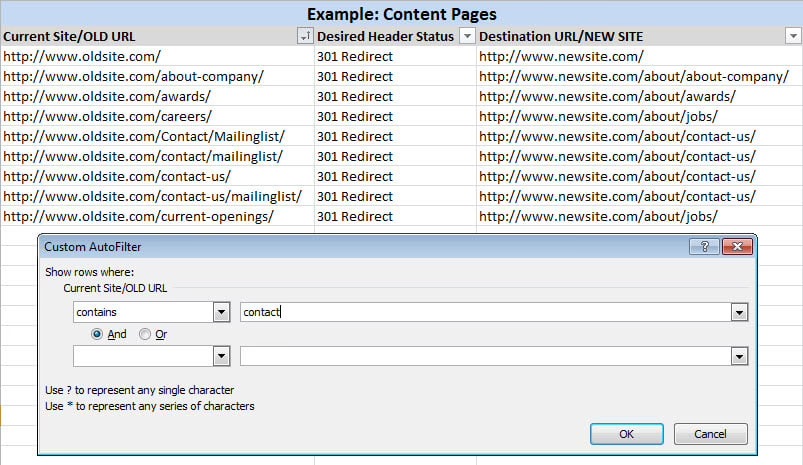
The first challenge is preserving URLs. Build a 301 redirect map from Shopify to Magento for product, collection, content, and retired URLs. In the opposite direction, Shopify’s enterprise migration guidance suggests starting with the first 500 to 1,000 URLs by organic traffic and spot checking at least 20 to 30 redirects after import. (Shopify redirect mapping guidance) This same guidance applies when moving to Magento. For a broad reference, preserving rankings in a platform change, this 8-step SEO migration checklist is a strong cross-reference, particularly for metadata, canonicals, and sitemaps.
Test the storefront as a customer would use it
Block crawlers until the team approves the site. Test:
- Product search, filters, variants, inventory, and out-of-stock behavior.
- Account creation, password reset, order history, and guest checkout.
- Cart recovery, discount codes, tax calculation, shipping rates, refunds, and transactional emails.
- Webhooks and integrations that pass order data to fulfillment, finance, CRM, or analytics systems.
- Canonical tags, hreflang used, structured data, XML sitemaps, and URLs for indexing.
Magento performance deserves its own review. Set reasonable targets for Largest Contentful Paint, Cumulative Layout Shift, and Time to First Byte. These pages should be tested with realistic catalog, search, and checkout demands placed on them. Do not assume Magento will be faster than Shopify just because it offers more control. Flexibility becomes overhead if other areas such as hosting, caching, database queries, images, and extensions are not optimized or configured properly.
Staff should run through pre-launch drills on staging with a real payment method. Then verify the order, check the email was sent, confirm the fulfillment was processed, the refund path was working, and the customer record was created. At cutover, freeze Shopify writes, take a final snapshot and sync, repoint the domain, and monitor search performance and error logs for 72 hours. Keep the old store running until the new one clears every required check, and don’t shut it down just because the new homepage happens to load.
What This Costs, and Where Budgets Quietly Blow Up
Price the migration across the following five buckets: platform and hosting, theme and frontend, extensions and integrations, migration tooling, and post-launch support. Both Magento Open Source and Adobe Commerce (Cloud or on-prem) require licensing and differ in their hosting and infrastructure. Both require you to own the work for patches, security, monitoring, and performance along with maintenance, which is where budgets tend to undercount.
The failure patterns are predictable enough to plan for.
A customer import can preserve profile data, including contact information, but leave passwords unusable. To fix this, you need a tested reset flow and clear customer communications, confirmed with a login test before launch.
Incomplete order histories can mask the absence of custom Shopify Flow actions, fulfillment states or refund rules. Analyze sample orders in various common and unique states. Note the workflows that need to be rebuilt versus retired.
Subscription billing stops when the original Shopify app lacks a direct equivalent in Magento. Prior to migrating any active subscribers, verify ownership of recurring payments and the behavior that will govern renewals. This is a prime example of the “we will figure it out later” approach, which costs monthly recurring revenue.
Hidden behind the curtains, redirect chains can diminish search access even if all old URLs resolve correctly. Each old path must be mapped to its final, direct destination and must not rely on a chain. Test the actual HTTP response.
Slow Time to First Byte usually indicates issues with hosting, queries to the database, caching, or extensions and rarely the theme. Perform a performance test of example pages and document the performance of each page.
The Magento team you will require after launch goes well beyond the development team that builds the first release.
Migration risk is highly influential in the decision. One 2026 industry report said most merchants cited migration risk having the greatest impact on their decision-making, with completed migrations resulting in faster page loads and more conversions within six months, though those results aren’t guaranteed and don’t by themselves make the case for Magento. (2026 ecommerce migration findings). For the vast majority of merchants, the impact of a bad migration is greater than that of a good one.
Our ecommerce migration services were designed to help you consolidate data, customer experience, SEO, and operational edge capabilities under one roof. Refact has 12+ years of experience with ecommerce and product teams, has delivered over 200 projects, and stays with clients for approximately 2 years. That timeframe encompasses the typical replatform decision-making timeline.
Turning the Plan Into the Next 30 Days
Justifying the move from Shopify to Magento is appropriate in certain situations. The most common problem is seeing the move from Shopify to Magento as more of a preference of platforms rather than an operational model shift. If that framing is maintained in discovery, the remaining work becomes quite straightforward.
In the next 30 days, produce evidence rather than code:
- Conduct a store, data, URL, and integration audit.
- Freeze feature scope and capture what you define as “success” in measurable terms.
- Create a shortlist of two Magento Partners that have successfully performed reverse migrations.
- Ask for references, delivery plans, support terms, and itemized migration quotes.
- Initiate a discovery call with the owner of the decision in the same meeting.
Once this work is complete, if the justification of the move to Magento remains the same, execute the plan as described in this playbook. However, if this is not the case, if Shopify Plus, a headless storefront, or a focused build is the better option, consider those solutions. Our Magento to Shopify migration guide and Shopify migration checklist provide more direction for the more common case, and reading both clarifies which platform best fits.
The reverse migration is a legitimate move for a small group of operators, but a costly one for the rest. For those wanting a second opinion before sinking a year of time and engineering effort, we implement early clarity work. This is what the Refact ecommerce practice was built to do. For details, see our ecommerce technology partner page.
Building or replatforming a store? Let’s talk. Free 30-minute call, no pitch.

Masoud Golchin is a backend developer at Refact, working on server-side systems, internal tooling, and infrastructure. He builds and maintains the services that support both client projects and the team’s day-to-day development workflow. His work includes backend logic, developer tools, system reliability, and the technical foundations that allow products to scale and operate consistently. At Refact, Masoud focuses on creating practical engineering solutions that help the team move faster while keeping systems organized, maintainable, and dependable.
More from Masoud Golchin

