Patient Portal Development That Gets Used
Almost every U.S. hospital already has a patient portal.
 Parnia SebtiOctober 7, 2026
That gap matters if you are planning patient portal development, whether you are a health system extending a vendor portal or a digital health company building a new care model. The code is rarely what fails. Portals fail in the work around the code: clinical workflow, identity, EHR integration, message ownership, staff training, and getting patients enrolled. This guide covers where those failures come from and how to scope, build, and roll out a portal that patients and staff will actually use.
A Patient Portal Is a Clinical Service, Not a Web App
The first feature list usually sounds simple: login, records, appointments, messages. Then someone maps a single patient journey. The patient signs in, proves who they are, switches to a parent’s account, opens a lab result, asks a question about it, and books a follow-up. Each of those steps depends on identity proofing, proxy permissions, result-release rules, message routing, scheduling logic, audit trails, and a live connection to the EHR. A prototype can show the screens. Production has to make every handoff work for real patients and real staff.
A 2025 JMIR study of a dental hospital in Sydney shows how this goes wrong in practice. The hospital rolled out a patient portal with kiosk check-in, and an integration fault started texting patients after they had already checked in, sending them back to the front desk. The kiosks also saved no reception time. Hospital policy still required staff to physically see each patient’s Medicare or concession card, so the clinic now had two queues instead of one. Staff had no way to delegate message tasks. Training for rotating staff arrived late, and late budget approvals squeezed the whole timeline.
The software did most of what it was supposed to do. The trouble came from the organization around it. The authors’ recommendations were operational: give the vendor direct access to end users, observe on site, protect time for co-design, set realistic timelines, and review any policy that conflicts with the new digital step.
If the portal has to sit on top of older scheduling, billing, or lab systems, assess them before you design anything. Work out what each system can share, how fresh its data is, and which workflows still depend on someone retyping information. Our guide to legacy system modernization strategies covers how to run that assessment without disrupting the systems you still depend on.
What Patients Actually Return For
Portals did not get here through demand alone. The 2009 HITECH Act put more than $30 billion into health IT adoption through the Meaningful Use program. By 2020, about 90% of U.S. health systems and providers offered online record access, according to a longitudinal analysis in the National Library of Medicine. Uptake trailed availability. The same research found portal use rose from 12.5% in 2011 to just 25% in 2017. A 2020 review put use at 15% to 30% across the studies it examined, a figure that still circulates online as if it were current.
Current numbers are higher and more useful for scoping. A Journal of Medical Internet Research analysis of nationally representative 2022 data found that 61.3% of U.S. adults had used a portal in the past year, up from 48.1% in 2020. Among those users, 89.9% viewed test results and 69.8% read clinical notes. Far fewer used transactional features: 48.4% sent a secure message, 41.0% requested a refill, and 37.6% booked an appointment.
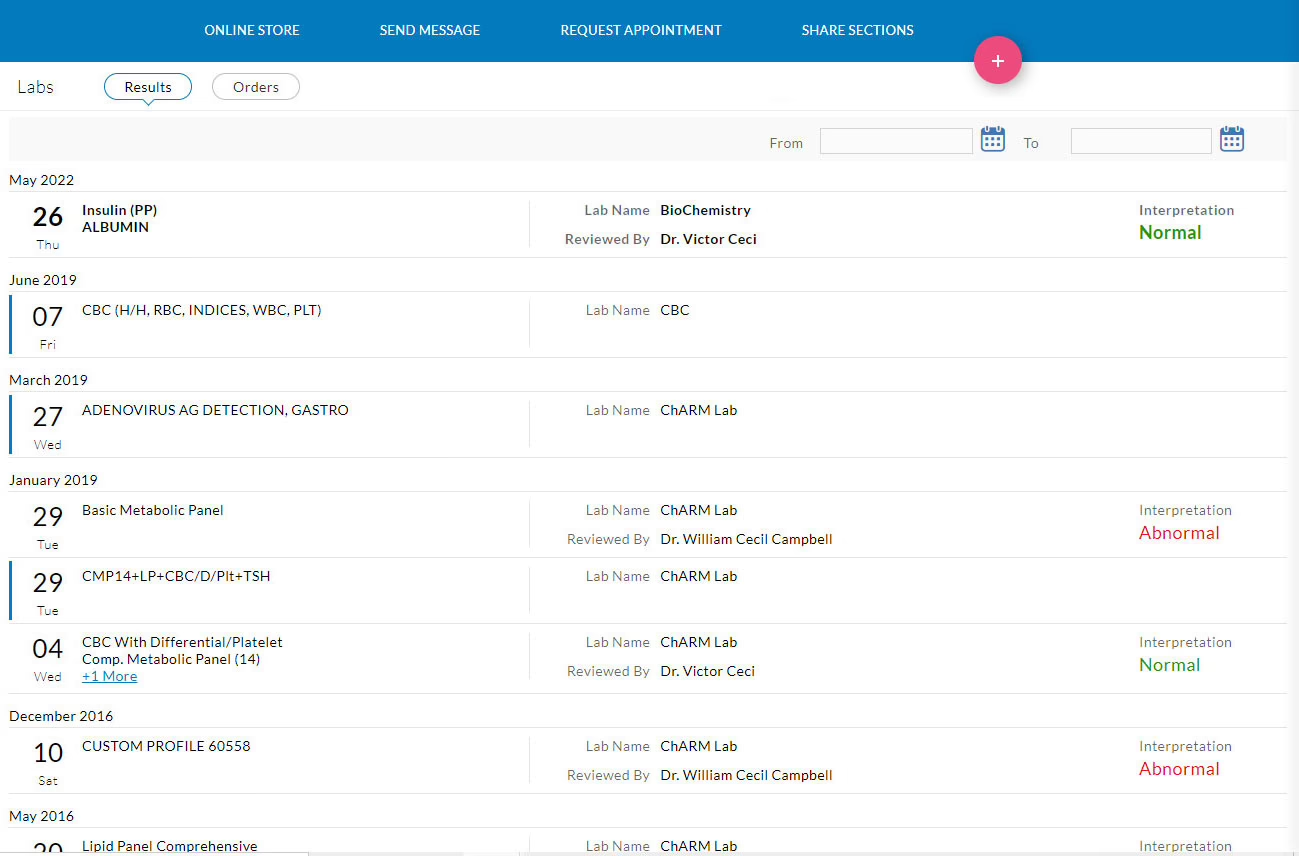
For a product team, this sets the order of work. Results and notes are what bring people back, so they need to be accurate, timely, and understandable on a phone. Two more findings from the 2024 national survey should also shape the design. First, 57% of portal users now go through an app, up from 38% in 2020. Second, 59% have records spread across portals at more than one organization, yet only 7% use an app that brings them together. Your portal is probably one of several your patients juggle. Every extra login, password reset, or confusing label adds to that burden.
Scope the MVP Around an Operational Problem
The patient portal projects with the strongest reported results did not start with a feature list. They started with a specific operational problem, like missed appointments, unused clinic slots, or the cost of mailing letters. They picked the portal functions that addressed it and measured the change.
Guy’s and St Thomas’ and King’s College Hospital in London used self-scheduling in MyChart for this. They report more than 125,000 patient-managed appointments, with 18,000 moved earlier by an average of 21 days. They also report about 403 working days of administrative time saved. In oral surgery, waiting lists fell 40% for new patients and 25% for follow-ups. Dudley Group reports 7,329 wasted slots avoided and a 5% drop in missed appointments over four months. These figures come from vendor-hosted or trust-reported case studies without control groups, so treat them as direction, not proof. The pattern is still clear: a narrow target, a pilot, then expansion.
A first release for many teams looks like this:
- Secure access and recovery: identity proofing, sign-in, account recovery that does not require a phone call, and session controls.
- Results and records: the data your clinical partners can reliably supply, with plain-language context where it helps.
- Appointments: visit types, eligibility rules, cancellations, reminders, and a clear fallback when no slot fits.
- One communication channel: secure messaging, or a deliberate decision to postpone it (more on this below).
- Refills and profile updates: only the workflows your care team can actually handle at volume.
Scheduling deserves particular care because it touches front-desk capacity directly. A calendar view is the easy part. Visit-type rules, provider templates, confirmation logic, and staff ownership of exceptions are the hard part. This overview of appointment scheduling in healthcare covers the operational detail worth working out before it shows up as an interface problem.
Leave telehealth, wearable data, and AI assistants out of the first release unless they solve the problem you picked. Each one adds clinical review, permission rules, testing, and support load. Early complaints about AI replies in portals, mostly that answers miss the patient’s actual question, suggest these features need more evaluation before patients see them. Our guide to scoping a minimum viable product goes deeper on drawing that line.
Give every feature an operating contract
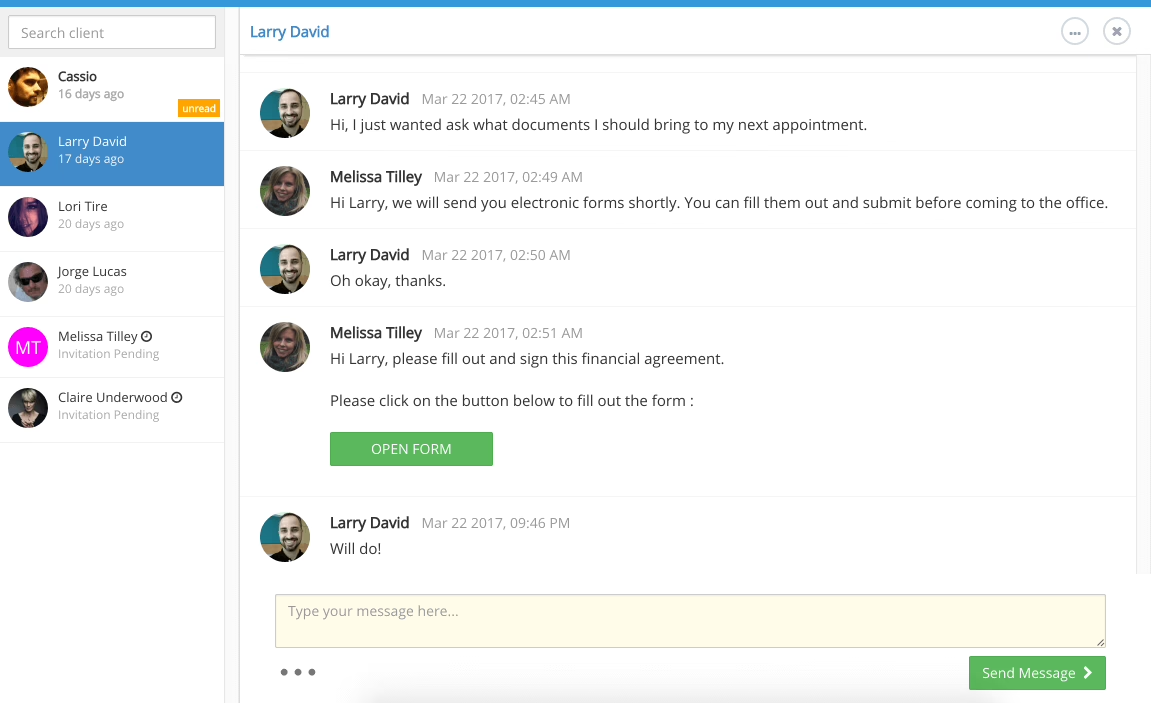
Secure messaging shows why features need an operating model before they need a UI. Once the inbox opens, someone has to own it. In nurse discussions from 2026, the same problems keep coming up. Patients treat portal messages like texts, including for urgent symptoms such as active bleeding, and providers end up absorbing unpaid inbox work. At Trillium Health Partners in Ontario, providers raised concerns about future messaging workload before the feature was even switched on.
The organizations handling this well made deliberate choices. Parkview Health routes more than 70% of portal messages to support staff and reports answering over 90% within one business day. Trillium launched MyChart in stages and did not turn on patient-provider messaging at launch. Front-line nurses describe practical fixes: a pop-up telling patients when to call instead of writing, a stated 48-business-hour response window, the correct clinic number shown next to the compose button, and reusable reply templates.
Before any feature goes live, write down its contract: who owns it, what it covers, response times, after-hours coverage, how urgent issues are escalated, and who pays for the staff time. If you cannot fill that in, the feature is not ready.
Decide how results are released before launch
This is the most contested product decision in the space. The Cures Act gives patients a right to their electronic health information. The information-blocking exceptions are conditional, so inconvenience is not a valid reason to hold results back. A 2020 study of real-time result release found few incidents caused by it. On the other side, patients have shared viral accounts of learning about cancer or a miscarriage in MyChart before any clinician called, and Trillium providers worried about patients reading sensitive results without help interpreting them.
No single answer settles this. What you can do is design for it. Prepare patients before results arrive, explain what the next step will be, train clinicians on what patients now see first, and get legal review of any delay rule against the information-blocking exceptions.
FHIR Is a Floor, Not a Complete Record
A portal that cannot pull reliable data is a nice-looking shell. Standards help, and adoption is real. In 2022, more than two-thirds of U.S. hospitals reported using a standards-based HL7 FHIR API for patient app access, according to a National Library of Medicine standards report. The same report found 69% supported standards-based APIs for patient access, while only 45% supported them for submitting patient-generated data.
The mistake is treating “FHIR compliant” as “complete.” HL7 calls US Core, the U.S. implementation guide built on FHIR R4, a floor: a minimum set of constraints and interactions. A system can meet it and still leave out data your portal needs. ONC also defines patient access to electronic health information as covering unstructured content like scanned documents and free-text notes, which an API may not expose at all. One cancer patient in a Reddit discussion valued their portal’s lab trends but wanted radiology reports the hospital never made available.
In practice, integration means making an inventory: every system of record, what each API actually returns, which gaps remain, and how data moves where no API exists. Practitioners building custom portals still describe lab data arriving as CSV files over SFTP, with HL7 v2 interfaces looking like a substantial project in their own right. Our guide to integrating with an EMR covers the questions to ask vendors before anyone commits to a timeline.
Own the rules, rent the plumbing
A direct connection to one EHR is quick when that vendor supports the data and actions you need. It gets expensive when you serve several systems or depend on proprietary endpoints. A shared integration layer takes more planning upfront, but it gives your web and mobile clients one place for authorization, data mapping, validation, and error handling. It also keeps the interface from being tied to any one EHR’s screens.
Buying an integration product can cut early engineering work. Check its data model, authorization approach, audit support, rate limits, and exit terms before you sign, and confirm it covers the specific lab, pharmacy, or billing system you depend on. Keep patient permissions, task design, and clinical workflow rules in your own codebase. Buy the parts that remove work without hiding behavior you will later need to explain to a compliance reviewer.
Epic needs separate planning. Developers describe MyChart as relatively closed to third parties: approval through Epic’s app program can take months, and few customer organizations use the APIs. If your product depends on Epic data, plan to work through the health system’s own team, and build that timeline into your plan from the start.
Identity, Proxy, and Consent Are Separate Problems
Teams often lump these together under “login,” and the architecture suffers for it. The SMART App Launch framework handles authorization: OAuth flows, scopes, and launch context. It requires PKCE with the S256 method and short-lived tokens, and it warns against sending tokens to other resource servers. It does not define how apps are registered, how a person is matched to their record, or which records a given person is allowed to see.
Those are your problems to design. NIST’s 2025 digital identity guidance (SP 800-63-4) treats identity proofing, authentication, and federation as distinct functions. It was written for government systems, but the separation applies to health portals too. Proxy access needs its own legal and permissions model. Under HIPAA, a parent counts as a minor’s personal representative only when they have legal authority over the child’s health decisions, and the portal has to encode that relationship correctly.
Proxy demand is probably larger than usage numbers suggest. In Trillium’s first year, only 232 accounts (0.4%) had proxy users, even though caregivers were one of the groups the hospital identified as underserved. Adolescents complicate things further. In interviews with 51 parent-adolescent pairs, 39% of adolescents did not know they could use the portal, and participants described confusion, distress, and strain on family relationships along with the benefits. Proxy access alone does not solve adolescent privacy.
Consent and segmentation of sensitive data are less mature than vendors suggest. A 2025 FHIR granular-consent prototype mapped 40 of 48 pilot items directly to SNOMED CT or LOINC codes and needed approximations for the other eight. It could not handle unstructured notes, used a non-standard decision-support hook, and was tested on one patient’s record. If your portal shows sensitive categories such as behavioral health, reproductive care, or adolescent visits, record explicit decisions on unmapped codes, conflicting rules, free-text notes, and overrides.
Authentication is also an accessibility issue. Patients who cannot receive a one-time passcode get locked out, and help desks that cannot reset accounts quickly lose them. WCAG 2.2 adds requirements for accessible authentication and minimum target sizes, and HHS’s Section 1557 rule requires free, accurate, and timely language assistance. If you also ship a native app, review mobile app compliance and store policies before submission, and see our guide to healthcare mobile app development for the HIPAA side.
Build, Buy, or Extend the Vendor Portal
Price alone rarely settles this. Compare total project cost and ongoing cost against the specific workflows the portal has to support. Don’t just compare feature checklists. Because integration scope and support staffing drive most of the cost, published price ranges mean little until those two are defined. Our breakdown of what drives MVP development cost explains how to get a quote you can trust.
| Criteria | Custom build | Vendor or EHR portal |
|---|---|---|
| Workflow fit | Shaped around your patient and staff tasks | Limited to the flows the vendor supports and your organization enables |
| Integration | You define the service layer and data rules, and own every edge case | Native to one EHR, harder to extend to outside systems |
| Roadmap | You control it | The vendor controls core changes and timelines |
| Ongoing burden | Hosting, security reviews, version changes, and support are yours | The vendor operates the platform. Your team still runs enrollment and support |
| Best fit | A new care model, several systems, or a portal that is the product | Standard workflows on a single clinical system |
Custom builds bring their own risks. One developer who built a portal for a COVID testing company found it fit the niche workflow well, until the business added antigen tests and flu vaccines and the bespoke system strained under each addition. Experienced commenters gave two pieces of advice: build in modules behind standard interfaces, and check first whether the real need is a portal or an EHR, CRM, or lab system.
A hybrid often works best. Use the EHR’s portal for core records access, and build a separate experience for the tasks it handles badly. Our guides to custom web portal development and choosing a portal development company cover how to decide which parts to own and how to judge a partner. The deciding question is who will own the patient experience when a workflow changes, not who can produce screens fastest.
Adoption Has to Be Designed In
A portal’s quality shows when patients finish tasks without calling the front desk. A systematic review of portal usability found the most common barrier to registration and use was an interface that was hard to use. Login problems, password management, complex navigation, technical faults, limited health literacy, and poorly presented information also came up repeatedly.
Many patients never get far enough to judge the interface. Of the 2,315 nonusers in Trillium’s patient survey, 59% did not know the portal was offered, 32% cited registration difficulty, and 23% were unsure how to use it. Among patients who did use it, 88% found it easy to use on their own. In that case, the barrier was getting people in the door, not the product.
The best-supported adoption lever is a person. Based on 2024 national survey data cited in this EHR patient portal comparison, 87% of patients whose provider encouraged portal use went on to use it, compared with 57% of those who were not encouraged. The same source reports a 2025 safety-net study in which 47% of patients had never accessed a portal, rising to 59% among Spanish speakers versus 42% among English speakers. Nearly a third of patients wanted training, and more than half of them preferred one-on-one help. The data is cross-sectional, so it shows association rather than cause, but it points the same way as the intervention studies.
- Remove the access code. In March 2020, UCSF started texting patients a direct enrollment link. Activation rose from 66.2% to 73.7% across more than 1 million encounters, and the gains held among Latinx, Black, Asian, and non-English-preferring patients.
- Put navigators in clinics. In a 2025 program at New York City community health centers, 1,062 of 1,658 eligible patients accepted help and 790 activated their accounts.
- Make sign-up a clinic-wide job. Parkview reports activation going from 28% to about 40% in three months by sharing sign-up responsibility between front desk and providers.
Watch who these efforts miss. A 2026 study at King’s and Guy’s and St Thomas’ found 52.7% activation overall, but 61% among patients with an email address on file versus 10.8% among those without. There were also gaps by deprivation, ethnicity, language, and age. Any headline activation rate can hide a gap that size.
Test tasks, not opinions
Run usability testing before launch, and give participants real jobs to complete:
- Regain access to a locked account without calling support.
- Open a result and explain, in their own words, what it says.
- Book an appointment when the preferred time is gone and the visit type is unclear.
- Decide whether a symptom belongs in a message or needs a phone call.
- Complete a task with a screen reader, keyboard only, or enlarged text.
Recruit older adults, people with limited health literacy, people with disabilities, phone-only users, caregivers, and patients who prefer a language other than English. Measure completion, time on task, sign-in abandonment, and whether they understood what they saw.
Roll Out in Stages and Measure More Than Activation
Release features in stages, at the pace your staff can handle. Staging alone does not guarantee readiness, though. Trillium staged its launch carefully, yet at six months 45% of providers said their training or information was inadequate. Only 42% said MyChart helped them provide better care, even though 66% said it improved communication. One-time launch training misses staff who rotate in later, and staff who cannot explain the portal will not recommend it. Continuous training, clinic huddles, and a governance group with front-line members are what kept programs like Parkview’s moving after go-live.
Guy’s and St Thomas’ and King’s rolled out self-scheduling one service line at a time in roughly 10-week implementations, piloting before expanding, and now cover more than 1,100 clinics. Each step had its own owner and its own measures.
Account counts tell you little about whether the portal is working. Track the signals that show whether friction is going down:
- Who activates and who comes back, broken down by age, language, and access to email
- Completed tasks, such as appointments booked and refills processed without staff intervention
- Failed sign-ins, password resets, and support contacts per active user
- Message volume, response times, and the share handled by support staff
- Proxy accounts relative to the caregivers you know exist
- Duplicate work, meaning tasks staff still do by hand alongside the portal
If those numbers improve for the patients who need the most help, the portal is working. If activation rises while phone volume, message backlog, and the email gap stay the same, you have added a channel without removing any work.
The portals that hold up treat launch as the start of an ongoing service, with someone accountable for messaging, enrollment, training, and data quality long after go-live. Most of the decisions that make that possible come before development: which operational problem the portal solves, which data you can actually get, who owns each feature, and how patients will get help. If you want those answers settled before you commit to a build, our product design and discovery work covers exactly that, and our portal and dashboard development team can carry the plan through to launch.
Building a product and unsure what to scope first? Let’s talk. Free 30-minute call, no pitch.

Parnia Sebti is a project and account manager at Refact, coordinating teams, clients, timelines, and delivery across the studio’s work. She helps keep projects organized from planning through execution, making sure communication stays clear and priorities stay aligned. Her role connects client needs with the internal team’s workflow, helping turn requirements, feedback, and moving parts into structured delivery. At Refact, Parnia also contributes to shaping the internal tools and processes the team uses to manage projects more effectively and keep work moving with clarity.
More from Parnia Sebti
