Website Relaunch Playbook That Protects Traffic
Website launches often encounter an array of issues well past their launch date.


This playbook is intended for the executive approving a new website. You do not need to review each deployment file. You do need to understand the metrics prior to code being deployed, the impact of decisions affecting the URL structure and search traffic, and the risks and opportunities during the testing window. The relaunch should be considered a business change event impacted by technology, as opposed to a technology change event that is business impacted.
Why Website Relaunches Are Judged Differently Than Teams Expect
Most new website launches are initiated following complaints corporate management has begun to notice. The website was developed a long time ago. Improving the design and website functionality on mobile is important. The team is unable to post new content updates without the aid of the web team. During the first planning meeting, the most important question is almost always asked last. What happens to the traffic to the website during the switch? At this point in time, the project has ceased to be a design project and is now a migration.
The tension shows up at the end. A practitioner on X described a redesign that shipped on time, loaded faster, and scored better on UX audits. The CEO described it as a failure because conversions did not move. There were two different definitions of success that were running in parallel the entire time and no reconciliation was done. This is the most common reason a technically clean relaunch gets called a failure.
Benchmarks help set expectations without burying the risk. A summary of website redesign ROI benchmarks states that a successful redesign may increase conversions by 20 – 200% and decrease bounce rates by 10 – 40% with a 10-point decrease in bounce rate often correlating to a 5 – 15% lift in conversions. These are not guarantees, and they only apply when the project is run to accomplish a specific business result. A generic refresh most likely yields generic results.
The rest of this playbook addresses the four choices that dictate which side of that ceiling you end up on: how you set your baseline, how you map your content and URLs, how you execute your cutover, and how you manage the first 90 days.
Baseline Before Anyone Argues About Design
A relaunch fails even before development begins if the team decides to adopt a new CMS or a new visual direction without understanding which pages are viewed the most, which forms contribute to sales, or which integrations Support the daily operation of the business. The baseline prevents this.
Analyze exported data from the last twelve months from Search Console and capture organic sessions, organic conversions, top queries, ranking positions, indexed pages, top landing pages, crawl status, backlinks to the URL, and core web vitals. Several items in Studio Meyer’s 50-point relaunch checklist rightfully place baseline captures as a first-phase task. Without a baseline capture, you cannot tell whether changes that happen after launch are the result of changes that you made, something seasonal, or something that Google did.
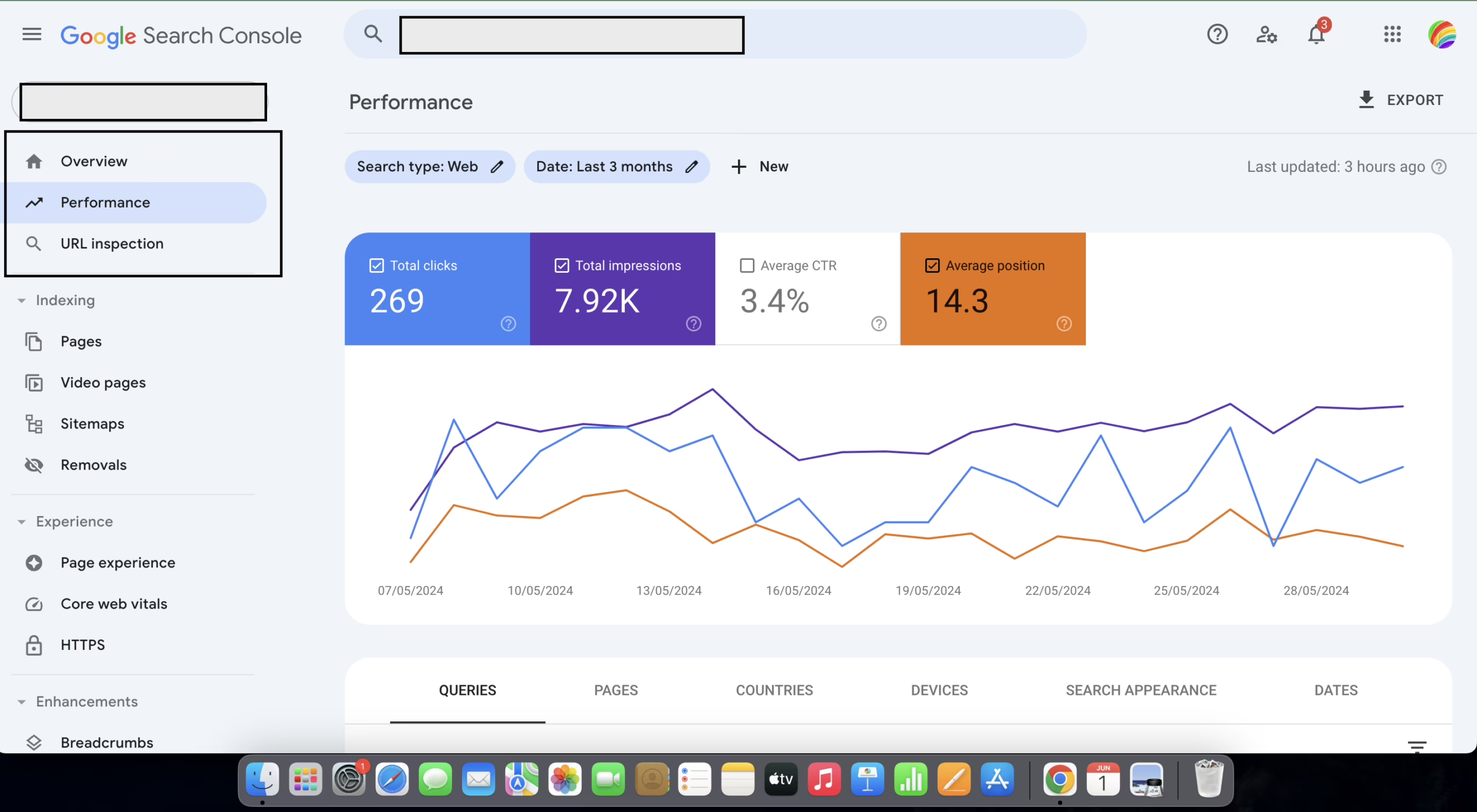
Separate your activity measures from your business measures. An increase in traffic may conceal a fall in the number of qualified enquiries. An improvement in conversion rate on a page that is not highly trafficked may mask the fact that other pages that do drive revenue are losing value. A useful baseline measures the following:
- Business outcomes. Qualified enquiries, completed purchases, bookings, member registrations, whatever the site is paid to produce.
- Key user journeys. The path from landing page to the action that matters, with the current conversion rate at each step.
- Top pages. Pages that pull search traffic and pages that assist conversions further down the funnel.
- Known defects. Slow templates, broken forms, outdated content, publishing workflows the editorial team avoids.
- Technical dependencies. Payment tools, ESP, CRM, search, logins, reporting, anything a customer or the business touches through the site.
This document will help you explain the reasons for the changes you see in the following months. Refact’s pre-migration checklist for sites focuses on recommendation captures before we define the scope for any site rebuild.
Decide what stays and what changes
Baseline two things. The assets that you should protect: URLs that perform well, user accounts, checkout funnels, legal and policy pages, and the integrations that you have. The problems that the relaunch must address: Page, workflow, and/or journey challenges that generate losses for you whether they are time or monetary. Suggest that the participants include marketing, sales, service, operations, and publishing. Your information is qualitative and irreplaceable. Analytics will not tell you that prospects are still calling and asking a question that the pricing page partially addresses.
If there is no owner, no test, or no decision date on any risks listed, then proceed with caution when committing the build budget. This is where a relaunch becomes either cheap or expensive.
SEO and Content Migration: A Mapping Exercise, Not a Redesign Task
SEO migration is dull work with a high margin of benefit. Page by page, search engines and repeat visitors must be provided a clear path to the new version of the page. The teams who consider this a design afterthought are the teams who lose traffic and never regain it.
A full inventory of all URLs is the best place to start. Published and retired campaign pages, PDFs, image files, blog posts, category and tag archive pages, anything from site analytics, Search Console, XML sitemaps, robots.txt, and backlink analysis tools. A page that a single member of your team may have once visited may still maintain a valuable link to a domain that your team cannot afford to lose.
For every old URL, choose one action:
- Keep it when the page still serves the same audience and purpose.
- Merge it when several weak or overlapping pages should collapse into one stronger resource.
- Retire it when the content is obsolete and has no useful successor.
- Redirect it when the address changes but the purpose remains.
A good redirect sends users from the old accounting services page to the new accounting services page. A bad redirect sends users to the homepage. For visitors, this creates a tremendous amount of confusion. To search engines, it illustrates no information regarding the relation of the old page to the new page. For search engines, Google and others treat a homepage catch-all redirect as a Soft 404, which is worse than an actual 404 for a ranking recovery.
Content parity is required if search intent remains the same. Copying word-for-word is not required. The preserved elements consist of information, topic coverage, internal links, metadata, structured data, and calls to action that help make the page useful. Check out our article for more info on how to redesign a website without losing SEO.
Know what a normal dip looks like
The level of risk for traffic depends on how much the URL structure changes. The same-URL platform migration with unchanged content typically results in minor change loss. During a URL structure change, organic traffic loss of 10 to 30 percent is expected in the first 30 to 60 days. Full domain migrations commonly result in loss of 20 to 50 percent, even with clean redirects, according to ZDS’s data on 300 relaunches. It takes getting used to (via recovery), and sometimes even a full quarter.
Traffic risk is defined as a set of escalation guidelines which should be created prior to launch. A 10 percent or greater drop in indexed pages, a sudden surge in 404s, or a Core Web Vitals regression should trigger investigation, not a wait-and-see response.
Technical Migration and the Launch Runbook
The new site is built in a staging environment to help test the important elements prior to launch. Search engines may treat a production staging environment a published site, meaning multiple versions of a site can be indexed.
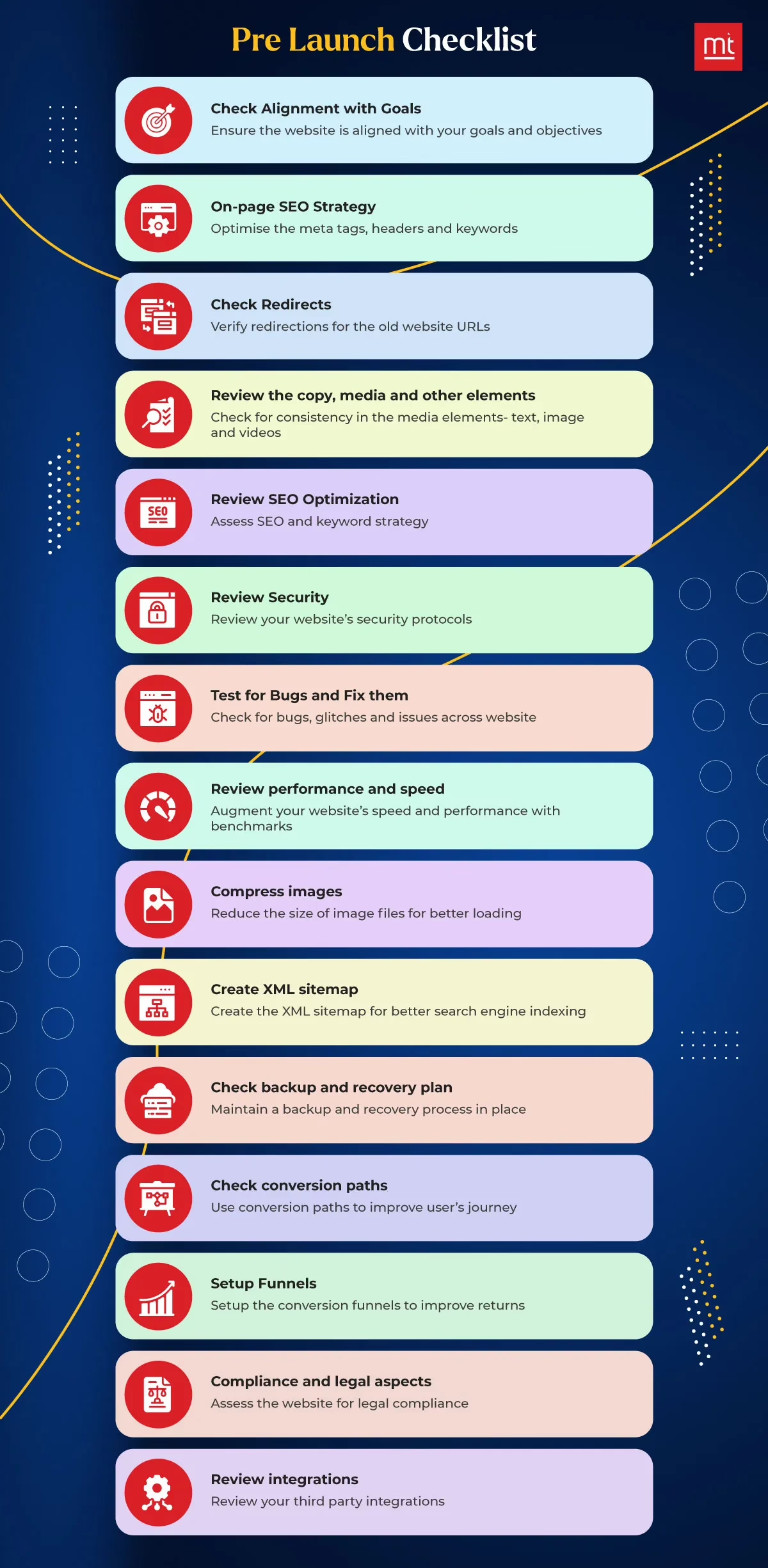
Have your engineers explain to you how the new system manages redirects, canonical tags, XML sitemaps, robots.txt rules, analytics, forms, and Core Web Vitals. Different systems may facilitate these concepts differently. For example, in WordPress, plugins and themes can contain redirects. Shopify, on the other hand, manages its URLs within the structure of its own store, and bulk redirects need to be managed carefully. So, it’s worthwhile to look at Shopify’s 301 redirects before you try to set up a redirect map. A headless CMS has a different approach compared to the other systems described, as the burden of each solution is distributed over the content system, the frontend framework, the rendering setup, and the deployment pipeline, and any of these can break the SEO plan.
During the rebuilding of Teton Gravity Research’s publishing platform, the biggest chunk of the work was the migration of ten thousand articles to a new system that preserved search performance and editorial workflow for a thirty-year archive. Multiple attempts to migrate the articles to a new system were abandoned, and the system became a liability. The biggest takeaway from this project is that when a site has a large amount of content, especially articles, a migration plan is essentially a complete redesign.
Test the parts customers notice
QA belongs on real devices and real tasks, not a desktop walkthrough. Someone should perform the service, fill out a form, make a purchase, request a password reset, perform a site search, and open key pages from a mobile connection. The list below is a minimum, not a maximum.
- Forms and calls. Notification emails, CRM records, thank-you pages, tracking events.
- Commerce. Product data, variants, cart behavior, checkout, payment status, taxes, order notifications.
- Analytics. Page views, conversions, key events, consent behavior, campaign attribution.
- Search basics. Titles, canonicals, indexability, internal links, redirects, sitemap submission.
- Performance. Core Web Vitals, image loading, blocking scripts, slow templates.
Test email deliverability specifically. Forms that successfully submit but end up in a never land are worse than forms that fail. A relaunch could change the sending domain, DKIM, or ESP configuration. Spam filters are an authentication issue that browser QA will not find. A quick check of a service like MailGenius’s deliverability test will find those.
Make launch day boring
The runbook must be in the correct order. Final backups, content freeze, redirect file, analytics checks, notification of stakeholders, coverage of support, rollback decision. One person is responsible for the go live call. The other checks the site like an outside user on a phone, on a network that is not the office wifi.
The first checks during cutover are performed on the homepage, high-value landing pages, forms, checkout, navigation, redirects, and tracking. Keep the old version available as a rollback until the team has confirmed stability. A launch plan that relies on one person remembering each step is a plan with a single point of failure. A written sequence allows all team members to check if the step has been completed.
Planning a move of your own? Our Migration Blueprint maps the content, redirects, and risks before anything is touched. Get the blueprint.
Post-Launch Monitoring for the First Ninety Days
Overreactions and underreactions during the first week are both costly. Search engines need time to crawl the new pages to understand the changes. Consider the impacts of the changes you have made, and don’t be too concerned about small changes in traffic. There will be things that you don’t understand, but that doesn’t mean they will be important in a month.
For the first week, you should monitor Crawl Errors, Organic Traffic, Conversions, Rankings for high-value keywords, new 404 errors, and Core Web Vitals every day. We recommend daily checks for the first week, followed by weekly checks for the next ninety days for organic traffic, leads, and rankings. Tracking rankings and organic traffic for the ninety days takes patience, but it should offer you valuable insights. Your new site will improve with time, but understanding how search traffic behaves will require you to have some level of understanding of how your visitors will use your site. Takeoff NYC’s B2B migration guidance may help explain how search traffic works.
Separate normal movement from failure
When you launch a new site, you need to take account your old site analytics. Use the baseline rather than your memory. Compare analytics on the same traffic sources, conversion events, and queries from the old site to the new site. We share the following breakdown with our clients to help them understand new site traffic for the first month.
| Signal | What it may mean | What to do |
|---|---|---|
| Short organic dip after URL changes | Reindexing or redirect processing | Check mapping and continue watching |
| Indexed pages down 10% or more | Missing pages, blocked templates, sitemap issues | Investigate immediately |
| Rising 404 errors | Broken internal links or incomplete redirects | Find source URLs, fix priority paths |
| Core Web Vitals regression | Slower templates, scripts, or media | Test affected templates and optimize |
| Conversions down while traffic holds | Offer, form, tracking, or journey problem | Test the path from landing page to submission |
For a domain move, you need to manage a situation where different users from different geographic regions get errors or redirects to different places. Track a number of redirects, performance in Search Console, and errors. A post by Redirect Pizza explains why those signals are important to understand if old URLs reach intended destinations and do not produce a soft 404 error.
Keep in mind that you need to monitor all aspects of your site functionality, including search functionality. Fivenines’ uptime monitoring guide is a good start to learn about keeping your site monitored for availability and responding to service disruptions. A website maintenance plan outlines the expected outcomes of site updates, scheduled fixes, routine backups, and ownership of reviews.
Improve from evidence, not opinion
Once the initial reviews are complete, the next priority is behavior. Look for pages where visitors land and take no action. Analyze if the copy is confusing, if calls to action are weak, if certain elements take time to load, if answers are missing, or if visitors exit unexpectedly. The CRO hides here and tends to take more time than the launch itself.
Focus is also shifting toward search visibility. Ostend Digital’s relaunch guidance advises tracking AI citations and visibility, alongside traditional rankings, under the assumption that some of the traffic to the site will come through LLM-related searches rather than a blue link. There is no perfect measurement. Ignoring it is a decision, not an oversight.
As we were building a website for The Daily Upside, when they came to us with a small budget and issues of scaling during their website relaunch, it was clear that this was not the opportunity for us to do a launch push that would be considered a ‘hero’. It was important to make strategic choices about the priorities before the cutover that would allow us to solve the problems that would most directly impact the stability of the site post-launch. This is documented in more detail here. The pattern is clear: in the ninety days after the launch is where the hard work of a solid relaunch comes into play.
What to Check Before You Sign Off
It is not necessary to review every deployment file. What is necessary is demonstration that the team has made the necessary decisions to meet the needs and goals of the business.
Before development
- Baseline captured. Traffic, conversions, rankings, indexed pages, Core Web Vitals, key journeys.
- Business priorities named. The journeys that matter most, with specific targets.
- Content decisions made. Keep, merge, update, archive, or retire, page by page.
- Ownership assigned. Approvals, content, launch, post-launch fixes, all with names next to them.
Before launch
- URL map reviewed. Old URLs matched to new destinations, high-value pages inspected by hand.
- Technical QA complete. Redirects, sitemaps, canonicals, forms, analytics, search, mobile layouts, performance.
- Rollback plan confirmed. Backup verified, cutover sequence written, decision owner named, support contacts on call.
- Comms sent. Sales, support, marketing, and operations know what changes and where to report problems.
A relaunch refers to a strategic business change with an underlying technical component. The teams that approach things in this manner tend to retain their traffic and grow their business. On the other hand, teams which prioritize traffic loss over technical considerations find themselves explaining declining metrics to their managers over the next two reporting cycles. If you’re considering spending the budget and would like a second opinion on the baseline, the URL map, and the launch sequence, Refact’s website migration service address the decisions detailed in this playbook. In such situations, the discovery phase is the best starting point.
Migrating off a legacy CMS? Let’s talk. Free 30-minute call, no pitch.

Masoud Golchin is a backend developer at Refact, working on server-side systems, internal tooling, and infrastructure. He builds and maintains the services that support both client projects and the team’s day-to-day development workflow. His work includes backend logic, developer tools, system reliability, and the technical foundations that allow products to scale and operate consistently. At Refact, Masoud focuses on creating practical engineering solutions that help the team move faster while keeping systems organized, maintainable, and dependable.
More from Masoud Golchin

