Strapi vs WordPress: An Honest Comparison
Strapi vs WordPress looks like a tool comparison.


The rest of this piece is written for teams making that call now: content operations leads, product managers, and the person signing the CMS bill. It covers where each platform actually fits, what the market data says, the tradeoffs that never make it into vendor pages, and the migration decisions that quietly destroy SEO if you skip them.
Why the choice hurts later, not now
The Strapi vs WordPress question rarely shows up on a clean whiteboard. It shows up when a redesign stalls, when marketing asks for one content system to feed a website, an app, and a partner API, or when editors keep filing tickets to change a paragraph. At that point, the argument moves from pages and posts to schemas, permissions, and who owns the frontend.
A useful test: if editors regularly need engineering help to publish, your CMS is already costing more than you think. That cost does not appear on an invoice. It appears in campaign lead times, developer context switches, and the number of small ideas that never get shipped. Whether you fix it by leaning harder into WordPress or by moving to a headless model like Strapi depends on who does the work every day, not on which platform sounds more modern.
If editors run the show, WordPress usually wins. If developers run the show and content has to feed more than a website, Strapi starts to earn its cost.
Where each platform actually sits in the market
WordPress is not close to a fair fight on market share. As of the August 2026 W3Techs snapshot, WordPress runs about 42% of all websites and holds roughly 60% of the CMS market where a CMS is known. Strapi sits below 0.1% on the same measure. You can see the side-by-side in the WordPress and Strapi usage statistics from W3Techs.
That gap matters practically. It shapes hiring costs, plugin availability, agency depth, and how easy it is to hand a WordPress site to the next team. It does not, on its own, tell you which system fits your work.
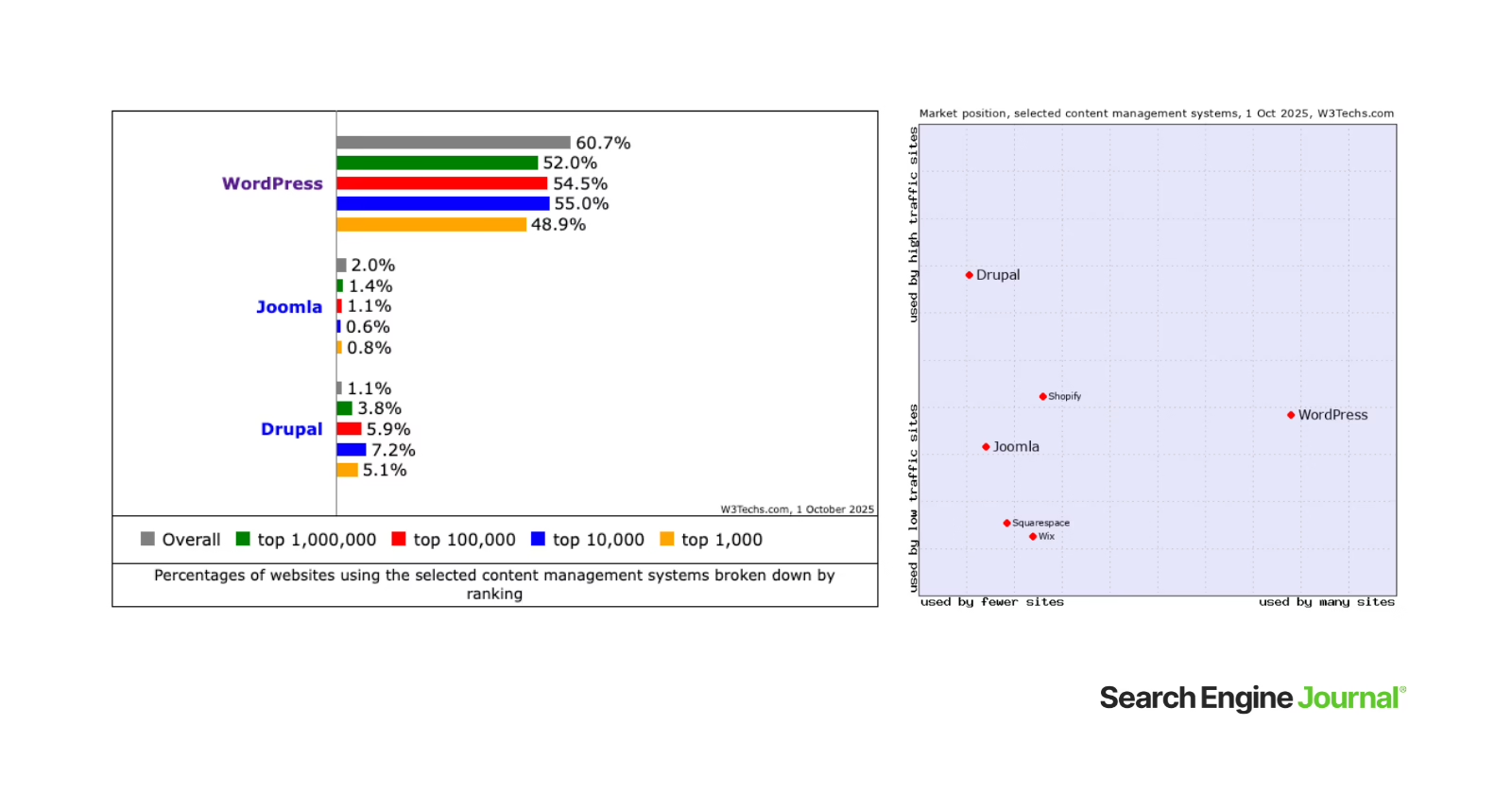
Strapi tells a different story on developer signal. A 2026 open-source comparison puts Strapi at roughly 72,000 GitHub stars against the WordPress core repository at around 21,000, though most of WordPress’s real community lives in its plugin and theme ecosystem rather than the core repo. Storyblok’s 2026 State of CMS reports that 67% of new enterprise projects now start on a headless architecture. Read that as momentum, not conquest. It is the reason serious teams still take Strapi seriously even when W3Techs makes the market look one-sided. The developer-focused CMS comparison on Dev.to walks through the numbers if you want the source.
Architecture is the real difference, not features
Feature checklists are a trap here. Both platforms can technically run a blog. Both can technically feed an app. The honest difference is where complexity lives.
WordPress is a monolithic PHP application. Content, admin, theme, and rendering ship together. That is why editors can install a plugin, drag a block, and publish without touching an engineer. WordPress can also be run headless through its REST API or WPGraphQL, but you inherit the full WP stack even when you only use its backend, plus every frontend concern the monolith used to hide.
Strapi is headless by design. It is a Node/TypeScript application that generates REST and GraphQL endpoints from the content models you define. There is no theme, no page builder, no editor preview by default. Your frontend, your routing, your search, your caching, and your preview flow are your problem.
| Decision area | WordPress | Strapi |
|---|---|---|
| Delivery model | Monolithic by default, headless or hybrid with work | Headless by design |
| Content model | Posts, pages, custom post types, ACF | Custom schemas with typed relations |
| Editor experience | Familiar to most content teams | Steeper curve, needs onboarding |
| Frontend | Themes bundled or Next.js if headless | You build it (Next.js, Nuxt, mobile) |
| Where complexity lives | Inside the CMS and its plugin sprawl | Inside your application architecture |
That last row is the whole trade. Strapi reduces CMS complexity by pushing more of it into your app. WordPress reduces application complexity by keeping more of it inside the CMS and its plugin ecosystem. Neither is free.
Content modeling shows the gap fastest
When a team lists their real content types, articles, landing pages, products, author bios, partner content, event listings, the difference becomes visible. In Strapi, you define each type, its fields, and its relations directly. In WordPress, you either use custom post types, lean on ACF, or accept some pseudo-structure through categories and tags. Both work. Strapi tends to feel cleaner as content becomes more structured and reused across surfaces. WordPress tends to feel cleaner when the site itself is the primary product.
If your decision is really about how to model structured content and not about WordPress specifically, our Strapi vs Sanity comparison is a better next read. And if you are trying to compare more than two options, the headless CMS comparison for founders covers Contentful and Sanity alongside these two.
Performance and SEO, told honestly
Headless setups do outperform monolithic WordPress in most benchmarks, but the story is more architectural than tribal. Finly Insights’ 2026 benchmark on identical content shows traditional WordPress on WP Engine at TTFB 487ms and Lighthouse 72. Headless WordPress on Next.js and Vercel hits TTFB 203ms and Lighthouse 94. Strapi on Nuxt and Netlify lands at TTFB 178ms and Lighthouse 91. The pattern is consistent across other 2026 benchmarks: monolithic WordPress runs roughly 2 to 4 times slower on backend response than headless stacks without heavy caching.
The nuance matters. A well-tuned WordPress with a CDN, an object cache, and disciplined plugin use can close most of that gap. A poorly implemented headless site can easily be slower than the WordPress it replaced. One agency we track migrated to a Strapi and Nuxt stack in 2023 and had to reverse the decision by late 2025 after organic visibility dropped roughly 90%, largely because SEO fundamentals were not carried across in the rebuild. Architecture is a ceiling. Implementation is what you actually get.
SEO follows the same rule. WordPress gives you Yoast or Rank Math out of the box. Sitemaps, metadata, canonicals, schema, redirects, all handled by mature plugins that most editors already know. Strapi gives you an API. Your frontend team decides how meta tags, structured data, sitemaps, and canonicals get emitted. Both can rank equally well. Only one requires that decision to be explicit. Teams evaluating the WordPress side of this decision often find the plugin picture messier than they expected, and this practical guide to SEO plugins by category is useful for cutting that stack down before it grows.
Security and total cost, without the marketing spin
Security data on this question is unusually clean. Roughly 97% of new WordPress vulnerabilities originate in third-party plugins, not core. OpenSSF Scorecard grades Strapi at 6.7 and WordPress core at 3.5. Strapi has a smaller default attack surface because there is no theme layer, no admin frontend for the public, and fewer moving parts. That advantage disappears the moment your team publishes an insecure integration or exposes an API endpoint without authentication. Strapi’s default disabled public API is a feature, not a bug, though it produces the confusing 403 errors that show up in every getting-started thread.
Total cost of ownership is genuinely unresolved. A HeyNeuron 2026 model for a 50-to-200-page mid-size site puts three-year TCO at $12,600 to $45,000 for WordPress and $22,400 to $62,200 for Strapi with Next.js. Strapi is more expensive upfront because you are paying for a custom frontend build. It avoids recurring plugin licenses and the maintenance tax that plugin sprawl creates. WordPress is cheaper on day one and, for many small teams, cheaper across three years too. For content-heavy businesses running multiple surfaces, the Strapi math flips because the same content feeds more than one product.
WordPress asks you to manage plugin discipline. Strapi asks you to manage engineering discipline. Skipping either produces the same result: a slow, brittle site that no one wants to touch.
Migration is a product project, not a data transfer
The most common mistake in a WordPress-to-Strapi migration is treating it as an export and import. It is not. WordPress content lives inside a specific structure of posts, taxonomies, custom fields, ACF flexible content, media attachments, and shortcodes. Strapi expects typed collections with explicit relations. Translating one to the other is a modeling exercise before it is a data exercise, and it usually requires Node or Python scripts that transform WP’s XML/JSON into Strapi’s expected format through authenticated APIs.
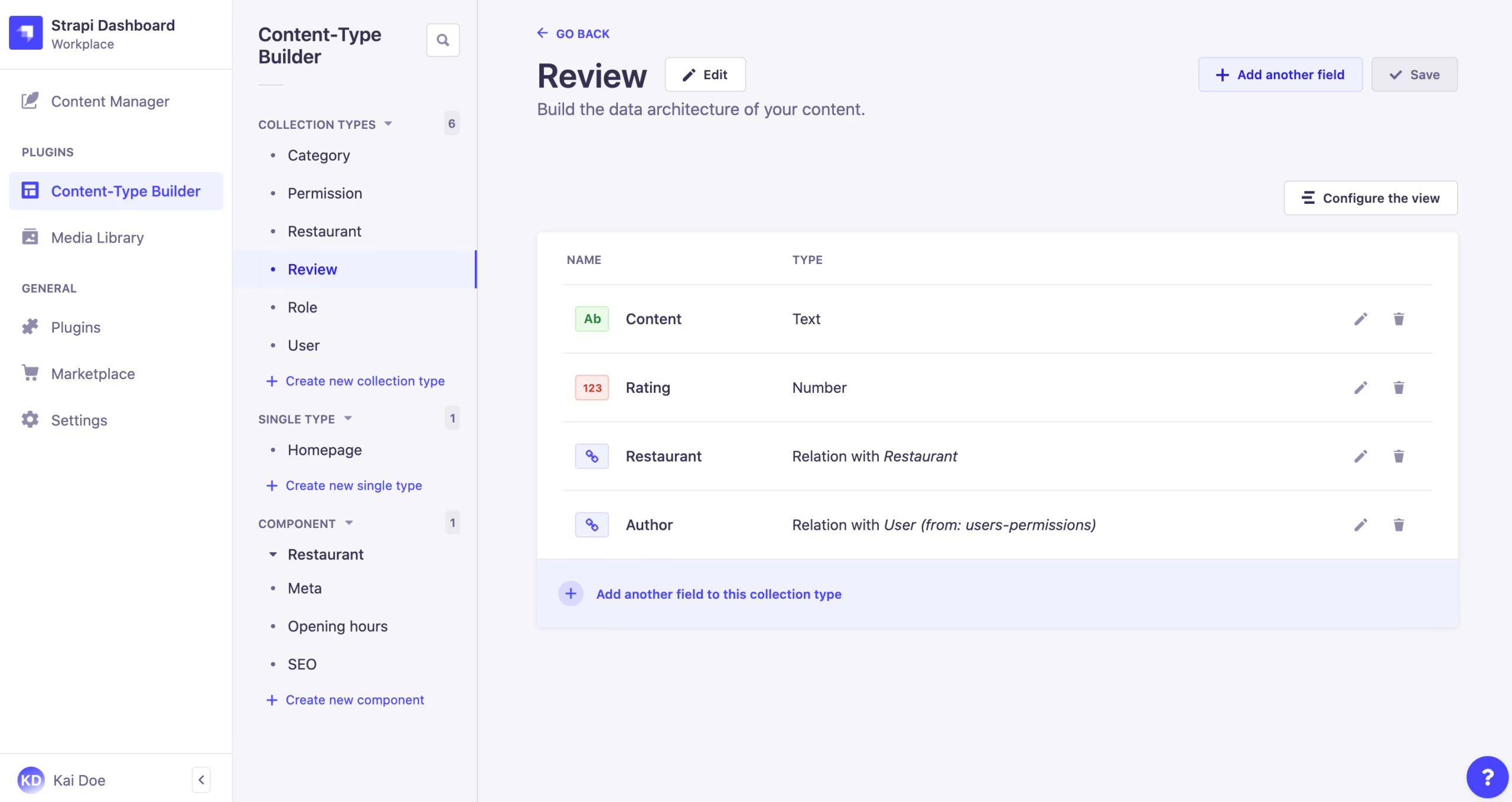
The places migrations quietly fail are predictable:
- URLs and redirects. New slug patterns without a 301 map will lose traffic. This is the single most common cause of the “we moved and lost SEO” story.
- Metadata and Open Graph tags. Titles, descriptions, canonicals, and OG tags need to be preserved field by field, not regenerated.
- Media. WordPress stores multiple derivatives per image and rewrites references inside content. A clean migration handles image derivatives, alt text, and internal references, usually with Cloudinary or S3 on the Strapi side.
- Editor workflow. Writers used to Gutenberg get confused by Strapi’s collection types and relations. Without training, publishing velocity drops for months.
- Schema decisions after launch. Renaming a Strapi collection type after go-live breaks APIs and requires manual DB and file edits. Get the model right before content starts flowing.
Our WordPress migration checklist covers the operational side of what actually breaks at cutover. If you are staying inside WordPress but want a modern frontend, the headless WordPress guide is the more relevant read.
Two Refact projects illustrate the shape of the work. When we rebuilt Teton Gravity Research’s platform, roughly 10,000 articles had to move out of a legacy CMS while editorial workflows kept running. The migration was only a fraction of the job. The larger work was deciding what to keep, what to retire, and how the new content model should serve a business that had changed since the original site was built. On Trends, we replaced a disconnected CMS, payments, and email stack with an integrated WordPress build that let The Hustle launch a premium newsletter in two weeks. Same problem, different answer, because the operating model was different.
Which platform fits which team
A two-person editorial team with no engineers should stay on WordPress. The install base, the plugin market, and the editor UX are worth more than architectural purity. A content-heavy publisher scaling into apps and syndication should look hard at Strapi or headless WordPress. An ecommerce brand with a custom storefront and mobile app is often the clearest Strapi fit, because product content, editorial content, and marketing content all feed multiple surfaces from the same source of truth.
A SaaS company sits in the middle. Marketing site plus in-app content plus documentation is the classic case where headless WordPress with a Next.js frontend works well, because the editorial team keeps a familiar admin while engineering owns the delivery layer. Strapi is the right call only if your JavaScript depth is real and someone on the team wants to own the platform, not just consume it.
A short decision checklist
- Who publishes daily? If editors do, WordPress is safer. If engineers pipe content in from other systems, Strapi is a fit.
- How many surfaces need the same content? One website favors WordPress. Web plus app plus partner API favors Strapi.
- What is your JavaScript depth? Strapi assumes real Node/Next.js capability in-house or on retainer.
- How much workflow change can the team absorb? Moving editors from Gutenberg to Strapi collection types is a training project, not a swap.
- Which maintenance failure are you better at avoiding? Plugin hygiene, or engineering discipline?
At Refact, our WordPress development, Strapi development, headless CMS, and CMS migration work usually starts with the same question: what is the content, and who has to touch it every day? The stack follows from that answer, not the other way around.
What comes after the Strapi vs WordPress question
The binary is starting to soften. WordPress 7.0 introduced native AI tooling and a browser-based version at my.wordpress.net. Strapi released an official MCP server that lets AI agents work against its content models. Newer platforms are being built agent-first from the start. None of that changes the decision in front of you now, but it does change how long your answer is likely to stay right. A CMS chosen for a specific team and a specific set of surfaces is easier to revisit in three years than one chosen because it looked modern in a benchmark.
If you are trying to decide between these two before committing engineering time, that is the exact kind of decision Refact’s discovery process is built to settle. We map the content model, the editorial workflow, the delivery surfaces, and the migration path before anyone writes production code, and the discovery phase is backed by a money-back guarantee. Clarity first. The stack second.
Building a product and unsure what to scope first? Let’s talk. Free 30-minute call, no pitch.

Masoud Golchin is a backend developer at Refact, working on server-side systems, internal tooling, and infrastructure. He builds and maintains the services that support both client projects and the team’s day-to-day development workflow. His work includes backend logic, developer tools, system reliability, and the technical foundations that allow products to scale and operate consistently. At Refact, Masoud focuses on creating practical engineering solutions that help the team move faster while keeping systems organized, maintainable, and dependable.
More from Masoud Golchin

