
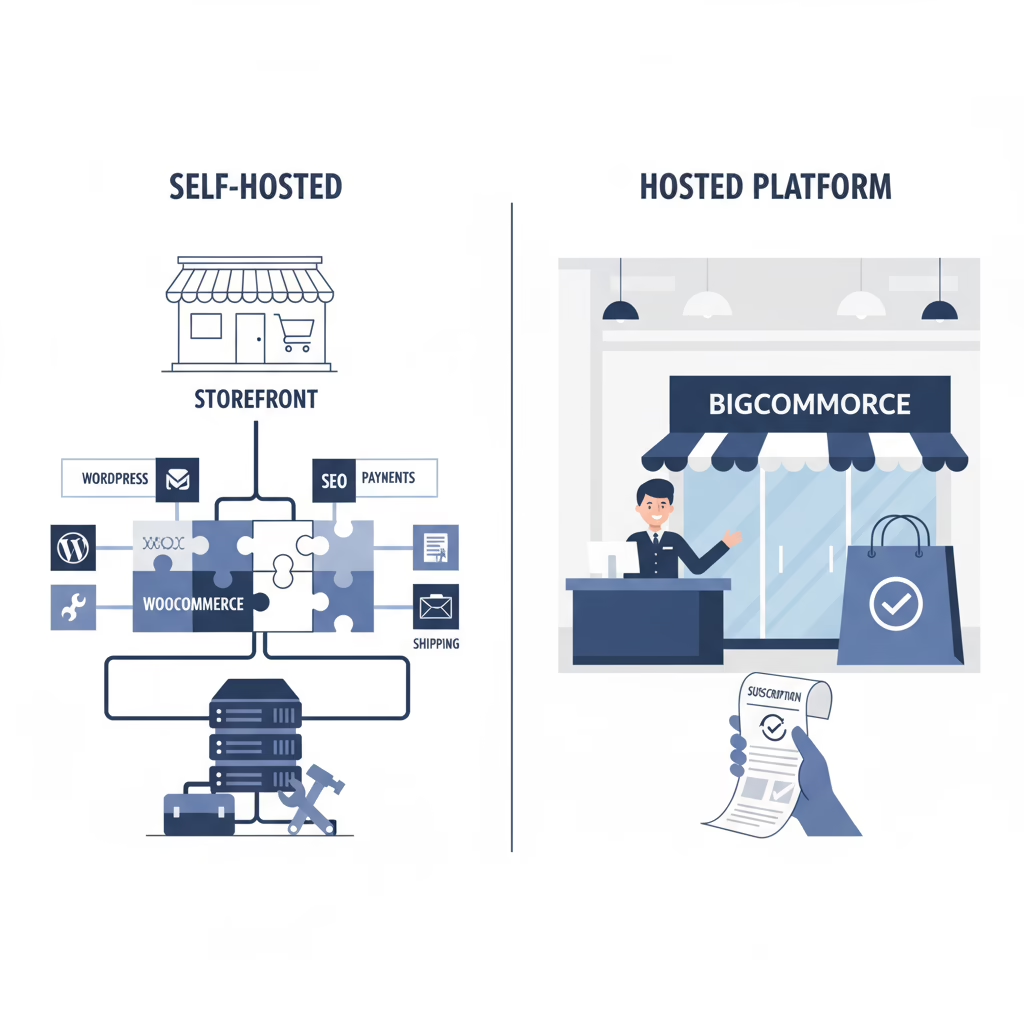


You can launch an online store on almost anything. The hard part is picking the platform you will live in for years. Bigcommerce vs WooCommerce is not a “tech” question as much as a control question, a budget question, and a time question.
One option is like renting a turnkey retail space. The other is like owning the building and choosing every contractor yourself. Both can work, but they lead to very different days, costs, and trade-offs.
If you want help scoping what you actually need before you commit, our website development services team usually starts by mapping goals to the simplest system that can support them.
Choosing Your Ecommerce Platform
Here’s a simple way to think about the difference:
- WooCommerce: An open-source ecommerce plugin for WordPress. You control the site, the code, and the hosting. You also own the upkeep.
- BigCommerce: A hosted SaaS ecommerce platform. You pay a monthly fee. They handle hosting, security, and platform maintenance.
WooCommerce runs on WordPress, which is why it is popular with founders who care about content, SEO, and custom workflows. You can shape it into almost any kind of store or paid-content product, as long as you are willing to manage the moving pieces.
BigCommerce is built to get you selling fast. It packs a lot of commerce features into one system, with fewer decisions to make on day one.
BigCommerce vs WooCommerce at a glance
| Aspect | WooCommerce (Ownership model) | BigCommerce (Subscription model) |
|---|---|---|
| Core structure | Open-source WordPress plugin (self-hosted) | All-in-one hosted SaaS platform |
| Cost model | Software is free, you pay for hosting, domain, and extensions | Monthly subscription, plus add-ons and plan changes as you grow |
| Flexibility | Very high customization with full code access | Customizable inside platform limits, themes, and apps |
| Best for | Content-driven brands, unique business models, teams that want control | Brands that want a managed setup and fast launch |
We’ve built 100+ products for founders, and this decision comes up every time. The right choice is the one that matches your vision, budget, and willingness to own the “boring” work.
The Real Cost of Building and Growing Your Store
WooCommerce is often called “free,” which is true in one narrow way. You do not pay to download it. But you still pay to run a real store.
What matters is total cost of ownership. That includes everything needed to keep the store fast, secure, and updated.
WooCommerce costs you should expect
With WooCommerce, you buy parts as needed. That gives you control, but it also means your costs can change as your store grows.
- Web hosting: Often $15 to $20/month for basic shared hosting. It can jump to $50/month or far more for managed, high-traffic setups.
- Domain name: Usually $15 to $25/year.
- Paid themes and plugins: Many stores end up buying tools for subscriptions, shipping rules, search, reporting, and more. It is common to see $50 to $300+ per add-on.
The upside is that you can spend where it matters. The downside is that you need someone to decide what “matters” and keep it all working together.
BigCommerce’s all-in-one pricing
BigCommerce wraps hosting, security, and core ecommerce features into a subscription. Plans often start around $34/month when billed annually.
There is one detail founders miss: BigCommerce plan tiers are tied to sales volume. For example, a plan may cap at $50k/year in sales. If you pass the cap, you may have to move to a higher tier.
With BigCommerce, the monthly fee is predictable only inside the revenue band for your plan. If you grow fast, plan changes can hit your budget at the same time you are trying to reinvest in inventory and marketing.
A real-world cost scenario
Here is a simplified way to compare the two models. Numbers will vary, but the pattern is common.
Scenario 1: MVP founder (Year 1)
| Expense | WooCommerce (self-managed) | BigCommerce (standard plan) |
|---|---|---|
| Platform | $0 | $408 ($34/month) |
| Hosting | $240 ($20/month) | Included |
| Domain | $20 | May vary by setup |
| Essential add-ons | $150 | Included or app-based |
| Total | ~$410 | ~$408 |
Scenario 2: Growth brand (hitting $100k in sales)
| Expense | WooCommerce (managed growth) | BigCommerce (higher tier) |
|---|---|---|
| Platform | $0 | $948 ($79/month) |
| Hosting | $600 ($50/month) | Included |
| Paid add-ons | $500 | $200 |
| Developer help | $1,000 | $0 |
| Total | ~$2,100 | ~$1,148 |
On paper, BigCommerce can look cheaper at this stage. But the WooCommerce budget often includes custom work, which can create features that SaaS platforms do not allow. That developer line item is sometimes the whole point.
Scalability and Performance Under Pressure
Traffic spikes do not feel like a “nice to have” when checkout starts failing. If you plan to run big promos, influencer pushes, or seasonal launches, performance becomes part of your brand.

BigCommerce performance
BigCommerce is hosted, so infrastructure is not your job. They handle capacity planning, uptime, and security patches.
- Uptime: Typically marketed at very high uptime.
- Traffic spikes: The platform can absorb spikes without you resizing servers.
- Default speed: You start from a decent baseline because the stack is controlled.
The trade-off is simple. You cannot tune the system beyond what BigCommerce allows. If you want a very specific performance setup, you might not be able to get it.
WooCommerce performance
WooCommerce performance depends on your hosting, your theme, your plugins, and your engineering choices. On cheap hosting, it can slow down quickly under load.
On strong hosting with a clean build, it can scale to very large traffic. Many teams run WooCommerce on serious cloud setups, but it takes planning and ongoing care.
BigCommerce is like a well-maintained rental car. WooCommerce is a car you own. You can tune it for racing, but you also have to do the maintenance.
Two performance metrics matter most to buyers:
- Page speed: Slow pages lead to lost sessions and fewer add-to-carts.
- Checkout speed and stability: Errors and lag at checkout are instant revenue loss.
If you want a practical checklist for reducing checkout friction (on any platform), start with our ecommerce UX best practices guide.
WooCommerce also has major market adoption, which is one reason it has such a large ecosystem. For broader market context, this WooCommerce vs Shopify market share breakdown is a useful reference: WooCommerce vs Shopify market share.
Customization and Control: How Much Freedom Do You Need?
This is the question that usually decides it. Do you need “enough” customization, or do you need to build something different?
WooCommerce flexibility
WooCommerce gives you code access. That matters when your store is also a content product, a membership site, or an experience that goes beyond a catalog.
Because WooCommerce lives in WordPress, you can extend your site with a huge plugin ecosystem and custom development. If you want a founder-focused view of the trade-offs, see our guide to WooCommerce development.
Common examples where WooCommerce is a better fit:
- Paid memberships with gated content
- Subscription boxes with custom billing rules
- Custom account dashboards
- Stores tied to large editorial libraries, guides, and landing pages
BigCommerce customization
BigCommerce gives you a strong set of tools, themes, apps, and APIs. For many brands, that is plenty.
The limit is that the platform is still the platform. You cannot change hosting. You cannot rewrite core commerce behavior beyond what their framework supports. If your use case falls outside the standard path, you may end up working around the system.
BigCommerce can feel like a well-run private club. It is convenient and clean, but you still follow the house rules.
Real-world customization scenarios
| Task | WooCommerce | BigCommerce |
|---|---|---|
| Custom user dashboard | Build a fully custom dashboard with any data and tools you want. | Customize account pages within theme and app limits. |
| Proprietary tool integration | Integrate internal tools directly through custom code and APIs. | Use available APIs. If an endpoint is missing, options shrink. |
| Checkout changes | Rewrite checkout steps and logic to match your model. | You can style and extend, but the core flow stays mostly fixed. |
| Infrastructure choice | Pick any host and architecture that fits your needs. | Hosting is managed by BigCommerce. |
SEO and Content Marketing: When Content Is the Product
If organic traffic is part of your plan, the platform’s content system matters more than most founders think.
WooCommerce has a natural advantage because it runs on WordPress. WordPress is built for publishing, internal linking, and structured content. That makes it easier to build large libraries of pages that support both search traffic and conversion.
Why WooCommerce tends to win for content
- Better content workflows: WordPress is designed for editing, updating, and managing lots of pages.
- Flexible site structure: You can create custom content types beyond products and posts.
- SEO tool choice: You can use plugins like Yoast SEO or Rank Math for on-page control.
BigCommerce covers the SEO basics. You can edit URLs, metadata, and image alt text. Many BigCommerce stores rank well.
The difference is depth. If you want to build a true content engine, WordPress gives you more ways to shape the site around your keywords, your internal links, and your publishing workflow.
Example: a search-focused gift guide
Say you want to rank for “Best Gifts for Coffee Lovers.”
On BigCommerce: You can publish a post or create a page and link products. It works, and it is fast to ship.
On WooCommerce: You can create a custom landing page, pull product data into custom blocks, add schema, and test layouts without being boxed into a single template.
Once content starts driving sales, conversion becomes the next bottleneck. This is why many teams pair content work with conversion fixes. If that is where you are stuck, use our guide to improve your ecommerce conversion rate.
Your Next Steps: How to Make the Right Choice
The best choice depends on your business shape and who will own the store week to week.
If you are unsure, do not guess. A short diagnostic can save months. Our website audit guide explains what to check before you spend on a rebuild or replatform.
When BigCommerce is a better fit
Pick BigCommerce if you want a managed commerce platform and your store is fairly standard. It is a strong choice when:
- You want a faster setup with fewer technical decisions.
- You do not want to manage hosting, updates, and security.
- Your checkout and catalog needs fit within typical ecommerce patterns.
When WooCommerce is a better fit
Pick WooCommerce if your store is tied to content, community, or a unique model. It is usually the better fit when:
- SEO and publishing are key growth channels.
- You need custom flows, custom data, or custom integrations.
- You want full control of your platform over the long term.
The trade is simple. BigCommerce lowers day-to-day technical ownership. WooCommerce increases control, but asks you to own more decisions.
Frequently Asked Questions
Is WooCommerce or BigCommerce better for a beginner?
If you are truly non-technical and want one vendor to handle hosting, support, and platform updates, BigCommerce is often easier to start with.
If you already know WordPress, WooCommerce can feel more natural. The admin area is familiar, and you can grow the site over time.
Can I migrate from BigCommerce to WooCommerce later?
Yes. Many brands start on a hosted platform, then move once they need more control.
The hard part is not moving products. The hard part is protecting SEO, preserving URL structure, and making sure analytics, payments, and customer accounts still work after launch. If you are planning a switch, our ecommerce migration services page outlines what a safer move looks like.
You can also use our broader platform migration guide to plan timelines and reduce risk.
Which platform is better for digital products or subscriptions?
WooCommerce is often the stronger choice for subscriptions and digital products because WordPress gives you more control over member experiences, gated content, and custom billing flows.
BigCommerce can support digital goods, but you may rely more on apps and platform limits as the model gets more complex.
Conclusion: Pick the Platform You Can Actually Run
If you want a managed store that “just works,” BigCommerce is usually the better fit. If you want deep control, content-driven growth, and the ability to build custom experiences, WooCommerce is usually the better long-term bet.
Either way, the goal is the same. Choose a platform that supports your next 12 to 24 months, not just your launch week.
If you want a second set of eyes on the decision, talk to Refact. Learn more about how we help non-technical founders build successful online products.