


Is your website quietly losing you customers?
You can spend on ads, post on social, and send emails, but if your site is slow, confusing, or hard to trust, results stall. Traffic stays flat. Sign-ups stay low. Sales never match the effort.
That’s when you need a website audit.
A website audit is a structured check of your site’s health. It looks for problems that hurt search visibility, user trust, and conversion, then turns those findings into a clear list of fixes.
The real cost of a “broken” website
Most “broken” sites do not look broken at first glance. The issues are usually hidden in the parts you do not see, but users and Google feel right away.
Those issues create friction. Friction kills trust, and trust is what turns a visitor into a customer.
A strong audit surfaces problems like:
- Technical issues: broken links, SSL errors, redirect chains, or a sitemap that keeps key pages out of Google.
- Poor user experience (UX): confusing menus, unclear calls to action, or forms that are painful on mobile.
- Slow speed: if pages take more than 3 seconds to load, many mobile visitors leave.
- Weak content: pages that do not answer buyer questions, or copy that does not match what people searched for.
For founders, a website audit is not busywork. It is the first step before you spend more on marketing or development.
At Refact, we start projects by finding what is blocking growth and what is already working. That often leads into website development services or ongoing improvements, but the first job is always clarity.
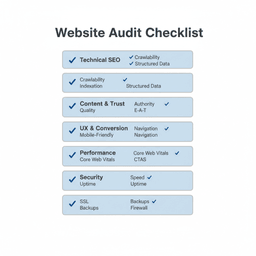
The five core audits every founder should know
People talk about a “website audit” like it is one big thing. In practice, it is a set of checks across five areas. Each one answers a different question.
When you understand the parts, the results stop feeling like a mystery report. You can see what matters, why it matters, and what to do next.
1) Technical SEO audit
This checks if search engines can access, understand, and index your site. It is not about writing better blog posts. It is about removing the barriers that keep your best pages from being found.
Common items include:
- Crawl errors: dead ends that stop Google from reaching key pages.
- Broken links: internal links that lead to 404s and frustrate users.
- Site structure: pages that are buried, duplicated, or hard to interpret.
If you are planning a platform change, this matters even more. See our website migration guide for the risks that tend to show up after a relaunch.
2) Content and trust audit (E-E-A-T)
After Google can find your pages, the next question is: should your pages rank?
This audit reviews whether your content is helpful, accurate, and trustworthy. Google often describes this as E-E-A-T: Experience, Expertise, Authoritativeness, and Trustworthiness.
This is not about stuffing keywords. It is about proving you understand the buyer’s problem and can help solve it.
This audit usually checks:
- Do your main pages answer the questions customers ask right before they buy?
- Do you show real experience, examples, and clear authorship?
- Is your content fresh, or has it gone stale while your market moved on?
3) UX and conversion audit
This is the “can people actually do the thing?” audit.
It reviews your key flows like buying, booking, joining, or signing up. The goal is to spot the moments where people hesitate, get confused, or give up.
Typical checks include:
- Is the navigation simple enough for a first-time visitor?
- Is the main call to action obvious on desktop and mobile?
- Does checkout feel safe and quick?
If you want a practical way to test this, our guide to web usability testing shows how to watch real users get stuck, without a lab and without a huge budget.
4) Performance and Core Web Vitals audit
Speed is not a “nice to have.” It is tied to rankings and revenue.
This audit checks load speed and interaction speed using Core Web Vitals, plus the items that usually cause slow pages, like heavy images, messy scripts, and slow servers.
Fixing speed problems often pairs well with Website Optimization Services because performance issues can return over time as teams add new plugins, scripts, and tracking tools.
5) Security audit
This checks whether your site and customer data are safe.
It includes SSL setup, software patching, plugin risks, weak admin access, malware checks, and common configuration errors.
One visible security warning in a browser can end a sale in seconds.
The hidden failures that cost most websites traffic and trust
Many founders assume a website works “well enough” because it loads and nothing is obviously broken. But the biggest failures are often silent.
A checkout can be slow, not broken. A form can be confusing, not broken. A page can be indexable but still not show up in search because of structure issues.
Here is a simple example. A buyer is ready to pay. They see a browser warning about an insecure connection because of an SSL issue. They leave. That is not a marketing problem. That is a trust problem.
How common performance problems really are
Performance issues are widespread, even on well-known sites.
According to HTTP Archive and Chrome UX Report data cited in the modern state of website audits, only 48% of websites pass all three Core Web Vitals on mobile, and 56% pass on desktop. In other words, most sites make mobile users work too hard.
Accessibility is not a niche issue
Accessibility problems also show up everywhere. They block real customers and increase risk.
Simple issues like missing alt text, low contrast, and form labels that screen readers cannot understand make a site hard or impossible to use for many people.
WebAIM’s 2024 analysis found that 94.8% of websites fail basic accessibility standards. That is a business risk, not just a design detail.
Small issues, big business impact
This table shows how common audit findings tie to real outcomes.
| Common audit finding | What it means for your business |
|---|---|
| Slow load times (poor LCP) | Higher bounce rate: visitors leave before they see your offer. |
| Insecure checkout (SSL errors) | Lost sales and trust: carts get abandoned fast. |
| Non-responsive design | Mobile traffic loss: your site feels broken on phones. |
| Poor accessibility | Legal risk and lost customers: you exclude people who want to buy. |
A good audit connects these issues to business results. It turns “technical” into “here is why revenue is leaking, and here is what to fix first.”
The business case for a website audit
Finding problems is only step one. The real value is what you do with the list.
When your site is faster, clearer, and easier to trust, your existing marketing works better. You do not need to double your ad spend to see better results. You need fewer leaks.
Turning fixes into revenue
It is easy to treat an audit as a long to-do list. Do not. Each fix should connect to a result you care about.
For example, speeding up a landing page is not “a score improvement.” It can reduce bounce rate, increase time on page, and lift sign-ups.
If you are already investing in content and organic search, the upside can be big. The same audit report that finds crawl issues can also show you which pages deserve more attention because they already attract high-intent traffic.
Audit work turns your website from a cost into an asset that earns trust, leads, and sales.
Getting ready for AI search
Search is changing fast. People still use Google, but they also get answers from AI Overviews and other AI tools.
That means fewer clicks for vague, hard-to-parse pages. Clear pages win.
An audit helps you prepare by checking:
- Content clarity: direct answers, simple structure, strong headings.
- Trust signals: real authors, real experience, accurate claims, updated pages.
- Structured data: markup that helps machines understand what your content is about.
If your site is also due for a repositioning or a visual refresh, pairing audit findings with brand and UX design work can prevent you from polishing pages that are broken underneath.
A simple audit framework you can use today
You do not need to be an engineer to run a helpful first pass. The point is to find red flags, then decide what deserves deeper work.
Think of it in two parts: automated scans, then manual checks.
Step 1: Run automated scans
Start with tools that are free and widely trusted. They will surface common problems fast.
- Google Search Console: check Indexing to see what Google is skipping and why.
- Google PageSpeed Insights: review Core Web Vitals and the “Opportunities” list.
- Screaming Frog: crawl up to 500 URLs for broken links, redirects, missing titles, and duplicate metadata.
Do not try to fix everything after the first scan. Look for patterns: lots of 404s, lots of duplicate titles, or a weak mobile score across key pages.
Step 2: Do manual checks
Tools cannot tell you what your site feels like.
Open an incognito window. Use your phone. Then try to complete the main task a buyer would do.
Tools can spot a broken link. Only a human can spot the sentence that makes a buyer doubt you.
As you test, ask:
- Do I understand what this company does in 5 seconds?
- Can I find pricing and the next step without hunting?
- Does the sign-up or checkout feel safe and quick?
- Does anything feel “off” on mobile?
Also make sure you can measure what happens next. If you are rebuilding or relaunching, follow our guide on how to set up analytics and ads so you do not lose tracking when you ship changes.
Your starter checklist
Here is a simple checklist you can copy into a doc:
- Technical: sitemap exists and is accurate, no major crawl errors, key pages indexable.
- Performance: main pages load in about 3 seconds or less on mobile, no heavy images on templates.
- UX: clear call to action above the fold, forms work on mobile, key pages are easy to find.
- Content: top pages match search intent, pricing and proof are easy to find, outdated pages updated or removed.
- Security: SSL is valid, software updated, admin access locked down.
These checks will not replace a full expert review, but they will show you where the biggest problems are.
Turn audit findings into a roadmap
Audit results can feel overwhelming. That is normal.
The goal is not to fix everything at once. The goal is to prioritize by impact and effort, then ship improvements in phases.
Prioritize by impact and effort
One broken link on an old blog post is annoying, but it may not move revenue. A slow checkout that causes cart abandonment is urgent.
Use four buckets:
- Fix now: security issues, broken payment flows, major indexing problems.
- High-impact projects: redesigning onboarding, rebuilding key landing pages, cleaning site structure.
- Quick wins: compressing images, rewriting a hero section, fixing missing titles on top pages.
- Later: low-impact polish on low-traffic pages.
If performance is a recurring issue for your team, it helps to set up monitoring. This list of website performance monitoring tools is a solid starting point.
Build a phased plan
Phase 1 should stop the bleeding, like trust issues and broken conversion paths.
Phase 2 should focus on a bigger lift that improves results month after month, like a stronger homepage, clearer product pages, or a faster mobile experience.
If the audit points to a larger rebuild, consider whether you need website redesign services instead of a string of small patches. Sometimes the best fix is a clean rebuild with the right structure.
If you are not sure where your needs fall, browse our services and use the audit findings to choose the smallest next step that creates real change.
Frequently asked questions about website audits
How often should I audit my website?
For most businesses, a deep audit every 6 to 12 months is a good baseline.
Do one sooner if you are redesigning, migrating, adding major features, or you see a sudden drop in traffic or sales.
Can I do a website audit myself?
Yes, you can do a strong first pass with free tools and manual testing.
The biggest mistake is running reports, then ignoring them. An audit only matters if it leads to fixes.
What is the biggest mistake to avoid?
Tunnel vision.
Do not only focus on SEO while ignoring speed, UX, and security. Users experience your site as one thing, so your audit plan should cover the full experience.
Your next steps
- Block 30 minutes this week. Run Google Search Console and PageSpeed Insights. Write down the biggest red flags.
- Act like a customer for 15 minutes. Try to buy, book, or sign up on mobile. Note where you hesitate or get stuck.
- Pick one fix. Choose the single issue most likely to improve trust or conversion and address it first.
If you want help turning audit findings into a clear build plan and steady growth, download Website Mastery for Publishers or talk with Refact about what is breaking and what to fix first.


