


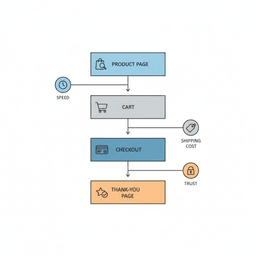
Ever look at your store analytics and feel stuck? You are paying for traffic, people are visiting, but sales do not follow. If that sounds familiar, this guide will show you how to improve ecommerce conversion rate by finding the exact places shoppers drop off, then fixing them one at a time.
This is not about one “magic” tweak. It is about removing small bits of friction that add up to lost revenue. When you get those fixes right, you keep more buyers moving from product page to checkout to purchase.
Why your store has traffic but not enough sales
Let’s be direct. Getting visitors is only half the job. If people land on your site and leave, something in the buying path is getting in their way.
The global average ecommerce conversion rate sits around 2.1%. That means 98 out of 100 sessions end with no order. For many stores, the gap is not “bad marketing.” It is a set of small issues across the funnel.
Pinpoint the real problem
After building 100+ products for founders, we rarely see one big failure. We see lots of tiny problems that stack up. Each one gives shoppers a reason to pause, doubt, or quit.
Common friction points include:
- Navigation that makes it hard to find the right product.
- Slow product pages that feel broken on mobile.
- A checkout that asks too many questions.
- Ads that promise one thing, then send people to a page that feels different.
If you want help finding and fixing those issues fast, our website optimization services are built for exactly this kind of work.
The goal is not to blame your marketing or your website. The goal is to find the specific, fixable problems that quietly cost you sales.
Establish your baseline with key metrics
Before you change copy, buttons, or layouts, get clear on what is actually happening. Improving conversion without a baseline is like fixing a car by guessing. You might get lucky, but you might also break what was working.
Your goal is to move from “sales feel low” to “mobile checkout drop-off is 70%, that is the first fix.” That level of clarity keeps your work focused.
Move beyond the overall conversion rate
A site-wide conversion rate is useful, but it hides the details. The best insights come from slicing your data.
Ask questions like:
- Which channels bring buyers vs. browsers?
- How do mobile, desktop, and tablet performance compare?
- Which product pages have the highest bounce rate?
Also make sure your tracking is clean. If your UTMs are messy, your “best channel” report is not trustworthy. Use a consistent naming system, and validate links before campaigns launch. Refact’s free UTM campaign URL builder helps you create and check tracking links quickly.
Key conversion metrics you must track
| Metric | What it tells you | Where to find it | Good benchmark |
|---|---|---|---|
| Session Conversion Rate | Percent of sessions that end in a purchase. Your main “north star.” | Your analytics purchase event vs. total sessions | 2–3% (varies) |
| Add to Cart Rate | How often visitors add an item. Low rate points to product page issues. | Add-to-cart events vs. sessions | 8–12% |
| Checkout Abandonment Rate | How many people start checkout but do not buy. High rate signals checkout friction. | Checkout funnel: begin checkout to purchase | ~70% (lower is better) |
| Bounce Rate | Percent of sessions that were not engaged. High rate can mean poor page match or weak UX. | Landing page report with bounce rate | 40–55% |
| Average Order Value (AOV) | Average revenue per order. Helps you judge conversion quality. | Ecommerce revenue reports | Industry dependent |
Your diagnostic dashboard: three core metrics
To stay out of the weeds, track a simple weekly dashboard. You can build this in your analytics tool or a spreadsheet. These three numbers often point to the biggest leak.
-
Session conversion rate by channel: Shows which sources bring buyers, not just clicks. If email converts at 4% and paid social converts at 0.5%, your message or targeting is off.
-
Add to cart rate: If this is low, your product pages are not doing their job. You might have weak photos, unclear price, missing details, or the wrong traffic landing on the page.
-
Checkout abandonment rate: This is the moment of truth. If people begin checkout then quit, it is usually cost shock, form overload, or low trust.
Track these three metrics, then segment by device and source. You stop guessing and start seeing where the funnel leaks.
This is the same approach we use before building anything. If the plan is wrong, the build will be wrong. If you need help setting up clean measurement, our guide on set up analytics and ads covers the basics.
Your product page is your digital sales floor
Your ads worked. People clicked. Now the product page has to close the gap between interest and action.
A common mistake is sending ad traffic to a generic homepage. If someone clicks an ad for a red dress, they should land on that red dress. If they have to hunt, many will leave.
Once people are on the right page, your job is simple to say, but hard to do. Reduce doubt and make the next step feel easy.
Write for outcomes, not specs
Product descriptions often read like a parts list. Shoppers do not buy parts. They buy a result.
Instead of: “Made from 100% organic cotton.”
Try: “Soft, breathable organic cotton that stays comfortable all day, even on sensitive skin.”
You are not just describing an item. You are helping the customer picture a better day with it.
Show it clearly with visuals and trust
Photos and video do heavy lifting. If your images are dark, blurry, or feel like stock photos, you are asking shoppers to take a leap of faith.
Use this checklist:
- Multiple angles: Front, back, and close-ups of important details.
- In-use shots: Show scale and context. People want to see the product in real life.
- Short video: A 20–40 second clip answers questions photos cannot.
Then add trust. Reviews, user photos, and clear returns and shipping info cut doubt fast. If you can, place reviews near the buy section, not hidden behind tabs.
Perfect your cart and checkout experience
This is where many stores lose the sale. A shopper has decided “yes,” then the process makes them rethink it.
Cart abandonment is often around 70%. That is not normal “shopping around.” It is a sign that the final steps feel too hard or too risky.

Stop surprising customers with costs
The top reason people bail is unexpected cost. Shipping, taxes, and fees that show up late feel like a trick.
Fix this with radical clarity:
- Show shipping estimates on the cart page (a zip code field is enough).
- State return policy in plain language.
- Show delivery timing early, not after payment.
When shoppers know the full cost early, they are less likely to “hit the brakes” at the last step.
Run a checkout friction test
Open an incognito window and buy from your own store. Count every field. Ask yourself if each one is truly needed.
We have seen teams cut a form from 15 fields to 8 and reduce abandonment by 35%. Often, phone number and “address line 2” do not need to be required.
Checkout basics that matter:
- Guest checkout: Do not force account creation before the sale.
- Fast payments: Offer popular wallet and express payment options your customers expect.
- Trust cues: Put returns, support links, and security reassurance near payment.
Localization is profit
If you sell across regions, payment and shipping preferences vary a lot. If you do not offer familiar options, you lose buyers who were ready.
This does not mean adding every method under the sun. It means using your data to decide what matters for your top markets, then supporting those needs.
If your platform is limiting checkout changes, it may be time to rethink your setup. Our guide on ecommerce development with Shopify explains how to judge platform fit. If a move is needed, ecommerce migration services can help you change platforms without losing sales momentum.
Drive repeat sales with a strong post-purchase plan
A purchase is not the end of the journey. It is the start of a new one.
If you stop after checkout, you leave future revenue to chance. Retention raises LTV, which makes your ad spend easier to sustain.
Turn your thank-you page into a next step
Many thank-you pages are dead ends. That is a missed opportunity because the buyer is excited and trusts you right now.
Ideas that work:
- Referral offer: Give a shareable code for friends, reward both sides.
- Community invite: Send them to your VIP list, group, or Discord.
- Social follow: Make it one tap to follow.
- Smart cross-sell: Offer a related product with a time limit.
Use post-purchase email to build trust
Post-purchase emails get strong opens because people look for them. That makes them a great place to teach, reassure, and set up repeat buying.
A simple sequence:
-
Order confirmation: Send instantly. Restate a key benefit so buyers feel good about the choice. Include support info.
-
Shipping email: Add tracking plus “how to use it” tips, care instructions, or customer photos.
-
Review request: Ask 7–14 days after delivery. Explain why reviews matter and keep it short.
If you want to go deeper here, the benefits of email automation article outlines ways to reduce manual work while improving repeat sales.
Your action plan for a higher conversion rate
Do not try to fix everything at once. Pick the biggest leak, fix it, measure it, then move on.
Start with your dashboard. Find the one metric that looks worst:
- If bounce rate is high, your landing page may not match the ad promise, or the page may load too slowly.
- If add to cart is low, your product page is not convincing.
- If checkout abandonment is high, checkout has friction or cost shock.
From diagnosis to action
Once you pick the main problem, write down three possible fixes. Keep them simple.
-
Problem: High cart abandonment.
Fix ideas: Show shipping earlier, cut form fields, add clear returns copy.
-
Problem: Low add to cart.
Fix ideas: Add a short product video, improve photos, rewrite the first 2–3 lines of the description to focus on the result.
Then choose the easiest fix you can ship this week. Launch it. Watch the numbers for 1–2 weeks. If it helps, keep it and do the next one. If it does not, roll it back and try the next idea.
Good conversion work is a loop: find the leak, make a small change, measure the result, repeat.
If you are still early and figuring out what to build or change, Refact’s ecommerce idea viability guide can help you pressure-test your plan before you spend months building the wrong thing.
Common conversion rate questions answered
These questions come up in almost every founder conversation about ecommerce performance. Here are clear answers you can use.
What is a realistic conversion rate to aim for?
Stop chasing one global number. A “good” conversion rate depends on your price point, category, traffic quality, and brand trust.
A $2,000 luxury product can do well at 1%. A $20 consumable may reach 5% or more. Your best benchmark is your own baseline.
If you are at 1% today, getting to 1.5% next quarter can be a big win. The best stores often land in the 3.5% to 5% range.
How long should I run an A/B test?
Run tests long enough to cover weekday and weekend behavior. For many stores, that is at least 1–2 full weeks.
Also make sure you have enough purchases per version. Early “wins” can flip once more data comes in.
Should I focus on desktop or mobile first?
Check your numbers. For most ecommerce stores, the majority of traffic is mobile.
Even if mobile converts lower, it often drives the most revenue potential because volume is higher. Fixing mobile usually helps desktop too.
Conclusion: fix one leak, then build momentum
If you want to improve ecommerce conversion rate, you do not need a full redesign. You need a clear baseline, a short list of leaks, and a weekly habit of shipping small fixes.
If you want a partner to help you find the biggest opportunities, plan the right work, then build and measure it, Refact can help across design, development, and performance work. Explore our website development services and branding and design services, then talk with our team when you are ready.


