


Ever tried to read your phone in bright sun and had to squint? Or opened an app at night and the text looked like it was fading into the background? That is a contrast problem, and it shows up in digital products all the time.
Contrast ratios put a number on that problem. They help you measure if text, buttons, and key UI elements are actually readable. If your interface is hard to read, people bounce, support tickets rise, and conversions drop.
If you want a fast way to spot issues beyond color, start with a quick audit. This founder’s guide to a website audit breaks down what to check first.
So, what are contrast ratios in simple terms?
A contrast ratio is a score that shows how different a foreground color (like text) is from its background. Higher scores are easier to read. Lower scores can make content hard to use or completely unreadable.
Technically, the score compares luminance, which is the perceived brightness of two colors. Pure black (#000000) on pure white (#FFFFFF) is the highest contrast you can get, 21:1. Light gray text on a slightly lighter gray background might land around 1.3:1, which is painful for many users.
This is not a “designer-only” detail. If someone cannot read your pricing, fill out a form, or see a “Buy” button, your product fails at the exact moment it needs to work.
To make the numbers feel real, here is a simple breakdown.
A quick guide to understanding contrast
This table shows what low and high contrast ratios look like in practice.
| Contrast level | Example | Is it readable? | Impact on users |
|---|---|---|---|
| Low contrast | Light gray text on white (1.5:1) | Barely | Creates eye strain and is unreadable for many people, especially users with low vision. |
| High contrast | Dark blue text on pale yellow (10:1) | Yes | Easy to read for most users, so your message lands quickly and clearly. |
The difference is not subtle. One feels frustrating. The other feels effortless.
Why this score matters
Contrast ratios are a direct measure of readability. If users cannot read your navigation labels, form instructions, or CTA button text, they cannot complete tasks. That hurts conversion and trust.
Good contrast also supports people with common vision challenges like low vision and color blindness. It also helps users in everyday situations, like glare, tired eyes, or small screens.
Contrast ratio is the technical name for readability. If your product is hard to read, your product is hard to use.
That is why teams talk about hitting specific targets like 4.5:1 or 7:1. Those are not random numbers. They come from accessibility standards that define what “readable” means for most people.
Why is good contrast good for business?
Contrast feels like a small design choice, but it affects outcomes you care about: activation, checkout completion, retention, and support load.
Poor contrast is not only a “look and feel” issue. It is a usability issue. And usability issues show up as lost revenue.
Expand your market by designing for more people
Millions of people live with vision impairments. For them, low contrast can be a dead end. They cannot read the price, find the sign-up button, or spot errors in a form.
But good contrast helps everyone, not just users with a diagnosis:
- Situational limits: Bright sun, a dim room, a cracked screen, or a low-quality monitor can turn “fine” contrast into unreadable contrast.
- Aging users: Contrast sensitivity often drops with age. What looks clear to a 25-year-old might be hard for a 65-year-old.
- Lower mental effort: When text is easy to read, people move faster. They make fewer mistakes. They are more likely to finish the flow.
Accessibility is not a niche feature. It often looks like better usability for everyone.
The long-term costs of ignoring contrast
If you ship low contrast, you may not notice right away. Then the problems pile up. Support teams get “I can’t find it” messages. Users abandon key pages. Your brand starts to feel sloppy.
Fixing it later is also expensive. You often need to update design tokens, component libraries, charts, icons, and templates. If you want to improve outcomes with small, targeted changes, Refact’s website optimization services focus on issues like conversion blockers and UX friction, including readability.
What are the accessibility magic numbers?
You do not have to guess. Contrast ratio targets are defined by the Web Content Accessibility Guidelines (WCAG), the most common standard used for digital accessibility.
For most products, teams aim for WCAG AA. It is the baseline standard many organizations use. WCAG AAA is stricter and best for experiences where readability is the whole point, like long-form content or tools for older audiences.
AA vs. AAA: the key contrast ratios
WCAG sets different thresholds for normal text and large text. Large text gets a lower requirement because it is easier to read.
- WCAG AA (standard):
- Normal text: at least 4.5:1
- Large text: at least 3:1 (18pt+ or 14pt bold)
- WCAG AAA (stricter):
- Normal text: at least 7:1
- Large text: at least 4.5:1
This is not about nitpicking your design team. It gives you a shared target. You can ask, “Do our main pages meet WCAG AA contrast for text and key UI elements?” and get a clear answer.
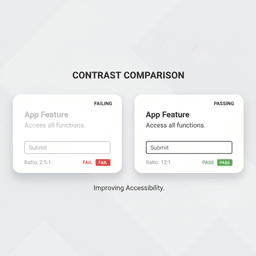
Knowing the AA numbers, 4.5:1 for normal text and 3:1 for large text, helps founders ask better questions and catch problems early.
If contrast problems are showing up across templates or components, it is usually a system issue, not a one-off mistake. That is where strong foundations matter, from design tokens to reusable components. For implementation support, Refact’s website development services cover the build work that makes these fixes stick.
How have modern screens changed the contrast game?
Screens today look far better than screens from a decade ago. That changes how your colors appear in real life, and it can expose weak contrast choices.
Older LCD screens used a backlight, so “black” often looked like dark gray. Many displays also struggled with glare and limited viewing angles. Newer OLED-style displays can produce much deeper blacks because pixels can switch off completely.
What modern displays do well, and what they cannot fix
Modern screens can make good design look great. They can also make bad contrast look worse.
- Deeper blacks: Dark themes can look cleaner and sharper.
- Clearer edges: Text can appear crisper at smaller sizes.
- More visible flaws: Light-gray-on-slightly-lighter-gray still fails, even on an expensive screen.
Better screens help, but they do not replace good contrast choices. Readability still starts with design.
This matters because your users are not all on the same device. Some are on the newest phone. Others are on older laptops, low-cost monitors, or screens with glare. Good contrast is how you keep your UI readable across all of them.
How can you check your product’s contrast?
You do not need to be a designer to check contrast ratios. You just need two color values, one for the foreground and one for the background.
A simple workflow looks like this:
- Use a color picker (browser dev tools or an extension) to grab the hex codes.
- Paste the values into a contrast checker.
- Confirm pass or fail for WCAG AA and AAA.
Free tool that makes this easy
The WebAIM Contrast Checker is one of the simplest options. You enter your foreground and background colors, and it returns the contrast ratio and pass/fail results for normal and large text.
If you want a wider way to find friction, not just color issues, pair contrast checks with user testing. This guide to web usability testing covers quick methods to see where people get stuck.
Contrast checks work best when they happen early, in design, before anything is coded. Fixing a color token is cheaper than reworking templates later.
What are the next steps for building an accessible product?
Numbers only help if they change what your team does next. The fastest progress comes from small, repeatable habits.
Your next team meeting agenda
- Set the baseline: Ask, “Are we designing to meet WCAG AA contrast for all standard text and key UI parts?”
- Spot-check one money page: Audit your homepage hero, pricing page, checkout, or sign-up flow. Check headline text, body text, form labels, error states, and button text.
- Decide where AAA is worth it: For long reading experiences, legal content, or older audiences, consider AAA for body text.
Accessibility works best as a habit. Small checks, done often, prevent big fixes later.
If your brand palette is the blocker, you may not need a full redesign. Many teams solve this with a slightly darker text shade, a lighter surface color, or a separate “accessible” variant for UI components. If the site needs broader structural changes, Refact’s website redesign services can help bring the whole experience up to standard without breaking what already works.
For teams that want end-to-end help, from visual design to implementation, Refact also offers web design services that include the systems needed to keep contrast consistent across pages and templates.
Frequently asked questions about contrast ratios
What if my brand colors fail contrast checks?
You usually do not need to abandon your brand. Small tweaks often solve it. A slightly darker version of your primary color, or a lighter background tint, can push you over AA.
Another option is to reserve the tricky color for decoration and use a compliant color for functional UI, like text, buttons, and form labels.
Does contrast only matter for text?
No. Contrast also matters for icons, input borders, focus states, charts, and any UI element people need to understand or use.
WCAG also includes requirements for these non-text elements. A common baseline is 3:1 for important UI components and graphical objects.
If an element is needed to understand content or take action, its contrast matters, whether it is text, an icon, or a chart label.
Is achieving the AAA standard always necessary?
No. For most products, WCAG AA is the practical target. It supports a wide range of users while still giving designers room to work.
AAA is best as a focused goal. Many teams meet AA everywhere, then apply AAA to core reading areas like article body text or key help content.
Conclusion: make contrast a standard, not a debate
Contrast ratios are a simple way to protect readability, accessibility, and conversion. Hit WCAG AA across your key pages, and you remove a common reason users struggle, quit, or complain.
If you want help checking your current UI and fixing contrast issues without turning it into a months-long project, talk with Refact.


