


When your site starts slowing down your business, you begin looking at WordPress migration services. Not because it sounds fun, but because your website is now tied to revenue, growth, and day-to-day operations.
If publishing takes forever, pages load slowly, or your team needs a developer for every change, you are paying a “website tax” each week. A move to WordPress can fix that, but only if the move is planned and executed with care.
If you want a partner who can build and rebuild platforms for growing teams, see our website development support and what a real engagement looks like.
When your website starts holding you back
Most founders do not wake up and decide to rebuild a website. It happens after months of small problems that keep stacking up.
Your site becomes the thing you work around. That is when it stops being an asset and turns into a drag on the business.
The signs your platform is stifling growth
The breaking point is rarely one big outage. It is the slow burn of constant friction.
You stop saying “yes” to good ideas, because you already know the platform cannot handle them. That is a business problem, not a tech problem.
Speed is one of the clearest signals. Studies show that a delay of 1 to 3 seconds can raise bounce rate by about 32%. That can mean a lot of lost trials, sales, or sign-ups.
Think of your website like a storefront. If the door sticks and the checkout line is confusing, people leave.
From frustration to a stronger foundation
The pain usually shows up in the same places. Simple tasks become hard, and every workaround adds more risk.
Do any of these feel familiar?
- Painful updates: Publishing is slow, clunky, or confusing. A short post turns into a long task.
- A feature wall: You need a paywall, better payments, a resource library, or deeper analytics. Your current platform cannot support it without hacks.
- Security stress: You worry about old plugins, weak logins, and what happens if the site goes down.
The common theme is lost time and lost momentum. When your site blocks shipping, marketing, and sales, it is time to plan a move.
What a WordPress migration actually includes
“Migration” sounds like a simple copy. For a real business site, it is closer to moving offices.
You are not just moving pages. You are moving systems, content, data, and the workflows your team depends on.
It is more than moving files
A good partner starts with a plan. That plan covers what is being moved, what is being rebuilt, and what should be retired.
It also defines how you will protect search traffic, avoid downtime, and confirm nothing goes missing. If you want a planning-first view, start with this pre-migration checklist.
It is the difference between tossing everything in a truck and hiring movers who label boxes, protect valuables, and set up your new space.
Why WordPress is often the destination
WordPress powers 43.3% of all websites, and holds about 60.9% of the CMS market. That scale matters because it creates a large ecosystem of themes, tools, and experienced developers.
For founders, this usually means more flexibility and fewer dead ends. You can build a simple marketing site, or something complex like a membership product, without getting trapped in a closed system.
Some teams also choose a decoupled setup for speed. If that is on your radar, this guide explains what headless WordPress is and when it makes sense.
Common migration scenarios we see all the time
Every business has its own story. Still, most migrations follow a few patterns.
After helping many founder-led teams move platforms, these are the situations that come up again and again.
Leaving the “walled garden” site builder
Many founders start on a site builder because it is fast to launch. That is a good move early on.
Later, those same constraints become the problem. You need custom membership logic, a real paywall, better integrations, or new templates for growth pages. The platform is not built for that level of control.
In one case, a growing publication needed a smoother paid experience and more control over analytics. After moving to WordPress and rebuilding the membership flow, they saw a 25% jump in member sign-ups in the first three months.
Replacing a legacy custom system
Another common scenario is an old custom build. It may have been “perfect” for version one.
Years later, it becomes slow and expensive to change. Only one person understands the code, and every update feels risky.
A professional migration is not just moving data. It is moving from dependency and tech debt to more control.
We worked with an education company on an aging custom PHP system. Adding a course took two weeks and required a specialist.
After moving to WordPress with a modern course setup, they cut monthly maintenance costs by over 60%. Their team could publish new courses in an afternoon.
Moving from WordPress to a healthier WordPress build
Sometimes you are already on WordPress, but the site is weighed down. The theme is slow, plugins conflict, and updates feel scary.
Other times, the issue is scale. The site needs better performance, better caching, and a build that can handle spikes without breaking.
An e-commerce brand came in with load times above five seconds. That is a conversion killer on mobile.
They kept WordPress as the content and product system, but changed the front end for speed. The performance win was immediate, and conversion rate improved.
Creator platforms and the ownership problem
Creator platforms can be great for starting a newsletter or paid community. But many founders later hit limits on branding, data ownership, and monetization.
Moving to WordPress often gives you more control over how content is organized, how readers become members, and how you build long-term value.
If that is your situation, this guide on how to transition from Substack shows what to plan for and what to avoid.
Comparing migration paths and why they matter
These paths are not only tech swaps. They change how your team ships work, runs marketing, and supports customers.
| Migrating From | Common Founder Pain Point | Primary Benefit After the Move |
|---|---|---|
| Site builders (closed platforms) | “I cannot add what my business needs without hacks.” | More control: Custom features, deeper integrations, and fewer platform limits. |
| Legacy custom systems | “It is slow, expensive, and one developer owns the knowledge.” | Lower overhead: Better tooling, easier hiring, and a safer long-term path. |
| Older WordPress builds | “It is bloated, hard to update, and I worry about security.” | Cleaner foundation: Faster pages, safer updates, and room to grow. |
| Creator platforms | “I do not own my audience data, and options are limited.” | Ownership: Control brand, data, and monetization in one place. |
The true cost of DIY or “cheap” migrations
It is tempting to take the low-cost route. A plugin promises a one-click move. A freelancer promises a fast job for a few hundred dollars.
The risk is not a few broken links. The risk is lost revenue, lost search traffic, and broken customer flows.
The hidden risks of cutting corners
We have worked on plenty of rescue projects. Most had the same root cause: the migration copied “pages,” but missed the business logic and data details.
Common failure points include:
- Data loss: Missing posts, product history, member data, or custom fields that were not mapped correctly.
- Search traffic drops: Missing 301 redirects and metadata can cause large ranking losses.
- Downtime: A broken cutover can take a site offline for days.
- Security gaps: Old files, weak permissions, and rushed setups can create easy entry points.
Paying for experience is often paying for fewer surprises. You want the business running the day after launch.
A rescue story (and the lesson)
A membership founder once used a plugin to move their site. The tool reported success, but it did not move custom database tables that stored subscription status.
For two weeks, new sign-ups did not process correctly and existing members could not log in. They found out after a wave of support emails and refunds.
The lesson is simple: if your site makes money, the migration should be treated like a revenue project, not a “site task.”
How to choose the right migration partner
If you are going to move, the partner matters as much as the platform. You are giving someone access to your core business system.
Choose based on how they think, not only what they code.
Look for strategy before tools
In the first conversation, listen for the questions they ask.
A strong partner asks about outcomes, not plugin lists. They should want to understand what is broken today and what “better” means for your team.
Good early questions include:
- What business problem are you trying to solve?
- What does success look like in six months?
- Which workflows cost you the most time right now?
Check proof, not promises
Look beyond a pretty portfolio grid. Ask for examples where the partner preserved search traffic, improved speed, or reduced support load.
Also look for long-term relationships. A migration is rarely “done” on launch day. Real results show up in the months after.
Ask about the business impact
A good partner can explain how the work affects revenue, content output, and conversion rates. If they cannot connect the work to outcomes, you are taking a blind risk.
Post-launch improvements often include faster pages, fewer publishing bottlenecks, and better tracking. If you also want help after the move to improve speed and conversions, ask how they handle performance work and measurement.
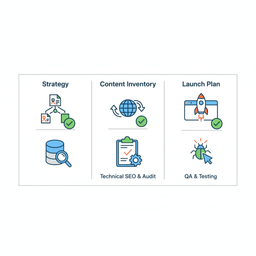
Your action plan for a smooth migration
You can do a lot before you hire anyone. This prep work makes every proposal clearer, and it reduces surprises later.
Use these steps as your starting point.
1) Write down your “why”
List the pains your site causes today. Keep it specific.
If publishing takes 10 hours a week, write that down. If sales are lost because checkout breaks, capture examples.
2) Inventory content, data, and features
Make two lists: “must keep” and “nice to keep.”
- Must keep: Core pages, posts, SEO metadata, accounts, orders, and any paid access logic.
- Nice to keep: Old experiments, unused sections, and anything you would not rebuild today.
Being strict here reduces cost and risk. It also helps partners give accurate timelines.
3) Define success metrics before kickoff
A migration is only “successful” if it improves the business.
Pick simple metrics like load time, conversion rate, publishing time, or support volume. Decide how you will measure them before and after launch.
When you get close to launch, use a practical launch-day migration checklist so your cutover is controlled and calm.
If you define your why, clean up scope, and pick success metrics, you get a plan. Plans prevent expensive surprises.
FAQ
How long does a WordPress migration take?
It depends on how much you are moving and what needs to be rebuilt.
A simple marketing site or blog might take 4 to 6 weeks. A large e-commerce or membership site often takes 8 to 12 weeks, sometimes more.
The biggest timeline drivers are content volume, feature complexity, and how custom the new design and templates need to be.
Will a migration hurt my SEO?
If it is done poorly, yes. Search traffic can drop fast when redirects, metadata, and page structure are not handled correctly.
A careful migration maps old URLs to new ones with 301 redirects, keeps core metadata, and checks crawl errors after launch. In many cases, rankings improve after the move because the site is faster and easier to crawl.
What is the difference between manual and plugin migrations?
A plugin migration is a bulk copy. For a small personal site, it might be fine.
For a business site, the risky parts are usually custom fields, membership logic, payment flows, analytics, and redirects. Manual migrations handle those pieces on purpose, not by luck.
Conclusion: A platform move is not just a tech change. It is a business change. When it is planned well, you get faster pages, easier publishing, safer updates, and a site you can grow without fighting it.
If you want help scoping the move and pressure-testing the plan, book a strategy call with Refact.


