


Founders move fast. But the wrong website stack can slow you down for months. WordPress development is often the middle path, you get a flexible build plus a simple editor your team can use. It can power a marketing site, a content product, a membership business, or even a full web app.
In plain terms, WordPress development means building custom pages and features on top of WordPress so you can ship quickly, test ideas, and still own your platform. If you want help scoping the right build, start with our website development services.
Is WordPress the Right Choice for Your Product?
Founders ask this all the time: “Is WordPress actually right for what I’m building?” The answer is less about tech debates and more about your business needs. You want speed, control, and a path to grow without rebuilding everything next year.
WordPress is not just for blogs. It is an open-source CMS that powers a huge part of the web. WordPress runs 43.5% of all websites, which is over 522 million sites worldwide.
It also shows up in high-traffic places. About 29.74% of the top 100,000 sites run on WordPress. You can explore more WordPress market statistics if you want to see the breakdown.
When WordPress works best
WordPress is a strong fit when speed to market and content control matter. It is also a smart choice when you need flexibility, but you do not want to hire a large engineering team on day one.
It is often a great fit if your product includes:
- Content as the product: Articles, guides, reports, podcasts, newsletters, or courses. WordPress makes publishing and editing simple.
- An MVP: You need to test demand and learn fast. WordPress supports quick iteration without a full custom build from scratch.
- Membership or subscriptions: You can add user accounts, paywalls, and gated content with well-known tools and custom code where needed.
- A plan to scale: You can start with a standard build and later move to a decoupled setup if the business earns it.
For many of the 100+ products we’ve built with founders, WordPress was the starting point because it balances speed, control, and room to grow.
If you are unsure, a quick gut check helps. If your team needs to publish often, and you want to own the platform, WordPress is usually worth serious consideration. If your product is mostly a custom app with little content, a different stack may be cleaner.
Choosing Your Architecture: Traditional vs Headless
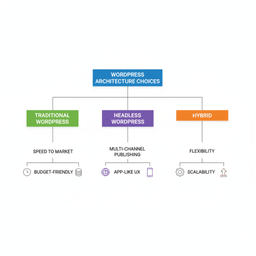
Once you choose WordPress, the next decision is how it should be built. You will hear terms like “traditional” (sometimes called monolithic) and “headless.” The best option depends on your budget, your timeline, and what you are shipping.
Think of a traditional build as one system where WordPress runs both the admin area and the website your users see. A headless build separates those parts. WordPress stays as the content engine, and a separate frontend is built with something like Next.js or React.
The case for a traditional WordPress build
For about 80% of founder projects, a traditional WordPress build is the right call. It is easier to ship, easier to manage, and cheaper to maintain.
This approach is a good fit when you want:
- Speed and simplicity: Launch a marketing site, publication, or standard store faster.
- Lower build cost: One system means less engineering time and fewer moving parts.
- One dashboard: Your team can update content and pages without touching code.
Most founders do not need extra complexity to win. A well-built traditional site can support serious growth while staying easy to run.
When a headless approach is worth it
Headless can be a good move, but only when you have a clear reason. It adds more work up front and can increase ongoing costs.
Consider headless if you need:
- Multiple channels: One backend feeding a website, mobile app, and other surfaces.
- Very fast, app-like UX: Heavy interactivity, complex UI, or strict performance targets.
- Long-term scale planning: You expect big traffic spikes or many system integrations.
If you want a deeper explainer, see our headless WordPress guide to understand what changes in the build and what stays the same.
Traditional vs headless WordPress: quick comparison
| Consideration | Traditional | Headless |
|---|---|---|
| Best for | Marketing sites, content sites, most ecommerce, most businesses | Complex web apps, multi-channel content, strict performance needs |
| Speed to market | Faster | Slower |
| Cost | Lower | Higher |
| Performance ceiling | Good to great with solid engineering | Very high |
| Editing experience | Simple, all in one place | Still WordPress for editors, but more engineering behind the scenes |
| Team needs | WordPress devs | Frontend specialists plus WordPress expertise |
Your goal is not the fanciest setup. It is the setup that lets you ship, learn, and grow without dragging your team into constant rebuilds.
Building a Revenue Engine with WooCommerce
At some point, the product needs to make money. If you plan to sell anything on WordPress, WooCommerce will come up quickly. It is the main ecommerce engine for WordPress, and it can support simple stores and complex business models.
WooCommerce is widely used. It runs nearly 94% of WordPress-based ecommerce sites and about 28% of all online stores globally. For many founders, those numbers matter because they signal a mature ecosystem and lots of available talent.
What you can sell with WooCommerce
WooCommerce is more than a cart. It is a flexible commerce layer that can support several revenue models.
- Physical products: Inventory, shipping, taxes, and product variants.
- Digital downloads: Files, license keys, or gated resources.
- Subscriptions and memberships: Recurring payments and access control. If you are weighing paywall options, use this paywall models overview to pick the right approach before you build.
- Bookings and services: Appointments, calendars, and service packages.
The big benefit of WooCommerce is ownership. You own your customer data, your checkout, and your future options.
When Shopify is the smarter choice
WooCommerce gives you control, but it also gives you responsibility. You still need hosting, updates, and security. For some founders, Shopify is the better business call.
Consider Shopify if:
- You want the simplest path: Shopify handles hosting, updates, and much of the security work.
- You are purely retail: If your business is mostly selling products and content is secondary, Shopify can be a cleaner fit.
- You do not want technical overhead: Shopify is built for “set up and sell.”
The trade-off is control and fees. Shopify has its own pricing and platform rules, and you will work within its templates and app limits. WooCommerce is open-source and can be shaped around your business, but it needs a stronger maintenance plan.
Migrating and Modernizing an Existing Platform
Many founders are not starting from zero. They have a site that is slow, hard to update, or stuck on a platform that no longer fits. Migration can feel risky, especially if SEO or revenue depends on the current site.
That fear is valid. A sloppy migration can break pages, lose content, and tank rankings. The fix is not heroics. It is planning, testing, and a clear launch process.
What a safe migration includes
A migration is not just moving content. It is setting the next version of your business up to run better.
- Strategy first: Map the current site, the goals, and what needs to change. If you are weighing a bigger platform change, this platform migration planning guide is a helpful starting point.
- Content and data mapping: Plan how posts, pages, products, users, and custom fields will translate into WordPress.
- SEO protection: Build a 301 redirect map so search engines can find the new URLs.
- Staging and testing: Build and QA the new site privately before you flip the switch.
For a step-by-step view, see our WordPress migration services guide.
The common failure point is skipping planning. A migration that goes well is mostly preparation, then careful execution.
A good migration also gives you a chance to improve speed, clean up old content, tighten security, and modernize your design system. It is one of the few times you can fix big problems without constant patching.
Keeping Your WordPress Site Fast and Secure
Launch is not the finish line. If your product is slow or gets hacked, users leave. Search rankings drop. Trust takes a hit. Speed and security are business problems, not just technical ones.
Why speed affects revenue
Speed changes behavior. A delay of 1–3 seconds can increase bounce probability by 32%. That is lost signups, lost sales, and weaker SEO.
Speed usually comes down to a few repeatable choices:
- Hosting that matches your traffic: Avoid bargain hosting if the site matters to your business.
- Fewer, better plugins: Every plugin is code. Too many can slow the site and increase risk.
- Smaller images and assets: Compress images and serve the right size for each device.
If your site is scaling and database load is climbing, these WP_Query performance tips explain one of the most common problem areas and how to fix it.
A simple WordPress security checklist
WordPress is popular, which means it gets attacked often. Most attacks are not personal. They are automated bots looking for old plugins, weak passwords, and misconfigured servers.
Good security is boring and consistent:
- Run updates: Core, themes, and plugins. Do this on a schedule.
- Use strong logins: Unique passwords and MFA for admin accounts.
- Install trusted plugins: Choose tools with a strong update history.
- Add a WAF: A web application firewall blocks bad traffic before it hits WordPress.
Most security wins come from not being the easiest target. Updates, access control, and good hosting do most of the work.
What a WordPress Development Project Looks Like
Founders often expect to hire “a WordPress developer” and be done. For a serious product, it is usually a small team. That is how you get a clean build, fewer surprises, and a better launch.
The typical team
Roles vary by scope, but most builds include:
- Product strategy: Defines goals, users, and what “done” means.
- UI/UX design: Builds the flows, layouts, and interaction rules.
- Backend development: Custom features, integrations, data models, and admin tooling.
- Frontend development: Page templates, performance, and responsive behavior.
Smaller sites can combine roles. Bigger projects should not. Specialization saves time later because you avoid fragile shortcuts.
Timelines you can plan around
Every project is different, but founders still need ranges for planning.
- Marketing site or blog (4–8 weeks): Custom design, templates, and editorial setup.
- WooCommerce store (8–16 weeks): Payments, product setup, shipping and tax rules, plus custom features.
- Membership site or custom app (16–24+ weeks): Accounts, gated content, paywalls, and integrations.
- Headless WordPress build (20–30+ weeks): Two builds, backend and frontend, plus more testing paths.
The phase that protects your timeline is discovery. Clear scope early prevents budget creep and late rework.
Cost scales with time and complexity. The best way to control cost is not cutting corners. It is choosing the right scope for v1, then expanding after you have proof.
WordPress Development FAQs
How long does it take to build a custom WordPress site?
A custom marketing site is often 4–8 weeks. A WooCommerce store often lands in the 8–16 week range. A membership product or custom web app is usually 16 weeks or more.
The biggest driver is custom functionality, not page count. The more integrations and custom user flows you need, the more time you should plan for.
Is WordPress secure enough for my business?
Yes, if it is maintained. The riskiest setups are outdated plugins, weak passwords, and cheap hosting. With updates, access control, and monitoring, WordPress is a safe foundation for most businesses.
Can WordPress handle high traffic?
Yes. Many high-traffic sites run on WordPress. The limit is usually not WordPress itself. It is your hosting, caching, database design, and code quality.
Scaling is an engineering problem. With the right build and infrastructure, WordPress can support very large audiences.
Will I need a developer to make changes later?
Not for normal content work. Your team should be able to edit pages, publish posts, and update products in the WordPress editor.
You will want a developer for bigger changes like new templates, new features, complex integrations, or major redesigns. A good build makes everyday updates easy and keeps custom work clean.
If you are a founder with a product vision, your next step is a clear plan before development starts. We can help you define scope, pick the right architecture, and ship a WordPress build that supports growth.


