


Launching an online store looks simple until your platform starts saying “no” to the features your customers want.
That is where WooCommerce development comes in. In the first weeks, it can feel like “just WordPress with a shopping cart.” In reality, it is a build process that decides how flexible your store will be a year from now, how fast it can get, and how much it will cost to change direction.
WooCommerce runs on WordPress, which means you can treat your store like a real product, not a template. You can own the code, control the data, and shape the full buying experience.
What Is WooCommerce Development, Really?
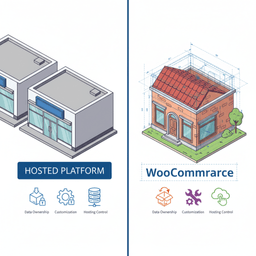
Picture setting up a physical retail shop. You have two paths.
You could rent a pre-built spot in a high-end mall. This is your Shopify or BigCommerce. It’s quick, someone else handles the maintenance, and you can open your doors fast. The trade-off is that you follow the mall’s rules. The layout is fixed, and you cannot knock down a wall when you outgrow the space.
Your other option is to buy land and build your own flagship store. That is the world of WooCommerce. You get control over the layout, the experience, and the back office. You also take on more responsibility for hosting, security, and upkeep.

Understanding the core trade-off
WooCommerce development is the full process of planning, designing, and building that “owned” store. It is a better fit when your website is a real business asset, not just a checkout page.
This path is right when you need:
- Total ownership: You control your data, your code, and your customer relationships.
- Deep customization: You can build special flows, pricing, products, and content-driven shopping experiences.
- Room to scale: You can choose the hosting setup that fits your traffic, catalogs, and marketing plans.
If you are still comparing platforms, start with your “must-have” list. If hosted tools already meet it, you might not need a custom build. If they do not, you can also review our Shopify fit assessment before you commit either way.
WooCommerce vs all-in-one platforms at a glance
| Factor | WooCommerce | Hosted Platforms (e.g., Shopify) |
|---|---|---|
| Ownership & Control | You own everything: data, code, and hosting. | You rent space. The platform owns the core infrastructure. |
| Customization | Very flexible. Best for unique features and branding. | Limited by themes, apps, and API limits. |
| Cost Structure | Software is free. You pay for hosting, plugins, and build work. | Monthly plans plus app costs and sometimes transaction fees. |
| Ease of Use | More setup and more maintenance responsibility. | Built for fast starts and non-technical teams. |
| Scalability | Scales well, but you manage the hosting and architecture. | Scales “for you,” but costs often rise with growth. |
| Support | Community, docs, and your dev team. | Direct support from the platform provider. |
The power of the ecosystem
WooCommerce is not a niche tool. It powers a huge share of online stores, and it dominates e-commerce on WordPress. That popularity matters because it means better plugin options, more developer talent, and fewer dead ends.
If you want the market-share details, you can read the full research on its market dominance.
Choosing WooCommerce is not just a software pick. It is a decision to own your store and build on an open foundation, instead of renting space on a closed platform.
Hosted platforms are great for quick launches with standard needs. WooCommerce is often the better long-term play when your store needs to evolve as fast as your business does.
When is WooCommerce the Right Choice for Founders?
The question is not “which platform is best.” It is “which platform fits how you sell, market, and grow.” After helping more than 100 founders work through this, the decision usually comes down to three reasons.
You need a unique customer experience
If your store has a special buying flow, standard themes and app stacks can get in the way. WooCommerce gives you room to shape the experience, from product pages to checkout.
Think of it like this. Shopify gives you a clean store. WooCommerce lets you build a destination with your own layout and rules.
When your store is one of the main ways customers judge your brand, “close enough” design is not good enough.
Example: a furniture brand needed shoppers to see fabric and wood combinations in real time. That meant a custom product builder tied into the cart. Off-the-shelf options fell short.
You sell complex products or services
WooCommerce is often too much for a simple t-shirt store. It becomes a strong choice when your products are not a basic “add to cart” transaction.
- Memberships and subscriptions: tiered plans, access rules, recurring billing.
- Bookable services: calendars, staff schedules, time slots, special rules.
- Configurable products: custom builds with pricing and compatibility logic.
- Digital downloads and courses: secure delivery and account controls.
In these models, the store is not a side feature. It is the system your business runs on.
You want content and commerce in one place
Because WooCommerce lives inside WordPress, it is a strong fit for founders using content to drive sales. You can sell products inside articles, build landing pages quickly, and connect search traffic to revenue without duct-taping tools together.
Example: a food site can add “buy the ingredients” inside a recipe. A B2B publication can sell reports next to free articles.
If this is your plan, read our WordPress development guide for founders. It explains what is possible when your CMS and store share the same foundation.
Comparing Your WooCommerce Build Options
Once you pick WooCommerce, the next decision is how to build it. This choice affects your budget, your launch date, and how hard it is to add features later.
There are two common paths:
- A traditional build where WordPress, WooCommerce, and the front-end theme live together.
- A headless build where WooCommerce runs the back end, and a separate front end (like React or Next.js) handles the customer experience.

The traditional monolithic approach
This is the default WooCommerce setup. Your store, content, and design all live in one WordPress install. Most themes and plugins assume this structure, which keeps the build simpler.
- When it makes sense: Most stores, especially when you want content plus commerce in one dashboard.
- Main benefit: You can use proven themes and plugins instead of custom code for every feature.
- Example: A membership organization selling premium articles and downloads. Subscriptions and content rules can be handled with established plugins.
If you need help scoping the work and picking the right architecture, start with our website development services overview. It explains how we approach builds, integrations, and migrations.
The modern headless approach
Headless WooCommerce separates the front end from the back end. You manage products and orders in WooCommerce, but customers browse a separate app-like storefront that talks to WooCommerce through an API.
This can improve speed and give more freedom for custom interfaces. It also adds cost and complexity.
Headless setups make sense when you need an app-style experience or have strict performance goals that themes and plugins cannot meet.
- When it makes sense: High traffic, heavy interactivity, or strict speed targets.
- Main trade-off: More engineering work, fewer plug-and-play tools, and more moving parts to maintain.
- Example: A DTC brand that wanted instant loads and animated transitions across the whole store.
This choice often mirrors the thinking in custom software vs off-the-shelf software. Traditional WooCommerce leans on off-the-shelf plugins. Headless pushes you closer to a custom product build.
The Real Cost and Timeline for a WooCommerce Project
Founders ask two questions first: cost and timeline. Agencies often answer with “it depends.” It does, but you still deserve real ranges you can plan around.
Most projects fall into three tiers.
Breaking down the tiers
-
Basic store ($10,000 to $20,000 | 2 to 3 months): A premium theme, branded styling, and standard store setup. This is best when you need to launch fast and prove demand without a custom design process.
-
Custom build ($40,000 to $80,000 | 4 to 6 months): Custom UI/UX, custom templates, special features, and integrations with tools like email, shipping, or inventory systems. This fits brand-led stores where the buying experience matters.
-
Headless or enterprise ($100,000+ | 6+ months): Separate front end, advanced performance work, and deeper engineering. This is a bigger build, and it needs a team that can support it long term.
WooCommerce powers a large amount of commerce, which is why the cost range is wide. If you want benchmark stats, see these WooCommerce statistics.
What actually drives the cost
Projects get expensive when complexity stacks up. More custom code, more design work, and more systems to connect all add time.
The final price is usually a sum of decisions. The biggest ones are design scope, integrations, and how much you can rely on existing plugins.
- Custom design vs theme: A theme edit is faster. A custom design means more UX and build time.
- Data migration: Moving products, customers, and order history from Shopify or Magento can be its own project phase.
- Third-party integrations: ERPs, shipping systems, CRMs, and marketing tools often require custom API work.
- Custom feature work: Configurators, special pricing rules, and custom checkout flows are build-heavy.
If migration is part of your plan, read our ecommerce migration planning guide. It lays out how to avoid common failures like data loss, broken URLs, and SEO drops. If you are also changing the wider site (not just the store), our website migration services guide adds more detail on risk control.
Our approach to budgets and timelines
Before we write code, we run a strategy phase to define scope, flows, and priorities. You get a roadmap that spells out what gets built, what gets deferred, and what your timeline looks like.
That is also how you avoid the most common project failure: starting development before the plan is real.
How to Find the Right Development Partner
A WooCommerce build is not a weekend job. It is an investment, and the team you choose will shape the quality of the store and the quality of your day-to-day life during the project.
Freelancers can be great for small tasks. But if you are building a core revenue engine, you usually need more than a single developer. You need product thinking, design, QA, and a support plan after launch.
The partnership model vs hiring a vendor
A vendor takes orders. A partner helps you make better decisions before they become expensive.
A vendor will build what you ask for, even when it is risky. A partner will push back, explain trade-offs, and help you ship the smallest version that still works.
The best partner feels like part of your team. They care about outcomes, not just deliverables.
Questions to ask any potential partner
- Can you show me a similar project? Ask what broke, what they learned, and what results changed.
- What does discovery look like? If they skip planning and go straight to coding, be careful.
- Who will I work with weekly? You need clear ownership and communication.
- What happens after launch? Ask how they handle updates, security, and feature requests.
If you want a deeper framework for vetting talent, use our guide on how to hire developers.
Your First Steps to Starting a Project
If you feel overwhelmed by the tech terms, pause. The first step is not technical. It is business clarity.
The three questions every founder must answer
-
What specific problem are you solving? “Selling clothes” is not a problem. “Helping busy professionals find sustainable office clothing fast” is.
-
What makes you truly different? “Better quality” is rarely enough. Look for a real edge that is hard to copy.
-
What is the simplest version you can launch? Define the MVP. It should prove people will pay, without months of extras.
Write your answers down. They will guide your features, your content strategy, and your platform decisions.
From clarity to action
Once you have the answers, you can turn them into a plan. This is where a good team can help you pick the right build approach, set priorities, and avoid wasted spend.
WooCommerce is common across small and large sites, and it shows up often among top-performing stores. If you want a comparison of platform usage, you can discover more insights about these platform statistics.
The goal is not a perfect plan. The goal is enough clarity to make good trade-offs and start building with confidence.
Common Questions About WooCommerce Development
Most founder questions repeat. These are the ones that come up the most, along with the honest answers.
Can WooCommerce handle high traffic and scale?
Yes, but it is not automatic. Scaling depends on hosting quality, clean code, caching, and smart plugin choices.
For high-traffic stores, we often use dedicated infrastructure, strong caching, and careful database work. In some cases, headless is part of the answer. The limit is usually the build choices, not WooCommerce itself.
Post-launch, scaling is also about conversion. Speed, UX fixes, and testing often pay off more than adding new features. That is why many teams plan ongoing site performance and conversion work after launch.
Is WooCommerce secure for handling payments?
Yes, but security is shared. The core can be safe, but your plugins, hosting, and update habits matter.
Use a trusted payment provider like Stripe. Keep plugins and themes updated. Use good hosting, backups, and a firewall. If you do not have an internal team, make sure your partner owns the security plan.
How difficult is migrating from another platform?
Migrating basic product and customer data from Shopify is often straightforward. The hard part is usually the details.
Migration difficulty tracks with data complexity. Simple catalogs move cleanly. Subscriptions, custom metadata, and long order histories take more planning.
Complex migrations should be treated as their own project phase. Plan scripts, test imports, and validate URLs before launch day. The goal is no surprises, no downtime, and no lost data.
One common growth issue after launch is cart abandonment. If you want practical tactics for that, these WooCommerce abandoned cart recovery strategies can help turn lost checkouts into sales.
Next steps
If you want a store that fits your business model instead of forcing your business to fit the platform, WooCommerce can be the right foundation.
At Refact, we help founders plan the build before the build starts. That means clear scope, honest timelines, and a setup that can grow.
Book a strategy call to talk through your goals, your constraints, and the simplest build that gets you to launch.


